BriteVerify vs OneMoreLead 2026: Which B2B Data Tool Wins?
BriteVerify cleans the lists you already have. OneMoreLead builds new ones. Here's an honest 2026 breakdown of pricing, accuracy, and the cheaper way to get both.
You typed "BriteVerify vs OneMoreLead" into a search bar because you have a list problem. Either your emails are bouncing, or you don't have enough emails to begin with. The frustrating part is that these two tools solve opposite halves of that problem — and most comparison pages pretend they're interchangeable. They aren't.
This breakdown sorts out who does what, where each one is honest value, and where you'd be paying for half a workflow.
TL;DR#
- BriteVerify is an email verification tool. It tells you whether the addresses you already own are deliverable. It does not find new contacts.
- OneMoreLead is a B2B lead database. It hands you contact lists. Its built-in verification is lighter than a dedicated verifier's.
- They are not direct competitors. Comparing them is like comparing a water filter to a well. You may need both.
- Pricing: BriteVerify is pay-as-you-go per verification; OneMoreLead sells list/contact access tiers. Neither bundles deep finding and deep verifying at a low price.
- The cheaper path for most teams is one platform that finds, enriches, and verifies — which is where a tool like Tomba Email Finder changes the math.
What is BriteVerify?#
BriteVerify, owned by Validity, is a real-time email verification service. Paste or upload a list, and it checks each address against syntax rules, domain/MX records, and mailbox-level signals, then returns a status: valid, invalid, accept-all (catch-all), or unknown. That's the whole job, and it does it well.
Think of BriteVerify as the bouncer at the door of your email list. It doesn't recruit guests — it just decides who gets in. If your bounce rate is creeping toward the 2% danger zone that hurts email deliverability, BriteVerify earns its keep.
Where it stops short: BriteVerify gives you nothing to verify if you don't already have a list. There's no prospecting, no domain search, no enrichment. You bring the data; it grades the data.

What is OneMoreLead?#
OneMoreLead is a B2B contact database. You filter by industry, title, company size, and location, and it returns lists of business contacts you can export and load into your CRM or outreach tool. Its pitch is volume and access — "stop scraping, start downloading."
If BriteVerify is the bouncer, OneMoreLead is the guest list provider. It populates the room. The catch is what every database faces: B2B data decays roughly 22–30% per year as people change jobs. A list that's accurate the day it's compiled drifts out of date fast, which is exactly why a separate verification step matters.
OneMoreLead does include some hygiene on its records, but a lead vendor's internal cleaning is rarely as strict as a dedicated verifier run immediately before send. That gap is the whole reason people end up searching for "BriteVerify vs OneMoreLead" in the first place — they bought a list and watched it bounce.
BriteVerify vs OneMoreLead: what's the core difference?#
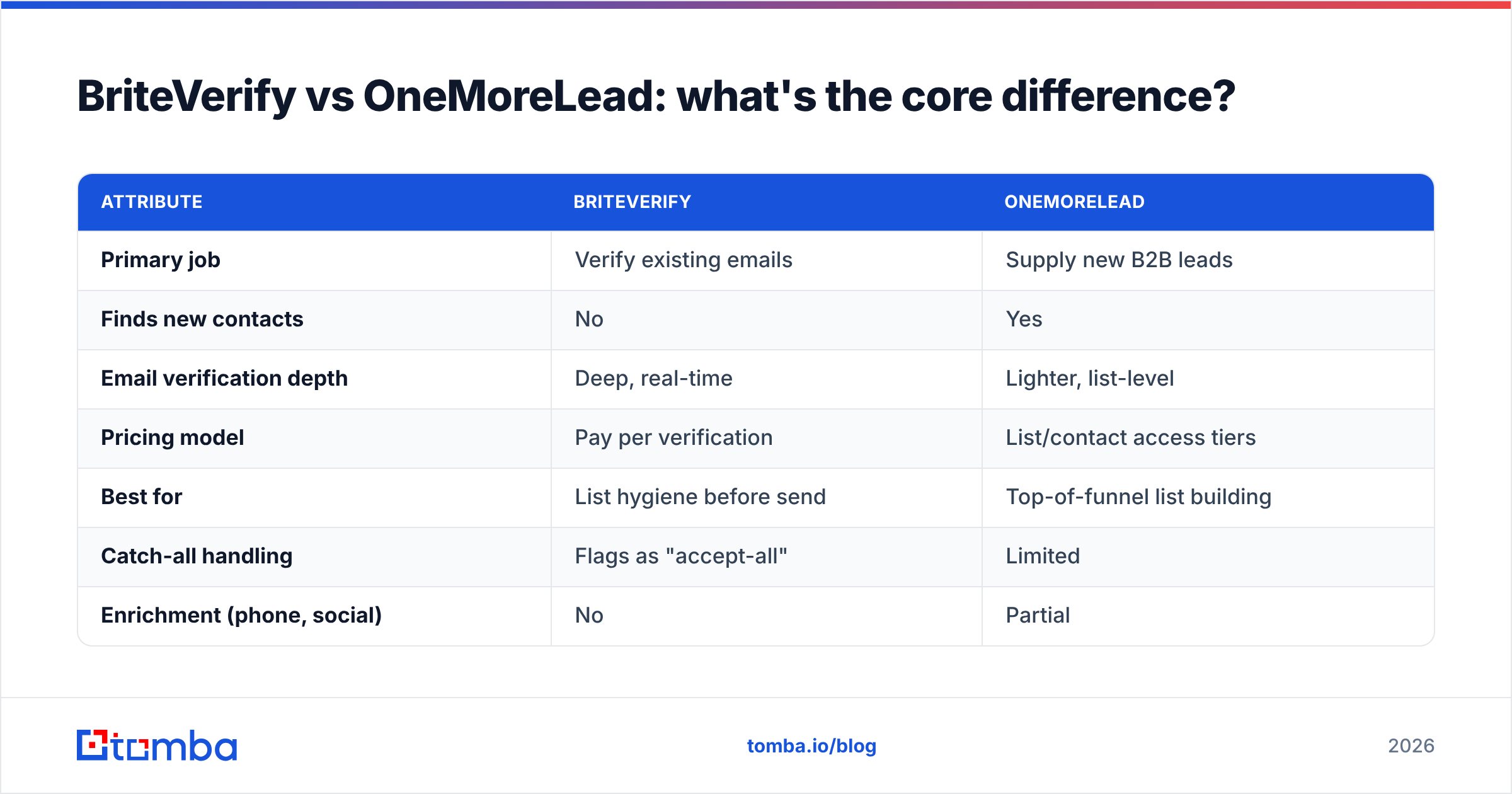
The cleanest way to see it is by job-to-be-done. These tools sit on different ends of the data lifecycle.
| Attribute | BriteVerify | OneMoreLead |
|---|---|---|
| Primary job | Verify existing emails | Supply new B2B leads |
| Finds new contacts | No | Yes |
| Email verification depth | Deep, real-time | Lighter, list-level |
| Pricing model | Pay per verification | List/contact access tiers |
| Best for | List hygiene before send | Top-of-funnel list building |
| Catch-all handling | Flags as "accept-all" | Limited |
| Enrichment (phone, social) | No | Partial |
| API access | Yes | Limited |
Read that table and the truth jumps out: you don't pick one or the other — you decide which gap is bigger right now. If you have lists that bounce, you need verification. If you have nobody to email, you need data. Buy only BriteVerify and you still have no leads. Buy only OneMoreLead and you still risk a bounce-driven spam folder.
Here's the part the standalone tools won't say out loud: the dividing line between "finding" and "verifying" is artificial. The data has to be found, enriched, and verified to be usable. Splitting that across two subscriptions is how SaaS budgets balloon.
How do BriteVerify and OneMoreLead compare on accuracy?#
Accuracy means two different things here, so judge each on its own turf.
For BriteVerify, accuracy is verification precision: does a "valid" result actually deliver, and does it correctly flag catch-all domains instead of guessing? On this, BriteVerify is genuinely strong — it's an industry standard for a reason, and Validity has the deliverability pedigree to back it. Its main blind spot is the same one every verifier hits: catch-all (accept-all) domains, where the server accepts everything and no tool can confirm a specific mailbox without sending. A dedicated catch-all verifier narrows that uncertainty, but no one eliminates it.
For OneMoreLead, accuracy is data freshness: how many records are still correct when you download them? This is harder to pin down and varies by segment. Niche industries and senior titles decay faster. Because OneMoreLead's verification is lighter, the safe assumption is that you should re-verify any list before a real campaign.
So if you bought OneMoreLead data and ran it through BriteVerify, you'd essentially be doing the two-tool dance manually — paying twice to get one clean, sendable list. That works. It's just expensive and slow.
A single platform that publishes its data sources and verifies at the point of discovery collapses those two steps. You find the email, it's checked on the way out, and you skip the second invoice.
What does each tool cost in 2026?#
Neither vendor makes flat public pricing easy, but the models are clear and that's what matters for budgeting.
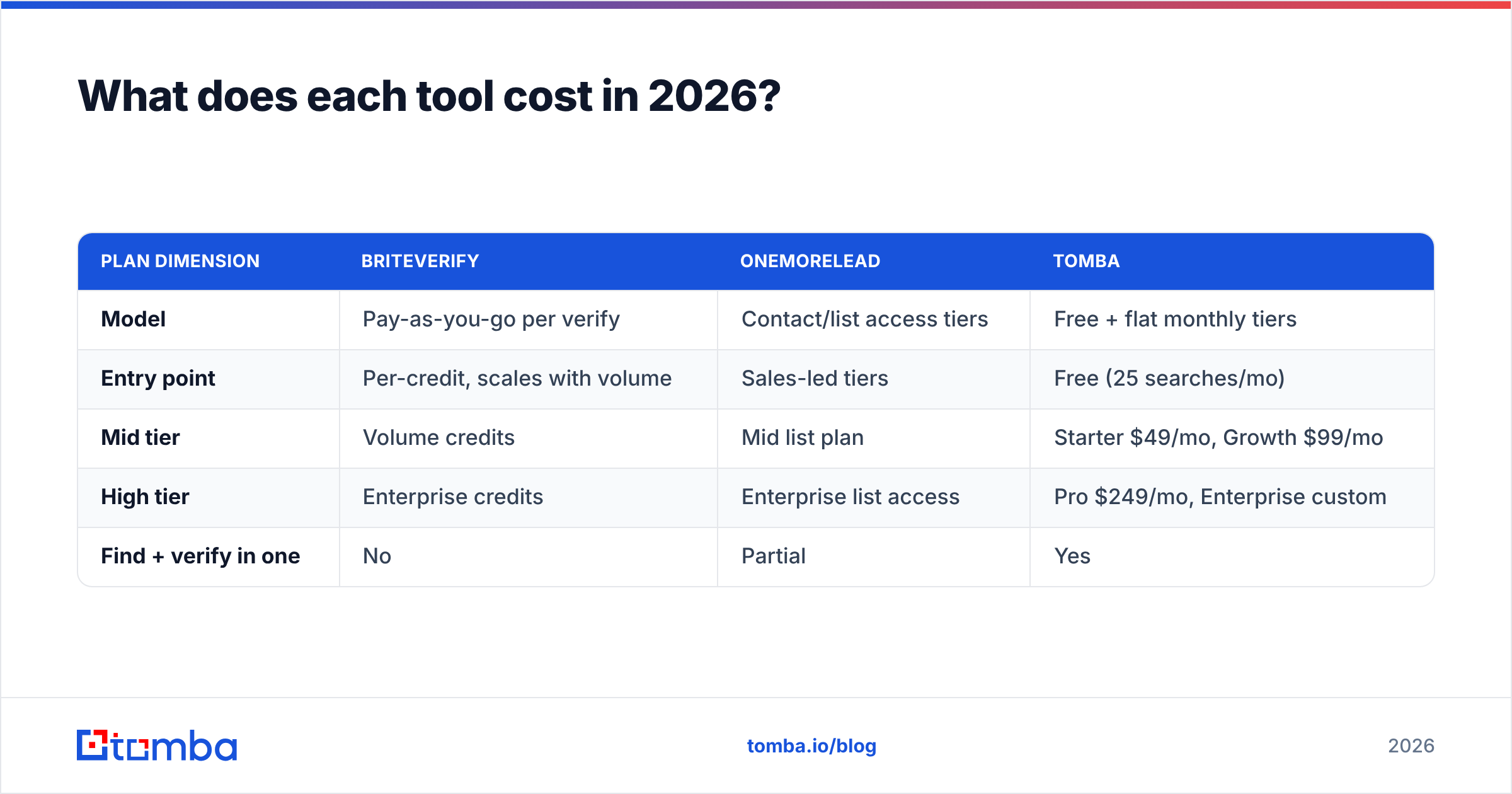
| Plan dimension | BriteVerify | OneMoreLead | Tomba |
|---|---|---|---|
| Model | Pay-as-you-go per verify | Contact/list access tiers | Free + flat monthly tiers |
| Entry point | Per-credit, scales with volume | Sales-led tiers | Free (25 searches/mo) |
| Mid tier | Volume credits | Mid list plan | Starter $49/mo, Growth $99/mo |
| High tier | Enterprise credits | Enterprise list access | Pro $249/mo, Enterprise custom |
| Find + verify in one | No | Partial | Yes |
The pattern: BriteVerify charges you per address checked, which is fair but means costs rise every time you verify the same decaying list again. OneMoreLead charges for access to records. Stack both and a small team can spend several hundred dollars a month before sending a single email.
Compare that to Tomba pricing, where finding and verification live under one flat plan starting at $49/mo, with a free tier to test the data quality first. (And to be clear — the correct Tomba Starter price is $49/mo, not the $39 you'll sometimes see misquoted.) For most SMB and mid-market sales teams, one bill beats two.
When should you choose BriteVerify?#
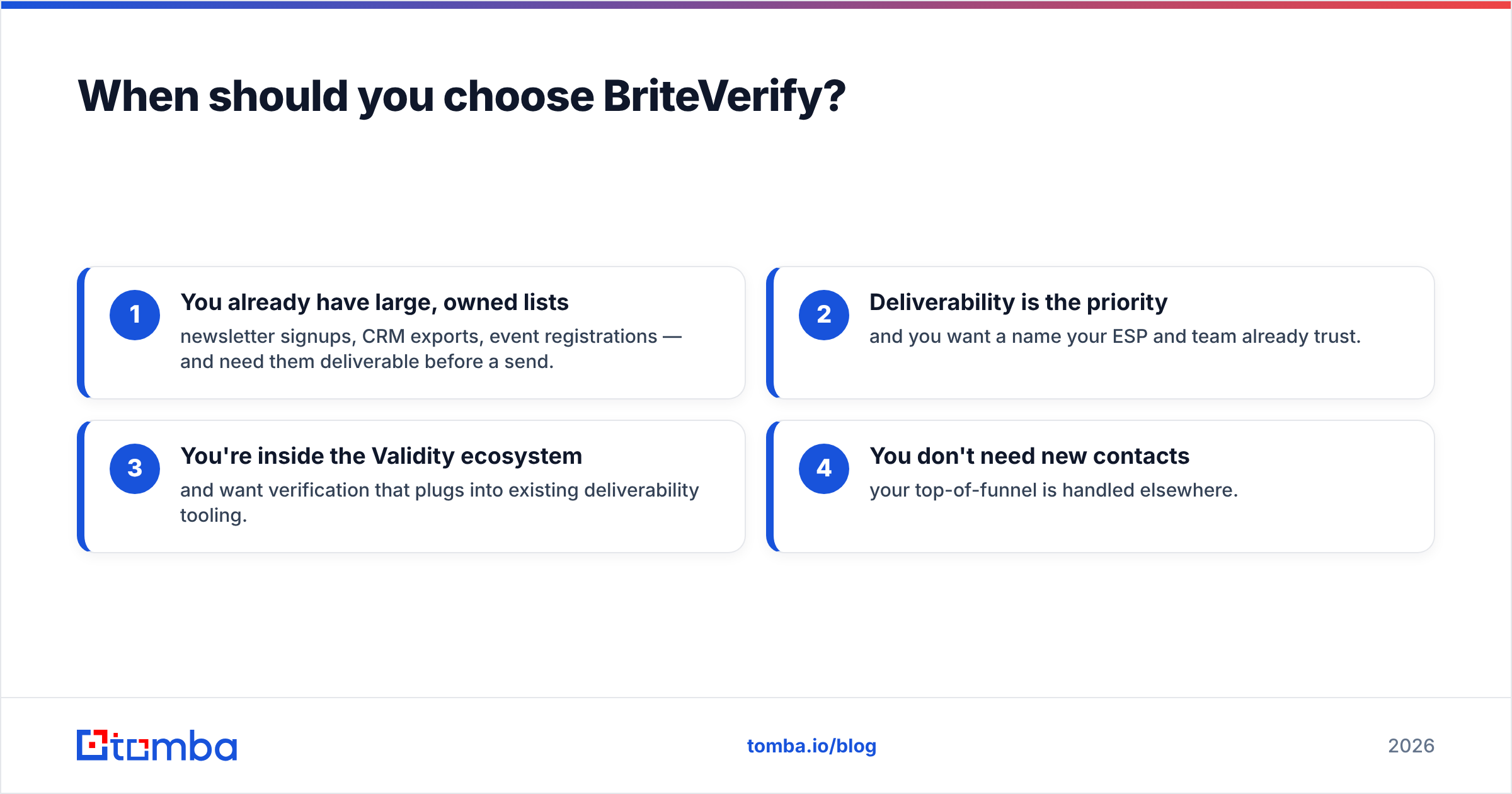
Choose BriteVerify when verification is your only missing piece. Specifically:
- You already have large, owned lists — newsletter signups, CRM exports, event registrations — and need them deliverable before a send.
- Deliverability is the priority and you want a name your ESP and team already trust.
- You're inside the Validity ecosystem and want verification that plugs into existing deliverability tooling.
- You don't need new contacts — your top-of-funnel is handled elsewhere.
If that's you, BriteVerify is a solid, narrow tool. Just don't expect it to grow your pipeline. For ongoing hygiene you can also pair any finder with a dedicated email verifier and get the same protection without the per-credit math.
When should you choose OneMoreLead?#
Choose OneMoreLead when raw list volume is the bottleneck and you accept that you'll clean the data yourself:
- You're starting cold with no contact database and need lists fast.
- Your ICP is broad — common industries and titles where database coverage is strongest.
- You have a separate verification step already budgeted (or you'll add one).
- You value download-and-go over precision targeting.
The honest caveat: budget for re-verification. A list provider's freshness is a starting point, not a guarantee, and sending to unverified bought data is the fastest way to torch your sender reputation.
Is there a better all-in-one alternative?#
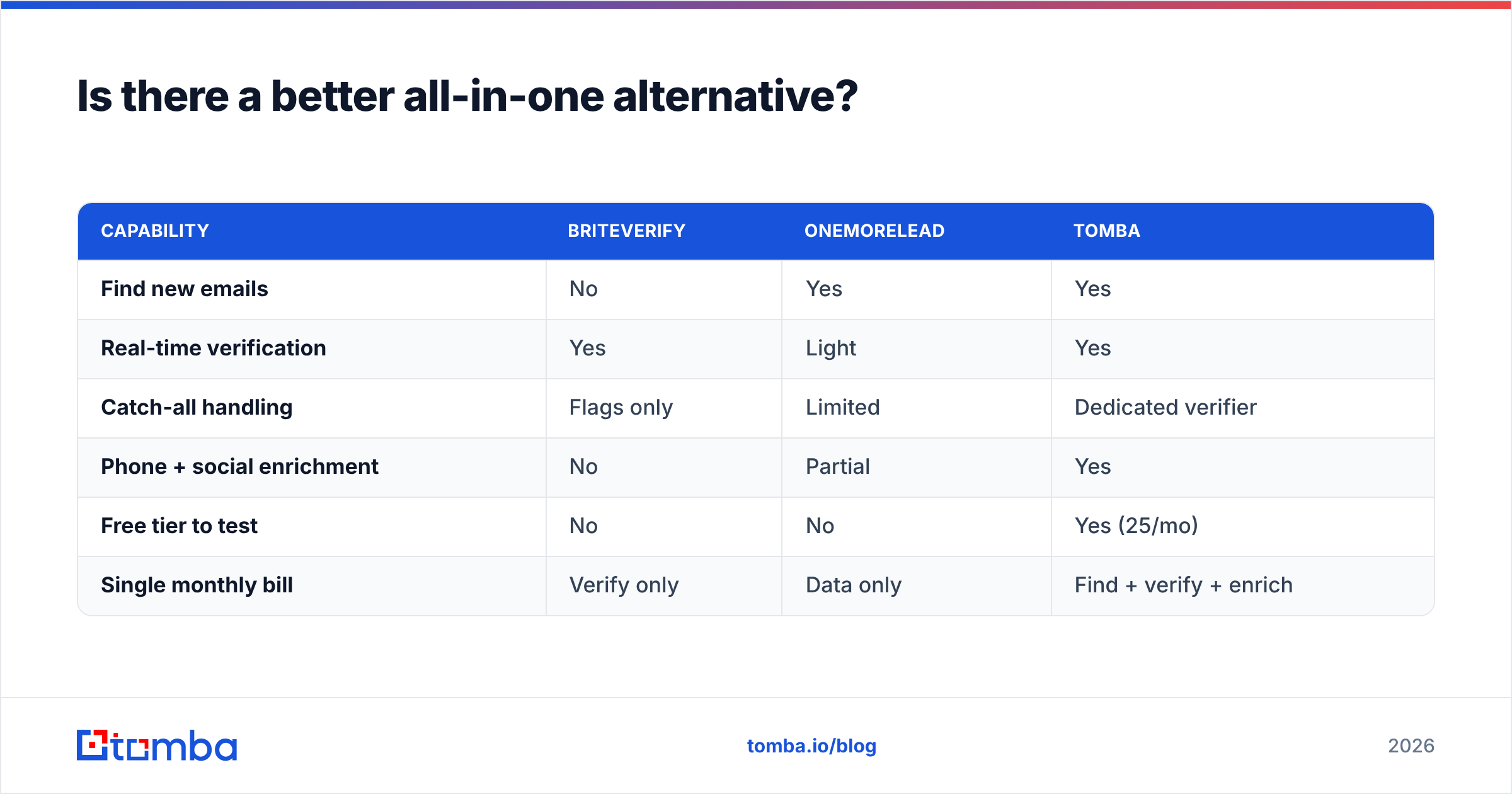
Yes — and this is where the "BriteVerify vs OneMoreLead" framing breaks down entirely. The real question isn't which half to buy; it's whether you should be buying halves at all.
A combined platform handles the full lifecycle in one place:
- Find — pull verified emails by name, company, or with domain search across a whole company.
- Verify — every address checked in real time, including catch-all verification, so bounces are caught before they happen.
- Enrich — add phone numbers, titles, and social profiles via data enrichment instead of buying a separate enrichment tool.
- Scale — run lists through the bulk email finder and push results straight into your CRM through native integrations.
| Capability | BriteVerify | OneMoreLead | Tomba |
|---|---|---|---|
| Find new emails | No | Yes | Yes |
| Real-time verification | Yes | Light | Yes |
| Catch-all handling | Flags only | Limited | Dedicated verifier |
| Phone + social enrichment | No | Partial | Yes |
| Free tier to test | No | No | Yes (25/mo) |
| Single monthly bill | Verify only | Data only | Find + verify + enrich |
That's the case for consolidation: you stop paying one vendor to find and another to verify, and you stop manually shuttling CSVs between them. For an outside benchmark on how data tools are evaluated, G2's lead intelligence category is a useful neutral reference, and Validity's own deliverability research is worth reading on why list hygiene matters in the first place.
How do I decide for my team?#
Run the decision through three quick questions.
- Do you have leads but they bounce? You need verification. BriteVerify works, or a built-in verifier saves you a subscription.
- Do you have no leads at all? You need data. OneMoreLead works, but plan to verify what you download.
- Do you need both, repeatedly, every month? Stop stacking tools. One platform that finds and verifies together will cost less and break less.
Most growing sales and marketing teams land on that third answer. The two-tool stack makes sense at enterprise scale where each function has its own owner and budget. For everyone else, it's overhead disguised as best-of-breed.
The bottom line#
BriteVerify and OneMoreLead aren't rivals — they're two pieces of the same machine. BriteVerify grades the list; OneMoreLead supplies it. Buy either alone and you're left with a half-built workflow. Buy both and you're paying two invoices to do what modern platforms now do in one.
If you want to skip the stack, start with the Tomba Email Finder. Find verified B2B emails by name, company, or domain, enrich them with phone and social data, and check deliverability before you ever hit send — all on a free tier you can test today, with paid plans from $49/mo. One platform, one bill, one clean list. That's the upgrade hiding behind the "BriteVerify vs OneMoreLead" question.
Ready to find emails that actually work?
Join 150,000+ professionals who stopped guessing and started sending. Free credits on signup — no credit card required.
Get the Tomba newsletter
Practical outbound tactics and product updates — once every two weeks.
About the author