Browse AI Pricing & Reviews 2026: Pros, Cons & Verdict
A no-fluff breakdown of Browse AI pricing, real user reviews, and the honest pros and cons — plus where a no-code scraper fits in a 2026 sales stack.
Browse AI gets pitched as the "scrape any website in two minutes" tool. That promise is mostly true — but the pricing model, the credit math, and the maintenance overhead are where teams get surprised. This review walks through what Browse AI actually costs in 2026, what real users say, and where it earns a spot in your stack versus where a purpose-built data tool does the job cheaper.
TL;DR#
- Browse AI is a no-code web scraper and monitor. You point it at a page, train a "robot" by clicking, and it returns structured data on a schedule.
- Pricing is credit-based. A free tier exists for testing; paid plans start in the low double digits per month and scale by credits, robots, and rows — costs climb fast at volume.
- Best for: monitoring competitor pages, scraping listings, and one-off extractions where no API exists.
- Weakest at: clean B2B contact data. For verified emails and enrichment, a dedicated tool like the Tomba Email Finder is more accurate and predictable per-lead.
- Verdict: A genuinely useful utility with a real learning-curve tax. Pair it with a data layer rather than treating it as one.
What is Browse AI?#
Browse AI is a no-code platform for extracting and monitoring data from websites. Think of it as a macro recorder for the web: you "train a robot" by walking through the clicks and selections you'd do by hand, and Browse AI replays that on a schedule, handing you rows in a spreadsheet, Google Sheet, or via webhook.
The two core jobs:
- Extract — pull a structured table out of a page (product listings, directories, search results).
- Monitor — re-run the extraction on a cadence and alert you when something changes (price drops, new listings, status flips).
It leans on a point-and-click trainer, pre-built robots for popular sites, and integrations through Zapier and Make so non-engineers can wire data into downstream tools. You can read the vendor's own framing on the Browse AI homepage.
That image reference is intentionally a placeholder concept — in your editor, swap in a real "Browse AI robot training" screenshot here so the section shows the trainer UI rather than a generic chart.
How does Browse AI pricing work in 2026?#
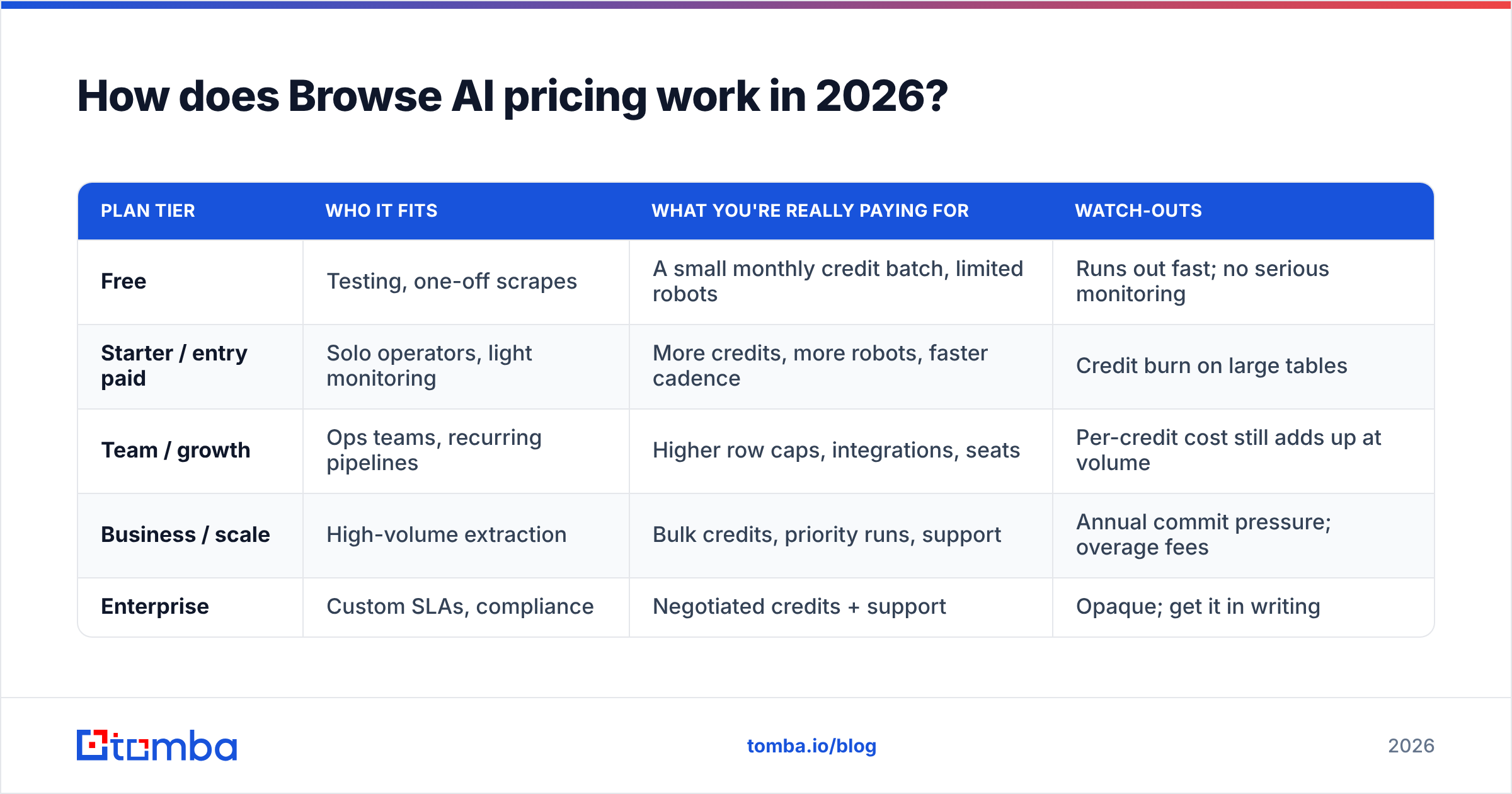
Conclusion first: Browse AI bills on credits, and credits are the number you must model before you commit. Every extraction and monitor run consumes credits; plans bundle a monthly credit allowance plus caps on robots, rows per run, and monitoring frequency. The headline monthly price is rarely the number you actually pay once you scale runs.
Because vendors adjust tiers often, treat the table below as a structure guide and confirm live numbers on the official pricing page before you buy.
| Plan tier | Who it fits | What you're really paying for | Watch-outs |
|---|---|---|---|
| Free | Testing, one-off scrapes | A small monthly credit batch, limited robots | Runs out fast; no serious monitoring |
| Starter / entry paid | Solo operators, light monitoring | More credits, more robots, faster cadence | Credit burn on large tables |
| Team / growth | Ops teams, recurring pipelines | Higher row caps, integrations, seats | Per-credit cost still adds up at volume |
| Business / scale | High-volume extraction | Bulk credits, priority runs, support | Annual commit pressure; overage fees |
| Enterprise | Custom SLAs, compliance | Negotiated credits + support | Opaque; get it in writing |
The pattern to internalize: credit-based tools punish volume and reward precision. If you scrape a 5,000-row directory daily, your credit line behaves very differently than if you monitor ten pages once a day. Map your actual run volume × frequency × rows before picking a tier.
This is also where buyers compare Browse AI's credit model against the flat, per-lead clarity of a data tool. If you mainly need contacts rather than arbitrary page data, predictable plans like Tomba pricing — free tier at 25 searches, Starter at $49/mo, Growth at $99/mo — are easier to forecast than "how many credits will this scrape eat?"
What do Browse AI reviews say?#
Aggregated feedback from G2 and Capterra clusters into a consistent picture. Here's the honest read:
What reviewers praise
- Speed to first result. Non-technical users genuinely scrape a page in minutes. This is the single most repeated compliment.
- Monitoring + alerts. The "tell me when this page changes" use case lands well for pricing, jobs, and inventory tracking.
- Pre-built robots. Starting from a template for a popular site beats configuring from scratch.
- Support responsiveness. Multiple reviews call out helpful onboarding.
What reviewers criticize
- Breakage on layout changes. When target sites redesign, robots fail and need retraining. This is the top recurring complaint and the hidden maintenance cost.
- Credit anxiety. Users dislike watching credits drain and hitting overages mid-task.
- Complex sites. Heavy JavaScript, aggressive anti-bot defenses, and infinite scroll cause flaky extractions.
- Data cleanup. Output often needs deduping and normalizing before it's usable downstream.
Net sentiment is positive but conditional: people who use it for the right job love it; people who expected a hands-off, set-and-forget data feed get frustrated.
What are the pros and cons of Browse AI?#
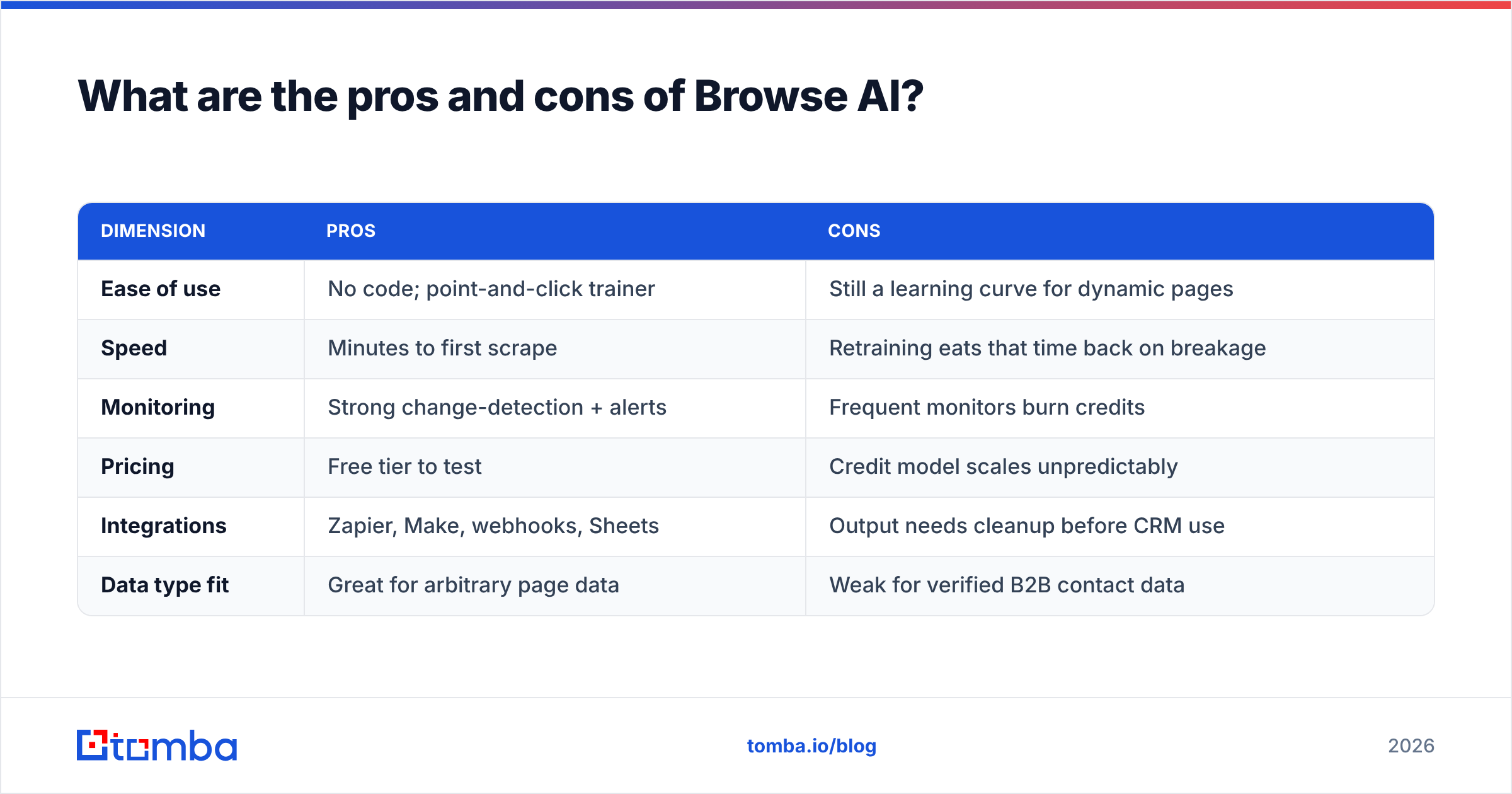
Here's the balanced ledger most "browse ai pricing reviews pros and cons" searches are actually looking for.
| Dimension | Pros | Cons |
|---|---|---|
| Ease of use | No code; point-and-click trainer | Still a learning curve for dynamic pages |
| Speed | Minutes to first scrape | Retraining eats that time back on breakage |
| Monitoring | Strong change-detection + alerts | Frequent monitors burn credits |
| Pricing | Free tier to test | Credit model scales unpredictably |
| Integrations | Zapier, Make, webhooks, Sheets | Output needs cleanup before CRM use |
| Data type fit | Great for arbitrary page data | Weak for verified B2B contact data |
The core trade-off in one line: Browse AI is excellent when no API exists and you need some page's data on a schedule — and mediocre when what you actually need is clean, verified, enrichable contact records.
That distinction matters for sales teams. Scraping a directory gives you raw strings. Turning those into deliverable outreach still requires verification and enrichment, which is a different problem than extraction. A scraper finding "jane@" text on a page is not the same as confirming a mailbox exists.
Is Browse AI right for a sales or RevOps stack?#
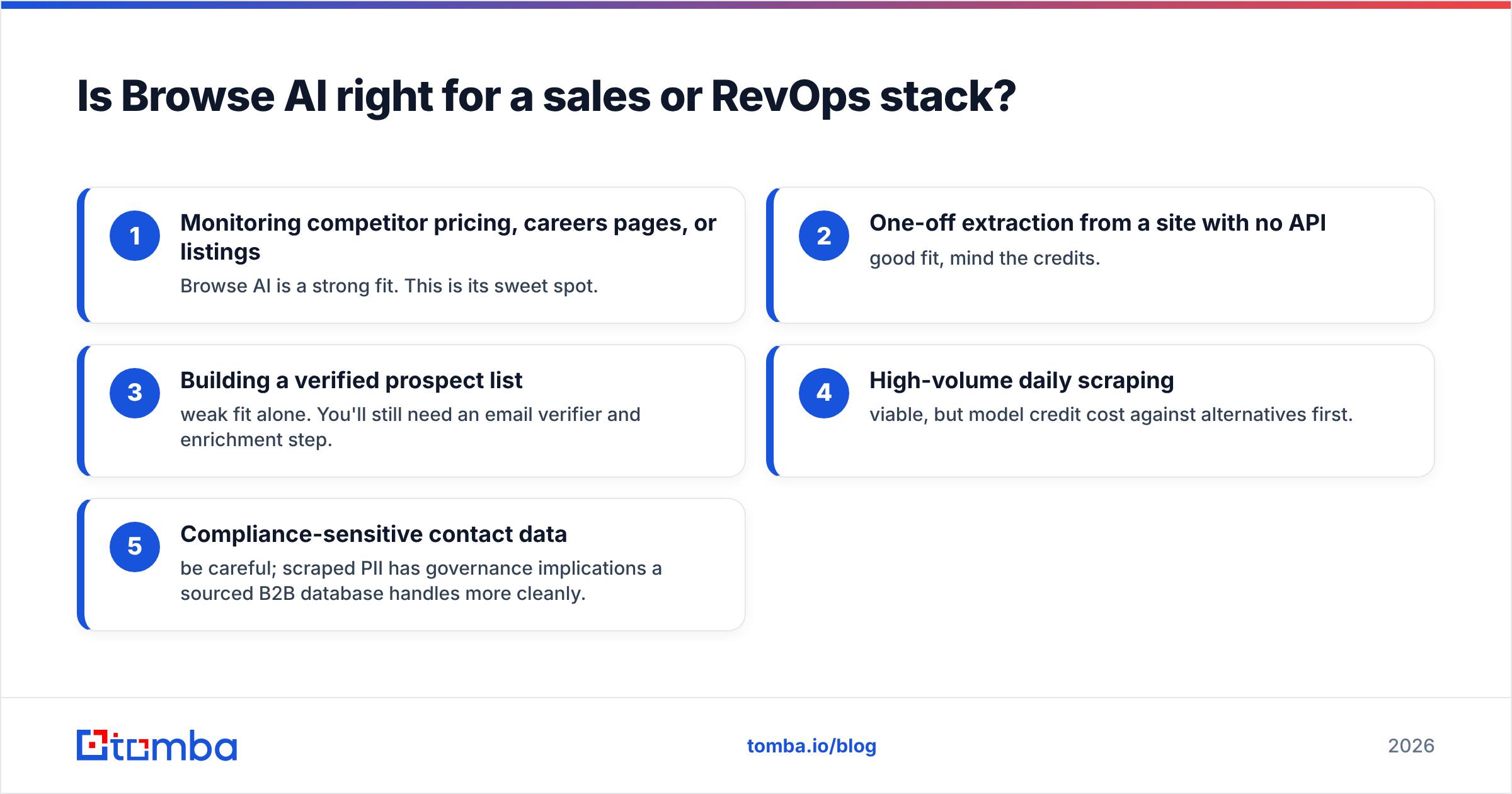
It depends on the job. Use this decision list:
- Monitoring competitor pricing, careers pages, or listings — Browse AI is a strong fit. This is its sweet spot.
- One-off extraction from a site with no API — good fit, mind the credits.
- Building a verified prospect list — weak fit alone. You'll still need an email verifier and enrichment step.
- High-volume daily scraping — viable, but model credit cost against alternatives first.
- Compliance-sensitive contact data — be careful; scraped PII has governance implications a sourced B2B database handles more cleanly.
For the prospecting use case specifically, the cleaner architecture is: let a scraper do what scrapers do (page data, signals, monitoring), and let a contact-data tool do contacts. Tomba's domain search returns company email patterns and verified addresses directly, and data enrichment fills the gaps — without you retraining a robot every time a site reskins.
How does Browse AI compare to dedicated data tools?#
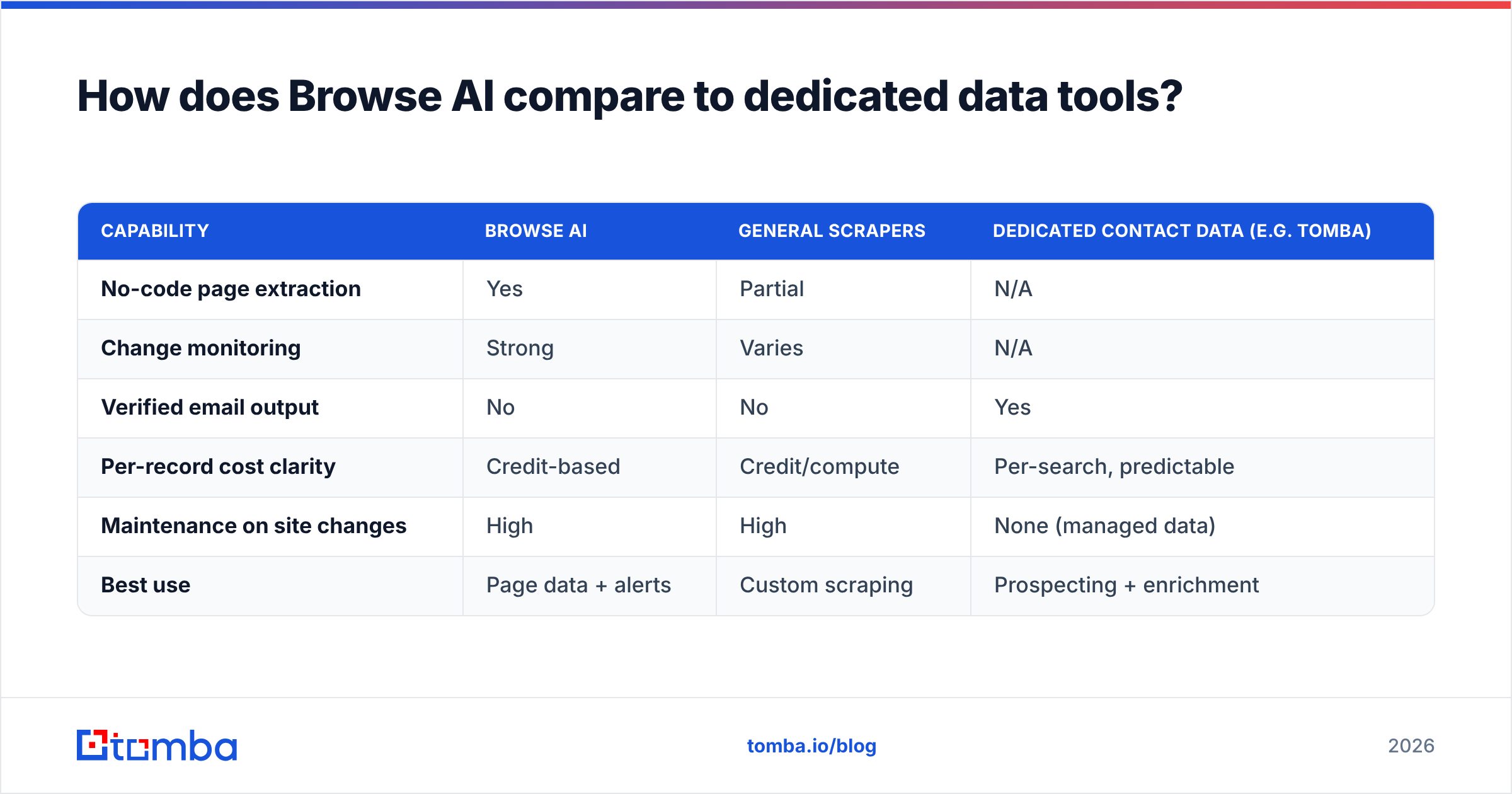
Different tools, overlapping buyers. Browse AI competes with general scrapers (Octoparse, Apify, ParseHub) on flexibility. But when the goal is contacts, the comparison shifts to data accuracy and cost-per-record, where email-finding platforms win.
| Capability | Browse AI | General scrapers | Dedicated contact data (e.g. Tomba) |
|---|---|---|---|
| No-code page extraction | Yes | Partial | N/A |
| Change monitoring | Strong | Varies | N/A |
| Verified email output | No | No | Yes |
| Per-record cost clarity | Credit-based | Credit/compute | Per-search, predictable |
| Maintenance on site changes | High | High | None (managed data) |
| Best use | Page data + alerts | Custom scraping | Prospecting + enrichment |
If you've been evaluating scrapers as a backdoor lead source and finding the data dirty, that's the signal to split the stack. Keep Browse AI for monitoring and signals; move contact sourcing to a verification-first tool. You can wire both together through Tomba's API so scraped signals trigger an enrichment lookup automatically.
What does Browse AI actually cost at scale?#
The sticker price misleads because credits, not dollars, are the constraint. Run the math like this:
- Estimate runs/month = (number of robots) × (runs per robot per day) × 30.
- Estimate credits/run ≈ rows returned ÷ rows-per-credit on your tier.
- Multiply. If that exceeds your plan's allowance, you pay overage or upgrade.
Teams frequently discover their "low monthly plan" needs to jump two tiers once daily monitoring and large tables enter the picture. Always pilot on the free tier with your real targets for two weeks and read the actual credit consumption before committing annually.
For contact data specifically, the comparison gets stark: a verified-email tool charges per successful find, so 1,000 contacts costs a knowable amount. A scraper charges for the attempt and the page, whether or not the row is useful — and useful, in B2B, means deliverable.
Final verdict on Browse AI#
Browse AI is a good no-code scraper held back by a credit model that rewards restraint and a maintenance tax that punishes complex targets. For monitoring and arbitrary page extraction with no API, it's one of the fastest ways to get structured data without writing code. For building outreach-ready contact lists, it's the wrong layer — you'll bolt on verification and enrichment anyway, so start there.
Buy it if your job is "watch these pages and tell me when they change." Look elsewhere — or pair it with a data tool — if your job is "give me verified people to email."
If contacts are the actual goal, skip the scrape-and-clean detour. The Tomba Email Finder returns verified professional emails by name, domain, or company with transparent per-search pricing and a free tier of 25 searches to test it on your own target accounts. Use Browse AI for signals; let Tomba handle the people you reach out to — and forecast your bill without doing credit arithmetic every month.
// get started
Find, verify and enrich your first contacts today
Start on the free plan with 25 searches a month, then scale when your team is ready.
Free plan · No credit card required · GDPR & CCPA
// about the author