BuiltWith vs Wappalyzer 2026: Which Tech Lookup Wins?
BuiltWith vs Wappalyzer compared on accuracy, pricing, coverage, and lead-gen use. See which technographics tool fits your prospecting stack in 2026.
Choosing between BuiltWith and Wappalyzer comes down to one question: do you want the deepest historical technology database on the market, or a fast, developer-friendly lookup that fits cleanly into automated workflows? Both tell you what software a website runs on. They get there very differently, and they charge for it very differently.
This guide breaks down BuiltWith vs Wappalyzer on accuracy, coverage, pricing, API quality, and — the part most comparisons skip — how each one actually plugs into a B2B prospecting motion.
TL;DR: BuiltWith vs Wappalyzer at a glance#
- BuiltWith wins on depth: the largest technology index, historical tracking back years, and rich firmographic filters for building target lists. It is also the pricier option.
- Wappalyzer wins on speed and price: a lightweight detection engine, generous API, browser extension, and lead lists at a lower entry cost.
- Accuracy is comparable for mainstream tech (CMS, analytics, ecommerce, ad pixels); both miss or misfire on obscure or heavily proxied stacks.
- Neither is a complete prospecting tool. Knowing a company runs Shopify or HubSpot is a signal, not a contact. You still need verified emails to act on it.
- Best move for sales teams: use technographics for targeting, then enrich with verified contact data before you send anything.
What do BuiltWith and Wappalyzer actually do?#
Both are technographics tools. Think of them like a home inspector who walks past a house and, just from the outside, tells you the brand of the furnace, the security system, and the solar panels. They read the public fingerprints a website leaves behind — JavaScript libraries, HTTP headers, DNS records, meta tags, cookie names — and map those fingerprints to named products.
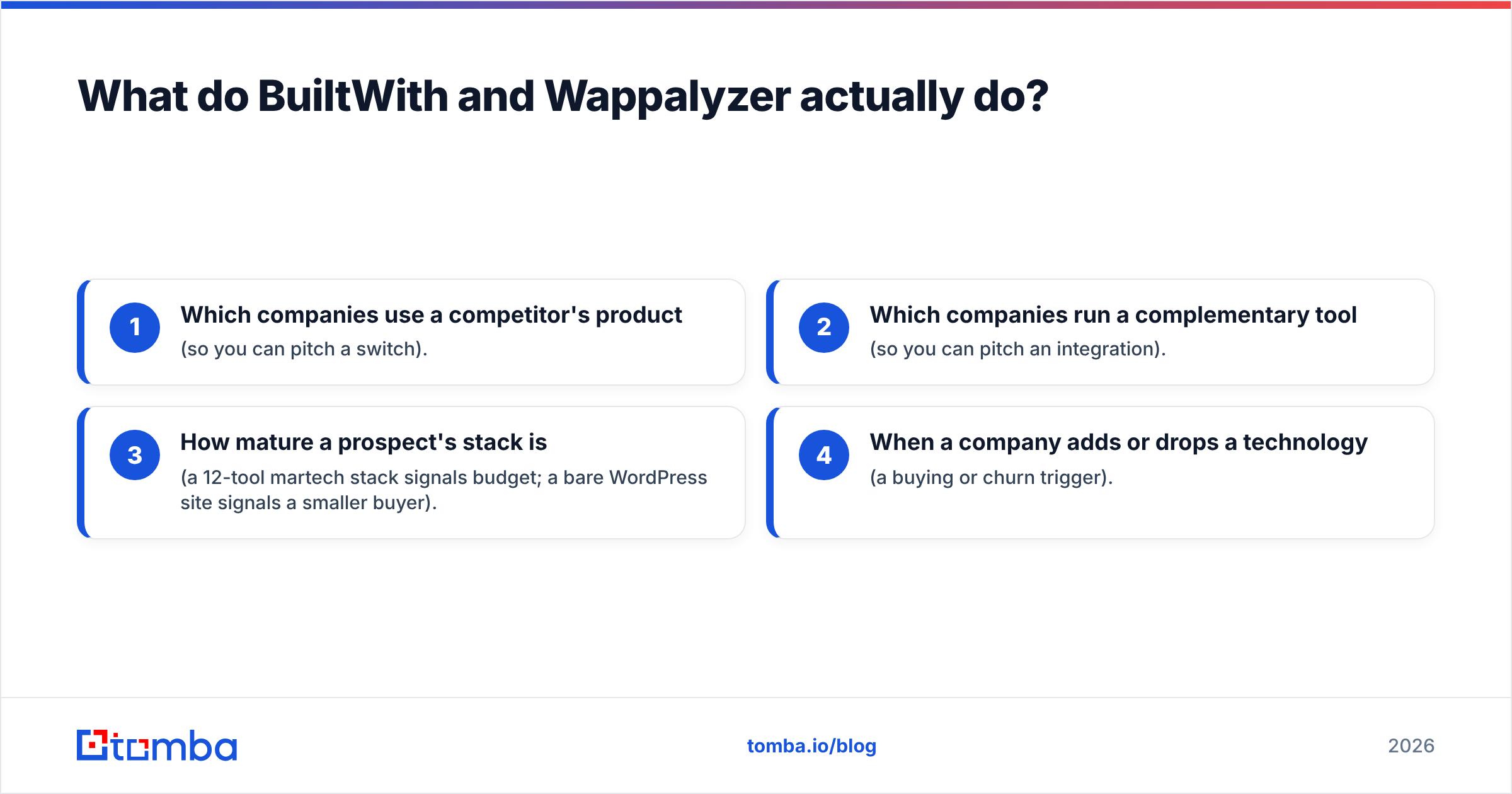
That output answers questions sales and marketing teams care about:
- Which companies use a competitor's product (so you can pitch a switch).
- Which companies run a complementary tool (so you can pitch an integration).
- How mature a prospect's stack is (a 12-tool martech stack signals budget; a bare WordPress site signals a smaller buyer).
- When a company adds or drops a technology (a buying or churn trigger).
BuiltWith launched in 2007 and has spent nearly two decades indexing the web, which is why its historical archive is its headline feature. Wappalyzer started as an open-source browser extension and grew into a commercial API and lead-generation platform, which is why it feels lighter and more developer-first.

BuiltWith vs Wappalyzer: side-by-side comparison#
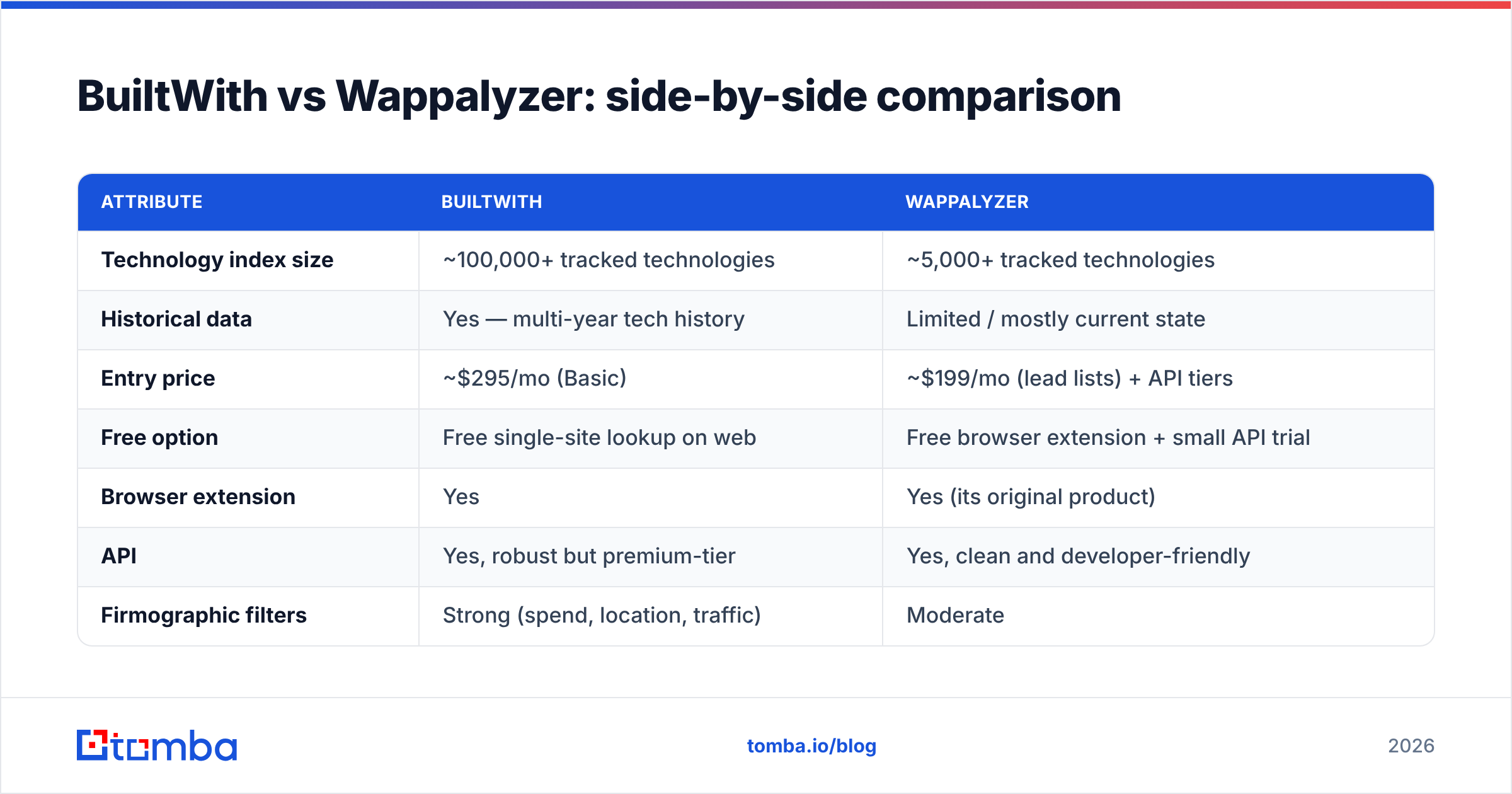
Here is the head-to-head on the attributes that decide most purchases. Pricing reflects publicly listed 2026 plans and can shift, so treat the dollar figures as ballpark tiers rather than quotes.
| Attribute | BuiltWith | Wappalyzer |
|---|---|---|
| Technology index size | ~100,000+ tracked technologies | ~5,000+ tracked technologies |
| Historical data | Yes — multi-year tech history | Limited / mostly current state |
| Entry price | ~$295/mo (Basic) | ~$199/mo (lead lists) + API tiers |
| Free option | Free single-site lookup on web | Free browser extension + small API trial |
| Browser extension | Yes | Yes (its original product) |
| API | Yes, robust but premium-tier | Yes, clean and developer-friendly |
| Firmographic filters | Strong (spend, location, traffic) | Moderate |
| Best for | Deep market research, TAM sizing | Fast lookups, automation, tighter budgets |
| Contact/email data | No verified emails | Limited contact emails on higher tiers |
The pattern is clear: BuiltWith is the research-grade database, Wappalyzer is the lean operational tool. Your choice depends on whether you value archive depth or workflow speed and price.
Which one is more accurate?#
For mainstream technologies, accuracy is close enough that it rarely decides the matchup — both correctly flag Shopify, WordPress, Google Analytics, HubSpot, Salesforce, Cloudflare, and the common ad pixels with high reliability.
Differences show up at the edges:
- BuiltWith tends to surface more detections per site, including long-tail and legacy tools, because of its larger index. The tradeoff is occasional stale entries — it may list a technology a site removed months ago unless you check the date.
- Wappalyzer tends to be more conservative and current, reporting what it can confidently fingerprint right now. It catches fewer obscure tools but throws fewer false positives on active stacks.
Both struggle with the same blind spots: sites behind aggressive reverse proxies, server-side rendering that hides client libraries, tag managers that load tools dynamically, and single-page apps that delay script execution. No technographics tool sees what the browser never downloads.
A practical rule: treat a single tool's read as a strong hint, not gospel. If a deal hinges on whether a prospect truly runs a competitor, confirm with a second source or a direct conversation. For broad list-building, the noise averages out and either tool is fine.
How do the APIs and integrations compare?#
If you are wiring technographics into automation, the API matters more than the dashboard.
Wappalyzer's API is the developer favorite. Clean JSON, predictable rate limits, straightforward authentication, and lookup-by-URL or by-company endpoints. It is the easier of the two to drop into a script, a Zapier flow, or a custom enrichment job without a week of integration work.
BuiltWith's API is powerful but gated behind higher price tiers, and its response payloads are denser — great when you want everything, heavier when you want a quick yes/no on one technology. Its Lists API for building filtered company sets is genuinely strong for TAM research, but you pay for that capability.
Where both fall short is the last mile. Knowing example.com runs Marketo doesn't get a reply into anyone's inbox. You still have to find the right person and a deliverable address. That is the gap a dedicated email finder closes — turn the company-level signal into a named contact you can actually reach. Tomba's own website tech stack checker and website to company lookups can sit alongside whichever technographics tool you pick, and you can push everything into your CRM through standard integrations.

Which is better for B2B prospecting and lead generation?#
For prospecting specifically, the decision flips on budget and workflow, not raw data quality.
Pick BuiltWith if you are doing serious market research — sizing a total addressable market, studying competitor footprints over time, or building large filtered lists with firmographic overlays. Its historical view lets you spot when companies adopted a technology, which is a sharper buying signal than a static snapshot.
Pick Wappalyzer if you are an SMB or a lean revenue team that wants fast, repeatable lookups and an API you can automate without a big bill. Its lead lists give you company-level technographics at a lower entry point, which is plenty for most outbound programs.
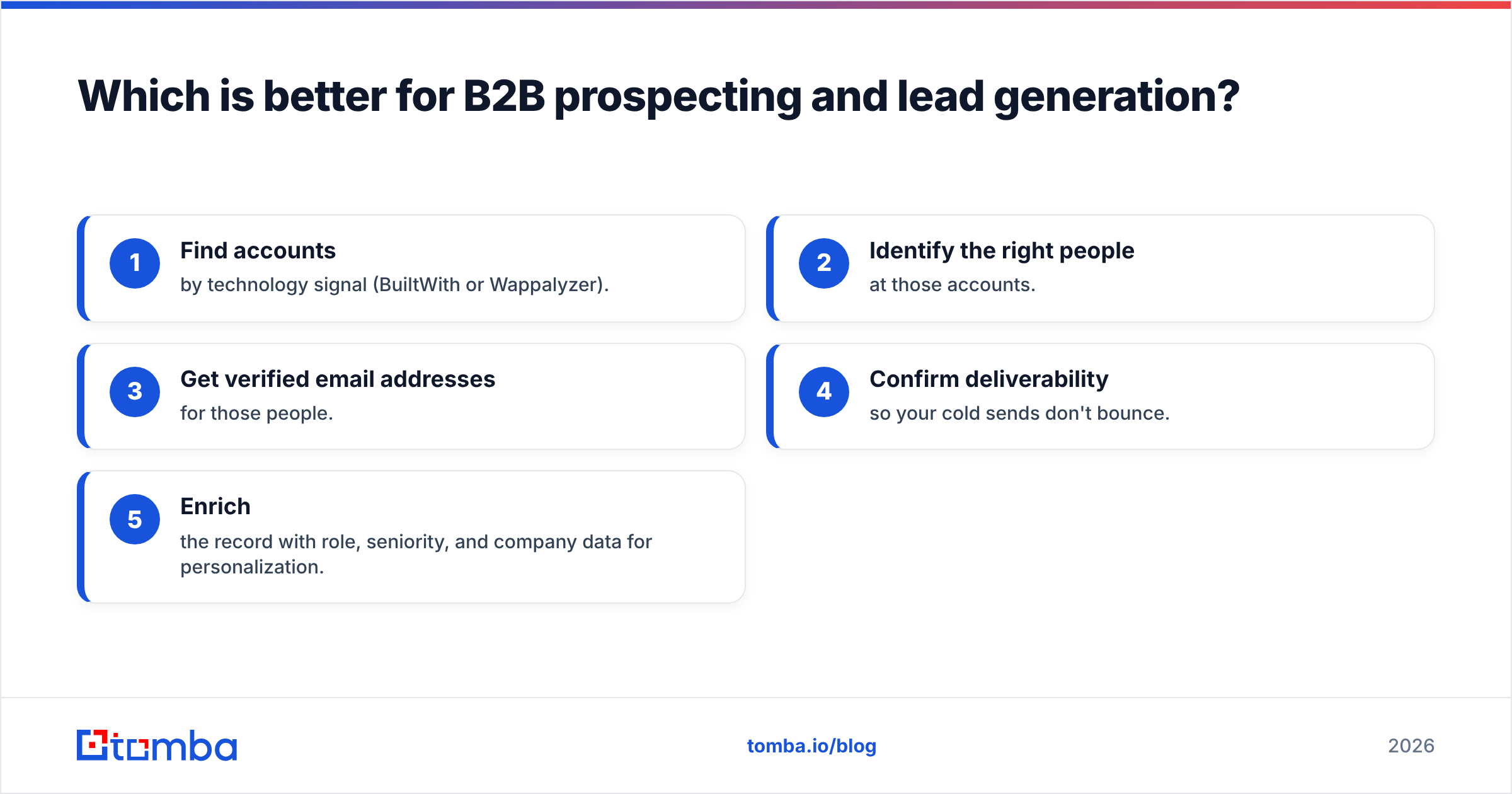
But here is the honest part both vendors gloss over. A technographics report is the top of your prospecting funnel. The full motion looks like this:
- Find accounts by technology signal (BuiltWith or Wappalyzer).
- Identify the right people at those accounts.
- Get verified email addresses for those people.
- Confirm deliverability so your cold sends don't bounce.
- Enrich the record with role, seniority, and company data for personalization.
Steps 2–5 are not what BuiltWith or Wappalyzer are built for. You'll either bolt on another tool or burn hours copy-pasting. This is where pairing technographics with a contact-data platform pays off: run the tech signal, then use domain search to pull every email pattern at a target company, verify each one with an email verifier, and layer on data enrichment so each lead is ready to personalize. The technographics tool tells you who to target; the contact platform makes the outreach possible.
What does each one cost, and is it worth it?#
Cost is where many teams flinch. BuiltWith's depth comes at a premium — its useful tiers start around the high-$200s per month and climb fast for API access and large list exports. Wappalyzer undercuts it, with lead-list plans and API tiers that start lower and scale more gently.
For a solo founder or a small sales team, Wappalyzer's price-to-value is hard to beat for day-to-day lookups. For an enterprise GTM or competitive-intelligence team that needs historical trends and exhaustive coverage, BuiltWith's archive justifies the spend.
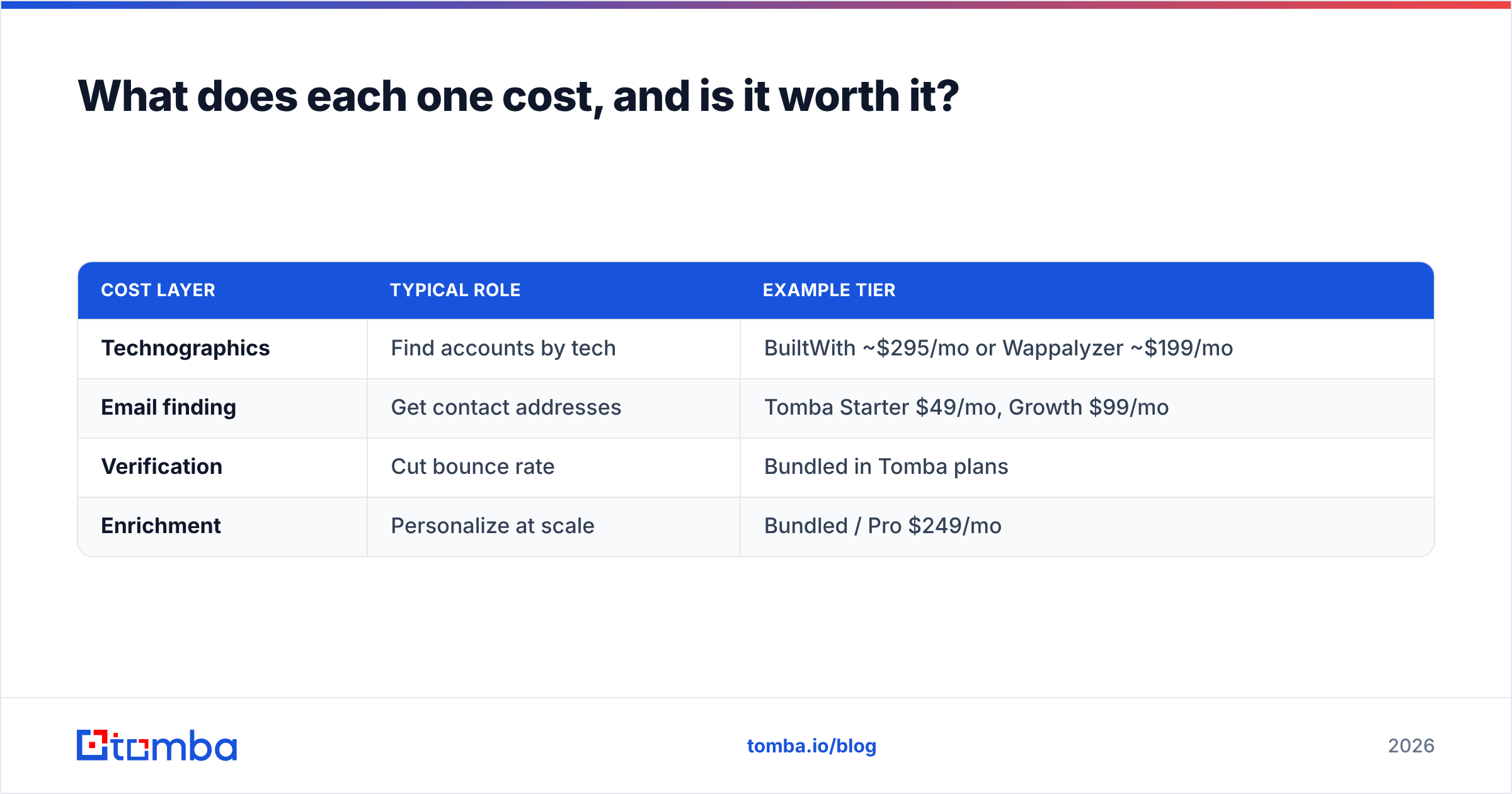
Either way, factor in the contact-data cost you'll incur to make the technographics actionable. A combined view often looks like this:
| Cost layer | Typical role | Example tier |
|---|---|---|
| Technographics | Find accounts by tech | BuiltWith ~$295/mo or Wappalyzer ~$199/mo |
| Email finding | Get contact addresses | Tomba Starter $49/mo, Growth $99/mo |
| Verification | Cut bounce rate | Bundled in Tomba plans |
| Enrichment | Personalize at scale | Bundled / Pro $249/mo |
You can review full Tomba pricing to size the contact-data layer, but the takeaway is that the email-finding and verification step is usually the cheaper half of the stack — and the half that determines whether any of the technographics data converts.
When should you skip both?#
Skip dedicated technographics entirely if your targeting doesn't depend on the tech a prospect runs. If you sell to "any company hiring sales reps" or "any local restaurant," knowing their CMS adds nothing. In those cases, spend your budget on contact discovery and verification instead.
You can also get a surprising amount of free signal without a paid technographics subscription: BuiltWith's free single-site lookup, Wappalyzer's free browser extension, and lightweight utilities like a company email pattern checker or a domain to socials lookup cover a lot of one-off research. Reserve the paid tools for when you need scale — thousands of accounts filtered by technology — not occasional curiosity checks.
For a neutral cross-section of user reviews on both platforms before you commit, G2 is a reasonable place to sanity-check the marketing claims against real-world feedback.
The verdict: BuiltWith vs Wappalyzer in 2026#
There's no universal winner — there's a winner for your situation:
- Choose BuiltWith for depth, history, and serious market research, if the budget allows.
- Choose Wappalyzer for speed, a clean API, and a lower price, especially for lean teams and automation.
- Choose neither if your targeting doesn't hinge on a prospect's tech stack.
And whichever you pick, remember the data only earns its keep once it reaches a person. Technographics identifies the door; verified contact data is the key.
Turn technology signals into real conversations with Tomba#
BuiltWith and Wappalyzer are excellent at telling you which companies fit your profile. They stop short of telling you who to email — and that's exactly where deals are won or lost. Run your technographics filter, then hand the account list to the Tomba Email Finder to pull verified, deliverable addresses for the decision-makers at every target company. Start free with 25 searches a month, scale up on the $49/mo Starter plan when your pipeline does, and stop letting good targeting die at the inbox. The tech signal gets you the account; Tomba gets you the reply.
Ready to find emails that actually work?
Join 150,000+ professionals who stopped guessing and started sending. Free credits on signup — no credit card required.
Get the Tomba newsletter
Practical outbound tactics and product updates — once every two weeks.
About the author