Bulk Data Export in 2026: The Complete B2B Data Guide
Bulk data export is how you move thousands of leads, contacts, and enriched records out of a tool and into your stack without breaking them. Here's how to do it cleanly in 2026.
TL;DR
- Bulk data export is the process of pulling large batches of records — leads, contacts, enriched profiles — out of a platform in one structured operation instead of one row at a time.
- The format you pick (CSV, JSON, XLSX, or a direct API stream) decides how clean the data lands on the other side. CSV is universal; JSON and API exports survive nested fields and automation better.
- The three things that wreck a bulk export are silent truncation, encoding errors, and duplicates. Plan for all three before you click "export."
- For B2B contact data, an export is only as good as the verification behind it — exporting 50,000 stale emails just moves the problem downstream.
- Tomba's bulk email finder and Tomba API handle large exports with verification baked in, so you ship usable records, not raw guesses.
What is bulk data export?#
Bulk data export is the act of moving many records out of a system at once, in a single structured file or stream, instead of copying them individually. Think of it like moving house: you can carry items out one box at a time through the front door, or you can back a truck up to the loading dock and move everything in one organized run. Bulk export is the truck.
In a B2B context, the records you export are usually contacts, company profiles, verified emails, phone numbers, or enriched lead data. The destination is almost always another system — your CRM, a sequencing tool, a data warehouse, or a spreadsheet your RevOps team lives in. The export is the bridge between where data is found and where it gets used.
The reason this matters more in 2026 than it did five years ago is volume. Sales and marketing teams now work with tens of thousands of records per campaign, pulled from multiple sources and stitched together. Doing that by hand is not just slow — it introduces errors at every copy-paste. A clean bulk data export is the difference between a list your team trusts and a list your reps quietly ignore.
Why does bulk data export matter for B2B teams?#
Because your pipeline is downstream of your data, and bad exports poison everything below them.
Here is the chain most teams run: find contacts → verify them → enrich them → export → load into CRM → sequence → measure. If the export step drops fields, mangles special characters, or smuggles in duplicates, every step after it inherits the damage. You get bounced emails, double-touched prospects, broken merge fields in cold emails, and dashboards that lie to you.
A few concrete reasons bulk export deserves real attention:
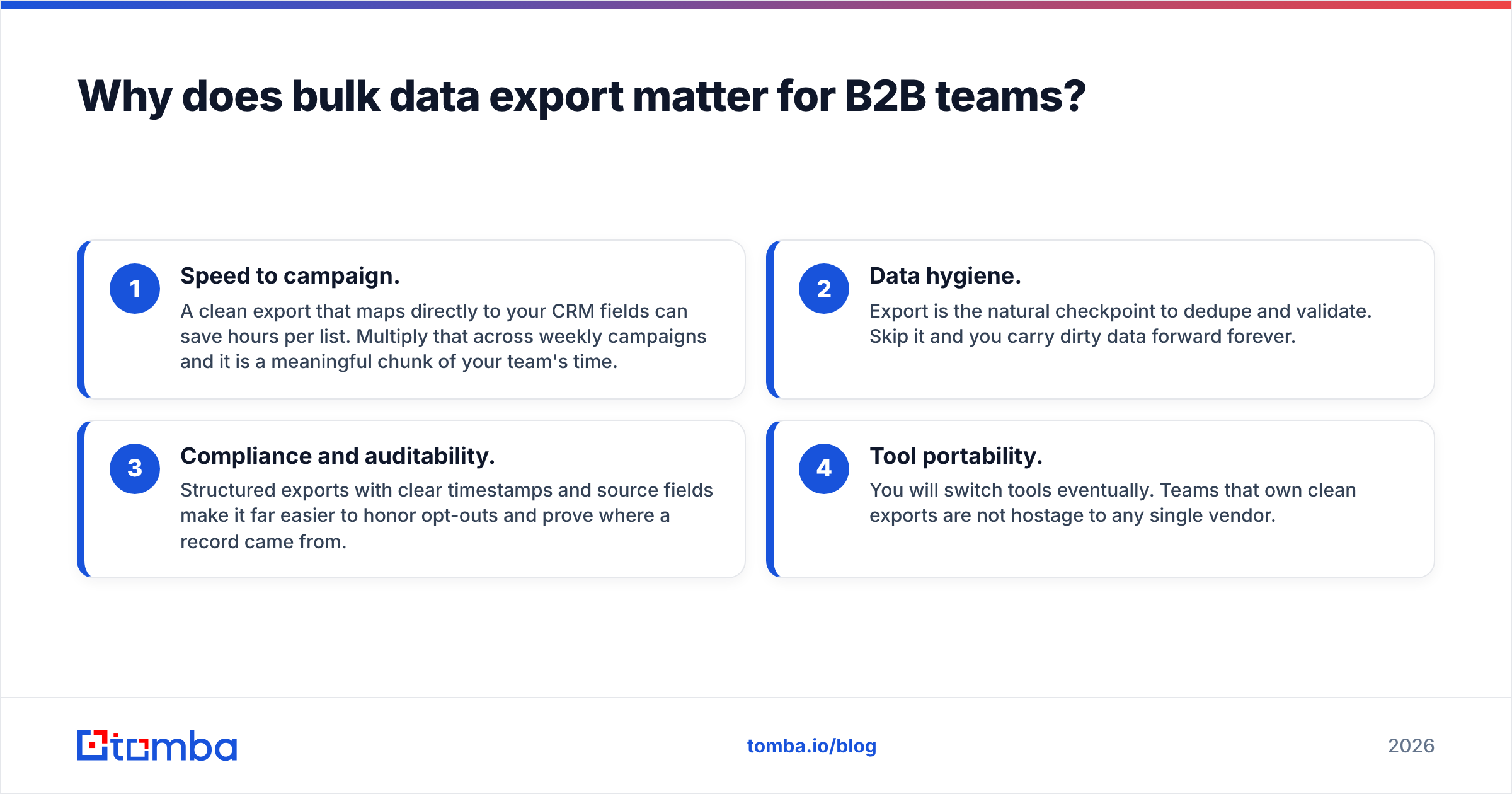
- Speed to campaign. A clean export that maps directly to your CRM fields can save hours per list. Multiply that across weekly campaigns and it is a meaningful chunk of your team's time.
- Data hygiene. Export is the natural checkpoint to dedupe and validate. Skip it and you carry dirty data forward forever.
- Compliance and auditability. Structured exports with clear timestamps and source fields make it far easier to honor opt-outs and prove where a record came from.
- Tool portability. You will switch tools eventually. Teams that own clean exports are not hostage to any single vendor.

If you are still moving records by hand, you are not just losing time — you are introducing a fresh error on every row.
What formats should you use for a bulk data export?#
The format is the single most important technical decision, because it determines what survives the trip. Here is how the common options stack up.
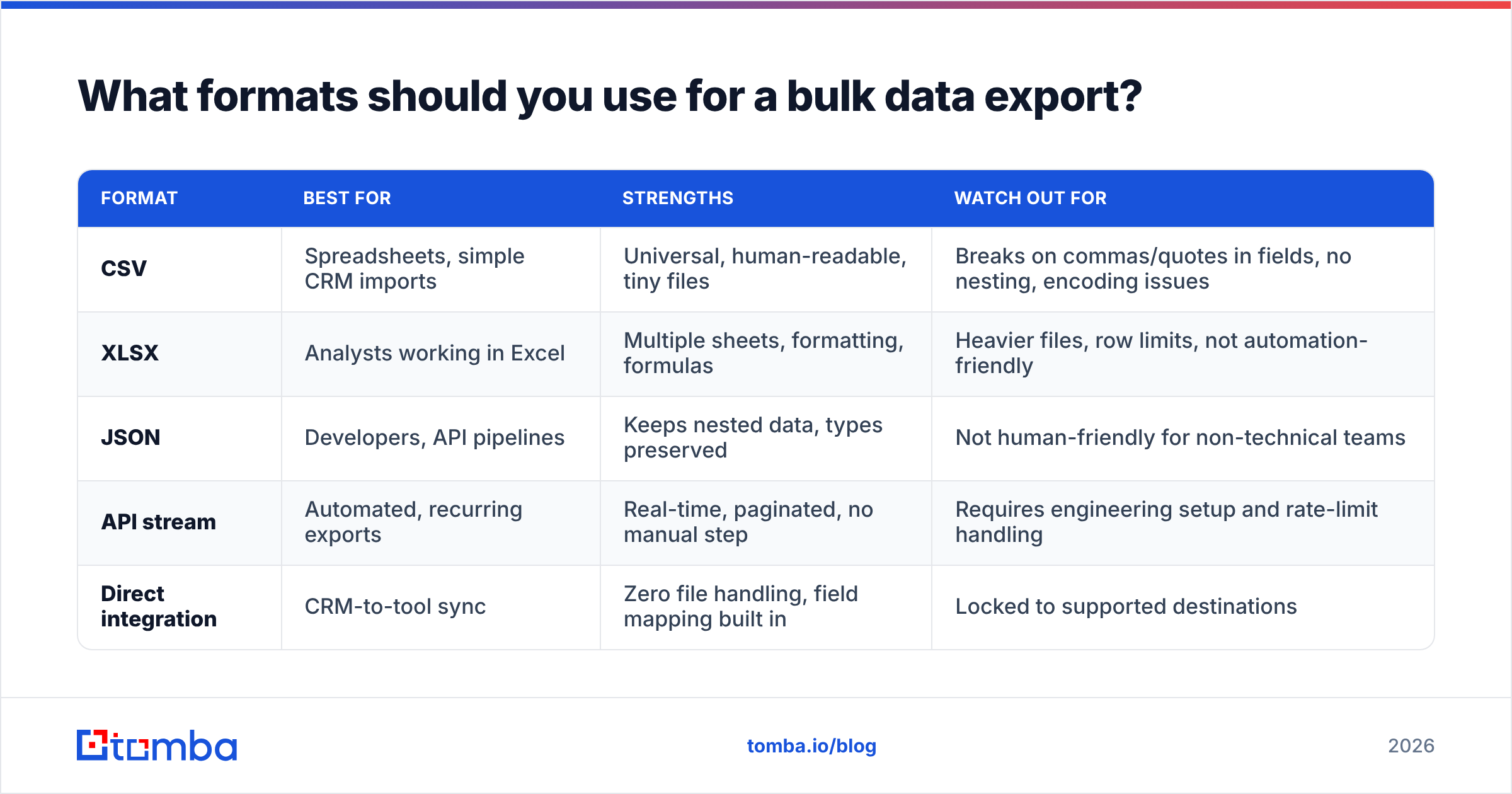
| Format | Best for | Strengths | Watch out for |
|---|---|---|---|
| CSV | Spreadsheets, simple CRM imports | Universal, human-readable, tiny files | Breaks on commas/quotes in fields, no nesting, encoding issues |
| XLSX | Analysts working in Excel | Multiple sheets, formatting, formulas | Heavier files, row limits, not automation-friendly |
| JSON | Developers, API pipelines | Keeps nested data, types preserved | Not human-friendly for non-technical teams |
| API stream | Automated, recurring exports | Real-time, paginated, no manual step | Requires engineering setup and rate-limit handling |
| Direct integration | CRM-to-tool sync | Zero file handling, field mapping built in | Locked to supported destinations |
The practical rule: use CSV when a human will open the file, use JSON or an API stream when a machine will. If you are exporting enriched records with nested attributes — multiple emails per person, a list of social profiles, company hierarchy — CSV flattens them and you lose structure. JSON keeps it intact.
For recurring work, skip files entirely. A Tomba API call or a native integration pushes records straight where they need to go, paginated and verified, with no spreadsheet babysitting in the middle.
How do you run a clean bulk data export? (step by step)#
A clean export is mostly about what you decide before you click the button. Follow this sequence.
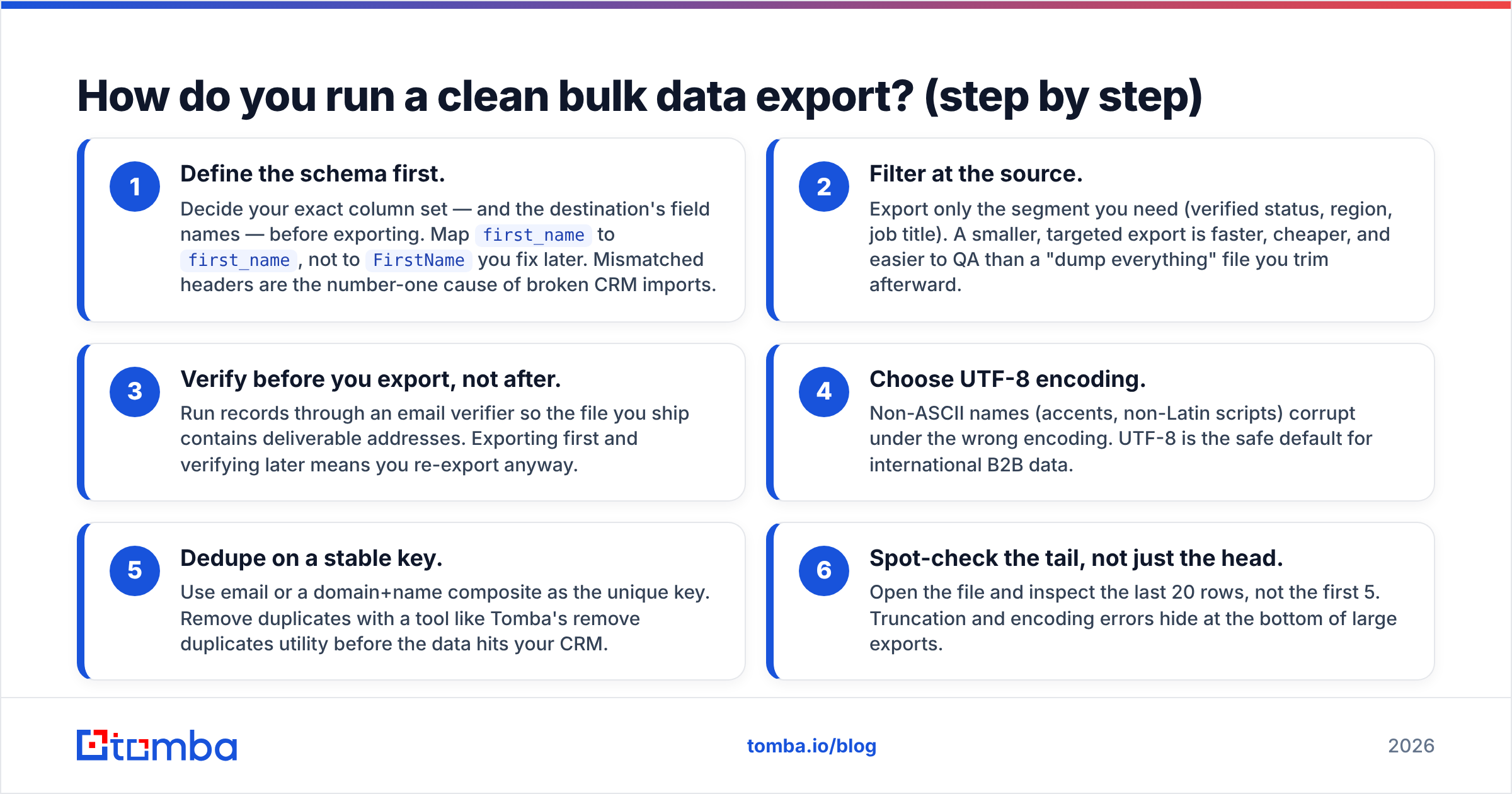
- Define the schema first. Decide your exact column set — and the destination's field names — before exporting. Map
first_nametofirst_name, not toFirstNameyou fix later. Mismatched headers are the number-one cause of broken CRM imports. - Filter at the source. Export only the segment you need (verified status, region, job title). A smaller, targeted export is faster, cheaper, and easier to QA than a "dump everything" file you trim afterward.
- Verify before you export, not after. Run records through an email verifier so the file you ship contains deliverable addresses. Exporting first and verifying later means you re-export anyway.
- Choose UTF-8 encoding. Non-ASCII names (accents, non-Latin scripts) corrupt under the wrong encoding. UTF-8 is the safe default for international B2B data.
- Dedupe on a stable key. Use email or a domain+name composite as the unique key. Remove duplicates with a tool like Tomba's remove duplicates utility before the data hits your CRM.
- Spot-check the tail, not just the head. Open the file and inspect the last 20 rows, not the first 5. Truncation and encoding errors hide at the bottom of large exports.
Do these six things and the actual export becomes a non-event. Skip them and you will be re-running the same export three times.
What are the most common bulk export mistakes?#
The failures are predictable, which is good news — predictable means preventable.
- Silent truncation. A tool caps the export at 10,000 rows but your segment had 14,000. No error, no warning, just 4,000 missing prospects you never knew existed. Always reconcile the export count against the source count.
- Encoding corruption.
JosébecomesJosé. This is almost always a UTF-8 vs Latin-1 mismatch, and it is invisible until a prospect replies asking why you spelled their name wrong. - Delimiter collisions. A company named "Smith, Jones & Co" in a comma-delimited CSV shifts every column after it. Use proper quoting or switch to a tab-delimited export.
- Stale data. The export ran fine, but the underlying records were six months old. Freshness is a data-source problem, not an export problem — which is why where your data comes from matters as much as how you export it.
- No source attribution. You export 30,000 contacts with no field saying where each came from. Six weeks later, compliance asks, and you cannot answer.

Every one of these is cheap to prevent at export time and expensive to fix once the data is loaded and your reps are already emailing it.
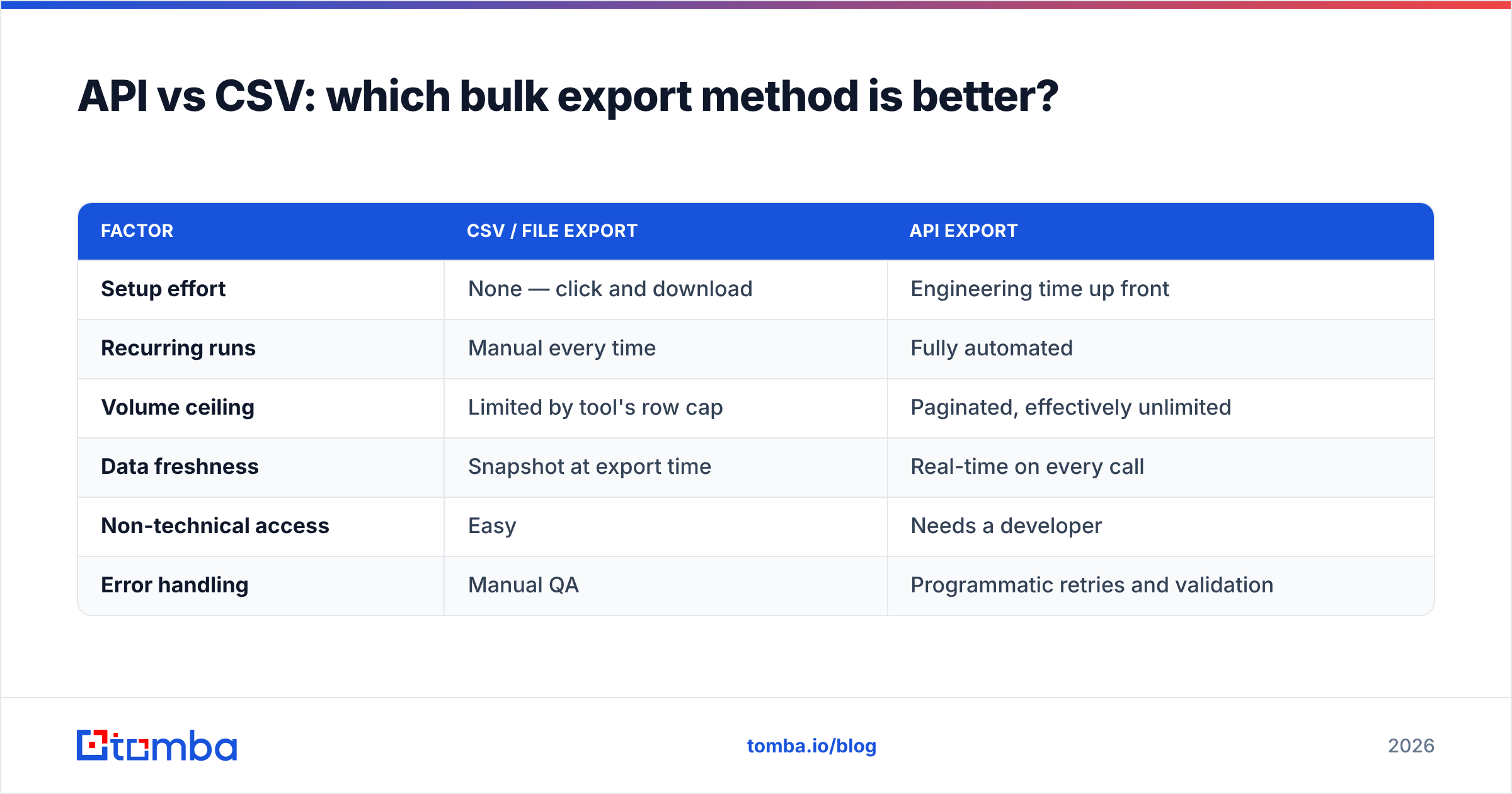
API vs CSV: which bulk export method is better?#
Neither is universally better — it depends on whether the export is a one-time pull or a recurring pipeline.
| Factor | CSV / file export | API export |
|---|---|---|
| Setup effort | None — click and download | Engineering time up front |
| Recurring runs | Manual every time | Fully automated |
| Volume ceiling | Limited by tool's row cap | Paginated, effectively unlimited |
| Data freshness | Snapshot at export time | Real-time on every call |
| Non-technical access | Easy | Needs a developer |
| Error handling | Manual QA | Programmatic retries and validation |
Use file exports for ad-hoc, human-driven work — a one-off list for a campaign, a sample for a stakeholder, a quick segment for a webinar. Use the API for anything that repeats — nightly CRM syncs, enrichment pipelines, or feeding a data warehouse.
Most mature teams run both: the Tomba API for automated enrichment and verification at scale, and CSV exports from the dashboard for the quick one-offs. You do not have to pick a side. If you want to test the waters cheaply, the Tomba pricing free tier gives you 25 searches a month to validate the workflow before committing.
For broader tool evaluations, independent review sites like G2 and Capterra are useful for seeing how export limits and formats compare across vendors before you buy.
How does bulk export fit into the wider data workflow?#
Export is one link in a chain, and it works best when the links around it are strong.
Upstream, you need a reliable way to find records — an email finder or domain search that pulls accurate contacts in the first place. In the middle, verification and data enrichment turn raw matches into complete, deliverable profiles. The export is the handoff. Downstream, your CRM and sequencing tools consume what you ship.
The mistake teams make is treating export as a standalone step disconnected from the rest. It is not. A bulk export from a tool that finds and verifies in the same workflow is dramatically cleaner than one stitched together from three disconnected sources. When find, verify, enrich, and export all live under one roof — as they do across Tomba's bulk tools and B2B database — the records arrive consistent, deduped, and ready to load.
This is also where CRM-native exports shine. If your destination is HubSpot or Salesforce, a direct integration beats a CSV every time, because field mapping and dedup logic are handled before the data lands. Both platforms publish detailed import guidance worth reading — see the HubSpot import documentation and Salesforce's data import resources — so you match your export schema to what they expect.
What should you look for in a bulk export tool?#
When you are evaluating tools, judge the export capability on these specifics rather than marketing claims:
- Verification at export. Does the tool let you export only verified records, or does it dump everything and leave QA to you?
- Format flexibility. CSV and JSON and API, or just a single download button?
- No silent caps. Does it tell you when an export hits a row limit, or fail quietly?
- Field control. Can you choose exactly which columns leave the system?
- Dedup built in. Does it deduplicate, or push that work downstream?
- Source transparency. Can you export a source field for each record for compliance?
A tool that scores well across all six gives you exports you can load without a babysitting QA pass. One that fails three of them gives you a download and a headache.
The bottom line on bulk data export#
Bulk data export is not a button — it is a discipline. The teams that do it well decide their schema first, verify before they export, dedupe on a stable key, and pick the format that matches the destination. The teams that do it badly export everything, fix nothing, and wonder why their bounce rates climb.
If your bulk exports are full of stale or unverified contacts, the fix starts upstream. Tomba's Email Finder finds accurate professional emails by domain, name, or company, verifies them as part of the same workflow, and lets you export clean, deduplicated records in bulk — by CSV, by API, or straight into your CRM. Start on the free tier, run a real list through it, and ship data your reps actually trust. Find the contacts, verify them, and export them right the first time at tomba.io/email-finder.
Ready to find emails that actually work?
Join 150,000+ professionals who stopped guessing and started sending. Free credits on signup — no credit card required.
Get the Tomba newsletter
Practical outbound tactics and product updates — once every two weeks.
About the author