Bulk Email Address Verification: A 2026 Guide to Clean Lists
Dirty lists kill deliverability and waste send budget. Here's how bulk email address verification works in 2026, what to look for, and how to cut bounces to near zero.
Bulk Email Address Verification: A 2026 Guide to Clean Lists
You bought a list, scraped a conference attendee sheet, or merged three years of CRM exports — and now a quarter of those addresses are dead. Send to them anyway and you don't just waste credits; you teach Gmail and Outlook that you're a careless sender. Bulk email address verification is how you stop that before the first send.
This guide explains what bulk verification actually checks, how to read accuracy claims without getting fooled, what it costs in 2026, and how to wire it into your workflow so a 50,000-row list takes minutes instead of a weekend.
TL;DR#
- Bulk email address verification checks thousands of addresses at once for syntax, domain/MX health, mailbox existence, and risk flags — before you ever hit send.
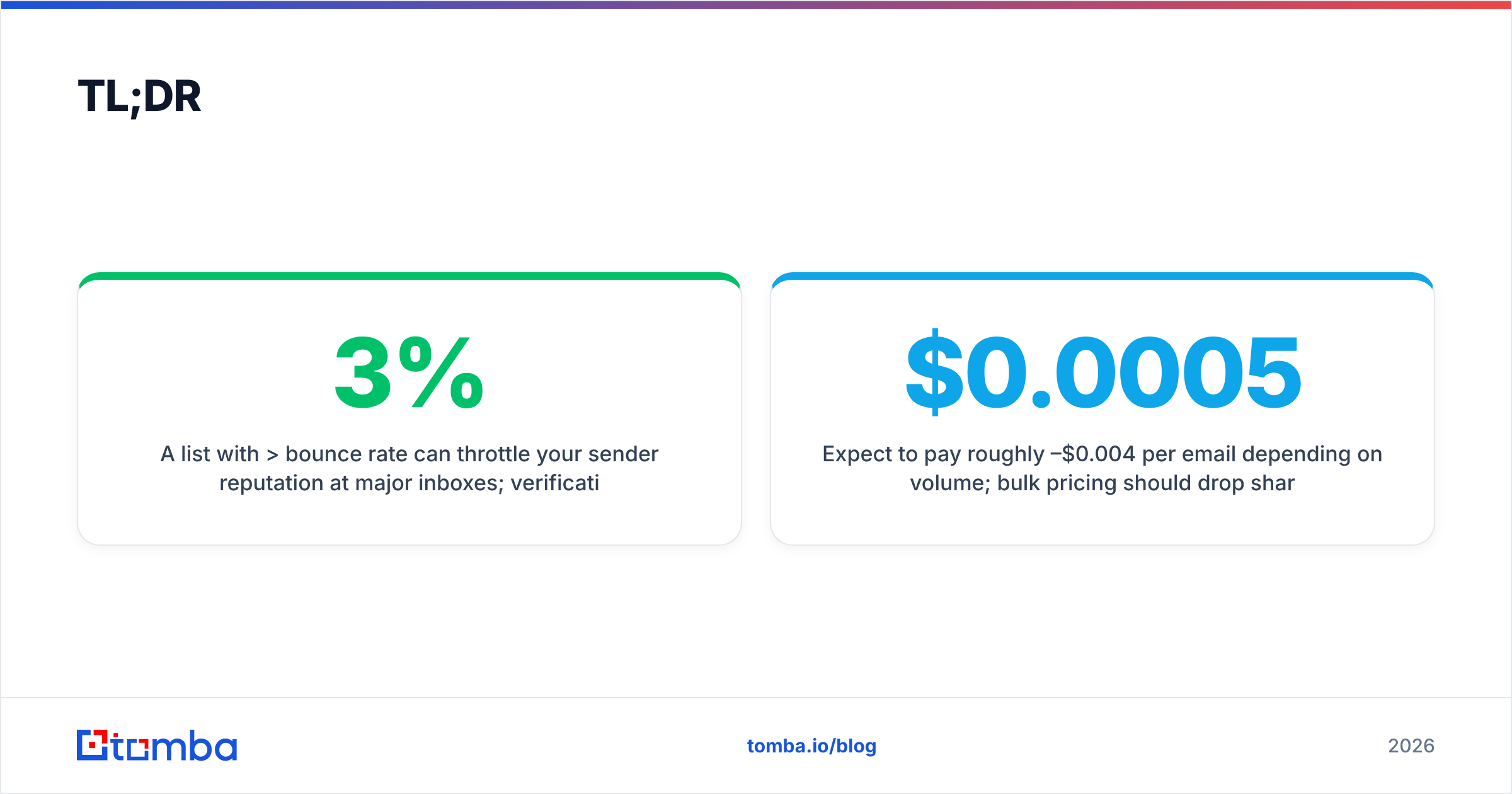
- A list with >3% bounce rate can throttle your sender reputation at major inboxes; verification keeps you under the safe threshold.
- The hard cases are catch-all domains and role accounts — a good tool labels them honestly instead of guessing "valid."
- Expect to pay roughly $0.0005–$0.004 per email depending on volume; bulk pricing should drop sharply as you scale.
- Verify on import, on a 90-day cadence, and right before every major campaign — not just once.
What is bulk email address verification?#
Bulk email address verification is the process of validating a large batch of email addresses in one operation, instead of checking them one by one. You upload a file (CSV, XLSX, or push rows through an API), the service runs each address through a series of checks, and you get back a cleaned file with a status for every row.
Think of it like airport security for your contact list. Every passenger (address) walks through the same set of gates — ID check, metal detector, watchlist — and comes out tagged as "cleared," "flagged," or "denied." You wouldn't board a flight without that screening, and you shouldn't load a send queue without it either.
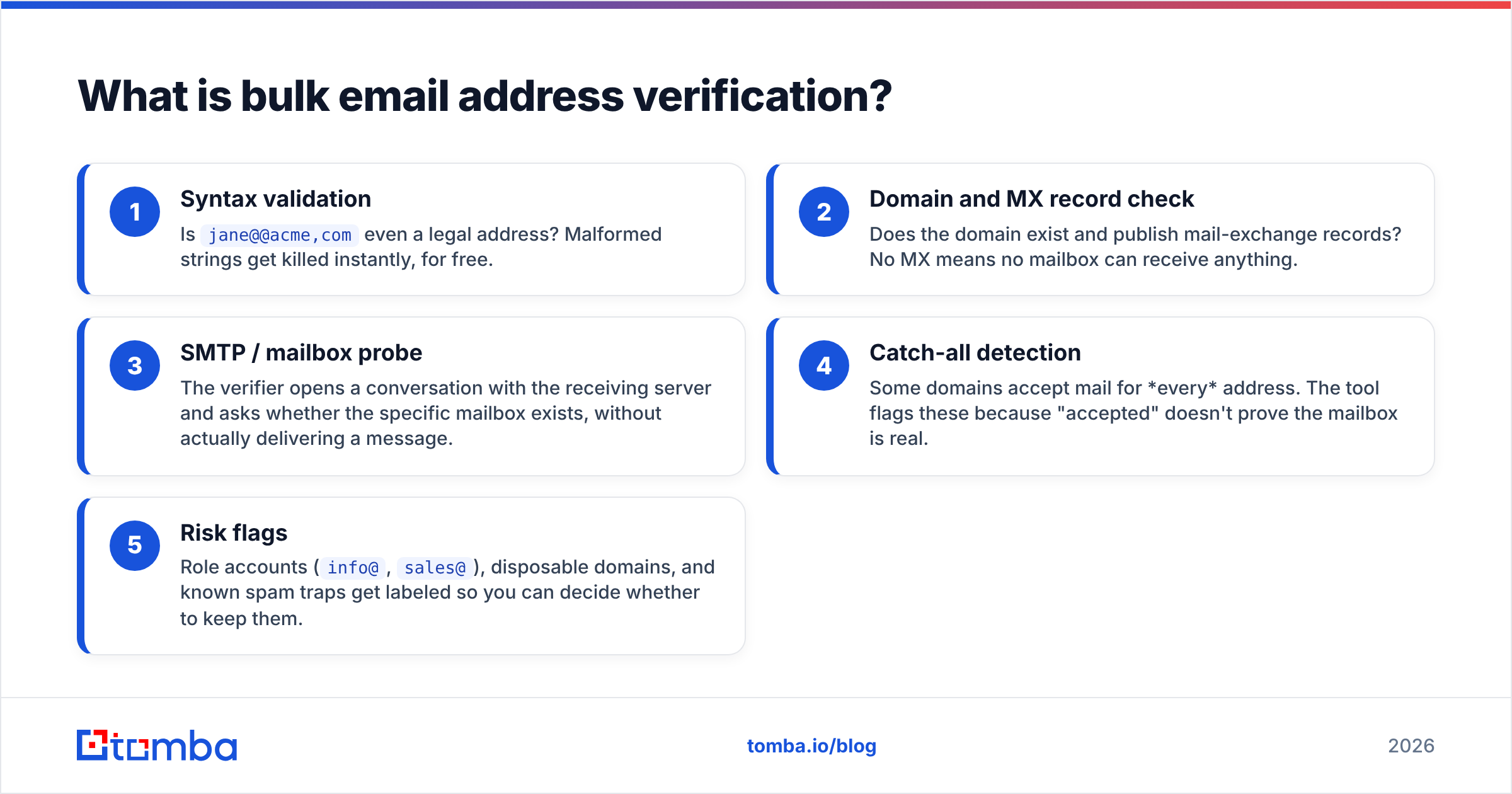
A typical verification pipeline runs these checks in order:
- Syntax validation — Is
jane@@acme,comeven a legal address? Malformed strings get killed instantly, for free. - Domain and MX record check — Does the domain exist and publish mail-exchange records? No MX means no mailbox can receive anything.
- SMTP / mailbox probe — The verifier opens a conversation with the receiving server and asks whether the specific mailbox exists, without actually delivering a message.
- Catch-all detection — Some domains accept mail for every address. The tool flags these because "accepted" doesn't prove the mailbox is real.
- Risk flags — Role accounts (
info@,sales@), disposable domains, and known spam traps get labeled so you can decide whether to keep them.
The output is a status per address — usually valid, invalid, catch-all/accept-all, unknown, or risky — plus the reason. The whole point is to do this at scale, with consistent rules, instead of eyeballing a spreadsheet.

Why does bulk verification matter for deliverability?#
Because mailbox providers judge you on bounces, and bounces compound. Conclusion first: a clean list protects your sender reputation, and reputation is the single biggest lever on whether your email lands in the inbox or the spam folder.
Here's the chain reaction. When you send to a dead address, the receiving server returns a hard bounce. A few bounces are normal. But when your bounce rate climbs past roughly 2–3%, providers like Google and Microsoft read it as a signal that you don't maintain your list — which is exactly what spammers fail to do. They respond by throttling you, routing you to spam, or blocking you outright. Now even your valid recipients stop seeing your mail.
Industry guidance from email vendors is consistent on this. HubSpot's deliverability documentation and most ESP onboarding flows treat list hygiene as a prerequisite, not a nice-to-have, and many platforms will suspend accounts that repeatedly exceed bounce thresholds. The math is brutal: one bad campaign to a stale list can suppress the next ten good ones.
Bulk verification breaks the chain before it starts. By removing invalids ahead of the send, you keep bounce rates low, email deliverability high, and your domain off the providers' watchlists. It also saves money — every dead address you don't send to is ESP volume you don't pay for and a credit you don't burn.
How do you read accuracy claims without getting fooled?#
Every verifier advertises "99% accuracy." The number is close to meaningless on its own, because what matters is how a tool handles the hard cases — and whether it's honest when it can't be sure.
The two categories that separate good tools from bad ones:
- Catch-all domains. When a domain accepts all mail, a lazy verifier marks every address "valid" to inflate its hit rate. An honest tool labels it "catch-all" and lets you decide. If you need certainty on these, a dedicated catch-all verifier applies extra heuristics rather than a coin flip.
- Unknown / greylisted results. Some servers deliberately refuse to confirm or deny a mailbox to defeat probing. A tool that calls these "valid" is lying; a tool that calls them "unknown" is telling the truth. Honesty here is a feature, not a weakness.
So when you compare vendors, don't ask "what's your accuracy?" Ask "what percent of my list comes back unknown, and how do you treat catch-alls?" Then run a sample of addresses you already know the truth about and check the results yourself. A verifier that returns 100% confident answers is hiding the unknowns, not solving them.
It's also worth understanding where the underlying data comes from. Verification quality depends partly on how fresh and broad the provider's data sources are, since cached intelligence about a domain's behavior supplements the live SMTP probe.
What does bulk email address verification cost in 2026?#
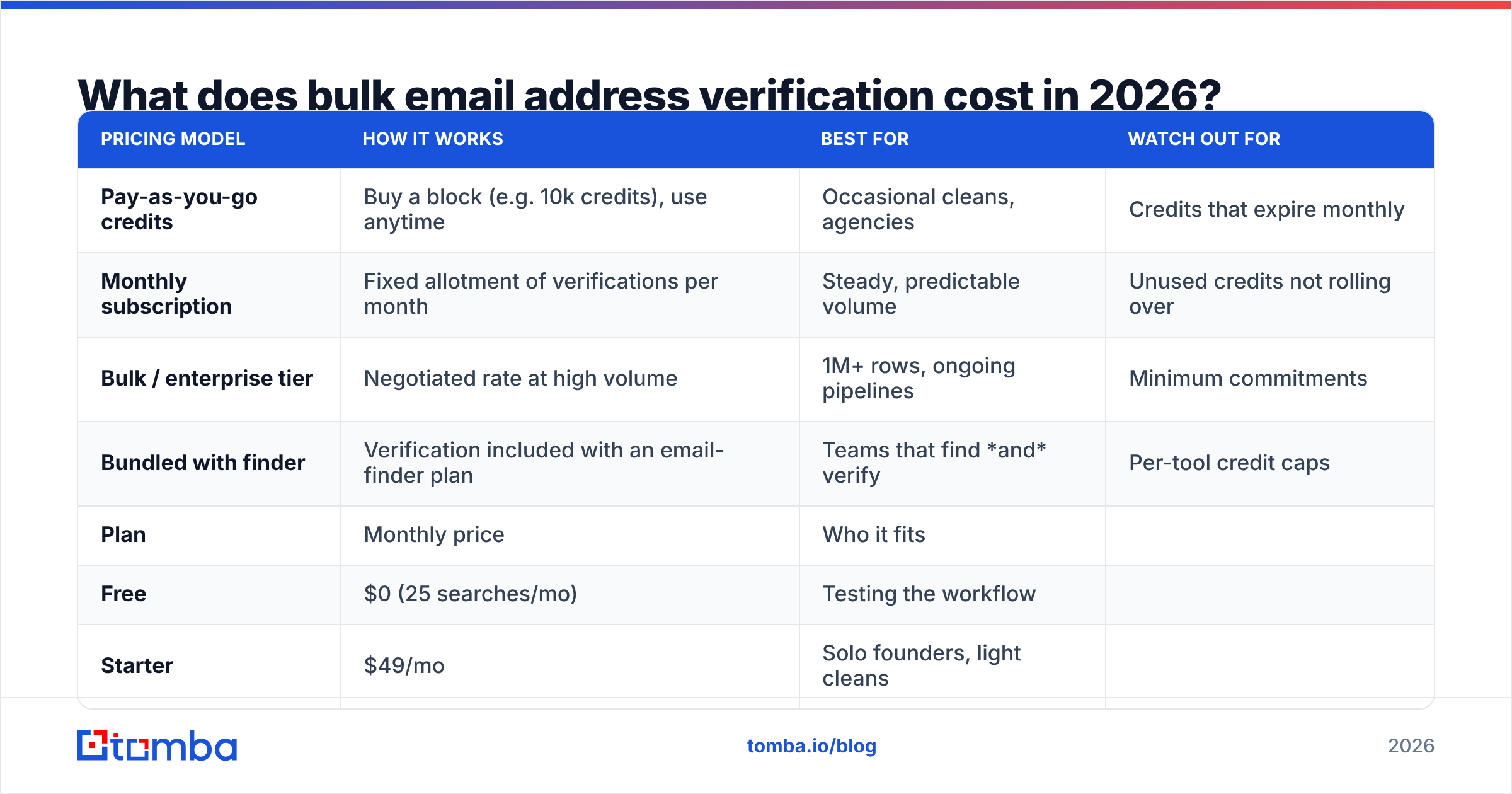
Pricing is almost always per-verified-email, and it should drop steeply with volume. Here's how the common models compare:
| Pricing model | How it works | Best for | Watch out for |
|---|---|---|---|
| Pay-as-you-go credits | Buy a block (e.g. 10k credits), use anytime | Occasional cleans, agencies | Credits that expire monthly |
| Monthly subscription | Fixed allotment of verifications per month | Steady, predictable volume | Unused credits not rolling over |
| Bulk / enterprise tier | Negotiated rate at high volume | 1M+ rows, ongoing pipelines | Minimum commitments |
| Bundled with finder | Verification included with an email-finder plan | Teams that find and verify | Per-tool credit caps |
As a rough 2026 benchmark, expect somewhere between $0.0005 and $0.004 per email verified, with the lower end reserved for six- and seven-figure volumes. A 50,000-address clean should cost tens of dollars, not hundreds.
Tomba folds verification into its core plans rather than charging for a separate product. The structure looks like this:
| Plan | Monthly price | Who it fits |
|---|---|---|
| Free | $0 (25 searches/mo) | Testing the workflow |
| Starter | $49/mo | Solo founders, light cleans |
| Growth | $99/mo | Scaling outbound teams |
| Pro | $249/mo | High-volume RevOps |
| Enterprise | Custom | 1M+ rows, SLAs, dedicated support |
Full Tomba pricing breaks down the exact credit allocations per tier. The thing to compare across vendors isn't the headline price — it's the effective cost per valid address after you subtract the unknowns you can't safely use.
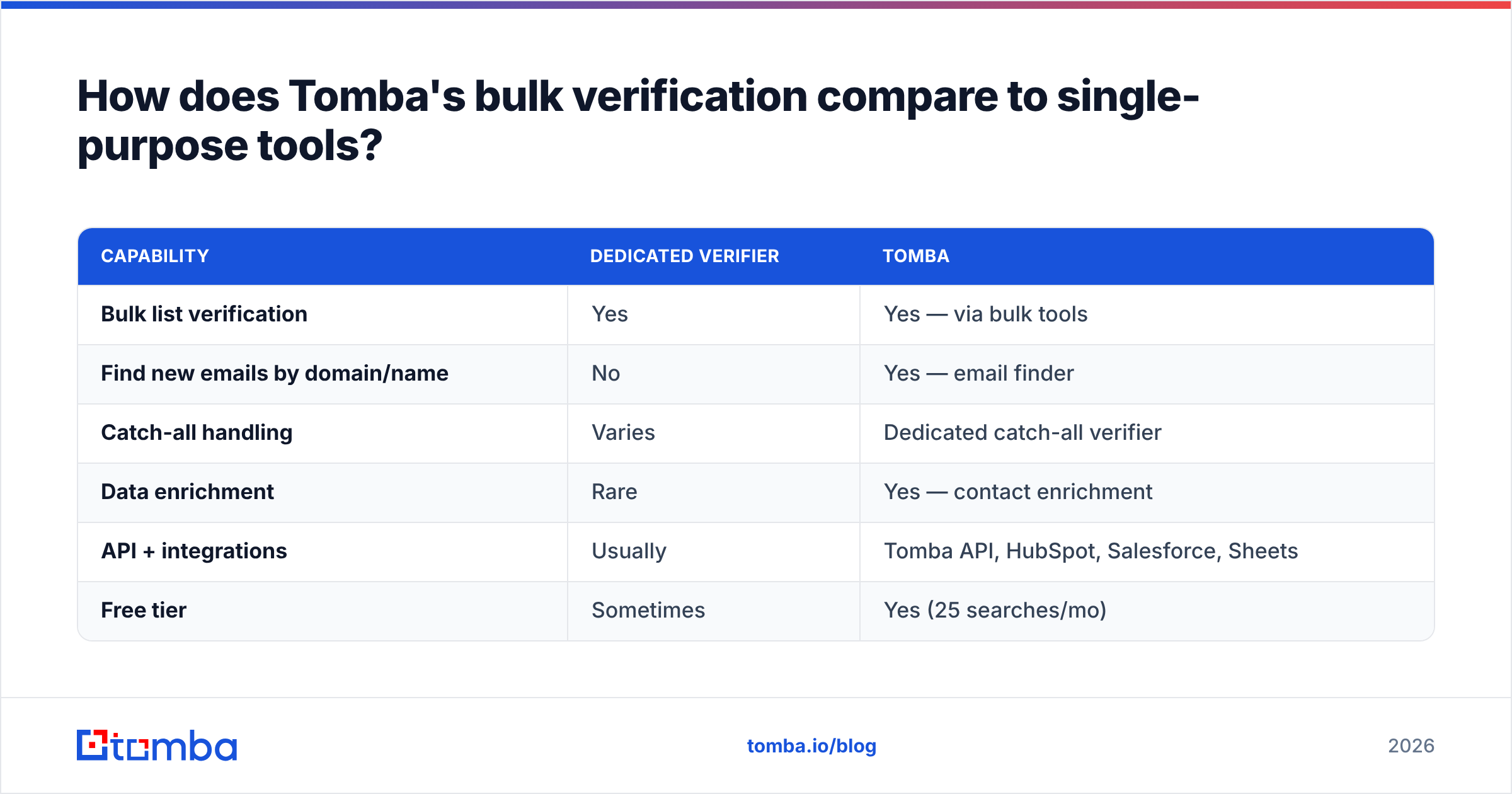
How does Tomba's bulk verification compare to single-purpose tools?#
Most verification vendors do one thing: they clean lists. That's fine until you realize that finding good addresses and verifying them are two halves of the same job, and bouncing between two tools wastes time and credits.
| Capability | Dedicated verifier | Tomba |
|---|---|---|
| Bulk list verification | Yes | Yes — via bulk tools |
| Find new emails by domain/name | No | Yes — email finder |
| Catch-all handling | Varies | Dedicated catch-all verifier |
| Data enrichment | Rare | Yes — contact enrichment |
| API + integrations | Usually | Tomba API, HubSpot, Salesforce, Sheets |
| Free tier | Sometimes | Yes (25 searches/mo) |
The practical advantage of a combined platform is that the same engine that finds an address can immediately verify it, so you're not exporting from one tool and re-importing into another. If your workflow is "find decision-makers at 500 target accounts, then verify before outreach," doing both in one pass with the email verifier removes an entire handoff.
That said — be honest with yourself about your needs. If you only ever clean lists someone else hands you and never source new contacts, a pure verifier may be all you require. The all-in-one case gets stronger the moment you also need to build lists.

How do you run a bulk verification, step by step?#
The mechanics are simple once your file is ready. Here's the workflow most teams use:
- Deduplicate first. Run your list through a remove duplicates pass before verifying. You don't want to pay to verify the same address three times.
- Normalize the column. Make sure emails sit in a single clean column with no stray spaces, names, or merged fields.
- Upload the batch. Push the CSV/XLSX through the bulk interface or the email verification API for programmatic runs.
- Let it process. Large lists run asynchronously — the service works through them and notifies you when the cleaned file is ready.
- Filter by status. Keep valid. Drop invalid. Decide case-by-case on catch-all, role, and unknown based on how risk-tolerant your campaign is.
- Re-import the clean segment. Load only the validated addresses into your ESP or sequencer.
For ongoing pipelines, skip the manual upload entirely and verify at the point of capture — every new lead gets checked the moment it enters your CRM through a HubSpot or Salesforce integration. That keeps the list clean continuously instead of in panicked batches before each campaign.
How often should you re-verify a list?#
Verify more than once, because email data decays fast. People change jobs, companies fold, and mailboxes get deactivated — research across B2B data vendors consistently puts annual contact decay somewhere around 22–30%. A list you verified in January is meaningfully dirtier by July.
A sensible cadence:
- On import — every new list or lead, no exceptions.
- Every 90 days — re-verify any active outreach segment.
- Before major campaigns — a fresh pass right before a big send, since that's when bounce damage hurts most.
- After re-engagement gaps — if a segment has sat untouched for six months, treat it as cold and re-verify before reviving it.
The cost of re-verifying is trivial next to the cost of a throttled domain. Treat it as routine maintenance, like rotating tires, not a one-time fix.
Frequently asked questions#
Does bulk verification guarantee zero bounces? No, and any vendor who promises that is overselling. Mailboxes can deactivate between your verification and your send, and catch-all domains carry inherent uncertainty. A good clean gets you well under the safe bounce threshold — it doesn't make the number literally zero.
Will verifying my list hurt the recipients' servers? No. A proper SMTP probe opens a handshake and asks whether a mailbox exists, then disconnects without delivering a message. It's a lightweight check, not a send.
What's the difference between verification and enrichment? Verification confirms an address is deliverable. Data enrichment adds more information — job title, company, phone — to a contact you already have. They're complementary: verify to protect deliverability, enrich to improve targeting.
Can I verify addresses one at a time too? Yes. For single lookups, a free email checker handles ad-hoc checks. Bulk verification is for when you have hundreds or thousands at once.
Clean your list before it costs you a domain#
Bulk email address verification is the cheapest insurance you can buy against a damaged sender reputation. A few dollars and a few minutes of processing protect every campaign that comes after — and the math only favors it more as your list grows.
If you want both halves in one place — sourcing new contacts and validating them before outreach — start with the Tomba Email Finder and run your batches through the built-in verifier. The free tier lets you test the full workflow on 25 searches before you commit to a paid plan, so you can see the bounce rate drop on your own data before spending a cent. Verify first, send second, and let your reputation compound in your favor instead of against you.
// get started
Find, verify and enrich your first contacts today
Start on the free plan with 25 searches a month, then scale when your team is ready.
Free plan · No credit card required · GDPR & CCPA
// about the author