Bulk Email Guidelines: Send at Scale Without Spam (2026)
Sending thousands of emails at once? These bulk email guidelines cover list hygiene, authentication, volume ramping, and the 2026 rules that keep you out of spam.
Sending one email is easy. Sending fifty thousand without torching your domain reputation is a discipline. The difference between a campaign that lands in the inbox and one that gets quietly filtered into spam comes down to a handful of rules that most senders learn the hard way — usually after a mailbox provider has already throttled them.
This guide lays out the bulk email guidelines that actually move deliverability in 2026: authentication, list hygiene, volume ramping, content hygiene, and the monitoring loop that tells you when something is going wrong before the damage is done.
TL;DR — The Short Version#
- Authenticate everything. SPF, DKIM, and DMARC are non-negotiable in 2026. Gmail and Yahoo reject or junk unauthenticated bulk mail outright.
- Clean the list before every send. Verify addresses, remove catch-alls and role accounts, and suppress anyone who bounced or unsubscribed.
- Ramp volume slowly. A cold domain blasting 50,000 emails on day one looks exactly like a spammer. Warm up over weeks, not hours.
- Keep complaint rates under 0.3%. One easy unsubscribe link and honest subject lines protect you more than any clever trick.
- Monitor reputation continuously. Watch bounce rates, spam complaints, and Postmaster dashboards so you can pull back before a block becomes permanent.
What Counts as "Bulk Email" Anyway?#
Bulk email is any single message sent to a large list of recipients at once — newsletters, product announcements, onboarding sequences, or cold outreach at scale. The exact threshold that triggers extra scrutiny varies by provider, but Google now treats anyone sending more than 5,000 messages per day to Gmail addresses as a "bulk sender" subject to stricter requirements.
That label matters. Bulk senders are held to authentication standards, complaint-rate ceilings, and one-click unsubscribe rules that casual senders can ignore. Cross the volume line without meeting the bar and your mail gets filtered regardless of how legitimate it is.
The mental model: think of your sending domain like a credit score. Every clean send, low bounce rate, and happy recipient nudges it up. Every spam complaint, hard bounce, and spam-trap hit drags it down. Mailbox providers read that score in milliseconds and decide inbox-or-spam before a human ever sees your message.
Why Do Bulk Emails Land in Spam?#
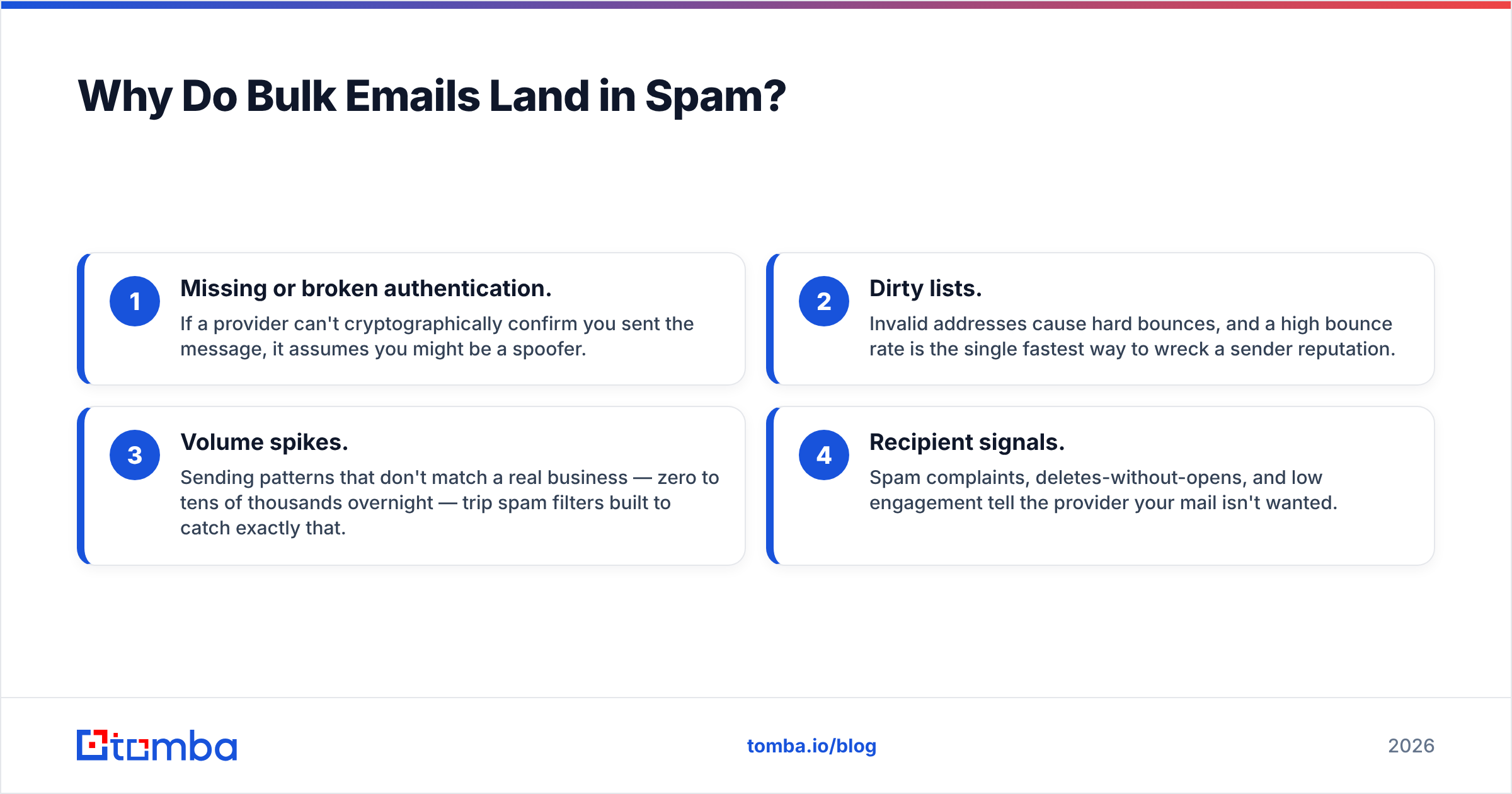
Most deliverability failures trace back to four root causes, and none of them are about your copy being "too salesy."
- Missing or broken authentication. If a provider can't cryptographically confirm you sent the message, it assumes you might be a spoofer.
- Dirty lists. Invalid addresses cause hard bounces, and a high bounce rate is the single fastest way to wreck a sender reputation.
- Volume spikes. Sending patterns that don't match a real business — zero to tens of thousands overnight — trip spam filters built to catch exactly that.
- Recipient signals. Spam complaints, deletes-without-opens, and low engagement tell the provider your mail isn't wanted.
Fix those four and you've solved 90% of deliverability problems. The remaining 10% is content and infrastructure detail. Understanding email deliverability as a system — not a single setting — is what separates senders who scale from senders who get blocked.
Which Authentication Records Do You Need?#
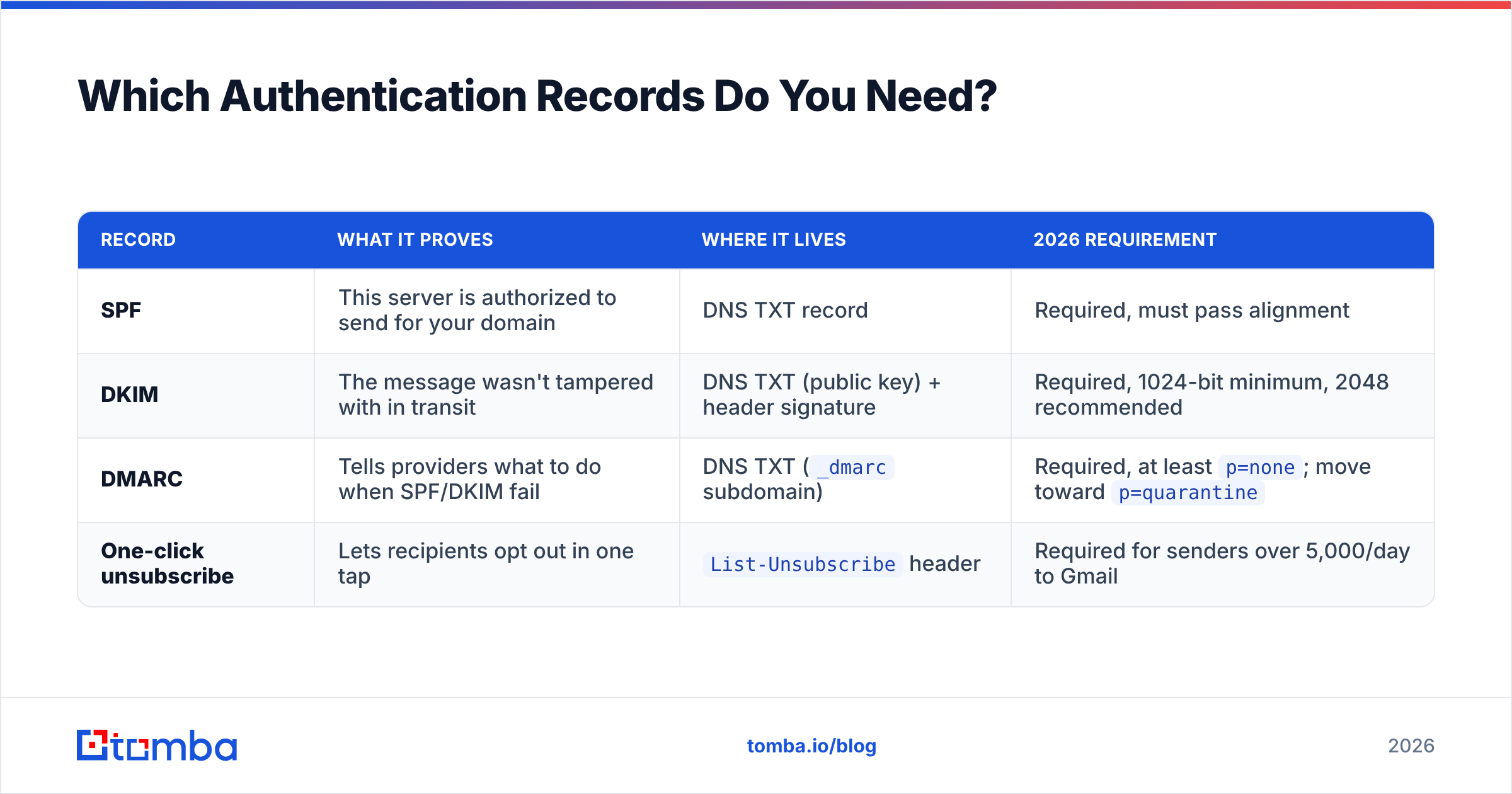
All three. SPF, DKIM, and DMARC each close a different spoofing gap, and the major providers now require the full set for bulk mail. Here's what each one does and where it lives.
| Record | What it proves | Where it lives | 2026 requirement |
|---|---|---|---|
| SPF | This server is authorized to send for your domain | DNS TXT record | Required, must pass alignment |
| DKIM | The message wasn't tampered with in transit | DNS TXT (public key) + header signature | Required, 1024-bit minimum, 2048 recommended |
| DMARC | Tells providers what to do when SPF/DKIM fail | DNS TXT (_dmarc subdomain) |
Required, at least p=none; move toward p=quarantine |
| One-click unsubscribe | Lets recipients opt out in one tap | List-Unsubscribe header |
Required for senders over 5,000/day to Gmail |
Start by publishing an SPF record listing every service that sends on your behalf. Add DKIM signing through your ESP. Then layer DMARC on top with a monitoring policy (p=none) so you can read the aggregate reports before you start enforcing. You can sanity-check your SPF setup with a free SPF checker before you go live, and confirm the record syntax matches what Google and Yahoo expect.
The official Google sender guidelines spell out the bulk-sender bar in detail and are worth bookmarking — they're the closest thing to a rulebook the industry has.
How Do You Keep a Bulk List Clean?#
List hygiene is the highest-ROI habit in email. A verified list of 8,000 engaged contacts outperforms a scraped list of 80,000 every time — better inbox placement, higher response rates, and a reputation that compounds instead of decays.
Run this checklist before every major send:
- Verify every address. Remove syntax errors, dead domains, and mailboxes that don't exist. An email verifier catches the addresses that would otherwise hard-bounce and damage your reputation.
- Suppress role accounts.
info@,sales@, andsupport@addresses generate complaints and rarely convert. Strip them from cold campaigns. - Handle catch-all domains carefully. Catch-all servers accept everything, so a "valid" result means little. Segment these and send to them at lower volume.
- Honor every unsubscribe and bounce. Maintain a permanent suppression list. Re-mailing someone who opted out is both a deliverability risk and, in many regions, illegal.
- Re-verify aging lists. B2B email decays roughly 22–30% per year as people change jobs. A list you verified six months ago is already partly stale.
If you're building lists from scratch, a bulk email finder that returns verified addresses saves you the round-trip of finding and then separately cleaning your data. Quality at the source means less cleanup later.
How Should You Warm Up a New Domain or IP?#
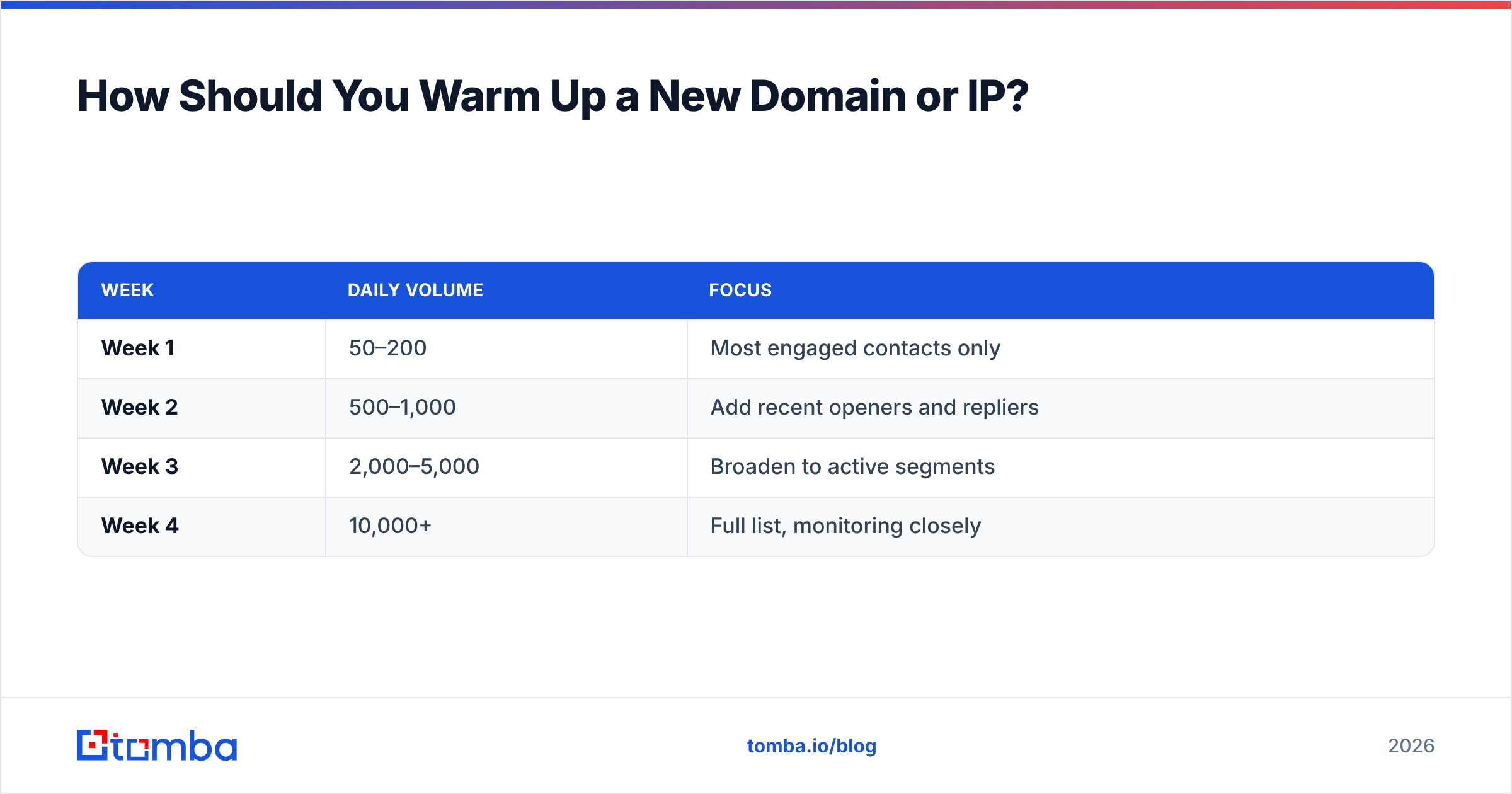
Slowly, and on a schedule. Mailbox providers judge new sending domains with suspicion because spammers burn through fresh domains constantly. Your job is to look like a real, growing business — which means ramping volume in steady increments while keeping engagement high.
A conservative warm-up schedule for a new domain looks like this:
| Week | Daily volume | Focus |
|---|---|---|
| Week 1 | 50–200 | Most engaged contacts only |
| Week 2 | 500–1,000 | Add recent openers and repliers |
| Week 3 | 2,000–5,000 | Broaden to active segments |
| Week 4 | 10,000+ | Full list, monitoring closely |
The exact numbers depend on your list quality and provider, but the principle holds: double cautiously, never 10x overnight. Seed the early sends with your most engaged recipients so the first signals providers see are opens and replies, not silence. Strong early sender reputation makes every later send easier.
If a free warm-up calculator helps you plan the ramp, run your target volume through one before you commit to a schedule rather than guessing.

What Content Rules Keep You Out of the Spam Folder?#
Content matters less than authentication and list quality, but bad content can still sink an otherwise clean campaign. The goal is to look like a trusted business correspondent, not a discount-blasting advertiser.
- Write honest subject lines. No
RE:fakery, no false urgency, no all-caps. Deceptive subjects drive complaints, and complaints drive blocks. - Balance your HTML. A single giant image with no text is a classic spam signature. Keep a healthy text-to-image ratio and always include a plain-text version.
- Limit links and avoid shorteners. Bit.ly-style redirects are heavily abused and get flagged. Link to your real domain.
- Make unsubscribing trivial. A visible, one-click unsubscribe lowers complaints far more than hiding it ever "saves" subscribers. Providers reward easy opt-outs.
- Personalize with real data. Merge fields that pull a recipient's actual name and company beat generic blasts on engagement, and engagement is what providers measure.
Run a draft through a spam checker before launch to catch trigger phrases, broken authentication, and formatting issues while you can still fix them. HubSpot's research on email deliverability best practices is a solid second opinion on content hygiene if you want to go deeper.
How Do You Monitor Bulk Email Health?#
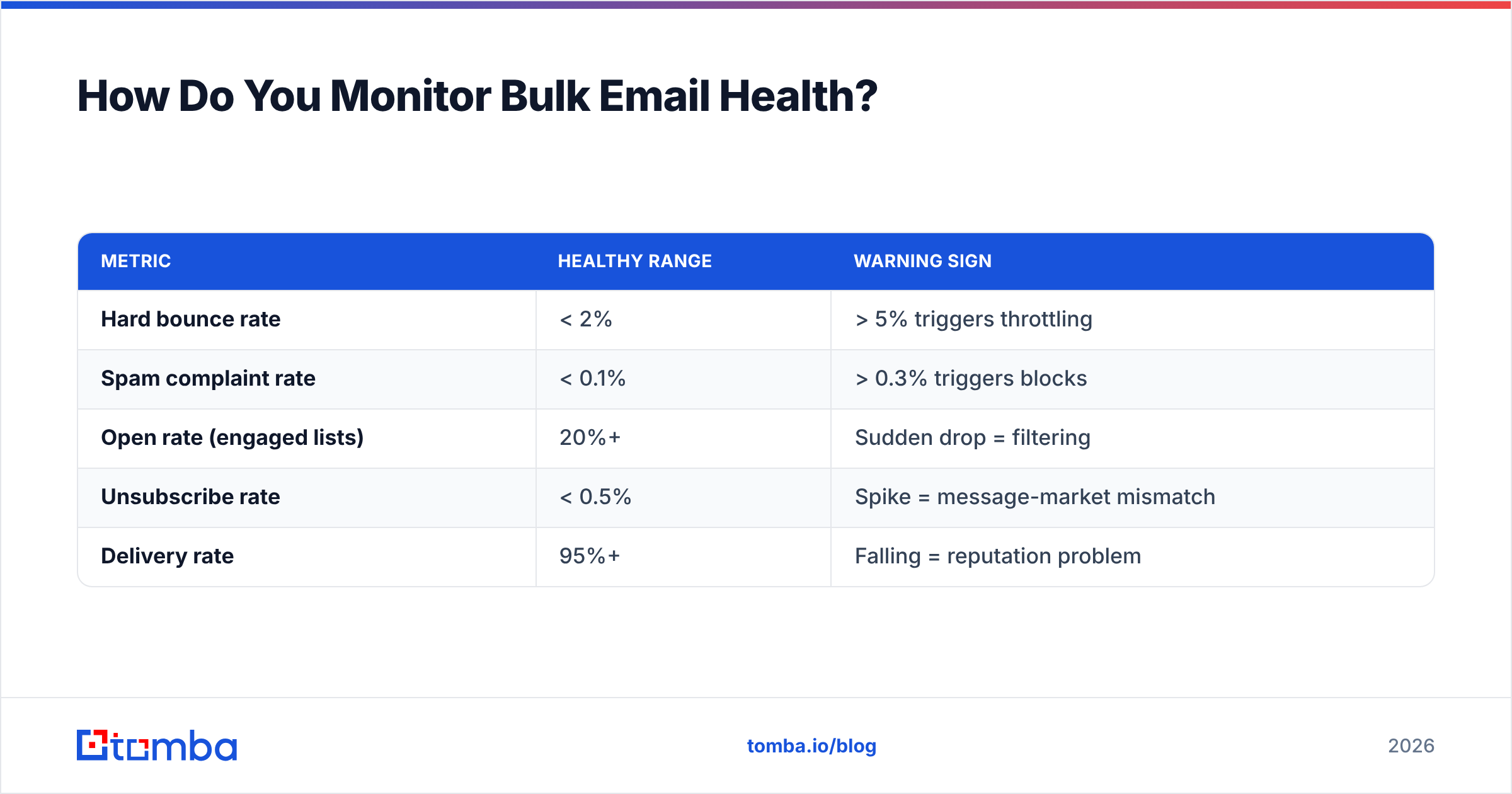
Sending is half the job; watching what happens next is the other half. The senders who never get blocked are the ones who spot a rising complaint rate on Tuesday and pull back before Thursday's send compounds the problem.
Track these metrics on every campaign:
| Metric | Healthy range | Warning sign |
|---|---|---|
| Hard bounce rate | < 2% | > 5% triggers throttling |
| Spam complaint rate | < 0.1% | > 0.3% triggers blocks |
| Open rate (engaged lists) | 20%+ | Sudden drop = filtering |
| Unsubscribe rate | < 0.5% | Spike = message-market mismatch |
| Delivery rate | 95%+ | Falling = reputation problem |
Set up Google Postmaster Tools to read your domain and IP reputation straight from the source — it's free and shows you exactly how Gmail scores you. Pair it with your ESP's analytics and check both after every send during a ramp.
When a number drifts into the warning column, slow down. Cut volume, re-verify the affected segment, and investigate before you send again. A 48-hour pause costs you one campaign. A provider-level block costs you the domain.
Bulk Email Guidelines: The Compliance Layer#
Deliverability and legal compliance overlap but aren't identical. Beyond the technical rules, bulk senders have to respect the laws governing the regions they mail into:
- CAN-SPAM (US): Include a valid physical address, honor opt-outs within 10 business days, and never use deceptive headers.
- GDPR (EU): Send only to contacts with a lawful basis — consent or legitimate interest — and document it.
- CASL (Canada): Requires express or implied consent, with strict record-keeping.
The practical takeaway is the same everywhere: send wanted mail to people who can easily opt out, and keep proof of why each contact is on your list. Compliance and good deliverability reinforce each other — the same habits that keep regulators happy keep mailbox providers happy too.
Putting It All Together#
Bulk email isn't about volume tricks; it's about earning the right to scale. Authenticate your domain, verify your list, ramp deliberately, write honestly, and watch your metrics. Do those five things consistently and your reputation compounds — every clean send makes the next one easier.
The most common failure point in that chain is the list itself. Sending verified, accurate addresses is the foundation everything else rests on, because no amount of authentication or warm-up saves you from a list full of dead mailboxes.
That's where the right tooling pays for itself. Use Tomba's Email Finder to build lists from verified professional addresses, then run them through Tomba's verifier before each send so your bounce rate stays low and your domain reputation keeps climbing. Compare Tomba pricing — the free tier gives you 25 searches a month to test the data quality, and the Starter plan at $49/mo scales with real campaigns. Clean data in, inbox placement out. That's the whole game.
// get started
Find, verify and enrich your first contacts today
Start on the free plan with 25 searches a month, then scale when your team is ready.
Free plan · No credit card required · GDPR & CCPA
// about the author