Bulk Email Scraper: The 2026 Guide to Clean, Safe Lists
A bulk email scraper can fill your pipeline fast—or torch your domain. Here's how to scrape emails at scale in 2026 without buying garbage data or landing in spam.
TL;DR
- A bulk email scraper collects many business email addresses at once from domains, company lists, or web pages—useful for prospecting, but dangerous if the data is unverified.
- Raw scraping (regex on web pages, browser extensions) is cheap but produces stale, role-based, and invalid addresses that wreck your sender reputation.
- API-driven tools that combine discovery with verification—like the bulk email finder from Tomba—give you cleaner lists at scale with confidence scores attached.
- Always verify before sending. A 30% invalid list will get you blocked faster than any "growth hack" can help you.
- Below: how scrapers work, a tool comparison table, accuracy benchmarks, legal guardrails, and a safe end-to-end workflow.
What is a bulk email scraper?#
A bulk email scraper is software that extracts many email addresses in a single run instead of one at a time. Think of it like a commercial fishing trawler versus a single rod: you cast once and pull in hundreds or thousands of contacts from a domain, a list of companies, a CSV of names, or a set of web pages.
The term covers a wide range of tools that behave very differently under the hood:
- Page scrapers — crawl URLs and pull any string matching an email pattern (
name@domain.com) out of the raw HTML. - Domain-based finders — take a company domain and return every public address tied to it, often with names and job titles.
- Name + company resolvers — accept a list of
first name, last name, companyrows and guess-then-verify the most likely address. - Browser extensions — sit on top of LinkedIn or a company site and grab visible or inferred emails as you browse.
- API + bulk upload tools — let you push thousands of rows programmatically and return structured, scored results.
The first two categories are what most people mean by "scraping," but they are also the most likely to hand you junk. The difference between a list that converts and a list that gets your domain blacklisted is almost entirely about what happens after the addresses are collected.
How does a bulk email scraper actually work?#
Most scrapers run one of three discovery strategies, frequently in combination:
- Pattern matching — The tool downloads a page and runs a regular expression that matches anything shaped like an email. Fast and free, but it grabs
noreply@,support@, image filenames, and addresses that were valid in 2019 and dead today. - Pattern prediction — The tool already knows a company uses
{first}.{last}@company.com, so given a name it constructs the likely address. This is where a company email pattern lookup or an email permutator earns its keep. - Source aggregation — The tool maintains its own crawled index of the public web plus public records, then serves matches from that index instead of crawling live. This is how API providers return results in milliseconds.
The critical step the cheap tools skip is verification: pinging the mail server (SMTP handshake), checking MX records, detecting catch-all domains, and filtering disposable addresses. Scraping finds candidates. Verification tells you which candidates are real. A serious workflow needs both, which is why an email verifier belongs in every pipeline.
What separates a good bulk email scraper from a list-killer?#
Use these six criteria to judge any tool before you trust it with your sending domain:
- Verification built in — Does it return a deliverability status and confidence score, or just raw strings? Unverified output is a liability, not an asset.
- Catch-all handling — Roughly half of B2B domains accept everything. A good tool flags these instead of marking guesses as "valid."
- Source transparency — You should be able to see where a contact came from. Tomba publishes its data sources; many scrapers won't say a word.
- Role-account filtering —
info@,sales@, andadmin@inflate your count and crush your reply rate. The tool should label them. - Throughput and rate limits — Can it actually do bulk, via API, CSV upload, or a Google Sheets add-on—without you babysitting a browser tab?
- Compliance posture — Does it respect GDPR/CCPA boundaries and give you opt-out hooks, or does it just dump personal data into your lap?
Which bulk email scraper should you use in 2026?#
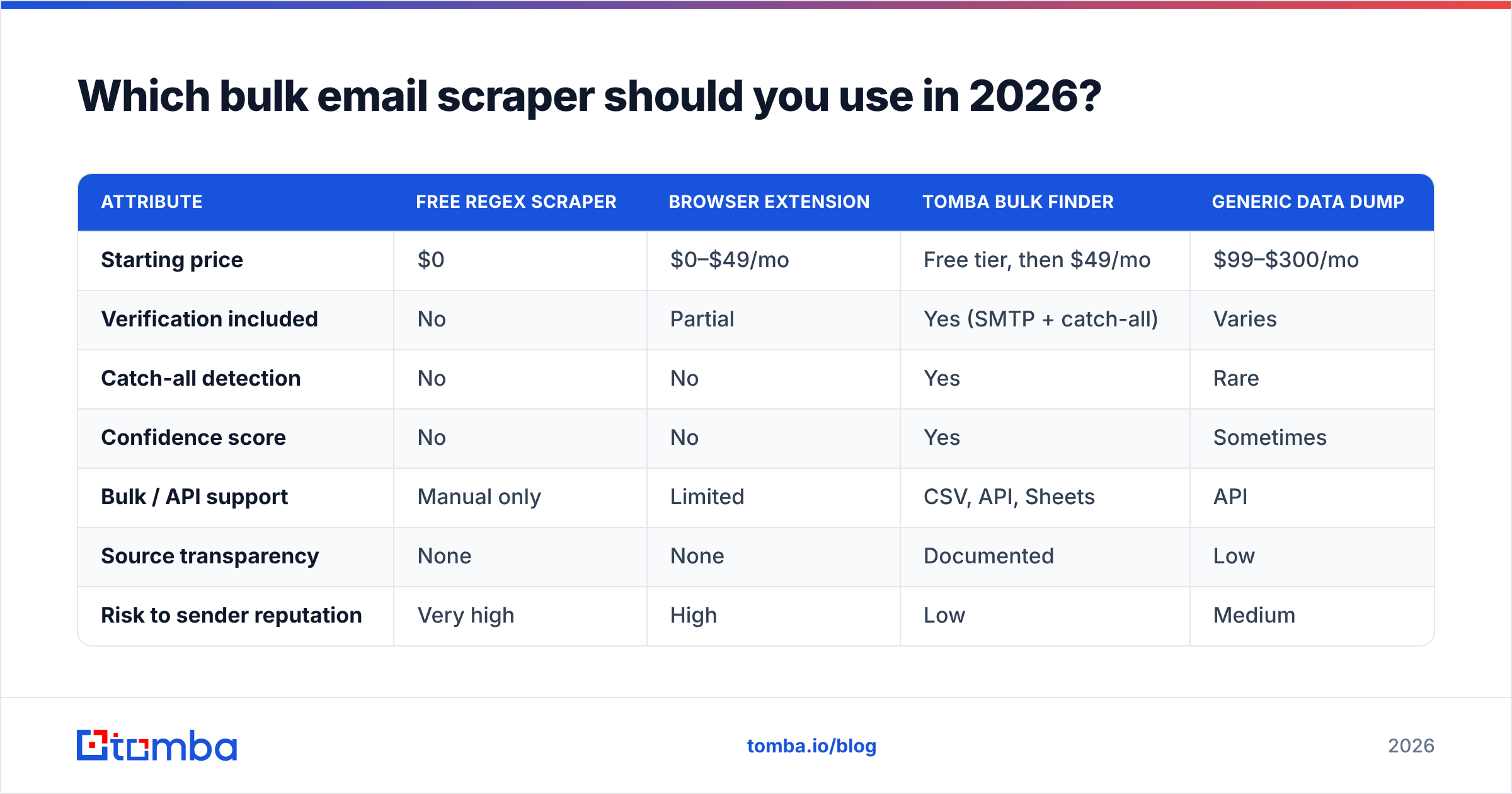
Here is a side-by-side of the main approaches, scored on the things that decide whether your campaign lands or bounces.
| Attribute | Free regex scraper | Browser extension | Tomba bulk finder | Generic data dump |
|---|---|---|---|---|
| Starting price | $0 | $0–$49/mo | Free tier, then $49/mo | $99–$300/mo |
| Verification included | No | Partial | Yes (SMTP + catch-all) | Varies |
| Catch-all detection | No | No | Yes | Rare |
| Confidence score | No | No | Yes | Sometimes |
| Bulk / API support | Manual only | Limited | CSV, API, Sheets | API |
| Source transparency | None | None | Documented | Low |
| Risk to sender reputation | Very high | High | Low | Medium |
The pattern is consistent: free tools win on price and lose on everything that costs you money downstream. A bounced list doesn't just waste sends—it teaches mailbox providers that your domain is careless, and that reputation damage follows you for months.

How accurate are bulk email scrapers?#
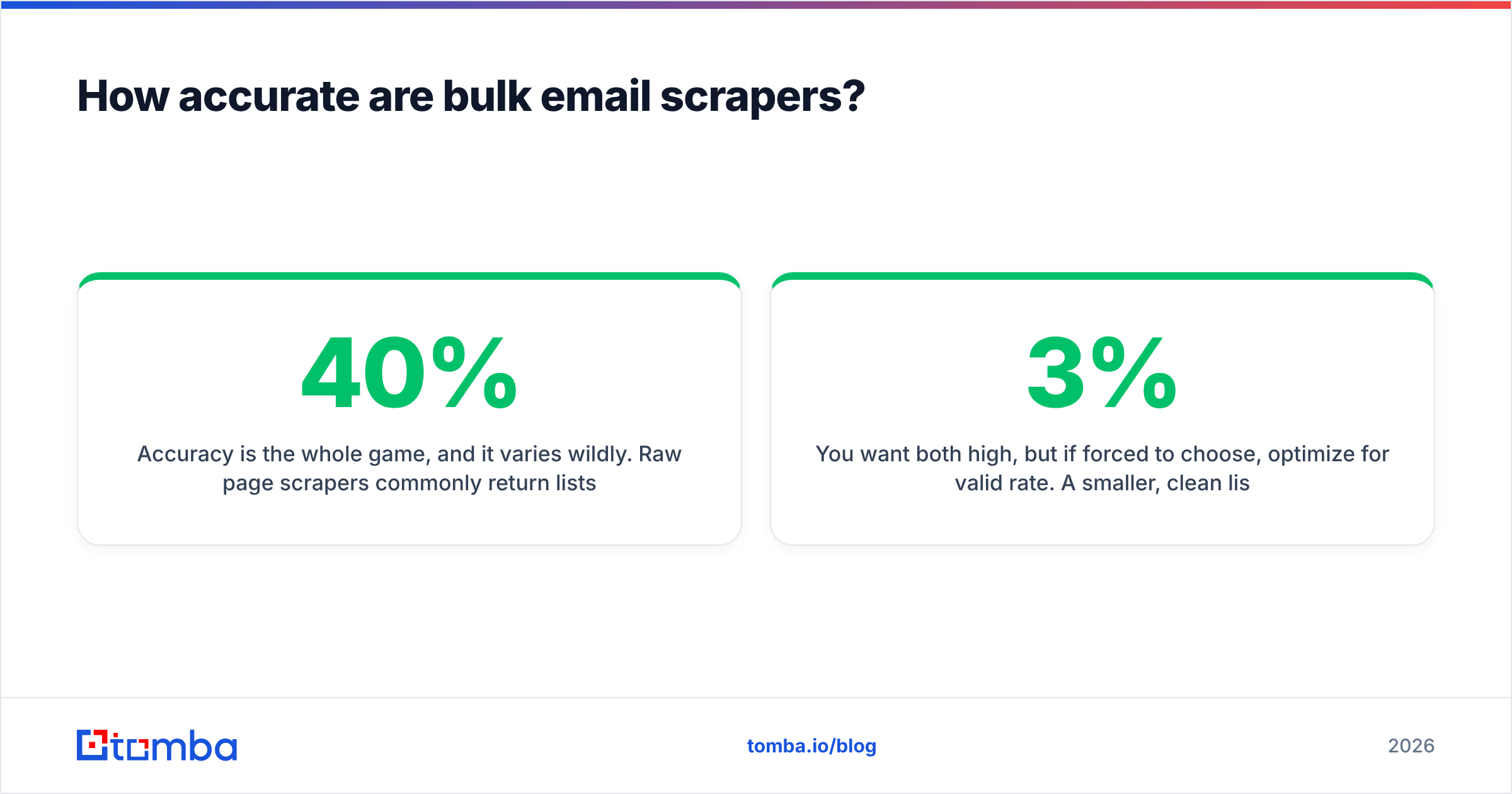
Accuracy is the whole game, and it varies wildly. Raw page scrapers commonly return lists where 25–40% of addresses are invalid, role-based, or stale—because a web page never tells you whether john@acme.com still works. Tools that verify in real time push valid rates well above 90% by discarding the guesses that can't complete an SMTP handshake.
Two numbers matter more than a vendor's marketing headline:
- Valid rate — the share of returned addresses that are actually deliverable.
- Coverage — the share of your target contacts the tool can find at all.
You want both high, but if forced to choose, optimize for valid rate. A smaller, clean list beats a bloated, dirty one every time, because bounces above ~3% trigger throttling and blocks at Gmail and Outlook. Check the math yourself before any campaign: run a sample through a free email checker and measure the bounce rate on a small batch before you scale.
For a deeper, tool-by-tool breakdown, compare the providers directly rather than trusting any single benchmark.

According to G2's category data, the lead-intelligence tools that rank highest are consistently the ones that pair discovery with verification—not the cheapest raw scrapers.
Is bulk email scraping legal?#
Conclusion first: scraping publicly available business email addresses is generally permissible, but how you use them is where the law bites. The collection and the outreach are governed by different rules.
- GDPR (EU) treats a work email tied to a named person as personal data. You need a lawful basis—legitimate interest is the usual one for B2B—and you must honor opt-outs and disclose how you got the data.
- CAN-SPAM (US) is lighter on collection but strict on sending: accurate headers, a real physical address, and a working unsubscribe in every message.
- CCPA (California) gives people the right to know what you hold and to request deletion.
The practical takeaway: scrape business contacts, not consumer data; target by role and relevance, not by volume; and keep your opt-out machinery clean. The official GDPR text on legitimate interests is worth a read before you build a large outbound program. None of this is legal advice—loop in counsel for anything at scale—but a verified, role-filtered, opt-out-respecting list is far easier to defend than a 50,000-row regex dump.

What's the safe workflow for scraping emails at scale?#
Here is the end-to-end process that keeps your domain healthy while still filling the pipeline. Each step exists to remove a specific class of junk.
- Define the target list first. Companies, roles, and regions—before you scrape anything. Scraping without a target is how you end up with 10,000 contacts and a 1% reply rate.
- Discover by domain, not by crawl. Feed a list of company domains into a domain search to get named contacts with titles, instead of grabbing every string on a homepage.
- Resolve names you already have. For known prospects, use an email finder that predicts and confirms the address in one call.
- Verify everything. Push the full list through bulk email verification. Drop invalids and flag catch-alls for a separate, cautious cadence.
- Strip role accounts and duplicates. Remove
info@/sales@and dedupe with a remove-duplicates pass so you don't email the same person twice from two rows. - Warm up and send small. Test a 50–100 contact batch, watch the bounce and spam rates, then scale only if the numbers hold.
- Enrich and route. Add firmographics with data enrichment and sync straight into your CRM via the HubSpot integration or Salesforce integration.
Notice that exactly one step is "scraping." The other six are the difference between a professional outbound motion and a spam complaint.
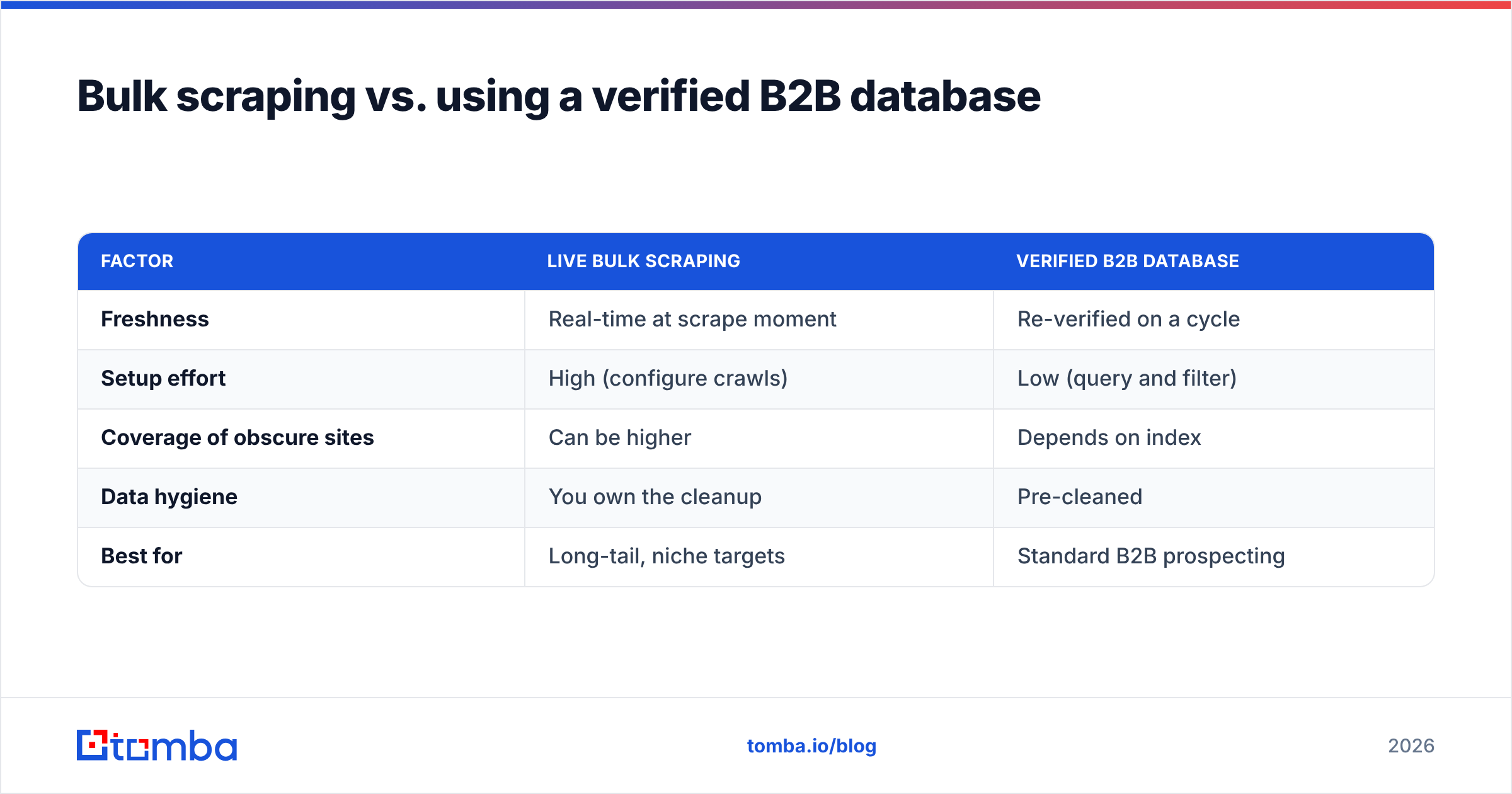
Bulk scraping vs. using a verified B2B database#
There's a third path that bypasses live scraping entirely: querying a pre-built, continuously verified contact index. Here's how the two compare.
| Factor | Live bulk scraping | Verified B2B database |
|---|---|---|
| Freshness | Real-time at scrape moment | Re-verified on a cycle |
| Setup effort | High (configure crawls) | Low (query and filter) |
| Coverage of obscure sites | Can be higher | Depends on index |
| Data hygiene | You own the cleanup | Pre-cleaned |
| Best for | Long-tail, niche targets | Standard B2B prospecting |
For most teams, a B2B database query plus targeted finder calls covers 90% of needs with a fraction of the maintenance. Reserve heavy custom scraping for the genuinely long-tail accounts a packaged index can't reach—and even then, verify the output the same way.
How does Tomba handle bulk email scraping?#
Tomba is built around the assumption that discovery without verification is worthless. Instead of dumping raw strings, every result ships with a confidence score and a deliverability status, so you know what you're sending into before you risk your domain.
The bulk pieces fit together like this:
- Bulk finder — upload a CSV of domains or names and get back structured, scored contacts via the bulk email finder.
- Domain search — one domain in, a full named contact roster out.
- API and integrations — wire it into your own pipeline with the Tomba API, or pull results straight into Google Sheets, Airtable, or your CRM.
- Verification at every step — catch-all detection, SMTP checks, and disposable filtering happen inline, not as an afterthought.
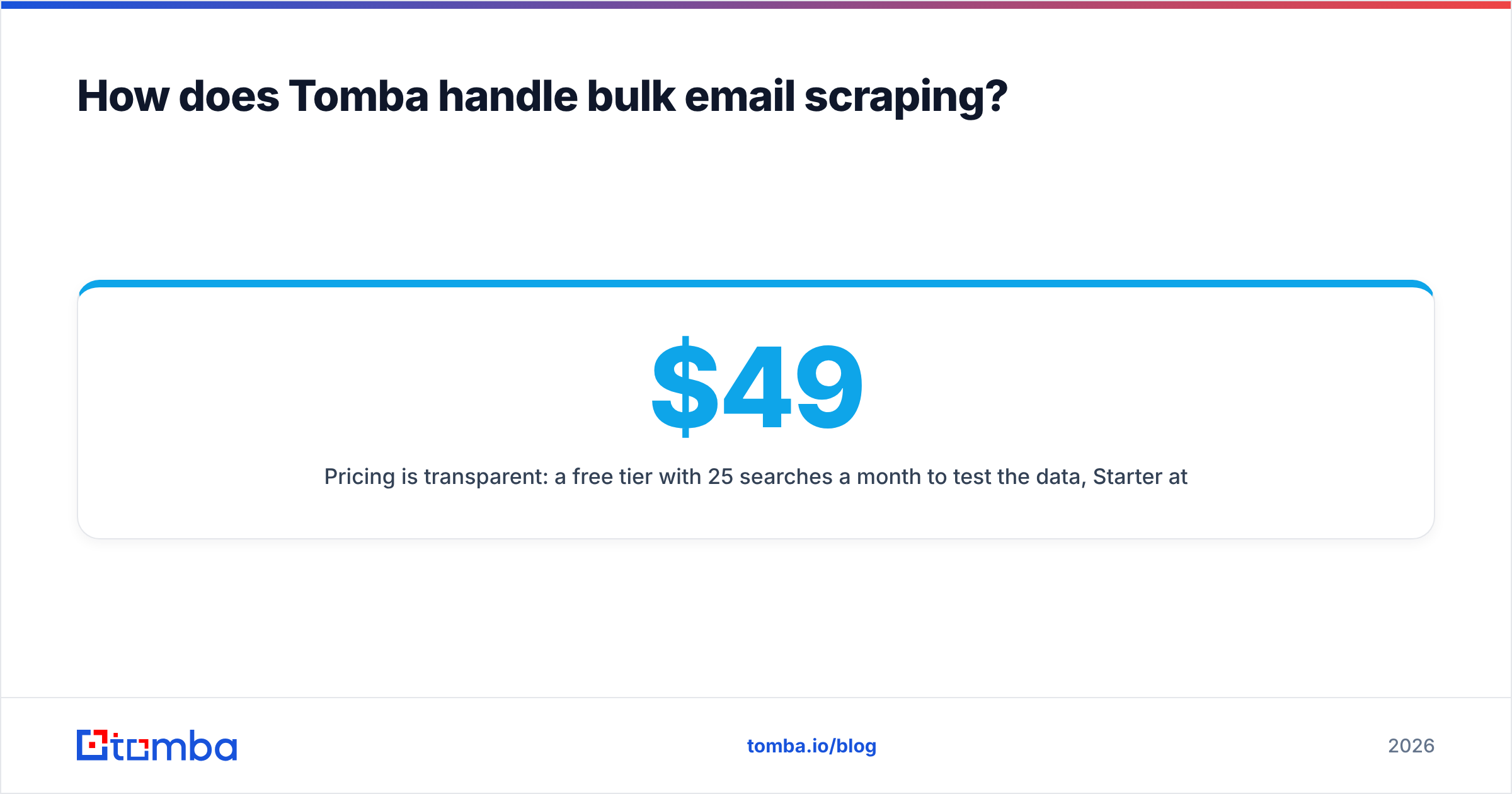
Pricing is transparent: a free tier with 25 searches a month to test the data, Starter at $49/mo, Growth at $99/mo, and Pro at $249/mo, with Enterprise custom. Full Tomba pricing is published so you can size the plan to your volume.
Frequently asked questions#
Is a free bulk email scraper good enough? For tiny, one-off tasks, maybe. For anything you'll actually send to, no—free regex tools skip verification, so you inherit a 25–40% junk rate that costs more in reputation damage than a paid tool costs in dollars.
How many emails can I scrape at once? That depends on the tool's rate limits and your plan. API-based tools handle thousands per batch; browser extensions cap out fast and risk account flags.
Will scraping hurt my deliverability? Only if you skip verification. The scraping itself is neutral; sending to unverified addresses is what triggers bounces, spam traps, and blocks. Verify first, send second.
Can I scrape LinkedIn emails? You can resolve LinkedIn profiles to business emails with a LinkedIn finder, but respect platform terms and privacy law—target by role and keep your opt-out clean.
Start scraping the right way#
A bulk email scraper is only as good as the verification behind it. Raw regex and grab-everything extensions feel fast, but they hand you lists that quietly destroy your sender reputation. The teams that win at outbound treat scraping as step one of seven—discover, then verify, filter, warm up, and route.
If you want discovery and verification in one place, start with the Tomba Email Finder and its bulk tools. Run your first 25 searches free, measure the valid rate yourself, and scale only when the numbers prove the data is clean. Your domain reputation is worth more than a cheap list.
// get started
Find, verify and enrich your first contacts today
Start on the free plan with 25 searches a month, then scale when your team is ready.
Free plan · No credit card required · GDPR & CCPA
// about the author