Bulk Email Threshold 2026: Sending Limits & Deliverability
What counts as a bulk email threshold in 2026, the 5,000/day rule from Gmail and Yahoo, and how to ramp volume without torching your sender reputation.
placeholder
Sending more email is not the problem. Sending more email badly is. The moment you cross a provider's bulk email threshold, you stop being treated as a person typing messages and start being judged as a mass sender — with authentication, complaint-rate, and list-hygiene rules that were optional yesterday and mandatory today.
TL;DR
- A bulk email threshold is the daily send volume at which mailbox providers apply stricter rules — most famously the 5,000 messages/day line Gmail and Yahoo drew in 2024 and still enforce in 2026.
- Cross it without SPF, DKIM, and DMARC aligned, and your mail gets throttled or junked regardless of content quality.
- Keep your spam complaint rate under 0.3% (ideally below 0.1%) or providers start filtering you even below the volume line.
- Thresholds are per-sending-domain and per-provider — there is no single global number, so you ramp into volume instead of jumping to it.
- Clean lists with an email verifier before you scale; bounces and spam traps are what actually trip the wire.
What is a bulk email threshold?#
A bulk email threshold is the point where a mailbox provider reclassifies you from "individual sender" to "bulk sender" and turns on a stricter rulebook. Think of it like a highway on-ramp with a weigh station: a passenger car drives straight through, but once your vehicle is heavy enough, you have to pull in, prove your paperwork is in order, and get waved on only if everything checks out.
The most concrete version of this is the shared Gmail and Yahoo requirement: if you send 5,000 or more messages per day to their users from the same domain, you are a "bulk sender" and must meet authentication, one-click unsubscribe, and complaint-rate rules. Below that line the rules are recommended; at or above it they are enforced, and failures mean throttling or the spam folder.
But 5,000 is not a magic universal number. Each provider runs its own filters, and your real threshold is shaped by reputation, list quality, and engagement long before you hit any published figure. A brand-new domain blasting 4,000 cold emails can get filtered harder than an established newsletter sending 50,000 to engaged subscribers.

The signals that define your threshold#
Providers do not just count messages. The number that matters is weighted by behavior. These are the core inputs, in rough order of impact:
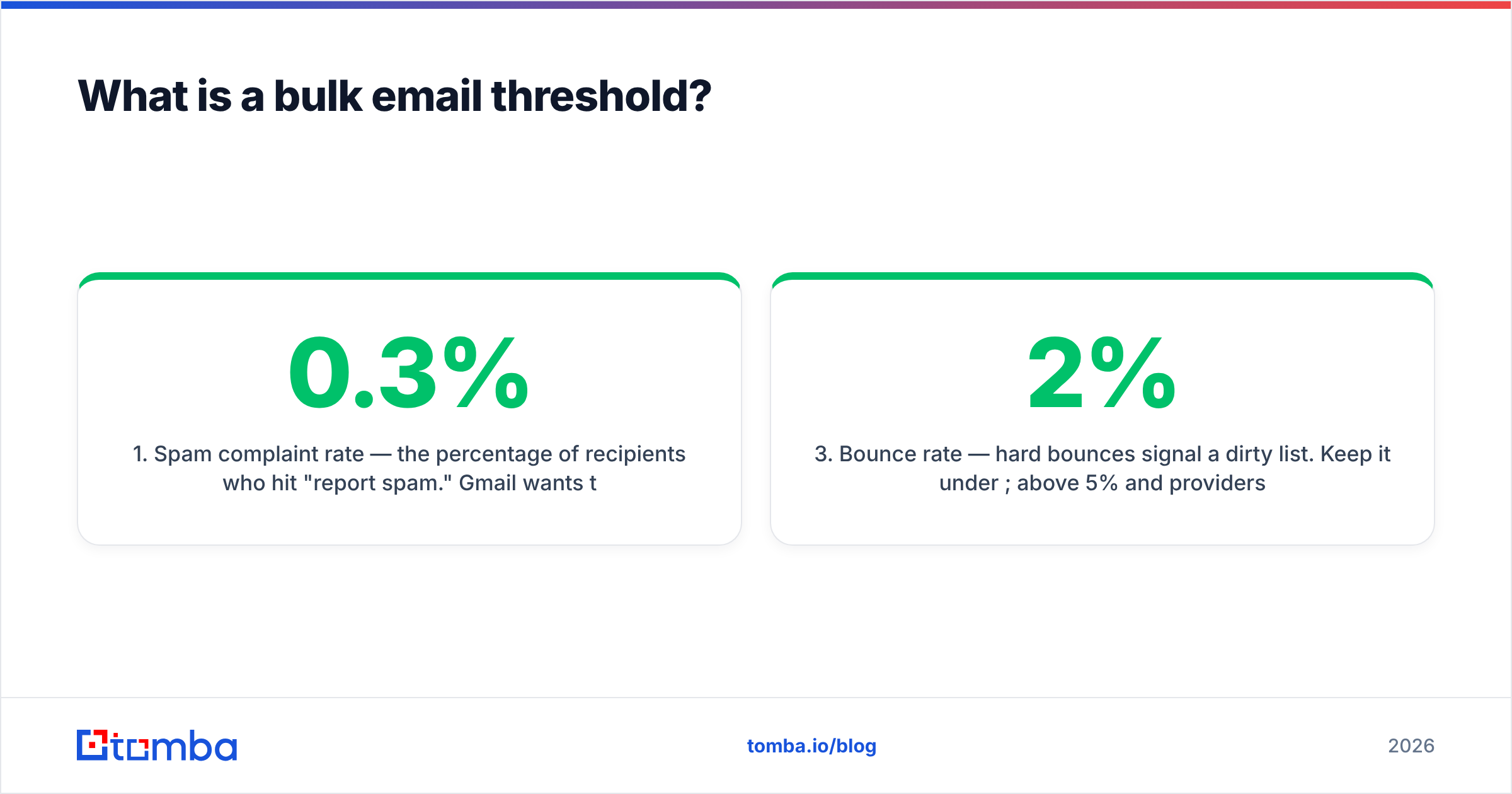
- Spam complaint rate — the percentage of recipients who hit "report spam." Gmail wants this under 0.3%; treat 0.1% as your real ceiling. This is the single fastest way to get filtered.
- Authentication alignment — SPF, DKIM, and a published DMARC policy. Missing or misaligned auth is an automatic fail at bulk volume.
- Bounce rate — hard bounces signal a dirty list. Keep it under 2%; above 5% and providers assume you bought or scraped the list.
- Engagement (opens, replies, deletes-without-reading) — high engagement raises your effective threshold; low engagement lowers it.
- Sending consistency — a domain that sends 200/day for months then suddenly sends 20,000 looks compromised. Volume spikes are themselves a red flag.
- List acquisition pattern — sudden list growth, spam-trap hits, and role addresses (info@, sales@) all drag your reputation down.
Master these six and your usable volume climbs. Ignore them and you will hit an invisible wall well under any published limit. For the underlying mechanics, see Tomba's glossary entry on email deliverability and sender reputation.
What are the bulk email thresholds by provider in 2026?#
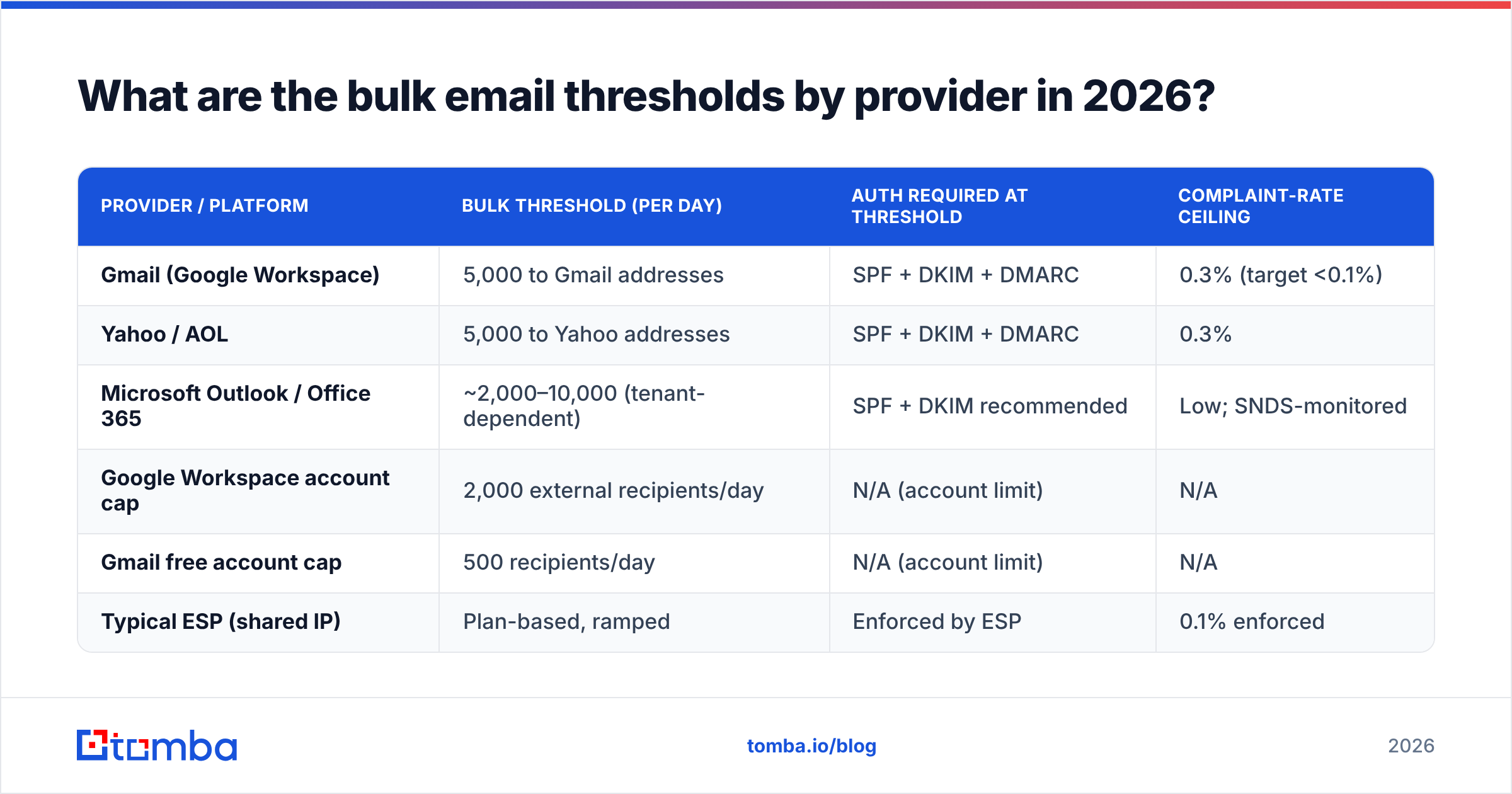
There is no single number, so here is how the major providers and common sending platforms treat volume today. Published limits change, but the shape of the rules has been stable since the 2024 Gmail/Yahoo update.
| Provider / Platform | Bulk threshold (per day) | Auth required at threshold | Complaint-rate ceiling |
|---|---|---|---|
| Gmail (Google Workspace) | 5,000 to Gmail addresses | SPF + DKIM + DMARC | 0.3% (target <0.1%) |
| Yahoo / AOL | 5,000 to Yahoo addresses | SPF + DKIM + DMARC | 0.3% |
| Microsoft Outlook / Office 365 | ~2,000–10,000 (tenant-dependent) | SPF + DKIM recommended | Low; SNDS-monitored |
| Google Workspace account cap | 2,000 external recipients/day | N/A (account limit) | N/A |
| Gmail free account cap | 500 recipients/day | N/A (account limit) | N/A |
| Typical ESP (shared IP) | Plan-based, ramped | Enforced by ESP | 0.1% enforced |
Two different limits are hiding in that table, and people constantly confuse them. The account-level cap (e.g., 2,000 external recipients/day on Workspace) is a hard ceiling on how many messages the mailbox itself will relay. The bulk-sender threshold (5,000/day) is a reputation rule about how providers judge inbound mail. You can be well under your account cap and still get treated as a bulk sender by the receiving side.
The practical takeaway: if you need real outbound volume, you do not raise these limits — you spread load across properly authenticated domains and dedicated infrastructure, and you ramp. For the official source, read Google's bulk sender guidelines and Yahoo's sender requirements directly rather than trusting third-party summaries.
Why does crossing the threshold hurt deliverability?#
Because the threshold flips you from "innocent until proven guilty" to "guilty until authenticated." Below it, providers extend benefit of the doubt. At or above it, every weak signal — an unverified list, a missing DKIM signature, a 4% bounce rate — becomes a reason to filter instead of a reason to watch.
The damage compounds. A bad first bulk send raises complaints and bounces, which lowers your domain reputation, which lowers your effective threshold, which means your next send of the same size performs worse. This is the deliverability death spiral, and it is far easier to avoid than to recover from. Recovery can take weeks of low-volume, high-engagement sending to rebuild trust.
The most common trigger is not content — it is list quality. Stale addresses bounce, recycled addresses become spam traps, and role accounts inflate complaints. That is why list hygiene is the highest-leverage move before any volume increase. Run your list through an email verifier and, for ambiguous domains, a catch-all verifier before the first big send.

How do you stay under (or scale past) the bulk email threshold safely?#
Conclusion first: ramp volume gradually, authenticate fully, verify every list, and watch your complaint rate like a hawk. Volume is earned, not switched on.
Here is the operational playbook teams use to grow from a few hundred sends to tens of thousands without tripping filters:
- Authenticate before anything else. Publish SPF, sign with DKIM, and set a DMARC policy (start at
p=noneto monitor, then move toquarantine). At bulk volume this is non-negotiable. - Warm up the domain and IP. Start at a low daily volume and increase roughly 20–30% per day while engagement stays healthy. A warmup curve protects new domains from looking like a sudden spam cannon. The email warmup calculator gives you a concrete ramp schedule.
- Verify the list every time. Remove hard bounces, role accounts, and spam traps before sending. This single step does more for deliverability than any copy tweak.
- Segment by engagement. Send to your most engaged recipients first. Their opens and replies build reputation that carries the rest of the batch.
- Honor unsubscribes instantly. One-click unsubscribe is required at bulk volume; slow or broken opt-outs convert into spam complaints, which are far more damaging.
- Split volume across subdomains. Use a dedicated sending subdomain (e.g.,
mail.yourdomain.com) so a deliverability problem never poisons your primary domain's reputation. - Monitor, then scale. Watch complaint and bounce rates in Google Postmaster Tools and your ESP. Only increase volume on days where the numbers stay green.
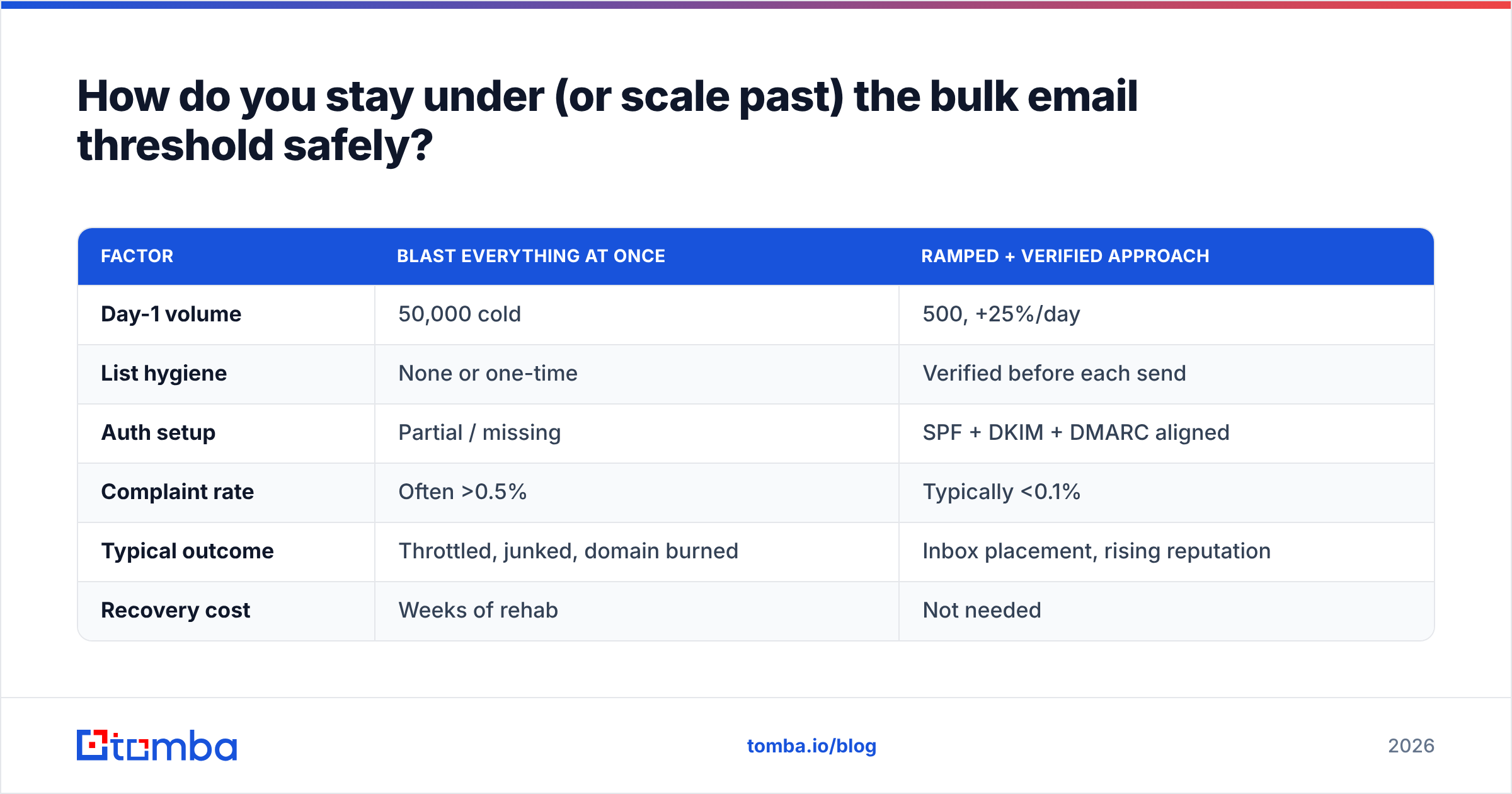
Manual sending vs. ramped, verified sending#
| Factor | Blast everything at once | Ramped + verified approach |
|---|---|---|
| Day-1 volume | 50,000 cold | 500, +25%/day |
| List hygiene | None or one-time | Verified before each send |
| Auth setup | Partial / missing | SPF + DKIM + DMARC aligned |
| Complaint rate | Often >0.5% | Typically <0.1% |
| Typical outcome | Throttled, junked, domain burned | Inbox placement, rising reputation |
| Recovery cost | Weeks of rehab | Not needed |
The second column is slower for exactly one week and faster for every week after. The first column feels productive until the bounce report lands.
How does list quality change your real threshold?#
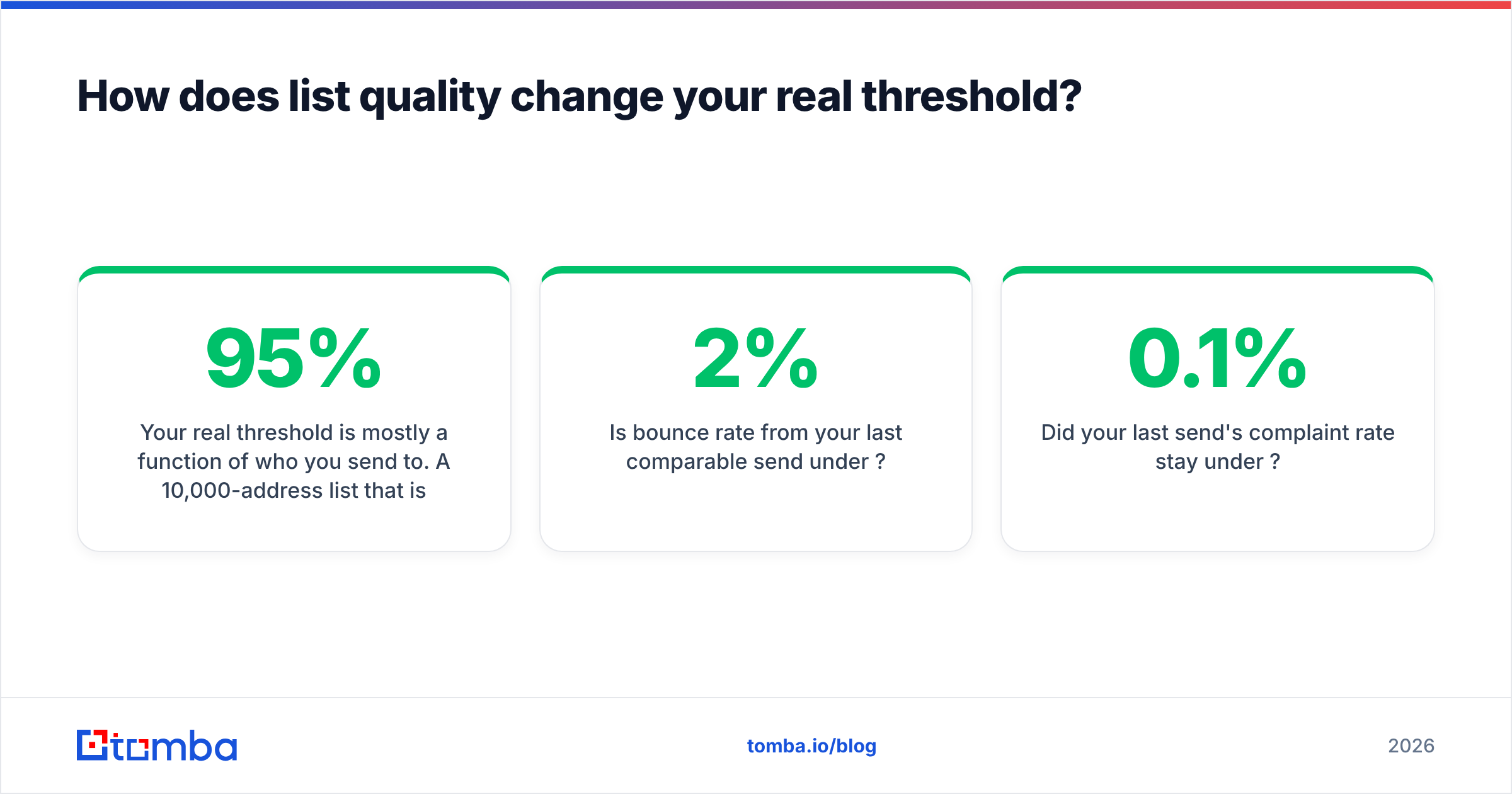
Your real threshold is mostly a function of who you send to. A 10,000-address list that is 95% deliverable and engaged behaves like a smaller, safer send. The same list at 70% deliverable behaves like a spam attack, because the bounces and trap hits tell providers the list was never permission-based.
This is where sourcing matters as much as sending. If you are building outbound lists, pulling verified, current contacts up front means you are not paying for it later in bounces. Tools like the bulk email finder and domain search return addresses with verification status attached, so the list you scale into is clean from the start rather than cleaned in a panic afterward. For the difference between gross volume and usable volume, that pre-send verification is the whole game.
A quick gut check before any send above a few thousand:
- Is every address verified within the last 90 days?
- Are role accounts and known traps removed?
- Is bounce rate from your last comparable send under 2%?
- Did your last send's complaint rate stay under 0.1%?
Four yeses means you can push volume. A single no means fix that first.
Frequently asked questions#
What is the bulk email threshold for Gmail? 5,000 messages per day to Gmail addresses from the same domain. At or above that, you must have SPF, DKIM, and DMARC configured, offer one-click unsubscribe, and keep your spam complaint rate below 0.3%.
Does the threshold count all my email or just one provider? It is measured per receiving provider. Sending 4,000 to Gmail and 4,000 to Yahoo keeps you under each provider's individual line, but your domain reputation is global — so weak sends anywhere still hurt you everywhere.
Can I just use multiple domains to dodge the limit? You can spread legitimate volume across subdomains, and that is good practice. But spinning up throwaway domains purely to evade reputation tracking is detectable and short-lived; providers correlate infrastructure. Earn volume on real, authenticated domains instead.
How long does it take to ramp to high volume? Plan on two to four weeks to reach tens of thousands per day from a cold domain, increasing ~20–30% daily while engagement and complaints stay healthy. Faster ramps work only when reputation is already strong.
Will good content keep me out of spam above the threshold? No. Above the threshold, authentication, complaint rate, and list quality decide placement first. Great copy on an unverified list still lands in junk. Reputation gates content, not the other way around — see HubSpot's email deliverability guidance for the marketing-side view.
The bottom line#
The bulk email threshold is not a wall to fear — it is a checkpoint that rewards senders who do the boring work. Authenticate fully, ramp deliberately, and never send to a list you have not verified. The single highest-leverage habit is verifying contacts before they ever enter a campaign, so bounces and traps never get the chance to drag your reputation under the line.
Start at the source: use the Tomba Email Finder to build outbound lists from verified, current professional addresses, with verification status attached to every result. Pair it with the email verifier before each scaled send, and you cross the bulk email threshold with reputation working for you instead of against you. Check Tomba pricing — the free tier gives you 25 searches a month to test the workflow before you commit.
// get started
Find, verify and enrich your first contacts today
Start on the free plan with 25 searches a month, then scale when your team is ready.
Free plan · No credit card required · GDPR & CCPA
// about the author