Bulk Email Verification Software: Best Tools Compared (2026)
Bouncing emails wreck your sender reputation. Here's how bulk email verification software works, what to look for, and the best tools to clean lists at scale in 2026.

Bulk email verification software checks thousands or millions of email addresses at once, flagging the dead, fake, and risky ones before you send. If you run cold outreach, newsletters, or a CRM full of aging contacts, it is the cheapest insurance you can buy for your sender reputation.
TL;DR#
- What it does: Bulk email verification software validates large lists in one pass — syntax, domain, MX records, and SMTP mailbox checks — so you stop emailing addresses that bounce.
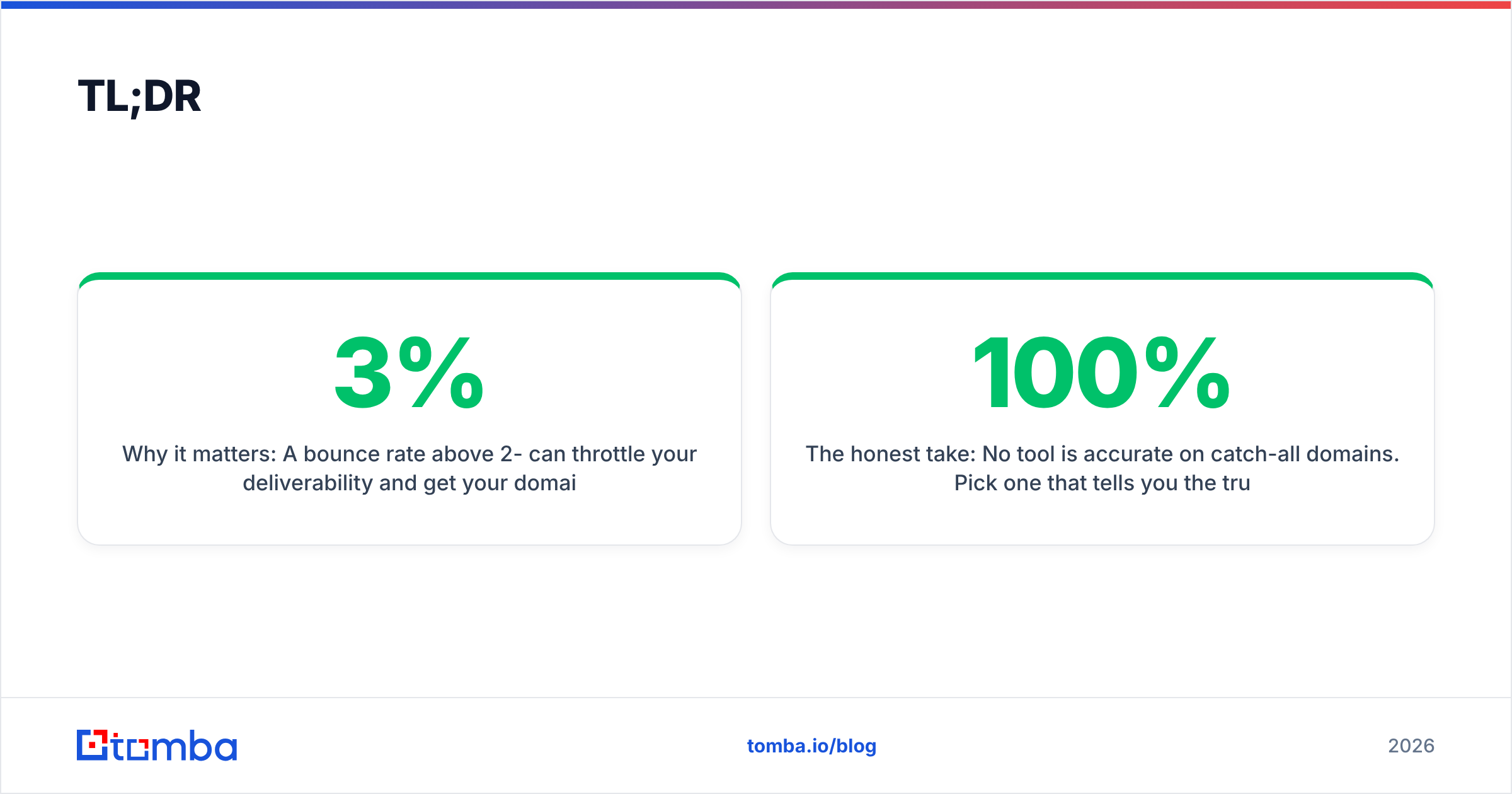
- Why it matters: A bounce rate above 2-3% can throttle your deliverability and get your domain flagged. Verification keeps bounces under 1%.
- What to compare: Accuracy, catch-all handling, speed, price per email, integrations, and data privacy.
- Best picks in 2026: Tomba, ZeroBounce, NeverBounce, and Bouncer each fit different budgets and workflows.
- The honest take: No tool is 100% accurate on catch-all domains. Pick one that tells you the truth instead of guessing.
What is bulk email verification software?#
Think of bulk email verification like a bouncer at a club checking IDs at the door — except it checks a whole line at once instead of one person at a time. Each address gets inspected against several rules, and only the valid ones get through to your sending tool.
Technically, bulk verification runs every address in an uploaded list (CSV, Excel, or an API stream) through a layered pipeline:
- Syntax check — Is the address formatted correctly?
john@@acmefails here. - Domain and MX check — Does the domain exist and have mail servers that can receive email?
- SMTP handshake — The verifier opens a conversation with the recipient's mail server and asks whether the mailbox exists, without actually sending anything.
- Catch-all detection — Some domains accept every address whether the mailbox is real or not. Good software labels these as "accept-all" rather than pretending they are valid.
- Risk scoring — Disposable domains, role accounts (
info@,sales@), and known spam traps get flagged.
The output is a clean list segmented into valid, invalid, catch-all, and unknown. You send to the safe segments and quarantine the rest.

Why does bulk email verification matter in 2026?#
Because mailbox providers are stricter than ever. Google and Yahoo both tightened bulk-sender requirements, and a high bounce rate is one of the fastest ways to tank your sender reputation. Once that reputation drops, even your valid emails start landing in spam.
Here is the chain reaction you are trying to avoid:
- Bad addresses bounce → mailbox providers see you sending to dead mailboxes.
- Bounce rate climbs above 2-3% → providers assume you bought or scraped a list.
- Spam folder placement rises → open and reply rates collapse.
- Domain gets blacklisted → you start over with a new domain and warmup.
Verification breaks that chain at step one. If you want the broader picture of how list hygiene ties into inbox placement, our guide to email deliverability connects the dots. For a quick single-address gut check, the free email verifier is a good place to start before you commit a whole list.
How does bulk verification work step by step?#
A typical bulk run looks like this:
- Upload your list — most tools accept CSV/XLSX or pull directly from a CRM, Google Sheets, or an API.
- Deduplicate — quality tools strip exact duplicates so you do not pay to verify the same address twice. You can also pre-clean with a remove duplicates utility.
- Process — the engine runs the syntax → domain → SMTP → catch-all pipeline across all rows, usually in parallel.
- Segment — results come back tagged: deliverable, undeliverable, accept-all, unknown, disposable, role.
- Export — download the cleaned segments, or push them back into your sending platform automatically.
The whole thing is asynchronous for big lists. You upload 100,000 rows, the job processes in the background, and you get a notification when the report is ready.
What should you look for in bulk email verification software?#
Not all verifiers are equal. Use these six criteria to separate the serious tools from the ones that just rubber-stamp your list:
- Accuracy and bounce guarantee — Look for a stated accuracy figure (most claim 97-99%) and a bounce guarantee you can actually test on a known sample.
- Catch-all handling — The honest tools label accept-all domains instead of marking them valid. A catch-all verifier that adds deeper signal here is worth the premium.
- Speed at scale — Verifying a million rows should take hours, not days. Parallel SMTP workers matter.
- Price per email — Compare cost per 1,000 verifications, not just the headline plan price. Credits should roll over or at least not expire monthly on you.
- Integrations and API — A real email verification API, plus native connections to your stack, beats manual CSV shuffling.
- Privacy and compliance — Your list is sensitive data. Check for GDPR alignment and that the vendor does not resell or retain your contacts.
A tool that nails accuracy but takes three days on a large list will quietly kill your campaign timing. Weight speed and price as heavily as the accuracy number on the marketing page.
Which bulk email verification software is best in 2026?#
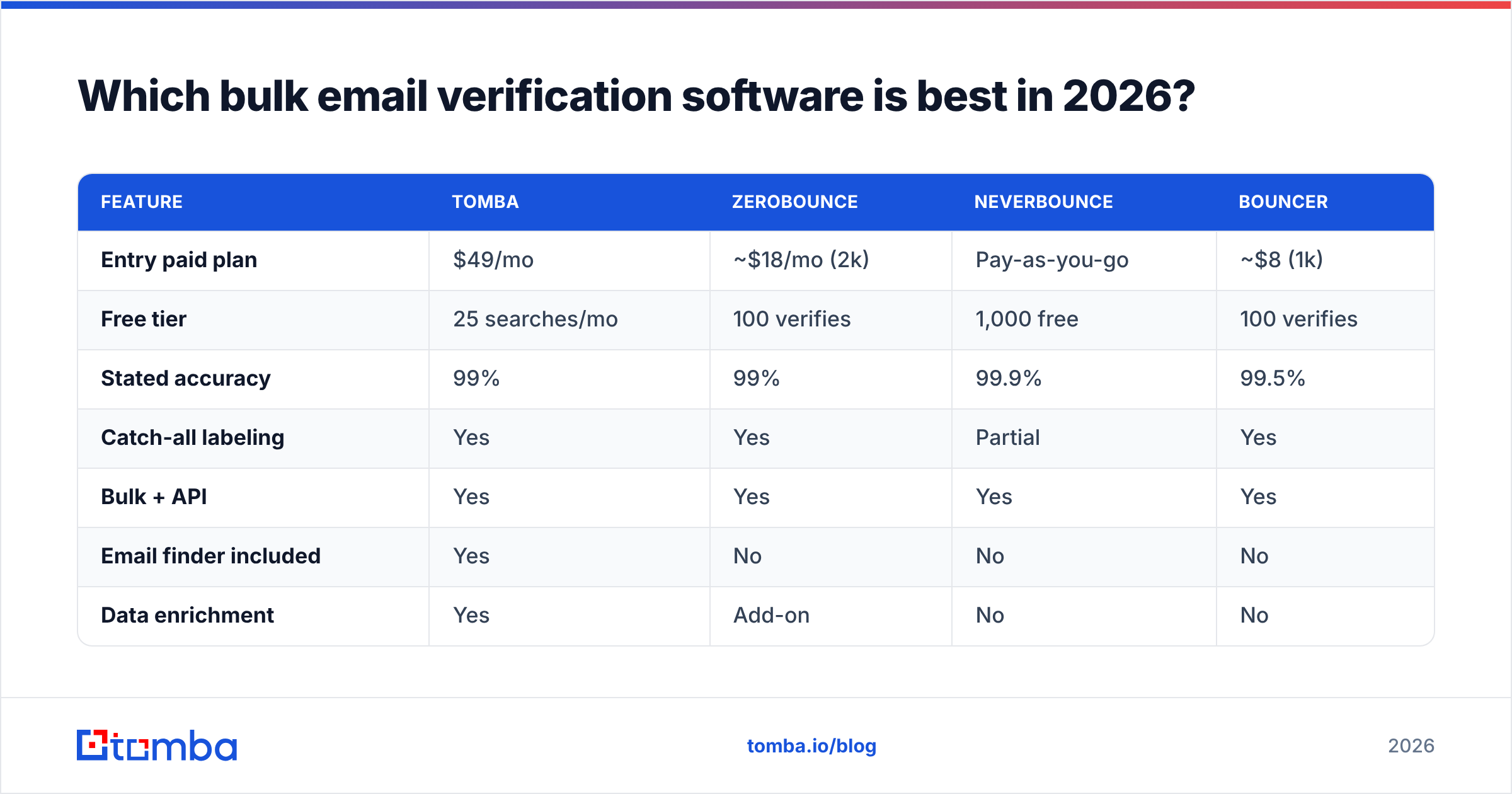
Here is a side-by-side comparison of four widely used options, focused on the attributes that actually change your results.
| Feature | Tomba | ZeroBounce | NeverBounce | Bouncer |
|---|---|---|---|---|
| Entry paid plan | $49/mo | ~$18/mo (2k) | Pay-as-you-go | ~$8 (1k) |
| Free tier | 25 searches/mo | 100 verifies | 1,000 free | 100 verifies |
| Stated accuracy | 99% | 99% | 99.9% | 99.5% |
| Catch-all labeling | Yes | Yes | Partial | Yes |
| Bulk + API | Yes | Yes | Yes | Yes |
| Email finder included | Yes | No | No | No |
| Data enrichment | Yes | Add-on | No | No |
The standout difference: most verifiers only verify. Tomba bundles bulk verification with an email finder, domain search, and data enrichment, so the same platform that cleans your list can also build it. If your workflow is "find leads, then verify them," consolidating both jobs saves a tool and a data hop. If you only ever clean lists someone else hands you, a verify-only tool like Bouncer or ZeroBounce is perfectly reasonable.
For a deeper feature-by-feature look at the verify-only crowd, the ZeroBounce alternative and Bouncer alternative breakdowns go further than this table.

How accurate is bulk email verification, really?#
Conclusion first: very accurate on standard mailboxes, genuinely uncertain on catch-all domains — and any vendor claiming otherwise is overselling.
On a normal mailbox at Gmail, Outlook, or a company using a standard mail server, SMTP verification is reliable. The recipient server tells the truth about whether the mailbox exists, and good software reads that answer correctly 97-99% of the time.
Catch-all (accept-all) domains are the hard part. These servers accept every address at the SMTP layer, so there is no clean signal for whether jane@catchall.com is real. Honest tools mark these "accept-all" and let you decide. Some platforms add secondary signals — historical send data, pattern matching, enrichment cross-reference — to raise confidence, which is where a dedicated catch-all finder earns its keep. According to independent reviews on G2, the gap between vendors is widest exactly on these catch-all and risky-domain edge cases, not on the easy mailboxes.
The practical rule: treat valid as send-now, invalid as never-send, and catch-all as a smaller, slower, more careful sending segment. Do not lump catch-all in with valid just to inflate your usable count.
How much does bulk email verification cost?#
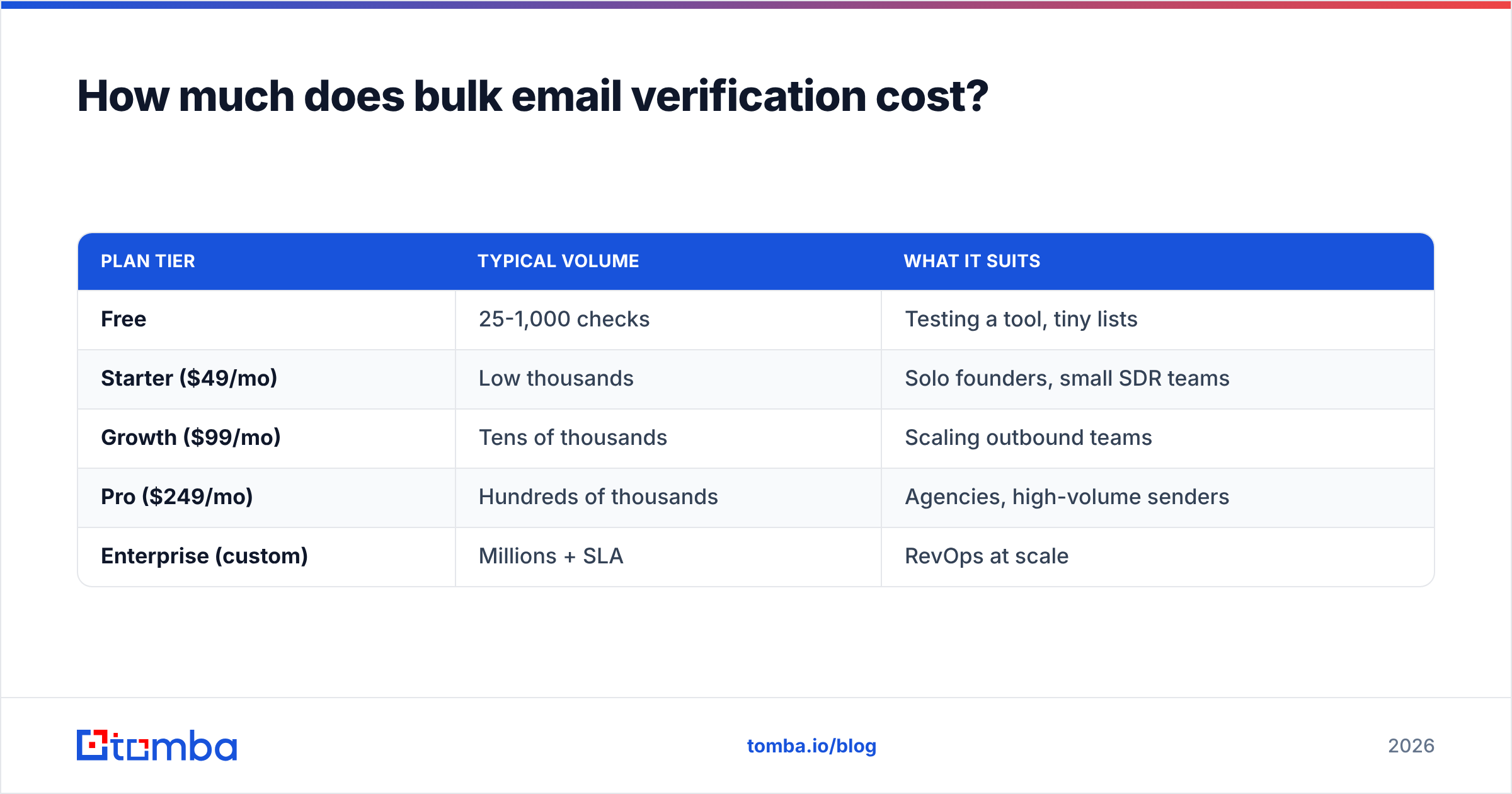
Pricing almost always scales by volume, and the per-email cost drops as you buy more. Watch for three traps: credits that expire monthly, separate charges for re-verifying the same address, and "accuracy guarantees" that exclude catch-all results.
| Plan tier | Typical volume | What it suits |
|---|---|---|
| Free | 25-1,000 checks | Testing a tool, tiny lists |
| Starter ($49/mo) | Low thousands | Solo founders, small SDR teams |
| Growth ($99/mo) | Tens of thousands | Scaling outbound teams |
| Pro ($249/mo) | Hundreds of thousands | Agencies, high-volume senders |
| Enterprise (custom) | Millions + SLA | RevOps at scale |
Those tiers reflect Tomba's structure; see the full Tomba pricing page for exact credit counts. The lesson across all vendors is the same: estimate your real monthly verification volume, then compare cost per 1,000 — not the sticker price. A cheaper headline plan with expiring credits often costs more than a slightly pricier plan that lets credits roll over.
When should you run bulk verification in your workflow?#
Run it at three moments:
- Before any cold campaign — Verify the entire list right before you load it into your sending tool. Lists decay; an address verified six months ago may be dead now.
- On import to your CRM — Clean contacts as they enter so your CRM does not fill with junk. Many teams wire this through the HubSpot integration or Salesforce integration.
- On a recurring schedule — Re-verify your active database quarterly. B2B email churns 20-30% a year as people change jobs.
If you generate leads in batches, pair verification with a bulk email finder so finding and cleaning happen in one motion instead of two disconnected exports.
Bulk verification vs single verification: which do you need?#
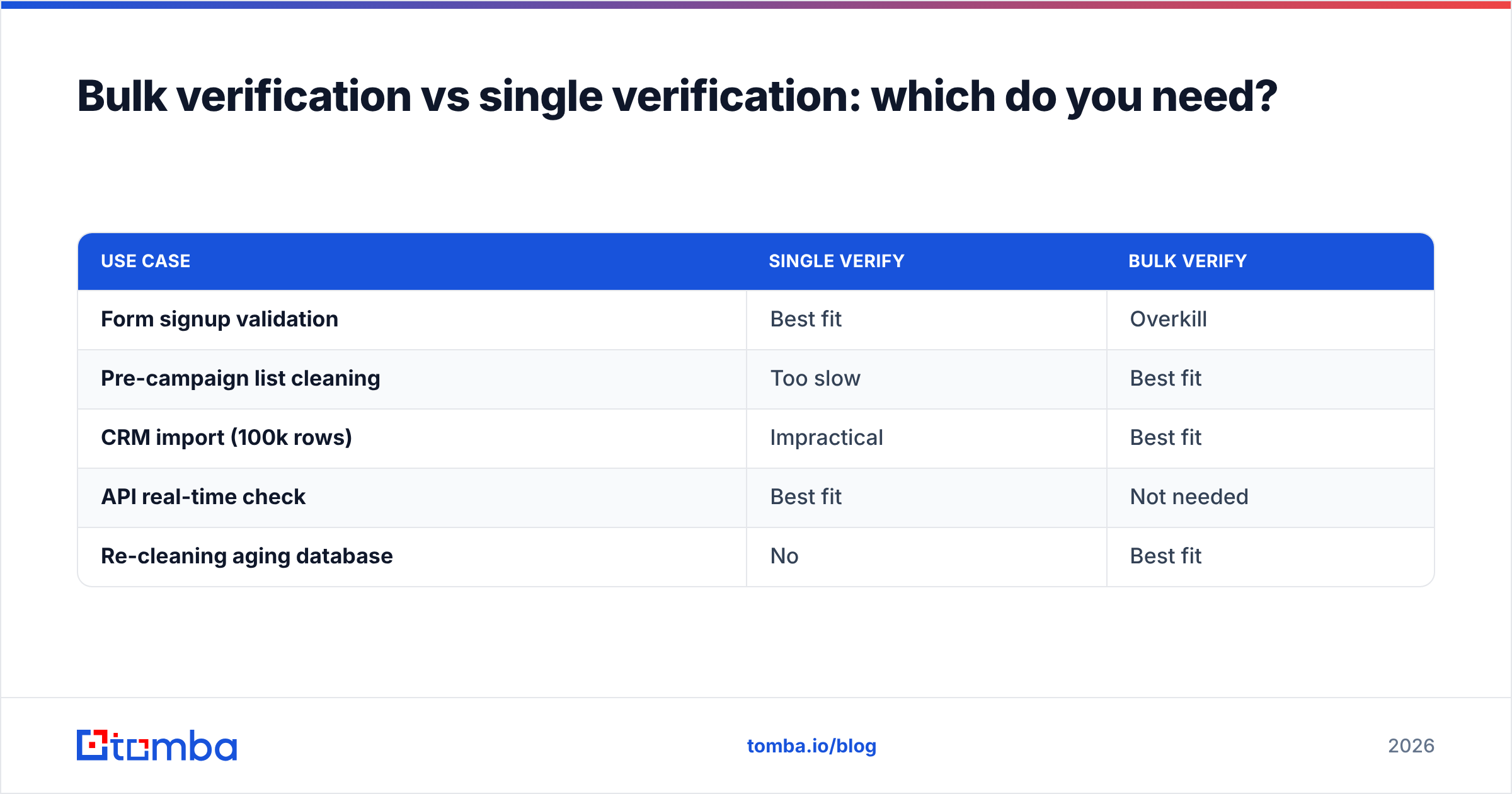
Both, at different moments. Single verification is the real-time check you run on one address — say, when a lead fills out a form. Bulk verification is the batch job you run on a list.
| Use case | Single verify | Bulk verify |
|---|---|---|
| Form signup validation | Best fit | Overkill |
| Pre-campaign list cleaning | Too slow | Best fit |
| CRM import (100k rows) | Impractical | Best fit |
| API real-time check | Best fit | Not needed |
| Re-cleaning aging database | No | Best fit |
A mature platform offers both through the same email verification API, so you can validate one address at signup and a million at quarter-end without switching vendors.
Common mistakes that waste your verification budget#
- Verifying then waiting weeks to send. A clean list goes stale fast. Send within days of verifying.
- Treating catch-all as valid. This is the single most common way "verified" lists still bounce. Segment them separately.
- Skipping deduplication. You pay per address — strip duplicates first.
- Ignoring role accounts.
info@andsupport@rarely convert and often trigger complaints. Flag and downweight them. - Buying lists and verifying them. Verification proves an address can receive mail, not that the person wants yours. Clean ≠ permission-based.
The bottom line#
Bulk email verification software is not optional in 2026 — it is the price of getting into the inbox at all. Pick a tool that is honest about catch-all domains, fast at scale, and priced on cost per 1,000 rather than a flashy plan name. If your workflow involves both building and cleaning lists, a single platform that does both will save you money and a brittle export-import dance.
Ready to clean a list and stop the bounces? Start with the Tomba Email Finder and its built-in verifier — find verified, deliverable B2B addresses by domain, name, or company, validate them in bulk through the same dashboard or API, and keep your sender reputation intact. The free tier lets you test the accuracy on your own list before you spend a credit. Your future deliverability will thank you.
// get started
Find, verify and enrich your first contacts today
Start on the free plan with 25 searches a month, then scale when your team is ready.
Free plan · No credit card required · GDPR & CCPA
// about the author