Bulk Email Verifier Online Free: Top Tools Tested in 2026
Looking for a bulk email verifier online free? We tested how far free tiers actually go, where they stall, and how to clean a list without nuking deliverability.
Bulk Email Verifier Online Free: What Actually Works in 2026
Uploading a list of 5,000 contacts and hitting send without checking them first is the email equivalent of mailing 5,000 letters with no return address. You won't know what bounced until your sender reputation is already bleeding. A bulk email verifier online free is the cheapest insurance you can buy against that — but "free" hides a lot of fine print.
This guide tests what free bulk verification actually delivers in 2026: how many addresses you can clean without paying, where accuracy holds up, and when a free tier quietly becomes the most expensive option you've ever used.
TL;DR#
- Free bulk email verifiers exist and work — most give you 25–100 free verifications per month, enough to clean a small list or sample a big one.
- Accuracy matters more than volume. A verifier that says "valid" on a dead inbox is worse than no verifier at all, because it gives you false confidence.
- Catch-all domains are the hard part. Most free tools mark them "unknown" and leave you guessing; a few handle them properly.
- Free tiers are for sampling, not production. Cleaning 50,000 addresses on a free plan means stitching together accounts — slower and riskier than one paid pass.
- Tomba's free tier gives you 25 verifications/month plus a free email checker tool with no signup for quick one-off checks.
What Is a Bulk Email Verifier?#
A bulk email verifier is a tool that takes a list of email addresses — usually a CSV — and checks each one for deliverability before you ever send a campaign. Think of it like a bouncer at the door of your email list: it turns away the fake IDs (invalid syntax), the people who left months ago (dead inboxes), and the troublemakers (spam traps) so your real guests get in.
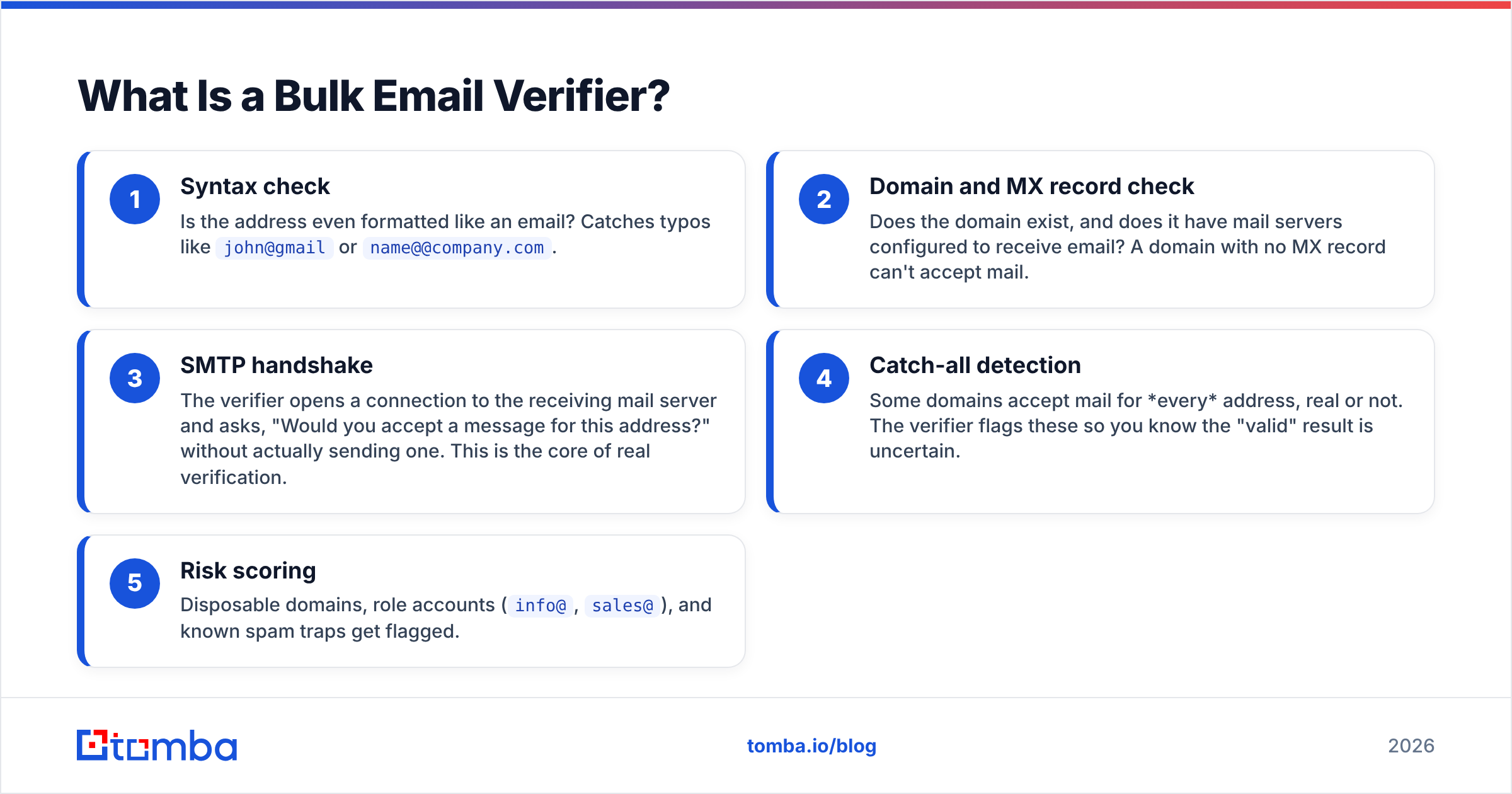
Under the hood, a good verifier runs each address through several checks in sequence:
- Syntax check — Is the address even formatted like an email? Catches typos like
john@gmailorname@@company.com. - Domain and MX record check — Does the domain exist, and does it have mail servers configured to receive email? A domain with no MX record can't accept mail.
- SMTP handshake — The verifier opens a connection to the receiving mail server and asks, "Would you accept a message for this address?" without actually sending one. This is the core of real verification.
- Catch-all detection — Some domains accept mail for every address, real or not. The verifier flags these so you know the "valid" result is uncertain.
- Risk scoring — Disposable domains, role accounts (
info@,sales@), and known spam traps get flagged.
The output is a status for each address: valid, invalid, catch-all/accept-all, or unknown. You keep the valid ones and quarantine the rest. If you want a deeper primer on the underlying concepts, Tomba's email verifier page breaks down each status in plain language.

Why Does Bulk Verification Matter So Much?#
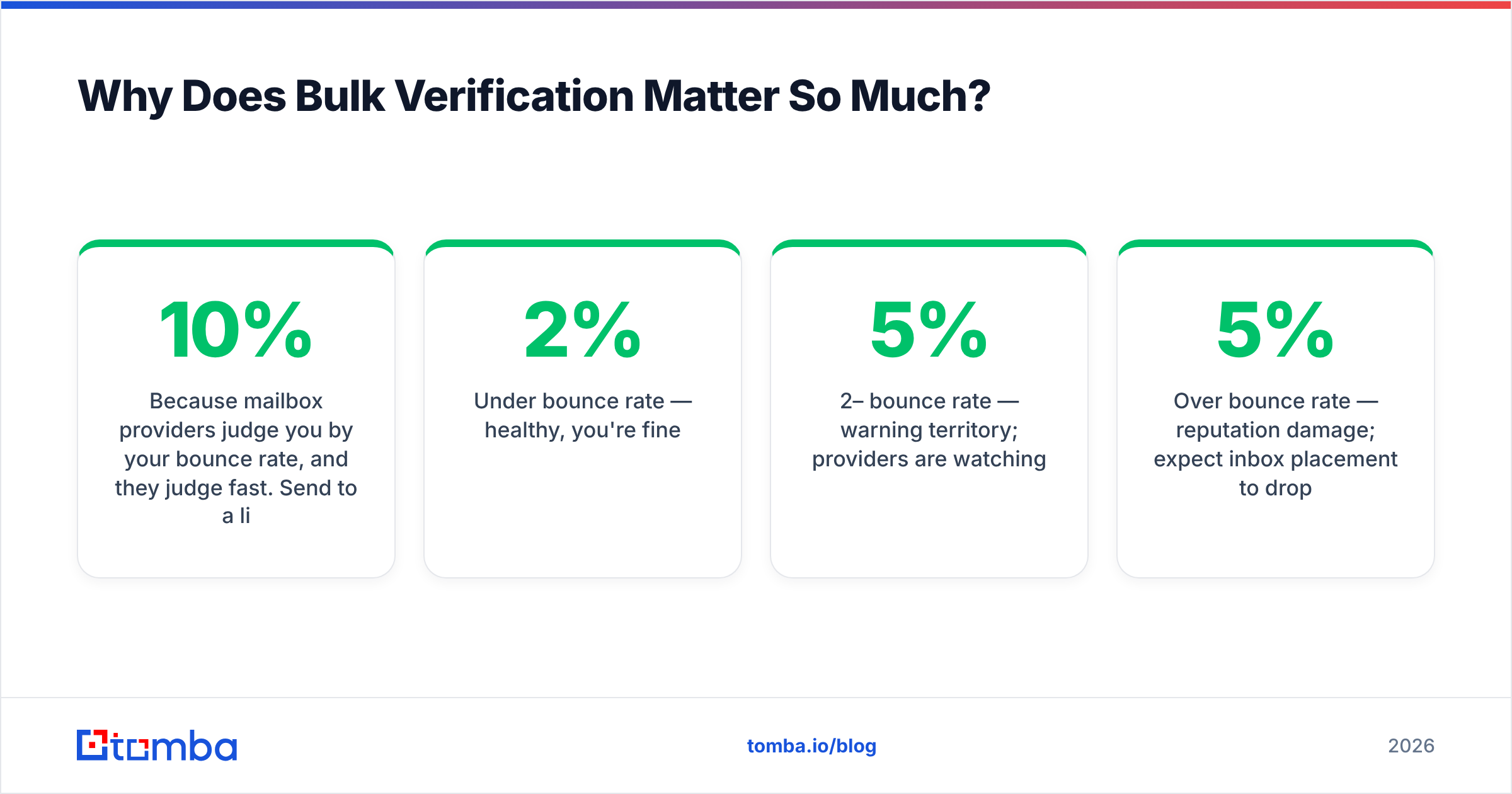
Because mailbox providers judge you by your bounce rate, and they judge fast. Send to a list with a 10% bounce rate and Gmail, Outlook, and Yahoo will start routing your mail to spam — for everyone on your list, not just the dead addresses.
The accepted danger zone is roughly:
- Under 2% bounce rate — healthy, you're fine.
- 2–5% bounce rate — warning territory; providers are watching.
- Over 5% bounce rate — reputation damage; expect inbox placement to drop.
A clean list also saves money on every email service provider that charges by contact count or send volume. You're paying to store and mail addresses that will never open anything. Verification is one of the highest-leverage things you can do for email deliverability — it costs cents and protects an asset (your sending domain) that takes months to rebuild once damaged.
Can a Bulk Email Verifier Online Free Really Clean a Whole List?#
Short answer: it can clean a small list completely, or sample a large one — but no free tier will clean a 50,000-row database in one pass without you paying somewhere.
Free verification is metered by credits. Here's the realistic math. If a tool gives you 100 free verifications a month and your list is 8,000 contacts, the free tier verifies 1.25% of it. That's useful as a quality probe — verify a random sample, and if 30% come back invalid, you know the whole list is rotten — but it won't get you to "send-ready."
Where free tiers genuinely shine:
- Small B2B lists (under a few hundred contacts) where the monthly free credits cover the whole file.
- Sampling a large purchased or scraped list before deciding whether it's worth a paid clean.
- Ongoing trickle verification — checking the handful of new signups or leads you collect each week.
Where they fail you:
- One-time bulk cleans of big lists. Splitting 40,000 addresses across free accounts is a slow, against-the-terms hack.
- Catch-all heavy lists. Free tools usually punt on catch-all domains, leaving a large "unknown" bucket you still can't send to confidently.
How Do the Free Bulk Email Verifiers Compare in 2026?#
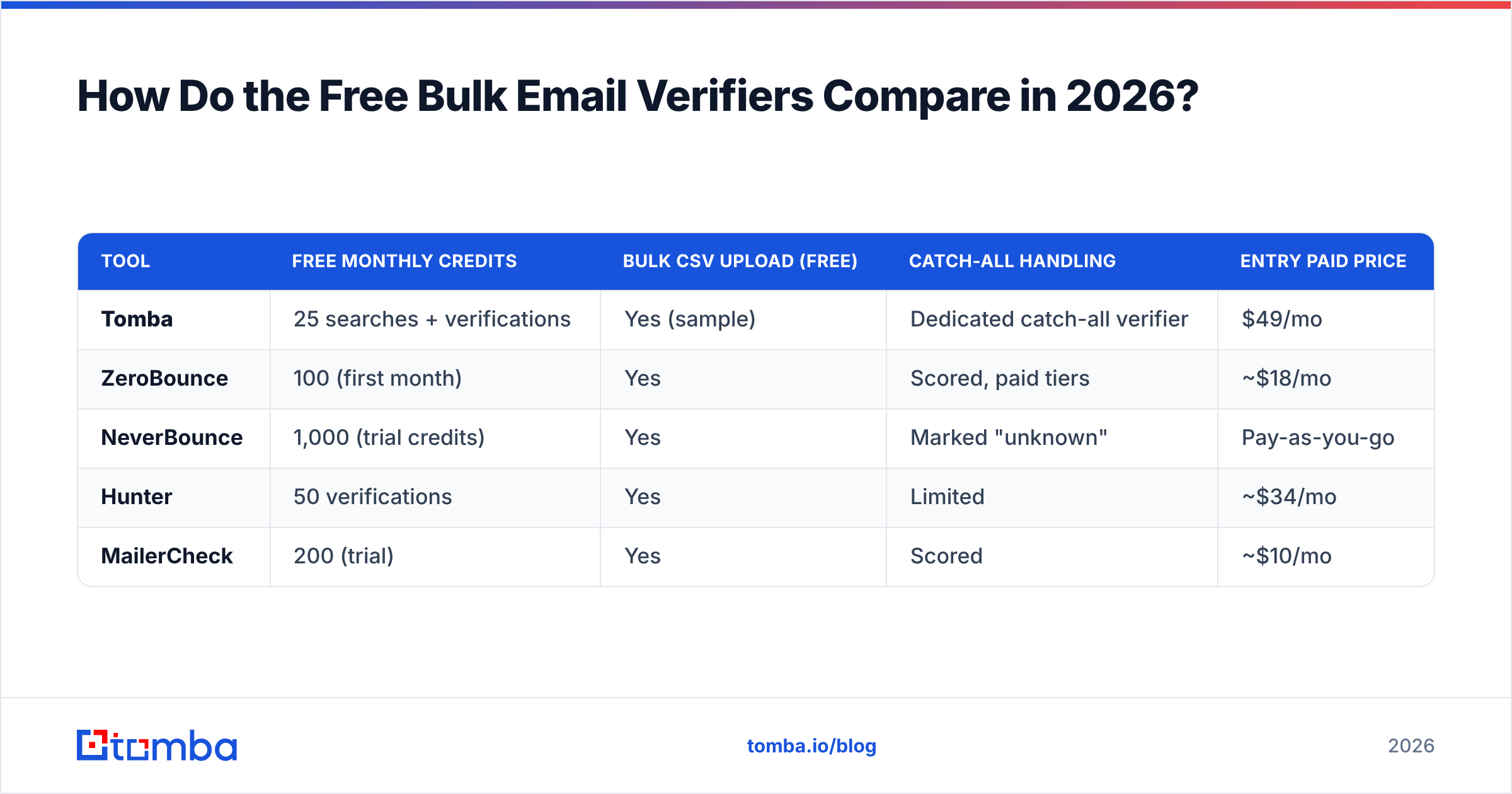
Here's how the most common options stack up on the things that actually matter: free volume, whether bulk upload is allowed on the free tier, catch-all handling, and what you pay when you outgrow free.
| Tool | Free monthly credits | Bulk CSV upload (free) | Catch-all handling | Entry paid price |
|---|---|---|---|---|
| Tomba | 25 searches + verifications | Yes (sample) | Dedicated catch-all verifier | $49/mo |
| ZeroBounce | 100 (first month) | Yes | Scored, paid tiers | ~$18/mo |
| NeverBounce | 1,000 (trial credits) | Yes | Marked "unknown" | Pay-as-you-go |
| Hunter | 50 verifications | Yes | Limited | ~$34/mo |
| MailerCheck | 200 (trial) | Yes | Scored | ~$10/mo |
A few honest caveats on that table. "Free monthly credits" is a moving target — vendors change trial sizes constantly, so treat these as ballpark, not contract. The bigger differentiator is catch-all handling: a tool that simply labels every catch-all domain "unknown" is offloading the hard work back onto you. Tomba runs a dedicated catch-all verifier that probes these domains rather than shrugging at them, which is the difference between a 5% unknown bucket and a 25% one.
Also note the price column. Tomba's pricing starts at $49/mo on the Starter plan, with Growth at $99/mo and Pro at $249/mo — but that buys the full suite (finder, verifier, domain search, enrichment), not verification alone. If you only ever need to verify, a single-purpose tool may be cheaper; if you also need to find the emails in the first place, bundling wins.
What Should You Look For in a Free Email Verifier?#
Don't pick on free volume alone. A generous free tier attached to an inaccurate engine just lets you clean more addresses wrong. Weigh these instead:
- Accuracy and the "unknown" rate. The real quality signal is how few addresses a tool dumps into "unknown" or "risky." Lower is better — it means the engine actually resolved the hard cases instead of giving up.
- Catch-all detection. Non-negotiable for B2B, where a huge share of corporate domains are catch-all. You want a tool that distinguishes a real mailbox on a catch-all domain from a guess.
- Speed and batch size. Some free tiers throttle bulk jobs to a trickle. Check the per-batch row limit, not just the monthly total.
- Export and integration. Can you get a clean CSV back, or push verified contacts into your CRM? Tomba connects to HubSpot, Pipedrive, and Salesforce so verified leads land where you work.
- No-signup quick checks. For one-off verification, a free email checker tool that needs no account beats burning bulk credits.

How Do You Verify a Bulk List Step by Step?#
The mechanics are simple; the discipline is in the order you do things.
- Deduplicate first. Run your CSV through a remove-duplicates tool before verifying. Verifying the same address three times wastes three credits.
- Strip obvious junk. Pull out blank rows, role accounts you don't want (
noreply@,abuse@), and malformed entries. Free credits are precious — don't spend them on garbage you'd delete anyway. - Sample before you commit. If the list is large and you're unsure of its quality, verify a random 100-row sample first. A high invalid rate tells you whether the full clean is even worth it.
- Run the bulk job. Upload the cleaned CSV to your verifier. For larger lists, Tomba's bulk verification handles the queue and returns a status per row.
- Segment by status. Keep "valid." Discard "invalid." Treat "catch-all" as a separate, lower-priority segment — send to it cautiously and watch engagement. Quarantine "unknown" for a later re-check.
- Re-verify on a schedule. B2B email decays at roughly 22–30% per year as people change jobs. A list verified in January is measurably worse by June. Re-run quarterly.
Are Free Verifiers Accurate Enough to Trust?#
For the easy cases, yes. For the hard cases, it depends entirely on the engine — and the hard cases are where money is lost.
Syntax and MX-record checks are deterministic: every competent verifier, free or paid, gets these right because they're just lookups. The divergence starts at the SMTP layer. Some mail servers deliberately accept every connection to hide which mailboxes exist (a privacy feature), which is exactly why catch-all detection is so hard. A weak verifier marks those "valid" and you bounce; a strong one flags the uncertainty.
This is why the "valid" label from two different tools is not equally trustworthy. The number to scrutinize is the false-positive rate — addresses marked valid that actually bounce. Independent reviews on G2 and vendor-published benchmarks are the closest thing to neutral data, though every vendor naturally tests on lists that flatter their own engine. When you can, run your own sample through two tools and compare against a real send to a known-good segment.
One concrete tip: the underlying SMTP protocol that powers every verification handshake is well documented — Wikipedia's SMTP entry is a solid primer if you want to understand why some servers behave the way they do. Understanding the protocol makes the "unknown" results far less mysterious.
Free vs. Paid: When Do You Cross the Line?#
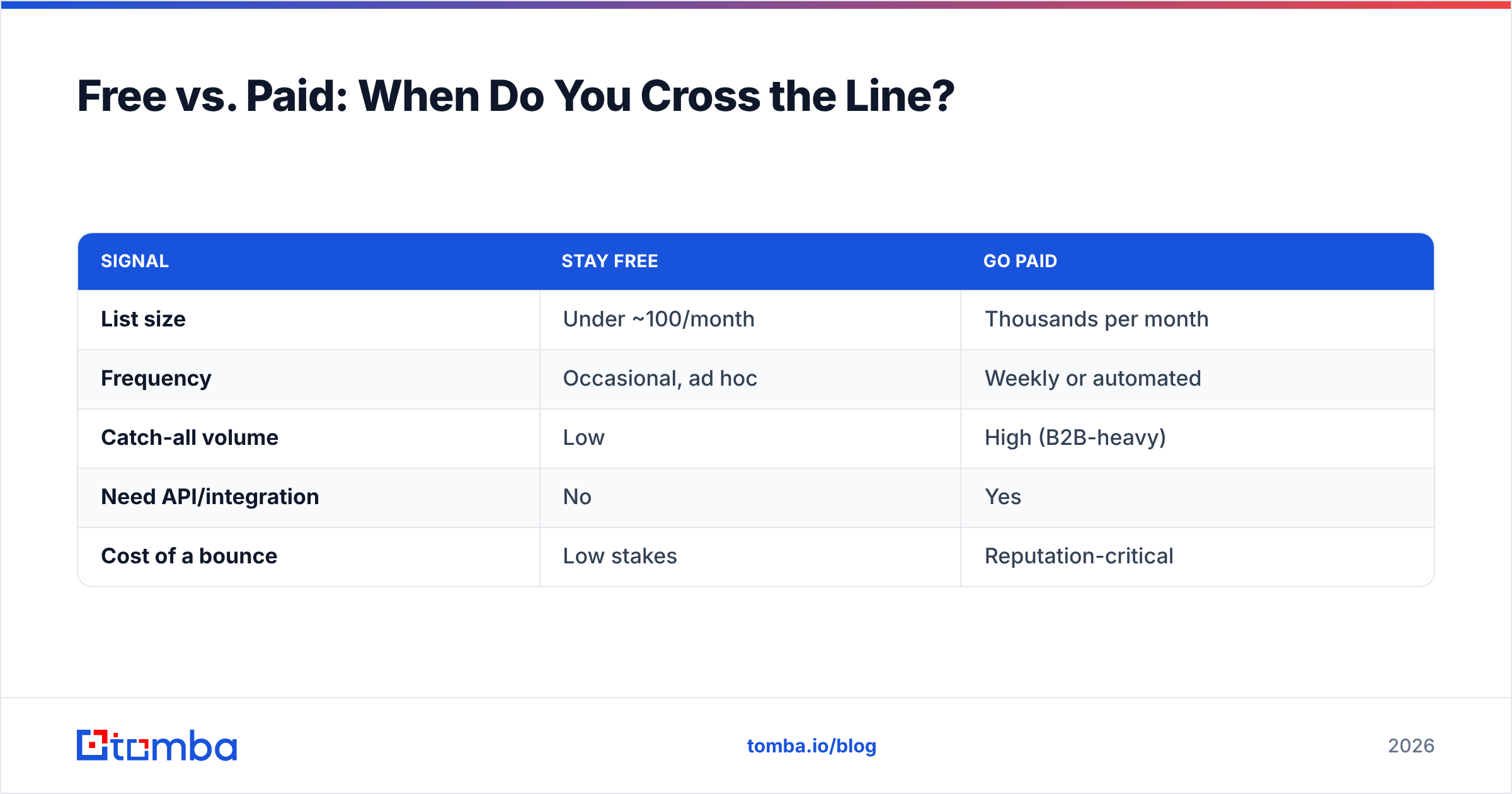
You graduate from free to paid the moment verification becomes a recurring operational need rather than a one-off chore. Concretely:
| Signal | Stay free | Go paid |
|---|---|---|
| List size | Under ~100/month | Thousands per month |
| Frequency | Occasional, ad hoc | Weekly or automated |
| Catch-all volume | Low | High (B2B-heavy) |
| Need API/integration | No | Yes |
| Cost of a bounce | Low stakes | Reputation-critical |
The tell is the API. The moment you want verification to happen automatically — every new CRM contact verified on entry, every form submission checked in real time — you need an email verification API, and that's a paid capability everywhere. Free tiers are designed for humans uploading CSVs by hand, not for systems calling them thousands of times a day.
There's also a hidden cost to staying free too long. Stitching together multiple free accounts to clean one big list violates most terms of service, fragments your results across logins, and usually takes longer than a single paid pass would. If you're spending an afternoon gaming free limits, you've already spent more than a month of Starter access is worth. Compare that against the Tomba pricing tiers and the math often favors paying once.
What's the Best Workflow for a Small Team on a Budget?#
If you're a founder or a two-person sales team, here's a practical, mostly-free stack that scales gracefully:
- Find emails with a metered email finder — start on the free tier and verify as you go, so addresses are clean the moment they enter your pipeline.
- Quick one-offs through a no-signup email checker — don't burn bulk credits to check a single address before an important outreach.
- Periodic list hygiene via bulk verification on a sample-first basis, upgrading to paid only when your list outgrows the free monthly allowance.
- Catch-all domains routed through a dedicated catch-all check rather than guessed at.
This keeps you on free tiers for as long as your volume genuinely allows, and gives you a clean upgrade path — same tool, same data, just more credits — when you outgrow them. No re-platforming, no re-learning a new dashboard.
Frequently Asked Questions#
Is a bulk email verifier online free actually safe to use? Yes, reputable verifiers don't send mail to your contacts during verification — they use a silent SMTP handshake. The risk isn't to your contacts; it's trusting an inaccurate "valid" result and bouncing anyway. Stick to known vendors.
How many emails can I verify for free? Typically 25–100 per month on permanent free tiers, or a few hundred to a thousand on one-time trials. Tomba's free tier includes 25 searches and verifications per month, renewing monthly.
Will verification guarantee zero bounces? No tool guarantees zero bounces — inboxes can fill up or get deactivated between verification and send. But good verification reliably pulls bounce rates under the 2% safe threshold, which is what mailbox providers care about.
Should I verify a purchased email list? Verify it, yes, but understand that verification checks deliverability, not consent. A verified address you have no permission to email is still a compliance and reputation risk. Verification is hygiene, not a substitute for opt-in.
The Bottom Line#
A bulk email verifier online free is the right starting point for nearly everyone — it's enough to sample a list, clean a small one, and learn whether your data is worth a deeper investment. The trap is treating "free" as a permanent home for production-scale verification. The moment you're gaming credit limits or copying CSVs between accounts, free has become the slow, expensive option.
If you want one tool that finds, verifies, and enriches contacts so they're clean the moment they enter your pipeline, start with the Tomba Email Finder. The free tier lets you test the accuracy on your own data before you spend a dollar — and when you scale, the same engine and the same dashboard scale with you, no migration required.
// get started
Find, verify and enrich your first contacts today
Start on the free plan with 25 searches a month, then scale when your team is ready.
Free plan · No credit card required · GDPR & CCPA
// about the author