Business Email Address Search: Best 2026 Tools Compared
A practical 2026 guide to business email address search — how the methods work, what accuracy to expect, and which tools beat manual guessing on cost and quality.
TL;DR
- A business email address search turns a name and a company into a verified work inbox — without manually trying twenty
first.last@permutations. - The three methods that actually work in 2026 are domain search, name-plus-company lookup, and bulk enrichment from a CSV.
- Accuracy is the whole game. A "found" email that bounces costs you more than no email at all, because bounces wreck sender reputation.
- Free guess-and-check tools top out around 60-70% accuracy; dedicated finders with SMTP and catch-all checks push past 95%.
- Tomba's Free tier (25 searches/mo) and Starter at $49/mo let you test real accuracy before committing budget.
What is a business email address search?#
A business email address search is the process of finding a person's professional email — jane@acme.com, not jane.doe1987@gmail.com — using signals you already have: their name, their employer, or the company domain. Think of it like a phone book that was never printed. The data exists scattered across the public web, company sites, and verification servers; a finder tool stitches those fragments into one answer and then checks whether that answer is real.
The reason this matters is simple. Cold outreach, recruiting, partnerships, and account-based sales all depend on reaching a human at their desk. Reaching the wrong address, or one that bounces, does active damage — it drags down your email deliverability and trains mailbox providers to route you to spam.
There are two failure modes people fall into. The first is manual guessing — typing john@, john.smith@, jsmith@ and watching for bounces. It's slow, it burns your domain reputation, and it caps out fast. The second is trusting any tool that returns a green checkmark without understanding how it verified the address. This guide is about avoiding both.

How does a business email address search actually work?#
Under the hood, a quality finder runs a pipeline. Each stage either adds a candidate or kills a bad one:
- Pattern detection — The tool already knows that Acme uses
{first}.{last}@acme.combecause it has seen dozens of verified Acme addresses. You can check a known company's format yourself with a company email pattern tool. - Source matching — It cross-references public pages, press releases, author bylines, and historical records where the person's real email appeared.
- SMTP verification — It opens a conversation with the receiving mail server and asks, politely, whether the mailbox exists — without sending an actual email.
- Catch-all handling — Some domains accept everything, so SMTP alone returns a false "valid." A proper catch-all verifier flags these so you know the score is "probable," not "confirmed."
- Scoring — The result comes back with a confidence number, not a naked yes/no.
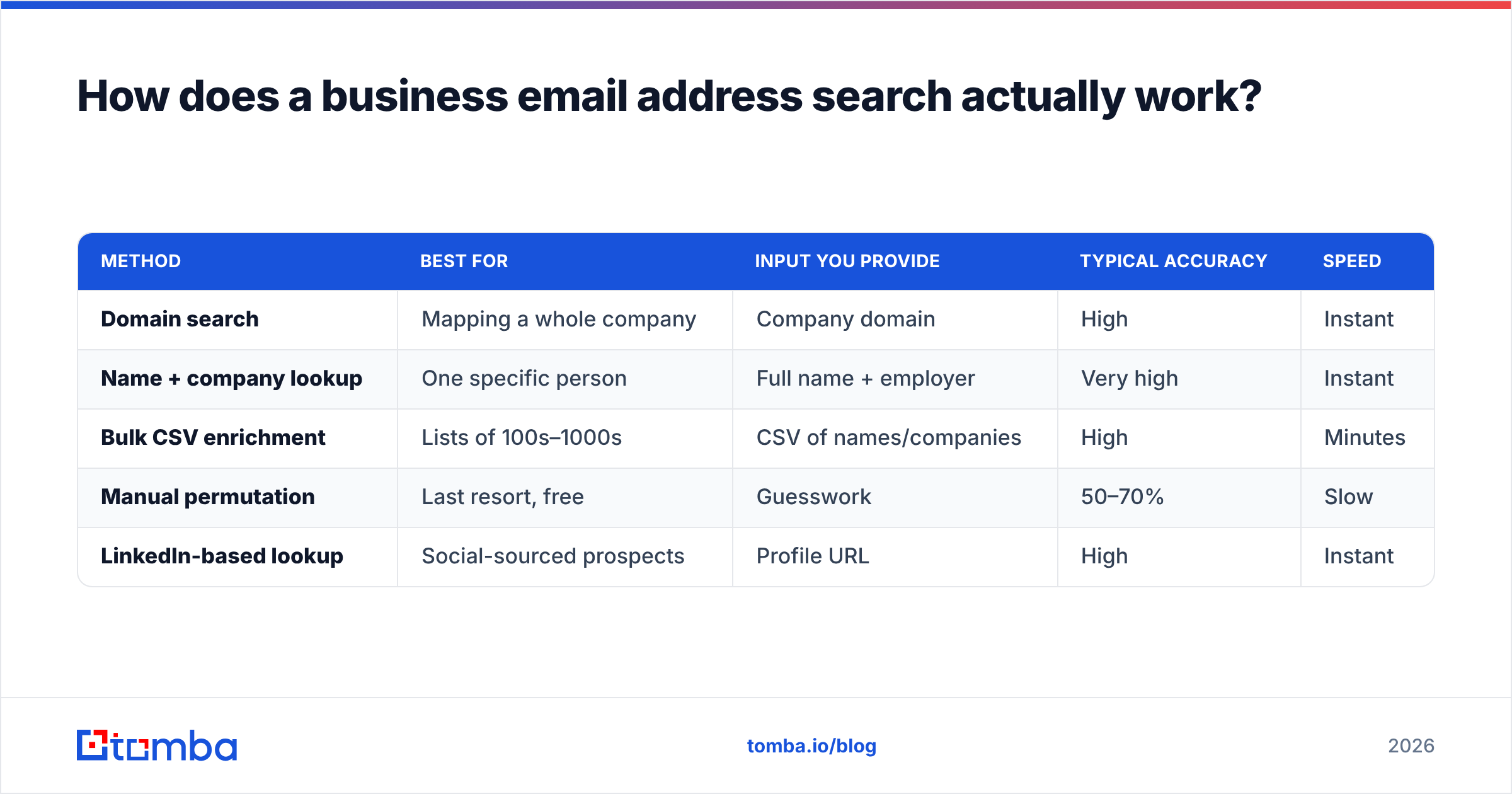
The methods you'll choose between map directly onto these stages. Here's how they compare:
| Method | Best for | Input you provide | Typical accuracy | Speed |
|---|---|---|---|---|
| Domain search | Mapping a whole company | Company domain | High | Instant |
| Name + company lookup | One specific person | Full name + employer | Very high | Instant |
| Bulk CSV enrichment | Lists of 100s–1000s | CSV of names/companies | High | Minutes |
| Manual permutation | Last resort, free | Guesswork | 50–70% | Slow |
| LinkedIn-based lookup | Social-sourced prospects | Profile URL | High | Instant |
- Domain search is your starting move when you want everyone at a target account. Point a domain search at
acme.comand you get the roster plus the detected pattern. - Name + company lookup is the surgical option — you know exactly who you want, so you feed the email finder a name and a company and get one verified address.
- Bulk enrichment is how you process a list. Upload a CSV, let a bulk email finder run, and download verified rows.
- LinkedIn-based lookup converts a profile into a work email when all you have is a social touchpoint — a LinkedIn finder handles this without manual copy-paste.
Why does accuracy matter more than volume?#
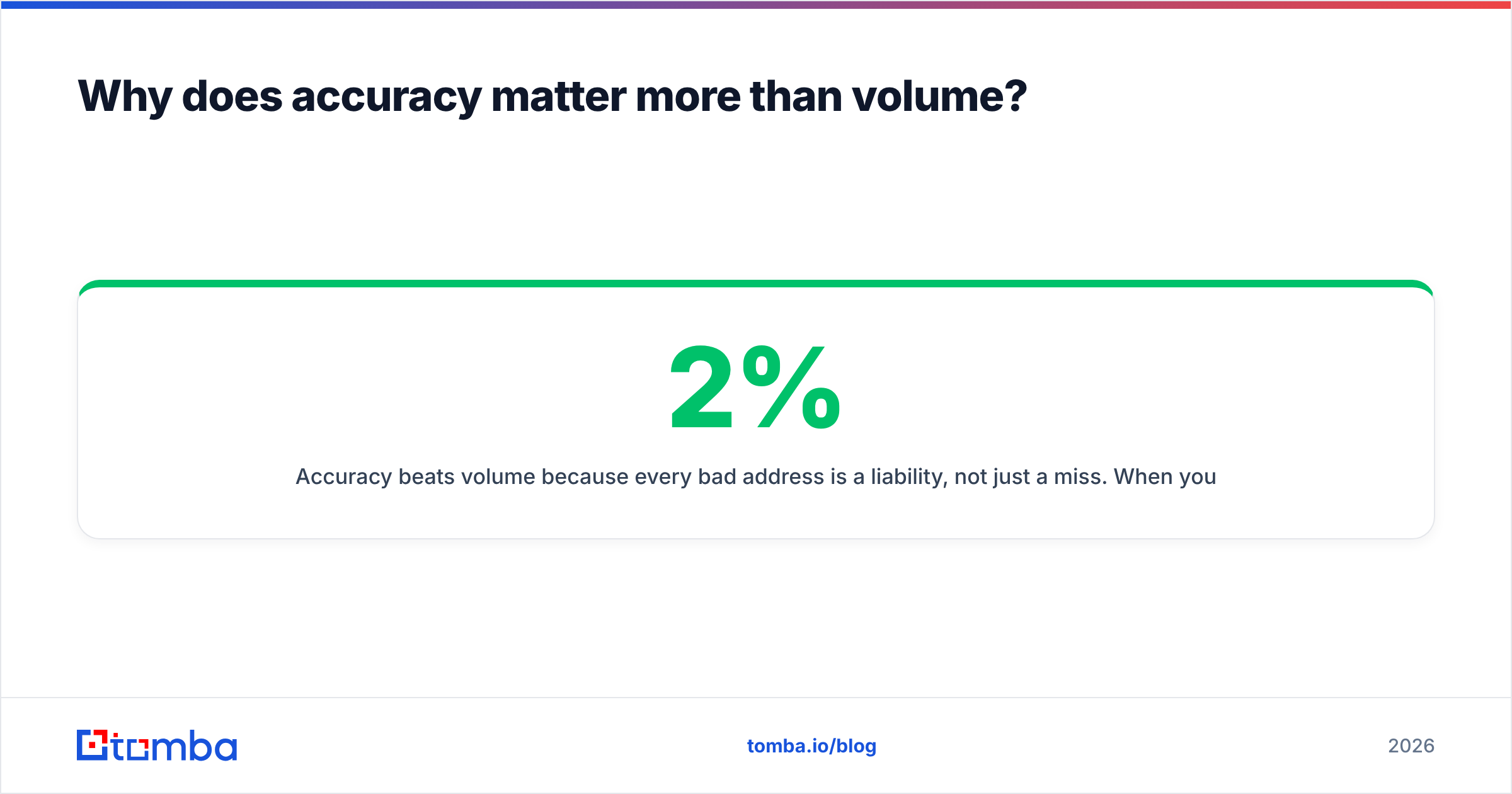
Accuracy beats volume because every bad address is a liability, not just a miss. When you email an inbox that doesn't exist, the receiving server returns a hard bounce. Mailbox providers — Google, Microsoft, and the rest — track your bounce rate as a core trust signal. Cross roughly 2% and your good emails start landing in spam too. So a finder that returns 1,000 addresses at 70% accuracy hands you 300 reputation-damaging bounces; a finder that returns 800 at 97% hands you a clean list.

This is why the verification stage is the part that actually earns the subscription fee. Anyone can guess first.last@domain.com. The hard, valuable work is confirming that the mailbox accepts mail and isn't a catch-all mirage. Before you trust any tool, run a sample through an independent email verifier and measure the real bounce rate yourself — don't take the dashboard's word for it.
A few habits keep your accuracy honest:
- Verify on a fresh schedule. People change jobs; a verified address from eight months ago may be dead. Re-verify lists older than a quarter.
- Treat catch-all domains as "probable." Segment them and warm up to them more cautiously.
- Watch the confidence score, not the binary. A 95+ score is send-ready; a 60 is worth a second source before you risk it.
- Check your own sending health too. Even perfect addresses bounce if your sender reputation is shot.
Which business email address search tool should you choose in 2026?#
The right tool depends on whether you need depth on a few accounts or breadth across thousands — and on how much of your budget verification quality is worth to you. Free tools are fine for occasional one-offs; they fall apart at scale because they skip the verification stage that prevents bounces.

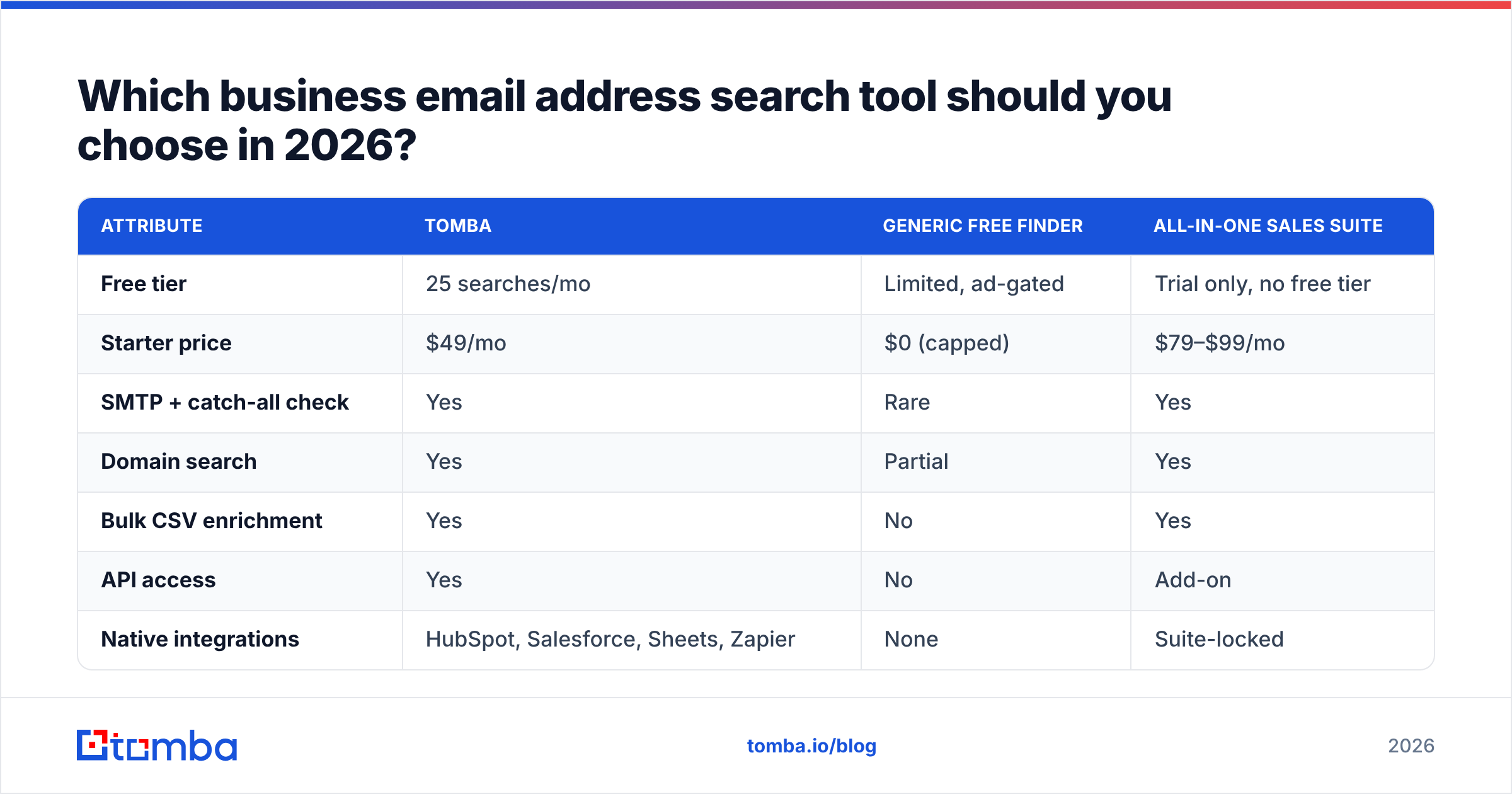
Here's a like-for-like comparison of how the categories stack up on the attributes that decide outcomes:
| Attribute | Tomba | Generic free finder | All-in-one sales suite |
|---|---|---|---|
| Free tier | 25 searches/mo | Limited, ad-gated | Trial only, no free tier |
| Starter price | $49/mo | $0 (capped) | $79–$99/mo |
| SMTP + catch-all check | Yes | Rare | Yes |
| Domain search | Yes | Partial | Yes |
| Bulk CSV enrichment | Yes | No | Yes |
| API access | Yes | No | Add-on |
| Native integrations | HubSpot, Salesforce, Sheets, Zapier | None | Suite-locked |
A few honest caveats. The all-in-one suites bundle sequencing and dialers you may already pay for elsewhere, so you can overspend on overlap. Free finders are genuinely useful for verifying a single address before an important email — just don't build a pipeline on them. And no tool, Tomba included, hits 100%; the goal is the highest verified yield at a price that makes sense for your volume.
If you're weighing a specific incumbent, vendor-neutral review sites like G2 and Capterra carry enough verified reviews to separate marketing claims from real performance. And if your current tool is one of the big suites, Tomba publishes direct Apollo alternative and RocketReach alternative breakdowns so you can compare on the same axes.

How do you run a business email address search step by step?#
Here's the workflow that takes you from a blank sheet to a verified, send-ready list — without torching your domain.
- Define the target. Decide whether you want a whole company (use domain search) or specific named people (use name + company lookup). This single choice sets your entire workflow.
- Detect the pattern first. Run one known employee through a finder to learn the company's format. Now every other name at that company is a high-confidence guess before verification even runs.
- Pull the addresses. For one account, use domain search. For a list, upload your CSV to a bulk email finder and let it process in the background.
- Verify before you trust. Push the results through an email verifier. Keep the high-confidence rows; quarantine catch-alls; discard hard fails.
- Enrich for context. Add title, company size, and location with data enrichment so your outreach is targeted, not generic.
- Sync to your stack. Push clean rows straight into your CRM — the HubSpot integration or Salesforce integration means no manual paste and no copy errors.
For teams that live in code, the Tomba API wires all six steps into your own pipeline, and there's a Google Sheets email finder add-on if a spreadsheet is your system of record. The point of automating is consistency: every lead gets the same verification, so quality doesn't depend on who ran the search.
What are the common mistakes to avoid?#
- Sending to unverified "found" emails. The single most expensive mistake. Always verify first; a $49/mo plan is cheaper than a burned domain.
- Ignoring catch-all domains. A catch-all says "valid" to everything. Use a catch-all verifier and treat the result as probable, not confirmed.
- Never re-verifying. Roughly a fifth of B2B contacts change roles each year. Stale lists quietly rot.
- Scraping in violation of terms. Use compliant sources. Reputable finders document where their data comes from — if a vendor won't, that's a red flag.
- Optimizing for raw count. A bigger list isn't a better list. Verified yield is the only number that maps to replies.
For the deliverability side of the equation, the practical guidance from HubSpot and Google's own Postmaster Tools is worth bookmarking — finding the address is only half the job; landing in the inbox is the other half.
How much should a business email address search cost?#
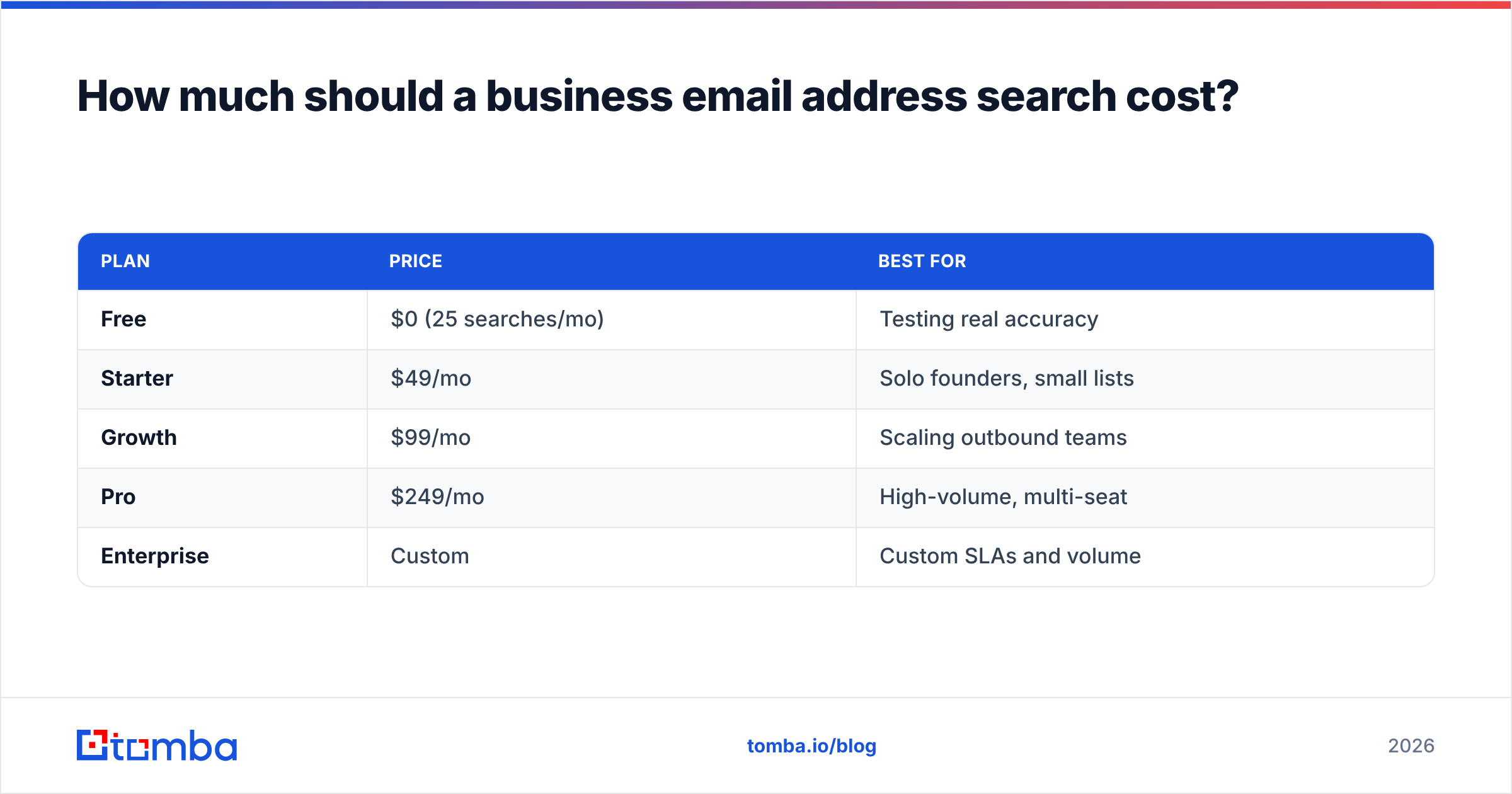
You should pay for verified accuracy and volume headroom, not for a logo. Most teams overpay by buying a full sales suite when they only needed a finder, or underpay by relying on free tools that bounce 30% of a list. The sweet spot is a dedicated finder with a real free tier to test on and transparent per-tier limits.
Tomba's structure is built for exactly that test-then-scale path:
| Plan | Price | Best for |
|---|---|---|
| Free | $0 (25 searches/mo) | Testing real accuracy |
| Starter | $49/mo | Solo founders, small lists |
| Growth | $99/mo | Scaling outbound teams |
| Pro | $249/mo | High-volume, multi-seat |
| Enterprise | Custom | Custom SLAs and volume |
Start free, measure your actual bounce rate on a real list, and only then move up a tier. Full Tomba pricing and per-tier search limits are public, so you can model cost-per-verified-lead before you spend a dollar. That's the number to optimize — not headline price, not list size.
Start your business email address search the right way#
Stop guessing permutations and watching bounces pile up. A disciplined business email address search — detect the pattern, find the address, verify before you send, enrich for context — turns a name into a real conversation without putting your domain at risk. The Tomba Email Finder gives you domain search, name lookup, SMTP and catch-all verification, and bulk enrichment in one place, with a Free tier so you can prove the accuracy on your own list before you pay. Run 25 searches free this week, check the bounce rate yourself, and scale up only when the numbers earn it.
// get started
Find, verify and enrich your first contacts today
Start on the free plan with 25 searches a month, then scale when your team is ready.
Free plan · No credit card required · GDPR & CCPA
// about the author