Buy Leads in 2026: Smart Guide to Buying B2B Leads
Thinking about whether to buy leads in 2026? Here's what bought lists actually cost, where the data comes from, and a build-vs-buy framework that protects your deliverability.
TL;DR
- "Buy leads" usually means one of three things: a static contact list, a pay-per-lead feed, or self-serve access to a B2B database. They are priced and risk-rated very differently.
- Pre-packaged, resold lists are the cheapest and the most dangerous — stale data, spam traps, and shared records that everyone else already emailed.
- Self-serve database access plus a verification step is the only "buy" model that protects your sender reputation. You pull and verify the exact records you need, when you need them.
- Real costs in 2026 range from $0.10–$0.50 per verified contact (self-serve) to $20–$100+ per qualified pay-per-lead. Cheap bulk lists ($0.01/record) are a false economy.
- The safest play for most teams: build a targeted list on demand and verify before sending. Buying raw "leads" you didn't qualify is how domains get blacklisted.
What does "buy leads" actually mean in 2026?#
The phrase hides three completely different products, and confusing them is the most expensive mistake teams make.
1. Static contact lists. A spreadsheet of names, emails, and titles you pay for once. This is the classic "buy a list" model — and the one most likely to torch your email deliverability. You don't know how old the data is, how many other buyers got the same rows, or how many addresses are spam traps.
2. Pay-per-lead (PPL). You pay for each qualified, often exclusive, lead — someone who matched your criteria and (ideally) showed intent. This is common in insurance, mortgage, home services, and some SaaS verticals. Higher cost, higher quality, but you're trusting the vendor's definition of "qualified."
3. Self-serve database access. You subscribe to a platform, search for accounts and people that fit your ICP, and export only the contacts you want — usually with built-in verification. This is the model that has largely replaced bulk lists for serious B2B teams, because you control freshness, targeting, and volume.
When someone says "I want to buy leads," ask which of these they mean. The rest of this guide compares them honestly.
Wait — that's a link, not the meme. Here's the meme:
Is it legal and safe to buy leads?#
Short answer: buying B2B contact data is legal in most markets, but how you use it is what gets you in trouble.
- GDPR (EU/UK): You need a lawful basis to process personal data. Legitimate interest can cover B2B outreach, but the data must be accurate, you must honor opt-outs, and you must be able to show where it came from. Resold lists rarely survive this test.
- CAN-SPAM (US): Sending is legal, but every message needs a real physical address, a working unsubscribe, and honest headers. CAN-SPAM doesn't require prior consent — but mailbox providers effectively do, via spam filtering.
- Spam traps & blacklists: This is the real risk. Old purchased lists are full of recycled and pristine spam-trap addresses. Hit a few and your domain reputation craters. No legal disclaimer fixes a blacklisted sending domain.
The practical rule: the more a list is resold and the older it is, the higher the legal and deliverability risk. Fresh, verified, narrowly-targeted data you pulled yourself is far safer than a 50,000-row file of unknown origin. If you want to understand the mechanics, the FTC's CAN-SPAM compliance guide is the authoritative source.
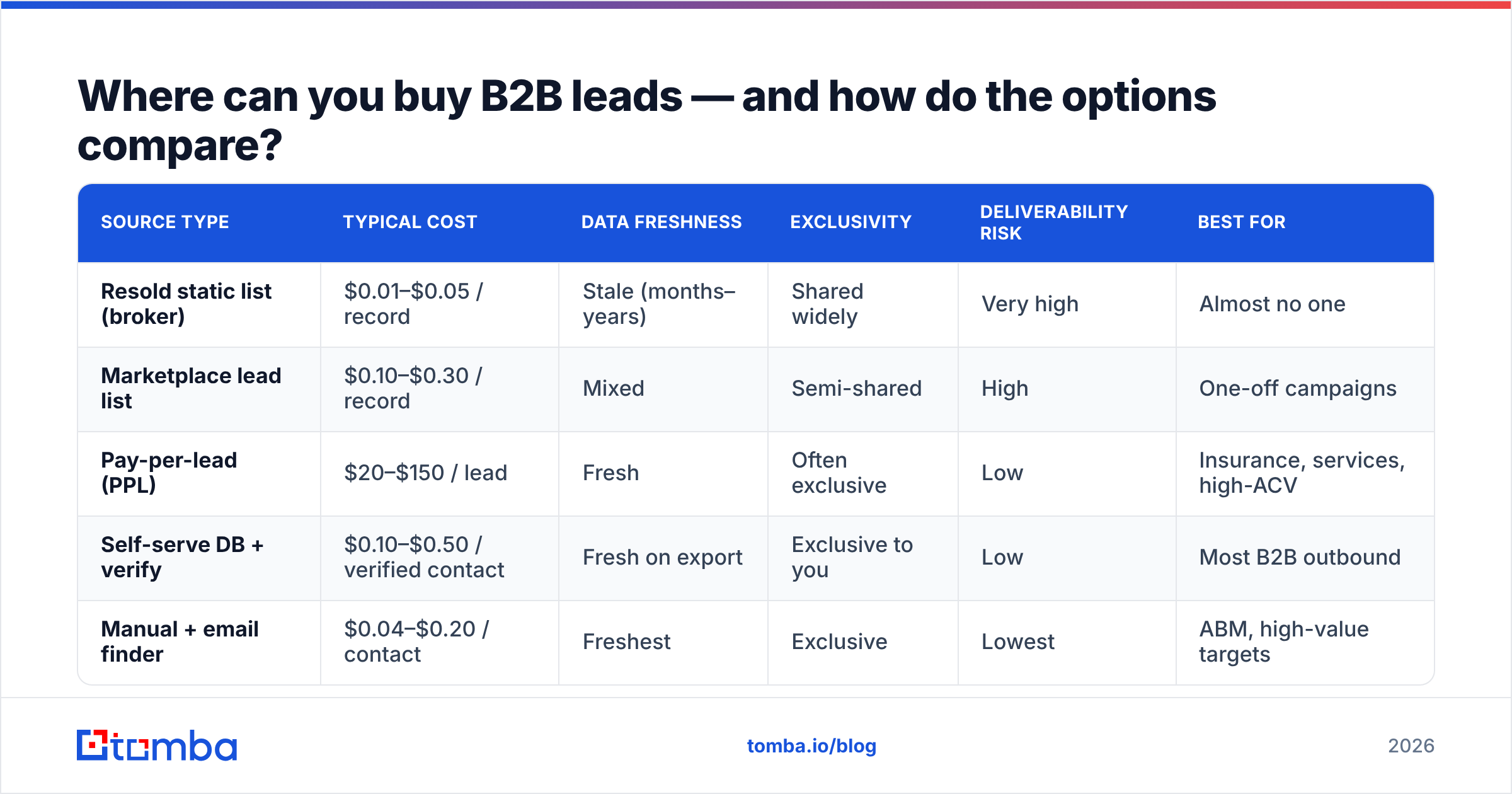
Where can you buy B2B leads — and how do the options compare?#
Here's the honest landscape. Costs are 2026 ballpark ranges; every vendor prices differently.
| Source type | Typical cost | Data freshness | Exclusivity | Deliverability risk | Best for |
|---|---|---|---|---|---|
| Resold static list (broker) | $0.01–$0.05 / record | Stale (months–years) | Shared widely | Very high | Almost no one |
| Marketplace lead list | $0.10–$0.30 / record | Mixed | Semi-shared | High | One-off campaigns |
| Pay-per-lead (PPL) | $20–$150 / lead | Fresh | Often exclusive | Low | Insurance, services, high-ACV |
| Self-serve DB + verify | $0.10–$0.50 / verified contact | Fresh on export | Exclusive to you | Low | Most B2B outbound |
| Manual + email finder | $0.04–$0.20 / contact | Freshest | Exclusive | Lowest | ABM, high-value targets |
A few takeaways:
- Cheapest is the worst. A $0.01 broker record looks like a bargain until you price in bounce penalties, wasted sending reputation, and reps emailing dead inboxes.
- Pay-per-lead is premium for a reason. You're buying exclusivity and intent. Worth it when one closed deal pays for hundreds of leads.
- Self-serve + verification is the sweet spot for volume B2B outbound — you get fresh, targeted, exclusive data at list-like prices.
If you're weighing platforms, independent review sites like G2's lead intelligence category are a better starting point than any single vendor's homepage.
Why do bought lists usually underperform?#
Because the economics of a resold list work against you.
A static list is a snapshot. B2B data decays fast — people change jobs, companies get acquired, domains migrate. Industry estimates put B2B data decay around 25–30% per year, and HubSpot's research on database decay backs that up. A list compiled 18 months ago can be 40% wrong before you send a single email.
Then there's the resale problem. Brokers sell the same file to dozens of buyers. By the time it reaches you, those contacts have been emailed repeatedly with the same generic pitch. Reply rates collapse and complaint rates climb — and complaints are what mailbox providers actually punish.
Finally, you didn't qualify these people. "Leads" implies fit and interest. A scraped list has neither. You're paying for rows, not pipeline.
This is why the build-vs-buy debate has shifted. The winning approach isn't "never buy data" — it's "buy access to fresh data and assemble your own list on demand."
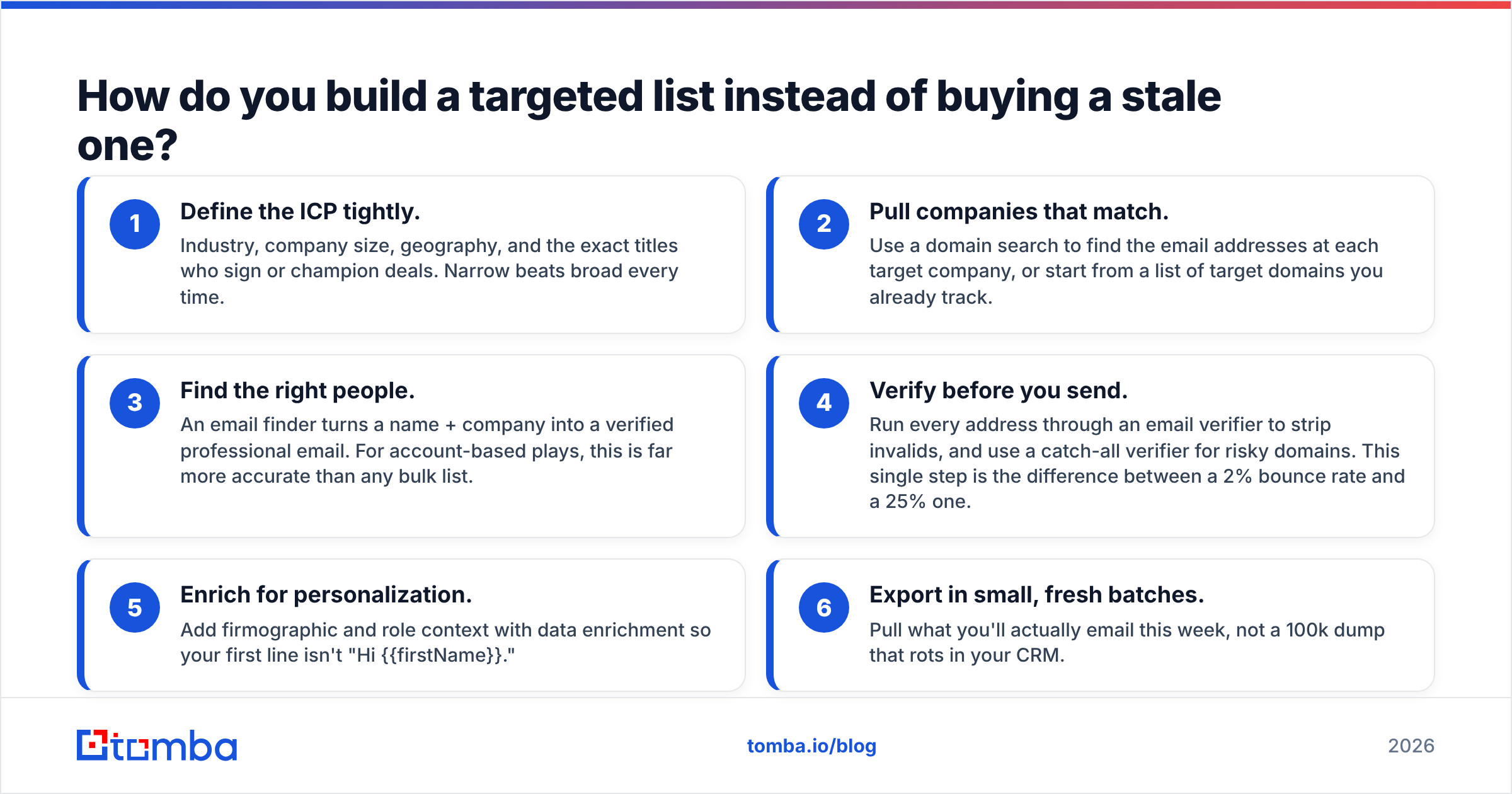
How do you build a targeted list instead of buying a stale one?#
This is the model that beats bought lists on cost and quality. You're still "buying" — you're buying a tool subscription instead of a file — but you control every variable.
- Define the ICP tightly. Industry, company size, geography, and the exact titles who sign or champion deals. Narrow beats broad every time.
- Pull companies that match. Use a domain search to find the email addresses at each target company, or start from a list of target domains you already track.
- Find the right people. An email finder turns a name + company into a verified professional email. For account-based plays, this is far more accurate than any bulk list.
- Verify before you send. Run every address through an email verifier to strip invalids, and use a catch-all verifier for risky domains. This single step is the difference between a 2% bounce rate and a 25% one.
- Enrich for personalization. Add firmographic and role context with data enrichment so your first line isn't "Hi {{firstName}}."
- Export in small, fresh batches. Pull what you'll actually email this week, not a 100k dump that rots in your CRM.
The result is an exclusive, verified, freshly-pulled list — assembled in the time it used to take to negotiate with a list broker, and at a fraction of the per-contact risk.
Buy leads vs. build leads: which wins for your team?#
There's no universal answer, but there is a clear decision framework.
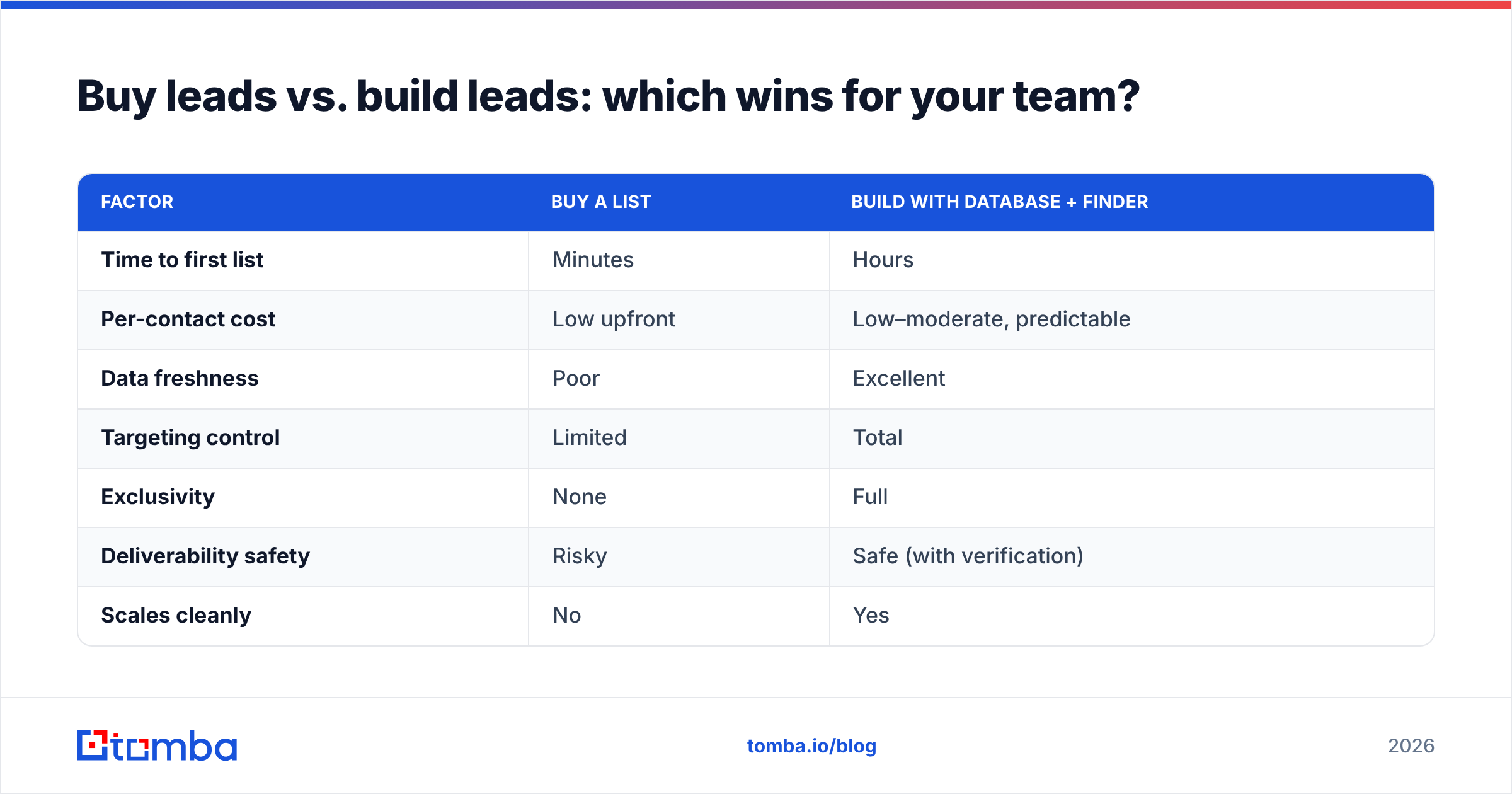
| Factor | Buy a list | Build with database + finder |
|---|---|---|
| Time to first list | Minutes | Hours |
| Per-contact cost | Low upfront | Low–moderate, predictable |
| Data freshness | Poor | Excellent |
| Targeting control | Limited | Total |
| Exclusivity | None | Full |
| Deliverability safety | Risky | Safe (with verification) |
| Scales cleanly | No | Yes |
| Best when | Truly one-off, low-stakes | Repeatable outbound, ABM, scale |
Buy a packaged list only if it's a genuine one-off, the stakes are low, and you'll verify aggressively before sending. Even then, treat every address as guilty until verified.
Build on demand if outbound is a repeatable motion, you care about your domain reputation, or you're running account-based outreach where precision matters more than raw volume. For nearly every B2B team running cold email at scale, this is the right call. (If you also need direct dials, a phone finder layers cleanly on top of the same workflow.)
How much should you actually budget to buy leads?#
Work backwards from a closed deal, not forwards from a price-per-record.
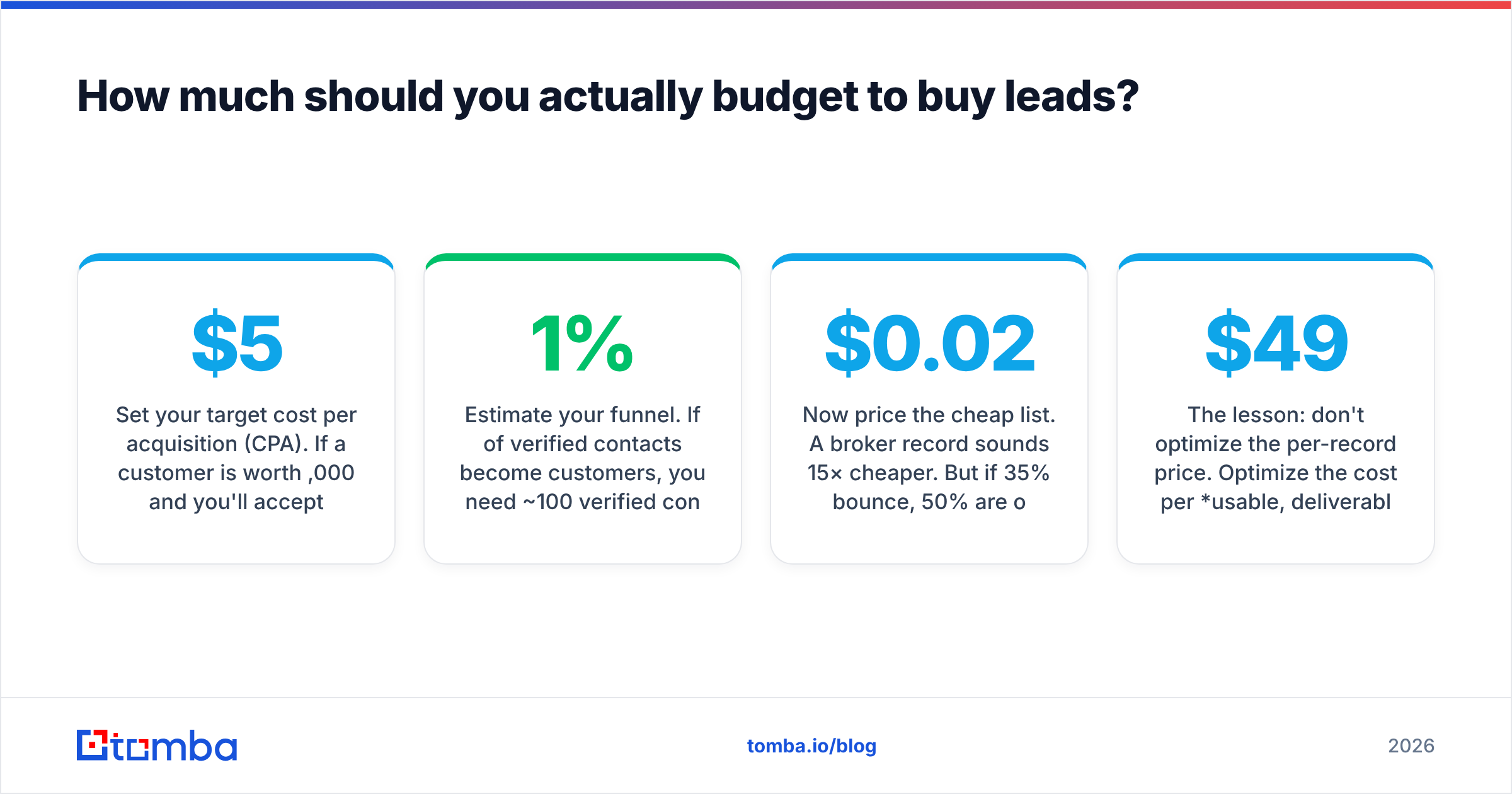
- Set your target cost per acquisition (CPA). If a customer is worth $5,000 and you'll accept a $500 CPA, that's your ceiling.
- Estimate your funnel. If 1% of verified contacts become customers, you need ~100 verified contacts per deal. At $0.30/verified contact that's $30 in data — comfortably inside a $500 CPA.
- Now price the cheap list. A $0.02 broker record sounds 15× cheaper. But if 35% bounce, 50% are off-ICP, and complaints get your domain throttled, your effective cost per usable contact can exceed the verified option — before counting the reputation damage that suppresses every future campaign.
The lesson: don't optimize the per-record price. Optimize the cost per usable, deliverable, on-ICP contact. That math almost always favors self-serve access plus verification over bulk buying. For exact plan tiers and credit math, see the full Tomba pricing breakdown — the Free tier (25 searches/mo) is enough to pressure-test the workflow before you commit, and the Starter plan runs $49/mo.
What's the safest way to start?#
Don't buy a list this week. Instead:
- Write down your ICP in one sentence.
- Pick 50 target accounts that fit it.
- Use a domain search and email finder to pull the decision-makers.
- Verify every address.
- Send a small, personalized batch and measure bounce + reply rates.
If that 50-contact test beats whatever a bought list would have given you — and it almost always does — scale the process, not the purchase. You'll spend less, protect your sender reputation, and own an asset no competitor can buy a copy of.
The bottom line#
"Buy leads" isn't one decision — it's three. Resold static lists are cheap and quietly destructive. Pay-per-lead is premium and situational. Self-serve database access plus verification gives you the freshness, exclusivity, and deliverability safety that actually drives pipeline, at a price that beats bulk lists once you count the real costs.
Stop buying rows. Start building lists. Use the Tomba Email Finder to pull verified, on-ICP contacts the moment you need them, run them through verification before you hit send, and keep your domain reputation — and your reply rates — exactly where they belong. Start free with 25 searches and see how on-demand, verified data compares to anything you'd buy off the shelf.
// get started
Find, verify and enrich your first contacts today
Start on the free plan with 25 searches a month, then scale when your team is ready.
Free plan · No credit card required · GDPR & CCPA
// about the author