The B2B Buying Committee in 2026: Map Stakeholders, Win Deals
The average B2B deal now involves 6-10 stakeholders. Here's how to map the buying committee, find every contact, and stop losing deals to the people you never spoke to.
TL;DR
- A buying committee is the group of people who collectively approve a B2B purchase — in 2026 that group averages 6 to 11 stakeholders, not one "decision-maker."
- Deals die when they stay single-threaded: you talk to one champion, that champion goes quiet, and you never reached the CFO, the security reviewer, or the end users who quietly killed it.
- Every committee has predictable roles — champion, economic buyer, technical buyer, end user, blocker, and influencer. Map them by role, not by job title.
- Winning means multi-threading: getting a named contact and a real conversation inside every role before the deal reaches procurement.
- The hard part is contact data. You can't multi-thread people whose email you don't have — which is where a fast, accurate finder turns an org chart into an outreach list.
What is a buying committee?#
A buying committee is the set of people inside a company who jointly decide whether to buy your product. Think of it like a co-op board approving a new tenant: the person who shows you the apartment is friendly and wants you in, but five other people you've never met vote in a closed room, and any one of them can say no.
That's the shift most reps still haven't internalized. The "decision-maker" you were taught to find rarely exists alone anymore. Gartner's research on B2B buying has shown for years that a typical complex purchase involves six to ten decision-makers, each armed with their own information and often their own preferred vendor. By 2026, with tighter budgets and mandatory security and finance reviews, the committee for any deal above a few thousand dollars a year is the rule, not the exception.
The practical consequence is blunt: if your pipeline is built around one contact per account, you are forecasting deals that the rest of the committee hasn't agreed to yet.
Who sits on the buying committee?#
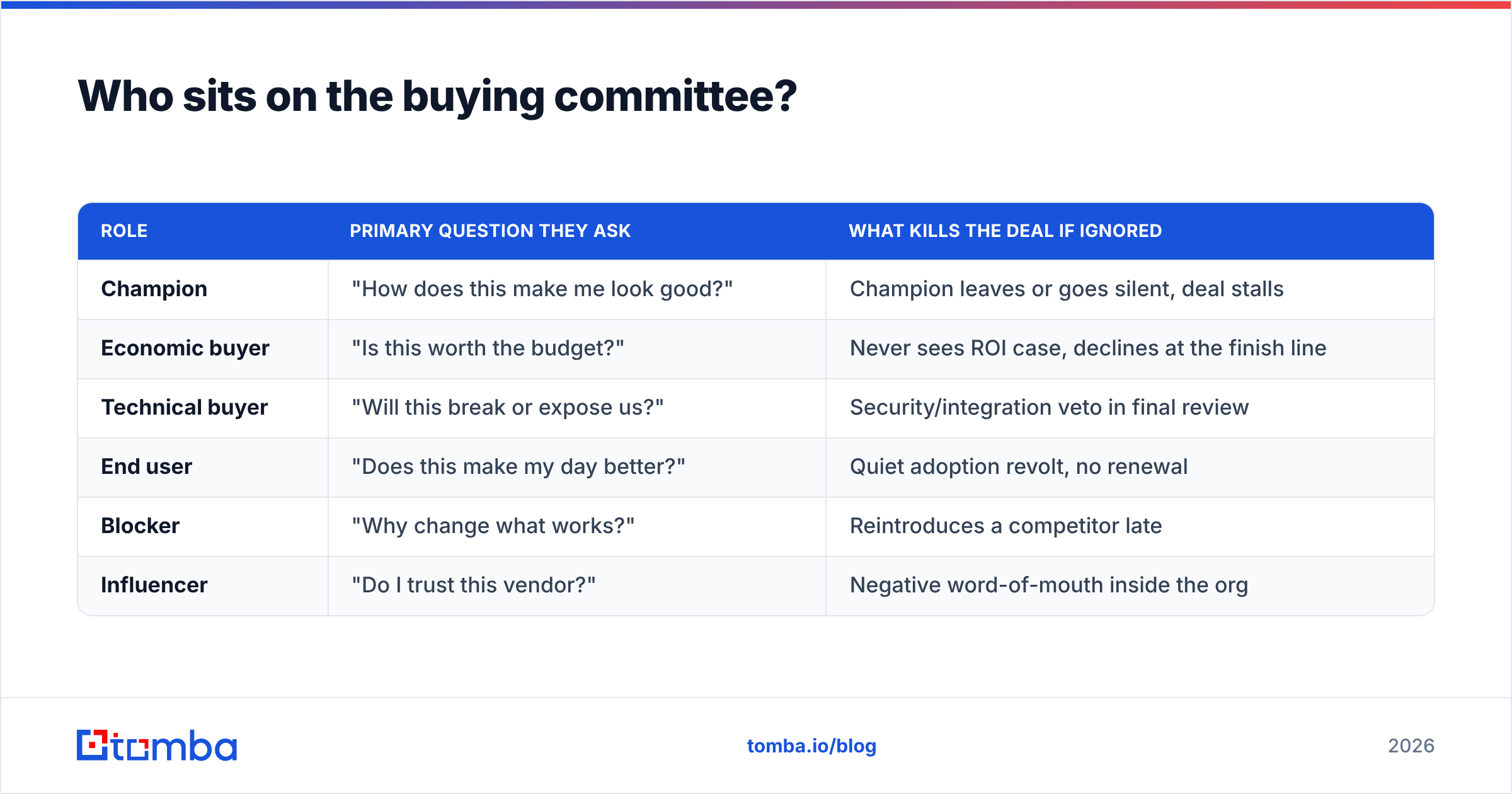
Roles matter more than titles. The same VP can be your champion at one account and a blocker at the next. Map people by the job they do in the deal, using these six recurring roles:
- Champion — Wants the change, will sell it internally when you're not in the room. Your most valuable contact, and the one you most often over-rely on.
- Economic buyer — Controls the budget and signs off on spend. Often a director, VP, or CFO who never joins early calls but holds the veto.
- Technical buyer — Evaluates whether the product actually works: IT, security, data, or RevOps. Says "no" on integration, compliance, or email deliverability grounds.
- End users — The people who live in the product daily. They rarely sign, but a vocal group of unhappy users sinks deals after the contract is drafted.
- Blocker — Has a reason to resist: a competing priority, a rival vendor, or simple change-aversion. Sometimes it's procurement; sometimes it's the person whose tool you're replacing.
- Influencer — No formal authority, but the committee trusts their opinion. An analyst they follow, a senior engineer, or a peer at another company.
You don't need a separate person for each role — a five-person committee might have one champion who is also an end user. But you do need to know which roles are covered and which are dark. A deal with no identified economic buyer is a deal you don't actually control.
| Role | Primary question they ask | What kills the deal if ignored |
|---|---|---|
| Champion | "How does this make me look good?" | Champion leaves or goes silent, deal stalls |
| Economic buyer | "Is this worth the budget?" | Never sees ROI case, declines at the finish line |
| Technical buyer | "Will this break or expose us?" | Security/integration veto in final review |
| End user | "Does this make my day better?" | Quiet adoption revolt, no renewal |
| Blocker | "Why change what works?" | Reintroduces a competitor late |
| Influencer | "Do I trust this vendor?" | Negative word-of-mouth inside the org |
Why do single-threaded deals die?#
Single-threaded deals die because your champion is one resignation, reorg, or busy quarter away from taking your entire pipeline with them. You built the relationship; you didn't build the coverage.
Here's the failure pattern, start to finish. You get a warm reply from a manager who loves the demo. You run three calls, send a proposal, and feel great about the forecast. Then the manager forwards it to "the team," and the team includes a security lead who wasn't in any of your calls and a finance director who sees the price for the first time on a PDF. Neither has heard your story. Both default to "not now." Your champion, who was never trained to handle those objections, can't carry the argument. The deal slips a quarter, then disappears.
The fix isn't more follow-up with the same person. Sending a fifth nudge to a champion who already agrees with you doesn't move the people who don't. The fix is multi-threading: building a real relationship inside every role before the deal hits the rooms you're not invited to.
There's a measurable upside, too. Accounts where sellers engage multiple stakeholders close at higher rates and shrink less at the negotiation table, because objections surface early — while you can still answer them — instead of in a final review you never attend. If you want a benchmark to hold yourself to, track win rate on multi-threaded versus single-threaded opportunities; the gap is usually embarrassing.
How do you map a buying committee?#
Mapping is a repeatable, four-step routine, not a one-time chart you draw at the kickoff call.
Step 1 — Inventory the roles, not the names. Before you know a single person, write down the six roles for this specific deal. A 50-seat sales team buying prospecting software will have RevOps as the technical buyer and a VP of Sales as the economic buyer; a security-conscious enterprise adds a CISO's team. Predict the shape before you fill it.
Step 2 — Pull the org structure. Use LinkedIn, the company's own site, and a domain search to list everyone in the relevant departments and seniority bands. The goal is a candidate list per role: three possible economic buyers beats one guess.
Step 3 — Confirm roles through your champion. Ask directly: "Who else needs to be comfortable with this before it moves forward? Who signs? Who in IT or security reviews tools like this?" A good champion will name the committee for you. A champion who can't answer is a signal the deal is less real than you think.
Step 4 — Get reachable contact data for every name. A name on an org chart is useless until you can actually email or call the person. This is the step that quietly breaks most mapping exercises — reps map ten stakeholders and have working contact info for two. Bulk-resolve the list with a bulk email finder and a phone finder so every role has a live channel, then keep the data current with contact enrichment as people change jobs.
Manual mapping vs. data-driven mapping#
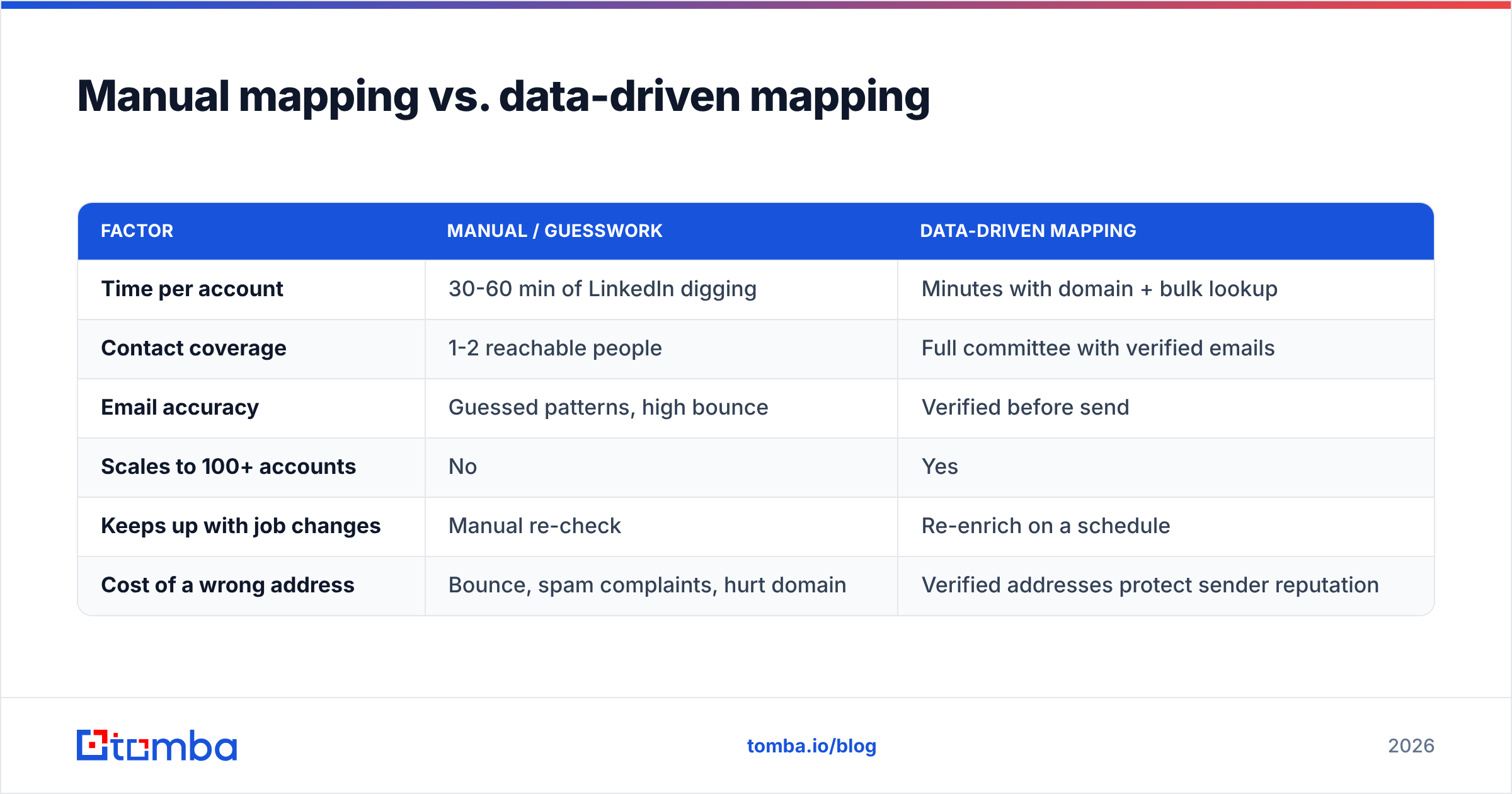
You can map a committee by hand, and for a single marquee account it's worth doing carefully. But at any real pipeline volume, hand-mapping collapses. Here's the honest comparison:
| Factor | Manual / guesswork | Data-driven mapping |
|---|---|---|
| Time per account | 30-60 min of LinkedIn digging | Minutes with domain + bulk lookup |
| Contact coverage | 1-2 reachable people | Full committee with verified emails |
| Email accuracy | Guessed patterns, high bounce | Verified before send |
| Scales to 100+ accounts | No | Yes |
| Keeps up with job changes | Manual re-check | Re-enrich on a schedule |
| Cost of a wrong address | Bounce, spam complaints, hurt domain | Verified addresses protect sender reputation |
The reason data quality belongs in this conversation at all is bounces. When you multi-thread, you're emailing people who've never heard of you — exactly the audience where a hard bounce does the most reputational damage. Sending to an unverified guessed address for a CFO is how you land in spam folders right when you most need to reach the committee. Run every new contact through an email verifier before the first send, and handle catch-all domains with a dedicated catch-all verifier instead of crossing your fingers.
How many people are actually on the committee in 2026?#
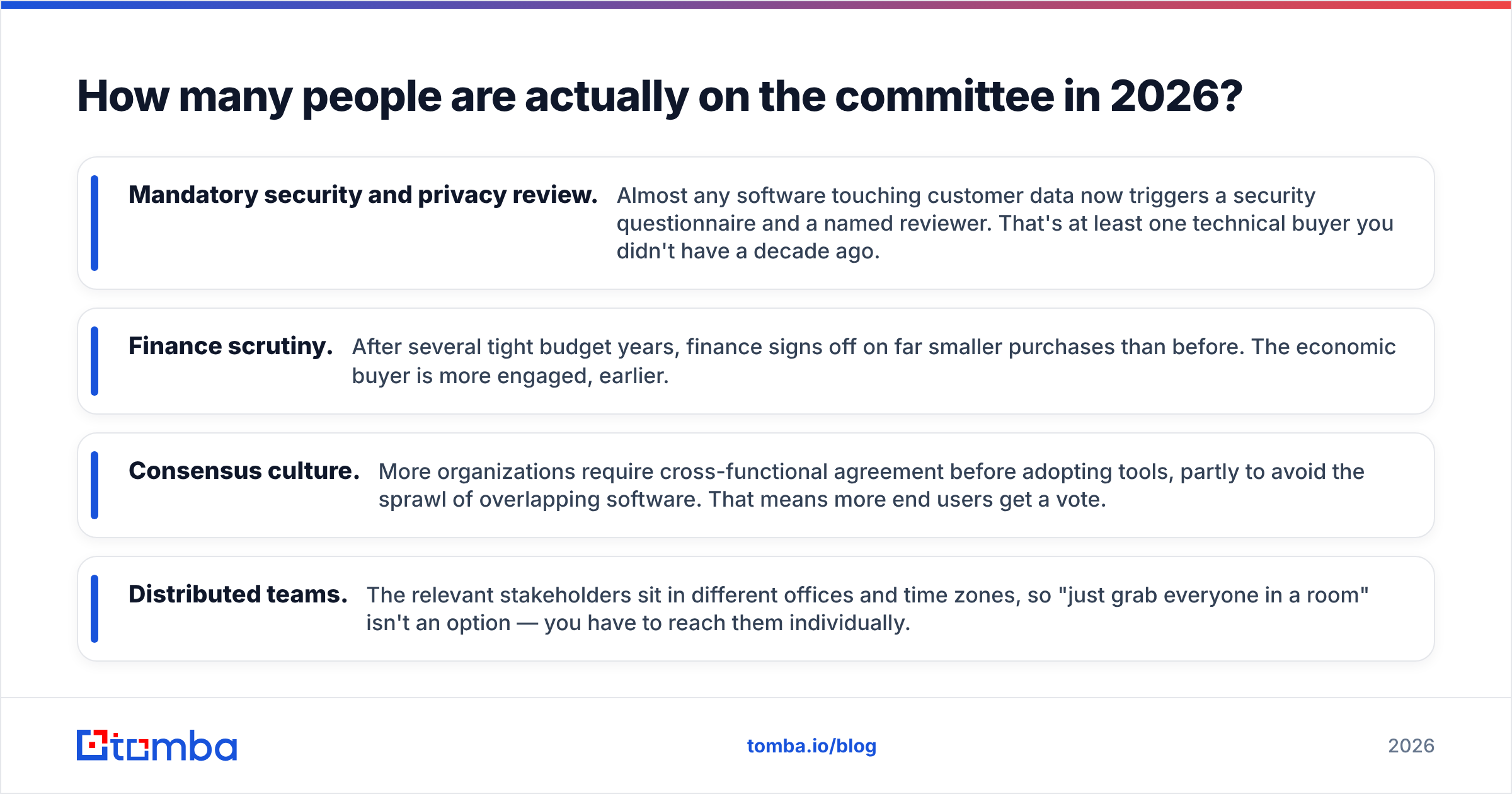
Plan for six to eleven, and assume it grows with deal size and risk. A few forces have pushed the number up rather than down:
- Mandatory security and privacy review. Almost any software touching customer data now triggers a security questionnaire and a named reviewer. That's at least one technical buyer you didn't have a decade ago.
- Finance scrutiny. After several tight budget years, finance signs off on far smaller purchases than before. The economic buyer is more engaged, earlier.
- Consensus culture. More organizations require cross-functional agreement before adopting tools, partly to avoid the sprawl of overlapping software. That means more end users get a vote.
- Distributed teams. The relevant stakeholders sit in different offices and time zones, so "just grab everyone in a room" isn't an option — you have to reach them individually.
The takeaway isn't to panic at the headcount. It's to budget your effort accordingly: a deal worth pursuing is worth eight to ten genuine contact attempts across roles, not one well-crafted email to a single inbox.
What tools help you find and reach the committee?#
You need three capabilities, and they don't have to come from the same vendor: a way to discover who's in each role, a way to get accurate contact details, and a way to keep that data fresh. Where vendors differ is accuracy and how much manual work they push back onto you.
For the discovery-and-contact layer, an email-finding platform that combines domain search, verification, and enrichment in one place removes most of the busywork. Tomba is built for exactly this slice: enter a company domain, get the people and the verified emails, then enrich with role and seniority so you can sort candidates into committee roles. You can compare full Tomba pricing against point tools, but the practical pitch is that one workflow covers find, verify, and enrich.
Pair it with your CRM and a sequencing tool, and the loop closes: map roles, resolve contacts, multi-thread with role-specific messaging, log everyone against the opportunity. If you live in spreadsheets, the Google Sheets add-on lets you paste a list of names and pull verified emails inline; if you live in your pipeline tool, the HubSpot integration and Salesforce integration push enriched contacts straight onto the account record. Vendor docs like HubSpot's own guidance on buying committees and analyst frameworks from Gartner are worth reading alongside the tooling, because the process discipline matters as much as the data.
How do you message each role differently?#
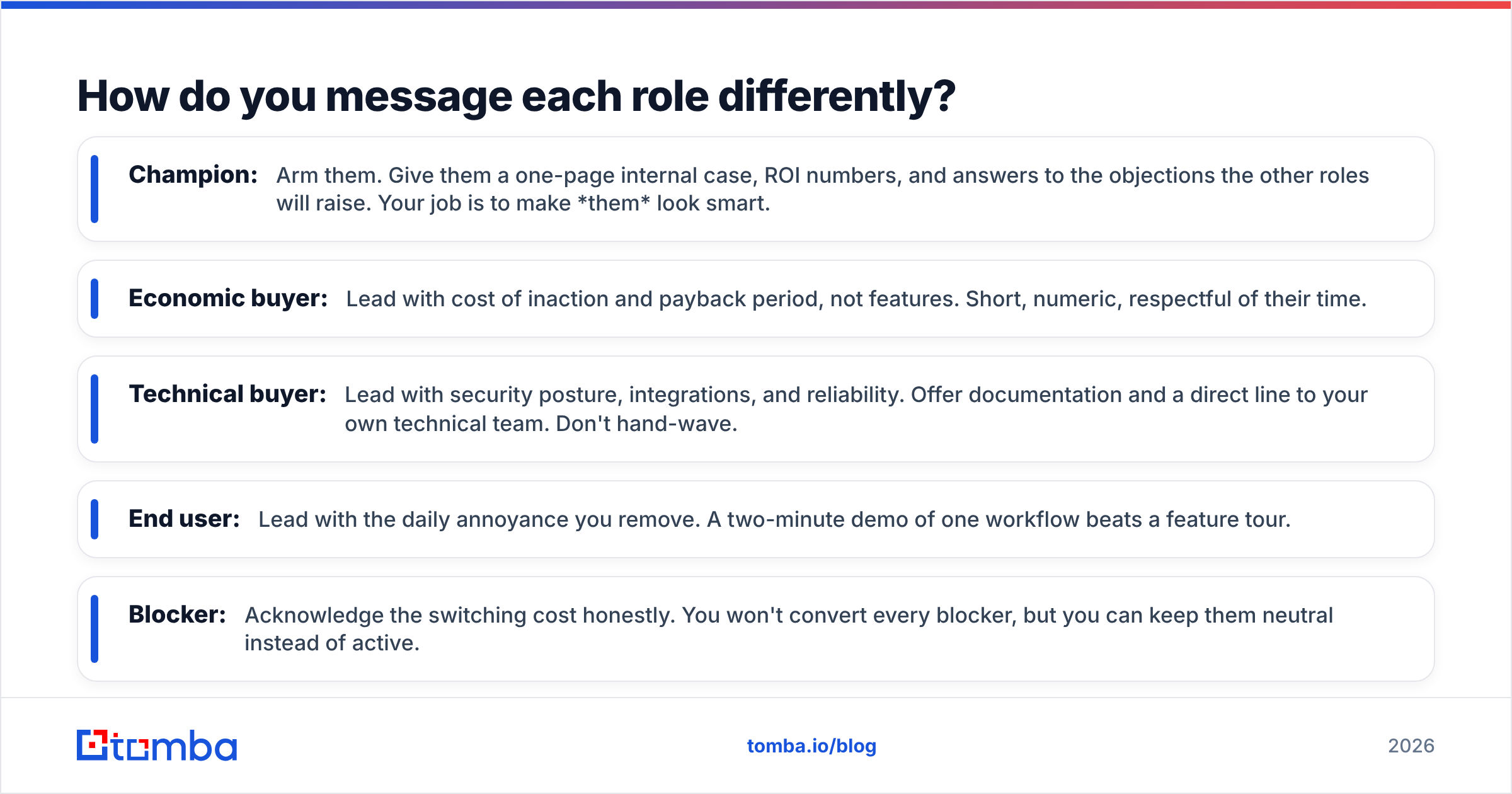
A single message can't win a committee, because each role measures value on a different axis. Reuse your research, not your copy:
- Champion: Arm them. Give them a one-page internal case, ROI numbers, and answers to the objections the other roles will raise. Your job is to make them look smart.
- Economic buyer: Lead with cost of inaction and payback period, not features. Short, numeric, respectful of their time.
- Technical buyer: Lead with security posture, integrations, and reliability. Offer documentation and a direct line to your own technical team. Don't hand-wave.
- End user: Lead with the daily annoyance you remove. A two-minute demo of one workflow beats a feature tour.
- Blocker: Acknowledge the switching cost honestly. You won't convert every blocker, but you can keep them neutral instead of active.
If you're systematizing this, build the role-specific angles once and store them with your cold email templates, then personalize per account. The structure stays; only the specifics change.
The bottom line#
The buying committee isn't a complication to route around — it is the deal. Reps who keep forecasting single-threaded opportunities will keep watching deals evaporate in rooms they were never invited to. Reps who map every role, reach every stakeholder, and arm their champion will close the same accounts at a higher rate and a smaller discount.
That whole strategy rests on one unglamorous foundation: accurate contact data for everyone on the chart. You can't multi-thread people you can't reach. Start by turning your next target account's domain into a verified, role-tagged contact list with the Tomba Email Finder — the free tier covers 25 searches a month so you can map your first committee before you pay a cent. Map the room, reach the room, and stop losing deals to the people you never met.
Ready to find emails that actually work?
Join 150,000+ professionals who stopped guessing and started sending. Free credits on signup — no credit card required.
Get the Tomba newsletter
Practical outbound tactics and product updates — once every two weeks.
About the author