BuzzBoard Pricing, Reviews, Pros and Cons (2026 Guide)
A neutral 2026 breakdown of BuzzBoard pricing, real user reviews, and the honest pros and cons — plus where a leaner stack beats it for outbound teams.
TL;DR
- BuzzBoard is an AI-driven sales intelligence platform aimed at agencies and teams selling digital services to small and mid-sized businesses (SMBs). It scores prospects and now leans heavily on its "Digital Sales Assistant" generative-AI angle.
- BuzzBoard does not publish transparent self-serve pricing. Plans are quote-based and typically land in the mid-to-high three figures per seat per month for full platform access, with annual contracts common.
- Reviews are polarized: users praise the SMB data depth and prospect-scoring; critics cite cost, data gaps outside the US, and a learning curve.
- The biggest con for most outbound teams is paying platform prices for data you may only partly use. If you mainly need accurate contact emails, a focused tool is far cheaper.
- If your real bottleneck is reaching the right person, pair lean prospecting tools with a dedicated email finder instead of an all-in-one suite.
What is BuzzBoard and who is it for?#
BuzzBoard is a sales intelligence and prospect-scoring platform built around one specific buyer: the rep or agency selling marketing and digital services to small businesses. Think of it as a credit-scoring agency, but for SMB sales readiness — it ingests signals about a local business (its website, ads, social presence, reviews, tech stack) and produces a "digital health" picture plus a fit score that tells a rep whether the prospect is worth a call.
In 2025–2026 the company repositioned hard around generative AI, marketing a "Digital Sales Assistant" that drafts personalized outreach and talking points from those signals. So the modern pitch is two-part: data about SMBs plus AI that turns that data into a pitch.
That focus is the whole story when judging BuzzBoard pricing, reviews, pros and cons. It is excellent at one job — qualifying and personalizing for SMB digital-services sellers — and weaker as a general-purpose B2B contact database. If you sell enterprise software, recruit, or just need verified emails at scale, you are paying for a specialized engine pointed at a different target.

How much does BuzzBoard cost in 2026?#
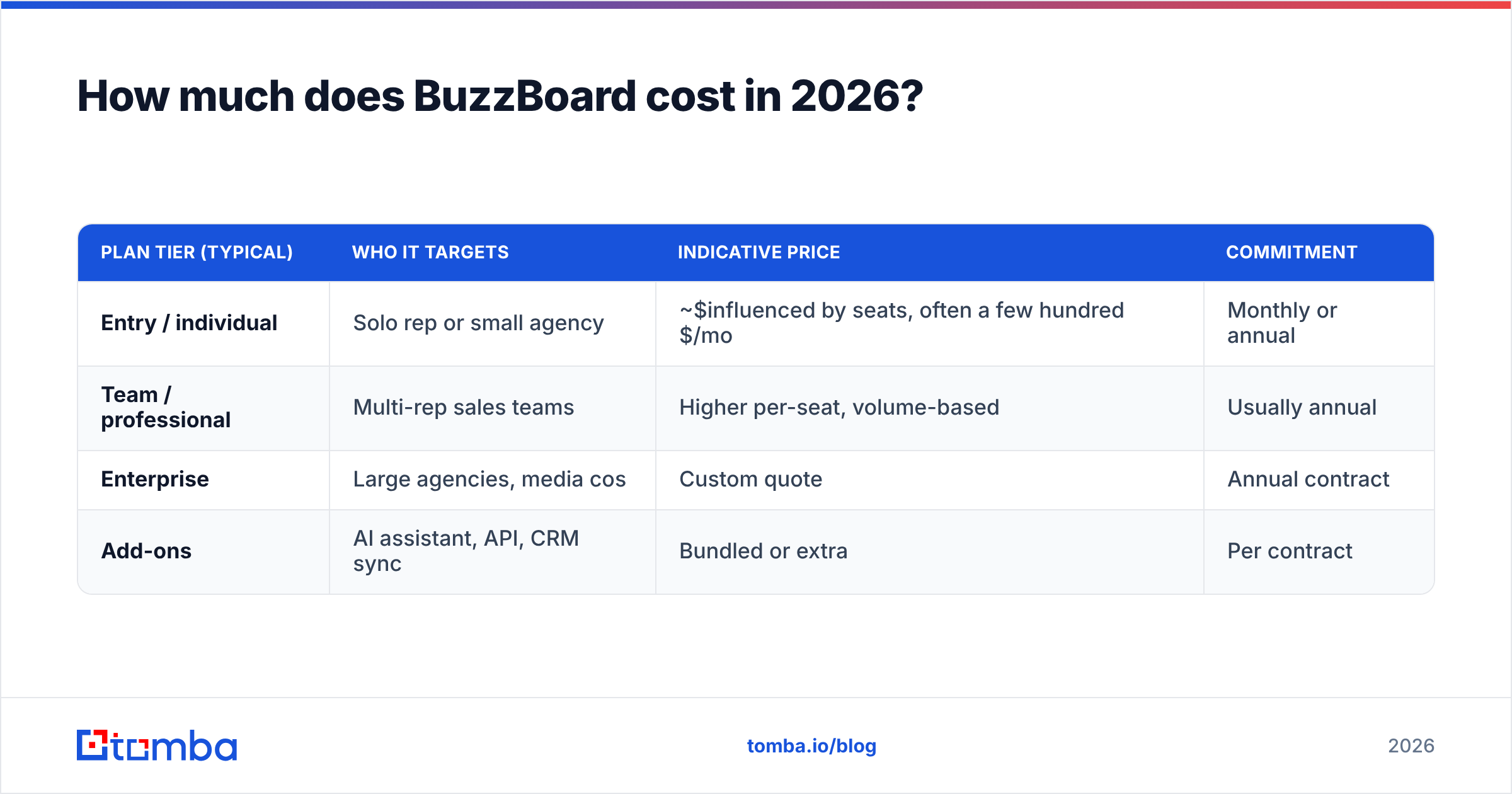
Short answer: BuzzBoard does not publish flat self-serve pricing, and you should expect a quote in the hundreds of dollars per seat per month for full access. Unlike tools with a public pricing page, BuzzBoard routes you through a demo and a sales conversation, then tailors a number to seat count, data volume, and which modules (scoring, AI assistant, integrations) you turn on.
Because the vendor keeps pricing behind a quote, the figures below are directional estimates synthesized from public review sites and historical user reports — treat them as a planning range, not a quote. Always confirm current numbers directly with BuzzBoard.
| Plan tier (typical) | Who it targets | Indicative price | Commitment |
|---|---|---|---|
| Entry / individual | Solo rep or small agency | ~$influenced by seats, often a few hundred $/mo | Monthly or annual |
| Team / professional | Multi-rep sales teams | Higher per-seat, volume-based | Usually annual |
| Enterprise | Large agencies, media cos | Custom quote | Annual contract |
| Add-ons | AI assistant, API, CRM sync | Bundled or extra | Per contract |
A few patterns show up repeatedly in reviews and procurement notes:
- Annual contracts are the norm for the better rates; month-to-month is more expensive per seat when it is offered at all.
- Seat-based pricing scales fast. A five-rep team is a materially different invoice from a solo subscription.
- The AI assistant is part of the upsell. The generative features are central to the current positioning, so expect them woven into mid and upper tiers rather than free.
- No meaningful free tier. You generally start with a demo, not a self-serve trial, which slows evaluation.
For comparison, transparent contact-data tools publish their numbers openly. Tomba pricing, for example, runs Free (25 searches/mo), Starter $49/mo, Growth $99/mo, and Pro $249/mo — you can see the cost before you talk to anyone. That transparency gap is itself a recurring complaint in BuzzBoard reviews.
What do BuzzBoard reviews actually say?#
Aggregate scores on G2 and Capterra put BuzzBoard in respectable but not category-leading territory, and the written reviews cluster into clear themes. Here is the honest split.
What reviewers like:
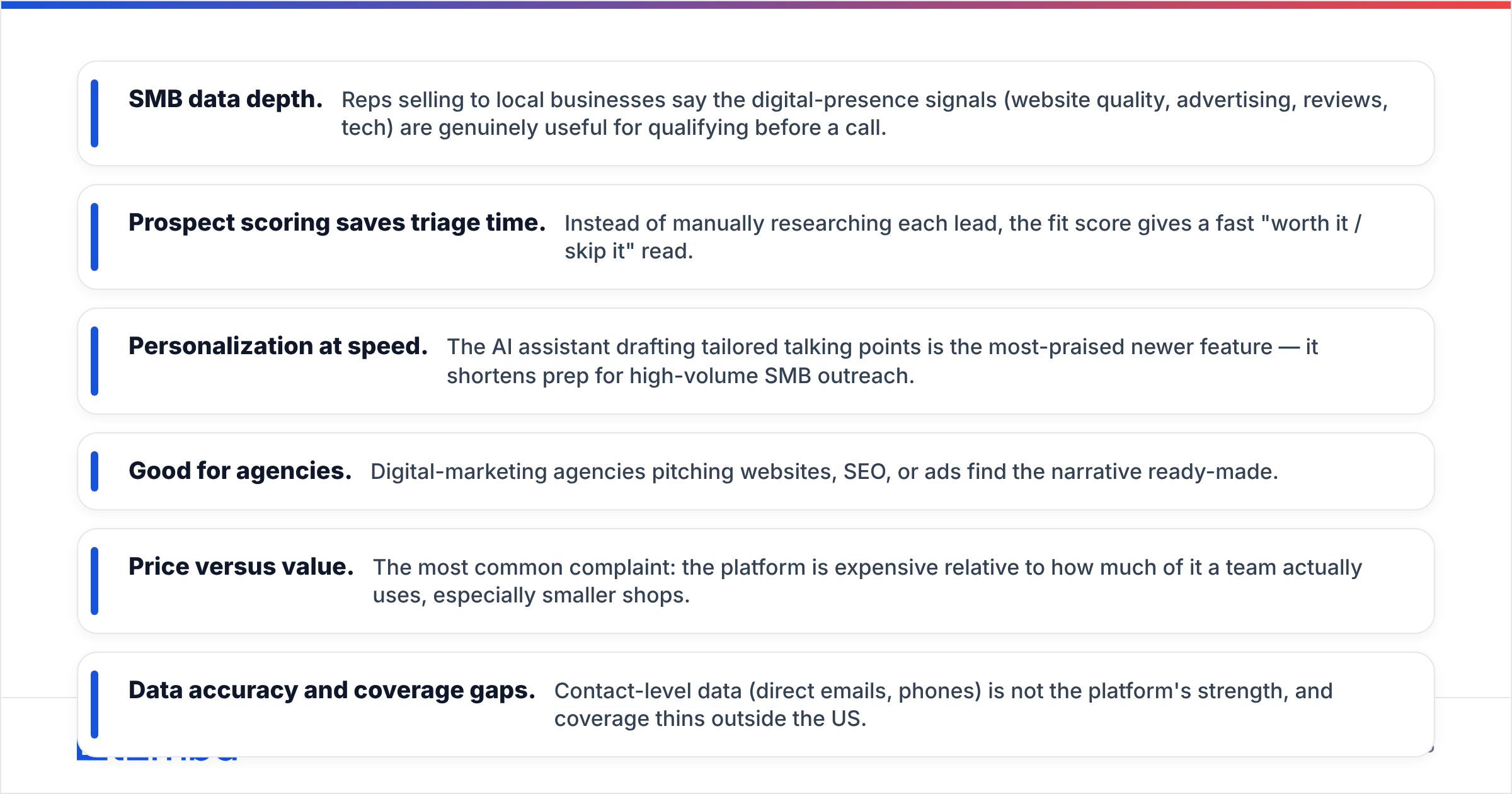
- SMB data depth. Reps selling to local businesses say the digital-presence signals (website quality, advertising, reviews, tech) are genuinely useful for qualifying before a call.
- Prospect scoring saves triage time. Instead of manually researching each lead, the fit score gives a fast "worth it / skip it" read.
- Personalization at speed. The AI assistant drafting tailored talking points is the most-praised newer feature — it shortens prep for high-volume SMB outreach.
- Good for agencies. Digital-marketing agencies pitching websites, SEO, or ads find the narrative ready-made.
What reviewers criticize:
- Price versus value. The most common complaint: the platform is expensive relative to how much of it a team actually uses, especially smaller shops.
- Data accuracy and coverage gaps. Contact-level data (direct emails, phones) is not the platform's strength, and coverage thins outside the US.
- Learning curve and onboarding. Several reviewers note it takes time to get value, and that self-serve evaluation is hard without sales involvement.
- Contract friction. Annual commitments and quote-based pricing make it hard to start small or exit cleanly.
The throughline: people who fit the exact ICP (SMB digital-services sellers) are happy; people who bought it as a general B2B data tool feel they overpaid for the wrong strengths.
What are the pros and cons of BuzzBoard?#
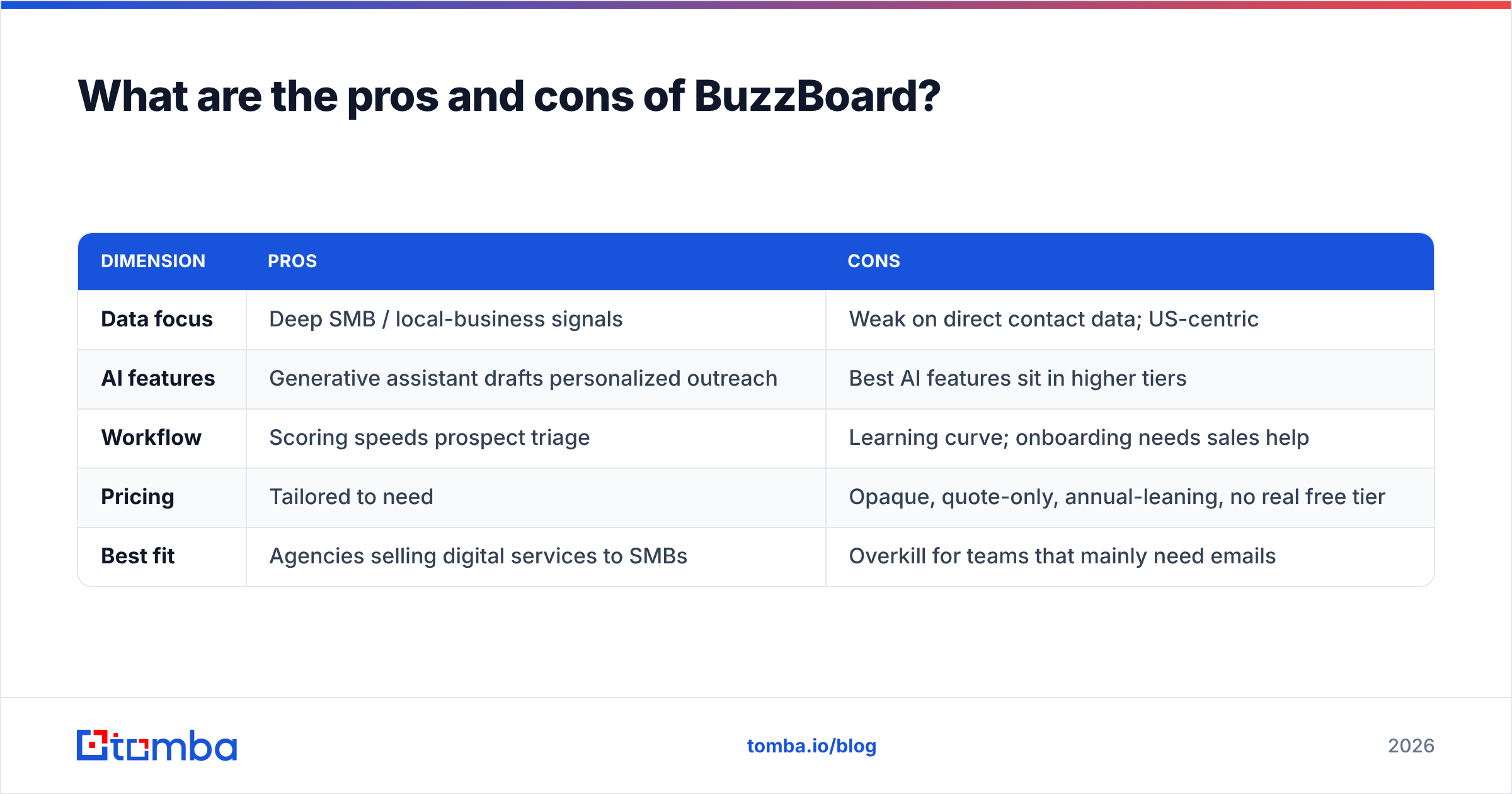
Here is the balanced scorecard most buyers actually need.
| Dimension | Pros | Cons |
|---|---|---|
| Data focus | Deep SMB / local-business signals | Weak on direct contact data; US-centric |
| AI features | Generative assistant drafts personalized outreach | Best AI features sit in higher tiers |
| Workflow | Scoring speeds prospect triage | Learning curve; onboarding needs sales help |
| Pricing | Tailored to need | Opaque, quote-only, annual-leaning, no real free tier |
| Best fit | Agencies selling digital services to SMBs | Overkill for teams that mainly need emails |
Pros, expanded:
- Purpose-built qualification. If your day is "research a local business, decide if they need our service, pitch it," BuzzBoard compresses that loop.
- Narrative-ready personalization. The AI assistant turns raw signals into a talk track, which is a real time-saver for high-volume SMB selling.
- One screen for fit. Consolidating digital-health signals into a score reduces tab-juggling.
Cons, expanded:
- You pay platform prices for breadth you may not use. If 70% of your need is "get me the decision-maker's verified email," a full sales-intelligence suite is an expensive way to get there.
- Contact data is the soft spot. For accurate, verified emails at scale you will likely still bolt on an email verifier or a dedicated finder.
- Opaque pricing slows procurement. No public number means longer sales cycles and harder budgeting.
- Geographic limits. Non-US prospecting is noticeably weaker.

Is BuzzBoard worth it, or is there a leaner alternative?#
It depends entirely on whether you are BuzzBoard's exact buyer. If you run an agency selling websites, SEO, ads, or reputation services to local SMBs, the scoring and AI personalization can justify the spend — that is the use case the whole product is engineered around.
But many teams arrive at BuzzBoard for the wrong reason: they need contacts and outreach, see "sales intelligence + AI," and assume it is a contact database. It is not primarily that. When your actual bottleneck is reaching the right person, a focused stack costs a fraction and converts the same.
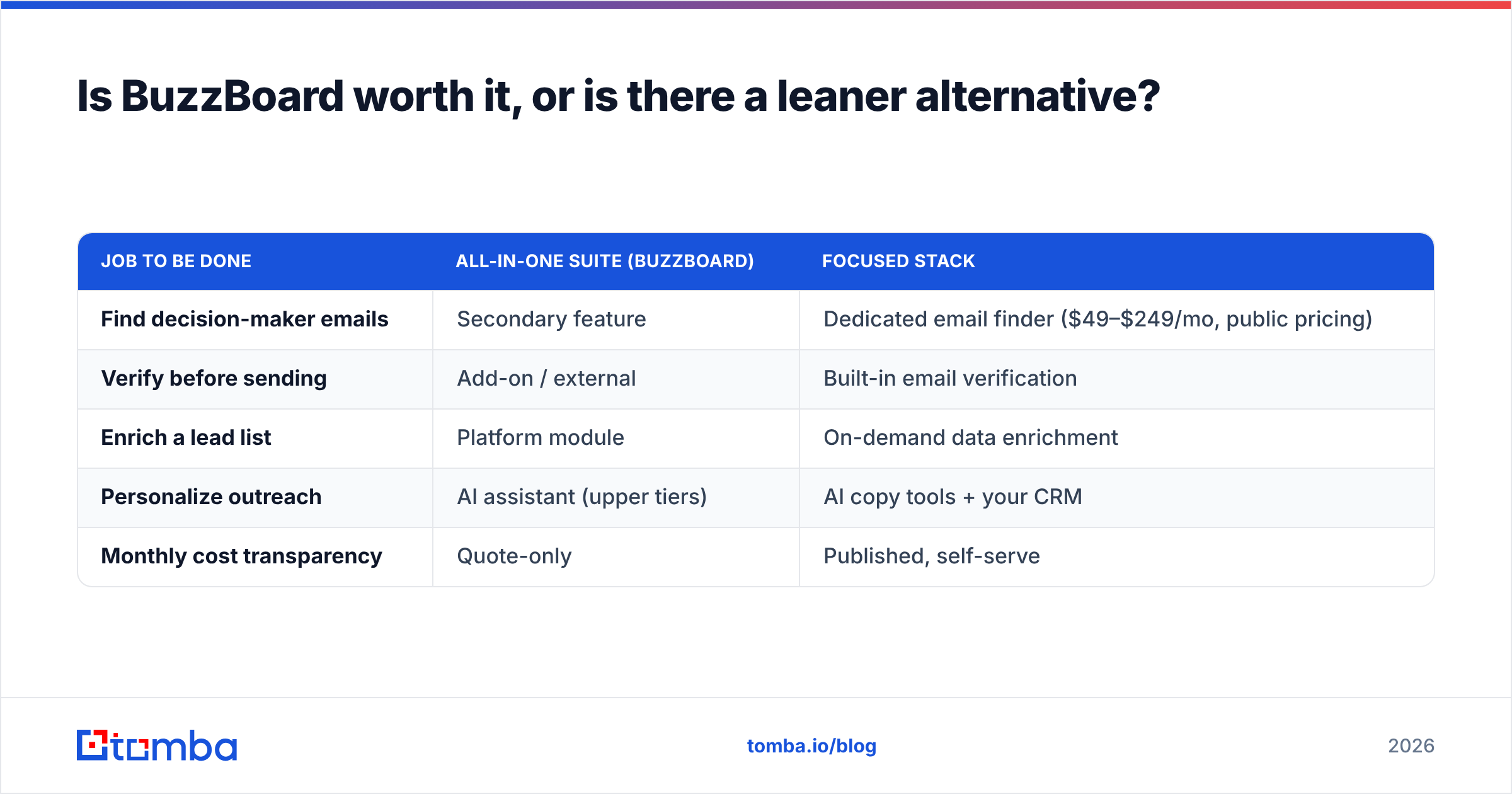
Consider how the math changes when you unbundle:
| Job to be done | All-in-one suite (BuzzBoard) | Focused stack |
|---|---|---|
| Find decision-maker emails | Secondary feature | Dedicated email finder ($49–$249/mo, public pricing) |
| Verify before sending | Add-on / external | Built-in email verification |
| Enrich a lead list | Platform module | On-demand data enrichment |
| Personalize outreach | AI assistant (upper tiers) | AI copy tools + your CRM |
| Monthly cost transparency | Quote-only | Published, self-serve |
A focused approach looks like this: pull your target accounts, use a domain search to map who works there, find and verify the right addresses, then enrich and hand off to your sequencer. You keep the part of BuzzBoard's value you can replicate cheaply (research-to-outreach) and drop the part you overpay for.
This is not "BuzzBoard bad, tool X good." It is altitude: match the tool to the job. Suites win when you genuinely use the suite. Focused tools win when one job — usually contact discovery — is 80% of the value you need.
To pressure-test whether you need the full platform, ask three questions:
- Do I sell digital services to SMBs specifically? If no, much of BuzzBoard's edge does not apply to you.
- Is contact discovery my real bottleneck? If yes, a dedicated finder solves it for less.
- Can I justify an annual, quote-based commitment before seeing value? If that gives you pause, start lean and scale up later.
How does BuzzBoard compare to contact-data tools?#
It is worth being precise about categories, because comparing BuzzBoard to an email finder is comparing a scoring engine to a contact engine. They overlap at the edges but solve different core problems.
- BuzzBoard's core: Should I pursue this SMB, and what should I say? (qualification + personalization)
- An email finder's core: What is this specific person's verified work email, and is it safe to send to? (contact discovery + deliverability)
Many high-performing teams run both — but they buy each deliberately. They use a qualification layer where it pays off and a contact layer everywhere, rather than forcing one expensive tool to do both jobs at half strength. If you go this route, look for transparent per-credit pricing and verification built in, so your deliverability does not suffer from stale data. You can read more about where contact data sources come from to judge accuracy claims from any vendor, BuzzBoard included.
The deliverability point matters: even a perfectly qualified prospect is worthless if your email bounces and drags your sender reputation down. A scoring suite will not protect your domain — verification will. That is why the contact layer is non-negotiable even when you also run a qualification tool.
What's the verdict on BuzzBoard pricing, reviews, pros and cons?#
Verdict: BuzzBoard is a strong, narrowly-focused tool that is worth its price only for its exact buyer — agencies and reps selling digital services to SMBs — and an expensive detour for everyone else.
The pros are real: deep SMB signals, fast qualification, and AI personalization that shortens prep. The cons are equally real: opaque, quote-based pricing that skews annual; weak direct-contact data; US-centric coverage; and a learning curve. Reviews reflect exactly this split — fans are the ICP, critics bought it for jobs it was never built to do.
If you are evaluating it, get a live quote, scope which modules you will actually use, and be honest about whether contact discovery is your true bottleneck. If it is, you do not need a suite — you need accurate emails and clean verification, and you need them at a price you can see.
That is where a focused tool earns its keep. Tomba Email Finder finds verified professional emails by name, domain, or company, with built-in verification and enrichment — and pricing you can read before you ever talk to sales (Free at 25 searches/mo, Starter at $49/mo). If your goal is to reach the right SMB decision-maker and land in their inbox, start with the contact layer, scale qualification later, and only pay for a full suite when you will genuinely use all of it.
Ready to find emails that actually work?
Join 150,000+ professionals who stopped guessing and started sending. Free credits on signup — no credit card required.
Get the Tomba newsletter
Practical outbound tactics and product updates — once every two weeks.
About the author