Bytemine vs eGrabber: B2B Lead Data Tools Compared (2026)
Bytemine and eGrabber both promise faster B2B lead lists, but they solve different problems. Here is an honest 2026 breakdown of accuracy, pricing, and fit.
Choosing between Bytemine and eGrabber feels harder than it should, because the two tools market themselves with the same words — "B2B leads," "verified data," "build lists fast" — while working in genuinely different ways under the hood. This guide cuts through that. You will see where each one wins, where each one quietly costs you time or money, and where a focused API-first tool changes the math entirely.
TL;DR#
- Bytemine leans toward web-scraping and data-mining workflows: pull contacts and company signals from public sources, then export. It suits operators who want raw scraping flexibility.
- eGrabber (LeadGrabber Pro) is a Windows desktop "append" tool: paste a name and company, and it appends a guessed business email and phone. It suits recruiters and SDRs who already have a name list.
- Neither is a verification-first platform. Both surface contacts, but you still need to confirm deliverability before you send, or you burn sender reputation.
- Pricing models differ sharply: eGrabber is annual-license, seat-based, and expensive; Bytemine is usage/credit oriented. Cost-per-good-record matters more than sticker price.
- If accuracy and API access are your priority, a credit-based finder-plus-verifier like Tomba often delivers cleaner records at a lower entry cost than either.
What is Bytemine?#
Bytemine positions itself as a B2B data and prospecting layer — the kind of tool you reach for when you want to extract contacts and firmographic signals from public web sources and turn them into a list you can work. Think of it as a mining rig: you point it at a vein (a market, a set of domains, a category) and it pulls ore you then have to refine.
The strength of this model is flexibility. You are not limited to a fixed contact database; you can chase niche segments that pre-built databases miss. The weakness is the same as every scraping-led approach: freshness and accuracy vary by source, and refining the raw output (dedupe, verify, format) lands on you. Scraped business emails in particular age fast — people change jobs, domains migrate, catch-all servers hide the truth.
What is eGrabber?#
eGrabber's flagship, LeadGrabber Pro, is a long-running Windows desktop application aimed squarely at recruiters and B2B sales teams. Its core trick is append: give it a person's name and company, and it researches and appends a likely business email address and phone number using pattern guessing plus public sources.
If you have ever built a list in a spreadsheet and thought "I have the names, I just need the emails and numbers," that is exactly eGrabber's lane. It is mature, it integrates with common CRMs and ATSs, and recruiters have used it for years. The trade-offs are real, though: it is desktop-bound (no clean cloud/API-first experience), licensing is annual and seat-based, and "appended" emails are guesses until something verifies them. eGrabber knows this — it ships verification as part of the value — but accuracy on appended data is the whole ballgame, and it varies.
Bytemine vs eGrabber: how do they compare?#
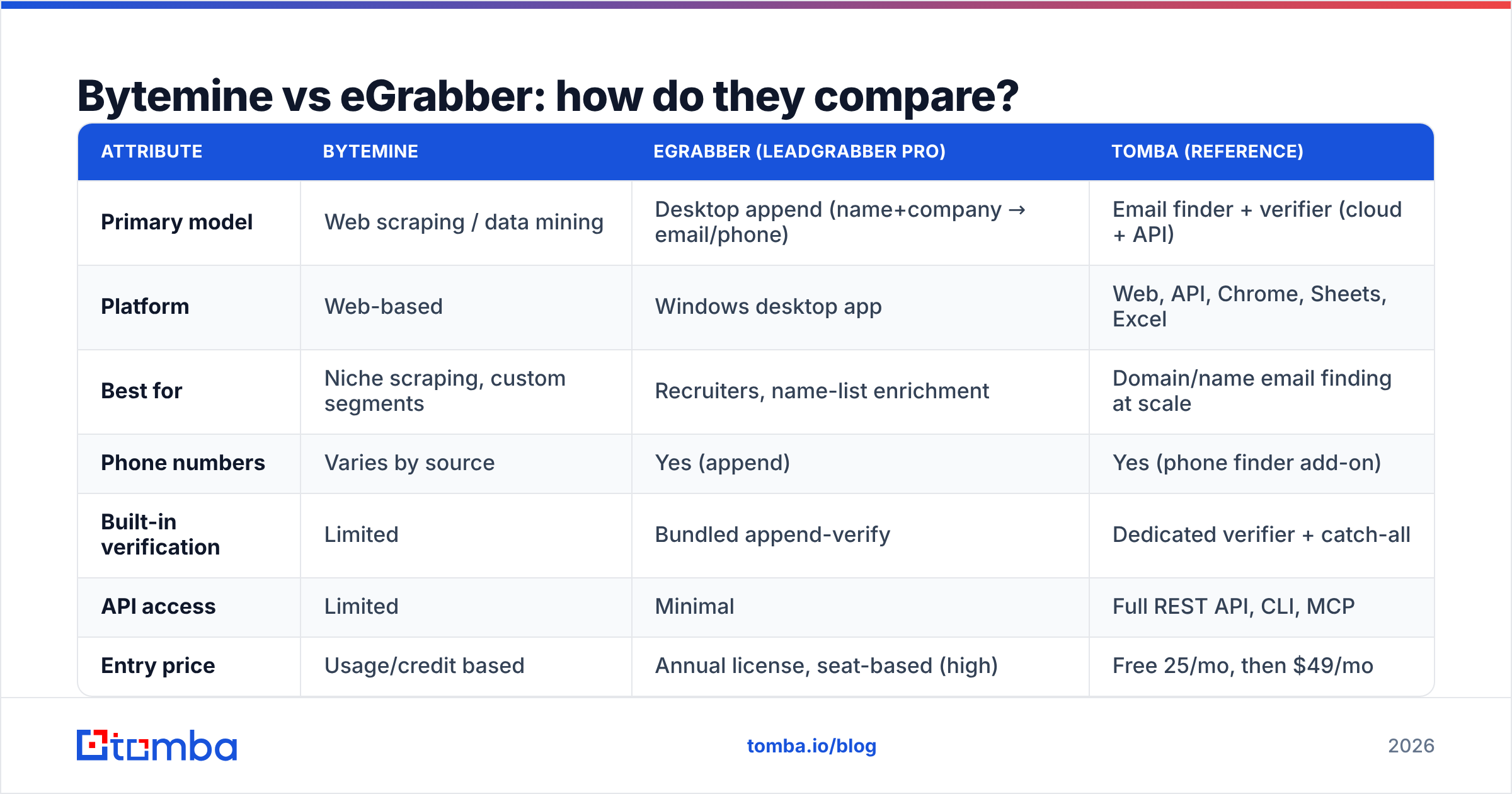
Here is the honest side-by-side. Prices for both vendors shift and are often quoted per seat or per year, so treat the pricing row as directional — confirm on each vendor's site — and weight the capability rows more heavily.
| Attribute | Bytemine | eGrabber (LeadGrabber Pro) | Tomba (reference) |
|---|---|---|---|
| Primary model | Web scraping / data mining | Desktop append (name+company → email/phone) | Email finder + verifier (cloud + API) |
| Platform | Web-based | Windows desktop app | Web, API, Chrome, Sheets, Excel |
| Best for | Niche scraping, custom segments | Recruiters, name-list enrichment | Domain/name email finding at scale |
| Phone numbers | Varies by source | Yes (append) | Yes (phone finder add-on) |
| Built-in verification | Limited | Bundled append-verify | Dedicated verifier + catch-all |
| API access | Limited | Minimal | Full REST API, CLI, MCP |
| Entry price | Usage/credit based | Annual license, seat-based (high) | Free 25/mo, then $49/mo |
| Free tier | Trial | Trial | Yes (25 searches/mo) |
A few takeaways worth saying plainly:
- eGrabber is a seat-and-license commitment. That model rewards a fixed team of heavy daily users and punishes spiky or seasonal usage. If two SDRs need it three months a year, you still pay for the year.
- Bytemine's scraping flexibility is a double-edged sword. You can find segments others can't, but you inherit the cleanup burden — and scraped lists need real email verification before they touch a live mailbox.
- Neither is API-first. If you want to enrich a record inside your own app, CRM workflow, or a script, the desktop and scraping models fight you.
Which tool is more accurate?#
Accuracy is the only metric that actually maps to revenue, because a bounced email costs you twice: the wasted send and the damage to your sending domain. Both tools generate contact data through inference (pattern guessing, scraping, public-source matching) rather than serving from a continuously re-verified database. That means the responsibility for confirming deliverability sits with you.
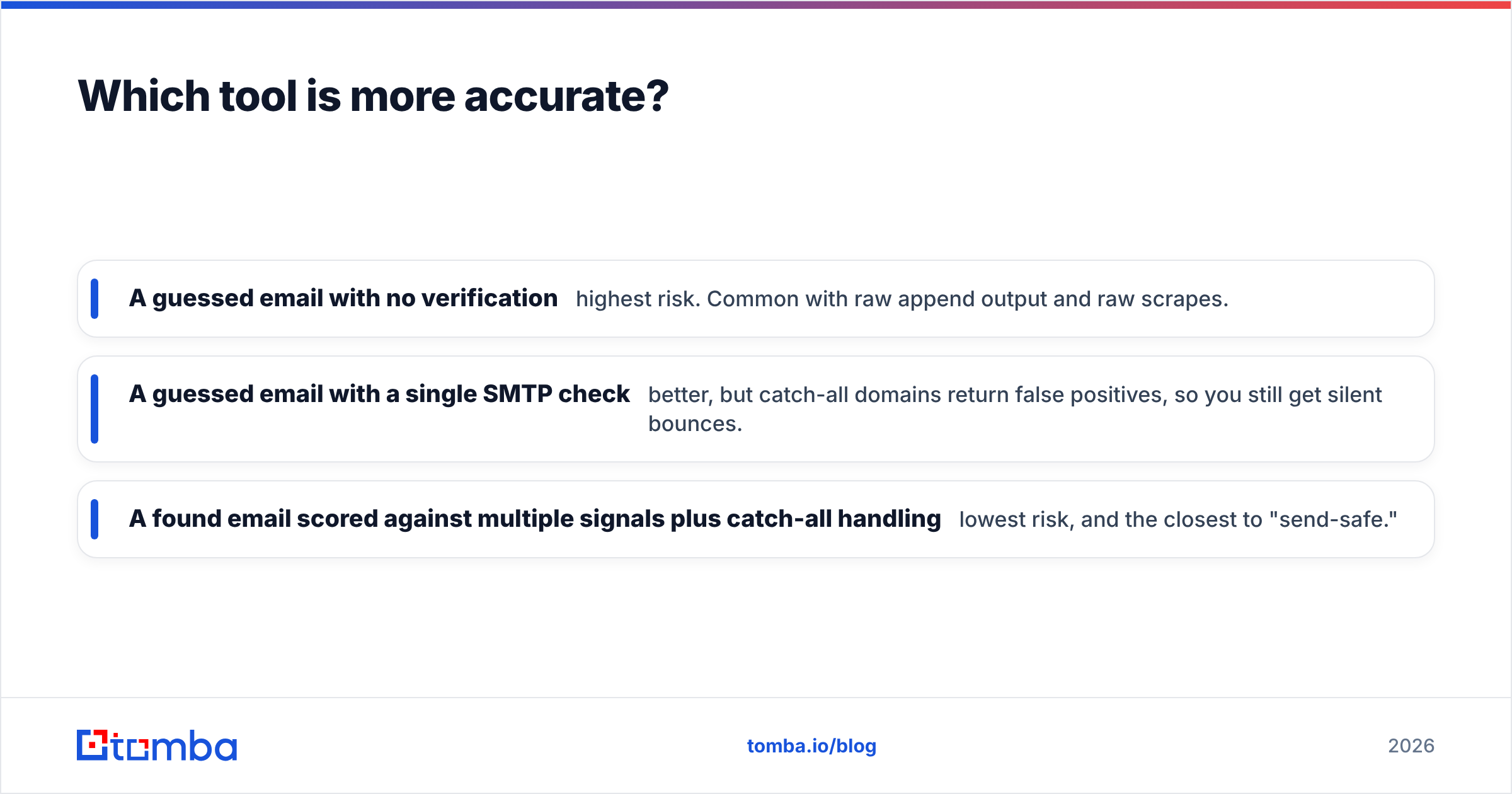
The practical accuracy hierarchy looks like this:
- A guessed email with no verification — highest risk. Common with raw append output and raw scrapes.
- A guessed email with a single SMTP check — better, but catch-all domains return false positives, so you still get silent bounces.
- A found email scored against multiple signals plus catch-all handling — lowest risk, and the closest to "send-safe."
This is where a verification-led workflow matters more than the source tool. Whatever you pull from Bytemine or eGrabber, run it through a real verifier and a catch-all verifier before you load it into a sequencer. According to independent reviews on G2, buyers consistently rank deliverability and bounce rate above raw record volume — quantity is easy, clean is hard.
When should you pick eGrabber?#
Pick eGrabber when you already have names and your bottleneck is appending contact details, especially in recruiting. If your daily motion is "I sourced 200 candidates on LinkedIn, now get me their work emails and phones," LeadGrabber Pro is purpose-built for that and has years of refinement behind it. Recruiters who live in a Windows environment and want a tool that drops results straight into an ATS get real value here.
Be honest with yourself about three things first: you are comfortable with desktop software (not cloud/API), you can justify an annual seat license, and you will verify the appended emails before outreach. If all three are yes, eGrabber earns its place. You can confirm current capabilities and pricing on the official eGrabber site and cross-check user sentiment on Capterra.
When should you pick Bytemine?#
Pick Bytemine when your edge is finding segments nobody else has a clean database for, and you want scraping flexibility over a fixed contact directory. Growth operators, niche-market lead gen agencies, and data teams who enjoy building and refining their own pipelines tend to get the most from a mining-style tool.
The honest prerequisite: you (or someone on your team) will own data hygiene. Scraped data is raw material, not a finished list. Budget time for deduplication — a quick pass with a remove duplicates utility — and for verification. If your team does not want that refining work, the flexibility becomes a liability rather than an advantage.
Where does a finder-plus-verifier fit instead?#
There is a third path that a lot of teams land on after trying both: a cloud, credit-based tool that finds and verifies in one workflow and exposes everything over an API. That is the lane Tomba sits in, and it is worth understanding why it often wins on cost-per-good-record.
Instead of paying an annual seat license (eGrabber) or owning a cleanup pipeline (Bytemine), you pay for searches you use. The email finder returns a professional email by name and domain; the verifier and catch-all logic score it before you ever send; and the whole thing runs from the web app, a Chrome extension, Google Sheets, or the Tomba API for automation. For team-wide list building, the bulk email finder processes a CSV of names and domains at once.
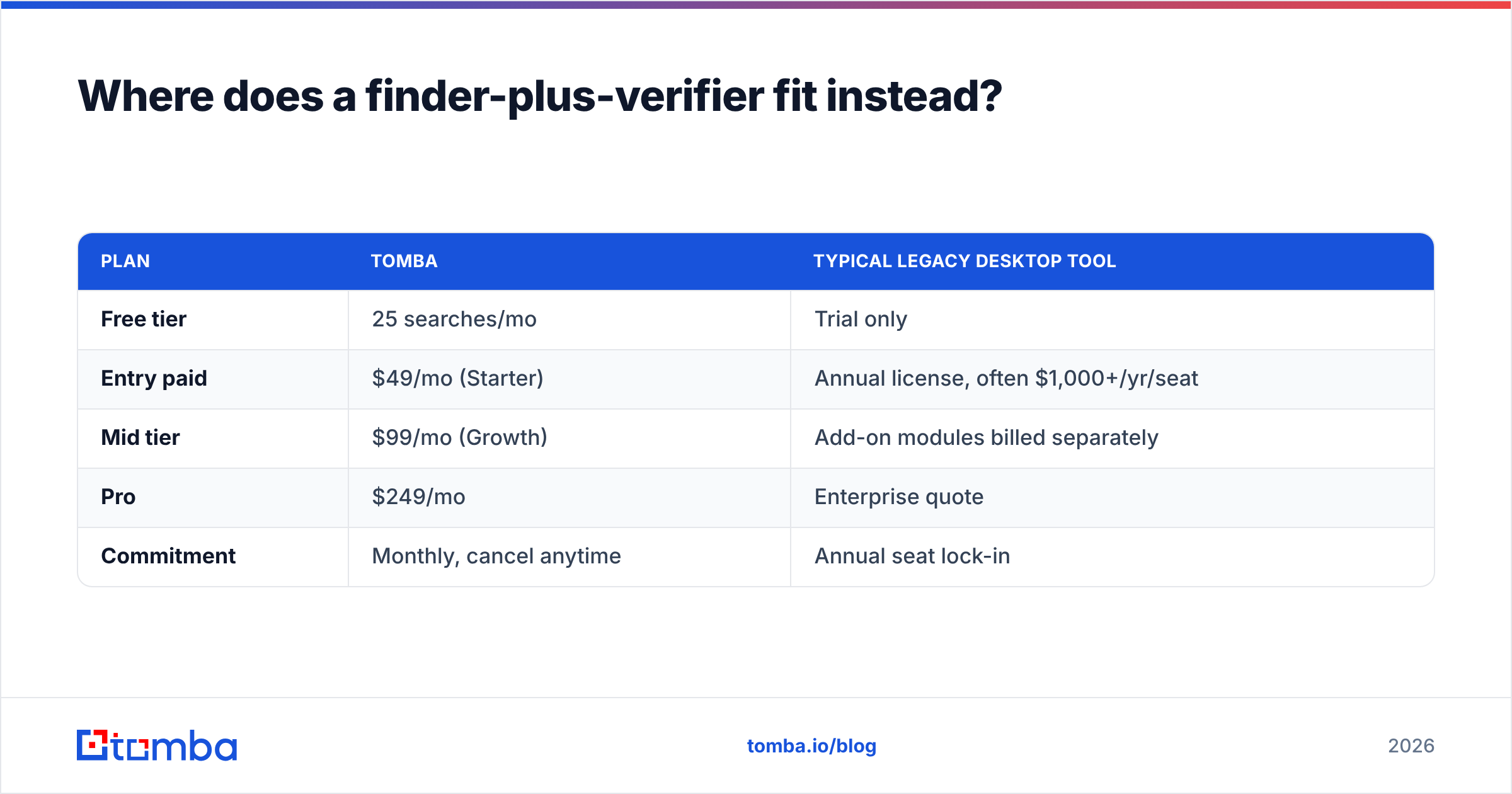
The pricing contrast is the clearest argument:
| Plan | Tomba | Typical legacy desktop tool |
|---|---|---|
| Free tier | 25 searches/mo | Trial only |
| Entry paid | $49/mo (Starter) | Annual license, often $1,000+/yr/seat |
| Mid tier | $99/mo (Growth) | Add-on modules billed separately |
| Pro | $249/mo | Enterprise quote |
| Commitment | Monthly, cancel anytime | Annual seat lock-in |
You can see the full breakdown on the Tomba pricing page. The point is not that Tomba is the only good tool — it is that the "pay for verified searches, automate via API, no annual lock-in" model removes the two biggest frustrations buyers report with both Bytemine and eGrabber: hidden cleanup cost and rigid licensing.
What does a sane workflow look like in 2026?#
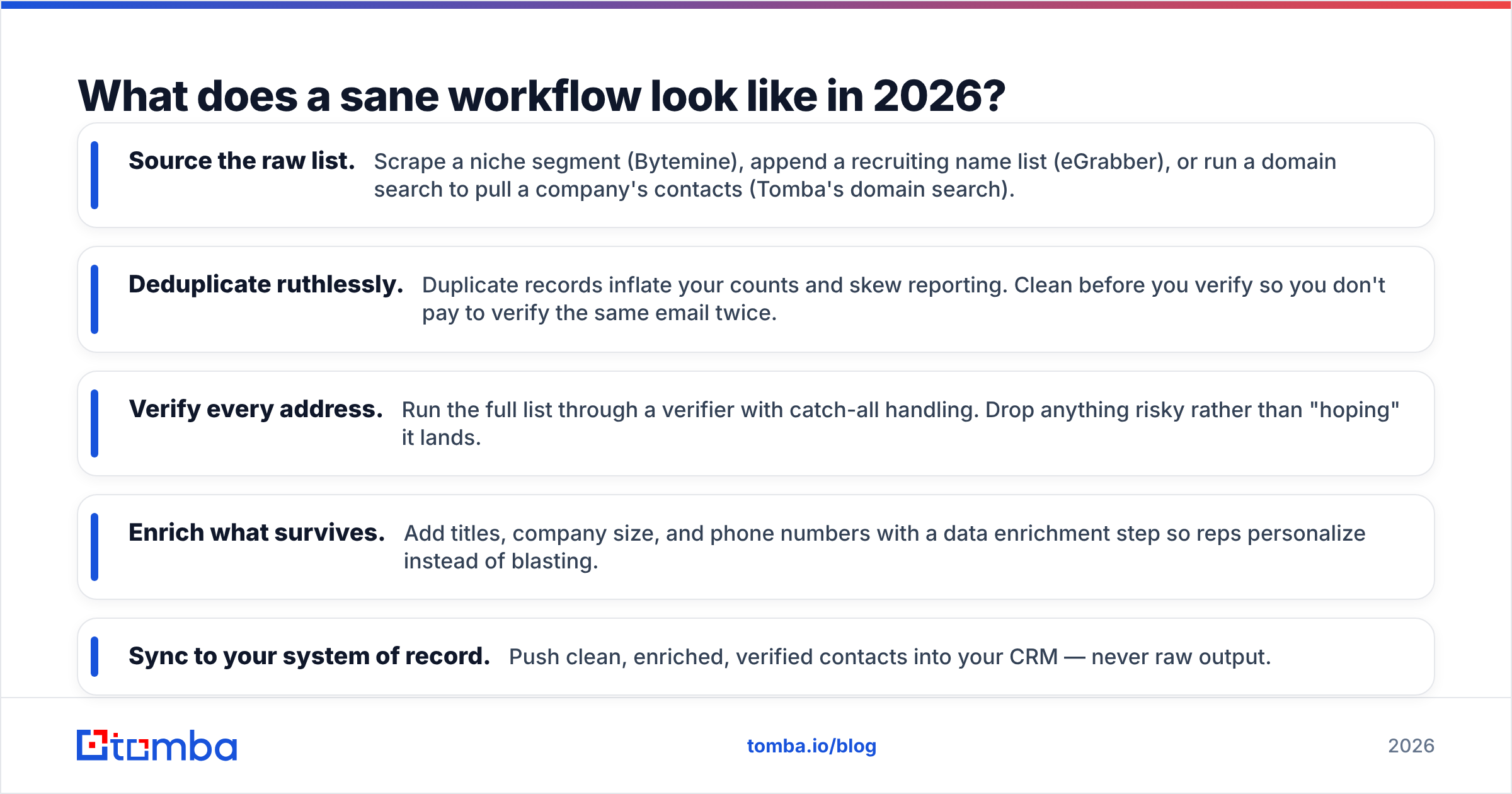
Whichever sourcing tool you choose, the winning teams treat sourcing and verification as separate, non-negotiable steps. A reliable, tool-agnostic flow:
- Source the raw list. Scrape a niche segment (Bytemine), append a recruiting name list (eGrabber), or run a domain search to pull a company's contacts (Tomba's domain search).
- Deduplicate ruthlessly. Duplicate records inflate your counts and skew reporting. Clean before you verify so you don't pay to verify the same email twice.
- Verify every address. Run the full list through a verifier with catch-all handling. Drop anything risky rather than "hoping" it lands.
- Enrich what survives. Add titles, company size, and phone numbers with a data enrichment step so reps personalize instead of blasting.
- Sync to your system of record. Push clean, enriched, verified contacts into your CRM — never raw output.
Skip the middle steps and you will feel it in your bounce rate within a week. Sender reputation is slow to build and fast to wreck.
Frequently asked questions#
Is Bytemine better than eGrabber? Neither is universally better — they solve different problems. Bytemine fits scraping-driven, niche segment building; eGrabber fits appending emails and phones onto an existing name list, especially for recruiters. Choose by your actual bottleneck: finding new segments versus enriching known names.
Is eGrabber's appended email data accurate? Appended emails are pattern-based guesses until verified. eGrabber bundles verification, but accuracy still varies by domain — catch-all servers are the main blind spot. Always run appended addresses through an independent verifier before a real send.
Do Bytemine or eGrabber offer a real API? API access is limited on both. eGrabber is fundamentally a Windows desktop product, and Bytemine's automation hooks are minimal. If programmatic enrichment inside your own stack matters, a finder with a full REST API is a better architectural fit.
What is the cheapest way to start? A free tier beats a trial for evaluation because you can test on real targets without a clock. Tomba's free 25 searches per month lets you benchmark accuracy on your own domains before paying anything, then scale to $49/mo when you are convinced.
The bottom line#
Bytemine and eGrabber are both legitimate tools for the teams they were built for: Bytemine for scraping flexibility, eGrabber for desktop append in recruiting. The catch is that both push data cleanup and licensing rigidity onto you, and neither is built API-first for modern, automated outbound.
If your priority is verified, send-safe contacts you can pull at scale — by name, by domain, or in bulk — and wire directly into your workflow, start with the Tomba Email Finder. Use the free 25 searches to compare accuracy on your own target accounts against whatever you are running today, then let cost-per-good-record decide. Clean data is the cheapest lead source you have; everything downstream depends on it.
Ready to find emails that actually work?
Join 150,000+ professionals who stopped guessing and started sending. Free credits on signup — no credit card required.
Get the Tomba newsletter
Practical outbound tactics and product updates — once every two weeks.
About the author