Byteplant vs FindThatLead (2026): Accuracy, Pricing & Verdict
Byteplant verifies emails; FindThatLead finds them. See which tool fits your 2026 outbound stack — and where a single platform beats running both.
Byteplant vs FindThatLead: Which One Does Your Pipeline Actually Need?
You searched "byteplant vs findthatlead" expecting a head-to-head. Here is the honest framing first: these two tools barely compete. Byteplant is an email verification engine. FindThatLead is an email finder and lead-generation tool. Comparing them straight up is like comparing a smoke detector to a moving truck — both useful, neither a replacement for the other.
So the real question is not "which wins." It is "which job am I solving, and do I need one tool, the other, both, or a single platform that does both jobs cleanly." This guide answers that.
TL;DR#
- Byteplant (Email Validator) is a deliverability-grade verification API and bulk cleaner. Strong if your problem is bounces, not finding people.
- FindThatLead is a prospecting tool — domain-based email discovery, lead search, and a basic cold-email sender. Strong if your problem is building a list, not cleaning one.
- Run them together and you pay two bills, manage two dashboards, and still stitch CSVs by hand.
- A combined finder + verifier like Tomba covers both jobs on one credit pool, with a free tier to test before you commit.
- Pick by the gap in your funnel: empty list → finder; high bounce rate → verifier; both → consolidate.
What Is Byteplant and What Does It Actually Do?#
Byteplant's flagship is Email Validator — a service that checks whether an address is syntactically valid, has live MX records, and will accept mail at the SMTP layer. It runs as a real-time API, a bulk file processor, and a set of integrations. The pitch is deliverability: feed it a list, get back graded results (valid, invalid, catch-all, role-based, disposable), and stop torching your sender reputation on dead addresses.
What Byteplant does not do is find new contacts. You bring the addresses; it tells you which ones are real. That is the entire scope, and it is a respectable scope — Byteplant has run validation since well before the current wave of all-in-one sales tools.
If your CRM is full of two-year-old leads and your bounce rate just crossed 5%, Byteplant-style verification is exactly the tool category you want. Just know it is one half of the workflow. For context on why that bounce number matters, see this primer on email deliverability and sender reputation.

What Is FindThatLead and What Does It Actually Do?#
FindThatLead sits on the opposite side of the funnel. It is a lead-generation tool: type a domain and it returns email addresses associated with that company; type a name and company and it guesses the work email; upload a list of domains and it enriches them in bulk. It also bundles a "Scrab.in" LinkedIn automation layer and a lightweight cold-email sender so you can prospect and send from one login.
FindThatLead's job is filling an empty pipeline. It does include a verification step on the emails it returns, but verification is a feature riding on the finder — not a standalone, deliverability-grade cleaning engine the way Byteplant is. If you already have a list and just need it scrubbed, FindThatLead is overkill aimed at the wrong problem.
So the two tools are not rivals. They are funnel neighbors. The honest comparison is: what is each one best at, and what does it cost you to need both?
)
Byteplant vs FindThatLead: The Side-by-Side#
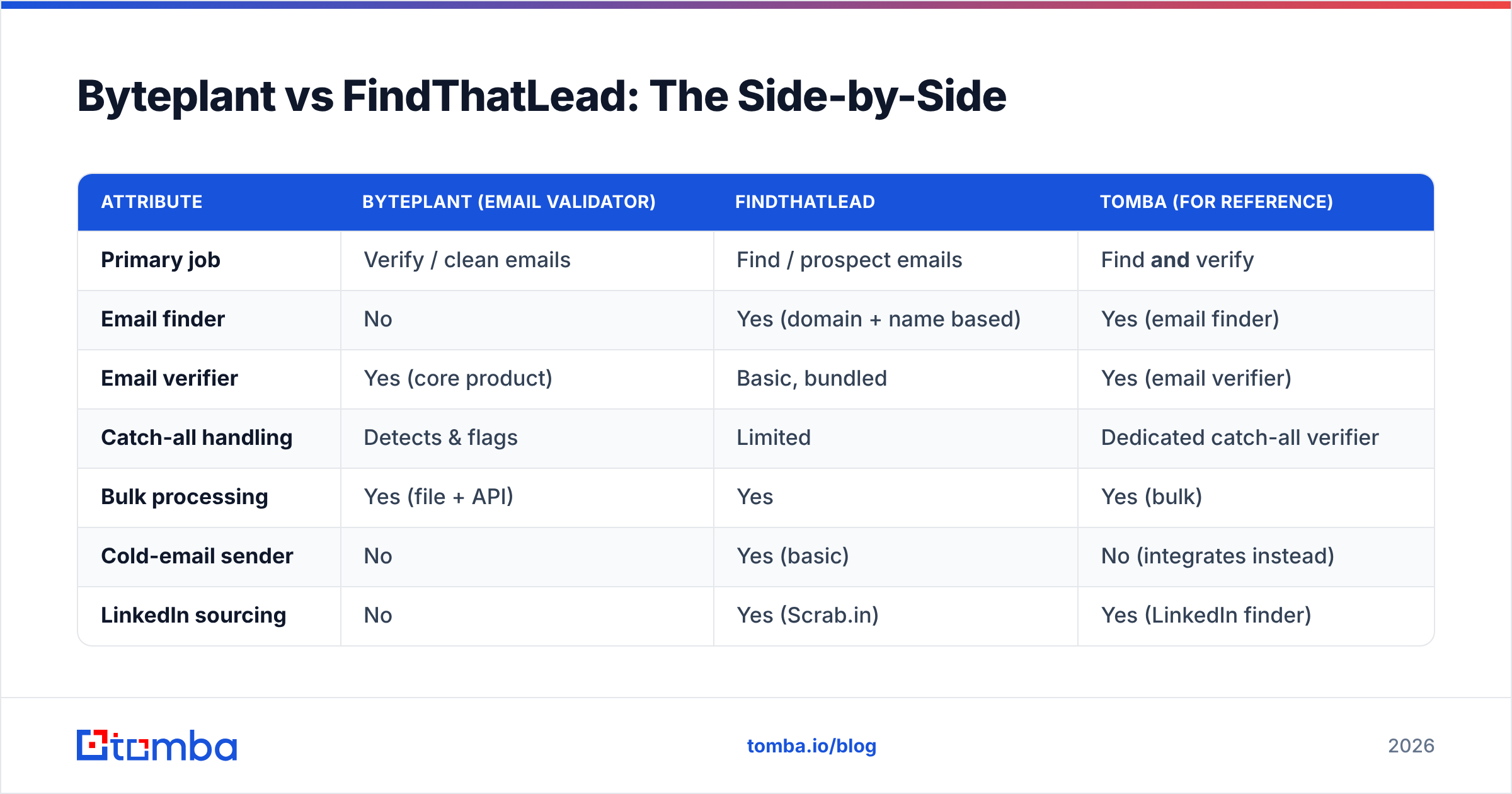
Here is the structured breakdown. Read it by column based on the job you are hiring for, not as a single scoreboard.
| Attribute | Byteplant (Email Validator) | FindThatLead | Tomba (for reference) |
|---|---|---|---|
| Primary job | Verify / clean emails | Find / prospect emails | Find and verify |
| Email finder | No | Yes (domain + name based) | Yes (email finder) |
| Email verifier | Yes (core product) | Basic, bundled | Yes (email verifier) |
| Catch-all handling | Detects & flags | Limited | Dedicated catch-all verifier |
| Bulk processing | Yes (file + API) | Yes | Yes (bulk) |
| Cold-email sender | No | Yes (basic) | No (integrates instead) |
| LinkedIn sourcing | No | Yes (Scrab.in) | Yes (LinkedIn finder) |
| Free tier | Trial credits | Limited free plan | 25 searches/mo free |
| Best for | Deliverability teams | Early-stage prospecting | Teams that need both |
The pattern is obvious once it is laid out: Byteplant is deep but narrow, FindThatLead is broad but shallow on the verification side, and the workflow you probably run needs strengths from both columns.
Is Byteplant More Accurate Than FindThatLead?#
For verification specifically, yes — and that is by design. Byteplant exists to do one thing, so its SMTP checks, catch-all detection, and disposable-domain filtering are more thorough than the verification FindThatLead bolts onto its finder results. If your only metric is "how clean is my list after processing," a dedicated validator wins.
But accuracy in finding is a different test, and here Byteplant scores zero because it does not find anything. FindThatLead's discovery hit-rate depends on how common the company's email pattern is and how much public data exists for the domain. That is normal for finders — accuracy varies by industry and company size.
The trap is treating "accuracy" as one number. It is two:
- Discovery accuracy — of the people you want, how many emails can the tool surface?
- Verification accuracy — of the emails surfaced, how many actually accept mail?
Byteplant only answers #2. FindThatLead answers a bit of both but specializes in neither. This is exactly why teams end up running both, and why a platform built to answer both questions on the same data — see how Tomba documents its data sources — removes the seam where leads leak between two tools.
What Does Running Both Cost You?#
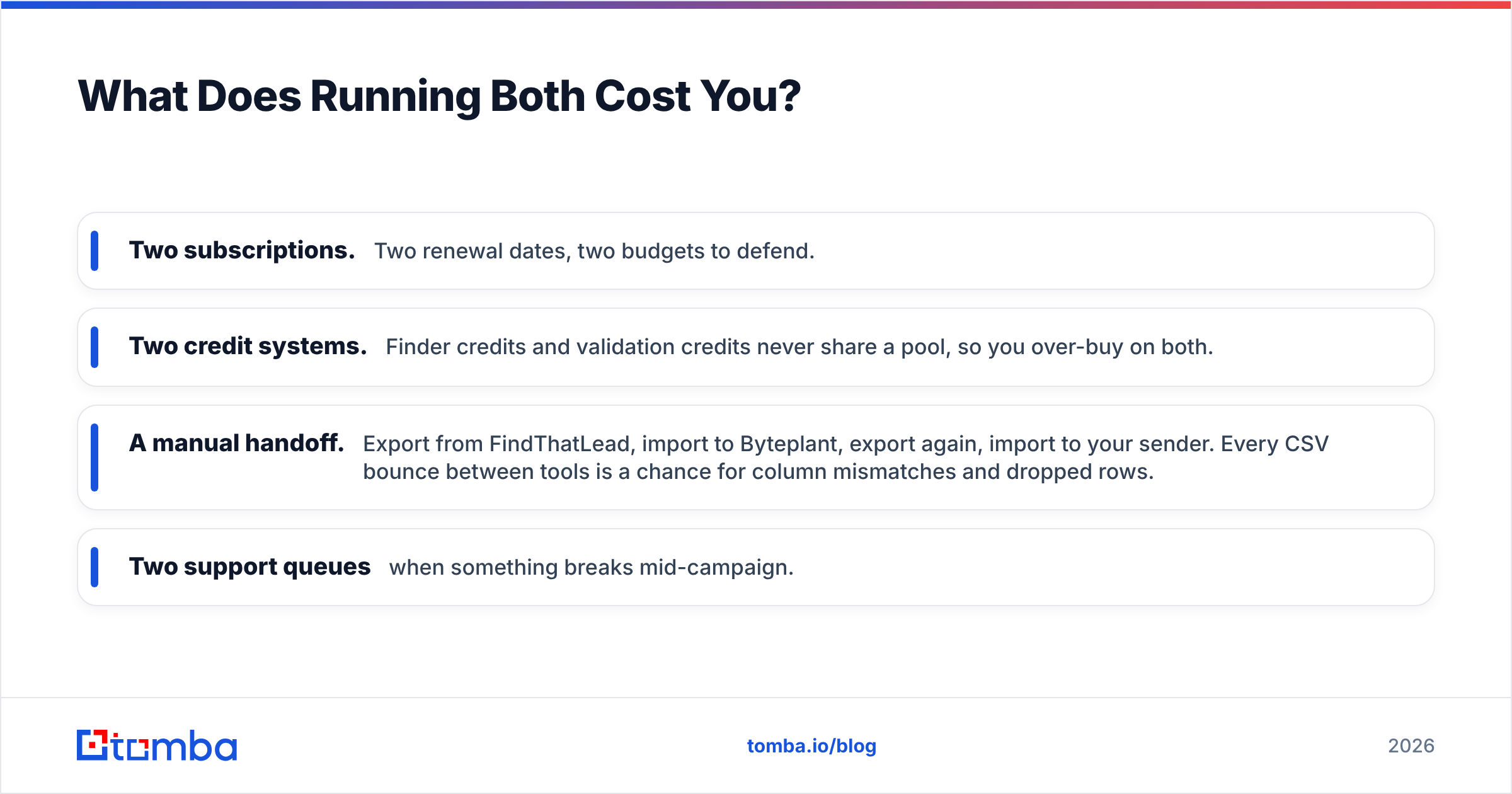
This is the part the individual product pages won't tell you. If your workflow is find → verify → send, and you pick FindThatLead for the finding and Byteplant for the verifying, you now own:
- Two subscriptions. Two renewal dates, two budgets to defend.
- Two credit systems. Finder credits and validation credits never share a pool, so you over-buy on both.
- A manual handoff. Export from FindThatLead, import to Byteplant, export again, import to your sender. Every CSV bounce between tools is a chance for column mismatches and dropped rows.
- Two support queues when something breaks mid-campaign.
For a solo founder or a small SDR team, that overhead is real money and real hours. The math only favors two specialist tools when you operate at a scale where each one's depth genuinely pays off — say, a deliverability team running millions of validations a month that also has a separate sourcing team.
When Should You Pick Byteplant?#
Choose a dedicated verifier like Byteplant when:
- Your lists already exist. You have CRM data, event lists, or purchased data that needs cleaning, not new contacts.
- Bounce rate is the fire. Mailbox providers are throttling you and you need deliverability-grade scrubbing now.
- You need verification at the API layer, embedded in a signup form or checkout to block junk addresses at entry.
- Compliance and accuracy outrank breadth. You want one job done extremely well.
In those cases the narrowness is a feature. You can always layer a finder on top later — and if you want to test verification logic for free first, Tomba's free email checker and standalone email verifier let you benchmark results before committing budget anywhere.
When Should You Pick FindThatLead?#
Choose FindThatLead (or any finder-first tool) when:
- Your pipeline is empty. You need names and emails before anything else matters.
- You want sourcing and sending in one cheap login and can tolerate a lighter feature set.
- LinkedIn is your main channel and the bundled Scrab.in automation fits your motion.
- You are early-stage and optimizing for "good enough to start," not "best in class at each step."
Just be clear-eyed that the verification you get is a passenger, not the driver. When your sending volume grows and deliverability starts to matter, you will feel the gap.
What Is the All-in-One Alternative?#
A combined platform handles find and verify on one credit pool so leads never fall through the CSV gap between two products. The structured way to evaluate the consolidation case:
- One credit system. Finding and verifying draw from the same balance — no double-buying.
- One dashboard and API. A single email finder API and verification endpoint instead of two integrations to maintain.
- Catch-all is handled in place. A real catch-all verifier for the domains finders usually flag as "unknown," instead of leaving them in limbo.
- Native enrichment and bulk. Bulk lead generation and data enrichment reuse the same dataset, so a found contact gets verified and enriched without leaving the tool.
- Free tier to de-risk. Test the actual results before a card is involved.
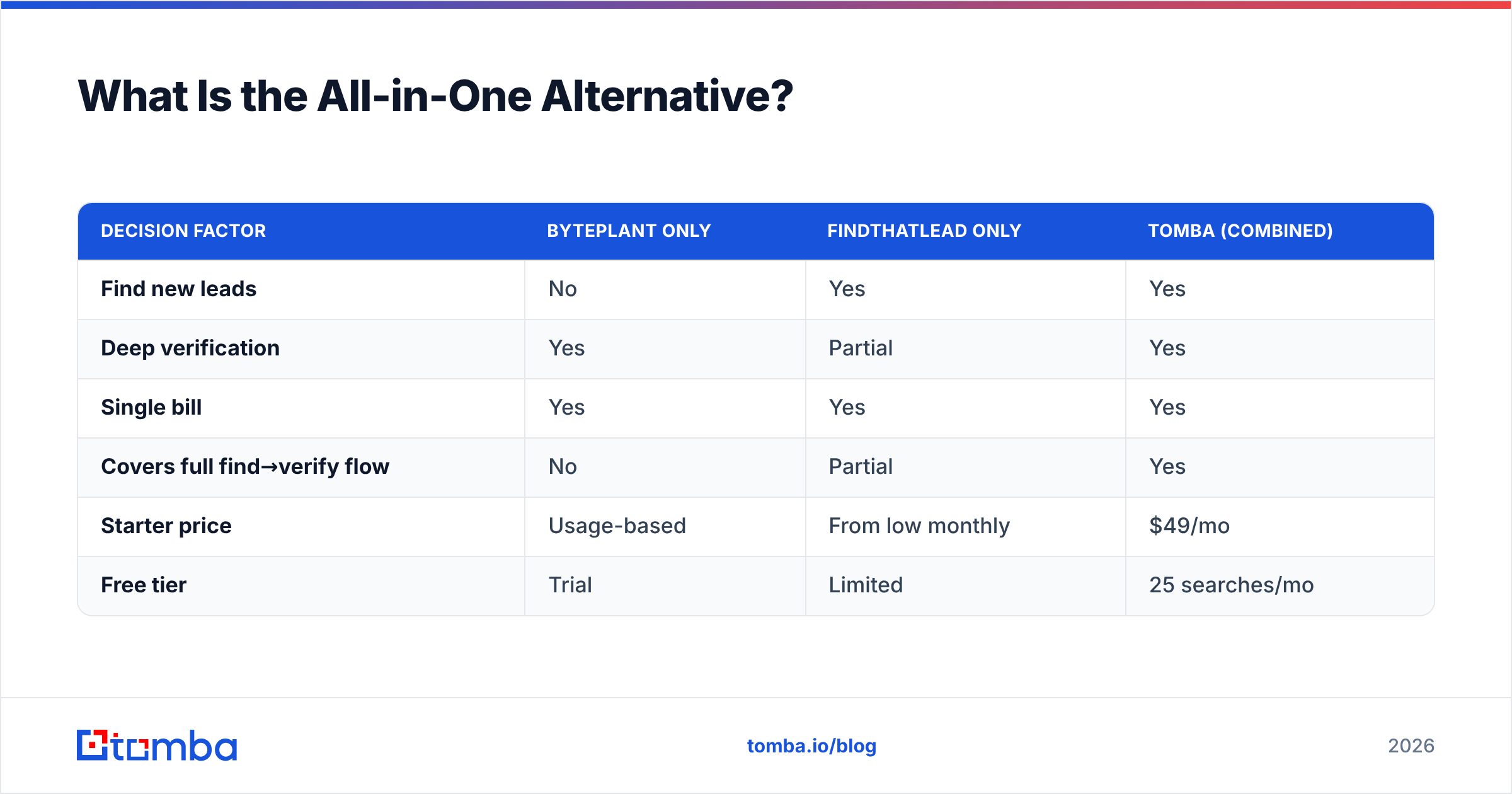
Here is how the three options stack up on the consolidation question specifically:
| Decision factor | Byteplant only | FindThatLead only | Tomba (combined) |
|---|---|---|---|
| Find new leads | No | Yes | Yes |
| Deep verification | Yes | Partial | Yes |
| Single bill | Yes | Yes | Yes |
| Covers full find→verify flow | No | Partial | Yes |
| Starter price | Usage-based | From low monthly | $49/mo |
| Free tier | Trial | Limited | 25 searches/mo |
Pricing transparency matters here too — you can see the full Tomba pricing ladder publicly: Free (25 searches/mo), Starter $49/mo, Growth $99/mo, Pro $249/mo, and custom Enterprise. No "contact sales to see a number" wall for the plans most teams actually buy.

How Do You Actually Decide?#
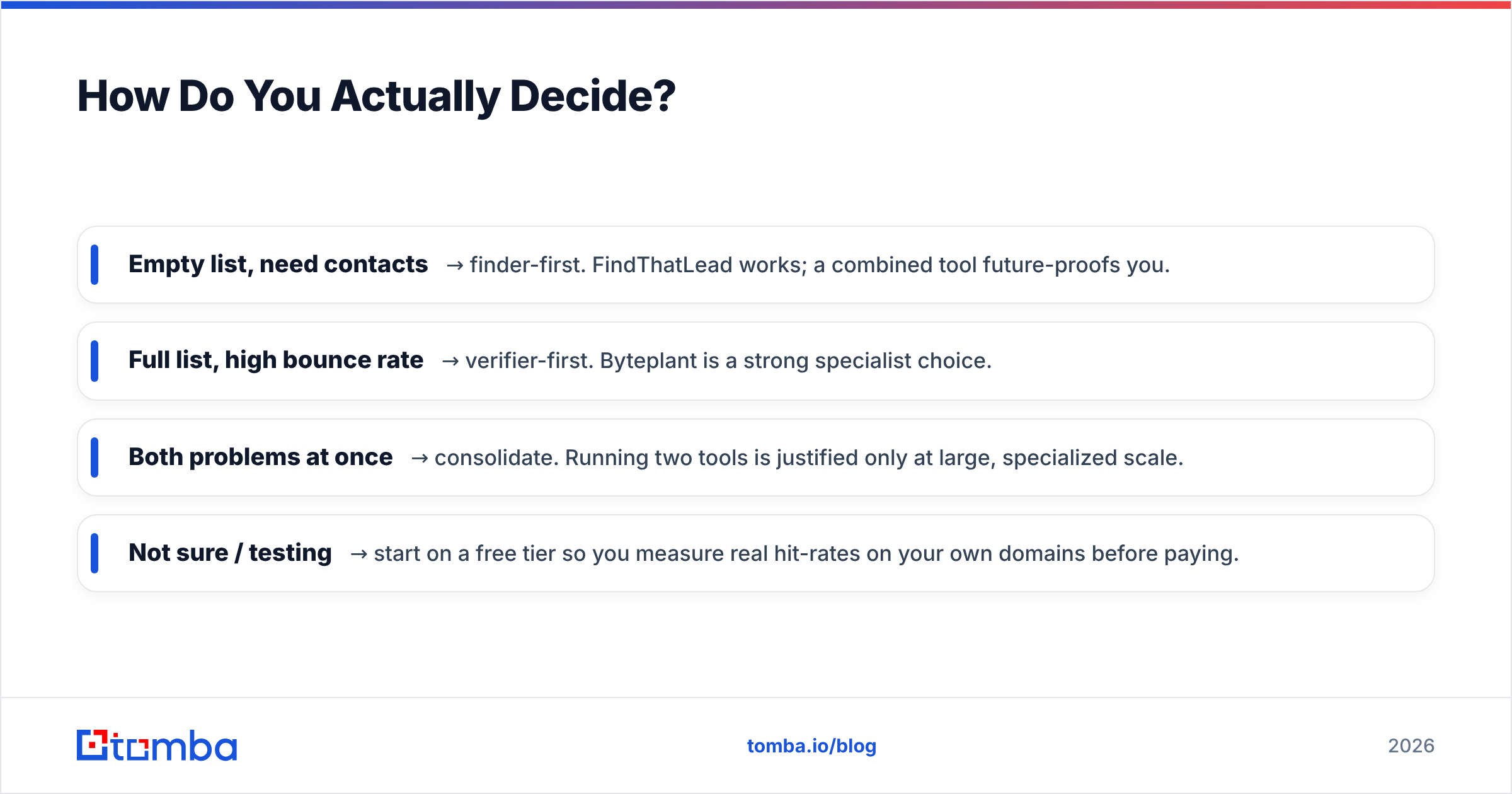
Map it to the gap in your funnel, not to a feature checklist:
- Empty list, need contacts → finder-first. FindThatLead works; a combined tool future-proofs you.
- Full list, high bounce rate → verifier-first. Byteplant is a strong specialist choice.
- Both problems at once → consolidate. Running two tools is justified only at large, specialized scale.
- Not sure / testing → start on a free tier so you measure real hit-rates on your own domains before paying.
Whatever you choose, validate with your data, not a vendor's marketing number. Pull 50 of your target companies, run them through each tool, and count two things: how many real contacts you got, and how many of those passed verification. That single test settles "byteplant vs findthatlead" faster than any blog post — including this one.
For deeper reading on the discovery side, both HubSpot and peer-review sites like G2 keep current breakdowns of email tools worth cross-checking against your own results.
The Bottom Line#
Byteplant and FindThatLead are not really competitors — they are two halves of one workflow. Byteplant cleans; FindThatLead finds. If you only have one problem, pick the specialist that owns it. If you have both problems, ask whether two subscriptions, two credit pools, and a manual CSV handoff are worth it versus a single platform that does both.
Most growing teams land on consolidation. If that is you, start free with the Tomba Email Finder — find verified professional emails by domain, name, or company, verify them in the same place, and skip the two-tool tax entirely. Twenty-five searches a month, no card, so you can run the 50-company test above before you commit a cent.
Ready to find emails that actually work?
Join 150,000+ professionals who stopped guessing and started sending. Free credits on signup — no credit card required.
Get the Tomba newsletter
Practical outbound tactics and product updates — once every two weeks.
About the author