Byteplant vs Tomba 2026: Email Finder & Data Compared
Byteplant validates emails; Tomba finds and verifies them. Here's an honest 2026 breakdown of accuracy, pricing, and which tool actually fits your B2B outreach stack.
Choosing between Byteplant and Tomba usually means you are confused about what each one actually does — and that confusion costs you money. They are not the same kind of tool, and picking the wrong one leaves a hole in your pipeline.
TL;DR — Byteplant vs Tomba in one screen#
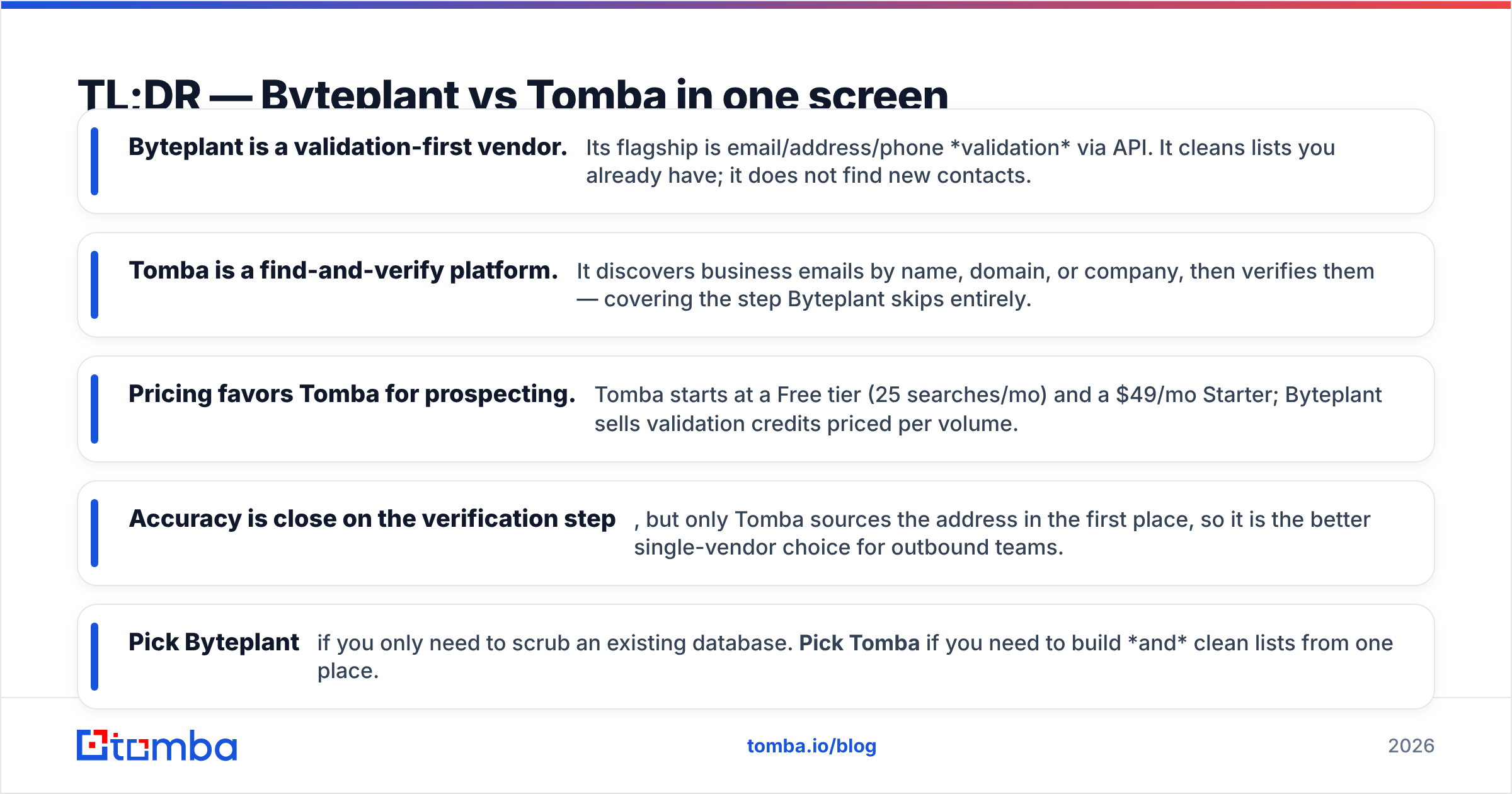
- Byteplant is a validation-first vendor. Its flagship is email/address/phone validation via API. It cleans lists you already have; it does not find new contacts.
- Tomba is a find-and-verify platform. It discovers business emails by name, domain, or company, then verifies them — covering the step Byteplant skips entirely.
- Pricing favors Tomba for prospecting. Tomba starts at a Free tier (25 searches/mo) and a $49/mo Starter; Byteplant sells validation credits priced per volume.
- Accuracy is close on the verification step, but only Tomba sources the address in the first place, so it is the better single-vendor choice for outbound teams.
- Pick Byteplant if you only need to scrub an existing database. Pick Tomba if you need to build and clean lists from one place.
What is Byteplant and what does it actually do?#
Byteplant is a German data-quality company best known for its validation APIs: EmailValidation.io, PhoneValidator, and AddressValidation. Think of Byteplant like a spell-checker for contact data — you hand it a list you already own, and it tells you which entries are real, risky, or dead. It does not write the document for you.
That distinction matters. Byteplant's email product checks syntax, domain/MX records, mailbox existence, and flags disposable or role-based addresses. It is genuinely good at that one job, and it is built for developers who want a clean REST endpoint and high throughput. You can read their positioning on the official byteplant.com site.
What Byteplant does not do is generate contacts. If you have a target account but no email address for the VP of Sales there, Byteplant has nothing to give you. You need a finder first.
What is Tomba and how is it different?#
Tomba is a B2B email finder and enrichment platform that covers both halves of the job: discovery and verification. You start from a name and company, a domain, or a LinkedIn profile, and Tomba returns the professional email — then runs it through its own email verifier before handing it back with a confidence score.
In restaurant terms: Byteplant inspects the ingredients you already bought, while Tomba sources the ingredients and inspects them. For a sales or growth team that needs net-new contacts every week, that end-to-end coverage is the whole point.
Tomba's surface area is broad: domain search to pull every public email at a company, a bulk email finder for list building, plus phone finding, catch-all verification, and data enrichment. The Tomba API exposes the same capabilities Byteplant developers expect from a REST endpoint, so you are not trading developer ergonomics for breadth.
How accurate is each tool?#
Accuracy is where most comparisons get sloppy, because the two tools are measured on different axes.
Byteplant's accuracy claim is about verification correctness: given an email, how reliably does it classify deliverable vs undeliverable? On clean, non-catch-all domains, dedicated validators like Byteplant perform well — typically catching syntax errors, dead mailboxes, and disposable domains with high confidence.
Tomba is measured on two axes: discovery hit-rate (did it find a real email for the contact at all?) and verification accuracy (is that email deliverable?). Tomba's verifier performs an SMTP-level check similar to Byteplant's, and its discovery engine draws on a large crawled and licensed dataset — see where Tomba gets its data for the sourcing detail.

The honest takeaway: if you only feed both tools a known list to scrub, their verification verdicts will agree most of the time. The gap opens on the contacts you don't have yet — and there, Byteplant returns nothing while Tomba returns a verified address. For prospecting, discovery hit-rate is the metric that actually drives revenue.
A practical tip regardless of vendor: catch-all domains are the hard case for everyone. Tomba ships a dedicated catch-all verifier to grade these instead of marking them all "unknown," which is where generic validators tend to give up.
Byteplant vs Tomba: full feature comparison#
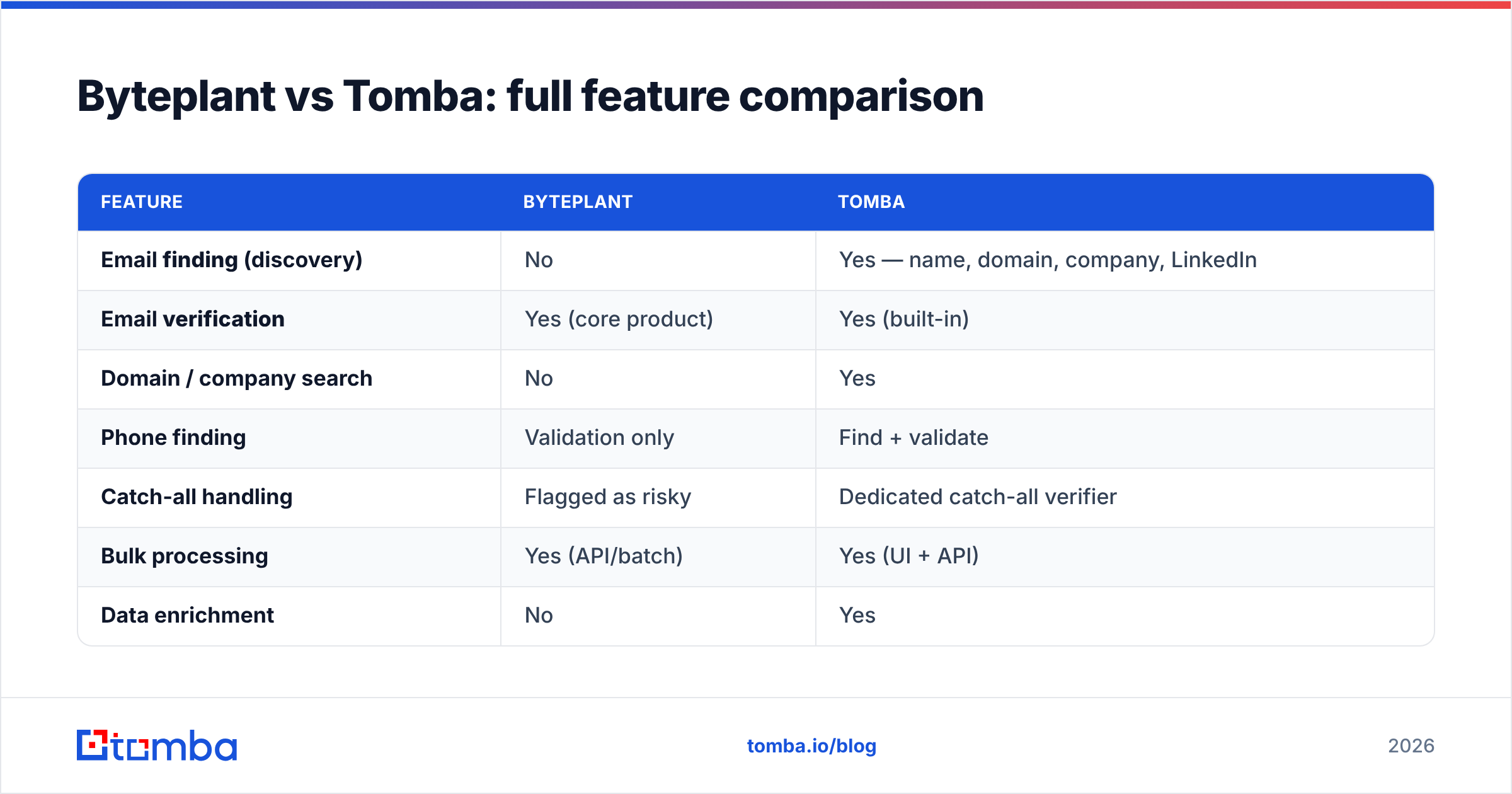
Here is the head-to-head on the attributes that decide most purchases.
| Feature | Byteplant | Tomba |
|---|---|---|
| Email finding (discovery) | No | Yes — name, domain, company, LinkedIn |
| Email verification | Yes (core product) | Yes (built-in) |
| Domain / company search | No | Yes |
| Phone finding | Validation only | Find + validate |
| Catch-all handling | Flagged as risky | Dedicated catch-all verifier |
| Bulk processing | Yes (API/batch) | Yes (UI + API) |
| Data enrichment | No | Yes |
| Chrome extension | No | Yes |
| Free tier | Trial credits | 25 searches/mo, ongoing |
| Entry paid price | Per-credit volume pricing | $49/mo Starter |
| Best fit | Cleaning owned lists | Build + clean from one tool |

The pattern is consistent: Byteplant is a focused validation utility, Tomba is a full contact-data platform. If your only job is list hygiene, Byteplant's focus is a feature, not a limitation. If your job is filling a pipeline, the missing discovery row is disqualifying.
How does pricing compare?#
Pricing is structured differently, so compare on cost per usable contact, not sticker price.
Byteplant sells validation credits in volume tiers — you pay per email checked, with the unit price dropping as volume rises. That model is efficient when you have a large existing list to clean once or on a schedule, and you never need to find anything.
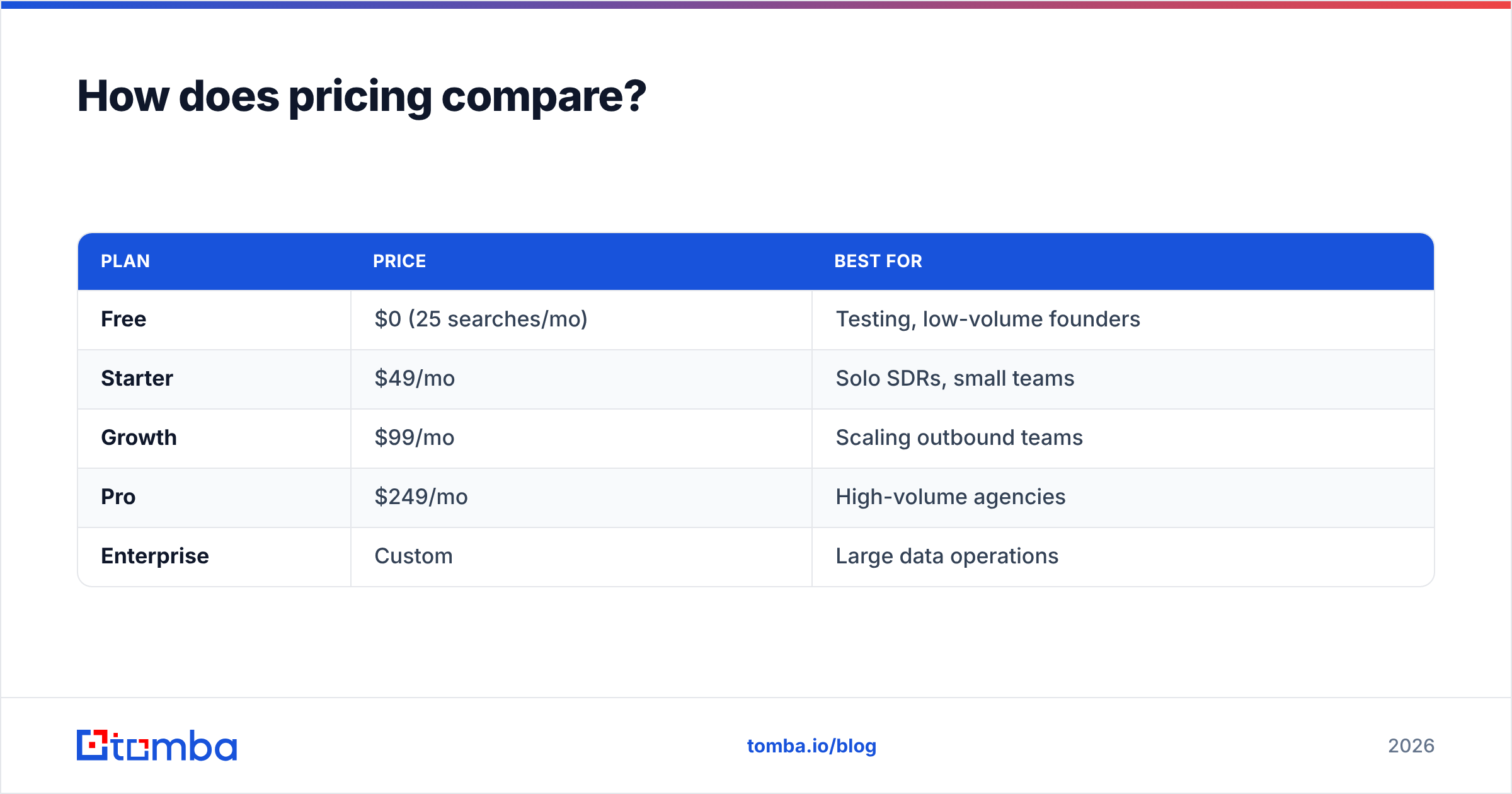
Tomba uses predictable monthly plans, and a single search credit covers both finding and verifying a contact. Full Tomba pricing:
| Plan | Price | Best for |
|---|---|---|
| Free | $0 (25 searches/mo) | Testing, low-volume founders |
| Starter | $49/mo | Solo SDRs, small teams |
| Growth | $99/mo | Scaling outbound teams |
| Pro | $249/mo | High-volume agencies |
| Enterprise | Custom | Large data operations |
The real cost question: if you buy Byteplant, you still need a separate finder tool to source contacts, which means two subscriptions and two integrations. Tomba folds both into one credit, so for any team doing outbound, the all-in cost is usually lower with a single platform. Validate that against your own volume on a marketplace like G2 where both categories are reviewed side by side.
Which one should you choose?#
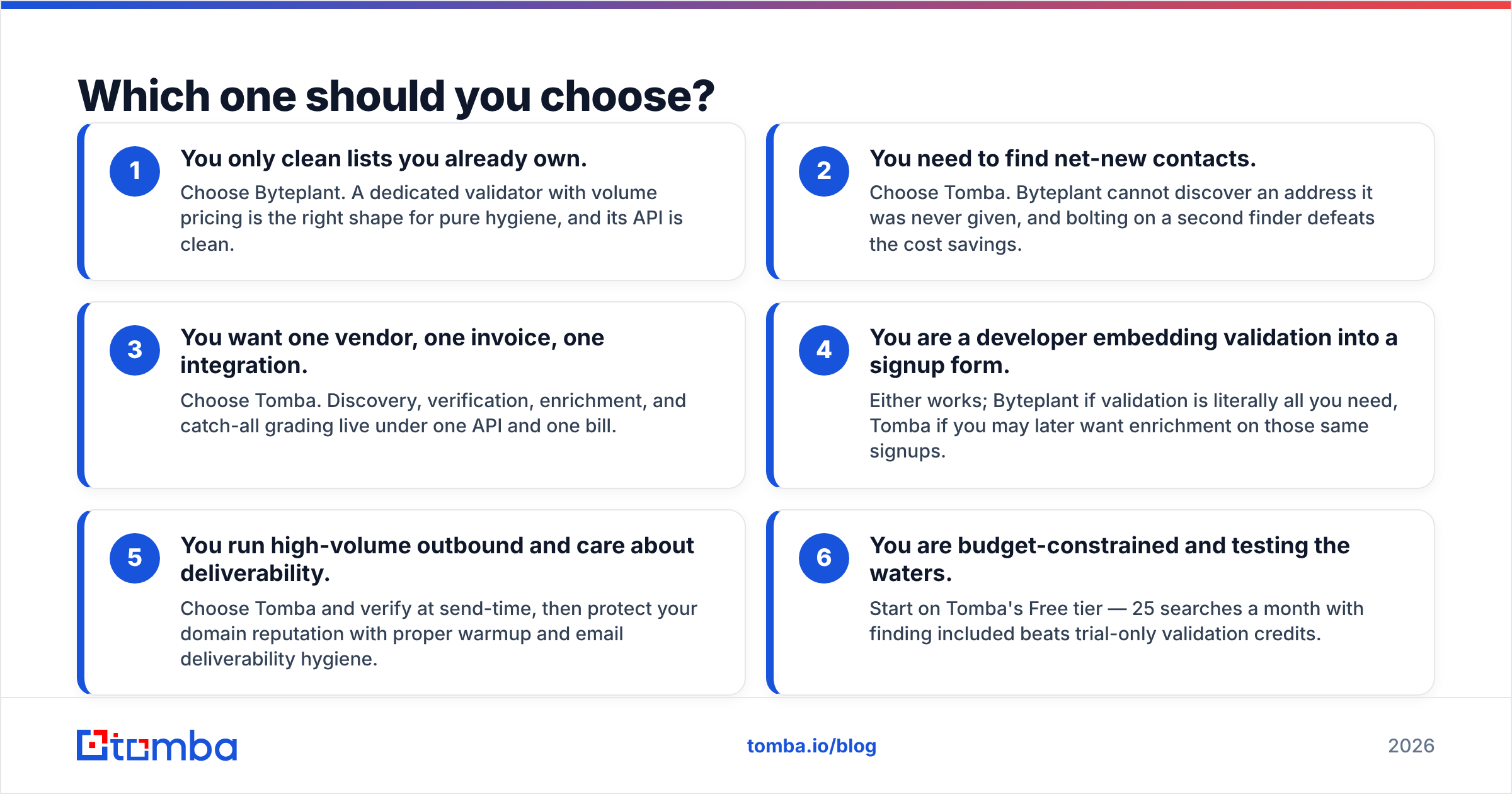
Match the tool to the job — and be honest about what the job actually is.
- You only clean lists you already own. Choose Byteplant. A dedicated validator with volume pricing is the right shape for pure hygiene, and its API is clean.
- You need to find net-new contacts. Choose Tomba. Byteplant cannot discover an address it was never given, and bolting on a second finder defeats the cost savings.
- You want one vendor, one invoice, one integration. Choose Tomba. Discovery, verification, enrichment, and catch-all grading live under one API and one bill.
- You are a developer embedding validation into a signup form. Either works; Byteplant if validation is literally all you need, Tomba if you may later want enrichment on those same signups.
- You run high-volume outbound and care about deliverability. Choose Tomba and verify at send-time, then protect your domain reputation with proper warmup and email deliverability hygiene.
- You are budget-constrained and testing the waters. Start on Tomba's Free tier — 25 searches a month with finding included beats trial-only validation credits.
How do they fit into a real outreach workflow?#
The cleanest way to see the difference is to trace a single campaign.
You build a target list of 500 accounts. With Byteplant alone, you are stuck at step zero — you have company names but no emails, and Byteplant has no way to produce them. You would need to buy or scrape a list elsewhere first, then pass it to Byteplant for cleaning. Two tools, two costs, a brittle hand-off.
With Tomba, you run domain search across those 500 companies, pull the right roles, and Tomba verifies each address inline. One pass, one tool, and the output is a verified, send-ready list. You can push it straight into your CRM through Tomba's HubSpot integration or export it.
This is not a knock on Byteplant — it is doing exactly what it was built to do. It is a reminder that "email validation tool" and "email finding platform" solve different problems, and most sales teams discover mid-campaign that they bought the validator when they needed the finder. Treat verification as a step inside a finding workflow, not a separate product you stitch in afterward. For more on why verification alone is not enough, HubSpot's own guidance on email list hygiene is a useful neutral reference.
What are the trade-offs and limitations?#
No tool is perfect, and you should buy with eyes open.
Byteplant trade-offs. Its narrow scope means you will need additional tooling for any discovery, enrichment, or prospecting work. Volume pricing can also be unpredictable for spiky usage — a big one-off clean is cheap per unit but easy to under-budget. And because it is validation-only, it offers no help with the catch-all guessing problem beyond flagging risk.
Tomba trade-offs. Breadth means there are features you may never touch if you only want validation, so a pure-hygiene buyer might find the platform broader than necessary. Discovery hit-rate also varies by region and seniority — very small companies and non-Western domains are harder for any finder, Tomba included. Always verify before sending, even on found addresses, which is why the verifier is built in rather than sold separately.
The shared limitation across both: no tool can deliver an email to a mailbox that has been deleted since it was last seen. Real-time verification at send-time, plus periodic re-cleaning of your database, is the only durable fix — and that is a process discipline, not a vendor choice.
Final verdict and next step#
Byteplant and Tomba are not really competitors — they are different categories that overlap on one step. Byteplant is an excellent validation utility for teams that only need to clean owned data. Tomba is the better choice for anyone who needs to build contact lists and verify them in the same motion, which describes almost every sales, growth, and recruiting team running outbound in 2026.
If your work involves finding people who are not already in your database, the decision is simple: a validator alone cannot get you there. Start free with the Tomba Email Finder, find and verify your first 25 contacts this month at no cost, and upgrade to the $49/mo Starter plan only once it is paying for itself. You get discovery, verification, enrichment, and catch-all handling under one roof — and one fewer subscription to manage.
Ready to find emails that actually work?
Join 150,000+ professionals who stopped guessing and started sending. Free credits on signup — no credit card required.
Get the Tomba newsletter
Practical outbound tactics and product updates — once every two weeks.
About the author