Cal.com Pricing, Reviews, Pros and Cons: A 2026 Breakdown
Is Cal.com worth it in 2026? We break down every pricing tier, the real pros and cons, what reviewers actually say, and when an alternative fits better.
TL;DR
- Cal.com has four tiers: Free (solo users), Teams at about $15/user/mo, Organizations at roughly $37/user/mo, and Enterprise/Platform at custom pricing.
- The biggest draw is that it's open-source and self-hostable — you can run the whole scheduling stack on your own servers for the cost of hosting.
- The biggest knock in reviews is setup complexity and a steeper learning curve than Calendly, especially for self-hosting.
- Cal.com is a strong fit if you value data ownership, deep customization, or embedding scheduling into your own product via the API.
- Scheduling only matters if the meeting actually happens — pair Cal.com with clean, verified contact data so your calendar fills with real prospects, not bounces.
What is Cal.com?#
Cal.com is an open-source scheduling platform — think of it as the self-hostable cousin of Calendly. You create event types (a 30-minute demo, a 15-minute intro call), share a booking link, and prospects pick a slot that syncs to your calendar. Where it differs is philosophy: the entire codebase is public, you can host it yourself, and you can bend almost any part of the booking flow to your needs.
It started life as "Calendso" in 2021 and rebranded to Cal.com. Today it serves two audiences at once: individuals and teams who want a polished booking tool, and developers who want to embed scheduling infrastructure directly into their own apps through the Cal.com platform and API.
If your day revolves around booking meetings — sales demos, discovery calls, onboarding sessions — the tool you pick quietly shapes your whole pipeline. So the pricing and the trade-offs are worth understanding before you commit a team to it.
How much does Cal.com cost in 2026?#
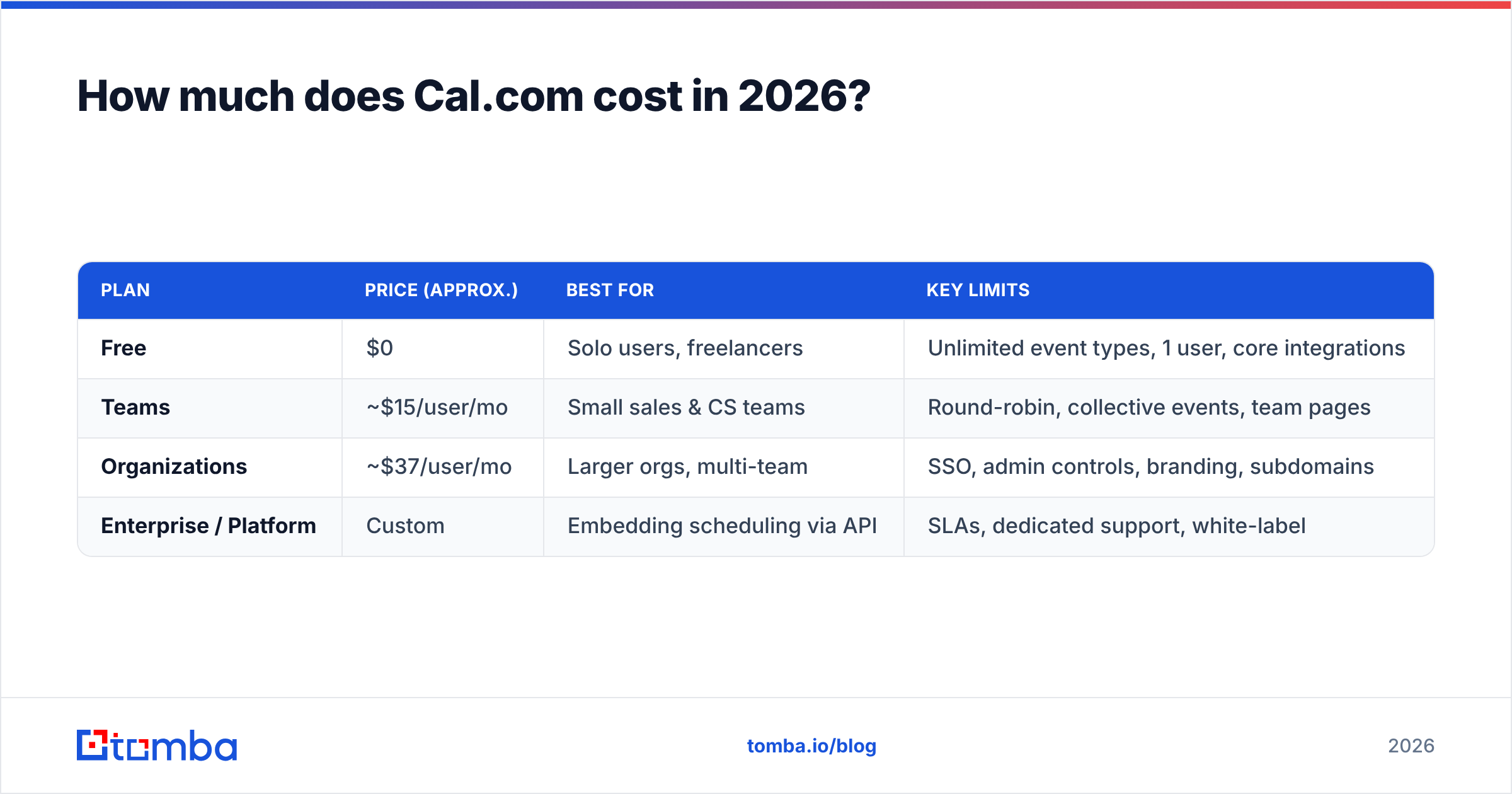
Cal.com keeps a genuinely useful free plan and then layers team and org features on top. Here's the current structure (always confirm live numbers on the official pricing page, since SaaS tiers shift):
| Plan | Price (approx.) | Best for | Key limits |
|---|---|---|---|
| Free | $0 | Solo users, freelancers | Unlimited event types, 1 user, core integrations |
| Teams | ~$15/user/mo | Small sales & CS teams | Round-robin, collective events, team pages |
| Organizations | ~$37/user/mo | Larger orgs, multi-team | SSO, admin controls, branding, subdomains |
| Enterprise / Platform | Custom | Embedding scheduling via API | SLAs, dedicated support, white-label |
A few things to note. The Free plan is unusually generous — unlimited event types and the core booking experience cost nothing, which is rare among Calendly-style tools. Teams unlocks the routing logic sales teams actually need: round-robin distribution and collective availability. Organizations is where governance lives (single sign-on, centralized admin, custom branding). And the Platform tier is a different product entirely — it's for companies building scheduling into their own software.
Self-hosting is the wildcard. Because Cal.com is open-source, you can deploy it yourself and skip per-seat fees, paying only for infrastructure. That's a real cost lever for larger teams — but it trades money for engineering time.

What do Cal.com reviews actually say?#
Across review platforms like G2 and Capterra, Cal.com lands solid ratings, and the themes are consistent.
What reviewers praise:
- Open-source and self-hostable. This is the headline. Teams that care about data ownership, compliance, or avoiding vendor lock-in love that they can inspect and host the code.
- Deep customization. From booking questions to workflows to branding, you can tailor far more than with closed tools.
- Generous free tier. Solo users get a lot without paying, which makes adoption easy.
- Developer-friendly API. The platform offering gets repeat praise from teams embedding scheduling into their own products.
What reviewers criticize:
- Setup complexity. Self-hosting in particular requires real technical chops. Even the cloud version has a steeper initial learning curve than Calendly.
- Occasional rough edges. Because the product moves fast, some users report bugs or features that feel less polished than incumbents.
- Support depends on tier. Free and lower tiers lean on community and docs; dedicated support sits behind higher plans.
The net read: people who choose Cal.com on purpose — for openness and control — tend to be happy. People who expected a zero-config Calendly clone are the ones who get frustrated.
What are the pros and cons of Cal.com?#
Let's make the trade-offs explicit.
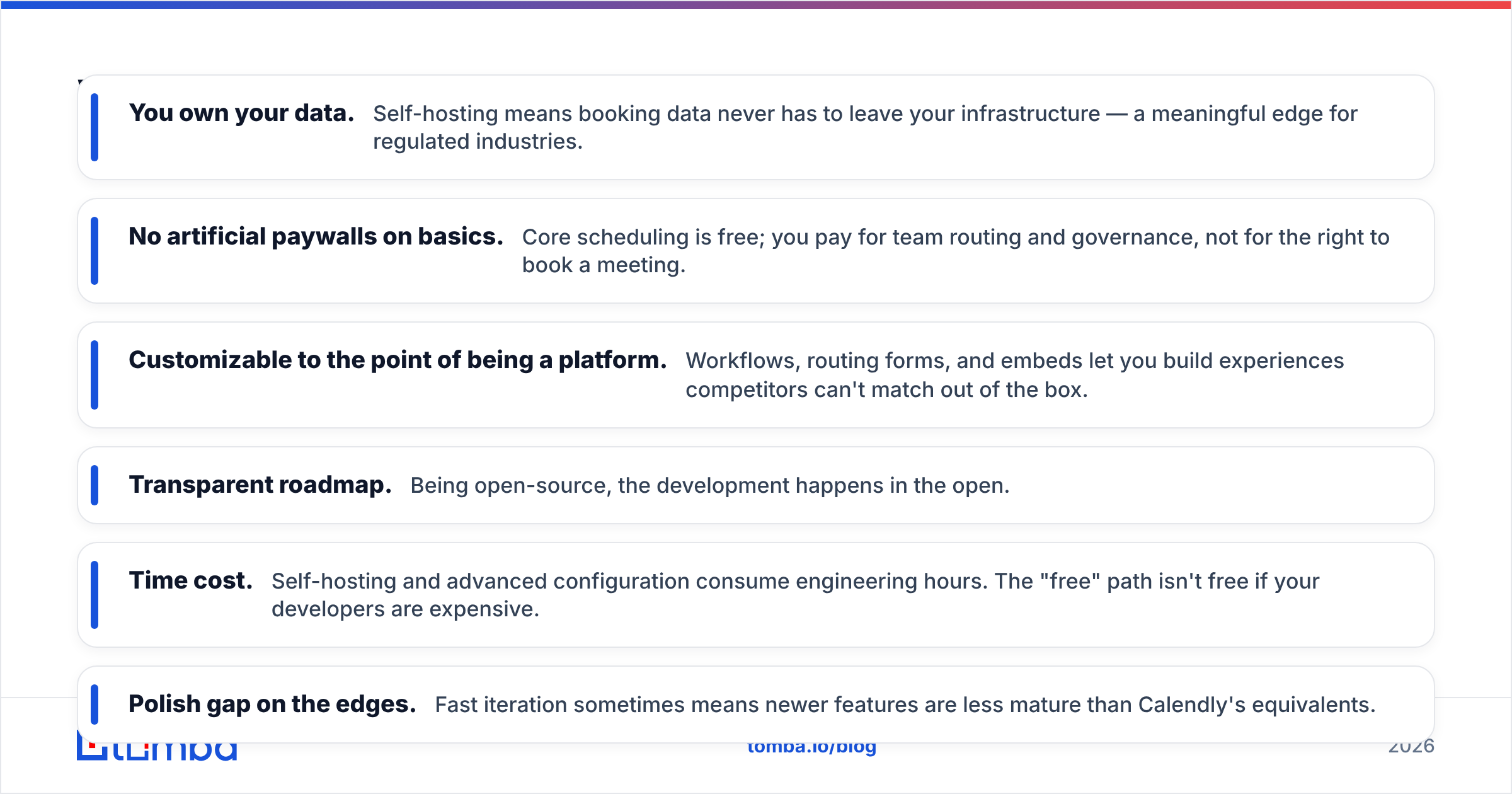
Pros
- You own your data. Self-hosting means booking data never has to leave your infrastructure — a meaningful edge for regulated industries.
- No artificial paywalls on basics. Core scheduling is free; you pay for team routing and governance, not for the right to book a meeting.
- Customizable to the point of being a platform. Workflows, routing forms, and embeds let you build experiences competitors can't match out of the box.
- Transparent roadmap. Being open-source, the development happens in the open.
Cons
- Time cost. Self-hosting and advanced configuration consume engineering hours. The "free" path isn't free if your developers are expensive.
- Polish gap on the edges. Fast iteration sometimes means newer features are less mature than Calendly's equivalents.
- Per-seat pricing adds up. On the cloud Organizations tier, costs scale with headcount like any SaaS.
Is Cal.com better than Calendly?#
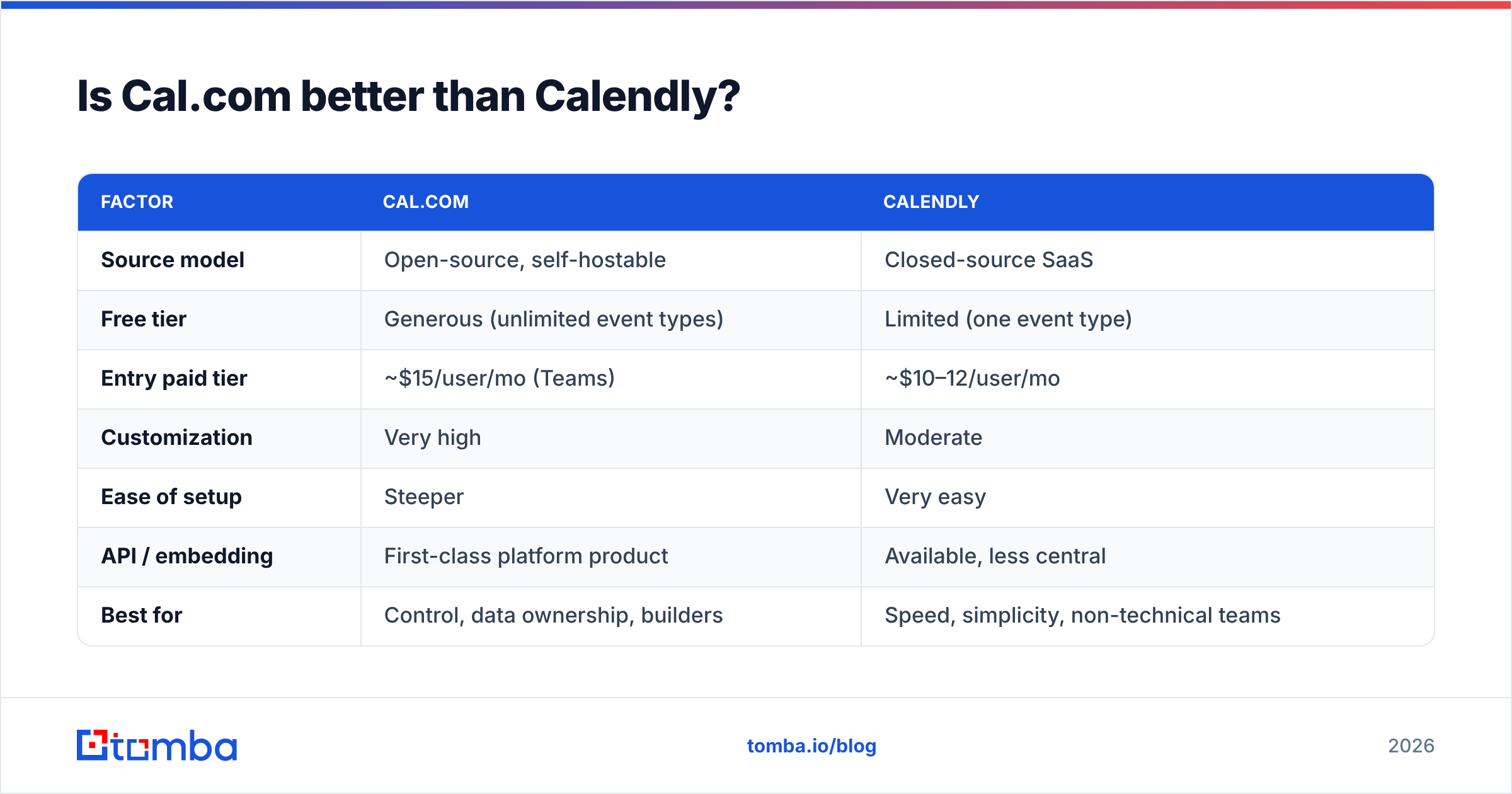
It depends on what you optimize for. Calendly is the polished, plug-and-play incumbent; Cal.com is the open, customizable challenger. Here's a direct comparison:
| Factor | Cal.com | Calendly |
|---|---|---|
| Source model | Open-source, self-hostable | Closed-source SaaS |
| Free tier | Generous (unlimited event types) | Limited (one event type) |
| Entry paid tier | ~$15/user/mo (Teams) | ~$10–12/user/mo |
| Customization | Very high | Moderate |
| Ease of setup | Steeper | Very easy |
| API / embedding | First-class platform product | Available, less central |
| Best for | Control, data ownership, builders | Speed, simplicity, non-technical teams |
Choose Calendly if you want the fastest path to a working booking link with zero engineering. Choose Cal.com if data ownership, deep customization, or embedding scheduling into your own product matters more than out-of-the-box polish. For more head-to-head context, Calendly's own site lays out its feature tiers clearly, which makes the comparison easy to run yourself.
Who should use Cal.com?#
Cal.com fits best for:
- Developer-led teams who want to self-host or embed scheduling via API.
- Privacy- and compliance-conscious organizations that need data to stay in-house.
- Customization-hungry sales and CS teams that have outgrown rigid tools.
- Cost-sensitive scale-ups willing to trade setup time for lower per-seat fees through self-hosting.
It's a weaker fit for a non-technical solo founder who just needs a link by lunchtime — that's Calendly's home turf.
Does a booking tool actually fill your pipeline?#
Here's the honest part: no scheduling tool, Cal.com included, generates demand. It captures intent that already exists. A booking link is the last step of a chain that starts with finding the right person and reaching them with a message that lands. If the top of that funnel is weak, a beautiful calendar just sits empty.
This is where contact data quality decides everything. You can have the cleanest Cal.com setup on earth, but if your outbound list is full of guessed addresses and dead inboxes, your meetings-booked number stays flat. The meeting that converts starts with reaching a real human at a real, verified address.

That's the gap a tool like Tomba closes. Before a single Cal.com invite goes out, you need to know who to invite and how to reach them:
- Use an email finder to pull verified professional addresses for the decision-makers you're targeting.
- Run those through an email verifier so your invites land in real inboxes and your sender reputation stays clean.
- Pull entire companies at once with domain search when you're booking a multi-stakeholder deal.
- Enrich your CRM records with data enrichment so your booking confirmations and follow-ups are personalized, not generic.
Connect that to your stack — Cal.com plays nicely with automation tools, and Tomba offers a Zapier integration to push freshly found contacts straight into your workflow. The result: your calendar fills with qualified prospects instead of no-shows.
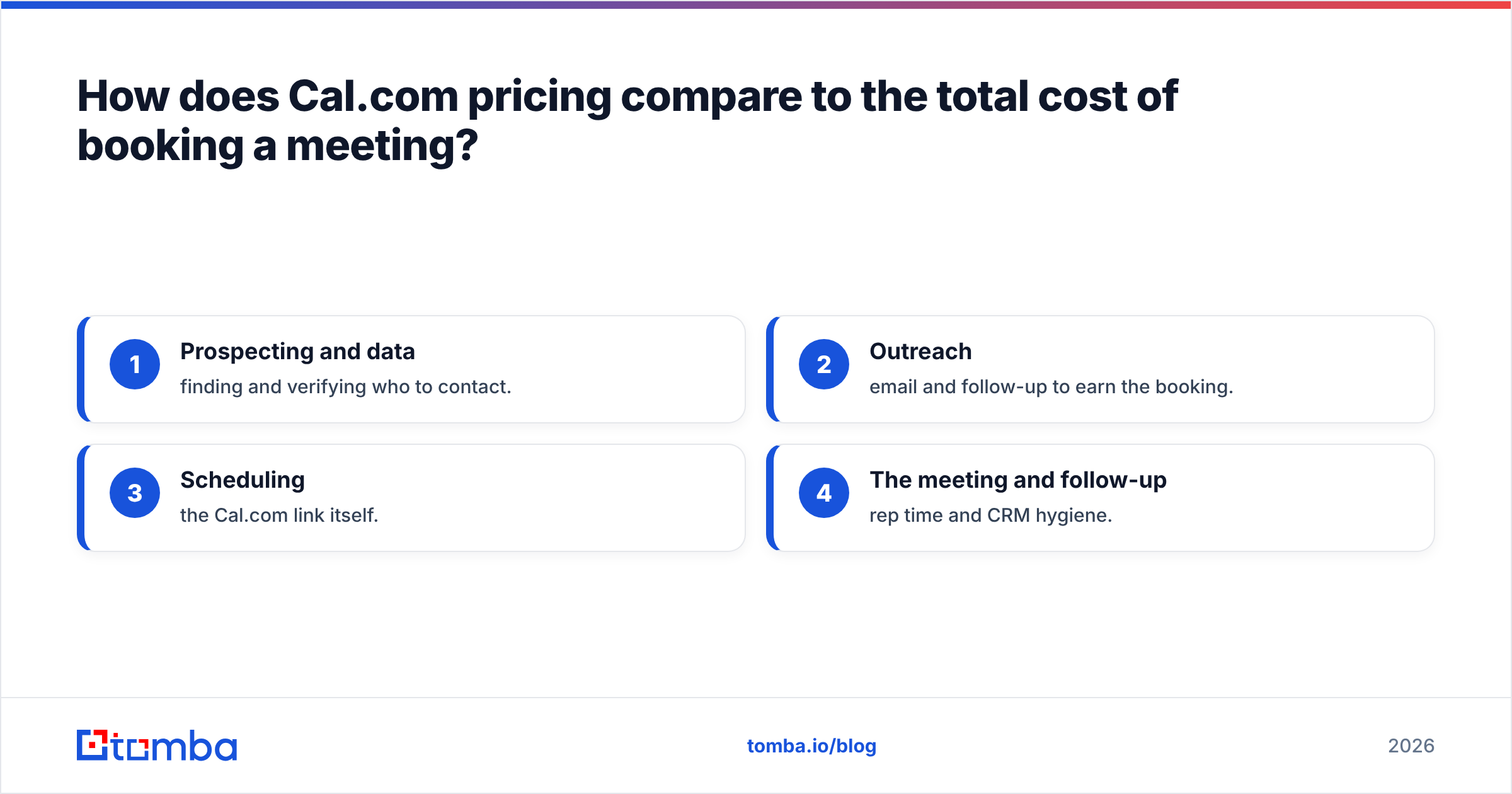
How does Cal.com pricing compare to the total cost of booking a meeting?#
It helps to zoom out. The per-seat price of Cal.com is a small slice of what a booked meeting actually costs you. Consider the full chain:
- Prospecting and data — finding and verifying who to contact.
- Outreach — email and follow-up to earn the booking.
- Scheduling — the Cal.com link itself.
- The meeting and follow-up — rep time and CRM hygiene.
Cal.com optimizes step three brilliantly. But if you over-invest in scheduling and under-invest in steps one and two, you've polished the door handle on an empty room. The cheapest way to raise meetings-booked is usually better data at the top, not a fancier calendar at the bottom. Tomba's pricing — a free tier, then paid plans starting at $49/mo — is built to make that top-of-funnel step affordable next to the rep hours each meeting consumes.
Final verdict: is Cal.com worth it?#
Yes — for the right team. Cal.com is one of the best open-source scheduling tools available in 2026, and its pricing is fair, especially the generous free tier and the self-hosting escape hatch. If you value data ownership, customization, or embedding scheduling into your own product, it's an easy recommendation. If you want zero-setup simplicity, Calendly may still suit you better.
But remember what the calendar can and can't do. Cal.com makes booking effortless; it does not put qualified prospects on the other end of the link. That part is yours to build — and it starts with accurate contact data.
If your bottleneck is filling the calendar rather than managing it, start at the source. Use the Tomba Email Finder to turn names and companies into verified, ready-to-contact email addresses, then let Cal.com handle the booking. Spin up a free Tomba account, find your first 25 prospects this week, and watch your scheduling tool finally earn its keep.
Ready to find emails that actually work?
Join 150,000+ professionals who stopped guessing and started sending. Free credits on signup — no credit card required.
Get the Tomba newsletter
Practical outbound tactics and product updates — once every two weeks.
About the author