Calendar Meeting Invitation Email Sample: 9 Templates for 2026
Steal 9 calendar meeting invitation email samples that get accepted, not ignored. Subject lines, structure, .ics tips, and follow-ups that book the meeting.
A calendar meeting invitation email is the difference between a booked slot and a thread that dies in someone's promotions tab. Most invites fail for boring reasons: no clear ask, no agenda, no easy way to say yes. This guide fixes that with copy-paste samples you can ship today.
TL;DR#
- A good calendar meeting invitation email sample has five parts: a specific subject line, a one-sentence purpose, a proposed time with timezone, a clear RSVP action, and an attached calendar file.
- Subject lines that name the outcome ("30 min: finalize Q3 renewal terms") get accepted faster than vague ones ("Quick chat?").
- Always attach an
.icsfile or send a native calendar invite so recipients add it in one click. - Send to a verified address — bounced invites silently kill your acceptance rate. Clean your list first.
- Follow up once, briefly, if there's no RSVP within 48 hours.
What is a calendar meeting invitation email?#
A calendar meeting invitation email is a message that proposes a specific meeting and gives the recipient everything needed to accept it: time, place (or link), purpose, and a one-click way to add it to their calendar. Think of it like a wedding invite versus a text that says "let's hang out sometime." One has a date, an address, and an RSVP card. The other gets forgotten.
Technically, the invite either is a calendar event (sent from Google Calendar, Outlook, or an API) or carries an .ics attachment that the recipient's mail client renders as an "Add to calendar" button. The email body exists to give context the bare calendar event can't.
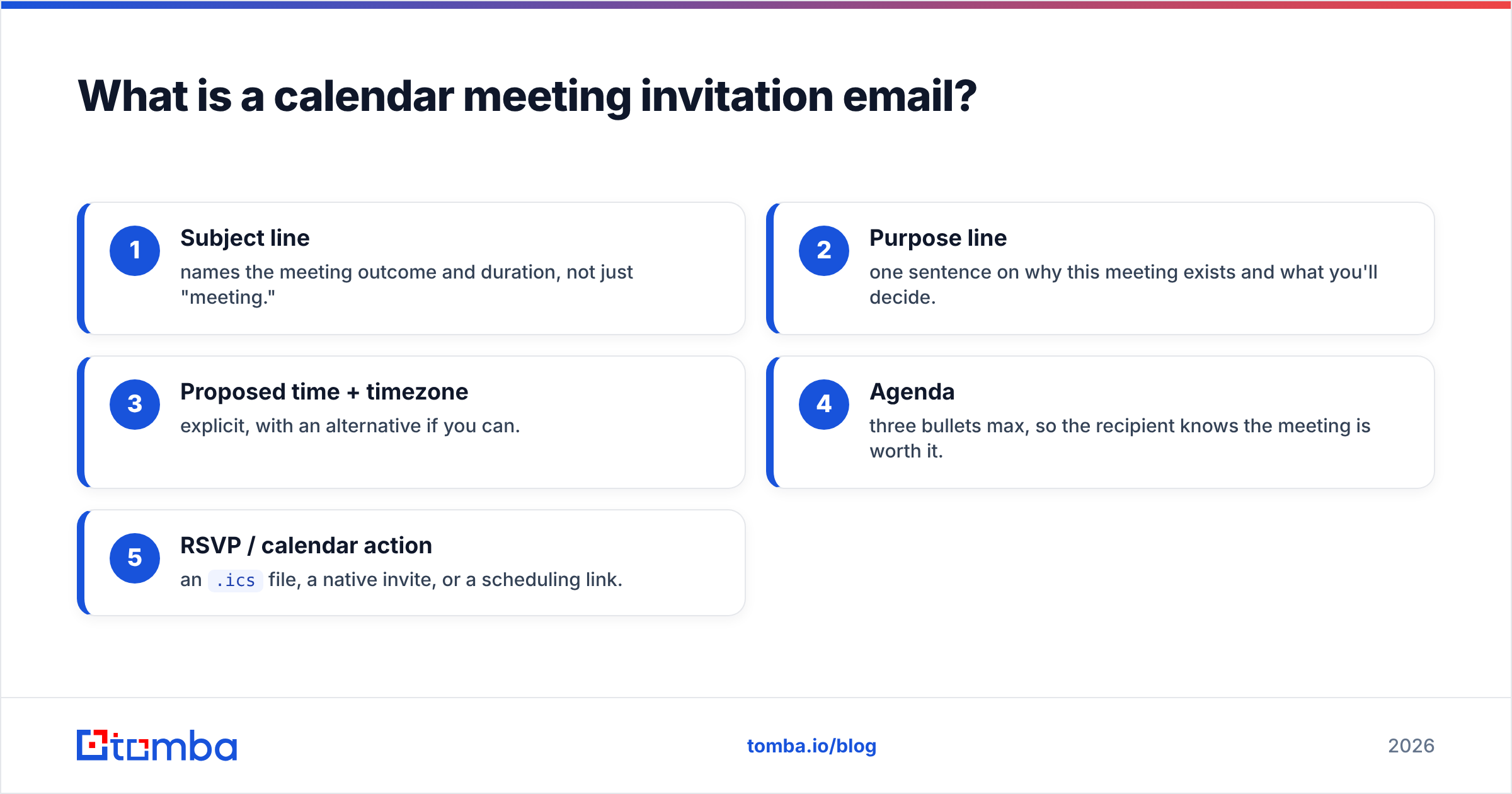
The components that actually move acceptance rates:
- Subject line — names the meeting outcome and duration, not just "meeting."
- Purpose line — one sentence on why this meeting exists and what you'll decide.
- Proposed time + timezone — explicit, with an alternative if you can.
- Agenda — three bullets max, so the recipient knows the meeting is worth it.
- RSVP / calendar action — an
.icsfile, a native invite, or a scheduling link.
Why do most meeting invitations get ignored?#
Most invites get ignored because they make the recipient do work. A line like "Let me know when you're free this week" pushes the scheduling burden back onto a busy person, so it sits unanswered. The fix is to propose a concrete time and let them accept or counter with one tap.
The other silent killer is deliverability. If your invite lands in spam or bounces, no amount of good copy helps. According to HubSpot's email research, a meaningful share of business email never reaches the inbox, and sending to stale addresses damages your sender reputation over time. Before you send invites to a list of prospects, run them through an email verifier so you're not inviting dead mailboxes.
Common reasons invites fail:
- No specific time — "sometime next week" creates a negotiation, not a booking.
- No timezone — "3 PM" is useless across borders; always write "3 PM ET (8 PM CET)."
- No agenda — a recipient who can't see the value declines or ghosts.
- No calendar attachment — forcing someone to manually create the event loses half of them.
- Wrong or unverified address — the invite bounces and you never know.
What does a strong calendar meeting invitation email sample look like?#
Here is the core template. Everything else in this guide is a variation on it.
Subject: 30 min — finalize onboarding plan for [Company]
Hi [Name],
I'd like to lock in next steps on your onboarding so your team is live by [date]. Can we meet for 30 minutes?
Proposed: Thursday, July 9, 2:00–2:30 PM ET (11:00 AM PT)
Where: Google Meet (link in the calendar invite)
Agenda:
- Confirm data migration owner
- Walk through admin setup
- Agree on go-live date
I've attached a calendar invite — just hit Accept. If that time doesn't work, reply with two windows that do and I'll send an updated invite.
Best,
[Your name]
Notice it takes under fifteen seconds to read and one click to accept. That is the entire job.
Which meeting invitation template should I use?#
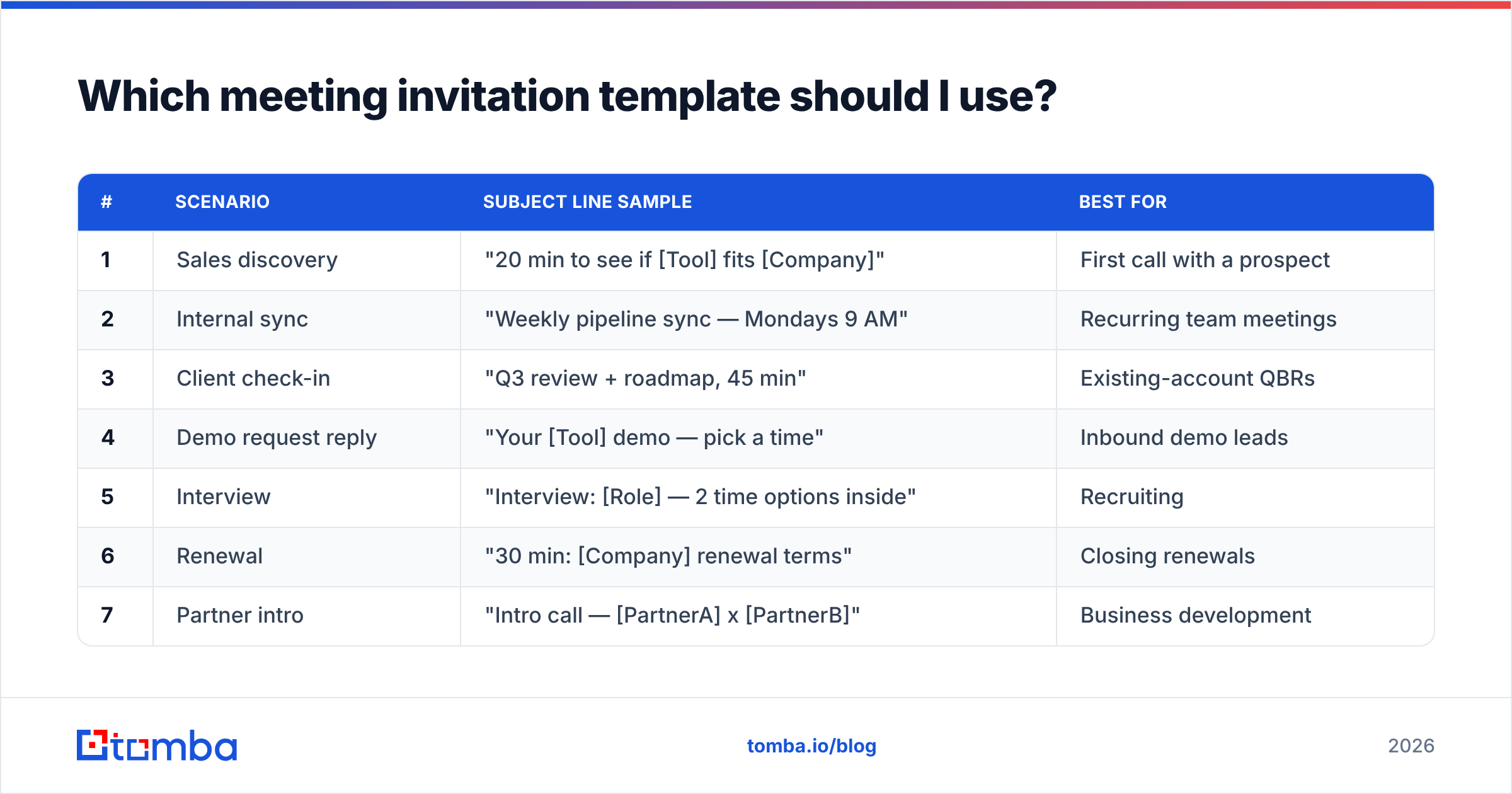
Pick by scenario. Below are nine samples mapped to the situations you actually send invites for.
| # | Scenario | Subject line sample | Best for |
|---|---|---|---|
| 1 | Sales discovery | "20 min to see if [Tool] fits [Company]" | First call with a prospect |
| 2 | Internal sync | "Weekly pipeline sync — Mondays 9 AM" | Recurring team meetings |
| 3 | Client check-in | "Q3 review + roadmap, 45 min" | Existing-account QBRs |
| 4 | Demo request reply | "Your [Tool] demo — pick a time" | Inbound demo leads |
| 5 | Interview | "Interview: [Role] — 2 time options inside" | Recruiting |
| 6 | Renewal | "30 min: [Company] renewal terms" | Closing renewals |
| 7 | Partner intro | "Intro call — [PartnerA] x [PartnerB]" | Business development |
| 8 | Reschedule | "Moving our Thursday call — new time" | Fixing conflicts |
| 9 | Executive ask | "15 min with [Exec] on [decision]" | Short, high-value asks |
Sample 2 — recurring internal sync#
Subject: Weekly pipeline sync — Mondays 9:00 AM ET
Team — setting up our standing pipeline sync. Same link each week, 25 minutes, camera optional.
When: Mondays, 9:00–9:25 AM ET, starting July 7
Agenda (rotating): deals at risk, new opps, one blocker each
Recurring calendar invite attached. Decline any week you're out and I'll catch you in notes.
Sample 4 — demo request reply#
Subject: Your [Tool] demo — pick a time
Hi [Name],
Thanks for requesting a demo. I'll tailor it to [use case] so it's not a generic tour.
Grab whatever works here: [scheduling link]. Prefer I just send an invite? Reply with a day and I'll do the rest.
Talk soon,
[Your name]
Sample 8 — reschedule#
Subject: Moving our Thursday call — new time inside
Hi [Name],
Something came up on my end Thursday — apologies. Can we shift to Friday, July 10, 2:00 PM ET (same agenda, same link)?
Updated calendar invite attached. If Friday's bad, send me two windows and I'll re-send.
How do I write a subject line that gets the invite accepted?#
Name the outcome and the time cost. "Quick chat?" hides both; "30 min to finalize renewal terms" shows both. People accept meetings when they can instantly judge whether it's worth the slot.
A few patterns that test well:
- Duration + outcome: "20 min — scope the migration"
- Decision-framed: "Decide on vendor by Friday — 15 min"
- Two-option: "Pick a time: Tue 2 PM or Wed 10 AM"
- Name-drop (when warranted): "Intro: [Their VP] x our founder"
If your invites are part of a cold outreach sequence, the subject line is doing double duty — it has to earn the open and the accept. You can pressure-test variants with a subject line tester before you send at scale, and pull fresh ideas from a subject line generator when you're stuck.
Keep it under about 50 characters so it doesn't truncate on mobile, and never bait — a subject that overpromises gets the accept but burns the meeting.
Should I attach an .ics file or send a native calendar invite?#
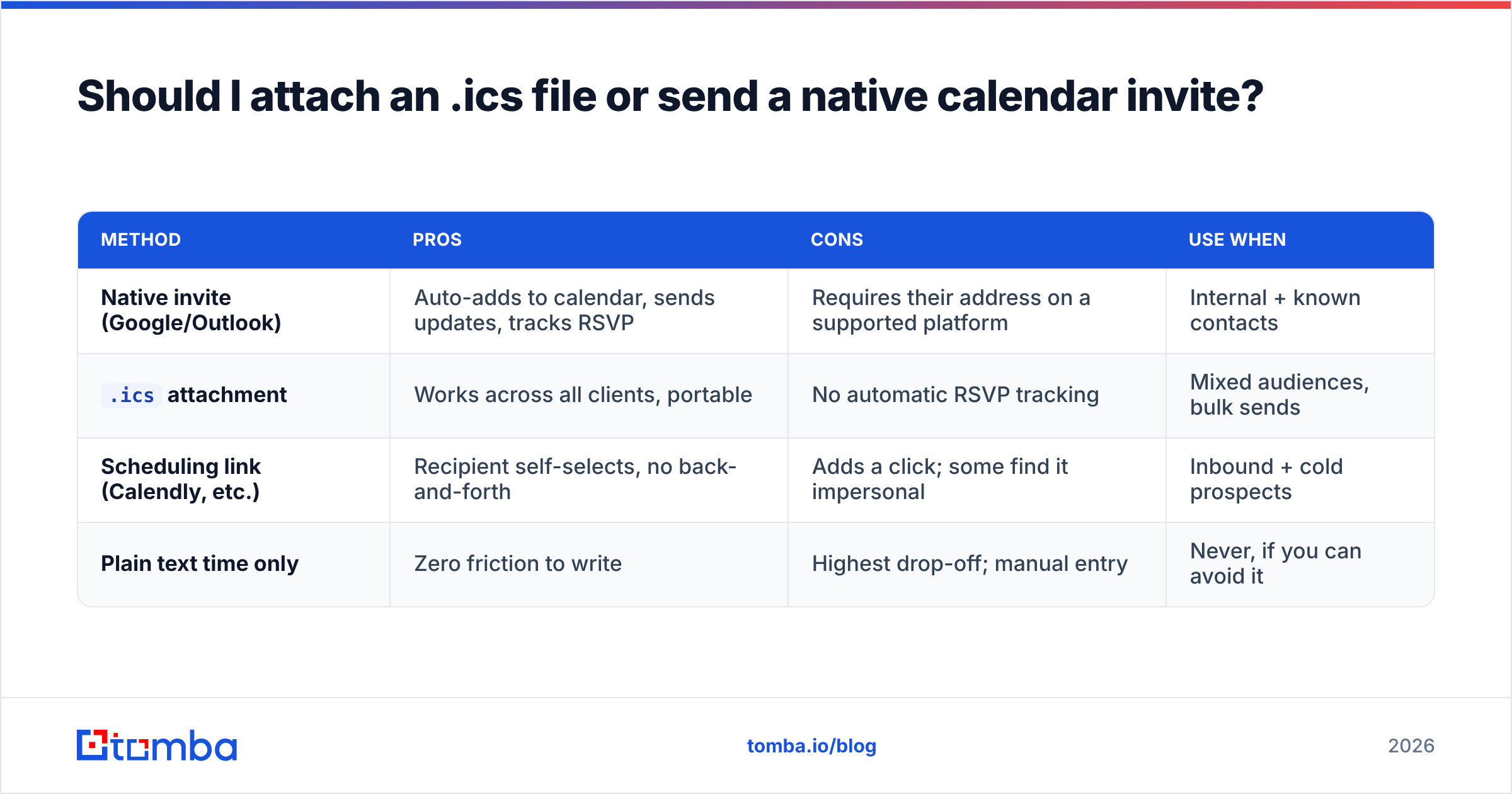
Send a native calendar invite when you have the recipient's address and your tools support it; attach an .ics file when you're emailing from a system that can't create cross-platform events. Both put a one-click "Add to calendar" action in front of the recipient, which is the whole point.
| Method | Pros | Cons | Use when |
|---|---|---|---|
| Native invite (Google/Outlook) | Auto-adds to calendar, sends updates, tracks RSVP | Requires their address on a supported platform | Internal + known contacts |
.ics attachment |
Works across all clients, portable | No automatic RSVP tracking | Mixed audiences, bulk sends |
| Scheduling link (Calendly, etc.) | Recipient self-selects, no back-and-forth | Adds a click; some find it impersonal | Inbound + cold prospects |
| Plain text time only | Zero friction to write | Highest drop-off; manual entry | Never, if you can avoid it |
For developers automating invites, you can generate .ics content programmatically and personalize the body per recipient. If you're enriching those recipients with role and company data first, the Tomba API and data enrichment endpoints let you populate name, title, and timezone fields so each invite reads as written for one person.
How do I make sure my meeting invite actually reaches the inbox?#
Reaching the inbox comes down to two things: a clean recipient list and basic sender hygiene. A perfectly written invite to a mistyped address bounces, and a pile of bounces drags down email deliverability for every future send.
Do these before a batch of invites goes out:
- Verify every address. Run new contacts through an email verifier to drop invalid and risky addresses. For unknown contacts you only have a name and company for, an email finder gets you a deliverable address instead of guessing the format.
- Check your domain auth. Confirm SPF and DKIM are set with an SPF checker so mailbox providers trust the sender.
- Watch your reputation. A bad sender reputation sends invites straight to spam regardless of content.
- Don't blast. Calendar invites are 1:1 by nature; sending hundreds of identical events trips spam filters fast.
For tooling and pricing on verification and finding at volume, the full Tomba pricing page breaks down per-plan credits.
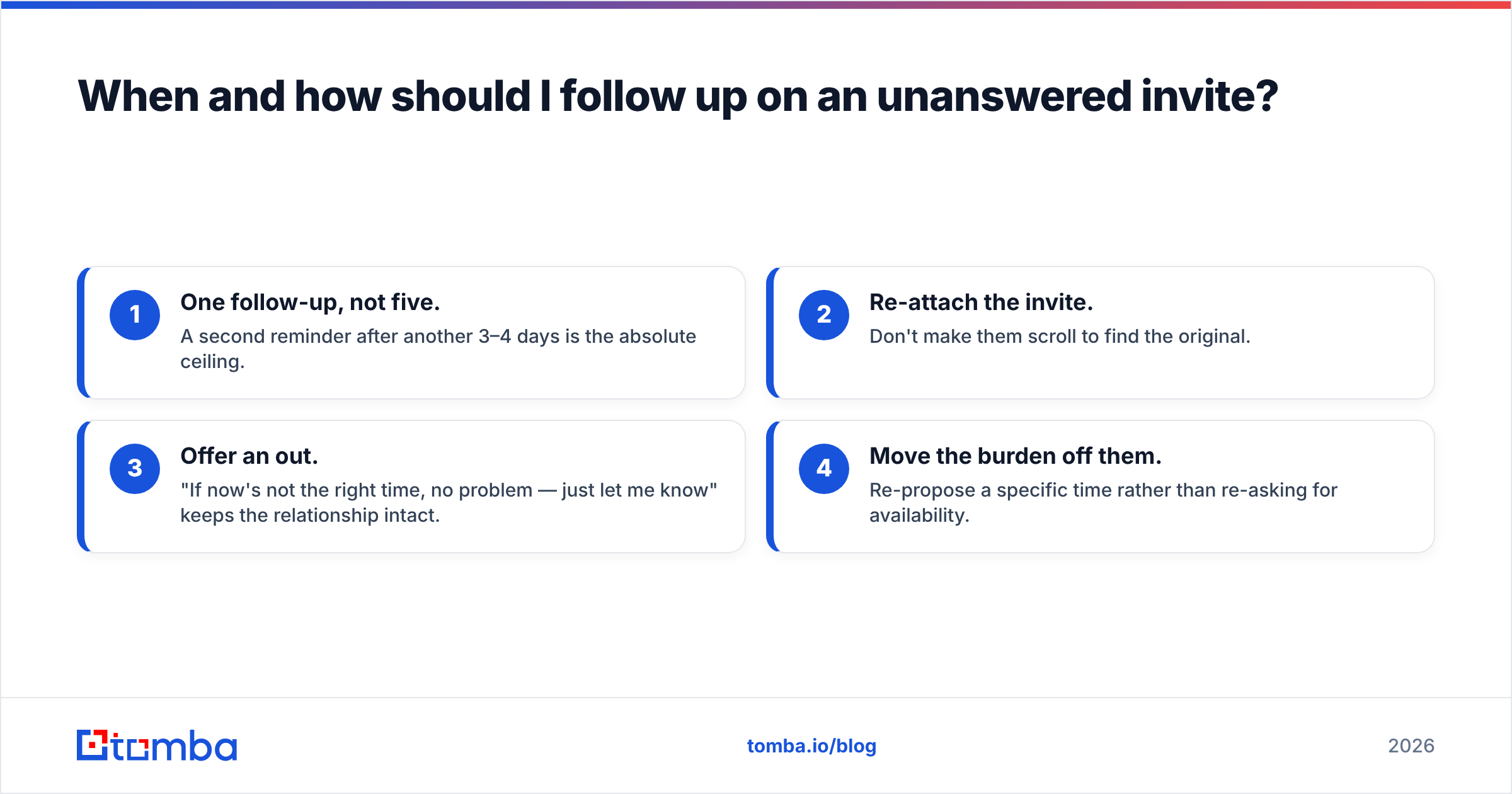
When and how should I follow up on an unanswered invite?#
Follow up once, 48 hours after sending, and keep it to two sentences. The recipient probably didn't decline on purpose — the invite got buried. Your job is to resurface it, not to guilt them.
A clean follow-up sample:
Subject: Re: 30 min — finalize onboarding plan
Hi [Name] — floating this back up. Still hoping to grab 30 minutes this week; the calendar invite is just below. If a different time is easier, send me two windows and I'll adjust.
Rules that keep follow-ups from becoming nagging:
- One follow-up, not five. A second reminder after another 3–4 days is the absolute ceiling.
- Re-attach the invite. Don't make them scroll to find the original.
- Offer an out. "If now's not the right time, no problem — just let me know" keeps the relationship intact.
- Move the burden off them. Re-propose a specific time rather than re-asking for availability.
If you run outreach at scale, you can templatize this in your sequencing tool. The same discipline that makes a cold email work — one ask, one click, easy to say yes — makes a meeting invite work. Browse ready-to-use email templates if you want a starting library.
Frequently asked questions#
What is the best length for a meeting invitation email? Short — under 120 words in the body. State purpose, time, agenda, and the RSVP action, then stop. The calendar attachment carries the logistics.
Should I include an agenda in every invite? Yes for anything beyond a casual 1:1. Three bullets is enough. It signals the meeting has a point and helps the recipient decide quickly.
How far in advance should I send a calendar invite? For external meetings, 3–5 business days gives people room to plan. Internal syncs can go out 1–2 days ahead. Recurring meetings should be set up as far ahead as the cadence is known.
Do I need to confirm the address before sending? For known contacts, no. For prospects or any imported list, verify first — bounced invites hurt deliverability and you never learn the meeting didn't reach them.
Start with verified recipients#
The best calendar meeting invitation email sample still fails if it lands in a dead inbox. Before your next batch of invites goes out, find and confirm the right address for each contact with the Tomba Email Finder — search by name and domain, get a deliverable email with a confidence score, and send invites that actually arrive. Start on the free tier (25 searches a month), then scale into paid plans as your outreach grows. Book more meetings by inviting real people, not typos.
// get started
Find, verify and enrich your first contacts today
Start on the free plan with 25 searches a month, then scale when your team is ready.
Free plan · No credit card required · GDPR & CCPA
// about the author