Calendly vs Doodle 2026: Which Scheduling Tool Wins?
Calendly vs Doodle in 2026: a no-fluff breakdown of pricing, group polls, automation, and integrations to help you pick the right scheduler for your sales team.
TL;DR
- Calendly wins for automated 1-on-1 and round-robin booking, CRM workflows, and sales teams that live inside HubSpot or Salesforce.
- Doodle wins for group scheduling — its poll-based model is unbeaten when you need to find one time that works for 8 people across two companies.
- Pricing is close at the entry level: both have a free tier and paid plans starting in the $6–$15/user/month range, but Calendly's automation depth costs more as you scale.
- Pick Calendly if scheduling is part of a repeatable sales motion; pick Doodle if your pain is coordinating committees and multi-stakeholder meetings.
- Whichever you choose, the booking link is only as good as the contacts you put in front of it — that's where your prospecting data matters more than the scheduler.
What is the real difference between Calendly and Doodle?#
The short answer: Calendly is a booking engine, Doodle is a consensus engine.
Think of it like restaurant reservations. Calendly is the "book a table" button — you expose your open slots, the other person clicks one, and it's locked. Doodle is the group text where six friends argue over which night works, and you tally the votes until a winner emerges. Both get you to a meeting, but they solve opposite problems.
Calendly was built around the asynchronous, one-to-one handoff: you send a link, the invitee picks a time from your live availability, and the event drops onto both calendars automatically. It shines when you are the bottleneck and the other side just needs to grab time.
Doodle was built around the many-to-many problem: you propose several candidate times, everyone marks what works, and the option with the most overlap wins. It shines when nobody has authority to just pick — committees, cross-company kickoffs, hiring panels.
Most teams eventually want both behaviors. The question is which one is your primary pain, because that determines which tool deserves to be the default and which becomes the occasional backup.
Note for the editor: the image above is a placeholder for a real Calendly booking-page screenshot.
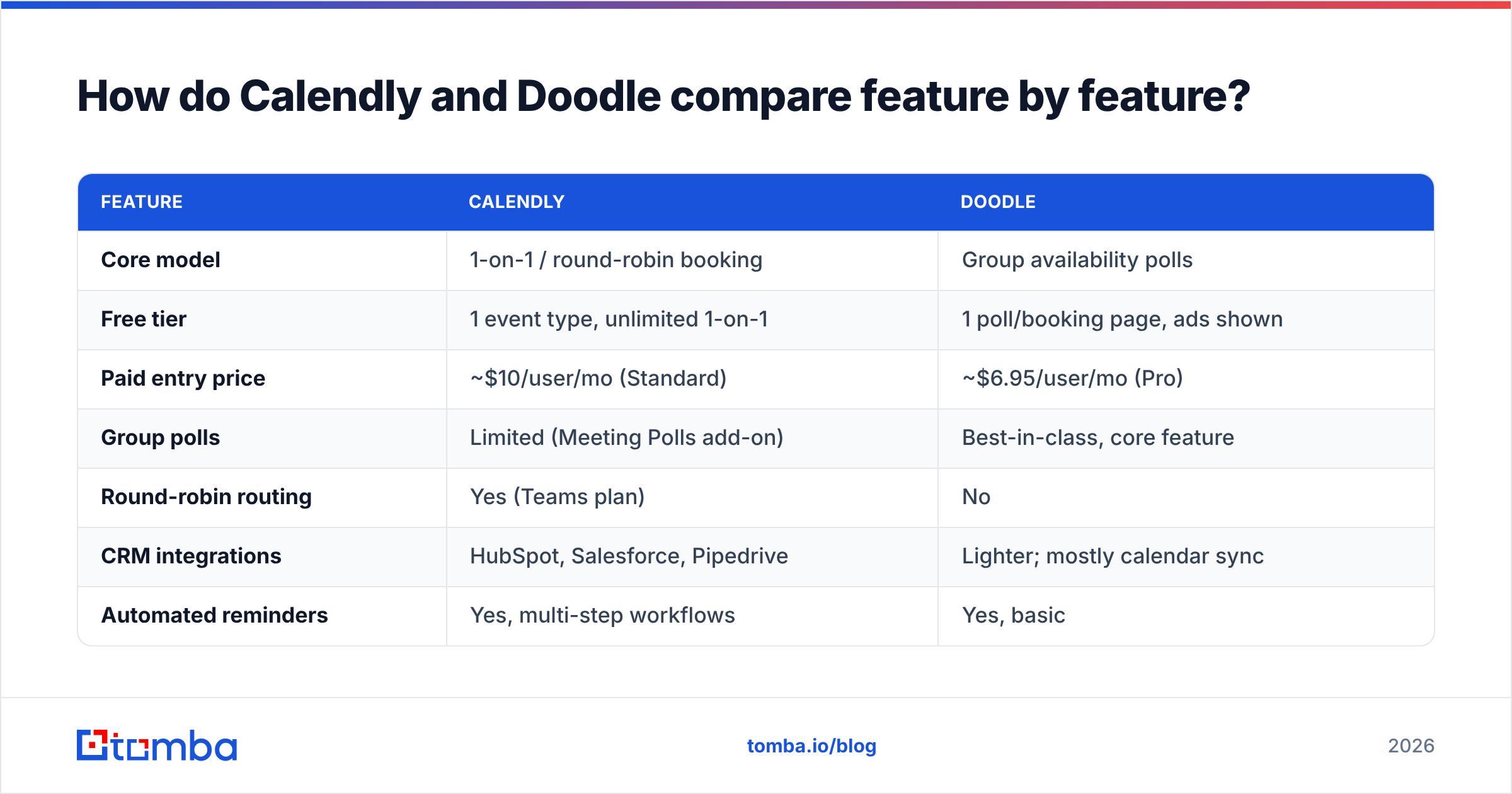
How do Calendly and Doodle compare feature by feature?#
Here's the head-to-head on the attributes that actually change your workflow, not the marketing checklist.
| Feature | Calendly | Doodle |
|---|---|---|
| Core model | 1-on-1 / round-robin booking | Group availability polls |
| Free tier | 1 event type, unlimited 1-on-1 | 1 poll/booking page, ads shown |
| Paid entry price | ~$10/user/mo (Standard) | ~$6.95/user/mo (Pro) |
| Group polls | Limited (Meeting Polls add-on) | Best-in-class, core feature |
| Round-robin routing | Yes (Teams plan) | No |
| CRM integrations | HubSpot, Salesforce, Pipedrive | Lighter; mostly calendar sync |
| Automated reminders | Yes, multi-step workflows | Yes, basic |
| Payment collection | Stripe/PayPal built in | Not native |
| Best for | Repeatable sales booking | Multi-stakeholder coordination |
A few things worth calling out beyond the grid:
- Round-robin is Calendly's moat. If you run a sales or support team where the next available rep should auto-take the meeting, Doodle simply doesn't do this. Calendly distributes by availability, priority, or equal weighting.
- Group polls are Doodle's moat. Calendly bolted on Meeting Polls, but it feels secondary. Doodle's entire UX assumes you're herding a crowd, and it's faster for that job.
- Payment collection ships with Calendly. Coaches, consultants, and paid-discovery sellers can take money at booking. Doodle expects you to handle that elsewhere.
- Branding and ads. Doodle's free tier shows ads on your poll pages; Calendly's free tier is ad-free but caps you at one event type. Neither free plan is something you'd hand to an enterprise buyer.
Note for the editor: the image above is a placeholder for a real Doodle group-poll screenshot.
Is Calendly better than Doodle for sales teams?#
Yes — for most outbound and inbound sales motions, Calendly is the stronger fit, and the reason is automation, not scheduling.
Sales scheduling isn't really about picking a time. It's about what happens around the booking: routing the lead to the right rep, syncing the meeting to the CRM, firing reminder sequences to cut no-shows, and qualifying the prospect with intake questions before they ever show up. Calendly's Teams and Enterprise tiers wire into that workflow. Doodle, by design, stays in its lane as a coordination tool.
If your reps work deals inside a CRM, Calendly's native HubSpot integration pattern is the kind of connection that removes manual data entry — the booked meeting and contact land in the pipeline without a copy-paste step. Pair that with multi-step reminder workflows and you measurably lower no-show rates, which directly protects your response rate on booked demos.
That said, Doodle earns its place in two sales scenarios:
- Multi-threaded enterprise deals where you're trying to get four people from the buying committee plus two from your side into one room. A poll beats a back-and-forth email thread every time.
- Partner and channel coordination, where no single party owns the calendar and consensus matters more than speed.
So the honest framing is: Calendly is the daily driver for a transactional sales motion, and Doodle is the specialist you pull out when the meeting has a committee. Many teams keep both, defaulting to Calendly and reaching for Doodle when the invite list gets crowded.
What about pricing — which is cheaper in 2026?#
At the entry level Doodle is cheaper; at scale the comparison flips to "what are you actually paying for."
Doodle's Pro plan lands lower per user, and if your only need is removing ads and running unlimited polls, it's the budget pick. Calendly's free tier is generous for a solo user doing 1-on-1s, but the features sales teams care about — round-robin, workflows, Salesforce sync — sit on the Teams plan and up.
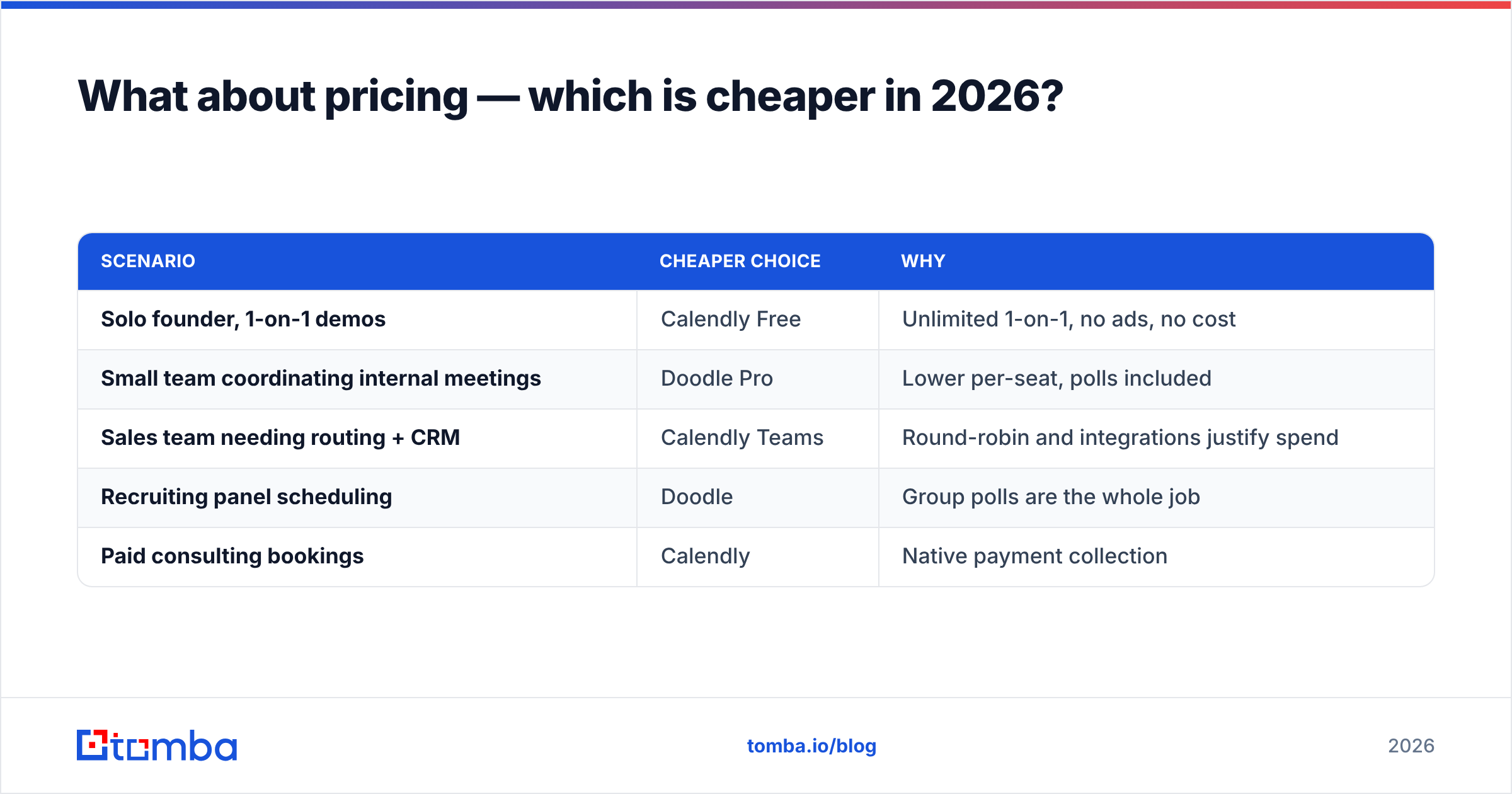
Here's the practical way to think about cost:
| Scenario | Cheaper choice | Why |
|---|---|---|
| Solo founder, 1-on-1 demos | Calendly Free | Unlimited 1-on-1, no ads, no cost |
| Small team coordinating internal meetings | Doodle Pro | Lower per-seat, polls included |
| Sales team needing routing + CRM | Calendly Teams | Round-robin and integrations justify spend |
| Recruiting panel scheduling | Doodle | Group polls are the whole job |
| Paid consulting bookings | Calendly | Native payment collection |
The mistake teams make is comparing sticker prices. A scheduler that saves each rep 20 minutes a day and cuts no-shows by 15% pays for the premium tier many times over. Buy on workflow fit, not on the per-seat line item.
Where do Calendly and Doodle both fall short?#
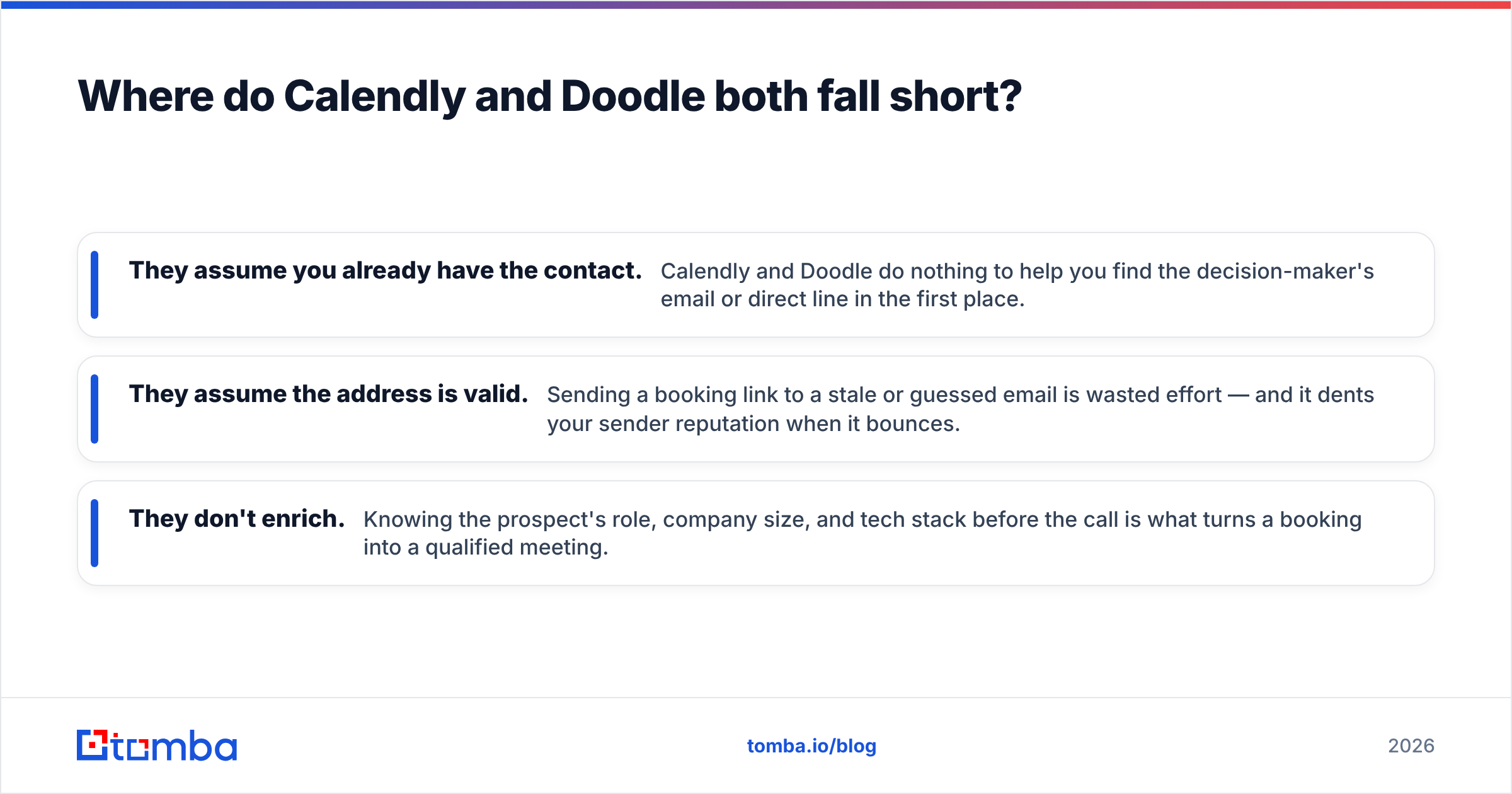
Neither tool fixes the part of the funnel that actually limits pipeline: you can't book a meeting with someone you can't reach.
A booking link is the last step. Before anyone clicks it, you need a verified, deliverable contact and a reason for them to care. This is the gap schedulers don't touch:
- They assume you already have the contact. Calendly and Doodle do nothing to help you find the decision-maker's email or direct line in the first place.
- They assume the address is valid. Sending a booking link to a stale or guessed email is wasted effort — and it dents your sender reputation when it bounces.
- They don't enrich. Knowing the prospect's role, company size, and tech stack before the call is what turns a booking into a qualified meeting.
That's the layer to solve upstream. Use an email finder to source the right contact, run a quick email verification pass so your invites actually land, and consider a phone finder when a calendar link alone won't get a busy executive to respond. Get those right and your scheduler — whichever you pick — starts converting at a much higher rate. You can compare entry costs on the Tomba pricing page if you want to slot this into your stack.
A small but real polish step: put your booking link in your email signature. A clean email signature generator lets you drop a "Book a call" link that works regardless of whether the backend is Calendly or Doodle.
How do I choose between Calendly and Doodle?#
Use this decision shortcut. Answer the first question that applies to you and stop there.
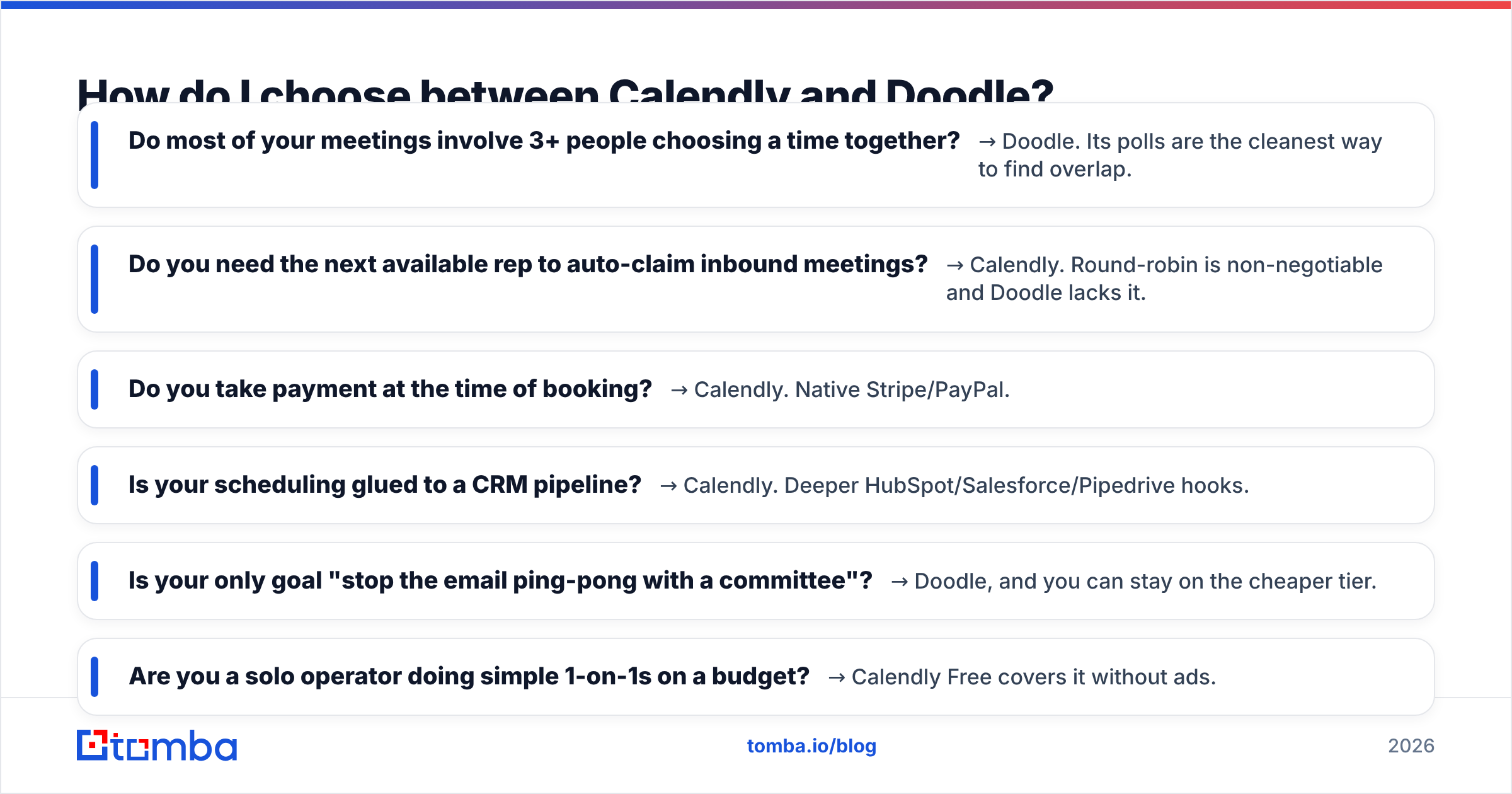
- Do most of your meetings involve 3+ people choosing a time together? → Doodle. Its polls are the cleanest way to find overlap.
- Do you need the next available rep to auto-claim inbound meetings? → Calendly. Round-robin is non-negotiable and Doodle lacks it.
- Do you take payment at the time of booking? → Calendly. Native Stripe/PayPal.
- Is your scheduling glued to a CRM pipeline? → Calendly. Deeper HubSpot/Salesforce/Pipedrive hooks.
- Is your only goal "stop the email ping-pong with a committee"? → Doodle, and you can stay on the cheaper tier.
- Are you a solo operator doing simple 1-on-1s on a budget? → Calendly Free covers it without ads.
If you still can't decide, default to Calendly and add Doodle later for the committee meetings — that combination covers ~95% of real-world scheduling without overpaying. Power users sometimes route both through automation via a Zapier integration so booked meetings, regardless of source, land in one place.
For a wider field of opinions before you commit, the scheduling-software category on G2 is worth a scan — both tools have thousands of reviews that surface edge cases specific to your industry.
Calendly vs Doodle: the verdict#
Calendly is the better default for B2B sales; Doodle is the better tool for group consensus. They're not really competitors so much as specialists in adjacent problems. Calendly automates the one-to-one booking and plugs into your revenue stack. Doodle solves the many-to-many coordination headache that makes committee scheduling miserable.
But remember what neither does: fill your calendar with the right people. A scheduler is a conversion tool, not a sourcing tool. The leads you put in front of it determine whether your booked-meeting rate is 2% or 20%.
That's the piece worth investing in first. Before you obsess over which scheduling link to send, make sure you're sending it to verified decision-makers who actually exist at the accounts you're targeting. Start with the Tomba Email Finder to source and verify the contacts that feed your pipeline — then let Calendly or Doodle do the easy part of locking the time. Spin up the free tier (25 searches a month), find a handful of real buyers, and watch how much more your booking link earns its keep.
// get started
Find, verify and enrich your first contacts today
Start on the free plan with 25 searches a month, then scale when your team is ready.
Free plan · No credit card required · GDPR & CCPA
// about the author