Callmaker Pricing, Reviews, Pros and Cons (2026 Guide)
A neutral 2026 breakdown of Callmaker's callback automation: real pricing signals, user reviews, honest pros and cons, and the alternatives worth weighing before you commit.
Callmaker promises something every revenue team wants: turn an anonymous website visitor into a live phone conversation in under a minute. But the marketing gloss rarely tells you what it costs, where it breaks, or whether the callback model actually beats running your own outbound motion. This is the neutral version.
TL;DR#
- Callmaker is a callback and sales-call automation platform built around speed-to-lead — it connects an inbound lead to a sales rep by phone, fast.
- Pricing is quote-based, not published. Expect a platform fee plus per-seat or per-lead components, which makes apples-to-apples comparison hard.
- The strongest pro is speed-to-lead; the biggest cons are pricing opacity, a phone-first scope, and dependence on inbound traffic volume.
- It is not a prospecting or data tool. If your gap is finding and verifying contacts, a callback widget won't fill it.
- Alternatives split two ways: other callback/dialer tools, or pairing a lighter calling stack with a dedicated data layer like a phone finder and email enrichment.
What is Callmaker?#
Callmaker is a Swedish sales-technology company whose core product converts website interest into phone calls. The headline use case is the "smart callback" widget: a visitor lands on your pricing or demo page, enters a number, and the platform dials an available sales agent and the prospect at the same time, bridging them into a live call. Some configurations promise connection in well under 60 seconds.
Around that core, Callmaker layers outbound calling workflows, lead routing, and reporting on call outcomes. Think of it less like a CRM and more like the plumbing between "someone showed intent" and "a human is talking to them." If your buying motion is phone-heavy — home services, finance, automotive, telecom, energy — that plumbing can matter a lot, because the difference between a 1-minute and a 30-minute callback is often the difference between a connected call and a voicemail.
The mental model: Callmaker is a fire-station dispatcher. The alarm (a form fill) comes in, and the dispatcher's only job is to get a truck rolling immediately. It does that one thing well. It does not investigate the fire, file the report, or restock the truck — those are other systems.
)
How does Callmaker pricing work in 2026?#
Callmaker does not publish standard pricing tiers, which is the single most important fact for anyone budgeting around it. Like many enterprise-leaning sales-call platforms, it runs a "contact sales" model where the quote depends on your seat count, call volume, region, and which modules you switch on.
From reviews, vendor patterns in this category, and how callback tools typically package, you should expect a quote built from some mix of these components:
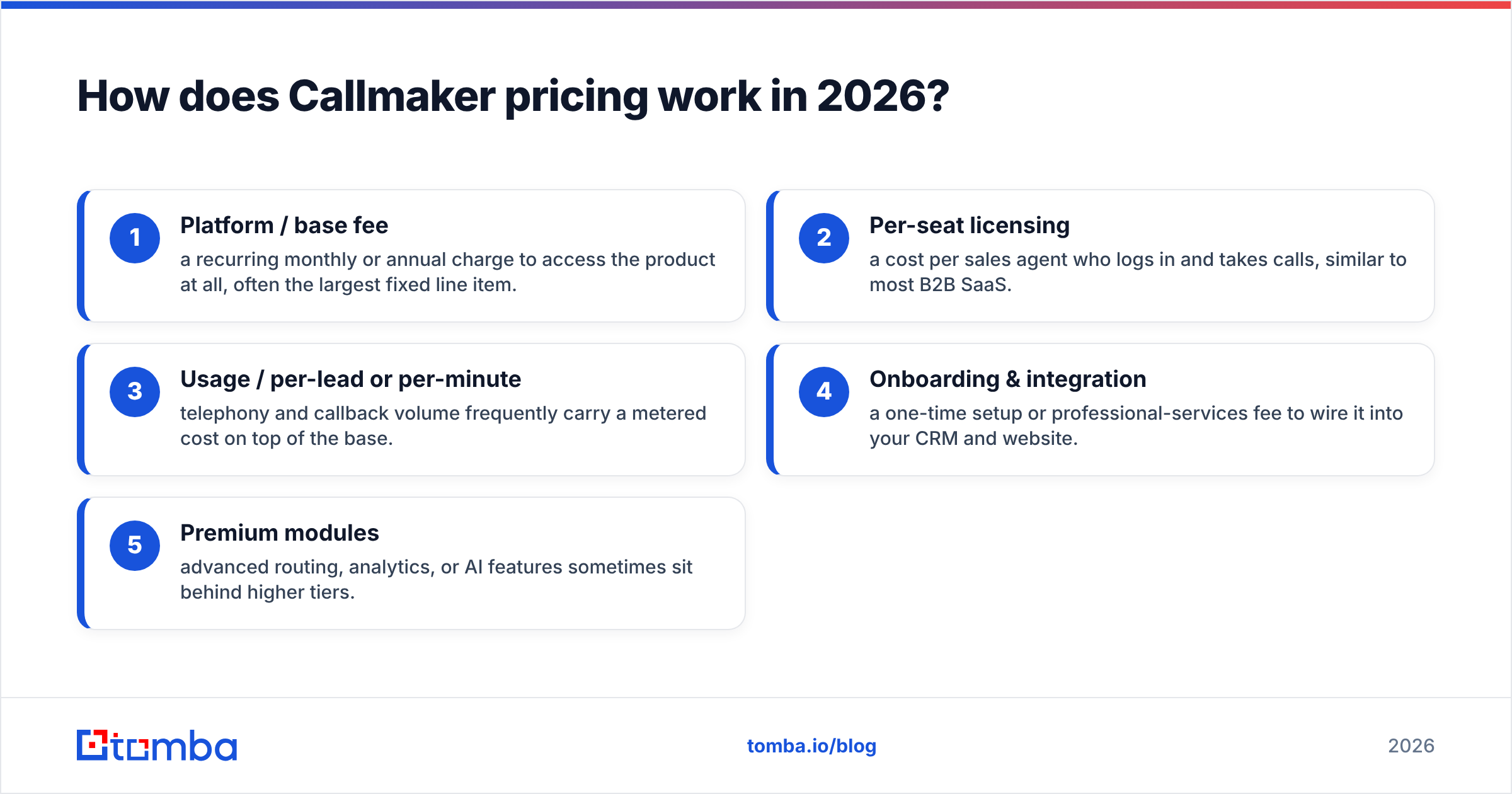
- Platform / base fee — a recurring monthly or annual charge to access the product at all, often the largest fixed line item.
- Per-seat licensing — a cost per sales agent who logs in and takes calls, similar to most B2B SaaS.
- Usage / per-lead or per-minute — telephony and callback volume frequently carry a metered cost on top of the base.
- Onboarding & integration — a one-time setup or professional-services fee to wire it into your CRM and website.
- Premium modules — advanced routing, analytics, or AI features sometimes sit behind higher tiers.
Because none of those are listed publicly, two companies can pay very different effective rates for the "same" product. That is normal for the category, but it means you cannot benchmark Callmaker on price the way you can a transparent tool. Always get the quote in writing, ask which line items are fixed versus metered, and model your worst-month call volume — usage-based pricing punishes the months you most want to scale.
A practical way to compare cost#
Don't compare sticker prices; compare cost per connected, qualified conversation. A platform that looks expensive but connects 40% of leads in under a minute can be cheaper per real conversation than a "free" manual process where reps call back the next day and reach voicemail. Build that denominator before you sign anything.
Callmaker pricing, reviews, pros and cons at a glance#
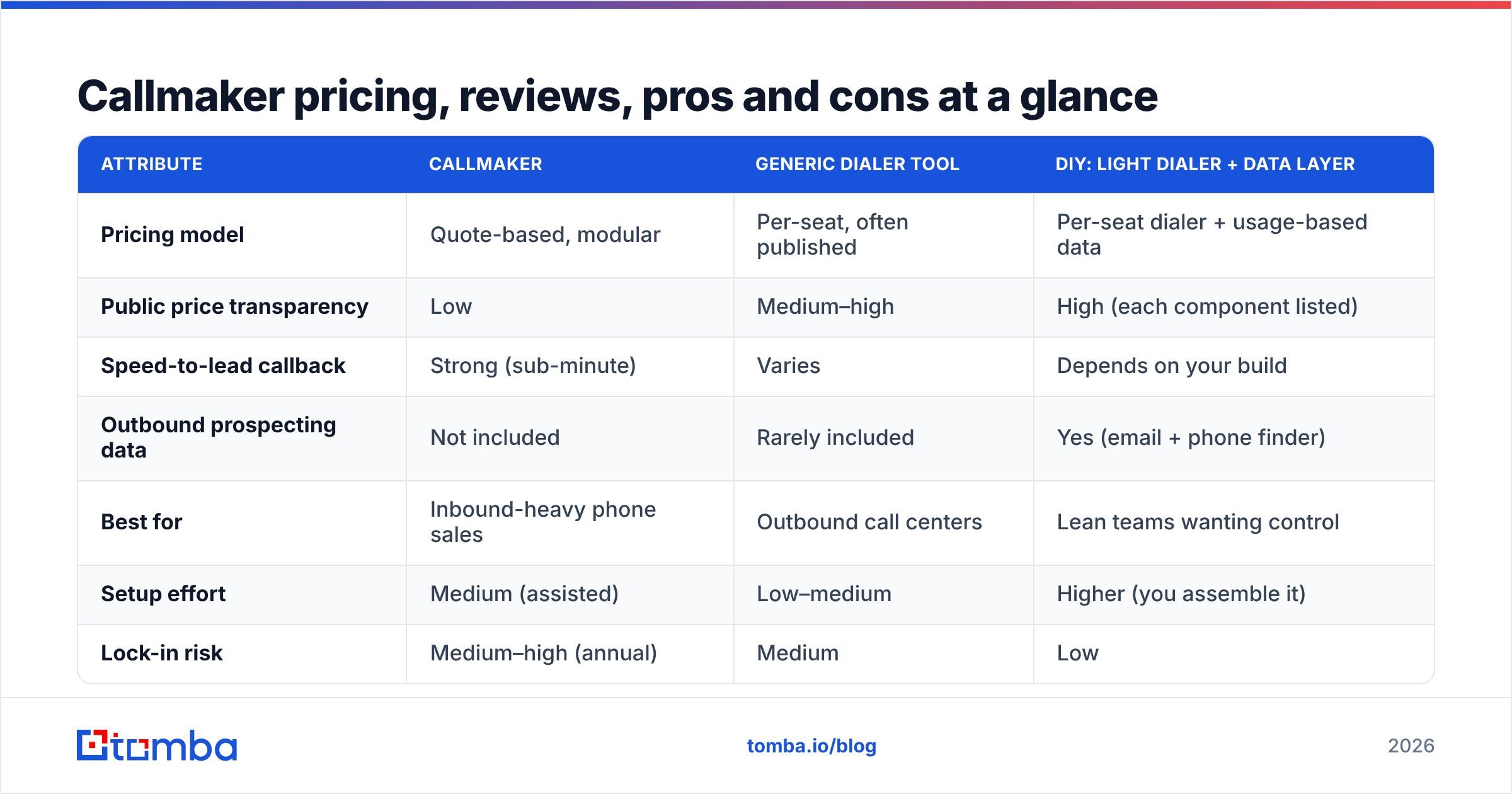
Here is the honest scorecard. Treat the cost column as directional — exact numbers come from a quote, not a pricing page.
| Attribute | Callmaker | Generic dialer tool | DIY: light dialer + data layer |
|---|---|---|---|
| Pricing model | Quote-based, modular | Per-seat, often published | Per-seat dialer + usage-based data |
| Public price transparency | Low | Medium–high | High (each component listed) |
| Speed-to-lead callback | Strong (sub-minute) | Varies | Depends on your build |
| Outbound prospecting data | Not included | Rarely included | Yes (email + phone finder) |
| Best for | Inbound-heavy phone sales | Outbound call centers | Lean teams wanting control |
| Setup effort | Medium (assisted) | Low–medium | Higher (you assemble it) |
| Lock-in risk | Medium–high (annual) | Medium | Low |
The pattern is consistent: Callmaker concentrates on the callback moment and asks you to bring your own pipeline and data. That is a reasonable trade if inbound volume is your bottleneck, and a poor one if your problem is not having enough qualified contacts to call in the first place.
What are the pros of Callmaker?#
Speed-to-lead is the real product. The most cited research in inbound sales — popularized by the Harvard Business Review study on lead response time — shows that contacting a web lead within a minute dramatically improves qualification odds versus waiting even an hour. Callmaker operationalizes that finding instead of leaving it to a rep's to-do list.
- Fast inbound callbacks. The bridge-the-call mechanic removes the lag between intent and conversation. For high-intent pages, this is genuinely valuable.
- Reduced lead leakage. Leads that would have gone cold in a queue get a call attempt immediately, so fewer slip through.
- Phone-first focus. For industries where deals close on calls, a purpose-built calling layer beats bolting telephony onto a CRM.
- Assisted onboarding. Quote-based vendors usually include setup help, so the integration burden is lower than a pure DIY stack.
- Routing logic. Getting the right lead to the right available agent is handled for you rather than managed by hand.
If your funnel already produces steady inbound demo or quote requests, those pros compound. The tool is squarely aimed at converting demand you already have.
What are the cons of Callmaker?#
No tool is neutral about its weak spots, so here is where Callmaker tends to frustrate buyers.
- Pricing opacity. No public tiers means slower procurement, harder budgeting, and a real risk of usage-based surprises in high-volume months.
- Inbound dependency. A callback widget is only as good as your traffic. Thin website volume means an expensive tool sits idle.
- Narrow scope. It is not a prospecting engine, a data provider, or a full CRM. You still need systems to find contacts and store the relationship.
- Telephony and compliance overhead. Phone-based outreach carries regional consent, recording, and do-not-call obligations you must manage; check the G2 category for outbound call-tracking software and your local rules before scaling.
- Lock-in. Annual, quote-based contracts are harder to exit than a month-to-month transparent tool if it underperforms.
The recurring theme in critical reviews is mismatch: teams buy a callback tool hoping it will generate pipeline, when it only accelerates pipeline that already exists. Diagnose your bottleneck honestly first.
)
Who is Callmaker actually for?#
Callmaker fits best when three things are true at once: you sell over the phone, you already attract meaningful inbound web traffic, and slow callback times are measurably costing you deals. Home improvement, insurance, solar, telecom, and automotive teams often check all three boxes.
It fits poorly when your real constraint is finding people to call. If reps spend their morning hunting for direct dials and decision-maker emails instead of talking to prospects, a callback widget changes nothing — the queue is empty. That is a data problem, and it is solved upstream with a phone finder, a phone validator to keep dialer lists clean, and contact enrichment to fill in the firmographics your reps need to qualify fast.
A simple test: look at last week's rep calendars. If the gap is "we had leads but called them too late," Callmaker helps. If the gap is "we ran out of good numbers to dial," it doesn't.
How does Callmaker compare to building your own stack?#
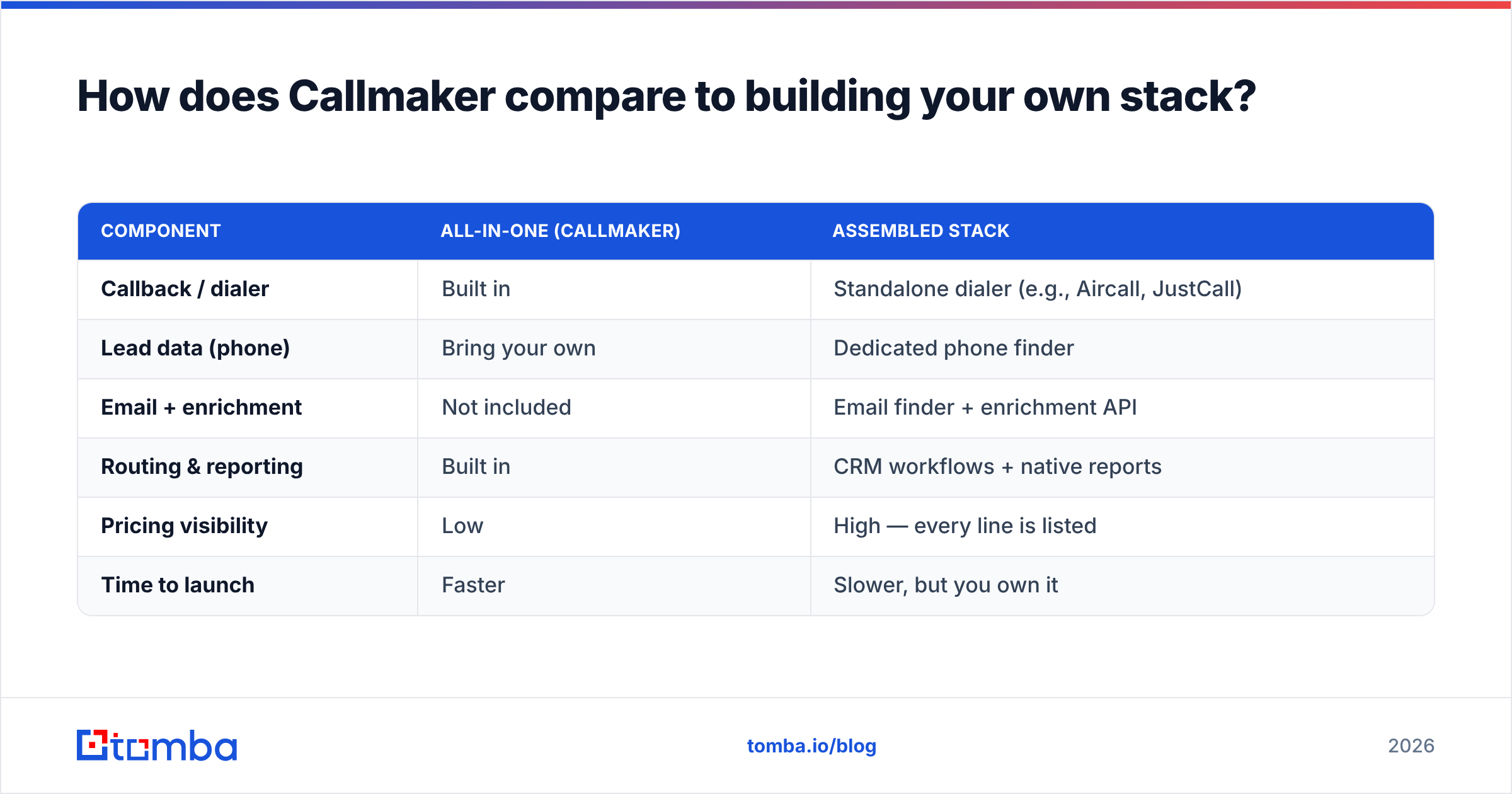
Many lean teams skip the all-in-one callback platform and assemble something cheaper and more transparent. The trade is effort for control and cost clarity.
| Component | All-in-one (Callmaker) | Assembled stack |
|---|---|---|
| Callback / dialer | Built in | Standalone dialer (e.g., Aircall, JustCall) |
| Lead data (phone) | Bring your own | Dedicated phone finder |
| Email + enrichment | Not included | Email finder + enrichment API |
| Routing & reporting | Built in | CRM workflows + native reports |
| Pricing visibility | Low | High — every line is listed |
| Time to launch | Faster | Slower, but you own it |
The assembled approach wins on transparency and on solving the upstream data problem the all-in-one ignores. You can verify exactly what each piece costs, and you are not paying a platform fee for modules you don't use. The cost is integration work and ownership — you become the dispatcher and the data team.
For teams that go the assembled route, the data layer is where outreach lives or dies. Pulling verified emails with an email finder, confirming them through an email verifier, and checking transparent Tomba pricing up front gives you the budget certainty a quote-based callback tool can't. You can always add a calling layer later once the pipeline is full.
What do Callmaker reviews say?#
Public review volume for Callmaker is thinner than for mass-market sales tools, so weigh individual reviews carefully and cross-check on neutral directories like Capterra and G2 rather than the vendor site. The themes that recur across the category — and in Callmaker-specific feedback — are consistent:
- Positive: noticeably higher connect rates on inbound leads, responsive onboarding, and a measurable lift in speed-to-lead once live.
- Mixed: value is tightly coupled to traffic volume; teams with seasonal or low inbound flow report underwhelming ROI.
- Negative: difficulty forecasting cost because of the quote model, and the need to keep paying for separate prospecting and CRM tools.
None of that should disqualify Callmaker — it should calibrate expectations. Reviews reward it for the one job it is built to do and penalize it when buyers expected it to be a whole go-to-market platform.
How should you evaluate Callmaker before buying?#
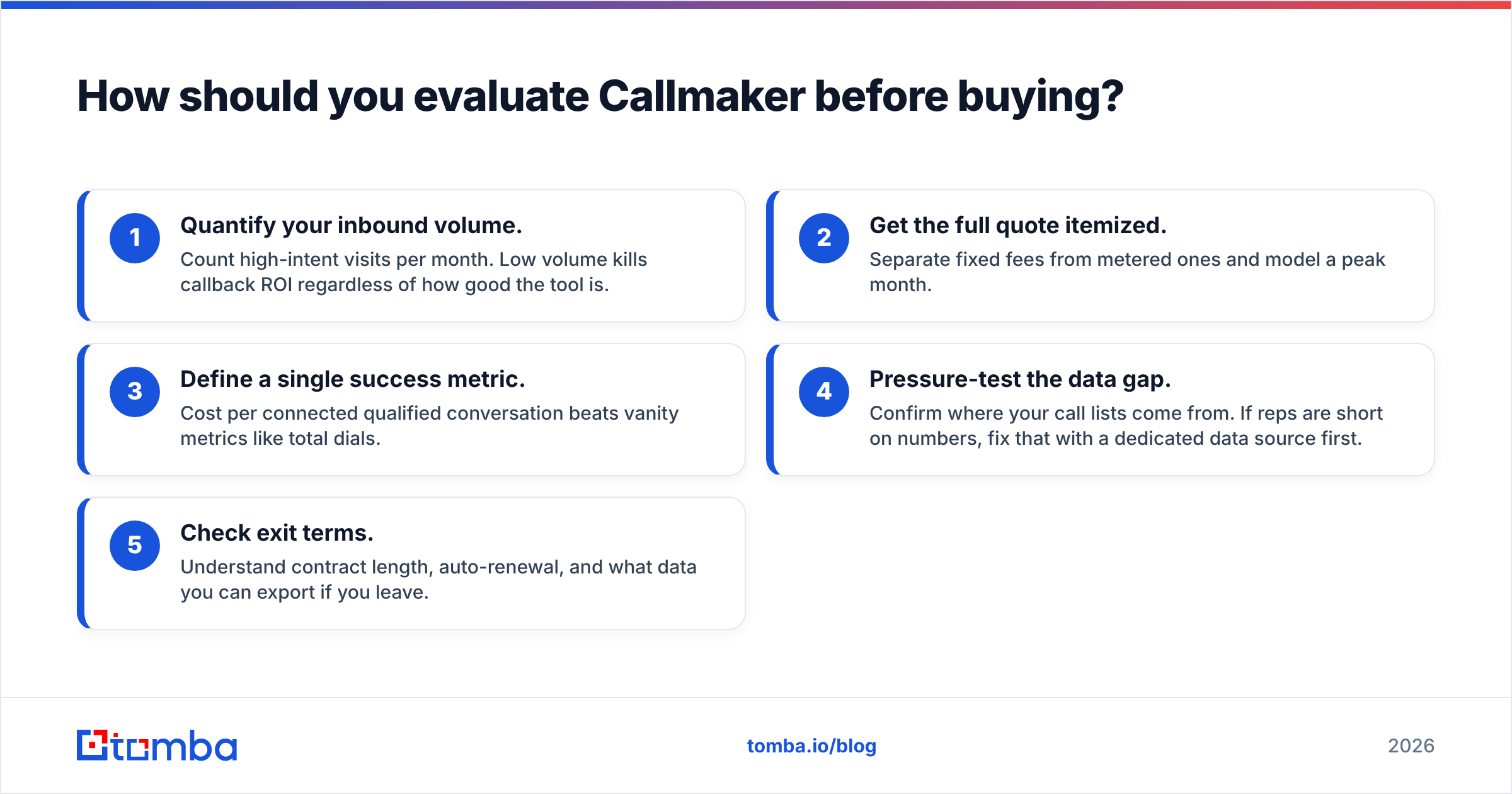
Run a structured trial, not a vibe check. Before signing:
- Quantify your inbound volume. Count high-intent visits per month. Low volume kills callback ROI regardless of how good the tool is.
- Get the full quote itemized. Separate fixed fees from metered ones and model a peak month.
- Define a single success metric. Cost per connected qualified conversation beats vanity metrics like total dials.
- Pressure-test the data gap. Confirm where your call lists come from. If reps are short on numbers, fix that with a dedicated data source first.
- Check exit terms. Understand contract length, auto-renewal, and what data you can export if you leave.
Do those five and you'll know within a pilot whether Callmaker accelerates real revenue or just adds a line to your stack.
The bottom line#
Callmaker is a focused, capable callback platform that earns its keep when you already have inbound phone demand and are losing deals to slow response times. Its honest weaknesses are pricing opacity and a deliberately narrow scope — it accelerates pipeline, it does not create it. Judge it on cost per connected conversation, not sticker price, and be brutally honest about whether your bottleneck is speed or supply.
If the bottleneck is supply — not enough verified decision-makers to call or email — start upstream. Tomba's Email Finder gives your team verified, ready-to-contact addresses by name, company, or domain, so reps spend their hours in conversations instead of hunting for contacts. Pair it with a phone finder and enrichment, and any calling tool you choose — Callmaker or otherwise — finally has a full queue to work. Start free with 25 searches and scale only when the pipeline proves it.
// get started
Find, verify and enrich your first contacts today
Start on the free plan with 25 searches a month, then scale when your team is ready.
Free plan · No credit card required · GDPR & CCPA
// about the author