Campaign Cleaner Pricing, Reviews, Pros and Cons (2026)
An honest 2026 breakdown of Campaign Cleaner's pricing, real user reviews, and the pros and cons that matter before you trust it with your list.
Campaign Cleaner is a list-hygiene and email validation tool aimed at email marketers who send through platforms like Mailchimp, AWeber, or GetResponse and want to scrub bounces before they tank their sender reputation. If you are weighing it against the dozen other cleaners on the market, this review walks through what it actually costs, what real users say, and where it falls short.
TL;DR#
- Campaign Cleaner is a desktop-and-cloud email list cleaner built mainly for marketers who manage CSV exports and ESP lists, not for sales teams building pipelines from scratch.
- Pricing leans toward one-time or credit-style purchases rather than rich monthly SaaS tiers, which appeals to occasional cleaners but limits API and team workflows.
- Pros: simple list-in, list-out flow; reasonable bounce detection; budget-friendly for small senders.
- Cons: thin integrations, limited catch-all handling, no real email-finding or enrichment, and patchy support reviews.
- If you need verification plus finding, enrichment, and an API in one place, a platform like Tomba's email verifier covers more ground per dollar.
What is Campaign Cleaner?#
Campaign Cleaner is an email verification and list-cleaning utility. You feed it a list of addresses — usually a CSV exported from your email service provider — and it checks syntax, removes duplicates, flags role accounts (like info@ or sales@), pings mail servers, and hands you back a cleaned file split into valid, invalid, and risky buckets.
Think of it like a coin-counting machine at the bank. You pour in a messy jar of addresses, and it sorts the usable coins from the slugs and the bent ones. It does that one job, and for the most part it does it without much fuss. What it does not do is help you find new coins — there is no email finder, no domain search, and no contact enrichment baked in.
That focus is the whole story with Campaign Cleaner. It is a hygiene tool, full stop. Whether that is a strength or a limitation depends entirely on what you are trying to accomplish.
Who is it built for?#
The honest fit is a specific kind of user:
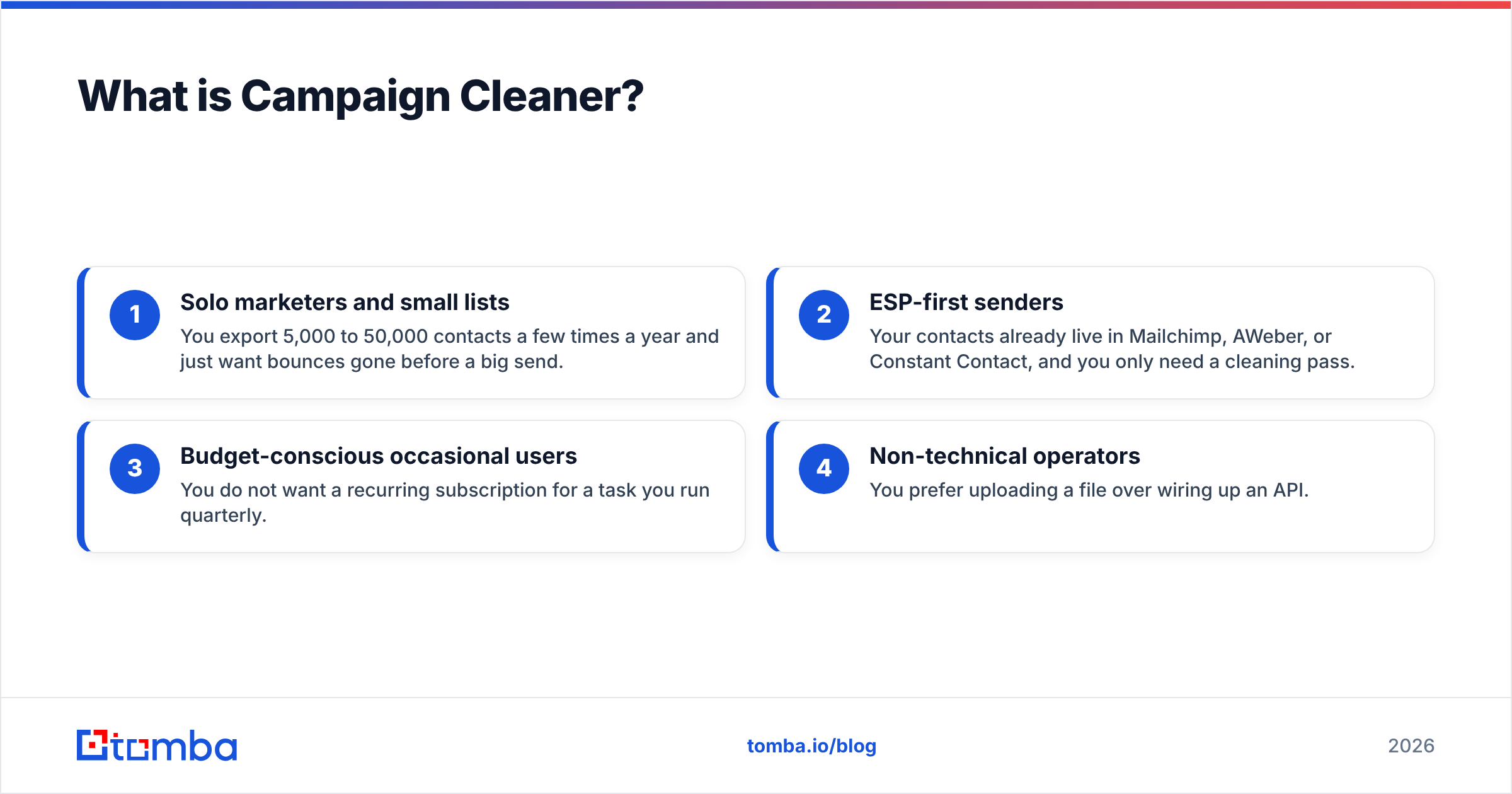
- Solo marketers and small lists — You export 5,000 to 50,000 contacts a few times a year and just want bounces gone before a big send.
- ESP-first senders — Your contacts already live in Mailchimp, AWeber, or Constant Contact, and you only need a cleaning pass.
- Budget-conscious occasional users — You do not want a recurring subscription for a task you run quarterly.
- Non-technical operators — You prefer uploading a file over wiring up an API.
If you recognize yourself in that list, Campaign Cleaner is a reasonable tool. If you are running outbound sales, building lists from company domains, or need verification inside an automated pipeline, keep reading — the gaps get wider.
How much does Campaign Cleaner cost?#
Campaign Cleaner's pricing model historically favors one-time and credit-based purchases over the deep monthly tiers you see from full sales-intelligence platforms. That keeps the entry price low, but it also means features like API access, team seats, and ongoing monitoring are thin or absent compared to subscription tools.
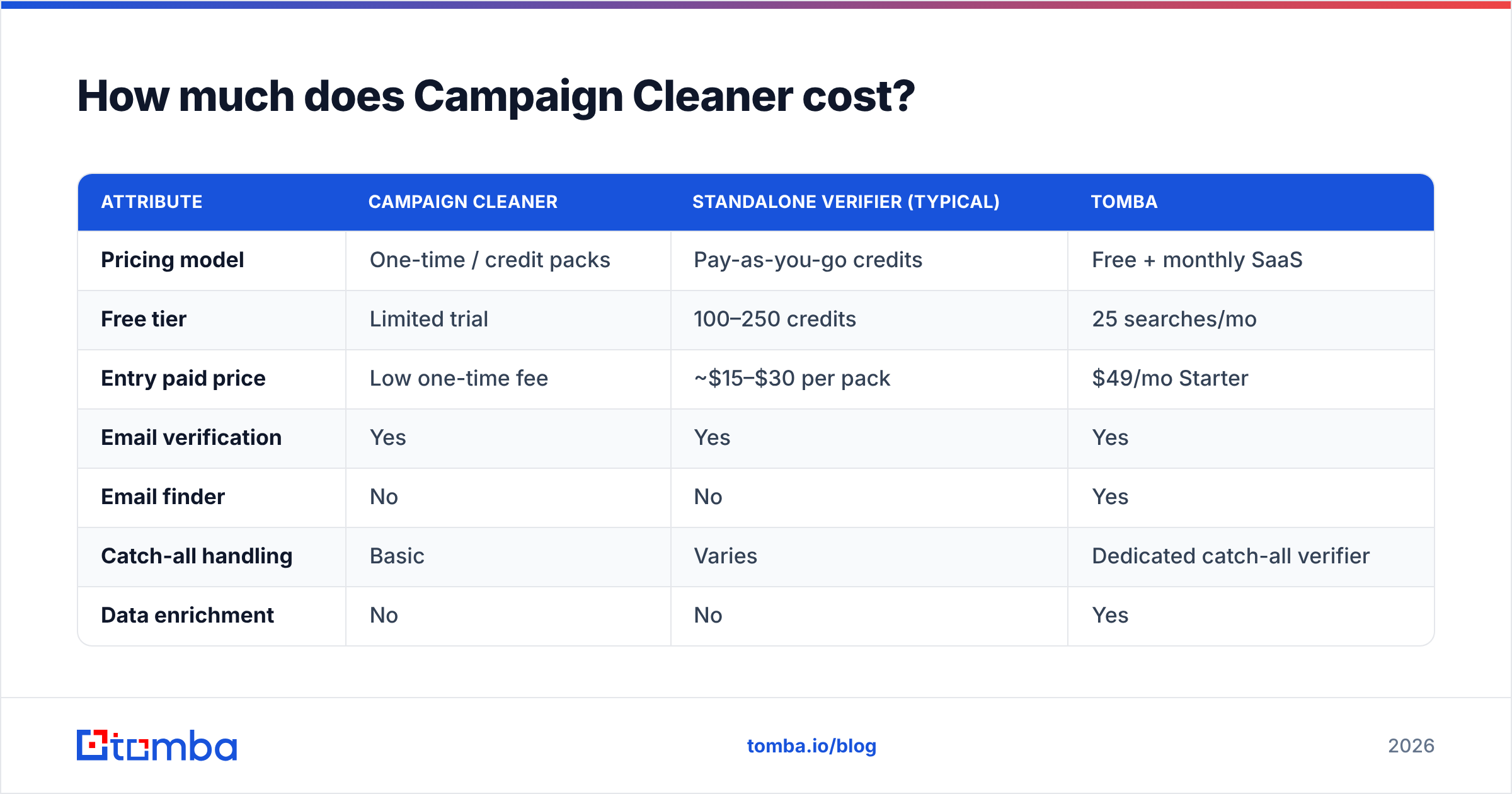
Pricing in this category shifts often, so confirm current numbers on the vendor's own site before buying. The table below compares the shape of Campaign Cleaner's offer against two reference points: a dedicated verification suite and Tomba, which bundles verification with finding and enrichment.
| Attribute | Campaign Cleaner | Standalone verifier (typical) | Tomba |
|---|---|---|---|
| Pricing model | One-time / credit packs | Pay-as-you-go credits | Free + monthly SaaS |
| Free tier | Limited trial | 100–250 credits | 25 searches/mo |
| Entry paid price | Low one-time fee | ~$15–$30 per pack | $49/mo Starter |
| Email verification | Yes | Yes | Yes |
| Email finder | No | No | Yes |
| Catch-all handling | Basic | Varies | Dedicated catch-all verifier |
| Data enrichment | No | No | Yes |
| Public API | Limited / none | Sometimes | Full REST API |
| Bulk processing | Yes (file-based) | Yes | Yes (bulk + API) |
The key takeaway: Campaign Cleaner can be cheaper for a one-off scrub, but the cost-per-outcome flips once you need anything beyond cleaning. You end up buying a second tool for finding contacts, a third for enrichment, and gluing them together by hand. For reference on a bundled approach, see the full Tomba pricing breakdown — Free, Starter at $49/mo, Growth at $99/mo, and Pro at $249/mo.
Is the one-time price actually cheaper?#
Conclusion first: only if cleaning is all you ever do. The moment your workflow includes finding new prospects or verifying catch-all domains at scale, the "cheap" tool becomes the expensive one because of everything it forces you to buy alongside it. A single bad assumption here — that list hygiene is a standalone task — is what leads teams to a tangle of five subscriptions that barely talk to each other.
What do Campaign Cleaner reviews say?#
Aggregated feedback across review sites like G2 and Capterra paints a consistent picture: people who use Campaign Cleaner for exactly what it is built for tend to be satisfied, and people who expect more walk away frustrated.
What reviewers praise:
- Simplicity. The upload-clean-download loop is hard to get wrong. Non-technical marketers consistently call it "easy."
- Bounce reduction. Users report meaningful drops in hard bounces after a cleaning pass, which is the entire point.
- Price for occasional use. Quarterly cleaners like not paying a monthly fee.
What reviewers criticize:
- Support responsiveness. Several reviews mention slow or thin support when something goes wrong with a large file.
- Catch-all accuracy. Risky and catch-all addresses are where cheap verifiers struggle, and Campaign Cleaner is no exception — results can be inconsistent.
- No growth path. Reviewers who scaled up found themselves outgrowing the tool and migrating to a platform with an API and integrations.
- Limited integrations. It is largely a file-based experience; native connectors to CRMs and modern sequencers are sparse.
Reviews are subjective, so treat star ratings as a starting point, not gospel. The pattern that matters is directional: it is a competent single-purpose cleaner that users abandon when their needs grow. That is not a knock on the tool so much as a signal about scope.
What are the pros and cons of Campaign Cleaner?#
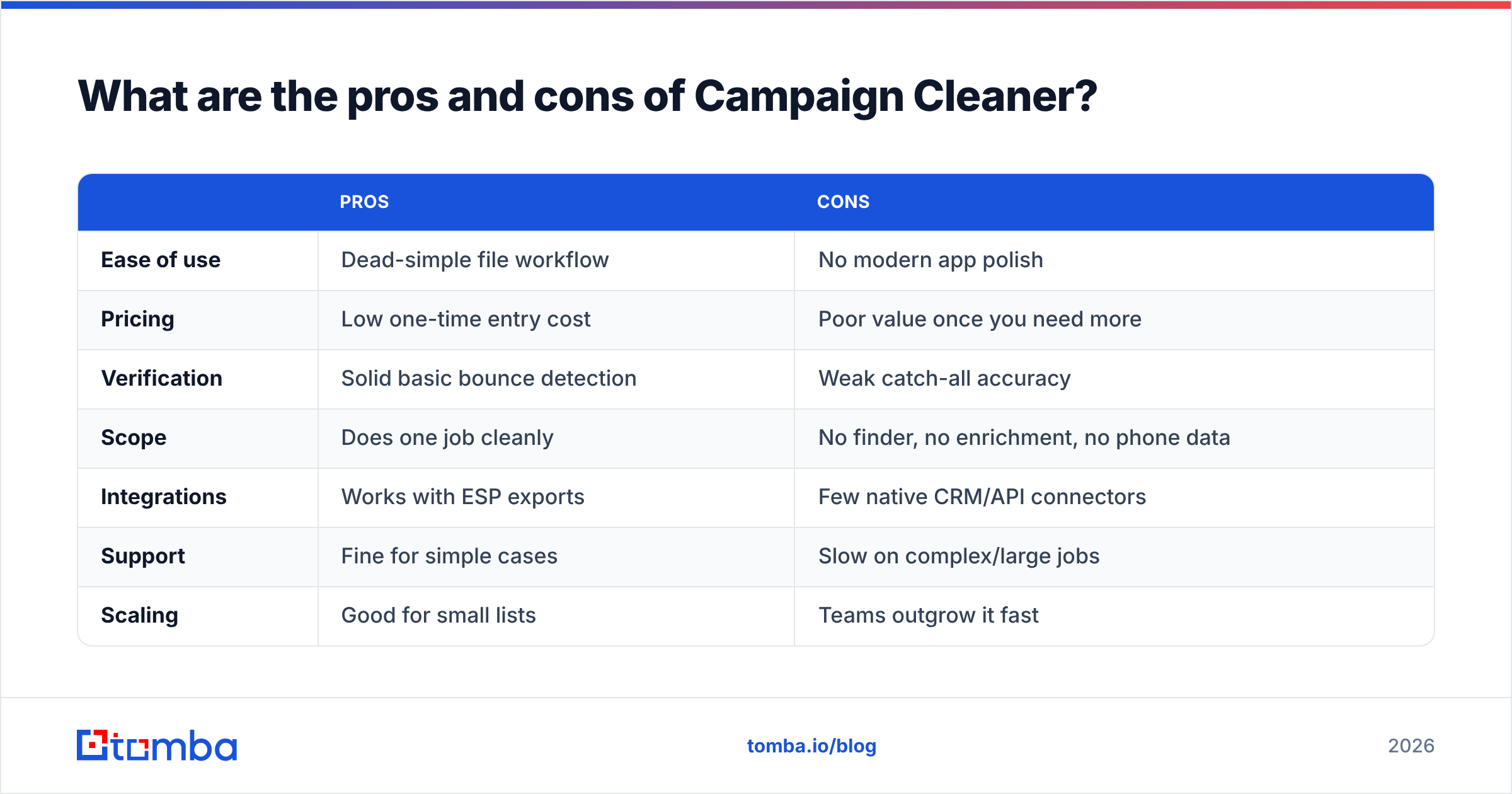
Here is the balanced ledger, which is really what "pros and cons" should deliver.
| Pros | Cons | |
|---|---|---|
| Ease of use | Dead-simple file workflow | No modern app polish |
| Pricing | Low one-time entry cost | Poor value once you need more |
| Verification | Solid basic bounce detection | Weak catch-all accuracy |
| Scope | Does one job cleanly | No finder, no enrichment, no phone data |
| Integrations | Works with ESP exports | Few native CRM/API connectors |
| Support | Fine for simple cases | Slow on complex/large jobs |
| Scaling | Good for small lists | Teams outgrow it fast |
The honest verdict on scope#
Campaign Cleaner is a screwdriver, not a toolbox. A screwdriver is great when you have one screw. It is a bad deal when you are building furniture and keep reaching for tools that are not in the drawer. Most B2B teams are building furniture — they need to find contacts, verify them, enrich them, and push them into a CRM. A cleaner alone leaves three of those four jobs undone.
Is Campaign Cleaner the right choice for B2B sales teams?#
Short answer: usually not. Campaign Cleaner is built around marketing list hygiene, and B2B sales motions have different demands.
Sales teams typically need to:
- Build lists from scratch using a company domain or a name — that is an email finder job, which Campaign Cleaner does not do.
- Verify in real time as contacts enter the pipeline, ideally through an API, not a nightly CSV ritual.
- Enrich records with job titles, company data, and B2B phone numbers so reps can actually reach people.
- Protect deliverability continuously, because email deliverability is an ongoing discipline, not a one-time scrub.
A pure cleaner addresses one slice of that and leaves the rest to other tools. For a marketer cleaning a newsletter list, that is fine. For a sales org, it creates a stitched-together stack that is slower and more error-prone than a single platform. Industry analysts at firms like HubSpot have long argued that consolidating prospecting and data hygiene into fewer systems reduces both cost and data-decay risk — and that logic cuts against single-purpose cleaners.

What are the best Campaign Cleaner alternatives in 2026?#
If Campaign Cleaner's narrow scope is the dealbreaker, your alternatives split into two camps: other standalone verifiers, and full platforms that include verification.
Standalone verifiers (ZeroBounce, NeverBounce, Bouncer, Debounce) do roughly what Campaign Cleaner does, often with better catch-all logic and real APIs. They are upgrades if you only want cleaning but want it done better. You can compare a few via Tomba's head-to-head pages, such as the ZeroBounce alternative and Debounce alternative breakdowns.
Full platforms (Tomba, Apollo, Hunter) bundle verification into a broader find-verify-enrich stack. These cost more per month but replace three or four tools.
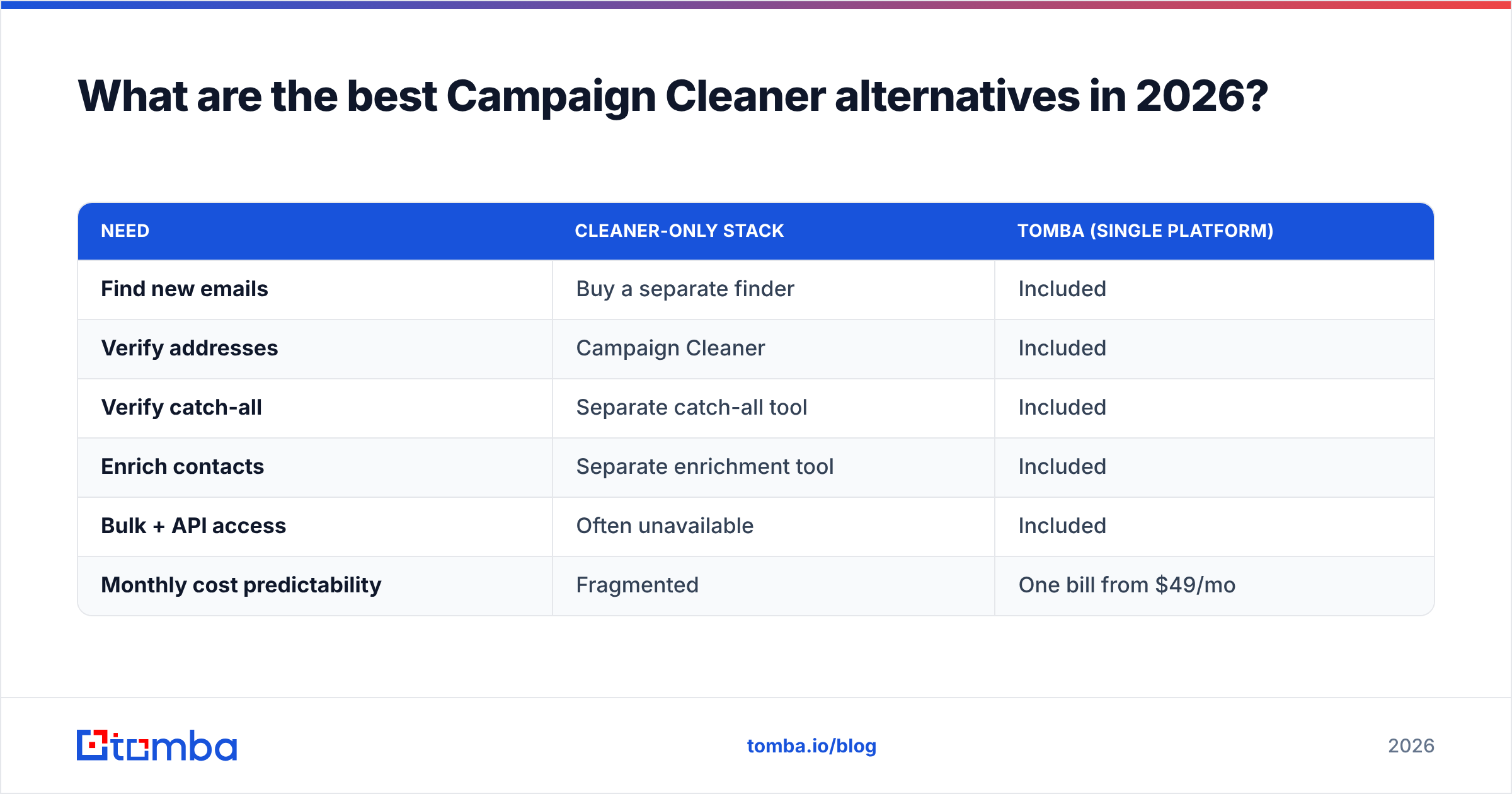
Here is how the consolidation math looks:
| Need | Cleaner-only stack | Tomba (single platform) |
|---|---|---|
| Find new emails | Buy a separate finder | Included |
| Verify addresses | Campaign Cleaner | Included |
| Verify catch-all | Separate catch-all tool | Included |
| Enrich contacts | Separate enrichment tool | Included |
| Bulk + API access | Often unavailable | Included |
| Monthly cost predictability | Fragmented | One bill from $49/mo |
For most teams that send cold email or run outbound, the platform path wins on total cost of ownership even when the sticker price is higher. The hidden expense of a cleaner-only approach is the integration tax: every tool you bolt on is another export, another import, and another place data goes stale. You can run a bulk verify and an enrichment pass from the same dashboard instead of juggling files.
A quick decision framework#
- You clean one list a quarter and never prospect → Campaign Cleaner or a cheap standalone verifier is genuinely fine.
- You clean often and want better accuracy → Move to a dedicated verifier with a real API.
- You find, verify, and enrich → Use a unified platform and retire the cleaner entirely.
- You run a sales team on outbound → Skip cleaners; you need finding plus verification plus phone and enrichment data in one place.
Be honest about which row you are in. Most buyers overestimate how "simple" their needs are and underestimate how fast a prospecting motion outgrows a single-purpose tool.
How does verification accuracy actually work?#
Verification accuracy is where cheap and serious tools separate, so it is worth understanding what is happening under the hood before you trust any vendor's "99%" claim.
A solid verifier runs a layered check:
- Syntax — Is the address even formatted like an email? Free and instant.
- Domain/MX — Does the domain exist and accept mail? A DNS lookup.
- SMTP ping — Does the mailbox respond without actually sending a message?
- Catch-all detection — Does the domain accept everything, making per-mailbox verdicts uncertain?
- Role and disposable flags — Is this info@ or a throwaway address?
The first three are commodity checks that almost every tool, Campaign Cleaner included, handles acceptably. The catch-all layer is where weak tools fail, because a catch-all domain says "yes" to every address whether the mailbox exists or not. Tools without dedicated catch-all logic either mark these as valid (risking bounces) or as risky (wasting good contacts). This is precisely the accuracy gap reviewers flag with budget cleaners. A platform with a purpose-built catch-all verifier gives you a more confident verdict on exactly the addresses that matter most in B2B, where catch-all domains are common.
If you want to understand the terminology behind any of this, the concept of sender reputation is the thread that ties cleaning to deliverability — dirty lists burn reputation, and burned reputation lands you in spam regardless of how good your copy is. For the broader definition of email validation itself, Wikipedia's overview of address structure is a neutral starting point.
Final verdict: should you use Campaign Cleaner?#
Use Campaign Cleaner if you are a small or occasional sender who needs to scrub a CSV before a campaign and nothing more. For that narrow job, it is affordable and uncomplicated, and the reviews back that up. It is a legitimate tool that does what it claims within a tight boundary.
Look elsewhere if you need verification accuracy on catch-all domains, an API, native CRM integrations, or — most importantly — the ability to find and enrich contacts, not just clean the ones you already have. That gap is structural, not a feature you can wait for a future update to fill.
For teams that want one platform instead of a fragile chain of single-purpose tools, Tomba's Email Finder pairs email finding, verification, catch-all checking, phone discovery, and enrichment behind one Tomba API and one predictable bill starting free and scaling to $49/mo. You stop exporting CSVs between four tools and start running find-verify-enrich in a single pass. If your list hygiene is really a symptom of a bigger prospecting need, that consolidation is where the real savings — and the cleaner pipeline — actually show up. Start with the free tier, verify your current list, and see how much of your stack you can retire.
Ready to find emails that actually work?
Join 150,000+ professionals who stopped guessing and started sending. Free credits on signup — no credit card required.
Get the Tomba newsletter
Practical outbound tactics and product updates — once every two weeks.
About the author