CapitalConnectorAI vs FinalScout: 2026 Email Finder Showdown
CapitalConnectorAI vs FinalScout in 2026: a side-by-side look at accuracy, pricing, data coverage, and which email finder actually fills your pipeline.
TL;DR
- CapitalConnectorAI is built for capital-raising and investor outreach — narrow ICP, strong on fund/founder context, thin on general B2B coverage.
- FinalScout is a LinkedIn-first email finder with AI-written outreach baked in — convenient if LinkedIn is your only channel, limited if it isn't.
- Neither tool publishes independent accuracy benchmarks, and both lock data behind their own sending workflow, which makes exporting clean lists harder than it should be.
- If you need raw email-finding accuracy, verification, and an API you can wire into any stack, a dedicated finder like Tomba Email Finder outperforms both on coverage and price.
- Read on for a feature-by-feature table, pricing, and a clear recommendation by use case.
What are CapitalConnectorAI and FinalScout?#
Short version: both are AI-flavored prospecting tools that promise to find a verified email and help you send a message — but they aim at very different buyers.
CapitalConnectorAI is a vertical tool. It markets itself to founders and fundraisers who want to reach investors, angels, and fund partners. Think of it as a Rolodex with an AI co-pilot stapled on: it pairs contact discovery with context about who a person invests in and at what stage. That focus is its strength and its ceiling. If you're raising a seed round, the curation is useful. If you're selling SaaS to RevOps leaders, the investor-centric data model gets in your way.
FinalScout is a horizontal LinkedIn email finder. You browse profiles or run a search, FinalScout extracts the professional email, and its "ScoutAI" feature drafts an outreach message tuned to the profile. It leans hard on the LinkedIn graph, so coverage tracks whatever a person has exposed on their profile and wherever FinalScout can match it to a verified inbox.
The honest framing: these are workflow tools first and data tools second. The email finding is a feature inside a sending product. That matters because the quality of your pipeline depends on the data underneath — and a tool optimized for "click send fast" is not always optimized for "find the right person and confirm the address is real."

How accurate is each email finder?#
Accuracy is where the marketing copy and the spreadsheet diverge.
Neither CapitalConnectorAI nor FinalScout publishes a third-party-audited accuracy rate, so you're trusting a self-reported number or, more often, a vague "high accuracy" claim. In practice, accuracy on a finder comes down to three things: the size and freshness of the underlying data, whether every result is SMTP-verified before it's handed to you, and how the tool handles catch-all domains.
That last point trips up a lot of buyers. A domain configured as catch-all accepts mail to any address, so a naive finder reports "valid" for guesses that will actually bounce. A serious finder runs a dedicated catch-all verifier and tells you the confidence level instead of pretending the address is confirmed. Ask both vendors directly how they score catch-all results — the answer is revealing.
For a topic this dependent on data quality, it helps to look at how dedicated finders benchmark against each other rather than trusting any single vendor's homepage claim.

The pattern across independent tests is consistent: tools that treat verification as a separate, first-class step beat tools that bundle "found + sent" into one click. When the finder's incentive is to keep you sending inside its platform, there's less pressure to surface a "we're not sure about this one" flag. A standalone email verifier that you run before import gives you a cleaner bounce rate than trusting an in-app green checkmark.
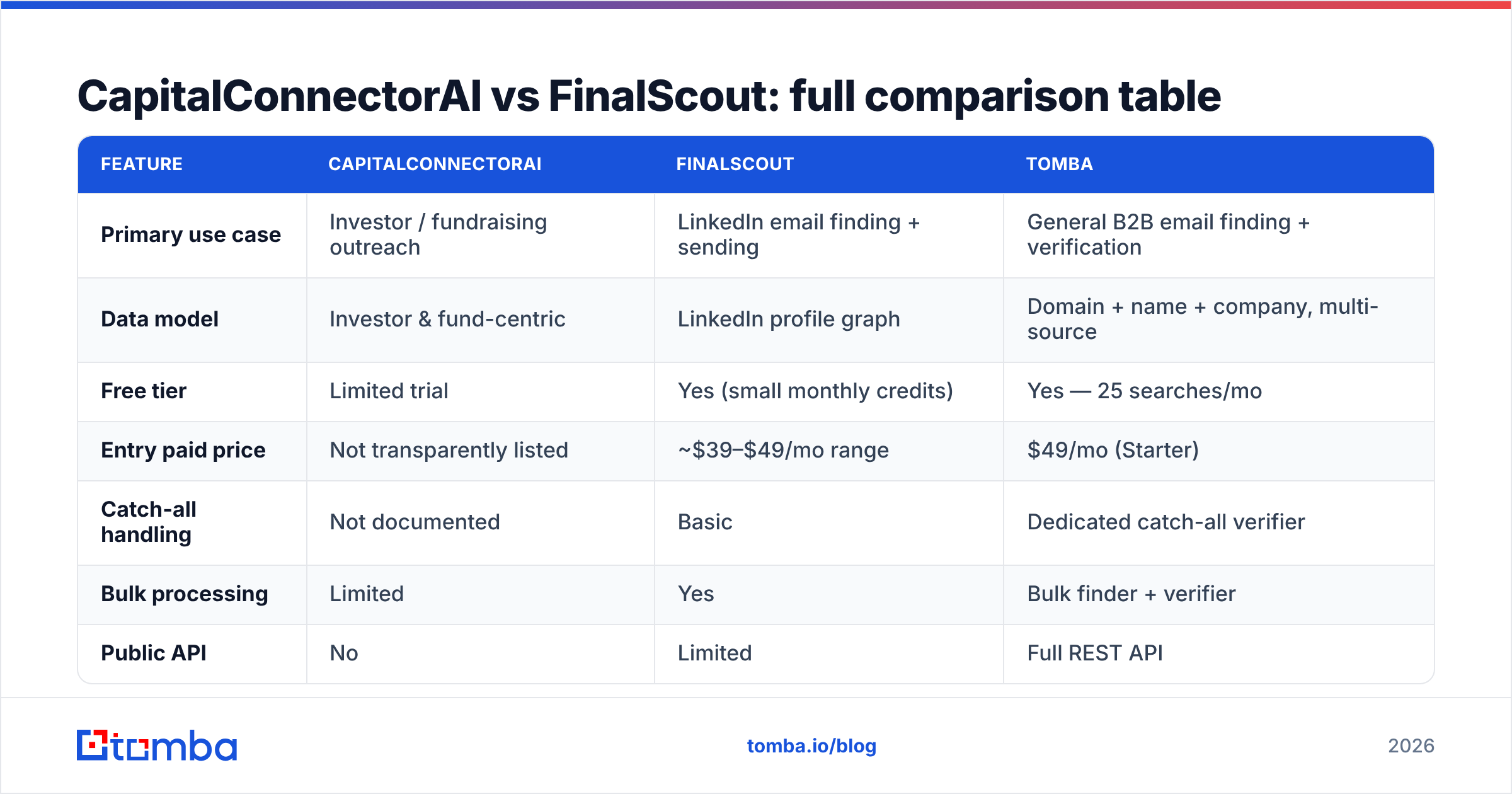
CapitalConnectorAI vs FinalScout: full comparison table#
Here's the side-by-side. Where a vendor doesn't publish a number, it's marked accordingly — and that opacity is itself a data point.
| Feature | CapitalConnectorAI | FinalScout | Tomba |
|---|---|---|---|
| Primary use case | Investor / fundraising outreach | LinkedIn email finding + sending | General B2B email finding + verification |
| Data model | Investor & fund-centric | LinkedIn profile graph | Domain + name + company, multi-source |
| Free tier | Limited trial | Yes (small monthly credits) | Yes — 25 searches/mo |
| Entry paid price | Not transparently listed | ~$39–$49/mo range | $49/mo (Starter) |
| Catch-all handling | Not documented | Basic | Dedicated catch-all verifier |
| Bulk processing | Limited | Yes | Bulk finder + verifier |
| Public API | No | Limited | Full REST API |
| Native integrations | Few | LinkedIn, email | HubSpot, Salesforce, Pipedrive, Sheets, Zapier |
| Best for | Founders raising capital | Solo LinkedIn prospectors | Teams that need clean data at scale |
A few things to read out of that table. First, API access separates a data tool from a closed app. If you can't pull results into your own CRM enrichment job, you're renting a workflow, not building a pipeline. Tomba exposes a full email finder API; FinalScout's programmatic access is limited and CapitalConnectorAI doesn't publish one. Second, integration breadth decides how much manual CSV shuffling you'll do every week.
Which tool has better data coverage?#
It depends entirely on who you're trying to reach — and that's the real decision, not the feature list.
Think of data coverage like fishing. CapitalConnectorAI stocks one well-curated pond: investors and fund people. If that's your target, you'll catch fish fast. FinalScout fishes the LinkedIn lake — huge, but you only get the fish that surface (people with complete, matchable profiles). A general-purpose finder fishes the whole coastline: it combines public web sources, domain patterns, and verification to find addresses that never appear on a single LinkedIn profile.
The practical consequences:
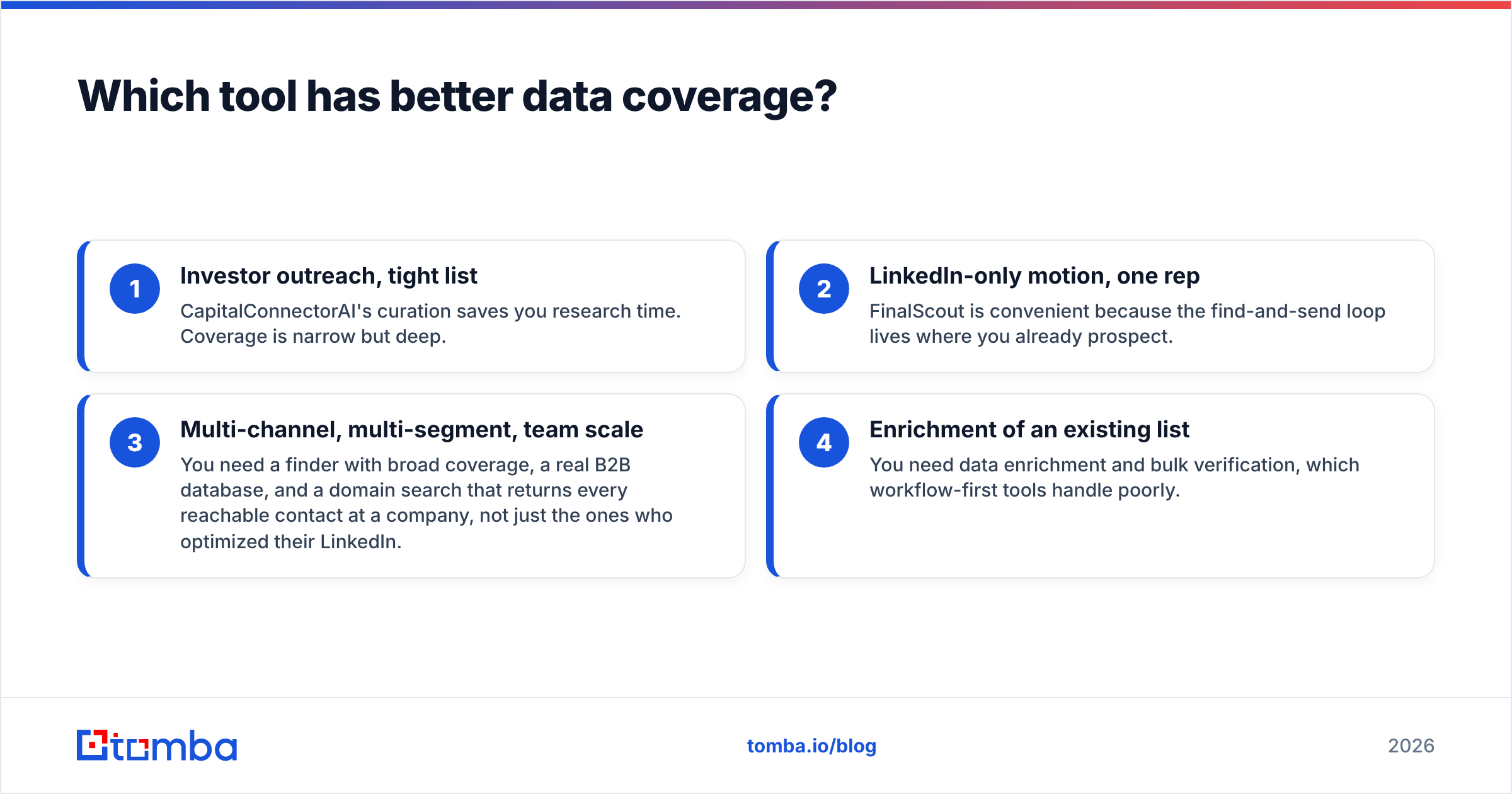
- Investor outreach, tight list — CapitalConnectorAI's curation saves you research time. Coverage is narrow but deep.
- LinkedIn-only motion, one rep — FinalScout is convenient because the find-and-send loop lives where you already prospect.
- Multi-channel, multi-segment, team scale — You need a finder with broad coverage, a real B2B database, and a domain search that returns every reachable contact at a company, not just the ones who optimized their LinkedIn.
- Enrichment of an existing list — You need data enrichment and bulk verification, which workflow-first tools handle poorly.
Coverage also decays. Roughly 25–30% of B2B contact data goes stale each year as people change jobs — a number repeatedly cited in sales-ops research and visible in any old list you re-verify. A tool that re-checks addresses at find-time protects you from that rot; one that served you a cached result from last quarter does not.

How do CapitalConnectorAI and FinalScout price out?#
Pricing transparency is itself a feature, and both tools could do better here.
FinalScout publishes tiered plans that generally start in the ~$39–$49/month range for a modest monthly credit allowance, scaling up for more finds and AI message generation. CapitalConnectorAI is less transparent about public pricing, which usually signals a sales-led or usage-negotiated model — fine for funded startups, friction for a solo operator who just wants to start.
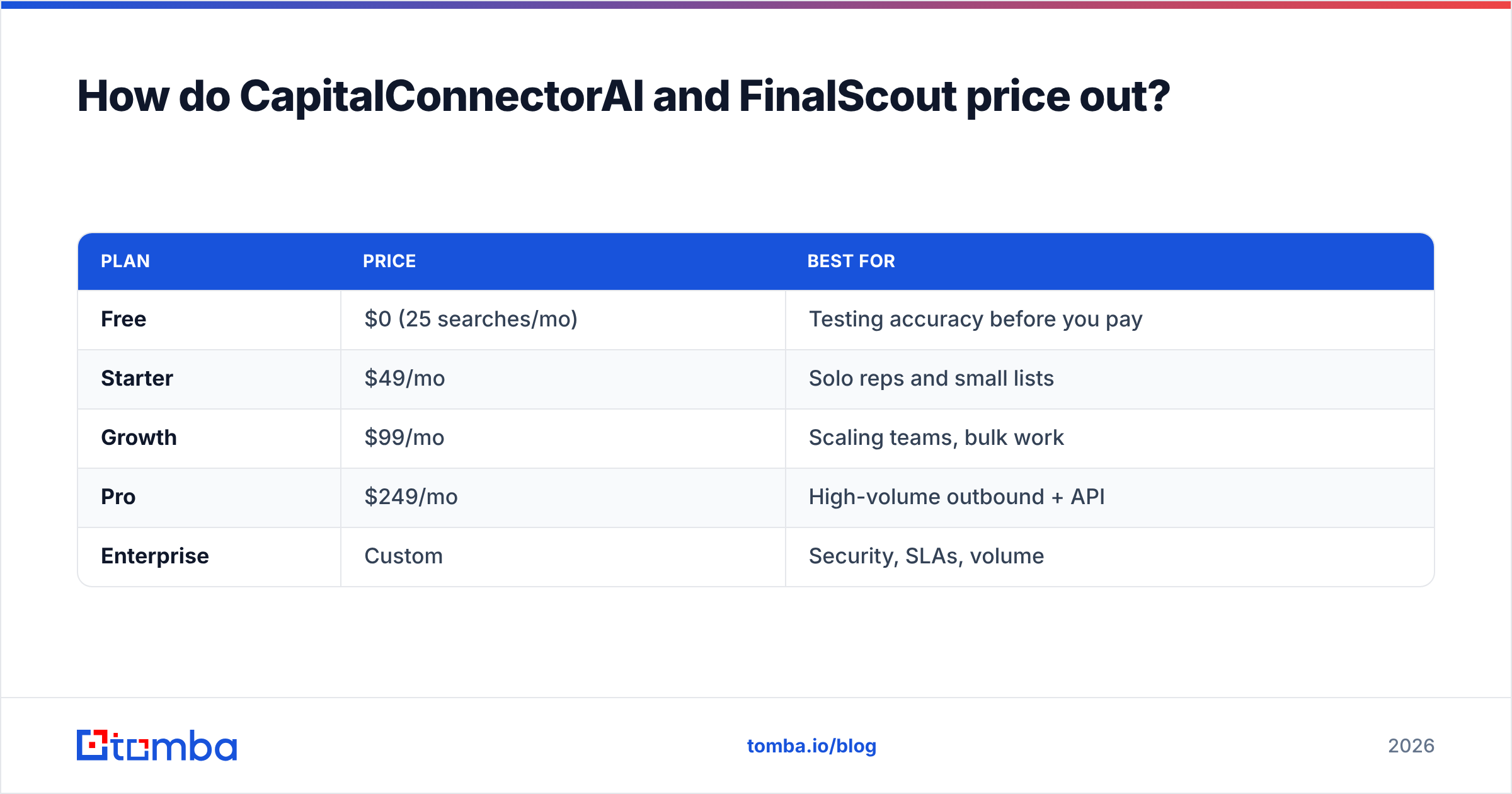
For comparison, Tomba pricing is published in full:
| Plan | Price | Best for |
|---|---|---|
| Free | $0 (25 searches/mo) | Testing accuracy before you pay |
| Starter | $49/mo | Solo reps and small lists |
| Growth | $99/mo | Scaling teams, bulk work |
| Pro | $249/mo | High-volume outbound + API |
| Enterprise | Custom | Security, SLAs, volume |
The number that actually matters isn't sticker price — it's cost per usable, verified contact. A cheaper plan that hands you a 12% bounce rate costs more than a slightly pricier plan that lands you at 2%, because bounces burn sender reputation and torch your email deliverability. Run the math on net good contacts, not gross credits. Independent review sites like G2 are a decent place to sanity-check how each vendor's real bounce rates land versus their claims.
Is FinalScout's AI writing worth it?#
It's a genuine convenience, but don't let it decide your data tool.
FinalScout's ScoutAI drafts a message from the prospect's profile, which removes the blank-page problem and speeds up a one-person LinkedIn motion. For a solo founder sending 20 messages a day, that's real time saved. The catch: AI-generated, profile-scraped openers are increasingly easy for buyers to recognize, and personalization that's obviously templated can underperform a plain, specific human line. The AI is a writing accelerant, not a strategy.
More importantly, bundling the writer into the finder pushes you toward sending from inside the platform — which is exactly where you lose control of deliverability, warmup, and your own domain reputation. Plenty of teams prefer to find and verify with a dedicated tool, then send through a system they control (and that they can warm up properly — see HubSpot's own guidance on email deliverability and Google's Postmaster Tools for monitoring reputation). Keeping data and sending separate is more flexible, not less.
If you want AI assistance without locking your data inside one vendor, you can pair an open finder with standalone writing tools — a cold email AI draft, a subject line generator, and a spam checker — and still export your verified list anywhere.
When should you pick a dedicated email finder instead?#
Pick a dedicated finder whenever the data is the point — which is most of the time.
CapitalConnectorAI and FinalScout are good at their narrow jobs: investor curation and LinkedIn find-and-send. But the moment your needs widen — multiple personas, multiple channels, a CRM to enrich, an API to call, a team that needs consistent verified data — a finder built around data quality rather than a single send workflow pulls ahead.
That's the gap a tool like Tomba fills. It treats finding, verifying, and enriching as distinct, auditable steps. You get a published accuracy posture, a real catch-all verifier, bulk lead generation, and native ties into HubSpot, Salesforce, and Pipedrive — so the data lands where your team already works instead of trapped in another dashboard.
Here's how the email-finder field generally shakes out when you line tools up on coverage and verification rather than workflow gimmicks:

The takeaway isn't "one tool to rule them all." It's that you should match the tool to the bottleneck. If your bottleneck is "I need warm investor intros," CapitalConnectorAI earns its place. If it's "I live in LinkedIn and want to send fast," FinalScout is reasonable. If it's "I need clean, verified, exportable B2B contacts at scale across channels" — which describes most sales and marketing teams — a dedicated finder wins on every axis that shows up in your bounce report.
The verdict: CapitalConnectorAI vs FinalScout in 2026#
Choose CapitalConnectorAI if fundraising is your entire use case and you value curated investor context over broad coverage. Choose FinalScout if you're a solo prospector whose whole motion lives on LinkedIn and you want AI drafting in the same window. Choose neither if your real need is accurate, verified, exportable contact data across segments and channels — because both tools optimize for their own sending loop, not for the clean pipeline you actually have to live with downstream.
Data quality compounds. A 2% bounce rate versus a 12% one is the difference between an inbox that lands and a domain that gets throttled. That compounding is why the finder underneath your stack matters more than the AI sticker on top of it.
If you want to test that claim instead of taking it on faith, start with the free tier and check the addresses yourself. Tomba Email Finder gives you 25 searches a month at no cost, real SMTP verification, a catch-all verifier, and a full API — so you can benchmark accuracy against whatever CapitalConnectorAI or FinalScout returns before you commit a dollar. Find the right people, confirm the address is real, and send from a system you control. Run the comparison and let the bounce rate decide.
// get started
Find, verify and enrich your first contacts today
Start on the free plan with 25 searches a month, then scale when your team is ready.
Free plan · No credit card required · GDPR & CCPA
// about the author