Capsule CRM vs Zoho CRM: The Honest 2026 Comparison
Capsule CRM keeps it simple; Zoho CRM scales into a full suite. Here's a no-fluff 2026 breakdown of pricing, features, and which one fits your team.
Choosing between Capsule CRM and Zoho CRM comes down to one question: do you want a tool that gets out of your way, or a platform you can grow into for years? Both are credible, both are affordable, and both will outlast a spreadsheet. But they solve different problems for different teams.
TL;DR — Capsule CRM vs Zoho CRM#
- Capsule CRM wins on simplicity. It's the faster setup, the cleaner interface, and the better choice for teams of 1–20 who want contacts, pipelines, and tasks without a learning curve.
- Zoho CRM wins on depth and scale. Workflow automation, custom modules, AI scoring, and a 50-app ecosystem make it the stronger pick for growing or process-heavy sales orgs.
- Pricing is close at the low end, divergent at the top. Capsule stays cheap and predictable; Zoho's price climbs as you unlock automation and analytics.
- Neither tool finds or verifies contact data well. Both assume you already have accurate emails — which is where a dedicated email finder earns its keep.
- Pick Capsule for speed, Zoho for room to grow. If you're unsure, your team size and appetite for configuration decide it.
What is Capsule CRM?#
Capsule CRM is a lightweight, contact-first CRM built for small businesses and lean sales teams. Think of it as a well-organized address book that grew a sales pipeline and a task list — everything you need to track relationships, nothing you don't.
Founded in the UK and live since 2009, Capsule has stayed deliberately focused. Its core is contact management, a visual sales pipeline, task management, and a handful of integrations. You can be productive in an afternoon, which is rare in CRM land.
The trade-off is ceiling. Capsule is not trying to be your marketing platform, your help desk, and your analytics warehouse. When your processes get complex — multi-stage approvals, territory rules, deep reporting — you'll feel the walls.
What is Zoho CRM?#
Zoho CRM is a full-featured sales platform and the flagship of the broader Zoho ecosystem of 50+ business apps. Where Capsule is a focused tool, Zoho is a system you configure.
Zoho CRM gives you customizable modules, multi-pipeline support, workflow automation, an AI assistant (Zia) for lead scoring and predictions, and reporting that goes well beyond the basics. It connects natively to Zoho Campaigns, Desk, Books, and Analytics, so you can run an entire revenue operation inside one vendor's walls.
That power has a cost: configuration time. Zoho rewards teams willing to invest in setup and punishes those who want plug-and-play. The interface, while much improved, still carries more cognitive load than Capsule's.
How do Capsule CRM and Zoho CRM compare on features?#
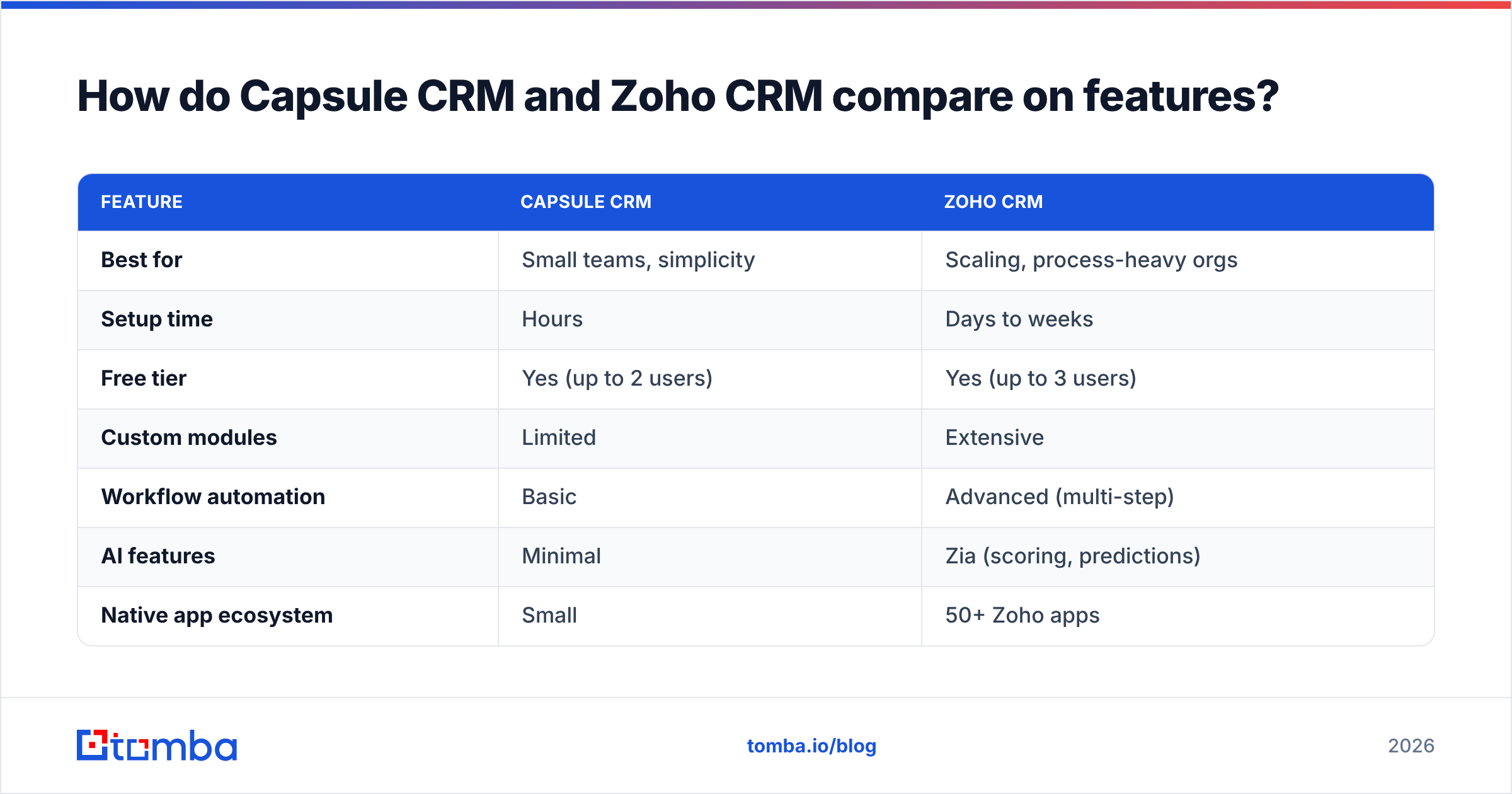
Here's the head-to-head on the attributes that actually change how your team works day to day.
| Feature | Capsule CRM | Zoho CRM |
|---|---|---|
| Best for | Small teams, simplicity | Scaling, process-heavy orgs |
| Setup time | Hours | Days to weeks |
| Free tier | Yes (up to 2 users) | Yes (up to 3 users) |
| Custom modules | Limited | Extensive |
| Workflow automation | Basic | Advanced (multi-step) |
| AI features | Minimal | Zia (scoring, predictions) |
| Native app ecosystem | Small | 50+ Zoho apps |
| Reporting | Standard dashboards | Custom analytics + BI |
| Learning curve | Low | Moderate to high |
| Mobile app | Solid | Feature-rich |
The pattern is consistent: Capsule gives you 80% of the value with 20% of the complexity. Zoho gives you the remaining 20% — the automation, the AI, the deep customization — but you pay for it in setup and ongoing admin.
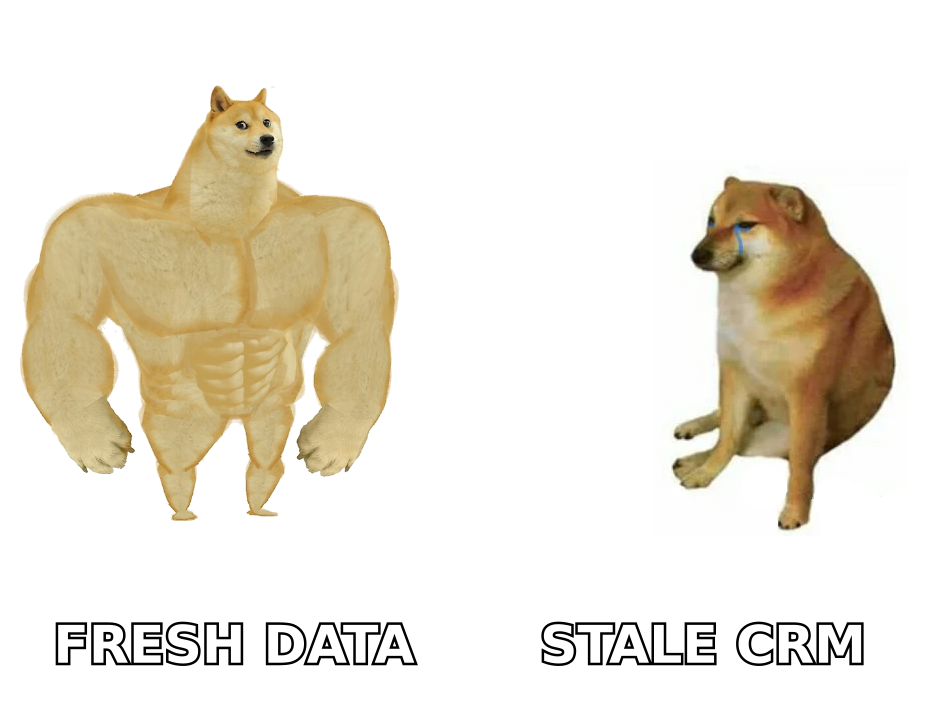
If your sales motion is straightforward — qualify, demo, close — Capsule's lighter feature set is a feature, not a bug. If you run complex deal cycles with handoffs between SDRs, AEs, and customer success, Zoho's modules and automation start paying for themselves.
Is Capsule CRM or Zoho CRM cheaper?#
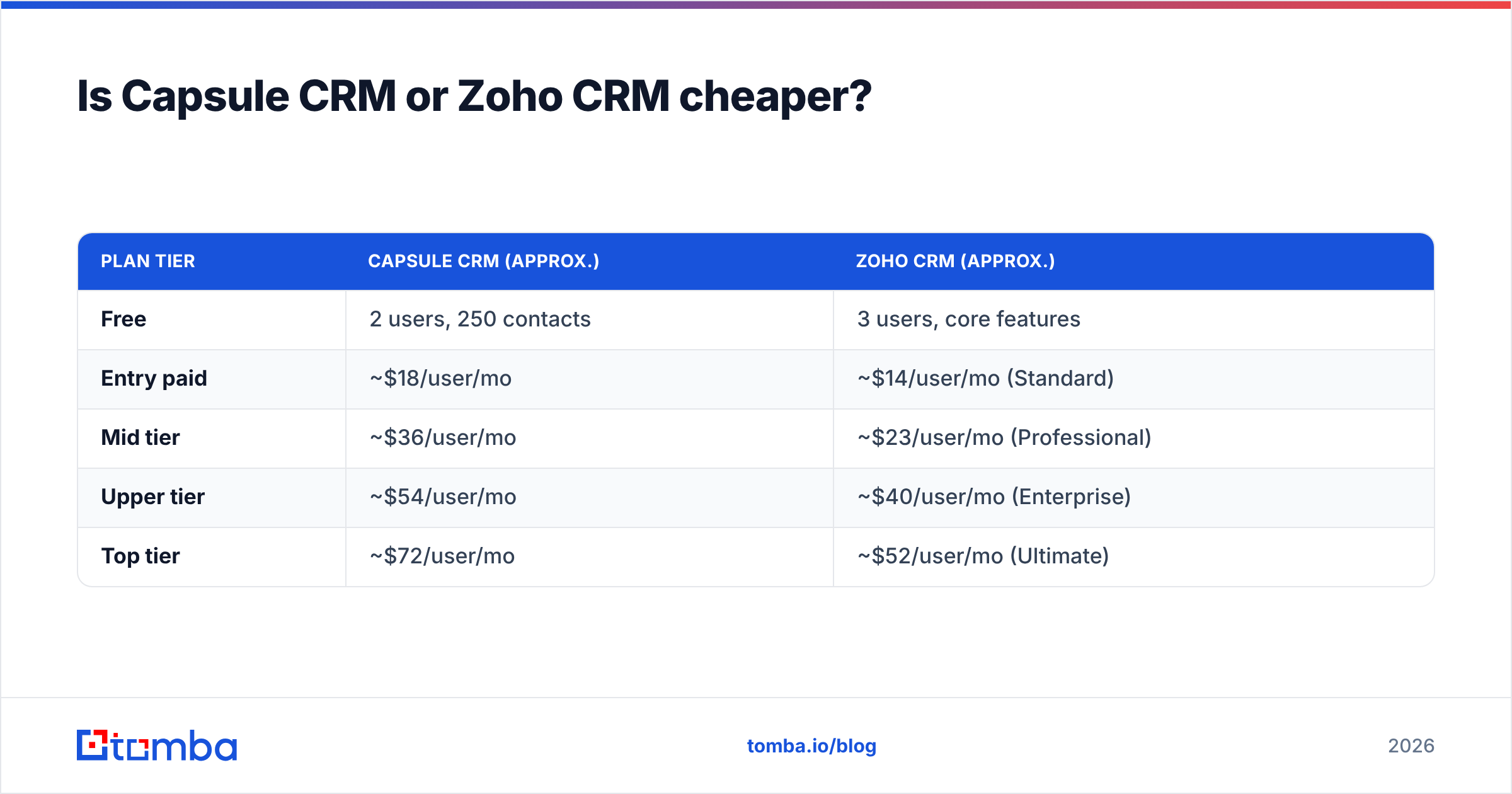
At the entry level they're close. As you climb tiers, Zoho's pricing accelerates because each tier unlocks meaningfully more capability. Capsule stays flatter and more predictable.
| Plan tier | Capsule CRM (approx.) | Zoho CRM (approx.) |
|---|---|---|
| Free | 2 users, 250 contacts | 3 users, core features |
| Entry paid | ~$18/user/mo | ~$14/user/mo (Standard) |
| Mid tier | ~$36/user/mo | ~$23/user/mo (Professional) |
| Upper tier | ~$54/user/mo | ~$40/user/mo (Enterprise) |
| Top tier | ~$72/user/mo | ~$52/user/mo (Ultimate) |
Prices are list rates billed annually and shift with promotions — always confirm on each vendor's pricing page.
The headline reads "Zoho is cheaper per user," and at face value it often is. But the comparison isn't apples to apples. Capsule's mid tier already includes most of what a small team needs. Zoho's lower tiers withhold the automation and analytics that make the platform worth choosing — so the fair comparison is usually Zoho Professional or Enterprise against Capsule's mid tier, which narrows the gap.
Factor in admin time, too. Zoho's lower sticker price can be offset by the hours (or consultant fees) spent configuring it. Capsule's "expensive" plan may be cheaper once you price your own time.
Which CRM is easier to use?#
Capsule, clearly. This is its single biggest advantage.
Onboarding a new rep to Capsule takes minutes. The pipeline is visual, the contact records are clean, and there's little to misconfigure. For non-technical founders and small teams, this matters more than any feature checklist — a CRM nobody updates is worse than no CRM at all.
Zoho's interface has improved a lot, but it still asks more of you. There are more menus, more settings, and more ways to set things up wrong. Teams that invest in proper onboarding love it; teams that expect to "just start" often stall.
A useful rule: if your team has resisted CRM adoption before, Capsule's simplicity removes the excuse. If you have an ops person who enjoys building systems, Zoho gives them a canvas.
How do they handle automation and AI?#
This is where Zoho pulls ahead decisively.
Workflow automation. Zoho supports multi-step, conditional workflows — trigger an email, update a field, assign a task, and notify a manager, all from one rule. Capsule's automation is intentionally basic: task templates and simple triggers cover the common cases but not complex branching.
AI. Zoho's Zia assistant scores leads, predicts deal outcomes, flags anomalies, and suggests the best time to contact a prospect. Capsule has minimal AI by comparison. For a deeper primer on the category, the revenue operations and CRM glossary entries are worth a read.
Ecosystem automation. Because Zoho CRM sits inside Zoho's suite, automation can span CRM, email campaigns, accounting, and support tickets without third-party glue. Capsule leans on integrations and tools like Zapier to reach the same outcomes.
If automation is core to your strategy, Zoho is the stronger platform. If you mostly want reminders so nothing slips, Capsule's lighter touch is sufficient.
What about integrations?#
Both integrate with the usual suspects — email, calendar, accounting, and marketing tools — and both connect to Zapier and Make for the long tail.
Zoho's advantage is its native ecosystem. Staying inside Zoho means tighter data flow and fewer connectors to maintain. Capsule's advantage is that it plays nicely with best-of-breed tools instead of locking you in, which suits teams that have already chosen their stack. If you're weighing other platforms, the Pipedrive integration shows how a focused pipeline CRM connects to the rest of a sales workflow.
The honest caveat for both: a CRM is only as good as the data inside it. Neither Capsule nor Zoho is built to find prospect emails or verify that the addresses in your records still work. That's a separate job — and skipping it quietly wrecks your outreach numbers.
How do you keep either CRM filled with accurate data?#
A CRM is a container. Garbage in, garbage out — and most CRMs fill up with stale, bounced, or missing contact data within a year.
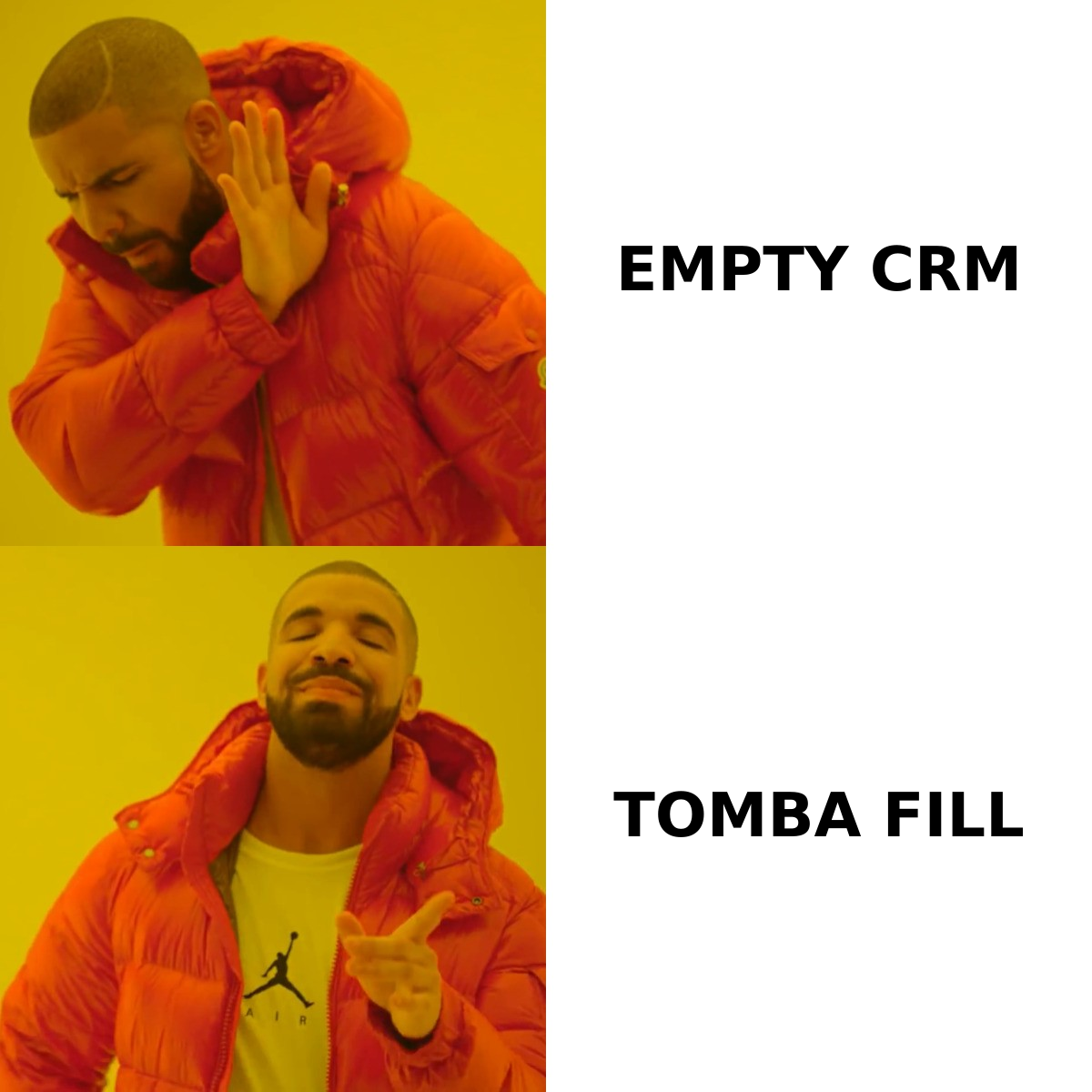
The fix is to separate the two jobs. Let your CRM do what it's great at — tracking relationships and deals — and use a dedicated data layer to keep it populated and clean:
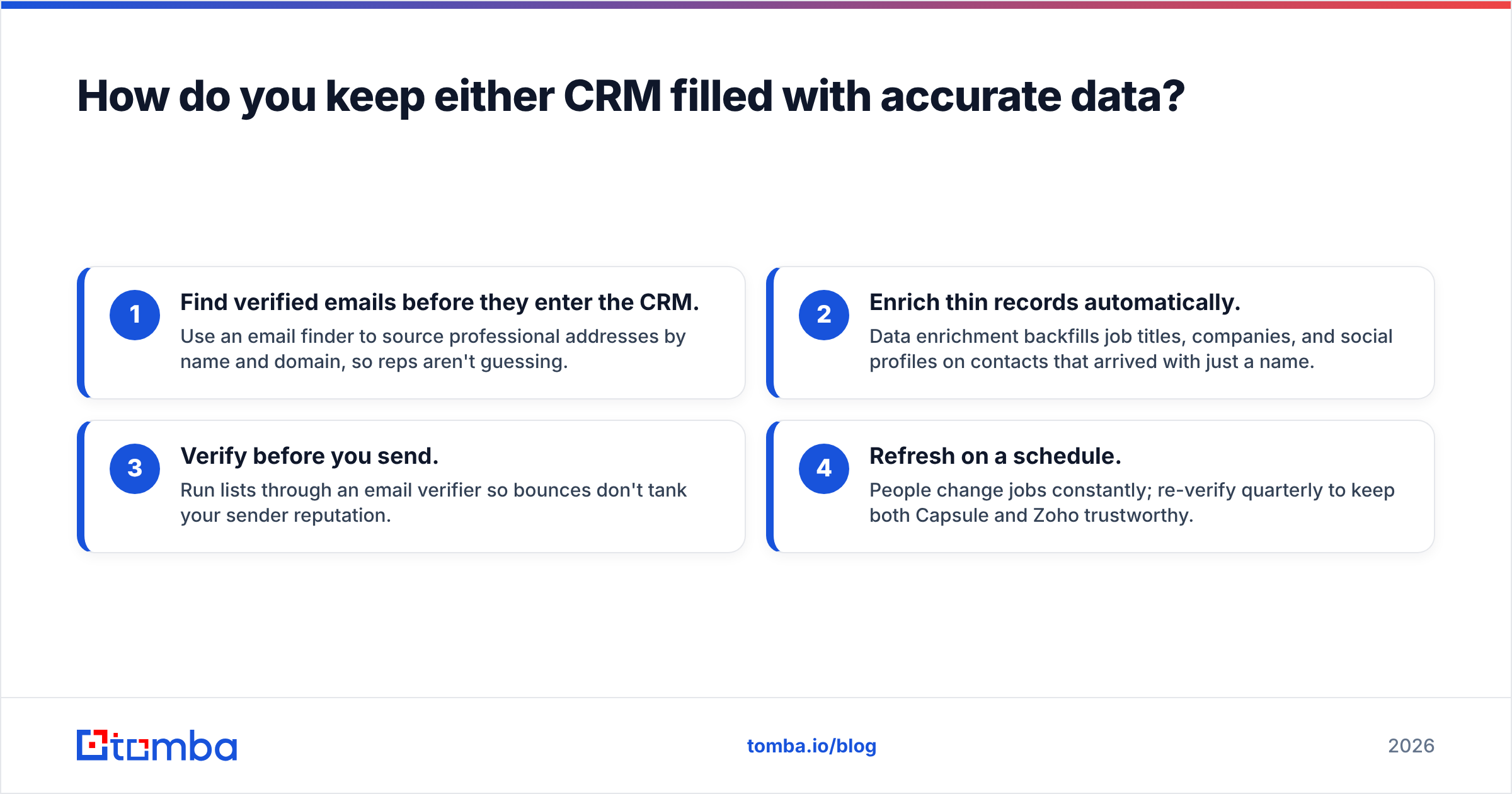
- Find verified emails before they enter the CRM. Use an email finder to source professional addresses by name and domain, so reps aren't guessing.
- Enrich thin records automatically. Data enrichment backfills job titles, companies, and social profiles on contacts that arrived with just a name.
- Verify before you send. Run lists through an email verifier so bounces don't tank your sender reputation.
- Refresh on a schedule. People change jobs constantly; re-verify quarterly to keep both Capsule and Zoho trustworthy.
Whichever CRM you choose, this hygiene layer is what determines whether the tool actually drives revenue or just stores dead contacts.
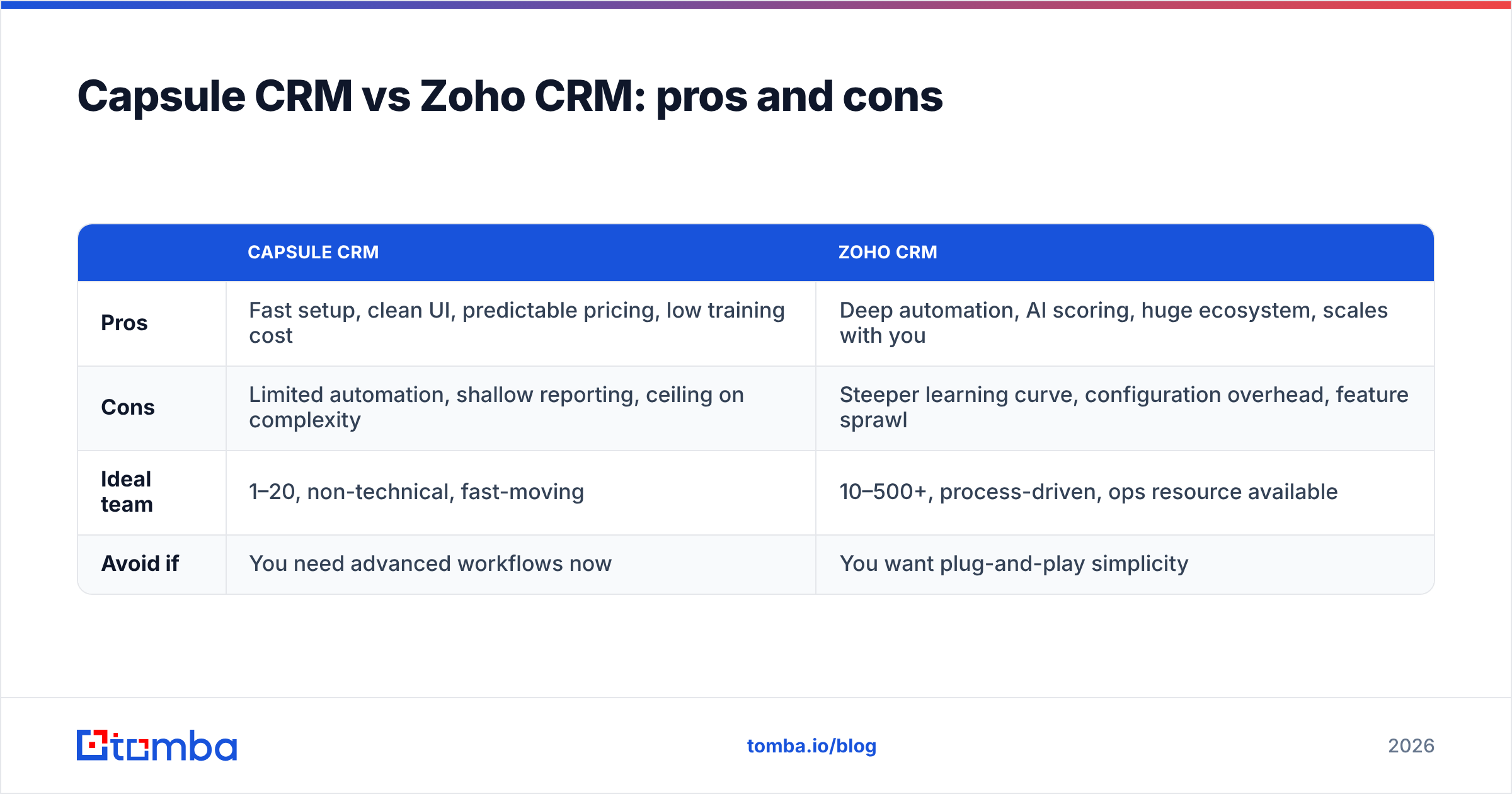
Capsule CRM vs Zoho CRM: pros and cons#
| Capsule CRM | Zoho CRM | |
|---|---|---|
| Pros | Fast setup, clean UI, predictable pricing, low training cost | Deep automation, AI scoring, huge ecosystem, scales with you |
| Cons | Limited automation, shallow reporting, ceiling on complexity | Steeper learning curve, configuration overhead, feature sprawl |
| Ideal team | 1–20, non-technical, fast-moving | 10–500+, process-driven, ops resource available |
| Avoid if | You need advanced workflows now | You want plug-and-play simplicity |
Which CRM should you choose?#
Choose Capsule CRM if you're a small team that values speed and simplicity, you don't have a dedicated ops person, and your sales process is relatively linear. Capsule will be adopted, used, and loved precisely because it doesn't overwhelm. It's the safe pick when the real risk is your team not using the CRM at all.
Choose Zoho CRM if you're scaling, your processes are getting complex, you want automation and AI to do heavy lifting, and you have someone willing to configure and maintain the system. Zoho is the better long-term bet for organizations that will outgrow a simple tool — and the fact that it anchors a 50-app suite means you may never need to switch vendors again.
Read real-world reviews on G2 before committing; both tools have loyal user bases, and the comments reveal edge cases pricing pages hide.
There's also a hybrid truth worth stating plainly: the CRM debate matters less than most people think once your data pipeline is solid. A simple CRM with clean, enriched, verified contacts outperforms a powerful CRM full of bounced emails every single time.
The bottom line#
Capsule CRM and Zoho CRM are both good — they're just good for different teams. Capsule optimizes for adoption and speed; Zoho optimizes for power and scale. Match the tool to your team's complexity and appetite for configuration, and either one will serve you well.
But before you obsess over which CRM to buy, fix the input. Most pipelines don't fail because the CRM was wrong — they fail because the contact data was. Start free with the Tomba Email Finder to source verified, accurate B2B emails, then push clean records straight into whichever CRM you pick. Tomba's free tier gives you 25 searches a month to test it; paid plans start at $49/mo when you're ready to scale. A great CRM deserves great data — give it some.
Ready to find emails that actually work?
Join 150,000+ professionals who stopped guessing and started sending. Free credits on signup — no credit card required.
Get the Tomba newsletter
Practical outbound tactics and product updates — once every two weeks.
About the author