Catch All Domain Explained: How to Verify Them in 2026
A catch all domain accepts every address you throw at it, real or fake. Here is how catch-all verification actually works and how to reach real inboxes safely.
TL;DR
- A catch all domain (also called accept-all) is configured to accept email sent to any address at that domain —
anything@company.comreturns "OK" whether the mailbox exists or not. - Standard SMTP verification can't confirm a single mailbox on a catch-all, so most verifiers mark these addresses "unknown" or "accept-all" rather than valid.
- Catch-alls are common at enterprises, agencies, and small businesses using Google Workspace or Microsoft 365 — you cannot just delete them from your list without losing real buyers.
- Smart catch-all handling uses pattern data, historical signals, and confidence scoring instead of a single SMTP ping.
- Tools like a dedicated catch-all verifier let you keep deliverable contacts while filtering the genuinely dead ones.
What is a catch all domain?#
A catch all domain is a mail server set up to accept every message addressed to its domain, even when the specific mailbox does not exist. Think of it like an apartment building with a single mail slot: the doorman takes anything addressed to the building and sorts it later, instead of rejecting letters at the door. Technically, the receiving server returns a 250 OK response to every RCPT TO command during the SMTP conversation, so there is no public way to tell a real inbox from a typo.
Administrators enable catch-all for practical reasons. They don't want to lose mail sent to jon.smith@ when the real address is john.smith@. They want a safety net during employee turnover. Sometimes it's just the default on a cheap hosting plan. Whatever the reason, the side effect is the same for anyone building a prospect list: the domain will happily confirm asdf123@company.com as a valid recipient.
That is why catch-all domains break naive verification. When you ping the server, it says yes to everything. A verifier that trusts that response would mark every fake address as "valid" and tank your bounce rate the moment you hit send.
How does a catch all domain affect email verification?#
Email verification normally works in stages. First a syntax check, then an MX-record lookup to confirm the domain can receive mail, then an SMTP handshake that asks the server whether a specific mailbox exists. On a normal domain, a non-existent mailbox returns 550 No such user and you can safely discard it. On a catch-all, that final step is useless — the server never says no.
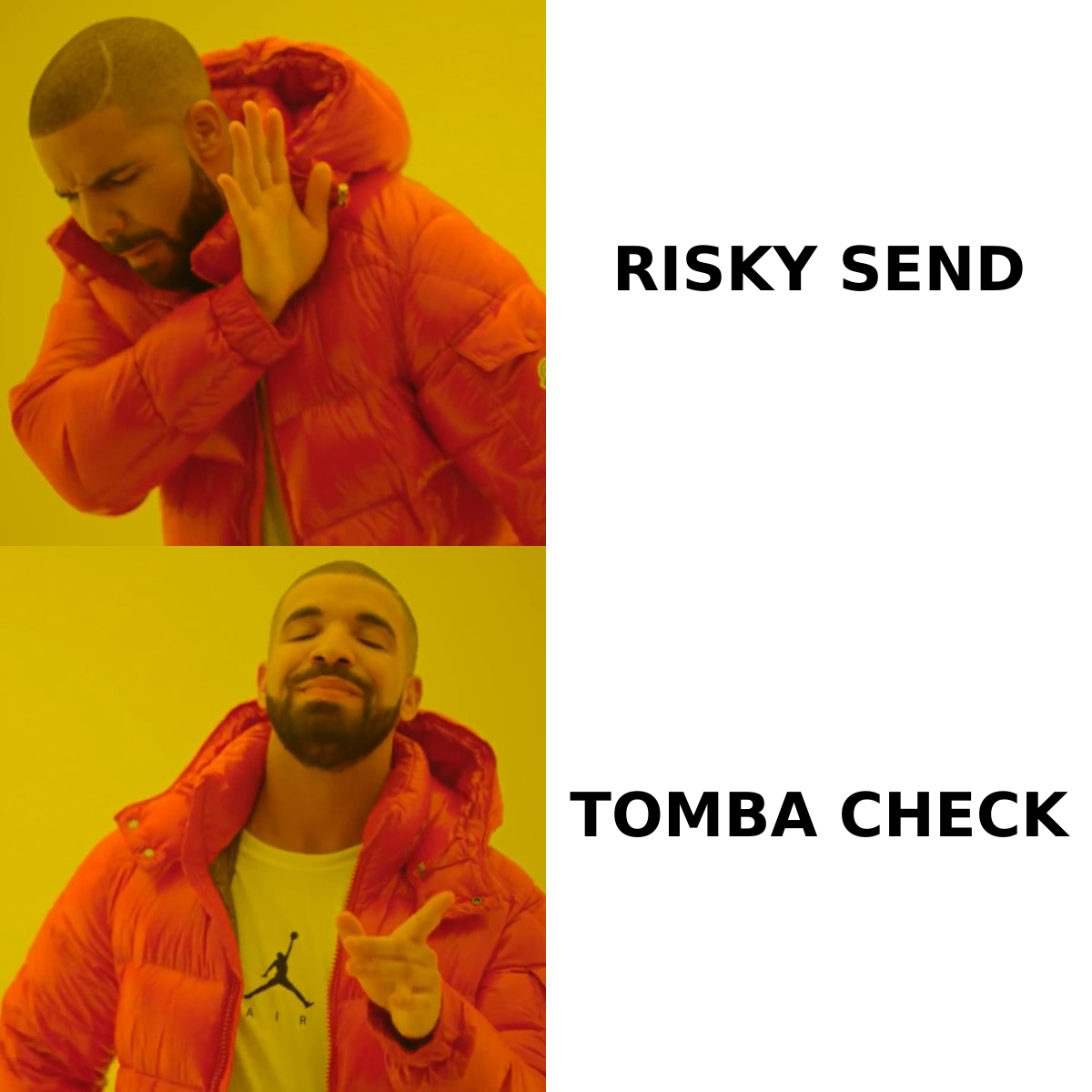
Here is what a typical verification result set looks like once catch-alls enter the picture:
| Result status | What it means | Safe to send? | Typical share of B2B lists |
|---|---|---|---|
| Valid | Mailbox confirmed to exist | Yes | 55–70% |
| Invalid | Server rejected the mailbox | No | 8–15% |
| Catch-all / Accept-all | Domain accepts everything; mailbox unconfirmed | Maybe | 10–25% |
| Unknown | Server timed out or greylisted | Retry later | 2–6% |
| Disposable / Role | Temporary or shared inbox (info@, sales@) | Usually no | 3–8% |
The "catch-all" bucket is the one that costs people money. If you treat all of it as valid, you bounce. If you treat all of it as invalid, you delete real decision-makers — because plenty of legitimate companies run accept-all domains. The goal is not to eliminate catch-alls; it's to score them.
For a deeper primer on the underlying mechanics, the Wikipedia entry on the SMTP protocol explains the RCPT TO exchange that every verifier depends on.
Why can't a normal verifier confirm a catch all address?#
Because the information simply isn't exposed. The server is deliberately configured to hide which mailboxes are real, so an SMTP-only check has nothing to grab onto. A single connection gives you one answer — "yes" — and that answer is meaningless.
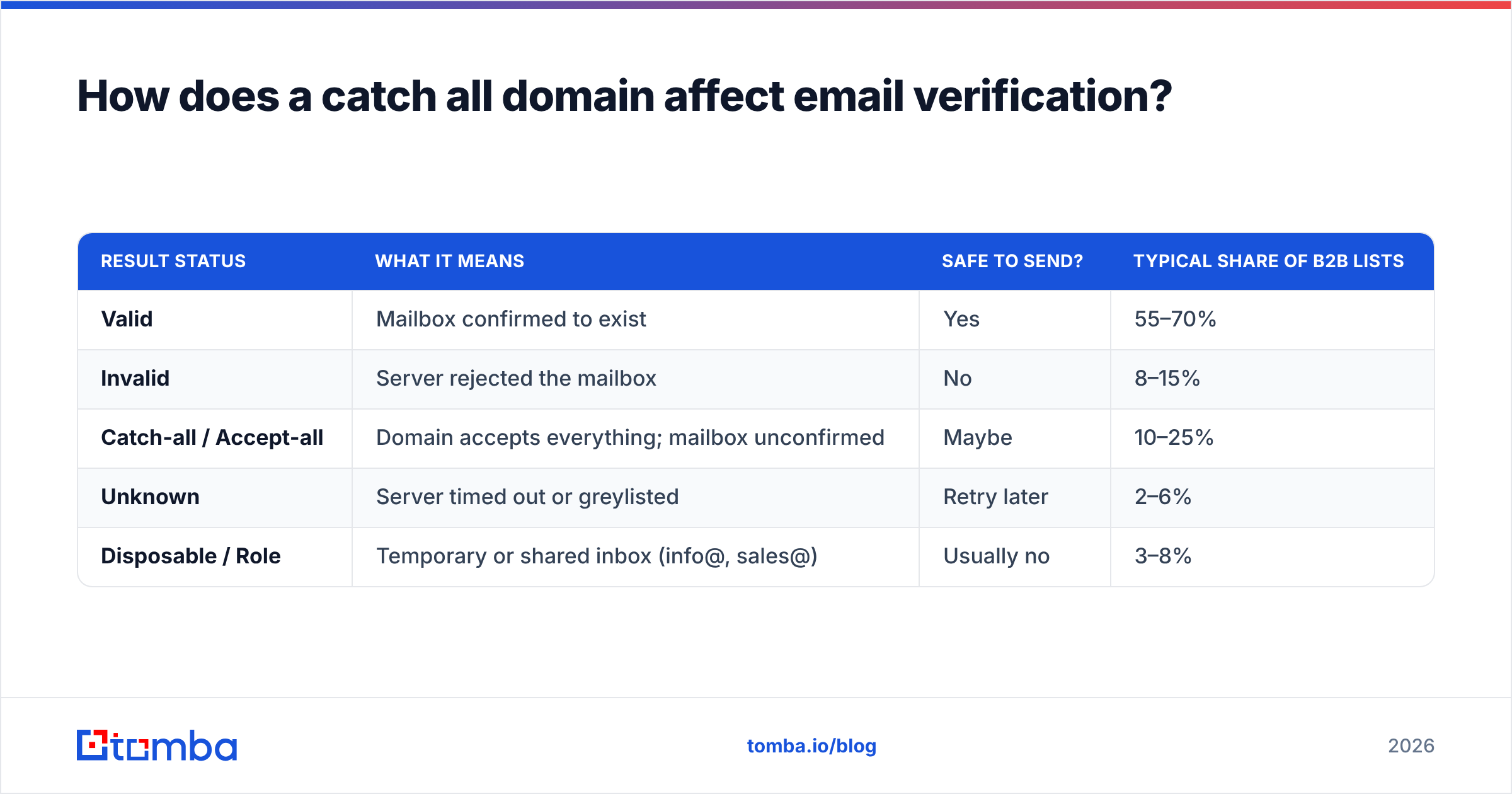
To get past that wall, modern verification stacks combine several signals instead of relying on the handshake alone:
- Pattern matching — If the domain's known format is
first.last@, thenmarketing.team@is far less likely to be a real person thansarah.chen@. Format consistency is a strong prior. - Historical engagement data — Has this exact address been seen opening, clicking, or replying before? Observed activity beats a live probe every time.
- Profile corroboration — When an address is tied to a real LinkedIn profile, job title, and company, confidence rises sharply. This is where an email verifier that's backed by a real B2B dataset pulls ahead of a thin SMTP-only tool.
- Domain reputation and configuration — Catch-alls on disposable or parked domains behave differently from catch-alls on a 2,000-employee enterprise. Treating them identically is a mistake.
- Confidence scoring — Instead of a binary valid/invalid, you get a probability. You decide your own risk threshold for a send.
Stacking these signals turns "we have no idea" into "85% likely real," which is the difference between a usable list and a guess.
Is a catch all email address safe to send to?#
Sometimes — and the honest answer is "it depends on your sender reputation and your tolerance for bounces." A catch-all address that matches the company's standard format and links to a verified person is usually safe. A random-looking catch-all address with no corroborating data is a coin flip you shouldn't take if your domain is young or your warmup is incomplete.
The risk is concrete. Mailbox providers watch your bounce rate as a sender reputation signal. Push past roughly 2% bounces and Gmail or Outlook starts routing you to spam — even for the contacts who are real. So the catch-all decision isn't just about one address; it's about protecting deliverability for the whole campaign.
A practical framework most senders converge on:
| Sender situation | Recommended catch-all policy |
|---|---|
| New domain, no warmup history | Skip catch-alls entirely; send only to "valid" |
| Warmed domain, moderate volume | Send to high-confidence catch-alls only (≥80% score) |
| Established domain, strong reputation | Send to all corroborated catch-alls, monitor bounces |
| Re-engagement of cold list | Verify fresh first; never trust an old catch-all flag |

How do you verify a catch all domain the right way?#
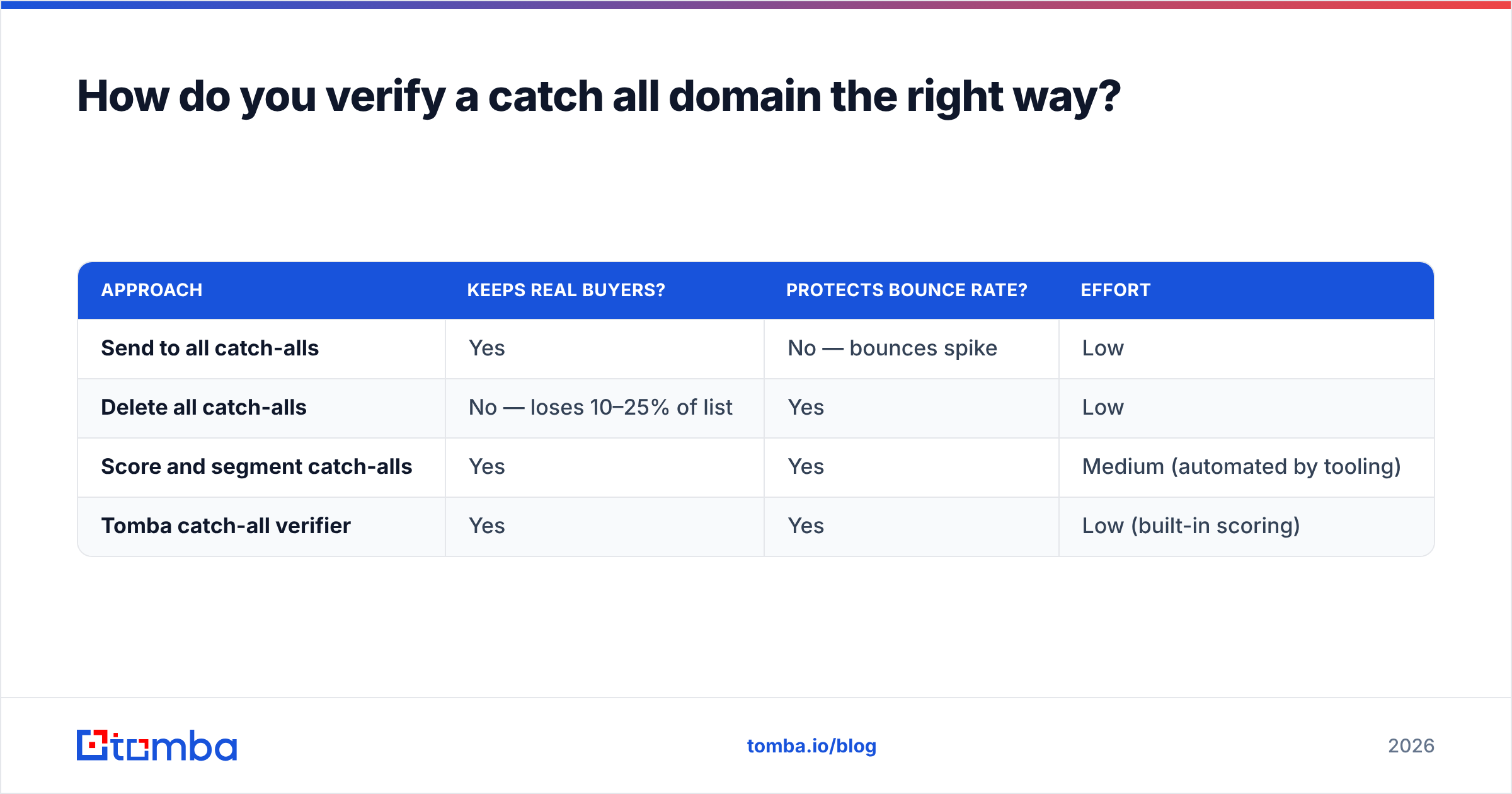
Run it through a verifier that scores instead of guesses, then segment by confidence. The wrong way is to dump catch-alls into your "send" pile or your "trash" pile wholesale. The right way is a three-step routine.
Step one: identify the catch-all domains in your list. Group your contacts by domain and flag which domains return accept-all. A catch-all finder does this at the domain level so you're not re-testing the same server hundreds of times.
Step two: score each catch-all address individually. Layer pattern data, profile matches, and historical signals to assign a confidence value. This is where data depth matters — a verifier built on a large B2B database has far more corroborating evidence than one running blind SMTP probes.
Step three: segment and send by threshold. Send confidently to high scores, hold or re-verify the middle, and drop the bottom. Re-check before any major campaign, because mailboxes churn and a catch-all flagged six months ago tells you nothing today.
Here's how a dedicated approach compares to the two shortcuts people usually take:
| Approach | Keeps real buyers? | Protects bounce rate? | Effort |
|---|---|---|---|
| Send to all catch-alls | Yes | No — bounces spike | Low |
| Delete all catch-alls | No — loses 10–25% of list | Yes | Low |
| Score and segment catch-alls | Yes | Yes | Medium (automated by tooling) |
| Tomba catch-all verifier | Yes | Yes | Low (built-in scoring) |
The first two rows are why so many cold campaigns underperform. The bottom two are the only versions that respect both your list size and your reputation.
What tools handle catch all domains best?#
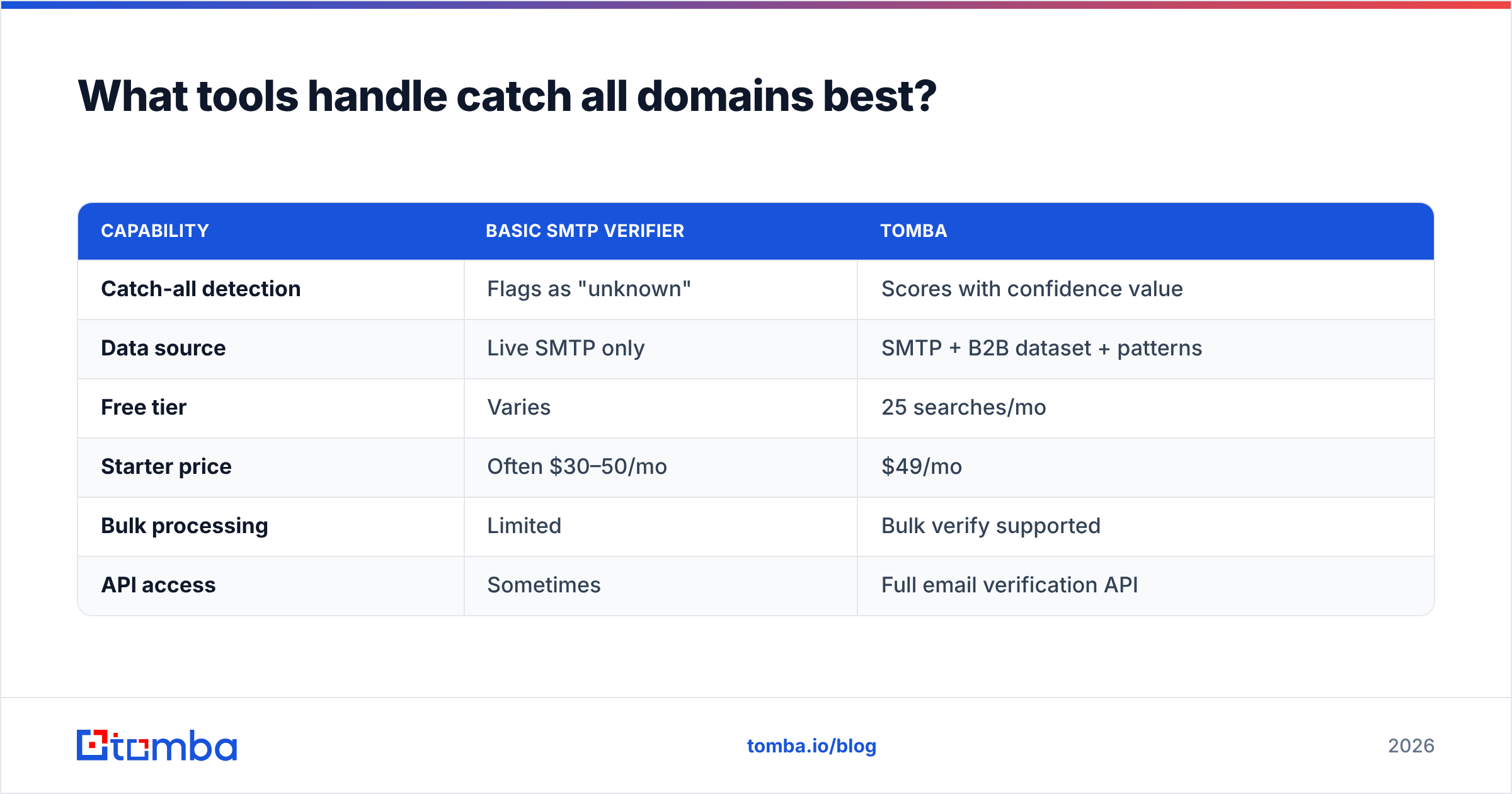
The market splits into pure verifiers and platforms that combine finding, enrichment, and verification. For catch-all specifically, the platforms with their own data advantage win, because verification quality is a function of how much corroborating evidence the tool can bring to an unconfirmable mailbox.
| Capability | Basic SMTP verifier | Tomba |
|---|---|---|
| Catch-all detection | Flags as "unknown" | Scores with confidence value |
| Data source | Live SMTP only | SMTP + B2B dataset + patterns |
| Free tier | Varies | 25 searches/mo |
| Starter price | Often $30–50/mo | $49/mo |
| Bulk processing | Limited | Bulk verify supported |
| API access | Sometimes | Full email verification API |
If you're evaluating options, third-party review sites like G2 keep current user ratings across the email-verification category, and most vendors publish their own deliverability methodology — worth reading before you commit a budget. Compare on data depth and catch-all handling, not just on price per credit, because a cheap verifier that returns "unknown" for a quarter of your list isn't actually cheaper.
For teams already pulling addresses with an email finder, keeping the verification step on the same platform avoids the format mismatches and credit waste that come from stitching two tools together.
How is a catch all domain different from a disposable or role-based one?#
People lump these together, but they're three different problems with three different fixes.
- Catch-all domain — A real, legitimate domain that accepts everything. The mailbox might be real. Solution: score and segment, don't blanket-reject.
- Disposable domain — A throwaway service (think 10-minute-mail providers) used to dodge signups. The address is real for minutes, then dead. Solution: reject on sight using a maintained blocklist.
- Role-based address — A shared inbox like
info@,support@, orsales@. It exists and accepts mail, but no single person owns it, so reply rates are poor. Solution: deprioritize, don't necessarily delete.
The mistake is applying a disposable-domain reflex (delete) to a catch-all domain (legitimate enterprise) and quietly throwing away real pipeline. A good verifier labels all three distinctly so you can apply the right rule to each, and your data accuracy holds up across the whole list rather than collapsing on the ambiguous segment.
Frequently asked questions#
Does a catch-all address always bounce? No. Many catch-all addresses are real, deliverable inboxes — the server just won't confirm it during verification. Bounce risk depends on whether the specific mailbox exists, which is why scoring beats a yes/no flag.
Can I make my own domain a catch-all? Yes, it's a setting in Google Workspace, Microsoft 365, and most mail hosts. It's convenient for catching typos but invites spam, so weigh the trade-off before enabling it.
Why do verifiers charge a credit for catch-all results? Because the work still happens — the MX lookup, the SMTP handshake, and the scoring all consume resources even when the final label is "accept-all." See Tomba pricing for how credits map to plans.
How often should I re-verify catch-all contacts? Before every major campaign, or at least quarterly. Mailbox status changes constantly, and a stale catch-all flag is one of the most common causes of surprise bounces.
Stop guessing on accept-all addresses#
Catch-all domains aren't a list-quality problem to be deleted — they're a scoring problem to be solved. The senders who win treat the accept-all bucket as a segment to qualify, not a liability to dump, and they lean on data depth instead of a single SMTP ping that the server is configured to fool.
If a meaningful slice of your list is coming back "accept-all," run it through Tomba's catch-all verifier and pair it with the Tomba Email Finder to source new contacts that are already corroborated against a real B2B dataset. Start free with 25 searches a month, keep the real buyers your competitors are deleting, and protect your sender reputation while you scale outreach.
Ready to find emails that actually work?
Join 150,000+ professionals who stopped guessing and started sending. Free credits on signup — no credit card required.
Get the Tomba newsletter
Practical outbound tactics and product updates — once every two weeks.
About the author