Catch All Emails Explained: How to Verify Them in 2026
Catch-all emails accept every message at a domain, which hides invalid addresses and wrecks your bounce rate. Here's how to verify them safely in 2026.
Catch All Emails Explained: How to Verify Them in 2026
Catch-all emails are the single biggest blind spot in email verification. They pass a basic syntax check, the domain has valid MX records, the SMTP server says "yes" to everything — and yet a chunk of those addresses route nowhere. If you treat them like clean contacts, your bounce rate climbs and your sender reputation pays for it.
This guide breaks down what catch all emails actually are, why standard verifiers can't give you a clean yes/no, and the concrete tactics that separate the deliverable addresses from the dead ones in 2026.
TL;DR#
- A catch-all (or "accept-all") domain accepts mail for every address at that domain, so an SMTP check can't tell a real mailbox from a typo.
- Roughly 20-30% of B2B domains are configured as catch-all, and the share is higher among large enterprises using gateways like Mimecast or Proofpoint.
- Standard verifiers return "accept-all" / "unknown" for these — not a true valid/invalid result.
- You reduce catch-all risk with pattern confidence scoring, multi-signal enrichment, and tight sending hygiene — not by guessing.
- Tools like the catch-all verifier layer extra signals on top of SMTP so you can mail catch-alls with a known risk level instead of blind hope.
What are catch all emails?#
A catch-all email is any address at a domain configured to accept all incoming mail, regardless of whether the specific mailbox exists. The mail server is set up with a wildcard rule: anything@company.com gets accepted at the door, then sorted (or silently dropped) on the inside.
Think of it like a large office mailroom. A regular building only accepts letters addressed to a tenant who actually rents a unit — send mail to a fake name and it bounces back. A catch-all building accepts every letter at reception no matter the name on the envelope, and only later does someone decide whether there's a real person to hand it to. From the outside, you can't tell which names are real.
That "accept everything at the door" behavior is why catch-all addresses are also called accept-all addresses. Companies enable them on purpose — to avoid losing mail from misspelled addresses, to route everything through a security gateway, or to consolidate aliases. You can read the broader background on Wikipedia's catch-all entry. The intent is harmless; the side effect for anyone doing outreach is that verification gets a lot harder.

Why can't email verifiers confirm catch all emails?#
Because the server answers "yes" to everyone. A normal email verification flow does an SMTP handshake: it connects to the receiving mail server and effectively asks, "Does john.doe@company.com exist?" On a strict server, a nonexistent mailbox returns a 550 rejection, and the verifier marks it invalid. Clean signal.
On a catch-all domain, the server returns a 250 "OK" for john.doe@company.com, asdfjkl@company.com, and definitely-not-real@company.com alike. The verifier has no way to distinguish them at the protocol level, so an honest tool returns a status of accept-all or unknown rather than pretending it's valid.
Here's the distinction that trips people up:
- Valid — the mailbox provably exists; safe to send.
- Invalid — the mailbox provably does not exist; never send.
- Accept-all (catch-all) — the domain accepts everything; existence is unprovable by SMTP alone.
- Unknown — a temporary failure, greylisting, or timeout prevented a conclusive check.
- Risky — role accounts, full mailboxes, or other yellow flags that aren't outright invalid.
The mistake is collapsing category 3 into category 1. An accept-all result is not a green light. It's a "proceed with caution, and bring more evidence" signal. If you want a deeper primer on the mechanics, the email verifier documentation walks through each status code.
How common are catch-all domains in B2B?#
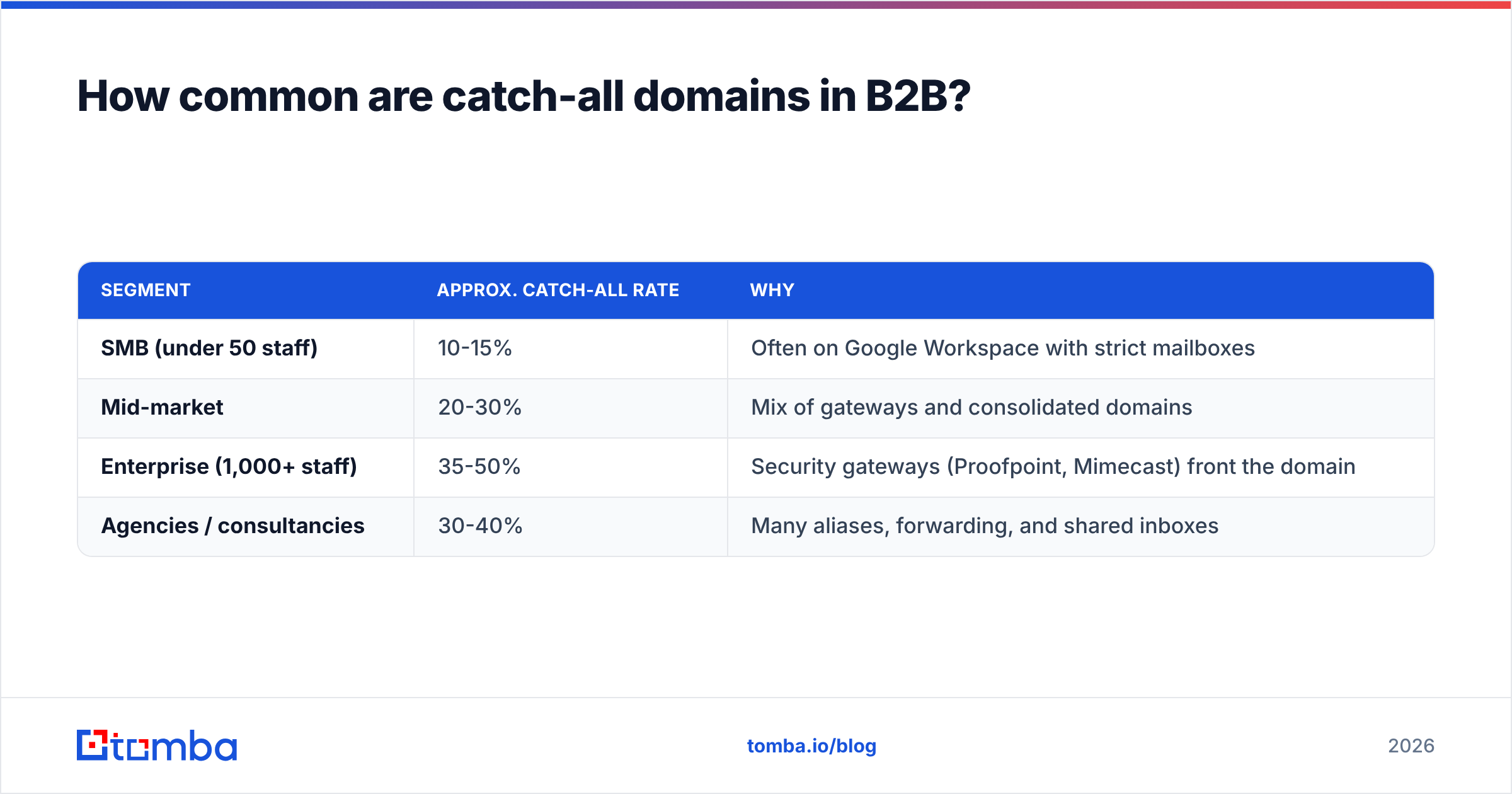
Common enough that you can't just discard them. Across typical B2B prospecting lists, somewhere between a fifth and a third of domains come back as accept-all, and that number skews higher in segments you probably care about most:
| Segment | Approx. catch-all rate | Why |
|---|---|---|
| SMB (under 50 staff) | 10-15% | Often on Google Workspace with strict mailboxes |
| Mid-market | 20-30% | Mix of gateways and consolidated domains |
| Enterprise (1,000+ staff) | 35-50% | Security gateways (Proofpoint, Mimecast) front the domain |
| Agencies / consultancies | 30-40% | Many aliases, forwarding, and shared inboxes |
If you throw away every catch-all contact, you're potentially deleting a third of your enterprise pipeline. That's why "just skip them" is bad advice for anyone selling upmarket. The job isn't to avoid catch-alls — it's to score them so you know which ones are worth a send.
How do you safely verify catch all emails?#
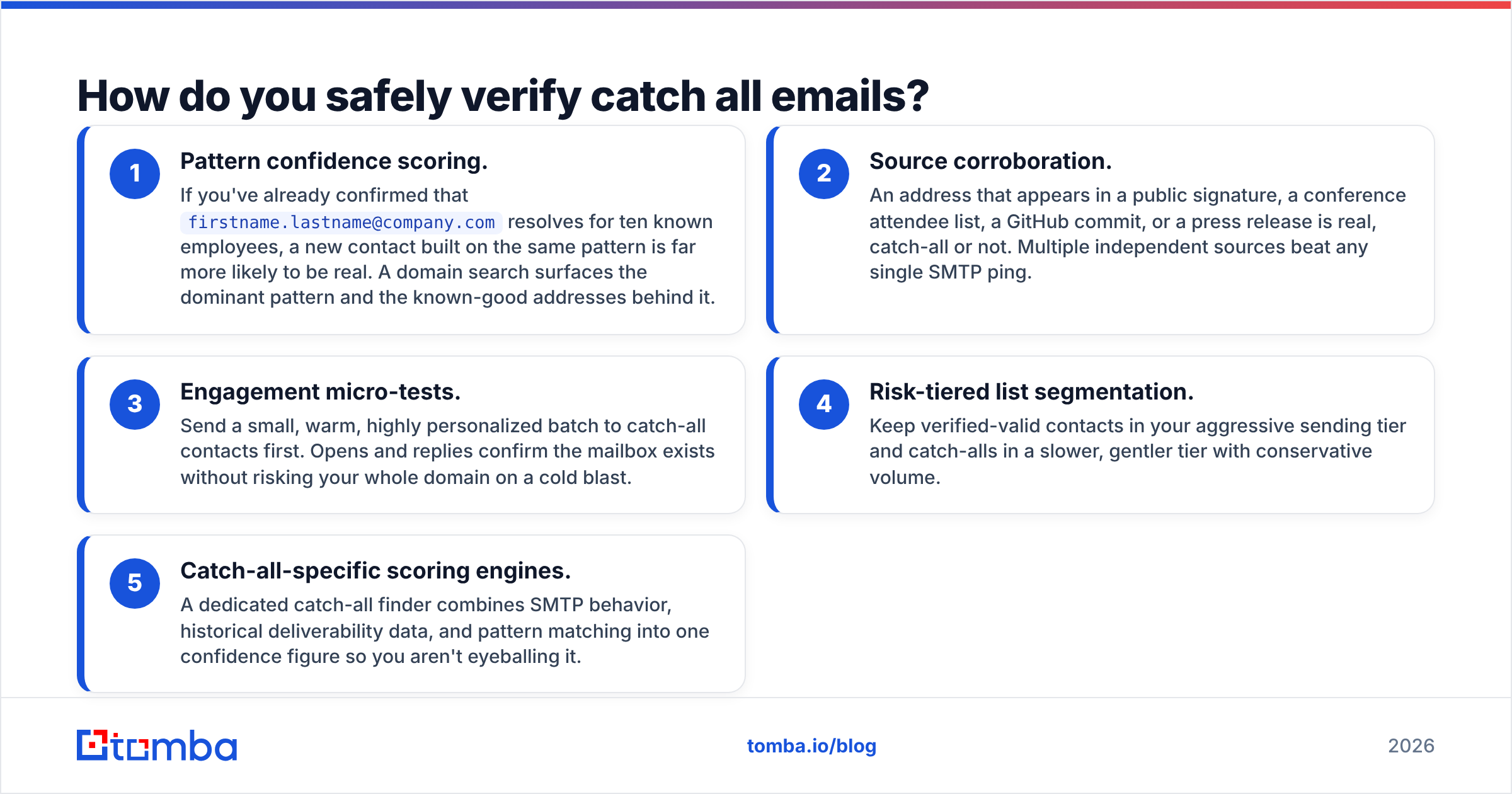
You stack independent signals until your confidence is high enough to send. No single check is conclusive, but layered together they get you to a defensible risk score. Here are the tactics that actually move the needle:
- Pattern confidence scoring. If you've already confirmed that
firstname.lastname@company.comresolves for ten known employees, a new contact built on the same pattern is far more likely to be real. A domain search surfaces the dominant pattern and the known-good addresses behind it. - Source corroboration. An address that appears in a public signature, a conference attendee list, a GitHub commit, or a press release is real, catch-all or not. Multiple independent sources beat any single SMTP ping.
- Engagement micro-tests. Send a small, warm, highly personalized batch to catch-all contacts first. Opens and replies confirm the mailbox exists without risking your whole domain on a cold blast.
- Risk-tiered list segmentation. Keep verified-valid contacts in your aggressive sending tier and catch-alls in a slower, gentler tier with conservative volume.
- Catch-all-specific scoring engines. A dedicated catch-all finder combines SMTP behavior, historical deliverability data, and pattern matching into one confidence figure so you aren't eyeballing it.
The point is to replace a coin flip with a graded decision. You'll still get the occasional bounce, but you control the rate instead of letting it control your reputation.

What's the difference between catch-all tools and standard verifiers?#
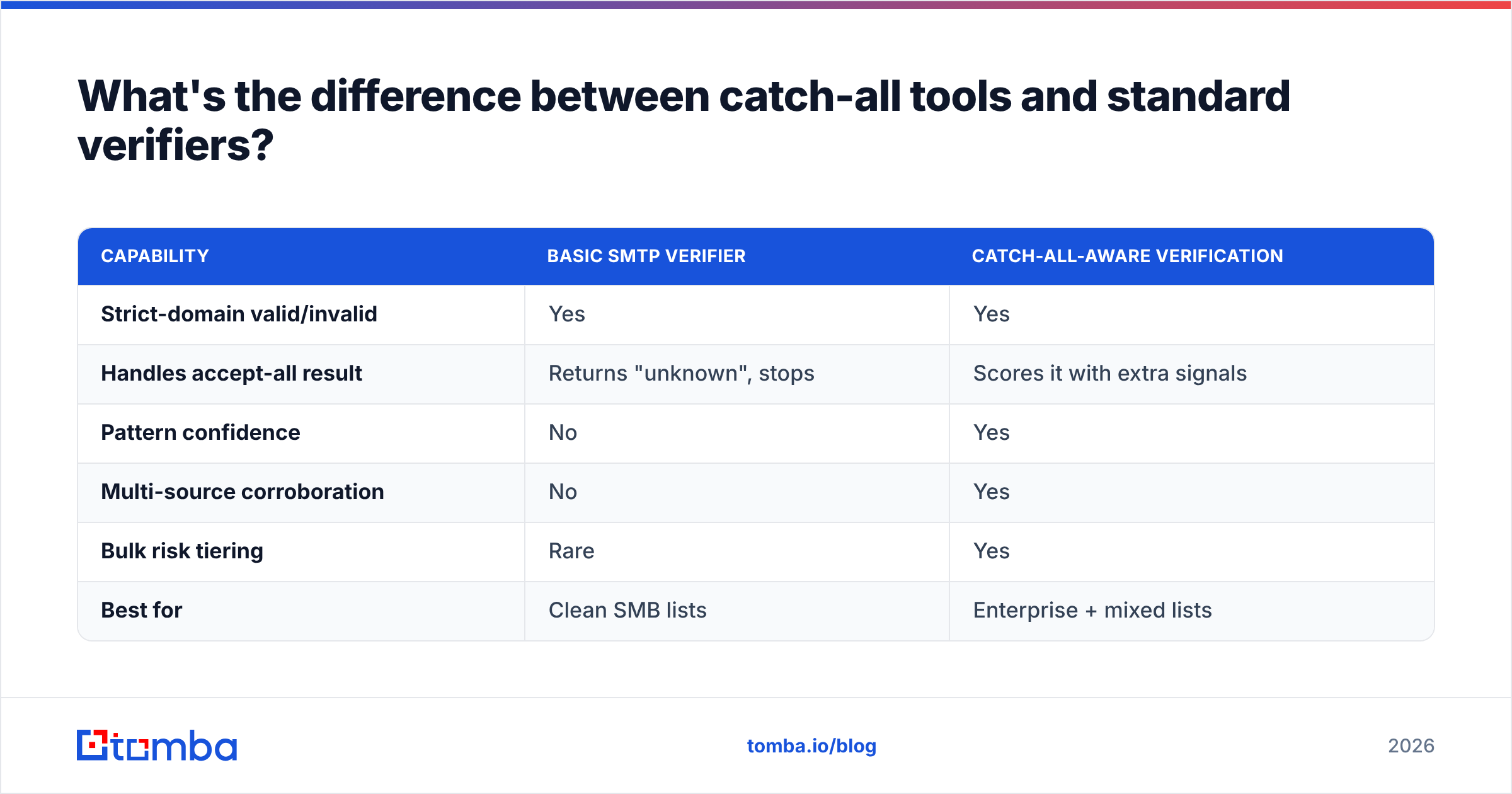
A standard verifier is built to return a hard valid/invalid verdict, and it does that well for strict domains. A catch-all-aware tool is built for the gray zone — it doesn't pretend to a certainty SMTP can't deliver, and instead reports a calibrated probability. Here's how the approaches compare:
| Capability | Basic SMTP verifier | Catch-all-aware verification |
|---|---|---|
| Strict-domain valid/invalid | Yes | Yes |
| Handles accept-all result | Returns "unknown", stops | Scores it with extra signals |
| Pattern confidence | No | Yes |
| Multi-source corroboration | No | Yes |
| Bulk risk tiering | Rare | Yes |
| Best for | Clean SMB lists | Enterprise + mixed lists |
When your list is mostly small businesses on strict mail servers, a basic verifier is fine and cheap. The moment you move into enterprise outreach, where half your domains are accept-all, you need the second column or you're flying blind on a third of your pipeline. Independent reviews on directories like G2 are a good sanity check on which vendors actually score catch-alls versus just flagging them.
Should you ever email a catch-all address?#
Yes — selectively, and with hygiene. Refusing to mail any catch-all is leaving real revenue on the table; blasting all of them is reputation suicide. The middle path is disciplined sending:
- Warm the domain first. Established sending reputation absorbs the occasional catch-all bounce far better than a cold domain does. Google's own Postmaster Tools will show you when your reputation can take the hit.
- Cap your catch-all bounce exposure. Keep total bounce rate under ~2-3%. Segment catch-alls so they never push you past it.
- Lead with your highest-confidence catch-alls. Send to pattern-matched, source-corroborated addresses before the speculative ones.
- Monitor and prune fast. First bounce on a catch-all? Suppress it immediately so it never gets a second send.
- Verify in bulk before campaigns, not during. Run lists through a bulk email finder and verifier ahead of time so scoring never happens live in your sequencer.
Done this way, catch-alls become a manageable risk tier rather than a landmine. The marketers who win at enterprise outreach aren't the ones with the cleanest lists — they're the ones who send to messy lists intelligently.
How does Tomba handle catch all emails?#
Tomba treats accept-all as a distinct status with its own scoring path rather than dumping it into a useless "unknown" bucket. When the SMTP layer can't give a hard verdict, the system pulls in the domain's known email pattern, the volume of corroborated addresses it has already seen at that domain, and historical deliverability signals, then returns a confidence figure you can act on.
That data comes from a large, continuously refreshed B2B database — the more known-good addresses on a domain, the tighter the pattern confidence. For teams running high volume, the same scoring is available through the Tomba API and in bulk, so you can grade thousands of catch-alls before a campaign instead of discovering the problem from your bounce report.
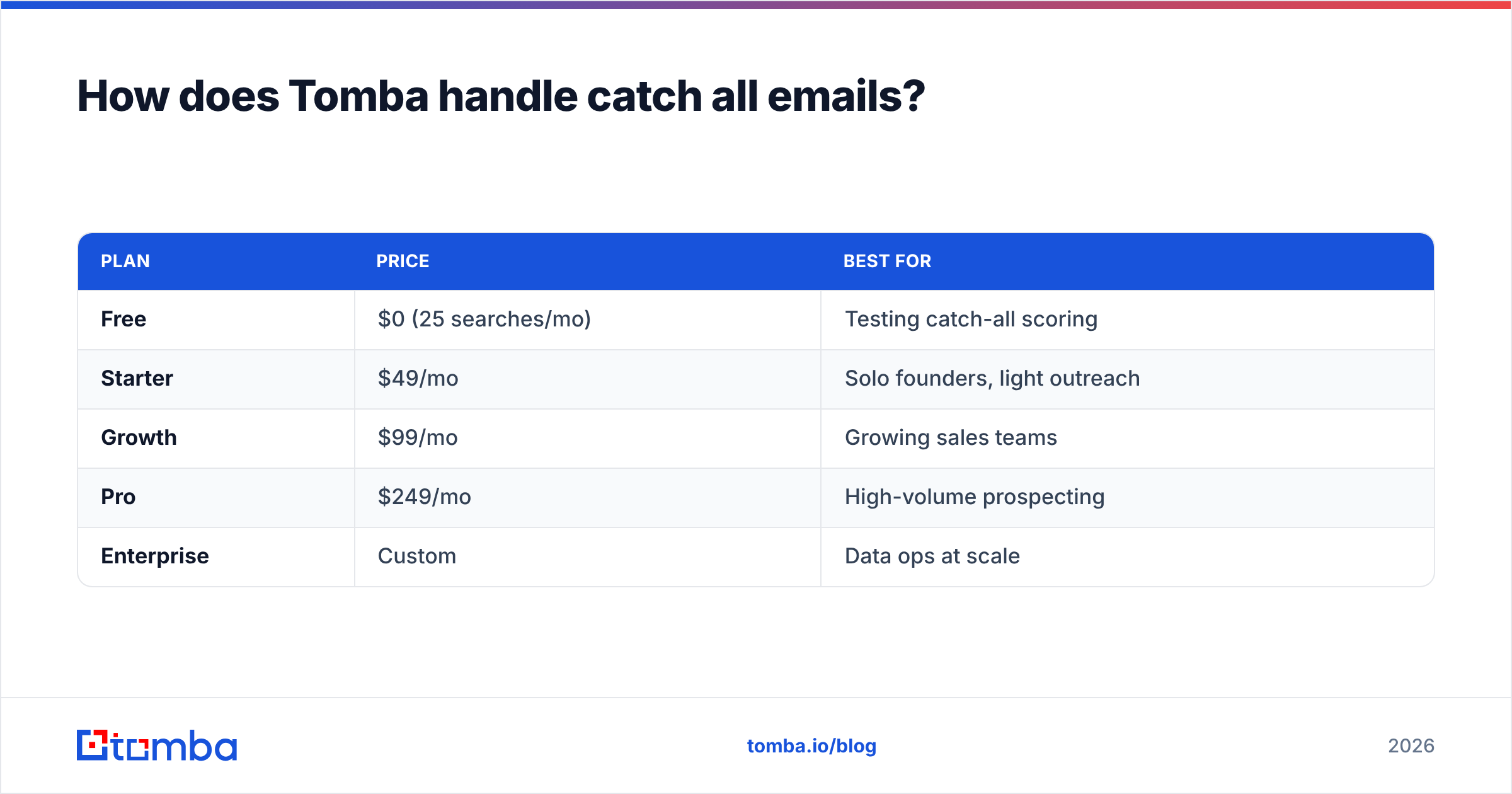
Pricing scales with volume. The Tomba pricing tiers run from a Free plan (25 searches/month) through Starter at $49/mo, Growth at $99/mo, and Pro at $249/mo, with Enterprise custom for large data operations. Even the free tier is enough to test catch-all scoring against a sample of your own list before committing.
| Plan | Price | Best for |
|---|---|---|
| Free | $0 (25 searches/mo) | Testing catch-all scoring |
| Starter | $49/mo | Solo founders, light outreach |
| Growth | $99/mo | Growing sales teams |
| Pro | $249/mo | High-volume prospecting |
| Enterprise | Custom | Data ops at scale |
Common mistakes with catch all emails#
A few errors show up again and again, and each one quietly damages deliverability:
- Marking accept-all as valid. The most common and most costly. You inflate your "verified" count and your bounce rate at the same time.
- Discarding every catch-all. The overcorrection. You torch a third of your enterprise list to avoid a problem you could have scored.
- Skipping warmup. Sending catch-all-heavy campaigns from a cold domain stacks two risks on top of each other.
- No suppression discipline. Letting a bounced catch-all stay in rotation means it bounces again, compounding the reputation hit.
- Verifying inside the sequencer. Real-time checks during a live send slow everything down and give you no time to react to a bad batch.
Avoid those five and you're already ahead of most senders working enterprise lists.
The bottom line on catch all emails#
Catch-all emails aren't a bug to eliminate — they're a permanent feature of how enterprise mail is configured, and they're only getting more common as security gateways spread. The winning move is to stop asking "is this valid or not?" and start asking "how confident am I, and how should I send accordingly?"
Get your verification stack to grade catch-alls instead of guessing, segment by risk, warm your domain, and prune bounces fast. Do that and a list that used to look one-third unusable becomes one-third qualified.
Ready to stop guessing on accept-all domains? Run your next list through the Tomba Email Finder and its catch-all scoring to get confidence figures on every contact — including the ones a basic verifier gives up on. Start free with 25 searches and see how many catch-alls in your pipeline are actually deliverable.
// get started
Find, verify and enrich your first contacts today
Start on the free plan with 25 searches a month, then scale when your team is ready.
Free plan · No credit card required · GDPR & CCPA
// about the author