CentralStationCRM Pricing, Reviews, Pros and Cons (2026)
A no-fluff breakdown of CentralStationCRM pricing, real user reviews, and the honest pros and cons — so you know if this lightweight German CRM fits your sales team in 2026.
Looking for an honest CentralStationCRM pricing, reviews, pros and cons guide? This breakdown covers the plans, real user ratings, and trade-offs in plain language. By the end, you will know if this lightweight German CRM fits your team.
TL;DR
- CentralStationCRM is a deliberately simple, German-made CRM. It targets small teams that find Salesforce-style tools bloated.
- Pricing starts with a free 3-user plan and tops out near €199/mo for larger teams. It is billed per workspace, not strictly per seat, so it stays cheaper than most US CRMs at scale.
- Reviewers love the clean interface, fast onboarding, and GDPR-friendly EU hosting. They criticize the thin reporting, limited automation, and shallow integrations.
- It is a contact-and-activity CRM, not a sales-engagement engine. You still need a data source to fill it.
- If your bottleneck is finding accurate contacts, pair it with an email finder like Tomba.
What is CentralStationCRM?#
CentralStationCRM is a cloud CRM built by 42he GmbH in Cologne, Germany. It serves small and mid-sized businesses that want contact management without enterprise overhead. Think of it as a shared address book with a memory. Every call, email, note, and task sits in one timeline your whole team can see.
The whole pitch is restraint. Salesforce and HubSpot pile on dashboards, scoring models, and workflow builders. CentralStationCRM ships a smaller feature set on purpose. A non-technical team can be productive on day one. That makes it popular with agencies, consultancies, nonprofits, and small manufacturers across the DACH region.
It helps to be clear about what it is not. CentralStationCRM is not a sales automation platform. It is not an outbound sequencer, and not a data provider. It stores and organizes relationships you already have. You bring the contacts; it keeps them tidy.
)
How much does CentralStationCRM cost in 2026?#
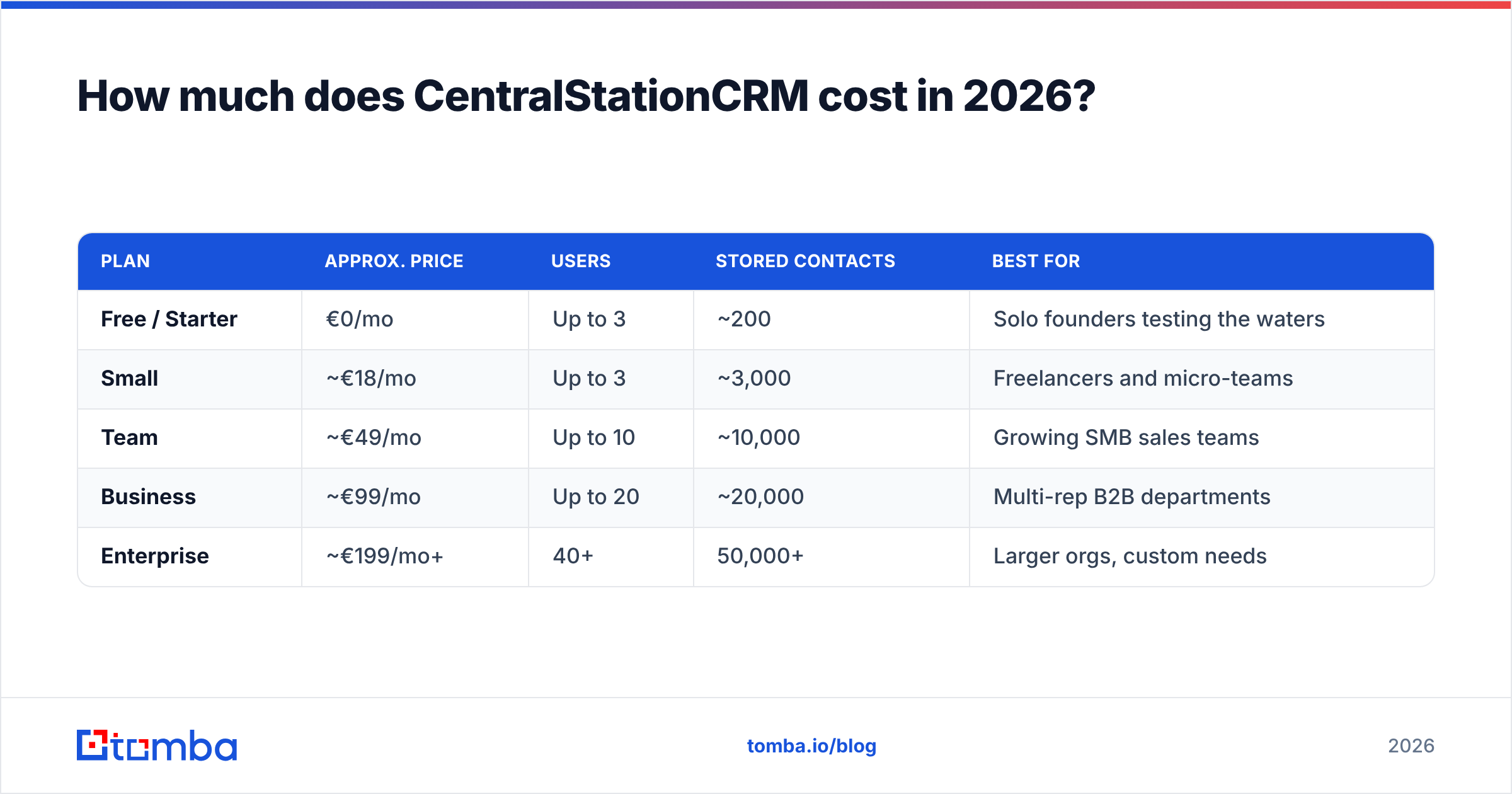
Short answer: it scales by users and stored contacts. It starts free and tops out around €199/mo for most published tiers, with enterprise pricing on request. Billing is per workspace tier, not a rigid per-seat charge. That is why teams who would pay hundreds per month on US tools often land much lower here.
Pricing on lightweight CRMs shifts often. Treat the table below as a structural guide. Confirm live numbers on the vendor's own pricing page before you commit.
| Plan | Approx. price | Users | Stored contacts | Best for |
|---|---|---|---|---|
| Free / Starter | €0/mo | Up to 3 | ~200 | Solo founders testing the waters |
| Small | ~€18/mo | Up to 3 | ~3,000 | Freelancers and micro-teams |
| Team | ~€49/mo | Up to 10 | ~10,000 | Growing SMB sales teams |
| Business | ~€99/mo | Up to 20 | ~20,000 | Multi-rep B2B departments |
| Enterprise | ~€199/mo+ | 40+ | 50,000+ | Larger orgs, custom needs |
A few things matter more than the headline numbers:
- No per-seat penalty. Adding a colleague within your tier costs nothing extra. That rewards collaboration instead of taxing it.
- Contact ceilings, not feature gates. You mostly pay for storage volume. The core features stay the same across paid tiers.
- EU hosting included. Data sits on German servers under GDPR. For European buyers, that is a compliance win, not an add-on.
- Free tier is genuinely usable. Three users and 200 contacts is enough to run a real pilot, not just a demo.
Compare it with a typical US stack. Tomba's own plans start at $49/mo for data tooling, and full sales suites run far higher. Against that, CentralStationCRM is priced like the utility it wants to be.
What do CentralStationCRM reviews actually say?#
Aggregate sentiment is positive but narrow. Users who want simplicity rave about it. Users who want power features churn. On directories like Capterra and G2, the themes are consistent. Most CentralStationCRM pricing, reviews, pros and cons summaries online land on the same split.
What reviewers praise:
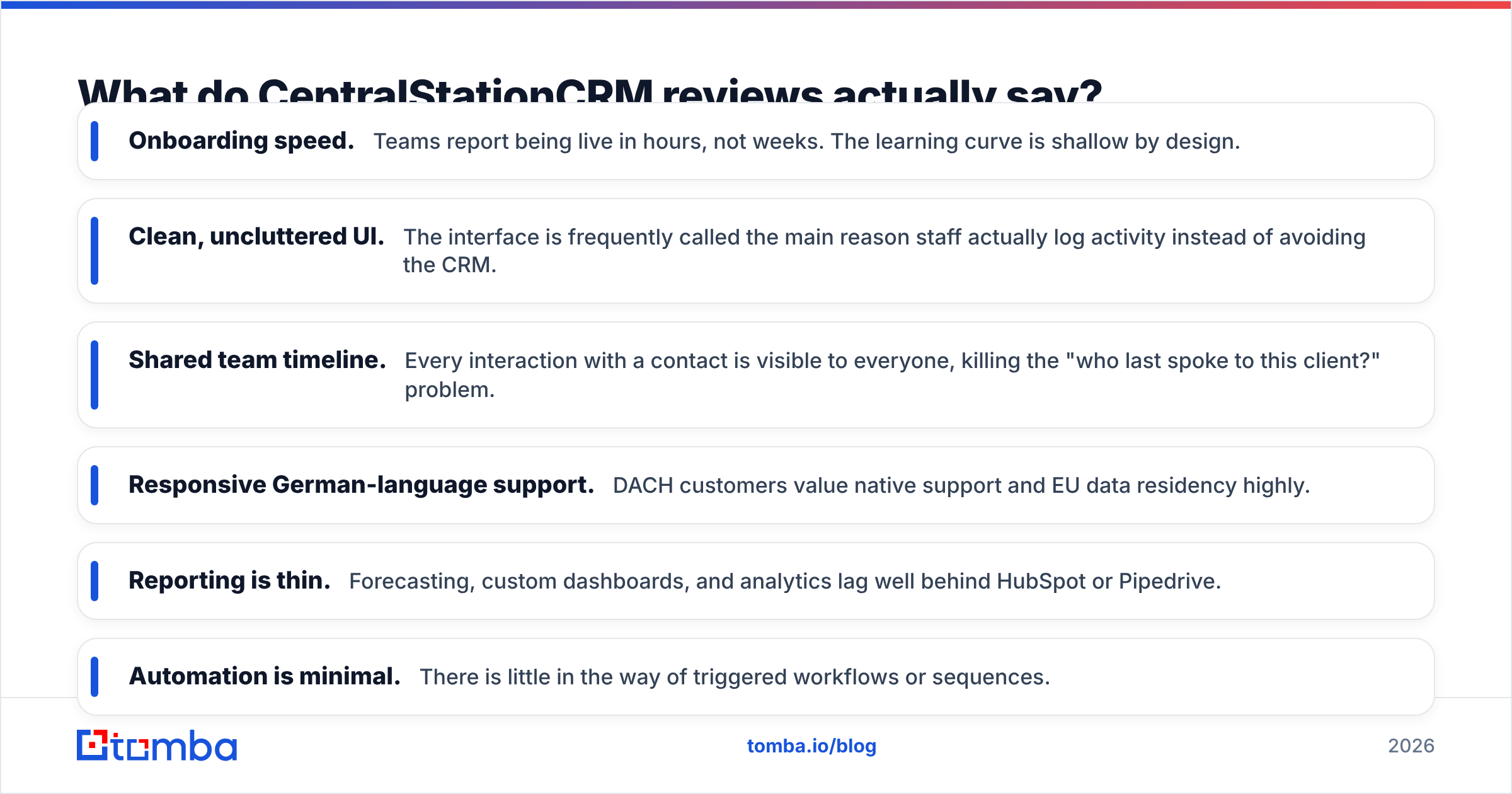
- Onboarding speed. Teams report being live in hours, not weeks. The learning curve is shallow by design.
- Clean, uncluttered UI. Reviewers say the interface is the main reason staff actually log activity instead of avoiding the CRM.
- Shared team timeline. Every interaction is visible to everyone. That kills the "who last spoke to this client?" problem.
- Responsive German-language support. DACH customers value native support and EU data residency highly.
What reviewers criticize:
- Reporting is thin. Forecasting, custom dashboards, and analytics lag well behind HubSpot or Pipedrive.
- Automation is minimal. There is little in the way of triggered workflows or sequences.
- Integrations are limited. It connects to common tools but lacks the sprawling marketplace of bigger players.
- Scales out, not up. Fast-growing teams sometimes outgrow it and migrate to a heavier platform within a couple of years.
The honest read: scores are high because the tool stays in its lane. People who buy it for what it is stay happy. People who expect an enterprise suite leave disappointed.
What are the pros and cons of CentralStationCRM?#
Here is the balanced view, stripped of marketing.
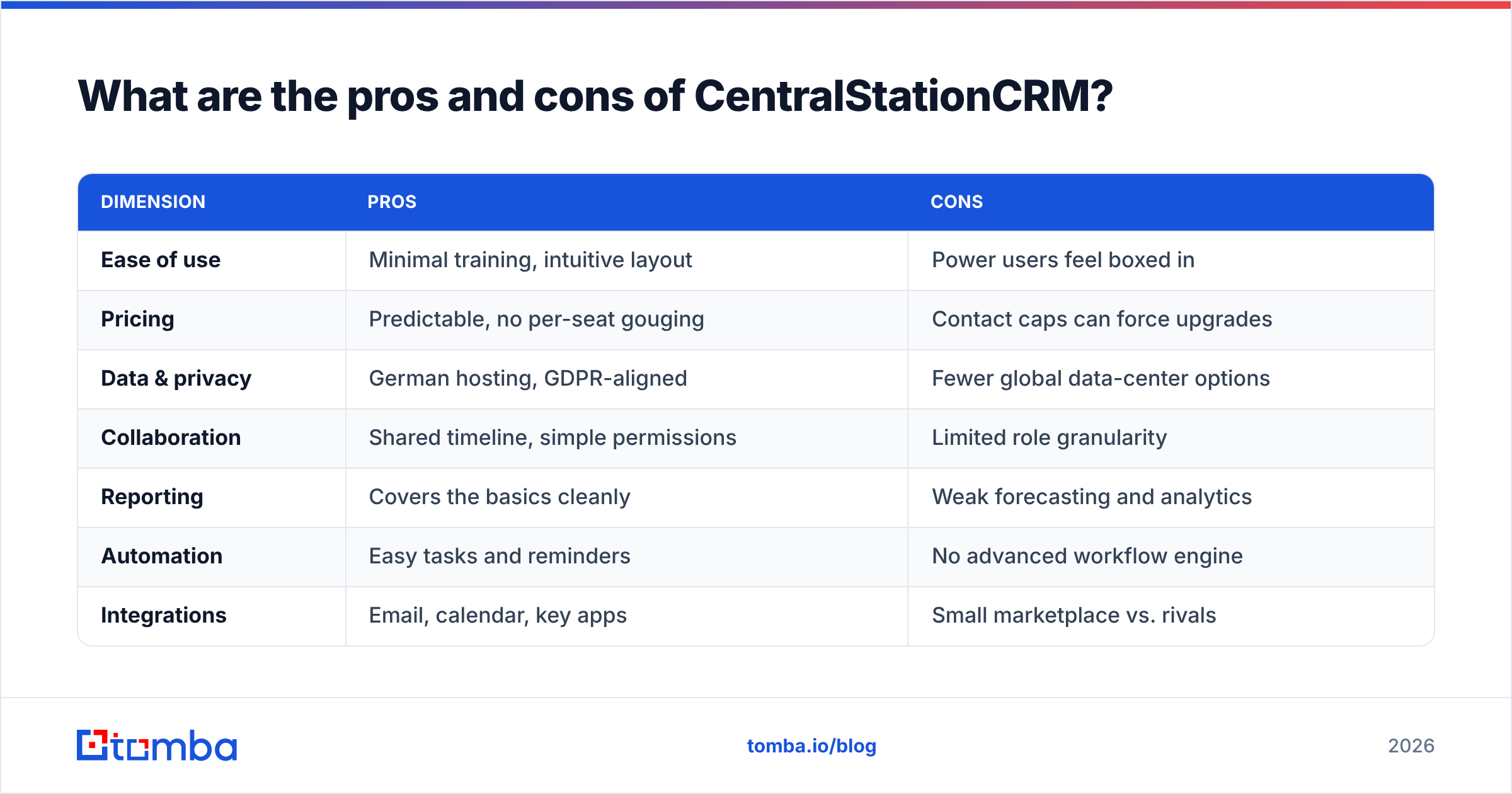
| Dimension | Pros | Cons |
|---|---|---|
| Ease of use | Minimal training, intuitive layout | Power users feel boxed in |
| Pricing | Predictable, no per-seat gouging | Contact caps can force upgrades |
| Data & privacy | German hosting, GDPR-aligned | Fewer global data-center options |
| Collaboration | Shared timeline, simple permissions | Limited role granularity |
| Reporting | Covers the basics cleanly | Weak forecasting and analytics |
| Automation | Easy tasks and reminders | No advanced workflow engine |
| Integrations | Email, calendar, key apps | Small marketplace vs. rivals |
Who it's right for: small B2B teams, agencies, and nonprofits. They need one shared source of truth for relationships. They have given up on spreadsheets but don't want a six-figure implementation.
Who should look elsewhere: revenue teams that need pipeline forecasting, lead scoring, multichannel sequencing, or a deep app ecosystem. If revenue operations maturity is your goal, you will likely outgrow it.
)
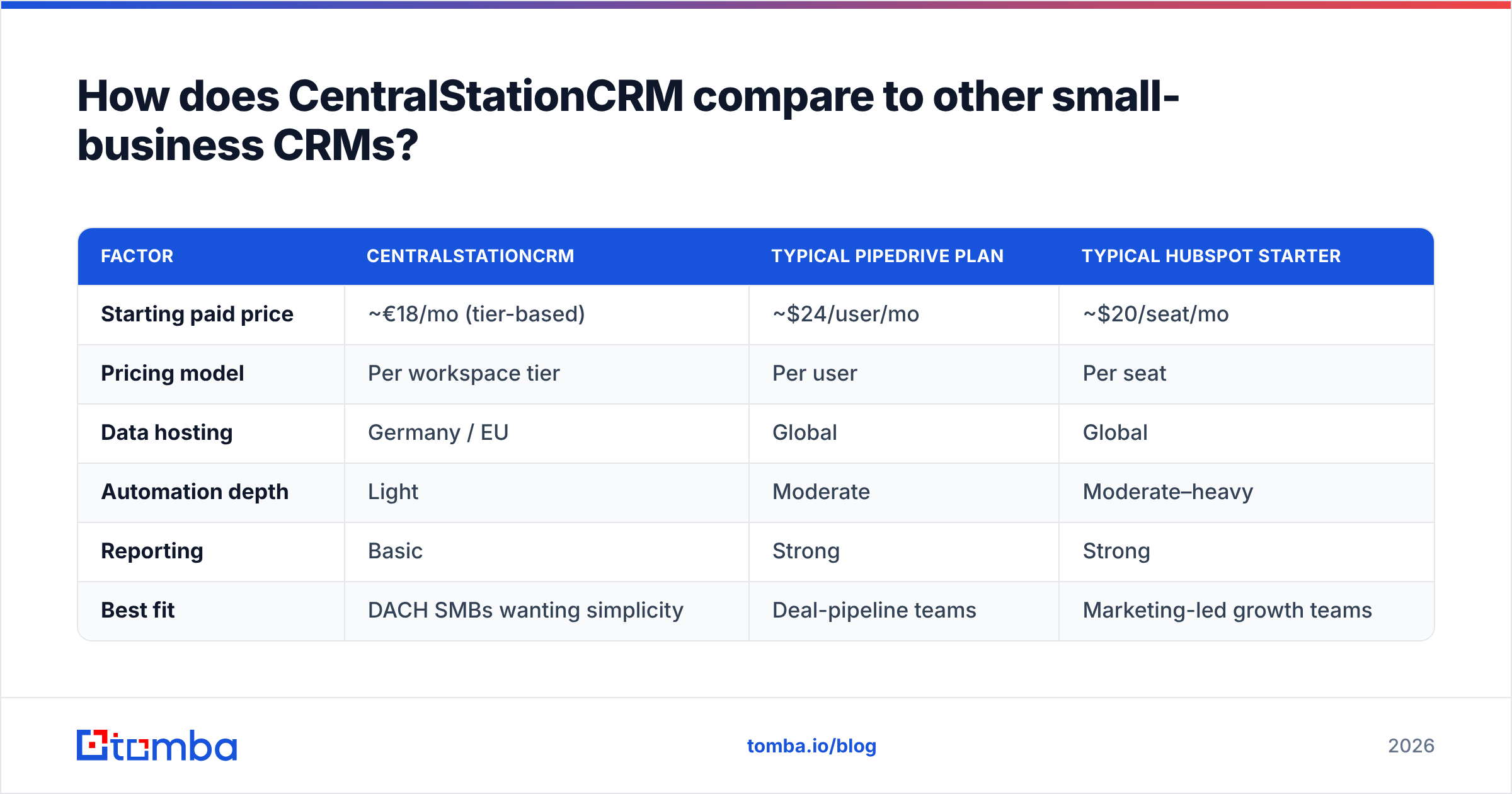
How does CentralStationCRM compare to other small-business CRMs?#
CentralStationCRM competes less with Salesforce and more with the "simple CRM" tier. Think Pipedrive, Nimble, and folk-style relationship tools. Its strengths are EU hosting and flat collaborative pricing. Its weaknesses are automation and analytics.
| Factor | CentralStationCRM | Typical Pipedrive plan | Typical HubSpot Starter |
|---|---|---|---|
| Starting paid price | ~€18/mo (tier-based) | ~$24/user/mo | ~$20/seat/mo |
| Pricing model | Per workspace tier | Per user | Per seat |
| Data hosting | Germany / EU | Global | Global |
| Automation depth | Light | Moderate | Moderate–heavy |
| Reporting | Basic | Strong | Strong |
| Best fit | DACH SMBs wanting simplicity | Deal-pipeline teams | Marketing-led growth teams |
If your decision hinges on simplicity and data residency, CentralStationCRM wins. If it hinges on pipeline automation or marketing alignment, a rival fits better. For deeper research, vendor-neutral directories like G2 let you filter by company size and read role-specific reviews.
What's the catch nobody mentions about CRMs like this?#
A CRM is only as valuable as the data inside it. CentralStationCRM, like every CRM, ships empty.
This is the trap teams fall into. They buy a CRM and configure it beautifully. Then they realize they have no fast way to fill it with accurate, current contacts. Reps copy-paste from LinkedIn, guess email formats, and log contacts that bounce. A CRM full of stale data is worse than a messy spreadsheet, because it looks trustworthy.
That is a sourcing problem, not a CRM problem. No contact-management tool solves it on its own. You need a reliable way to find and verify the right people first. These tools sit upstream of the CRM:
- Finding the contact — an email finder returns verified professional addresses from a name and domain.
- Validating before import — an email verifier strips out invalid addresses so your bounce rate stays low.
- Filling whole companies — a domain search pulls every reachable contact at a target account in one query.
- Enriching thin records — data enrichment adds titles, companies, and social profiles to bare contacts.
Run that sourcing layer first. Push clean records into CentralStationCRM. Then the CRM finally does what you bought it for.
CentralStationCRM pricing, reviews, pros and cons: is it worth it in 2026?#
Yes — if you match the tool to the job. For small B2B teams in Europe, it is simple, affordable, and privacy-friendly. The flat pricing rewards collaboration. The interface gets used instead of avoided. The free tier lets you prove value before spending a cent.
The caveats stand. Do not expect forecasting dashboards, deep automation, or a vast integration marketplace. If those are dealbreakers, pick a heavier platform now rather than migrate later. And whichever CRM you choose, remember it is a container, not a contact source. Its value tracks the quality of the data you feed it. That sums up our CentralStationCRM pricing, reviews, pros and cons take.
That last point is where most teams quietly lose pipeline. Before you worry about which CRM wins, fix the input. Use Tomba's Email Finder to source verified, GDPR-aware contact data. Then drop clean records straight into CentralStationCRM. Start free with 25 searches a month, and scale to a $49/mo Starter plan when outreach ramps. A simple CRM plus accurate data beats an expensive CRM full of guesses every time.
Ready to find emails that actually work?
Join 150,000+ professionals who stopped guessing and started sending. Free credits on signup — no credit card required.
Get the Tomba newsletter
Practical outbound tactics and product updates — once every two weeks.
About the author