12 ChatGPT Cold Email Prompts That Book Meetings in 2026
Copy-paste ChatGPT cold email prompts that write personalized, reply-worthy outreach in seconds — plus the inputs that separate booked meetings from spam.
(title rendered separately)
Cold email is still the cheapest way to start a B2B conversation — but only if the message reads like a human wrote it for one specific person. ChatGPT can do that at scale, if you feed it the right prompt and the right data. Most reps do neither, then blame the channel.
This guide gives you 12 battle-tested ChatGPT cold email prompts, a framework for building your own, and the one input that quietly decides whether any of them land in a primary inbox or a spam folder.
TL;DR#
- A prompt is only as good as its inputs. ChatGPT writes generic mush unless you give it a real prospect, a real trigger, and a real offer.
- Use role + framework + constraints. Tell ChatGPT who it is, which copy framework to follow (AIDA, PAS, BAB), and hard limits on length and tone.
- 12 copy-paste prompts below cover first touch, follow-ups, breakups, LinkedIn-to-email, and reply handling.
- Personalization needs verified contact data. A perfect email to a bounced or wrong address converts at zero. Pair ChatGPT with a verified email finder.
- Edit every draft. Treat ChatGPT output as a strong first draft, not a send-ready email.
Why do most ChatGPT cold emails fail?#
They fail because the prompt asks ChatGPT to invent context it doesn't have. "Write a cold email selling my SaaS to marketers" produces a template every other rep is also generating — same hook, same "I hope this finds you well," same vague value prop.
Think of ChatGPT like a brilliant copywriter on their first day who has never met your prospect. If you don't brief them — who the buyer is, what just changed in their world, what you actually do — they'll write something polished and useless. The quality of the brief is the quality of the email.
Three things separate prompts that work from prompts that don't:
- A specific recipient. Name, role, company, and ideally a recent trigger event.
- A specific offer. What you do, for whom, and the measurable outcome.
- Hard constraints. Word count, reading level, one call to action, no jargon.
Get those three right and the same model that wrote your worst email writes your best one.
What makes a good ChatGPT cold email prompt?#
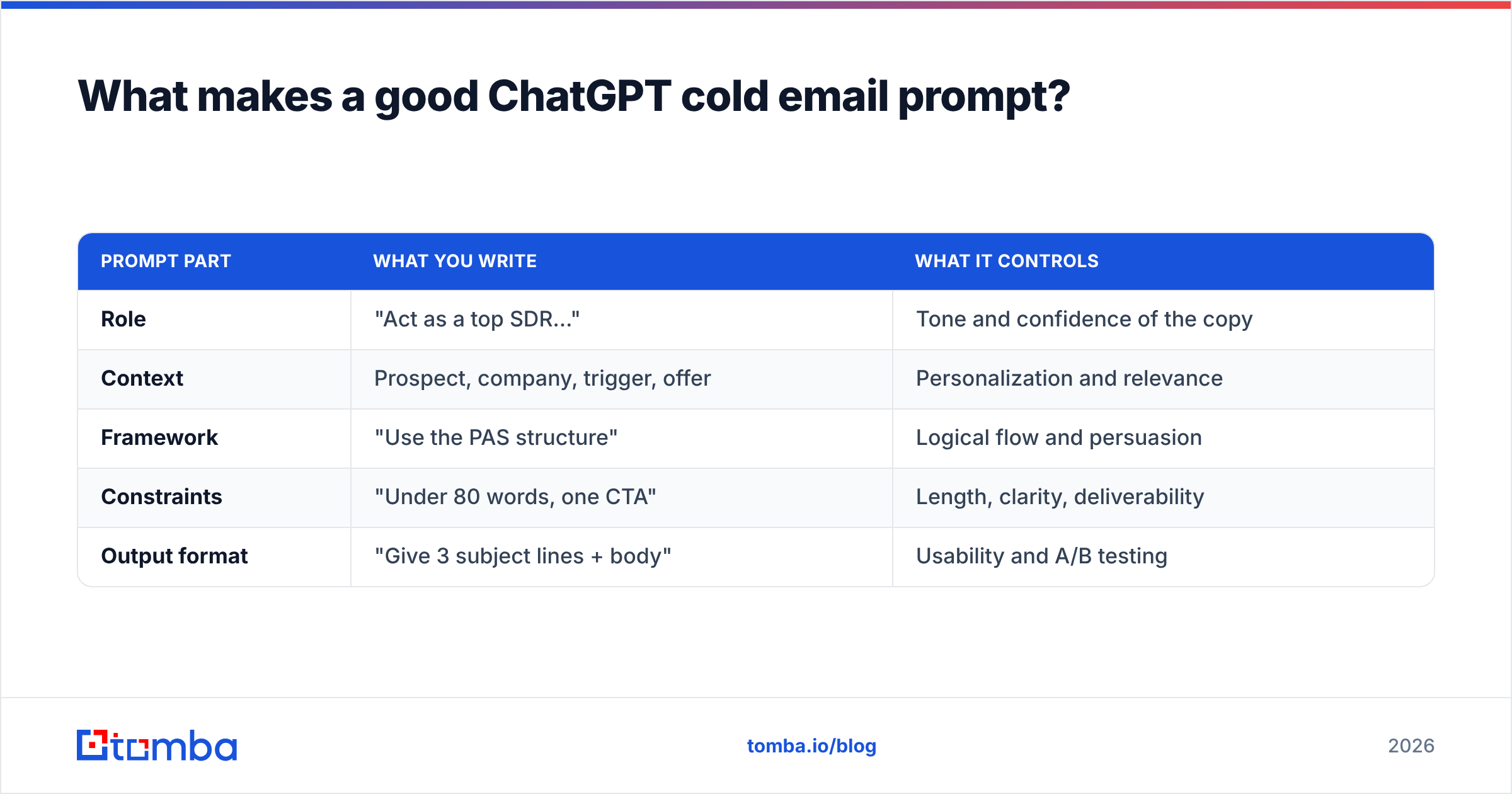
A reliable prompt has five parts. Skip any one and quality drops.
- Role — "You are a senior B2B copywriter who writes cold emails that get 10%+ reply rates."
- Context — the prospect, their company, the trigger, and your offer.
- Framework — name the structure you want (PAS, AIDA, BAB, or a 4-line "problem → proof → ask").
- Constraints — under 90 words, 6th-grade reading level, one CTA, no buzzwords, no "I hope this finds you well."
- Output format — subject line options + body, or three variants to A/B test.
Here's how those parts map to what ChatGPT actually produces:
| Prompt part | What you write | What it controls |
|---|---|---|
| Role | "Act as a top SDR…" | Tone and confidence of the copy |
| Context | Prospect, company, trigger, offer | Personalization and relevance |
| Framework | "Use the PAS structure" | Logical flow and persuasion |
| Constraints | "Under 80 words, one CTA" | Length, clarity, deliverability |
| Output format | "Give 3 subject lines + body" | Usability and A/B testing |
Save this structure as a reusable template. Every prompt below is just this skeleton filled in for a different scenario.
The 12 ChatGPT cold email prompts#
Copy these directly. Replace the bracketed inputs with your own. The more specific the brackets, the better the output.
1. First-touch, trigger-based#
Act as a B2B SDR who books meetings with a 12% reply rate. Write a cold email to [NAME], the [TITLE] at [COMPANY]. They just [TRIGGER EVENT — e.g. raised a Series B, posted about hiring 5 AEs, switched to HubSpot]. My product, [PRODUCT], helps [ICP] achieve [MEASURABLE OUTCOME]. Use the PAS framework. Under 80 words. One soft CTA asking for interest, not a meeting. No jargon, no "I hope this finds you well."
2. Pain-Agitate-Solution (PAS) classic#
Write a cold email using PAS. Prospect: [NAME], [TITLE] at [COMPANY]. Their likely pain: [PAIN]. Agitate it with a specific consequence. Then introduce [PRODUCT] as the solution with one proof point: [STAT OR CUSTOMER]. End with a low-friction question. Max 90 words.
3. Before-After-Bridge (BAB)#
Use the Before-After-Bridge framework to write a cold email to [NAME] at [COMPANY]. Before: their current state with [PAIN]. After: the world where [DESIRED OUTCOME] is solved. Bridge: how [PRODUCT] gets them there. Conversational tone, under 85 words, one CTA.
4. The two-line ultra-short#
Write a 2-sentence cold email to [NAME], [TITLE] at [COMPANY]. Sentence 1: a relevant observation about [TRIGGER]. Sentence 2: a single question tied to [OUTCOME my product delivers]. No greeting fluff, no signature. Make it feel typed from a phone.
5. Subject-line generator#
Generate 10 cold email subject lines for an email to [TITLE]s at [INDUSTRY] companies about [TOPIC]. Mix curiosity, specificity, and a question. Each under 6 words. No clickbait, no ALL CAPS, no emojis.
6. LinkedIn-to-email follow-up#
I connected with [NAME] on LinkedIn and they accepted but didn't reply. Write a cold email referencing that connection naturally. Their role: [TITLE] at [COMPANY]. My offer: [OFFER]. Keep it warm, under 70 words, one CTA. Don't be needy.
7. Follow-up #1 (no reply)#
Write follow-up #1 to a cold email [NAME] didn't open. Don't say "just following up" or "bumping this." Add new value: a relevant [RESOURCE / STAT / CASE STUDY]. Under 60 words. End with an easy yes/no question.
8. Follow-up #2 (different angle)#
Write follow-up #2 to [NAME]. Switch the angle entirely from my first email. Lead with a customer result: [CUSTOMER] achieved [RESULT] using [PRODUCT]. Tie it to [PROSPECT'S LIKELY GOAL]. Under 65 words.
9. The breakup email#
Write a polite breakup email to [NAME] after 3 unanswered touches. Acknowledge the silence, give one last reason to reply, and make it genuinely easy to say "not now." Under 55 words. No guilt-tripping.
10. Reply handler — "send me info"#
A prospect replied "send me more info." Write a response that does NOT dump a brochure. Ask one qualifying question about [THEIR USE CASE] and offer a 15-minute call as the path to the right info. Under 70 words, friendly.
11. Reply handler — objection#
A prospect replied "we already use [COMPETITOR]." Write a reply that respects that, surfaces one differentiator of [PRODUCT], and asks a curiosity question. Don't trash the competitor. Under 75 words.
12. Account-based, multi-stakeholder#
Write 3 cold email variants for 3 personas at [COMPANY]: the [ECONOMIC BUYER], the [CHAMPION], and the [END USER]. Same product ([PRODUCT]) but tailor the value to each role's priorities. Each under 80 words, PAS framework, one CTA per email.
Run any of these, read the output critically, and tighten the parts that sound robotic. ChatGPT gives you 80% — your edits are the 20% that earns the reply.
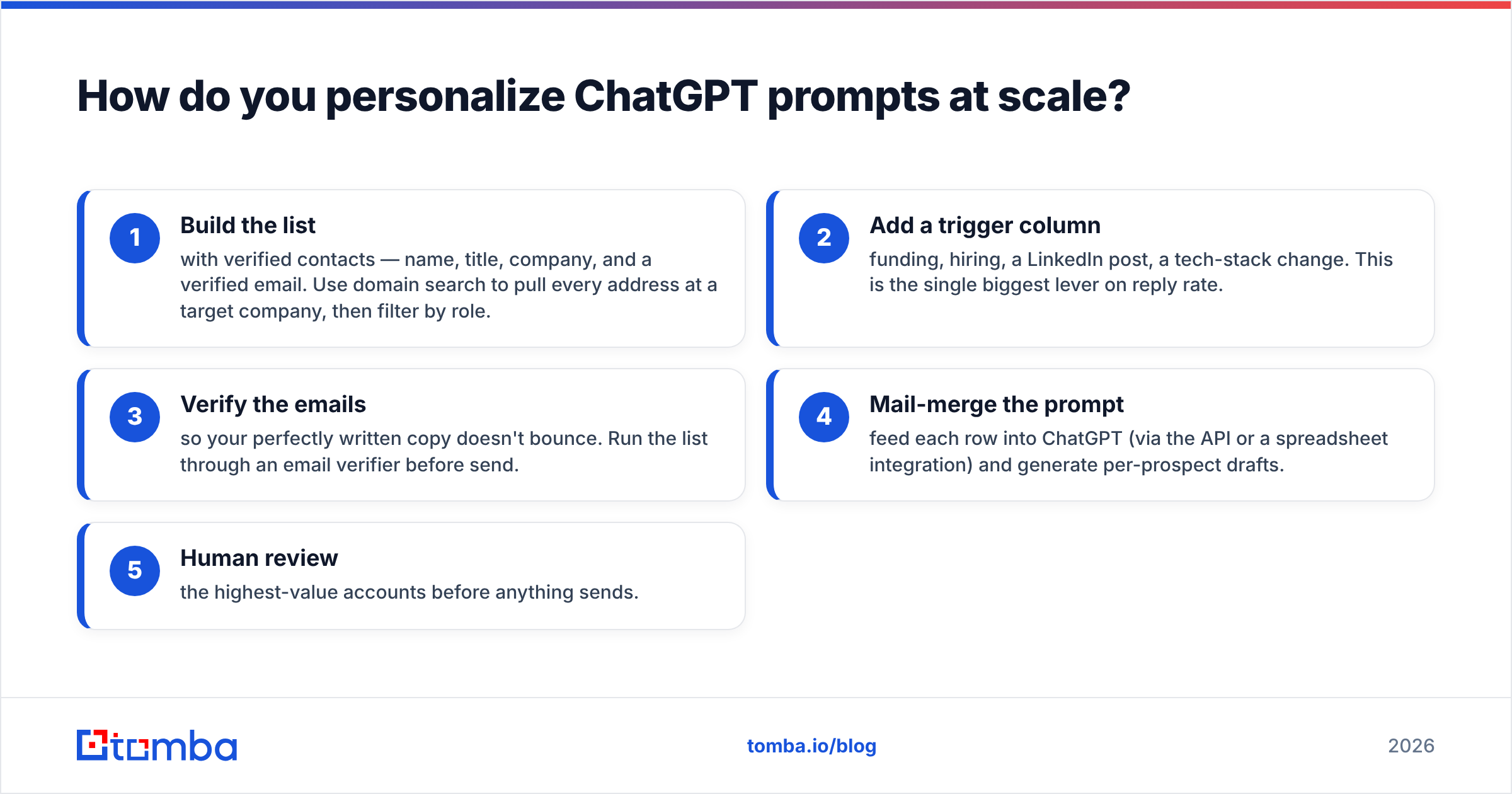
How do you personalize ChatGPT prompts at scale?#
You merge the prompt with a data row. The prompt stays fixed; the bracketed inputs come from your prospect list. That means your list quality determines everything downstream.
A realistic workflow:
- Build the list with verified contacts — name, title, company, and a verified email. Use domain search to pull every address at a target company, then filter by role.
- Add a trigger column — funding, hiring, a LinkedIn post, a tech-stack change. This is the single biggest lever on reply rate.
- Verify the emails so your perfectly written copy doesn't bounce. Run the list through an email verifier before send.
- Mail-merge the prompt — feed each row into ChatGPT (via the API or a spreadsheet integration) and generate per-prospect drafts.
- Human review the highest-value accounts before anything sends.
Here's the part most "ChatGPT for cold email" guides skip: a brilliant, hyper-personalized email sent to j.smith@company.com when the real address is john.smith@company.com converts at exactly zero percent. The model can't fix bad data. According to HubSpot's research on email marketing, deliverability and list hygiene are foundational to every other metric — and that starts with accurate addresses.

ChatGPT vs. dedicated cold email AI tools#
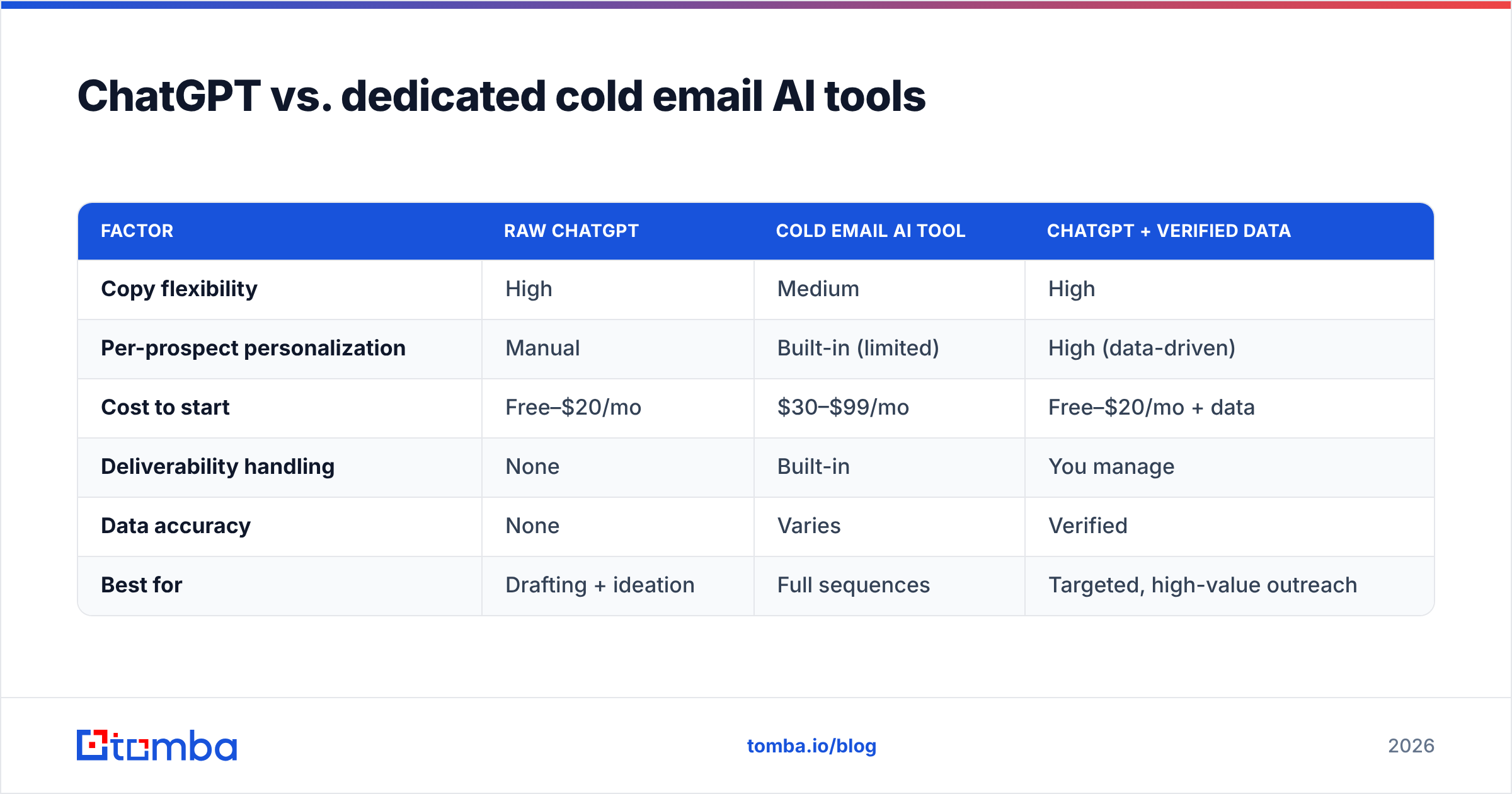
ChatGPT is a flexible copy engine. Purpose-built sales tools wrap a model in workflows — sequencing, deliverability, CRM sync. They're not mutually exclusive; most teams use both. Here's how the approaches compare:
| Factor | Raw ChatGPT | Cold email AI tool | ChatGPT + verified data |
|---|---|---|---|
| Copy flexibility | High | Medium | High |
| Per-prospect personalization | Manual | Built-in (limited) | High (data-driven) |
| Cost to start | Free–$20/mo | $30–$99/mo | Free–$20/mo + data |
| Deliverability handling | None | Built-in | You manage |
| Data accuracy | None | Varies | Verified |
| Best for | Drafting + ideation | Full sequences | Targeted, high-value outreach |
For a deeper look at automating the writing itself, Tomba's cold email AI and subject line generator handle the repetitive drafting so you can focus prompts on your best accounts. And if you want to pressure-test a draft before it sends, run it through a spam checker to catch trigger words and formatting that hurt deliverability.
How do you keep ChatGPT cold emails out of spam?#
Great copy means nothing if it never reaches the inbox. ChatGPT controls the words; you control the technical and behavioral signals.
- Verify every address. Bounce rates above 2–3% wreck sender reputation. Clean the list first.
- Warm the domain. New sending domains need 2–4 weeks of gradual volume ramp before cold campaigns.
- Authenticate. Set up SPF, DKIM, and DMARC. Check your SPF record before launching.
- Avoid spam triggers. Tell ChatGPT explicitly: no "free," no "guarantee," no exclamation pile-ups, no image-heavy HTML.
- Keep volume human. 20–50 cold sends per inbox per day, not 500.
- Make replies easy. Plain-text style, one clear question, real signature. Reply rate is itself a deliverability signal.
Add the deliverability constraints directly to your prompts — a single line like "avoid spam-trigger words and keep it plain-text friendly" measurably cleans up ChatGPT's output. For the full picture, review the fundamentals of email deliverability before you scale volume. Platforms like G2 track which tools sales teams actually trust for inbox placement, if you want third-party signal.
What's the biggest mistake people make with ChatGPT cold emails?#
Sending the first draft. ChatGPT is confident even when it's generic, and that confidence fools tired reps into hitting send on copy that opens with "In today's competitive landscape." Every prompt above will occasionally produce a cliché — your job is to catch it.
A 30-second edit pass:
- Cut the first sentence if it's throat-clearing. Cold emails should open on the prospect, not on you.
- Replace any vague claim with a number or a named customer.
- Read it aloud. If it doesn't sound like you talking, rewrite that line.
- Confirm the CTA is one clear, low-friction ask — a question beats "book a 30-minute demo."
Do this and your reply rate climbs without touching the prompt at all.
Frequently asked questions#
Can ChatGPT write cold emails that don't sound AI-generated? Yes — when you give it a real prospect, a real trigger, a named copy framework, and tight constraints, then edit the output. Generic prompts produce generic, detectable copy; specific prompts plus a quick human pass read like a person wrote them.
Is it against the rules to use ChatGPT for cold outreach? No. Using AI to draft is fine. What matters legally is compliance with CAN-SPAM, GDPR, and similar laws — accurate sender info, a real opt-out, and a legitimate basis for contact. The tool you draft with is irrelevant to those obligations.
How many follow-ups should a ChatGPT sequence have? Three to five touches over two to three weeks is a common, effective range. Use prompts 7–9 above so each follow-up adds new value instead of repeating the ask.
Do I still need verified emails if my copy is great? Absolutely. The most personalized email in the world converts at zero if it bounces. Verify addresses before send — it protects both your reply rate and your sender reputation.
Put it together#
ChatGPT turns a blank page into a strong cold email draft in seconds — but the prompt and the data are what make it convert. Use the five-part prompt structure, steal the 12 templates, feed them specific prospects and verified addresses, and edit every send.
The data half is where most teams leak results. Before you generate a single email, build a clean, verified list: use the Tomba Email Finder to find accurate professional addresses by name, domain, or company, then verify them so your best copy actually reaches a human. Check the Tomba pricing — the free tier gives you 25 searches a month to test the workflow before you commit. Great prompts plus verified data is the combination that books meetings; either one alone just makes noise.
// get started
Find, verify and enrich your first contacts today
Start on the free plan with 25 searches a month, then scale when your team is ready.
Free plan · No credit card required · GDPR & CCPA
// about the author