ChatGPT Email Prompts: 25 Templates That Convert in 2026
Steal 25 ChatGPT email prompts that write cold outreach, follow-ups, and replies in seconds — plus the framework to make every prompt sound human, not robotic.
ChatGPT Email Prompts: 25 Templates That Convert in 2026
TL;DR
- ChatGPT email prompts are reusable instructions that turn a few inputs — recipient, goal, tone, context — into a finished draft in seconds.
- The best prompts give ChatGPT a role, a constraint set (length, tone, CTA), and real context so the output stops sounding generic.
- Cold email, follow-ups, replies, and internal updates each need a different prompt shape — one template does not cover all four.
- A prompt only matters if the email reaches a real inbox, so pair your prompts with a verified address from a tool like the Tomba email finder.
- Below: 25 copy-paste prompts, a comparison of prompt styles, and the rules that separate a usable draft from one you have to rewrite.
A ChatGPT email prompt is a recipe, not a magic spell. You hand the model the same ingredients a good copywriter would ask for — who you are, who you are writing to, what you want, and how it should sound — and you get a draft back. Skip an ingredient and the dish tastes like every other AI email: polite, padded, and instantly forgettable. This guide gives you prompts that include the right ingredients, plus the reasoning so you can build your own.
What are ChatGPT email prompts?#
A ChatGPT email prompt is a structured instruction that tells the model exactly what email to write and under what constraints. Think of it like briefing a freelancer: "write me an email" gets you guesswork, while "write a 90-word cold email to a VP of Marketing at a 200-person SaaS company, referencing their recent rebrand, with one clear CTA to book a 15-minute call" gets you something you can almost send.
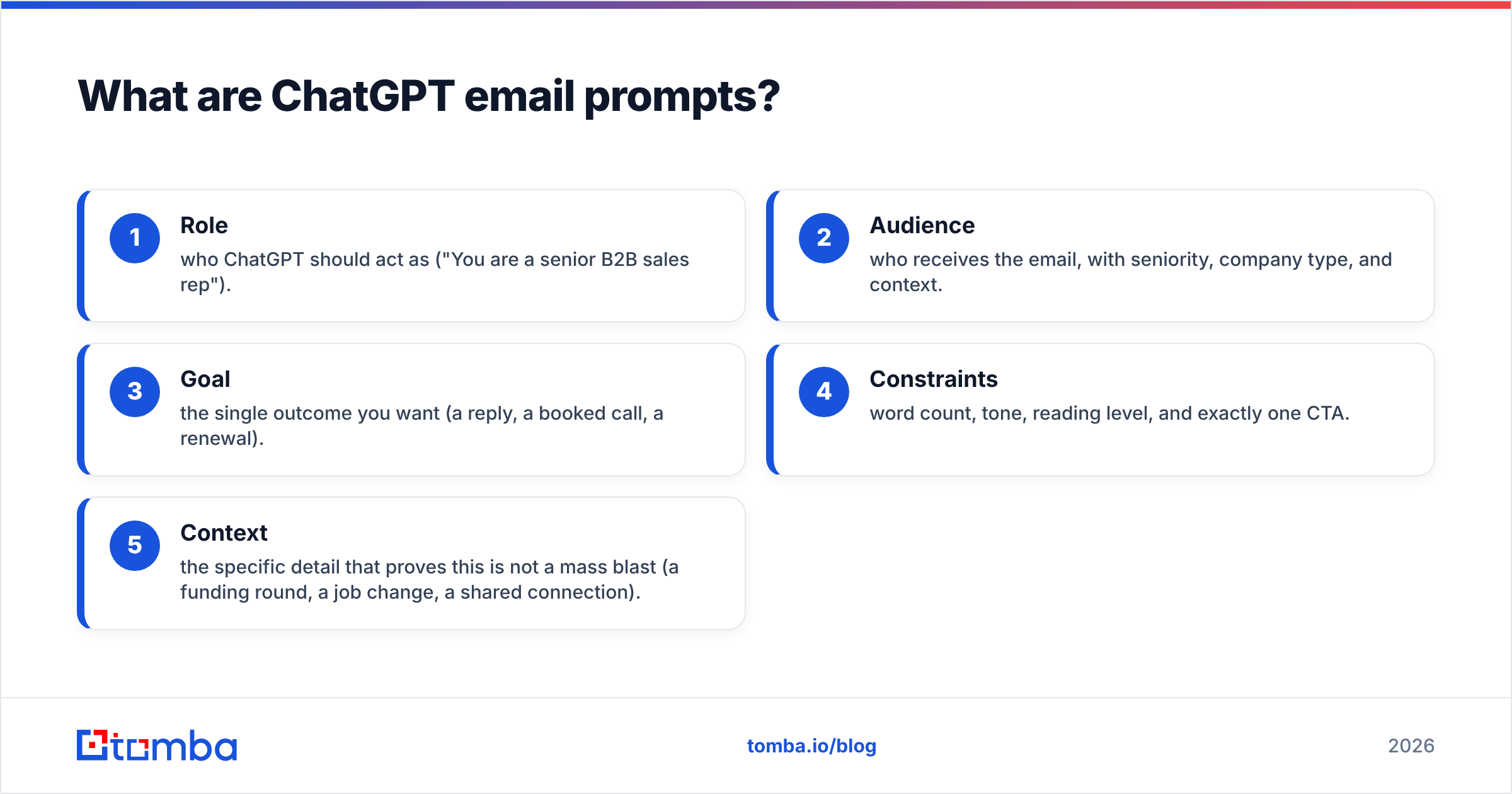
The difference between a weak prompt and a strong one comes down to five components. Leave any out and ChatGPT fills the gap with averages — which is why so much AI email reads the same.
- Role — who ChatGPT should act as ("You are a senior B2B sales rep").
- Audience — who receives the email, with seniority, company type, and context.
- Goal — the single outcome you want (a reply, a booked call, a renewal).
- Constraints — word count, tone, reading level, and exactly one CTA.
- Context — the specific detail that proves this is not a mass blast (a funding round, a job change, a shared connection).
)
When all five are present, the output shifts from "technically an email" to "an email a human would actually answer." The rest of this article is built on these five components — every prompt below uses them, and you can audit any prompt you write against the list.
Which ChatGPT prompt style should you use?#
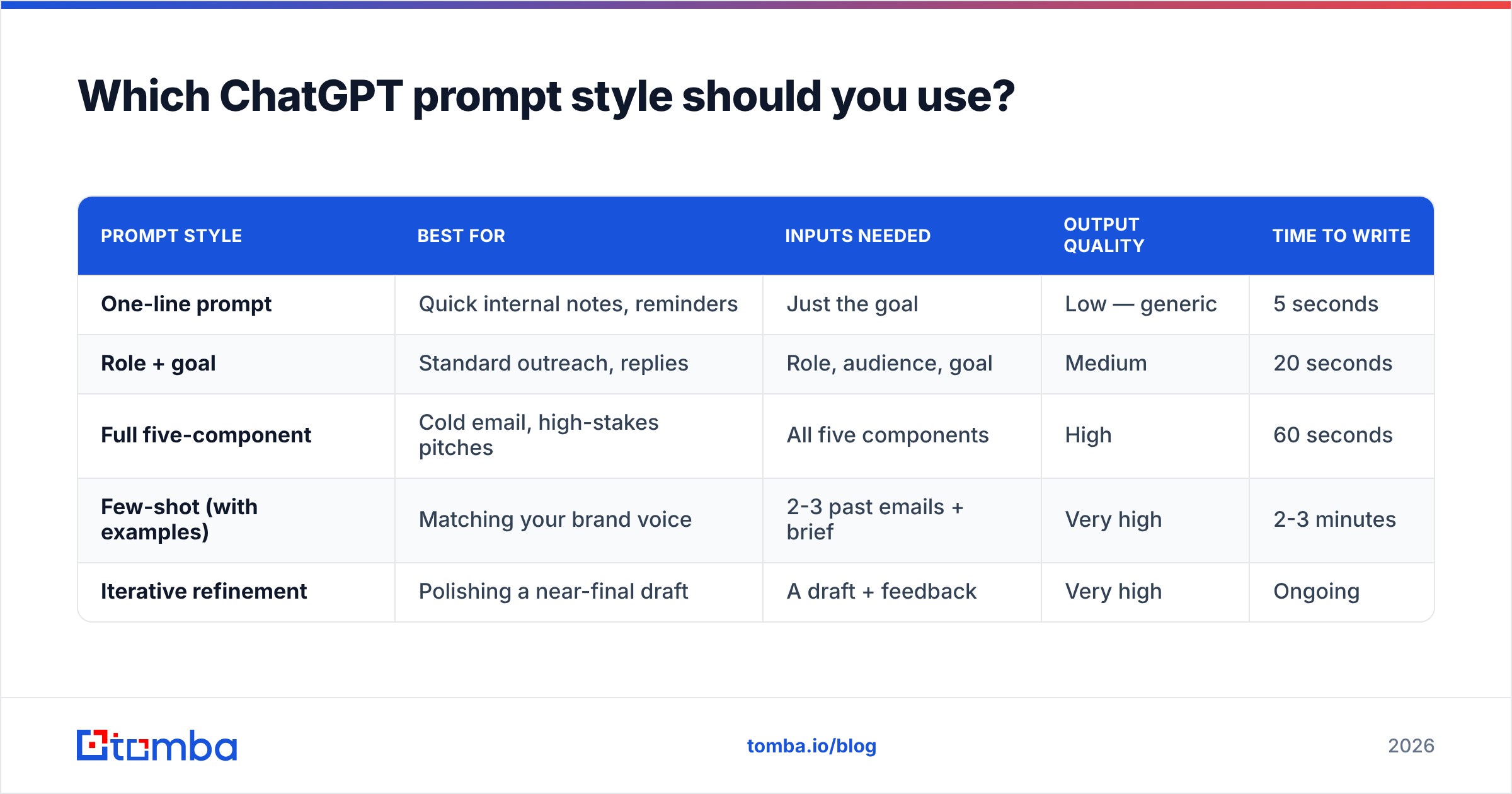
Not every email needs the same prompt structure. A one-line internal nudge does not need a persona and a tone spec; a cold pitch to a stranger needs all of it. Here is how the common styles compare so you pick the right tool for the job.
| Prompt style | Best for | Inputs needed | Output quality | Time to write |
|---|---|---|---|---|
| One-line prompt | Quick internal notes, reminders | Just the goal | Low — generic | 5 seconds |
| Role + goal | Standard outreach, replies | Role, audience, goal | Medium | 20 seconds |
| Full five-component | Cold email, high-stakes pitches | All five components | High | 60 seconds |
| Few-shot (with examples) | Matching your brand voice | 2-3 past emails + brief | Very high | 2-3 minutes |
| Iterative refinement | Polishing a near-final draft | A draft + feedback | Very high | Ongoing |
The pattern is simple: the higher the stakes and the colder the audience, the more structure you invest. A reply to a warm lead can run on a role-plus-goal prompt. A first-touch cold email to a VP who has never heard of you deserves the full five-component treatment or a few-shot prompt trained on your best-performing messages. For more on the wider category of AI-assisted writing, the cold email AI tool shows how these prompt patterns get productized.
What are the best ChatGPT prompts for cold email?#
Cold email is where prompt quality matters most, because the recipient owes you nothing. Each prompt below is copy-paste ready — replace the bracketed inputs.
1. The five-component cold opener
You are a senior B2B sales rep. Write a 90-word cold email to [name], [title] at [company], a [company size] [industry] company. Reference [specific trigger: funding, hire, product launch]. Offer [your value in one sentence]. End with one CTA: a 15-minute call next week. Tone: direct, peer-to-peer, no buzzwords. No "I hope this finds you well."
2. The problem-agitate-solve prompt
Write a cold email under 100 words using the problem-agitate-solve framework. Audience: [title] at [industry] companies. Problem they face: [problem]. Agitate it in one sentence, then introduce [product] as the fix. One CTA. Conversational, not salesy.
3. The pattern-interrupt prompt
Write a short, unexpected cold email opener (under 120 words) that does NOT start with my company or my name. Start with a specific observation about [company]'s [recent event]. Audience: [title]. Goal: get a reply. Make the first line impossible to ignore.
4. The case-study prompt
Write a cold email referencing a result we got for a similar company. We helped [similar company type] achieve [specific metric]. Audience: [title] at [company]. Keep it under 110 words, lead with the result, one CTA to share details.
5. The mutual-connection prompt
Write a warm-cold email mentioning that [mutual contact] suggested I reach out to [name] at [company]. Keep it natural, under 90 words, reference why the intro makes sense, and ask for a short call.
A prompt cannot fix a bad address, though. Even a perfectly written cold email bounces if the recipient's email is wrong — and bounces wreck your sender reputation. Run every address through an email verifier before you send a single one of these.
What ChatGPT prompts work for follow-ups and replies?#
Follow-ups are where most sequences die, usually because the writer either guilt-trips ("just bumping this") or repeats the first email. Good follow-up prompts add a new angle each time.
6. The value-add follow-up
Write a follow-up email to [name] who did not reply to my first message about [topic]. Do NOT guilt them. Instead, share one new useful insight: [insight or resource]. Under 70 words. One soft CTA.
7. The break-up email
Write a polite "break-up" email — my last follow-up after [number] unanswered emails. Acknowledge they may not be interested, leave the door open, under 60 words. No passive-aggression.
8. The reply-to-objection prompt
A prospect replied: "[paste their objection]." Write a reply that acknowledges their concern, reframes it without being defensive, and offers a low-friction next step. Under 100 words, calm and confident.
9. The reschedule prompt
Write a brief, friendly email rescheduling our meeting from [date] to [new options]. Apologize once, keep it under 50 words, make it easy to pick a new time.
10. The thank-you-plus-next-step prompt
Write a follow-up after a discovery call with [name]. Thank them, summarize the two main points we agreed on, and confirm the next step: [next step]. Under 90 words, warm but professional.
)
For inbound replies and customer responses, the AI email response generator handles the same job with the context pre-loaded, which saves you from rebuilding the prompt every time.
How do you stop ChatGPT emails from sounding robotic?#
Add specificity and subtract filler — that is the whole game. ChatGPT defaults to safe, padded, symmetrical prose because it is averaging across millions of emails. Your job is to drag it toward the specific.
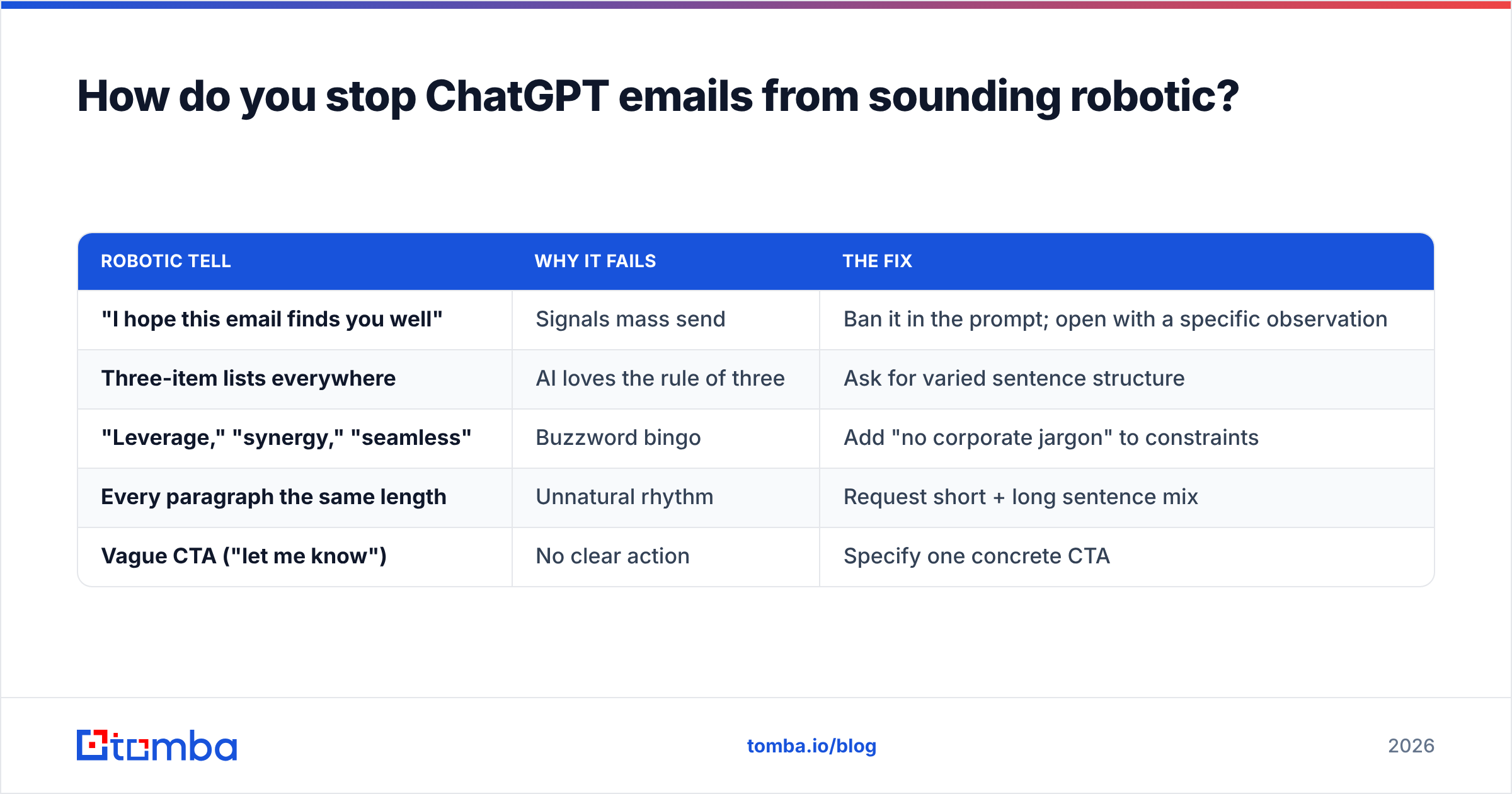
Here is a comparison of the habits that make AI email obvious versus the fixes that make it pass as human:
| Robotic tell | Why it fails | The fix |
|---|---|---|
| "I hope this email finds you well" | Signals mass send | Ban it in the prompt; open with a specific observation |
| Three-item lists everywhere | AI loves the rule of three | Ask for varied sentence structure |
| "Leverage," "synergy," "seamless" | Buzzword bingo | Add "no corporate jargon" to constraints |
| Every paragraph the same length | Unnatural rhythm | Request short + long sentence mix |
| Vague CTA ("let me know") | No clear action | Specify one concrete CTA |
Four practical moves make the biggest difference:
- Feed it real context. Paste the prospect's LinkedIn headline or a line from their company blog. Specificity is the single strongest signal that a human wrote the email.
- Constrain the length hard. "Under 90 words" forces ChatGPT to cut the filler it would otherwise generate.
- Ban the clichés explicitly. List the phrases you never want to see. The model obeys negative constraints well.
- Always do a human pass. Read it aloud. If a sentence sounds like a press release, rewrite that line yourself.
If you want a deeper checklist on this, the humanizer concept from Wikipedia's guide to AI-writing tells catalogs the exact patterns to strip out. Tools like Grammarly help with the final mechanical polish, but they will not fix a prompt that lacked context to begin with.
What are advanced ChatGPT prompts for sales workflows?#
Once you are comfortable with single emails, prompts can run entire micro-workflows. These save the most time at scale.
11-15. The sequence builder
Write a 4-email cold outreach sequence for [audience] selling [product]. Email 1: value-led intro. Email 2 (day 3): case study. Email 3 (day 7): new angle on the pain point. Email 4 (day 12): break-up. Each under 90 words, distinct angle, one CTA each, consistent voice.
16. The personalization-at-scale prompt
Here are 5 prospects with their titles and one fact each: [paste list]. Write a personalized one-line opener for each that references their specific fact. Keep each under 20 words.
17. The A/B subject-line prompt
Write 8 subject lines for a cold email about [topic]. Mix curiosity, specificity, and direct value. Under 6 words each. No clickbait, no all-caps.
18. The tone-matching prompt
Here are two emails I have written before: [paste examples]. Match this exact voice and write a new cold email to [audience] about [topic].
19. The summarize-and-reply prompt
Summarize this email thread in 3 bullets, then draft a reply that moves the deal forward: [paste thread].
20-25. Quick utility prompts
- "Rewrite this email to be 40% shorter without losing the CTA."
- "Make this email sound more confident and less apologetic."
- "Translate the tone of this email from formal to casual."
- "Turn these bullet notes into a polished follow-up email."
- "Write a re-engagement email to a lead who went quiet 60 days ago."
- "Draft a referral-request email to a happy customer."
The personalization-at-scale prompt only works if you actually have the prospect data to feed it. That is the unglamorous half of AI email: you need accurate names, titles, and verified addresses first. A domain search pulls every public email at a target company, and data enrichment fills in the titles and company facts that make prompt #16 produce something worth sending. Prompts handle the words; clean data handles the targeting. For pricing on running this at volume, see the Tomba pricing page.
How do prompts fit into the full outreach stack?#
A prompt is one link in a chain, and the chain is only as strong as its weakest link. You can write the most human cold email in the world, but if it goes to a guessed address, lands in spam, or targets the wrong person, the words never matter.
The realistic workflow looks like this: find the right contact and a verified email, enrich it with the facts that fuel personalization, generate the draft with a strong prompt, do a human edit pass, then send through a warmed inbox. ChatGPT owns exactly one stage of that — drafting. Treating it as the whole process is the most common mistake teams make in 2026.
That is also why "best ChatGPT email prompt" is the wrong thing to optimize in isolation. The prompt is a force multiplier on good inputs and a waste of time on bad ones. Garbage data in, polished garbage out — now at scale and with perfect grammar.
Frequently asked questions#
Are ChatGPT email prompts allowed for cold outreach?
Yes. Using AI to draft email is no different from using a template — what matters legally is consent and compliance (CAN-SPAM, GDPR), not who or what wrote the words. Always include an unsubscribe option and a real sender identity.
Will recipients know my email was AI-written?
Only if you let it stay generic. With real context, hard length limits, and a human edit pass, a ChatGPT draft is indistinguishable from a hand-written one. The tells come from lazy prompting, not from AI itself.
Do I need ChatGPT Plus for these prompts?
No. Every prompt here works on the free tier. The paid tier gives you a stronger model and longer context, which helps with the sequence and tone-matching prompts, but the prompt structures are identical.
How many follow-ups should a sequence have?
Most B2B sequences run 4-6 touches over two to three weeks. The prompts above scale to any length — just make sure each email introduces a genuinely new angle rather than repeating the ask.
Start with a real address, then let ChatGPT write#
Great prompts are worthless if the email bounces. Before you generate a single draft, build a list of accurate, verified contacts so every AI-written message actually reaches a human who can reply. The Tomba Email Finder turns a name and company into a verified professional email in seconds, and the free tier gives you 25 searches a month to test it against your next campaign. Find the right inbox first — then let ChatGPT do the writing.
// get started
Find, verify and enrich your first contacts today
Start on the free plan with 25 searches a month, then scale when your team is ready.
Free plan · No credit card required · GDPR & CCPA
// about the author