How to Check an Email Address for Blacklist in 2026
Learn how to check an email address for blacklist status, why senders get listed, and the exact steps to delist and protect inbox placement in 2026.
TL;DR
- "Blacklisting" rarely targets a single email address — it targets the sending domain or IP behind it, so you check both the address's domain and the server it sends from.
- Run the domain and IP through DNS-based blocklists (DNSBLs) like Spamhaus, plus a sender-reputation check, before you blame your copy for low reply rates.
- A clean list is the cheapest insurance: verify every address with an email verifier before you send, because bounces and spam traps are the fastest route onto a blacklist.
- Delisting is a process, not a button: fix the root cause (auth, volume, bad data), then submit a removal request and wait for the next refresh.
- Monitoring is ongoing. Check weekly if you run cold outbound; reputation decays quietly and you want to catch a listing before your whole campaign stalls.
When your open rates fall off a cliff overnight, the problem usually is not your subject line. It is that a mailbox provider or a blocklist has decided your mail looks like spam. Knowing how to check an email address for blacklist status — and what to do next — is the difference between a quick fix and a dead sending domain. This guide walks through what blacklists actually are, how to check, and how to get off one.
What does it mean to check an email address for blacklist status?#
The short version: you are almost never checking the address itself. You are checking the domain after the @ and the IP address of the server that sends your mail. Blacklists (more precisely, DNS-based blocklists, or DNSBLs) are databases of domains and IPs that have been flagged for sending spam, hosting malware, or triggering spam traps. Receiving servers query these lists in real time and decide whether to accept, junk, or reject your message.
Think of a blacklist like a bouncer's no-entry list at a venue. The bouncer does not memorize every troublemaker's face — they check the name on the reservation (your domain) and the car you arrived in (your IP). If either is on the list, you do not get in, no matter how nice your jacket looks.
So when someone says "my email got blacklisted," what they really mean is one of three things:
- The sending IP is listed — common on shared infrastructure where another tenant abused the IP.
- The sending domain is listed — usually from spam complaints, spam-trap hits, or poor authentication.
- The recipient's filter has a private blocklist — internal rules at a company or provider you cannot query directly.
Understanding which layer you are dealing with tells you exactly where to look and what to fix.
)
Why do email addresses and domains end up on a blacklist?#
Most listings trace back to a handful of repeatable mistakes. If you know the causes, you can avoid 90% of blacklist trouble before it starts.
- Hitting spam traps. These are dormant or recycled addresses that no longer belong to a real person. Mailing one is a strong signal you scraped or bought a stale list. Spamhaus and others seed traps specifically to catch this.
- High bounce rates. A flood of
550 user unknownresponses tells providers your data is dirty and you are not verifying it. - Spam complaints. When recipients hit "report spam" past a threshold (often ~0.3%), providers escalate fast.
- Missing or broken authentication. No SPF, DKIM, or DMARC alignment makes your mail trivially spoofable and instantly suspect. A misconfigured SPF record is one of the most common silent killers.
- Sudden volume spikes. Going from 20 emails a day to 5,000 on a cold domain looks exactly like a compromised account.
- Shared IP neighbors. On budget infrastructure, someone else's bad behavior can drag your IP onto a list.
The common thread is list hygiene and authentication. Nearly every blacklist story starts with an unverified contact list or a domain that was never properly warmed and authenticated.
How do you check an email address for blacklist status step by step?#
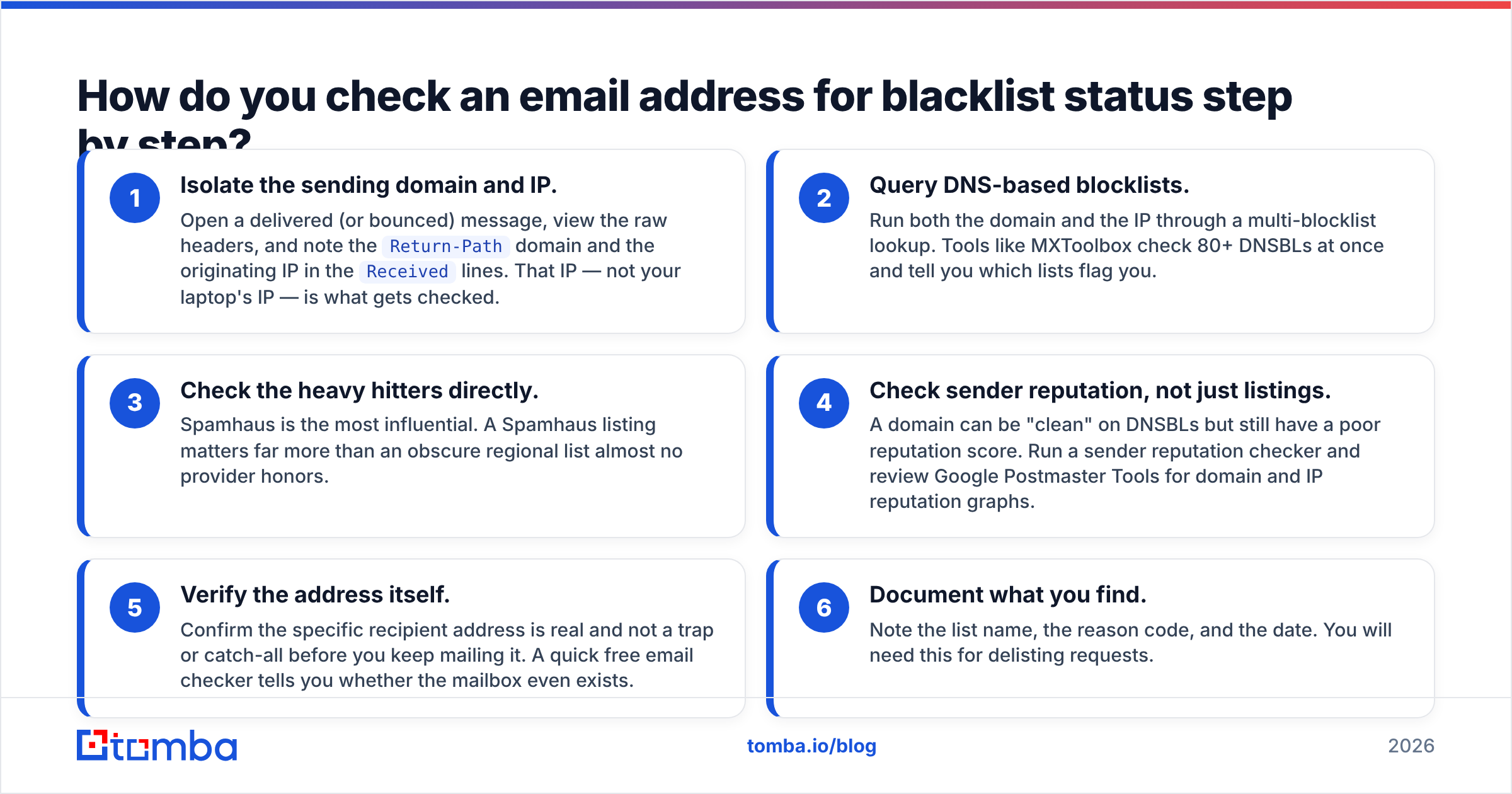
Here is the practical sequence. Work top to bottom and stop when you find the problem.
- Isolate the sending domain and IP. Open a delivered (or bounced) message, view the raw headers, and note the
Return-Pathdomain and the originating IP in theReceivedlines. That IP — not your laptop's IP — is what gets checked. - Query DNS-based blocklists. Run both the domain and the IP through a multi-blocklist lookup. Tools like MXToolbox check 80+ DNSBLs at once and tell you which lists flag you.
- Check the heavy hitters directly. Spamhaus is the most influential. A Spamhaus listing matters far more than an obscure regional list almost no provider honors.
- Check sender reputation, not just listings. A domain can be "clean" on DNSBLs but still have a poor reputation score. Run a sender reputation checker and review Google Postmaster Tools for domain and IP reputation graphs.
- Verify the address itself. Confirm the specific recipient address is real and not a trap or catch-all before you keep mailing it. A quick free email checker tells you whether the mailbox even exists.
- Document what you find. Note the list name, the reason code, and the date. You will need this for delisting requests.
If steps 2–4 come back clean and you are still landing in spam, the issue is content or engagement, not a blocklist — and you should stop hunting for a listing that does not exist.
Which blacklist checking tools should you use in 2026?#
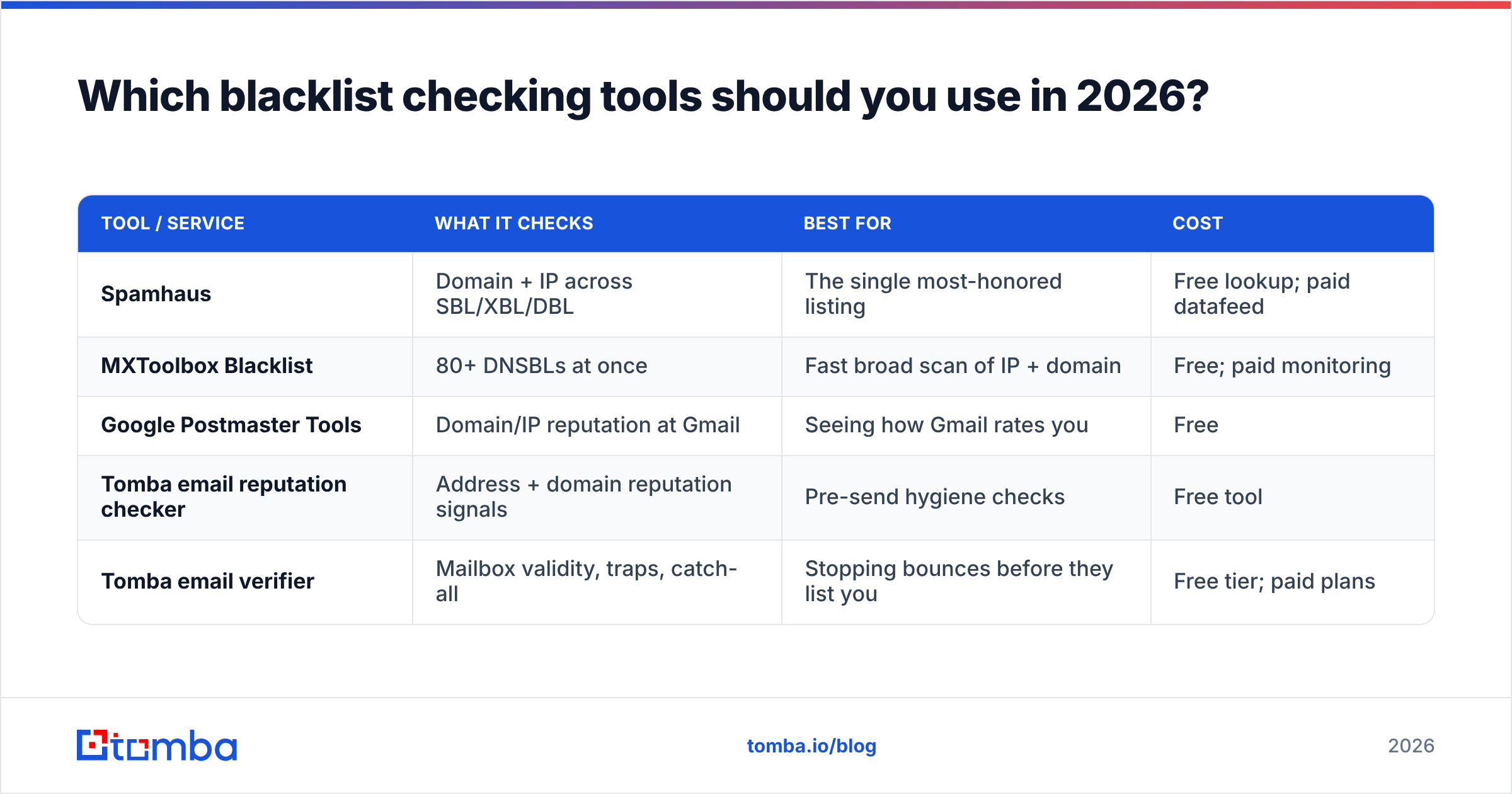
Not all blocklists carry the same weight, and not all tools check the same things. Here is how the main categories compare.
| Tool / Service | What it checks | Best for | Cost |
|---|---|---|---|
| Spamhaus | Domain + IP across SBL/XBL/DBL | The single most-honored listing | Free lookup; paid datafeed |
| MXToolbox Blacklist | 80+ DNSBLs at once | Fast broad scan of IP + domain | Free; paid monitoring |
| Google Postmaster Tools | Domain/IP reputation at Gmail | Seeing how Gmail rates you | Free |
| Tomba email reputation checker | Address + domain reputation signals | Pre-send hygiene checks | Free tool |
| Tomba email verifier | Mailbox validity, traps, catch-all | Stopping bounces before they list you | Free tier; paid plans |
The smart workflow combines them: use MXToolbox or Spamhaus to detect an active listing, Postmaster Tools to watch reputation trends, and an email verifier to keep the bad data that causes listings out of your list in the first place. Detection tells you when you are already in trouble; verification keeps you out of it.
)
How do you get an email address or domain off a blacklist?#
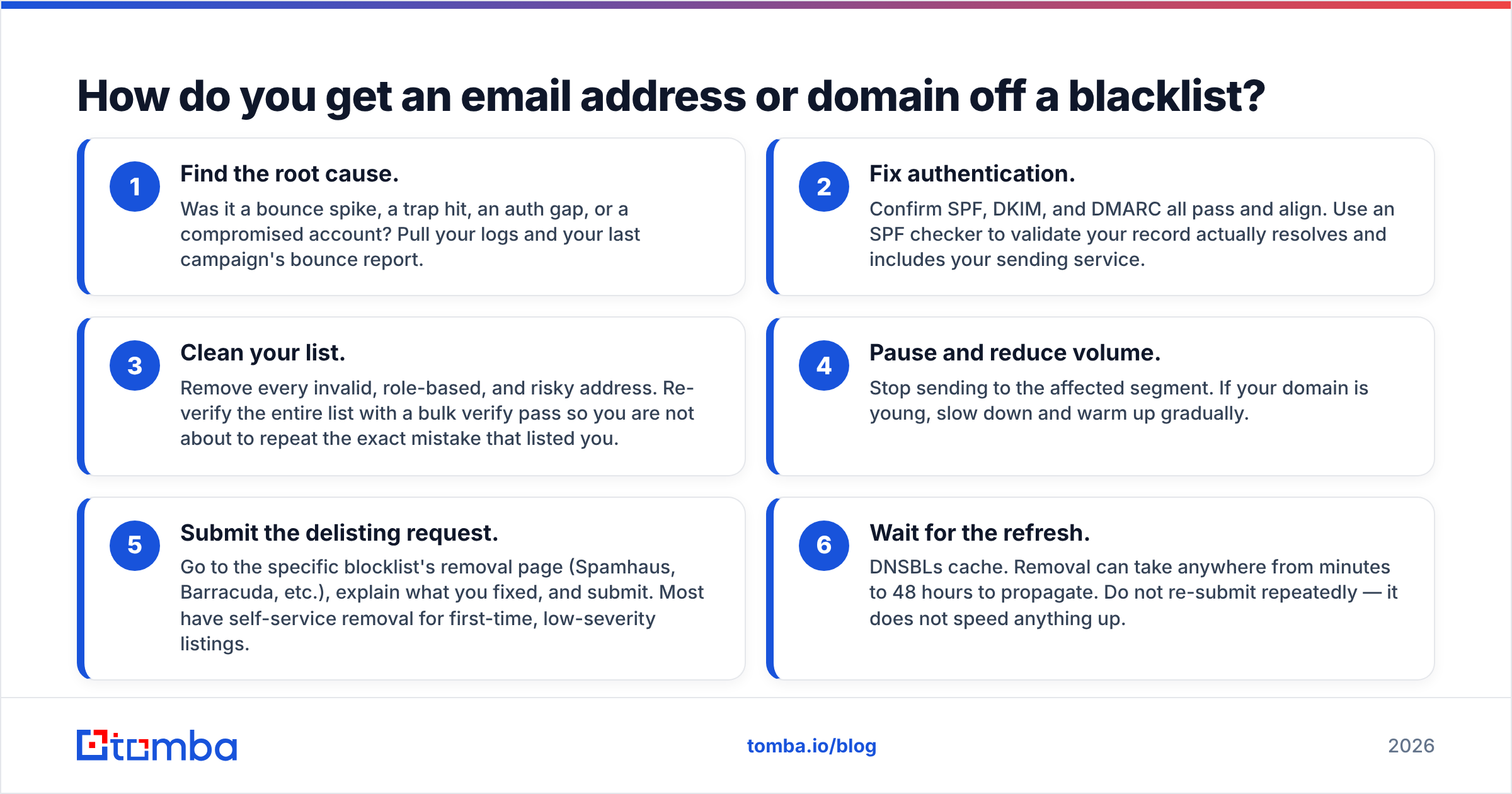
Delisting fails when people request removal without fixing what got them listed. Providers re-list you within days, and repeat offenders get harder to remove. Do it in order:
- Find the root cause. Was it a bounce spike, a trap hit, an auth gap, or a compromised account? Pull your logs and your last campaign's bounce report.
- Fix authentication. Confirm SPF, DKIM, and DMARC all pass and align. Use an SPF checker to validate your record actually resolves and includes your sending service.
- Clean your list. Remove every invalid, role-based, and risky address. Re-verify the entire list with a bulk verify pass so you are not about to repeat the exact mistake that listed you.
- Pause and reduce volume. Stop sending to the affected segment. If your domain is young, slow down and warm up gradually.
- Submit the delisting request. Go to the specific blocklist's removal page (Spamhaus, Barracuda, etc.), explain what you fixed, and submit. Most have self-service removal for first-time, low-severity listings.
- Wait for the refresh. DNSBLs cache. Removal can take anywhere from minutes to 48 hours to propagate. Do not re-submit repeatedly — it does not speed anything up.
If you are on a shared IP and a neighbor caused the listing, your real fix is to move to a dedicated IP or a better provider, because you will keep getting dragged down otherwise.
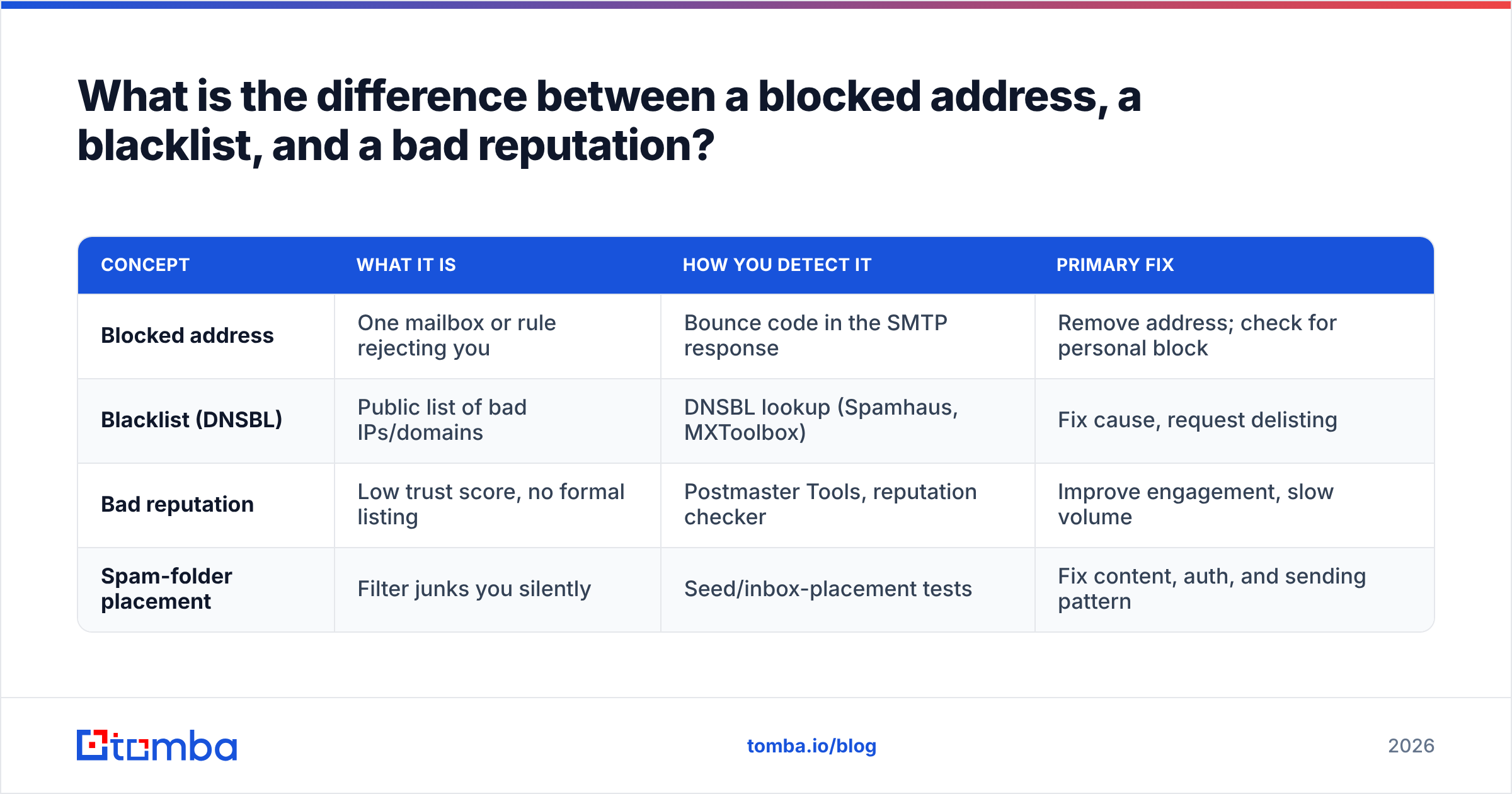
What is the difference between a blocked address, a blacklist, and a bad reputation?#
These three get used interchangeably and they are not the same. Knowing which one you have saves hours of pointing at the wrong fix.
| Concept | What it is | How you detect it | Primary fix |
|---|---|---|---|
| Blocked address | One mailbox or rule rejecting you | Bounce code in the SMTP response | Remove address; check for personal block |
| Blacklist (DNSBL) | Public list of bad IPs/domains | DNSBL lookup (Spamhaus, MXToolbox) | Fix cause, request delisting |
| Bad reputation | Low trust score, no formal listing | Postmaster Tools, reputation checker | Improve engagement, slow volume |
| Spam-folder placement | Filter junks you silently | Seed/inbox-placement tests | Fix content, auth, and sending pattern |
A bounce on a single address is a data problem — drop it and move on. A DNSBL listing is an infrastructure problem — fix and delist. A bad reputation with no listing is a behavior problem — you earn your way back with consistent, low-complaint sending over weeks. Treating a reputation problem like a blacklist problem (or vice versa) is why so many "I delisted but I'm still in spam" stories happen.
How often should you check an email address for blacklist status?#
Match the cadence to your sending volume and risk.
- High-volume cold outbound: check weekly, and set up automated monitoring so you get alerted the moment a domain or IP gets listed. By the time you notice falling opens, you have already lost a week of pipeline.
- Steady transactional/marketing senders: monthly DNSBL checks plus continuous Postmaster Tools monitoring is plenty.
- Before any new campaign: always verify the list and confirm the domain is clean. The cheapest blacklist fix is the one you never needed because you verified first.
- After any incident: if a campaign spiked bounces or complaints, check immediately rather than waiting for the next scheduled scan.
The pattern that keeps senders safe is boring and repeatable: verify data before sending, authenticate properly, warm new domains, watch reputation, and check blocklists on a schedule. Reactive senders fight fires; proactive senders rarely see one.
Frequently asked questions#
Can a single email address be blacklisted on its own? Rarely in the public-DNSBL sense — those target IPs and domains. But an individual recipient or company filter can block one specific address. If only one provider rejects you, suspect a private block, not a global blacklist.
Does checking a blacklist cost money? No. Spamhaus, MXToolbox, Google Postmaster Tools, and Tomba's reputation and email verification checks all have free tiers. Paid plans add monitoring, alerting, and bulk volume.
How long does delisting take? From a few minutes to about 48 hours, depending on the list and how its cache refreshes. Fix the root cause first, or you will be re-listed before the removal even propagates.
Will verifying my list really prevent blacklisting? It removes the single biggest cause — bounces and spam-trap hits from dirty data. Verification is not a guarantee, but no other single habit prevents more listings.
Keep your sending clean before you ever need a delisting#
The fastest way to never check a blacklist in a panic is to stop the cause upstream: send to real, verified people on a properly authenticated domain. That starts with the quality of your list. Tomba's Email Finder sources accurate professional addresses by domain, name, or company, and pairs with the email verifier so every contact you reach is real before it ever hits your sequence — fewer bounces, fewer trap hits, and far fewer reasons for a blocklist to flag you. Browse the full Tomba pricing options, start on the free tier, and build outbound on data that keeps you off the list instead of fighting to get off it.
Ready to find emails that actually work?
Join 150,000+ professionals who stopped guessing and started sending. Free credits on signup — no credit card required.
Get the Tomba newsletter
Practical outbound tactics and product updates — once every two weeks.
About the author