How to Check an Email Address for Spam (2026 Guide)
Learn how to check an email address for spam risk before you hit send — authentication, blacklists, content scoring, and the tools that catch problems early in 2026.
You hit send on a clean campaign, and 30% of it never reaches a human. The address looked fine. The copy was solid. So what went wrong? Usually the answer is something you could have caught beforehand — a dead mailbox, a blacklisted domain, or a message that trips spam filters before anyone reads it.
This guide shows you how to check an email address for spam risk on two fronts: whether the address itself is safe to send to, and whether your message and sending setup will land in the inbox instead of the junk folder. Both matter. Skip either and your deliverability suffers.
TL;DR#
- "Spam risk" has two halves: the recipient address (is it real, risky, or a trap?) and your sending reputation (will filters trust you?). Check both.
- Verify the address first — invalid, role-based, and spam-trap addresses are the fastest way to tank your sender reputation.
- Check authentication (SPF, DKIM, DMARC) and your domain/IP against blacklists before any real send.
- Run a content spam score with a tool like Mail-Tester or a spam checker to catch trigger words, broken links, and missing headers.
- Tools beat manual checks at scale — list verification and reputation monitoring catch problems a human eyeballing addresses never will.
What does it mean to "check an email address for spam"?#
It means two different things, and people constantly conflate them.
First: is the address itself spammy or dangerous to mail? Some addresses are invalid (the mailbox doesn't exist), some are role-based (info@, sales@) and tend to complain, and some are outright spam traps — addresses planted specifically to catch senders who don't clean their lists. Mailing these drags down your reputation fast.
Second: will your email be flagged as spam by the recipient's filter? This depends on your authentication records, your sending domain's reputation, your content, and your engagement history. A perfectly valid address still won't help if Gmail dumps your message in the junk folder.
Think of it like mailing a physical letter. The first check is whether the address on the envelope is a real, deliverable home. The second is whether the postal service trusts you enough to actually carry it there instead of returning it. You need both to land.
How do you check if an email address is risky to send to?#
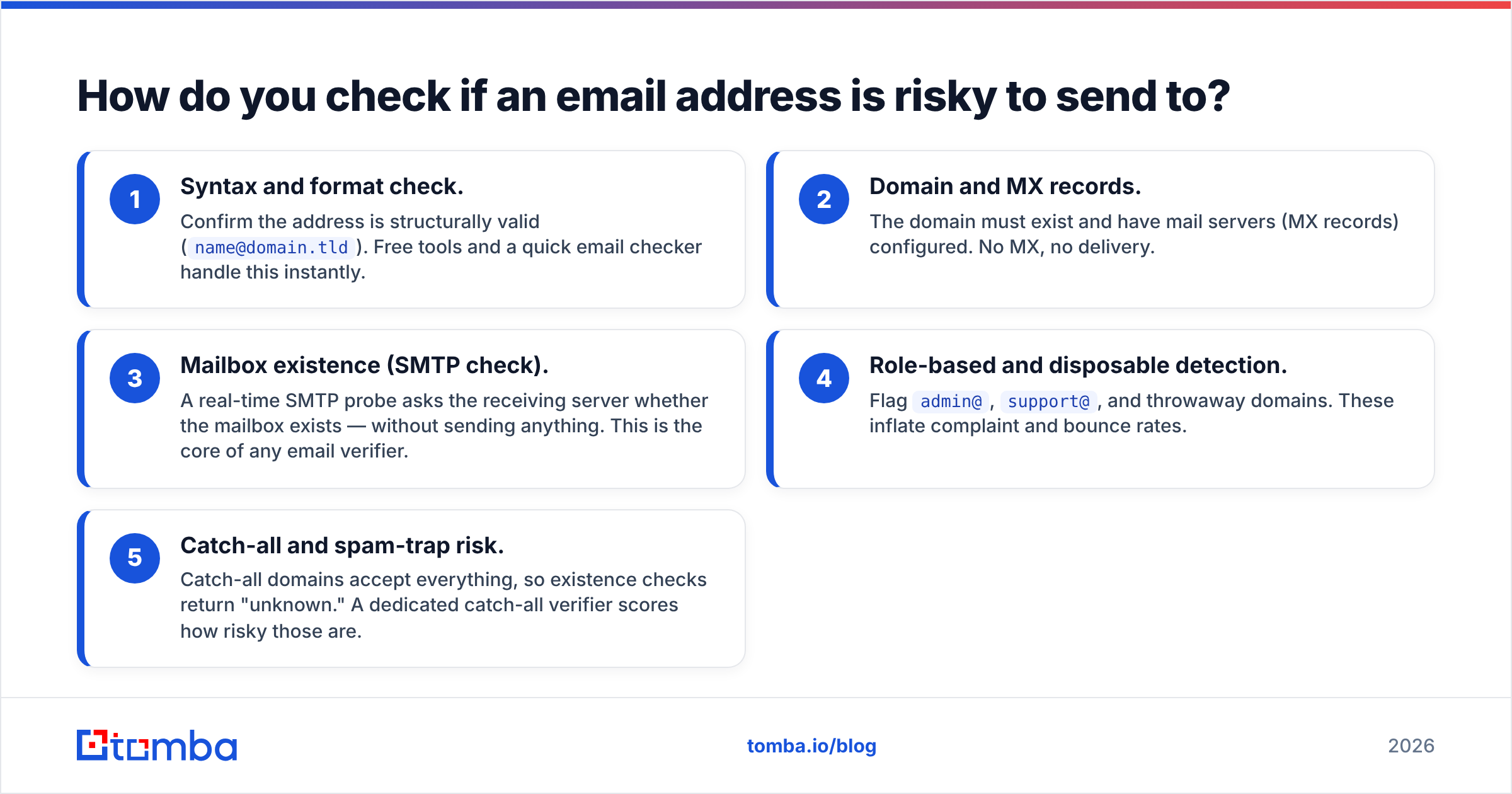
Before you worry about content, vet the address. Here's the order that catches the most problems with the least effort:
- Syntax and format check. Confirm the address is structurally valid (
name@domain.tld). Free tools and a quick email checker handle this instantly. - Domain and MX records. The domain must exist and have mail servers (MX records) configured. No MX, no delivery.
- Mailbox existence (SMTP check). A real-time SMTP probe asks the receiving server whether the mailbox exists — without sending anything. This is the core of any email verifier.
- Role-based and disposable detection. Flag
admin@,support@, and throwaway domains. These inflate complaint and bounce rates. - Catch-all and spam-trap risk. Catch-all domains accept everything, so existence checks return "unknown." A dedicated catch-all verifier scores how risky those are.
Run those five and you've eliminated the majority of addresses that would hurt your email deliverability. The remaining addresses are the ones worth your content effort.
How do you check if your email will be flagged as spam?#
Now flip to your side of the equation. Even a flawless list fails if filters distrust the sender. Check these:
- Authentication records. SPF, DKIM, and DMARC tell receiving servers you're a legitimate sender. Missing or misconfigured records are an instant spam signal. Run an SPF checker and confirm your SPF record and DKIM signature are valid.
- Blacklist status. Your sending domain and IP should not appear on major DNSBLs (Spamhaus, Barracuda, etc.). A blacklist checker scans dozens at once.
- Sender reputation. Mailbox providers score your domain over time based on bounces, complaints, and engagement. Monitor it with Google Postmaster Tools and an email reputation checker. Your overall sender reputation is the single biggest deliverability lever you control.
- Content spam score. Spam-trigger words, image-heavy/text-light layouts, broken links, shortened URLs, and missing unsubscribe headers all add points to a spam score. Send a test to a service like Mail-Tester or use a spam checker for a graded report.
What's the difference between the checks? A side-by-side#
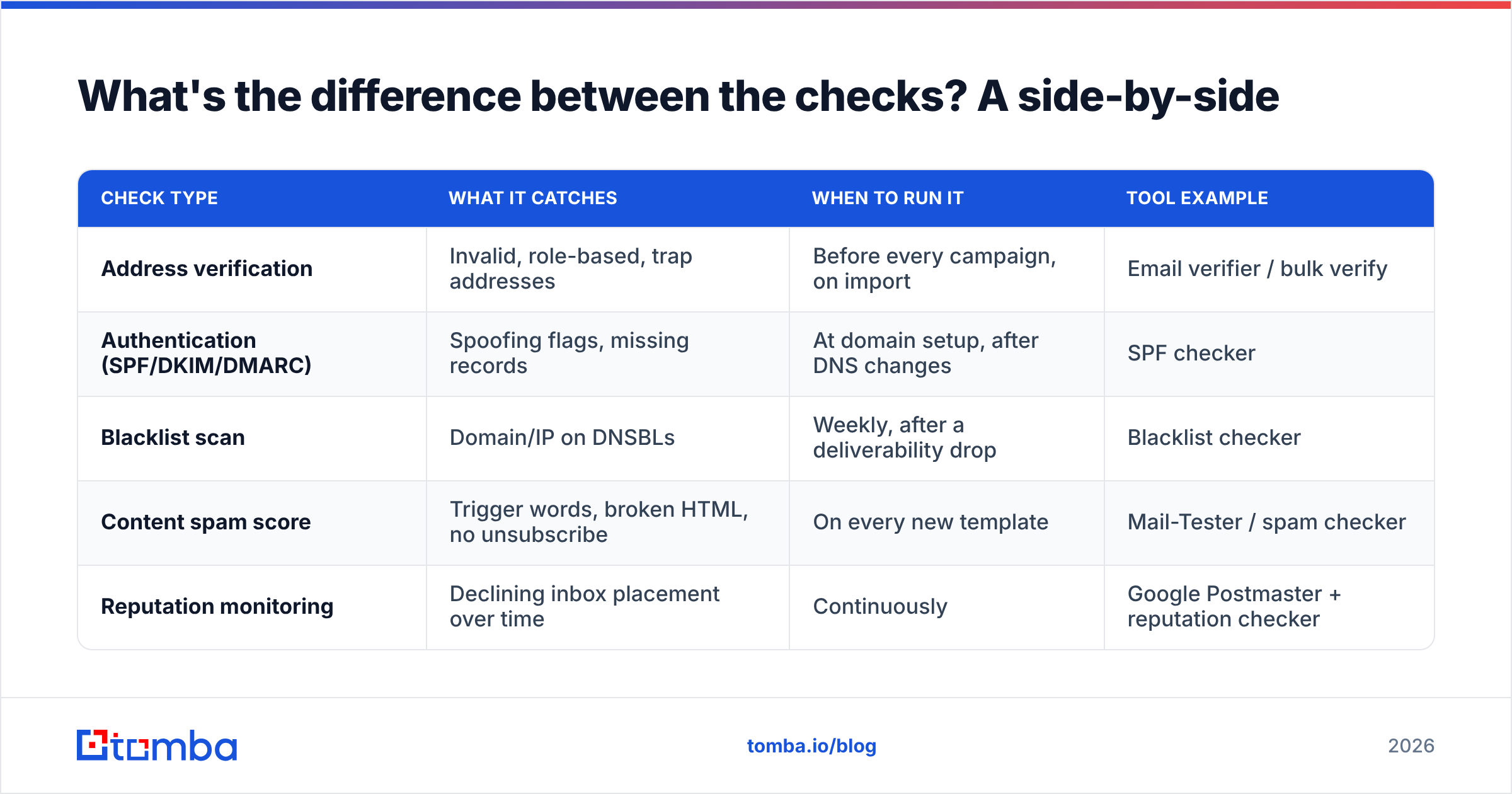
Here's how the main check types compare so you know which one solves which problem.
| Check type | What it catches | When to run it | Tool example |
|---|---|---|---|
| Address verification | Invalid, role-based, trap addresses | Before every campaign, on import | Email verifier / bulk verify |
| Authentication (SPF/DKIM/DMARC) | Spoofing flags, missing records | At domain setup, after DNS changes | SPF checker |
| Blacklist scan | Domain/IP on DNSBLs | Weekly, after a deliverability drop | Blacklist checker |
| Content spam score | Trigger words, broken HTML, no unsubscribe | On every new template | Mail-Tester / spam checker |
| Reputation monitoring | Declining inbox placement over time | Continuously | Google Postmaster + reputation checker |
The pattern is clear: address verification and content scoring are per-send checks, while authentication and reputation are ongoing health checks. Treat them differently.
Why does a single bad address hurt the whole campaign?#
Because mailbox providers judge you by aggregate behavior, not individual sends.
Send to a few thousand invalid addresses and your bounce rate spikes. A high bounce rate signals that you don't maintain your list — which is exactly what spammers do. Gmail and Outlook respond by routing more of your mail to spam, including messages to perfectly valid subscribers. One dirty batch can suppress an entire domain's inbox placement for weeks.
Spam traps are worse. A single recycled trap (an old abandoned address turned monitor) can land you on a blacklist. A pristine trap (an address that was never valid) signals you're scraping or buying lists. Either way, the damage hits every recipient, not just the trap.
This is why "check an email address for spam" can't be a one-off. List hygiene is continuous. Verifying once and never again is like checking your car's oil one time and assuming it's fine for 100,000 miles.

How do you check an email address for spam at scale?#
Manual checks work for ten addresses. They collapse at ten thousand. For real volume, automate.
- Bulk verification. Upload your list and verify every address in one pass. A bulk email finder and verifier returns deliverability status, role flags, and catch-all risk per row — no manual SMTP probing.
- API-driven checks. Wire verification into your signup form or CRM so addresses are validated before they ever enter your database. The email verification API does this in real time.
- Pre-send gating. Many sending platforms let you suppress risky addresses automatically. Feed them your verification results.
- Scheduled re-verification. Re-check your active list every 60–90 days. Addresses decay — people change jobs, mailboxes get deactivated.
The point is to make verification invisible and constant rather than a manual chore you skip under deadline pressure.
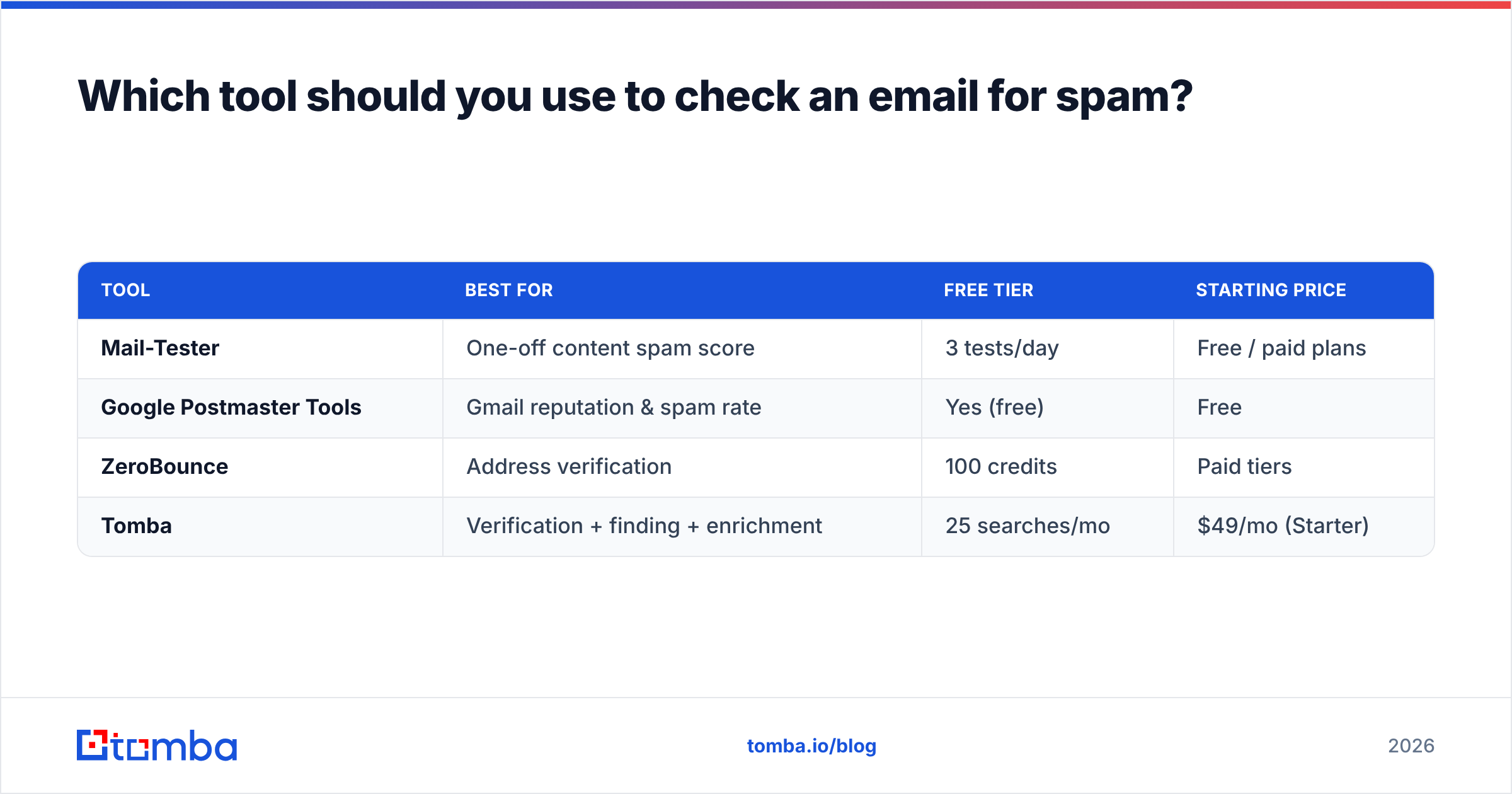
Which tool should you use to check an email for spam?#
It depends on which half of the problem you're solving. Here's an honest breakdown of common options.
| Tool | Best for | Free tier | Starting price |
|---|---|---|---|
| Mail-Tester | One-off content spam score | 3 tests/day | Free / paid plans |
| Google Postmaster Tools | Gmail reputation & spam rate | Yes (free) | Free |
| ZeroBounce | Address verification | 100 credits | Paid tiers |
| Tomba | Verification + finding + enrichment | 25 searches/mo | $49/mo (Starter) |
A few notes so this stays neutral:
- For a quick content score, Mail-Tester is the fastest free option — paste, send, read the grade.
- For Gmail-specific reputation, nothing beats Google's own Postmaster Tools, and it's free.
- For address verification at scale, you want a dedicated verifier with an API. Tomba pricing starts at $49/mo (Starter), with a free tier of 25 searches/month and Growth at $99/mo — useful if you also need to find and enrich contacts, not just verify them.
If your bottleneck is "are these addresses real and safe to mail," a verifier is the right tool. If it's "why is my mail going to spam," start with authentication and reputation checks. Don't buy a verification plan to solve a DKIM problem. Compare options on a neutral source like G2 before committing.
What's a practical pre-send checklist?#
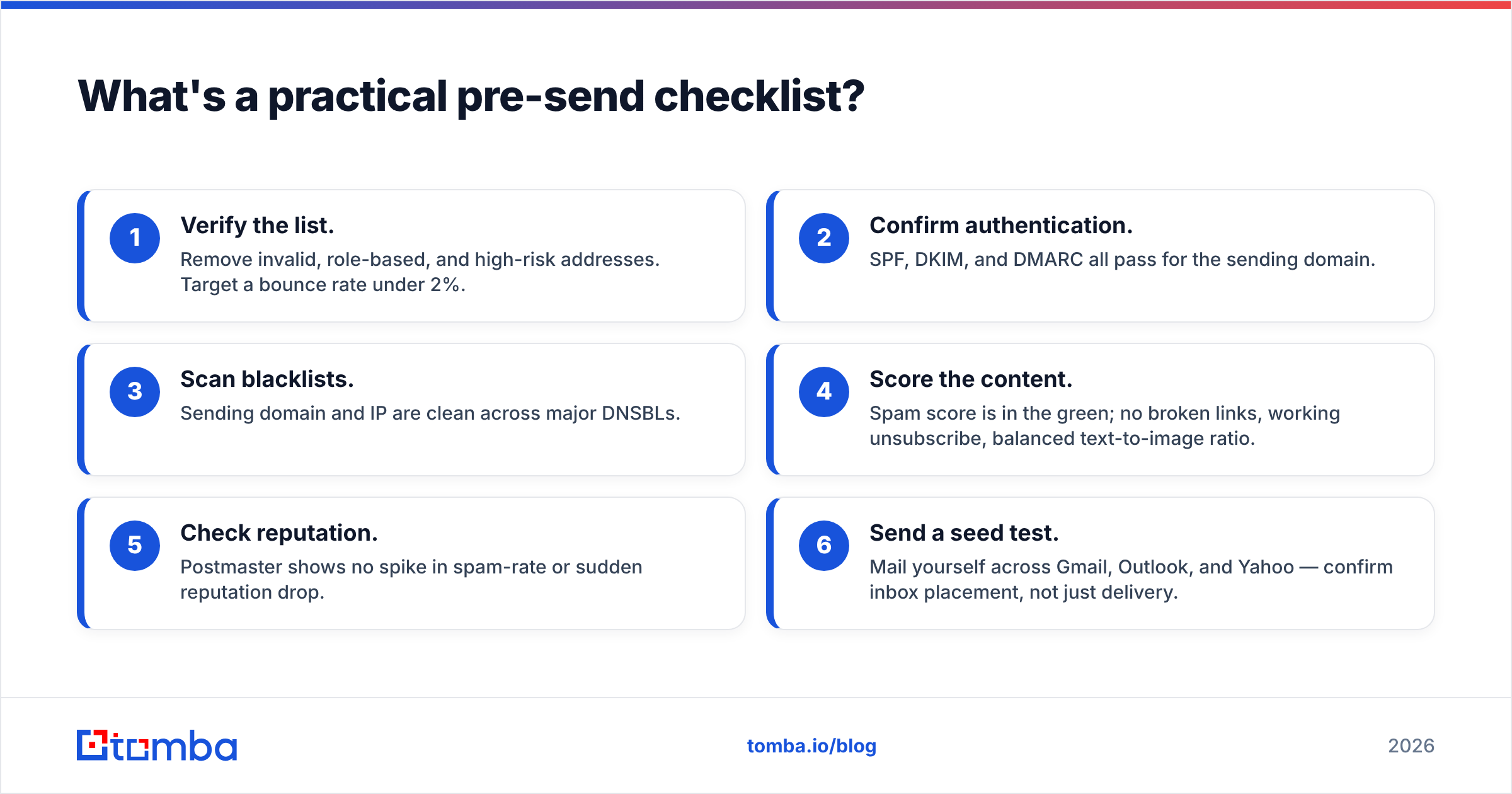
Run this every time before a major send. It takes under ten minutes once your tools are set up.
- Verify the list. Remove invalid, role-based, and high-risk addresses. Target a bounce rate under 2%.
- Confirm authentication. SPF, DKIM, and DMARC all pass for the sending domain.
- Scan blacklists. Sending domain and IP are clean across major DNSBLs.
- Score the content. Spam score is in the green; no broken links, working unsubscribe, balanced text-to-image ratio.
- Check reputation. Postmaster shows no spike in spam-rate or sudden reputation drop.
- Send a seed test. Mail yourself across Gmail, Outlook, and Yahoo — confirm inbox placement, not just delivery.
Miss step one and the rest barely matters. Verification is the foundation; everything else is reinforcement.
How often should you re-check?#
Different checks have different clocks:
- Per send: address verification (for cold/imported lists) and content spam score.
- Weekly: blacklist scan and a reputation glance, especially during active campaigns.
- Quarterly: full re-verification of your active subscriber list.
- On change: re-run authentication checks any time you touch DNS, switch sending platforms, or add a new sending subdomain.
Set calendar reminders or automate it. The senders who quietly maintain high inbox rates aren't lucky — they're disciplined about hygiene that nobody sees.
The bottom line#
Checking an email address for spam is really two jobs: vetting the address and vetting yourself as a sender. Verify your list to protect your reputation, then keep authentication, blacklist status, and content scores clean so filters keep trusting you. Do both consistently and "where did my campaign go?" stops being a question you ask.
If your immediate problem is building and validating a list of real, reachable contacts, start there. The Tomba Email Finder finds professional email addresses by name, domain, or company — and pairs with built-in verification so the addresses you collect are deliverable before they ever hit your sending platform. Pull clean contacts, verify them, and send to people who actually exist. That single habit does more for your spam rate than any subject-line tweak ever will.
// get started
Find, verify and enrich your first contacts today
Start on the free plan with 25 searches a month, then scale when your team is ready.
Free plan · No credit card required · GDPR & CCPA
// about the author