How to Check Bounce Rate and Stop Email Bounces in 2026
Learn how to check bounce rate, tell hard bounces from soft ones, and clean your list before you hit send — so more of your cold email actually lands in 2026.
You hit send on a 2,000-contact campaign. Twenty minutes later your inbox fills with "Delivery Status Notification (Failure)" replies, your open rate looks weirdly high, and your email service provider sends a warning about list hygiene. That is what a bounce problem looks like in real life — and most of it is preventable before the first email leaves your outbox.
This guide shows you how to check bounce rate, read the codes mailbox providers send back, and clean a list so it stops happening.
TL;DR#
- A bounce is a non-delivery. The receiving server rejected your email, either permanently (hard bounce) or temporarily (soft bounce).
- Check your bounce rate in your ESP dashboard (Mailchimp, HubSpot, Instantly, etc.) — keep it under 2%. Above 5% and providers start throttling you.
- The cheapest place to check a bounce is before you send. Verify addresses with an email verifier so dead addresses never enter the campaign.
- Hard bounces are forever (bad address, dead domain). Soft bounces are temporary (full mailbox, server down) and you can retry.
- Bounce rate is a sender reputation signal. A clean list protects deliverability for every future send.
What is an email bounce?#
An email bounce is the postal-service equivalent of a letter coming back stamped "return to sender." You handed the message to a mail server, the server tried to deliver it, and the destination refused. Instead of reaching an inbox, the message generates a bounce-back notification (technically a Non-Delivery Report) explaining why.
Every bounce is a small public statement about your list quality. Mailbox providers like Gmail and Outlook watch how often your mail bounces, and they use that signal to decide whether you are a careful sender or a spammer working through a scraped list. That is why "check bounce" is not a vanity metric — it is a survival metric for email deliverability.
Hard bounce vs soft bounce: what's the difference?#
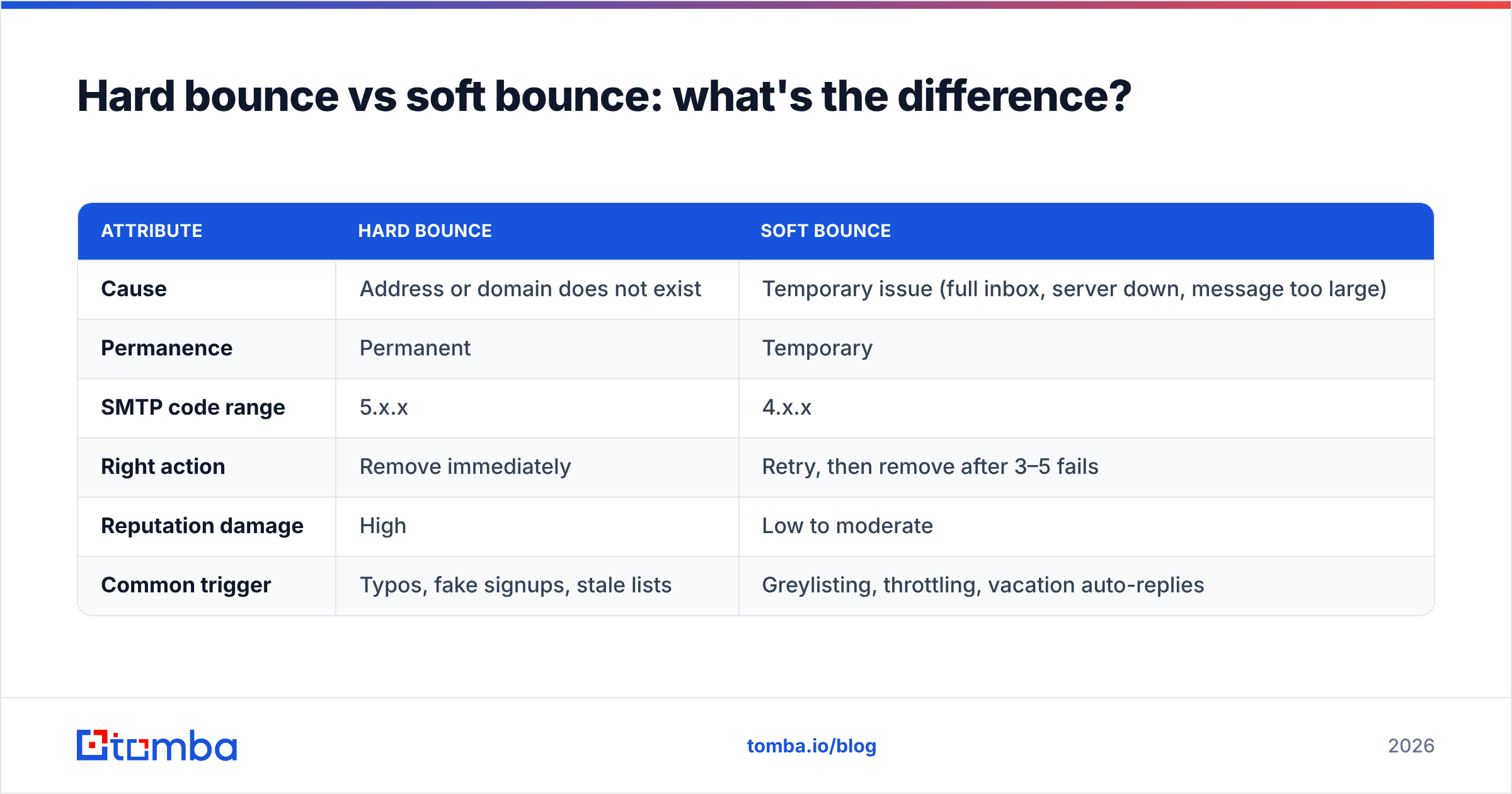
There are two categories, and they call for completely different responses. Confusing them is the most common reason senders keep emailing addresses that will never work.
| Attribute | Hard bounce | Soft bounce |
|---|---|---|
| Cause | Address or domain does not exist | Temporary issue (full inbox, server down, message too large) |
| Permanence | Permanent | Temporary |
| SMTP code range | 5.x.x | 4.x.x |
| Right action | Remove immediately | Retry, then remove after 3–5 fails |
| Reputation damage | High | Low to moderate |
| Common trigger | Typos, fake signups, stale lists | Greylisting, throttling, vacation auto-replies |
The rule of thumb: a hard bounce means the door does not exist, and a soft bounce means the door is temporarily locked. Hard bounces must leave your list the moment they happen. Soft bounces deserve a few polite retries before you give up on them.
Why does checking bounce rate matter so much?#
Because your bounce rate is one of the loudest reputation signals you broadcast. Here is what it actually controls:
- Inbox placement. A spiking bounce rate tells providers your list is dirty, so they route more of your mail to spam — even mail to valid addresses.
- Sending limits. ESPs throttle or suspend accounts that cross bounce thresholds. Many pause sending automatically above 5%.
- Domain health. Repeated hard bounces drag down your domain and IP reputation, which takes weeks to rebuild.
- Wasted spend. You pay per contact or per send. Emailing dead addresses is money lit on fire.
- Skewed analytics. Bounces inflate your "sent" count and distort open and reply rates, so you optimize against bad data.
A healthy benchmark, echoed across the industry, is to keep total bounce rate under 2%. HubSpot's email benchmarks and most ESP documentation treat anything above that as a warning sign.
How do you check your bounce rate?#
You can check a bounce at three different moments, and earlier is always cheaper.
After the send: read your ESP dashboard#
Every major platform reports bounces. The formula is simple:
Bounce rate = (bounced emails ÷ total emails sent) × 100
So 40 bounces on 2,000 sends is a 2% bounce rate. In Mailchimp, HubSpot, Instantly, or Salesloft, the campaign report breaks this into hard and soft bounces. Treat the hard-bounce column as a removal list, not a statistic to admire.
At the server: read the SMTP bounce code#
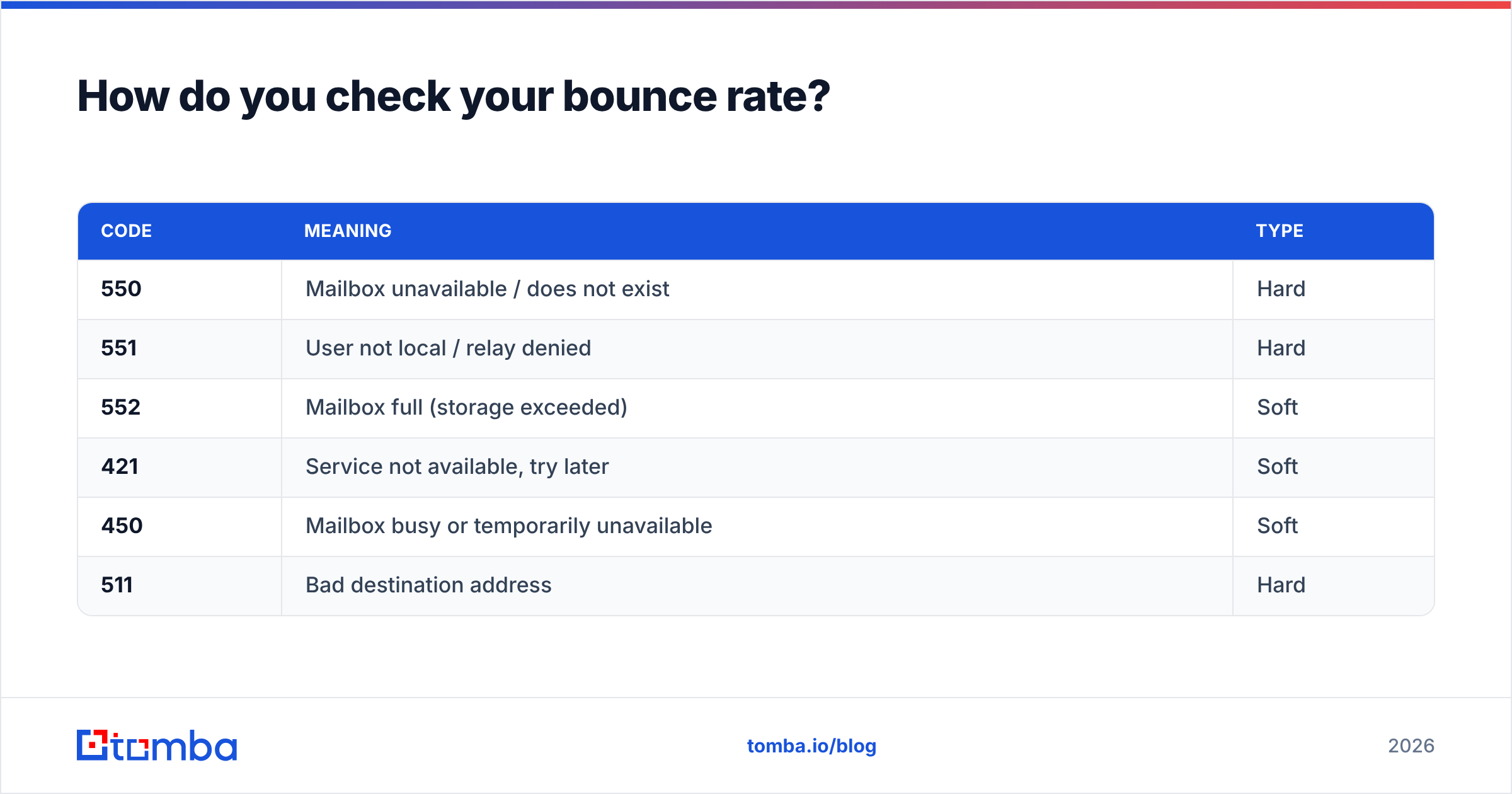
When you need to know why something bounced, open the bounce-back message and find the SMTP status code. Providers send a standardized reason:
| Code | Meaning | Type |
|---|---|---|
| 550 | Mailbox unavailable / does not exist | Hard |
| 551 | User not local / relay denied | Hard |
| 552 | Mailbox full (storage exceeded) | Soft |
| 421 | Service not available, try later | Soft |
| 450 | Mailbox busy or temporarily unavailable | Soft |
| 511 | Bad destination address | Hard |
The first digit is the shortcut: 5xx is permanent, 4xx is temporary. If you want the full reference, the SMTP status code list on Wikipedia maps every code to its meaning.
Before the send: verify the address (the smart move)#
This is the moment that prevents bounces instead of counting them. An email verifier pings the mail server, checks MX records, detects disposable domains, and flags risky addresses — all without sending a real email. Run your list through it first and the hard bounces never enter the campaign at all.

What causes a high bounce rate in the first place?#
Bounces are symptoms. Fix the cause and the rate drops on its own.
- Typos and fake signups —
john@gmial.comortest@test.comfrom a form with no validation. - List decay — roughly 25–30% of B2B email addresses go stale every year as people change jobs. Last year's clean list is this year's bounce machine.
- Scraped or purchased lists — these are riddled with traps, dead accounts, and catch-all domains.
- No double opt-in — single opt-in lets garbage addresses in the front door.
- Authentication gaps — missing SPF, DKIM, or DMARC records make providers reject mail outright. Run a quick SPF record check if you are unsure.
- Spam-trap hits — recycled addresses that providers use specifically to catch careless senders.
How do you reduce and prevent bounces?#
The playbook is short, and it works:
- Verify before every campaign. Run new and aging lists through bulk verification so dead addresses are gone before send time. This single step removes the majority of hard bounces.
- Handle catch-all domains carefully. Catch-all servers accept everything, so they hide bad addresses. Use a catch-all verifier to score them instead of blindly trusting them.
- Use double opt-in on signup forms. It costs a little list growth and saves a lot of reputation.
- Re-verify lists older than 90 days. Decay is constant; treat verification as routine maintenance, not a one-time event.
- Suppress hard bounces automatically. Most ESPs do this, but confirm yours is configured — never re-mail a confirmed hard bounce.
- Warm up new sending domains. Ramp volume gradually so providers learn to trust you.
- Authenticate everything. SPF, DKIM, and DMARC are non-negotiable in 2026. Google's sender guidelines require them for bulk senders.
Which tools help you check and prevent bounces?#
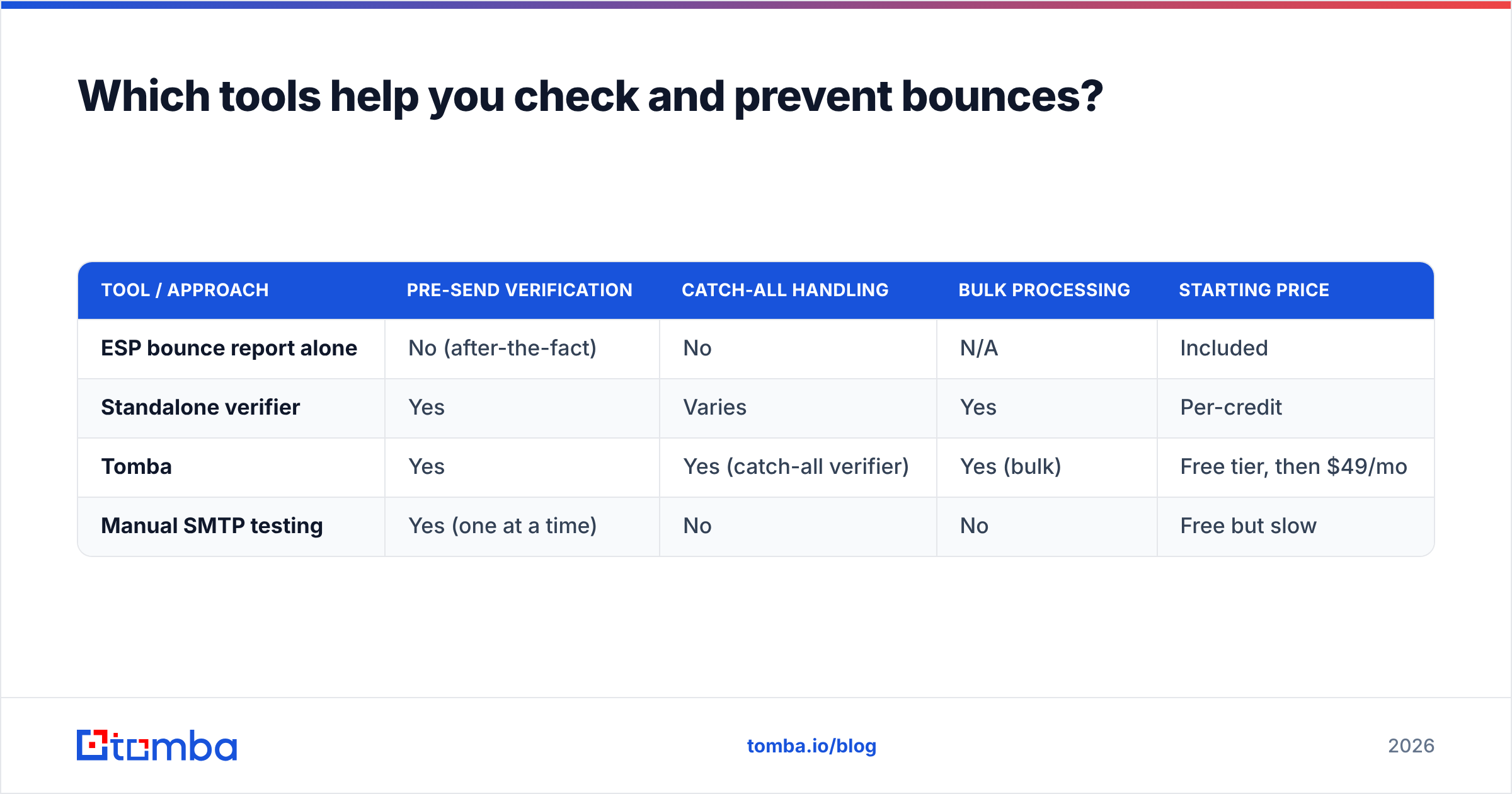
You can stitch this together from several point tools, or use a platform that does finding plus verification in one place. Here is how the common options compare for bounce prevention specifically.
| Tool / Approach | Pre-send verification | Catch-all handling | Bulk processing | Starting price |
|---|---|---|---|---|
| ESP bounce report alone | No (after-the-fact) | No | N/A | Included |
| Standalone verifier | Yes | Varies | Yes | Per-credit |
| Tomba | Yes | Yes (catch-all verifier) | Yes (bulk) | Free tier, then $49/mo |
| Manual SMTP testing | Yes (one at a time) | No | No | Free but slow |
Tomba's relevant pieces for bounce control are the email verifier, the catch-all verifier, and the bulk email finder. Pricing starts with a free tier of 25 searches per month, then Starter at $49/mo, Growth at $99/mo, and Pro at $249/mo — so you can test list hygiene before committing. You can see the full breakdown on the Tomba pricing page.
If you want a single-address gut check without an account, the free email checker tells you in seconds whether an address looks deliverable.
What bounce rate is "good," and when should you worry?#
Use these bands as a triage guide:
- Under 2% — healthy. Keep doing what you are doing.
- 2%–5% — caution. Re-verify your list and audit where addresses come from.
- Above 5% — danger. ESPs may throttle or pause you. Stop sending, clean the list completely, and resume slowly.
- Sudden spike — investigate immediately. A jump usually means a new bad source (a purchased list, a broken form, or a stale segment).
One more nuance: watch hard and soft bounces separately. A creeping hard-bounce rate is a list-quality problem you fix with verification. A creeping soft-bounce rate is often an authentication or reputation problem you fix with your DNS records and sending habits.
How often should you re-check your list?#
Treat verification like brushing your teeth, not like a dentist visit. The practical cadence:
- Every cold campaign: verify the segment right before send.
- Every 90 days: re-verify your active marketing list, since decay never stops.
- After any import: verify anything from a form, an event, or a third party before it touches a campaign.
- After a spike: re-verify the moment bounce rate jumps, then quarantine the source.
This rhythm keeps your bounce rate boring — which is exactly what you want it to be.
Frequently asked questions#
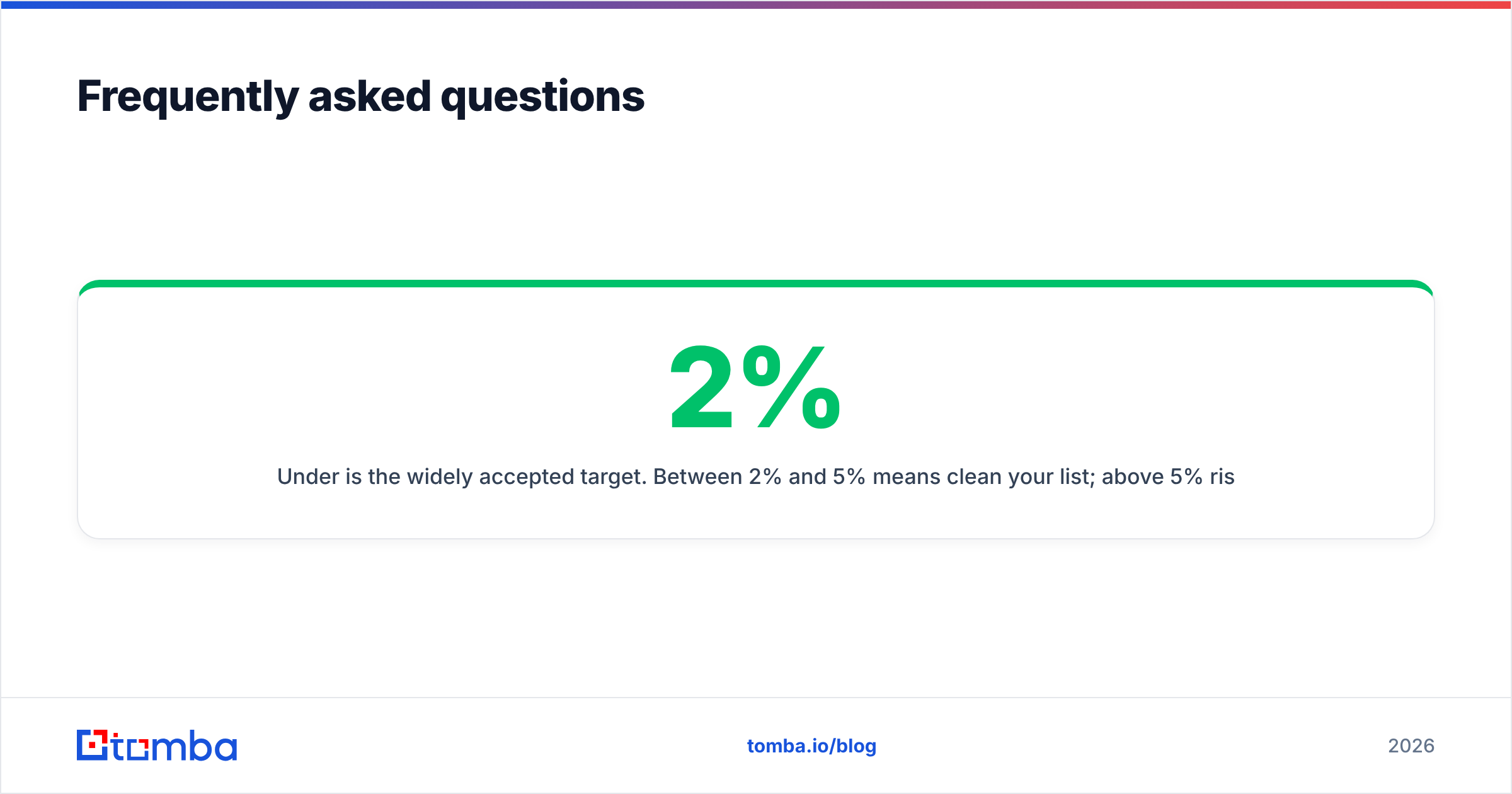
What is a good email bounce rate? Under 2% is the widely accepted target. Between 2% and 5% means clean your list; above 5% risks throttling or suspension by your email provider.
Can you fix a hard bounce? No. A hard bounce means the address or domain does not exist, so it will never deliver. Remove it permanently and, if it was a typo, find the correct address with an email finder.
Do bounces hurt my domain reputation? Yes. High bounce rates signal a dirty list to mailbox providers, which lowers inbox placement for all of your mail — including messages to valid addresses.
How do I check a bounce before sending? Run the address through an email verifier. It checks MX records and pings the mail server without sending a real email, so you catch the bounce before it counts against you.
Stop counting bounces — prevent them#
The fastest way to lower your bounce rate is to never email a dead address in the first place. Find verified, deliverable contacts with the Tomba Email Finder, then run every list through email verification and the catch-all verifier before you send. Start on the free tier, clean a list, and watch your bounce report go quiet. A boring bounce column is the surest sign your deliverability — and your domain reputation — is safe heading into 2026.
// get started
Find, verify and enrich your first contacts today
Start on the free plan with 25 searches a month, then scale when your team is ready.
Free plan · No credit card required · GDPR & CCPA
// about the author