How to Check a Domain for Spam: Blacklists & Fixes (2026)
Learn how to check a domain for spam, read blacklist and reputation signals, and fix the issues quietly killing your inbox placement in 2026.
You can send the best-written cold email in the world and still land in spam if the domain behind it has a bad reputation. Before you blame your copy, you need to check your domain for spam signals — blacklist listings, authentication gaps, and reputation scores that mailbox providers quietly use to decide whether you reach the inbox or the junk folder.
This guide walks through exactly what "spammy domain" means, how to test for it in minutes, and how to fix the problems you find.
TL;DR#
- A domain can be flagged as spam even when your content is clean — blacklists, poor authentication (SPF/DKIM/DMARC), and low engagement all drag down placement.
- Three checks cover 90% of problems: blacklist status, authentication records, and sender reputation. Run all three before scaling any sending.
- Free tools handle the basics — MXToolbox, Google Postmaster Tools, and a blacklist checker tell you most of what you need.
- Verify your list, not just your domain. Sending to dead or trap addresses is the fastest way onto a blacklist; clean lists keep reputation high.
- Fixing reputation takes weeks, not minutes — so check early and check often, not after deliverability collapses.
What does it mean to check a domain for spam?#
Checking a domain for spam means auditing the signals mailbox providers and spam filters use to judge whether mail from that domain is trustworthy. It is not one test — it is a small battery of checks.
Think of it like a credit check before a bank approves a loan. The bank doesn't read your personality; it pulls objective records — payment history, defaults, outstanding debt. Mailbox providers do the same with your domain: they look at listing history, authentication, and how recipients react to your mail. A single bad mark can cap how much of your mail reaches the inbox.
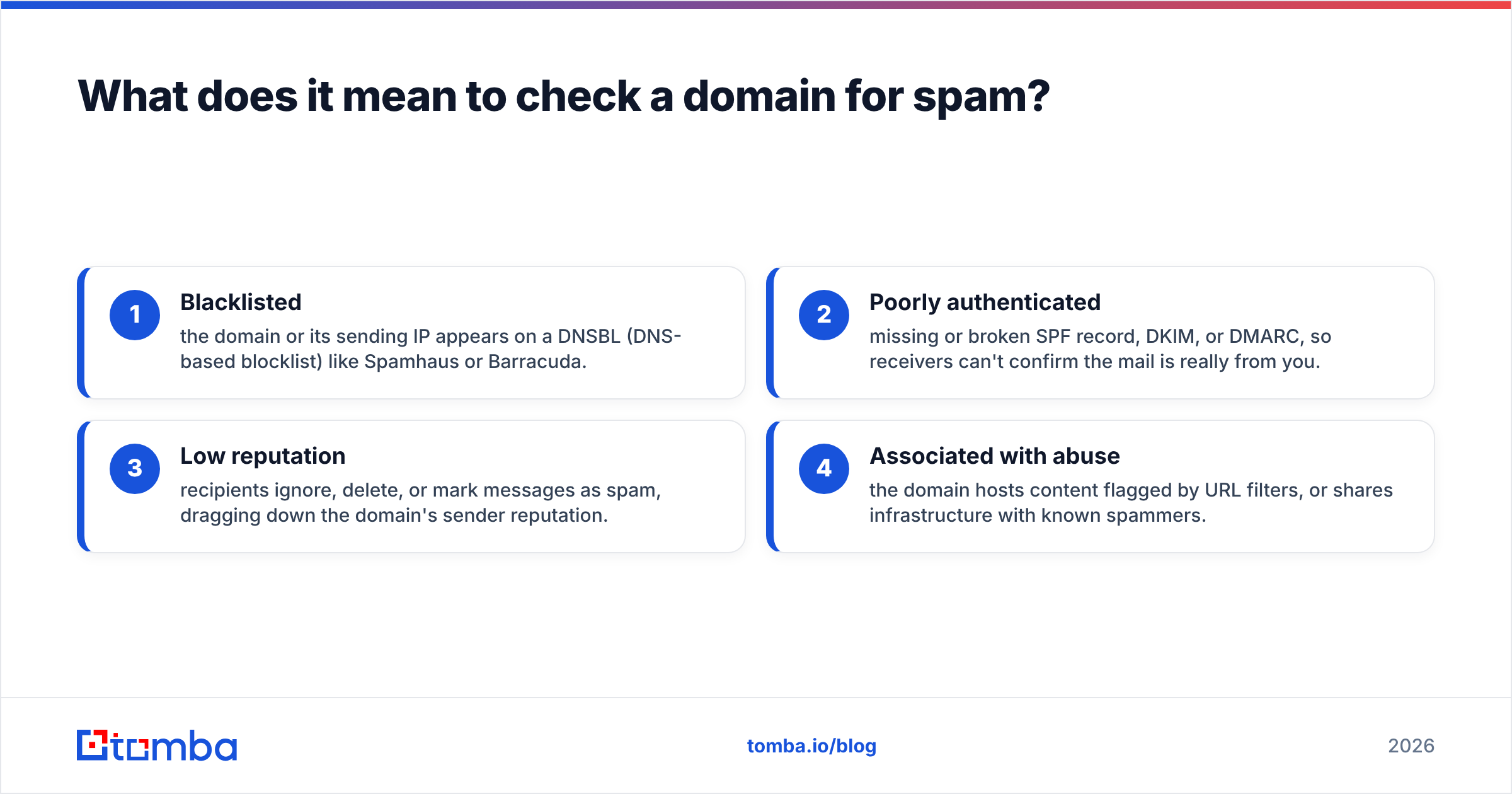
When people say a domain is "spammy," they usually mean one or more of these:
- Blacklisted — the domain or its sending IP appears on a DNSBL (DNS-based blocklist) like Spamhaus or Barracuda.
- Poorly authenticated — missing or broken SPF record, DKIM, or DMARC, so receivers can't confirm the mail is really from you.
- Low reputation — recipients ignore, delete, or mark messages as spam, dragging down the domain's sender reputation.
- Associated with abuse — the domain hosts content flagged by URL filters, or shares infrastructure with known spammers.
You need to check each category, because fixing one while ignoring the others won't move your placement.
)
How do you check if a domain is blacklisted?#
The fastest spam signal to test is whether your domain or IP sits on a blocklist. A blacklist is a shared database of senders flagged for abuse; many spam filters consult them in real time, so one listing can block mail across thousands of mailboxes at once.
Run these checks in order:
- Domain-based blacklists (DBLs) — check the domain name itself against lists like Spamhaus DBL.
- IP-based blacklists — check the sending IP (your ESP's shared IP, or your dedicated IP) against lists like Spamhaus ZEN, Barracuda, and SORBS.
- URL blacklists — check any domains in your email links, not just the sending domain. A flagged link domain sinks the whole message.
A free blacklist checker queries dozens of these lists at once and shows which, if any, you appear on. For a deeper IP and DNS report, MXToolbox cross-references 90+ blocklists and explains the reason for each listing.
If you find a listing, note the specific list — delisting steps differ. Spamhaus, for example, publishes a removal process you follow after fixing the underlying cause (an open relay, a compromised account, or a dirty list). Delisting without fixing the cause just gets you relisted.
Which signals actually decide inbox placement?#
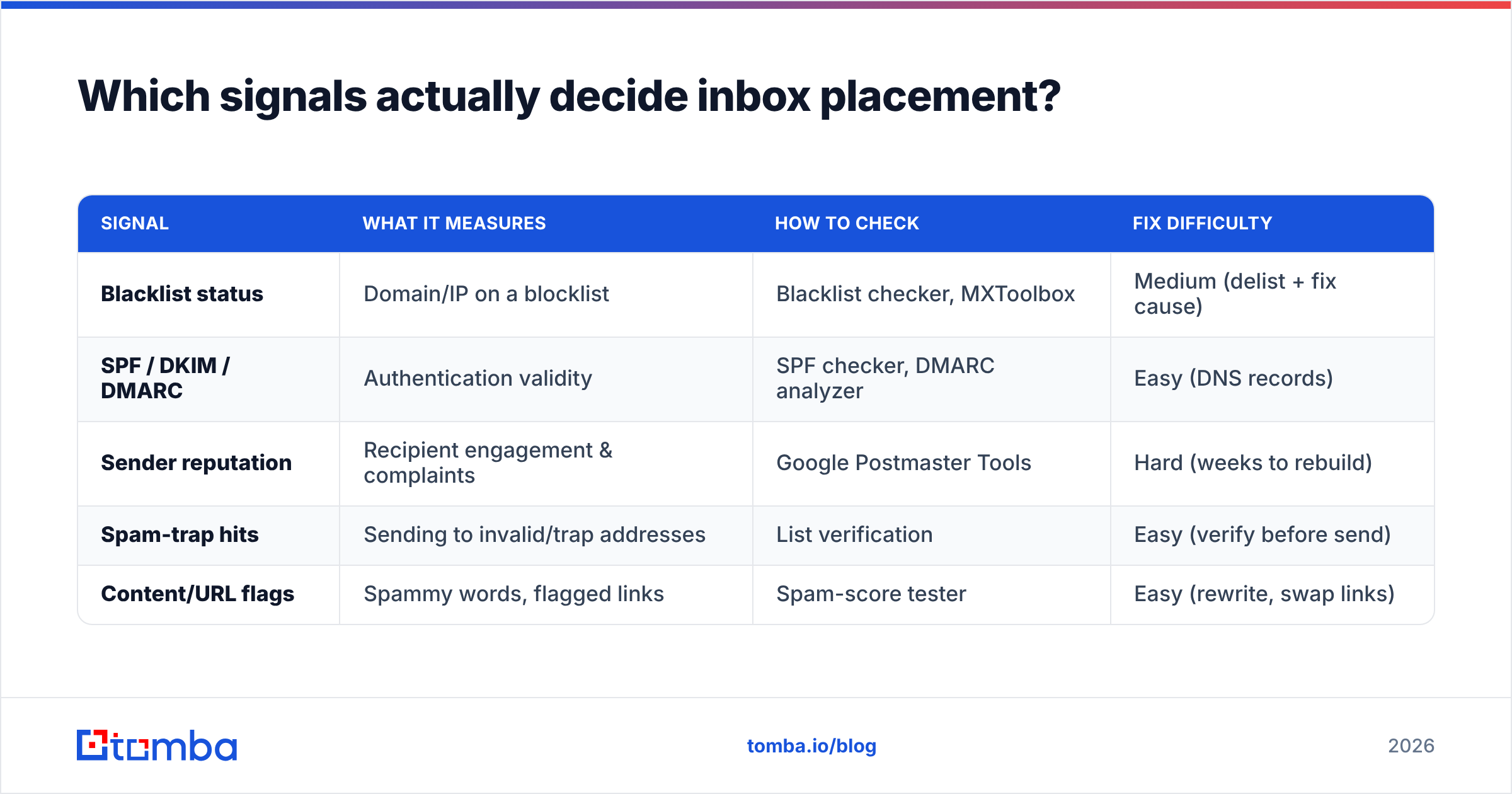
Blacklists are binary and loud, but most deliverability damage is quieter. Here are the core signals, ranked by how often they cause "good mail in spam" problems, with how to test each.
| Signal | What it measures | How to check | Fix difficulty |
|---|---|---|---|
| Blacklist status | Domain/IP on a blocklist | Blacklist checker, MXToolbox | Medium (delist + fix cause) |
| SPF / DKIM / DMARC | Authentication validity | SPF checker, DMARC analyzer | Easy (DNS records) |
| Sender reputation | Recipient engagement & complaints | Google Postmaster Tools | Hard (weeks to rebuild) |
| Spam-trap hits | Sending to invalid/trap addresses | List verification | Easy (verify before send) |
| Content/URL flags | Spammy words, flagged links | Spam-score tester | Easy (rewrite, swap links) |
The pattern is worth internalizing: the easy fixes (authentication, list hygiene, content) prevent the hard problem (reputation collapse). Skip the easy ones and you'll spend weeks rebuilding trust you didn't need to lose.
How do you check domain authentication (SPF, DKIM, DMARC)?#
Authentication is the cheapest deliverability win, and broken records are shockingly common. These three records tell receiving servers that mail claiming to be from your domain is legitimate.
- SPF (Sender Policy Framework) lists which servers are allowed to send for your domain. Test it with an SPF checker — confirm there's exactly one SPF record and that it includes every service you send from.
- DKIM (DomainKeys Identified Mail) adds a cryptographic signature to each message. Verify the public key resolves in DNS and that your ESP is signing outgoing mail.
- DMARC ties SPF and DKIM together and tells receivers what to do with mail that fails. Start with a
p=nonepolicy to monitor, then move toquarantineorrejectonce you confirm legitimate mail passes.
As of 2024, Google and Yahoo require bulk senders to authenticate with SPF, DKIM, and DMARC — so missing records aren't just a minor ding anymore, they're a hard gate. Their sender requirements spell out the thresholds, including a spam-complaint rate you must stay under.
A quick way to validate the whole stack: send a test message to a Gmail address and check the "Show original" view — it reports PASS/FAIL for SPF, DKIM, and DMARC in plain language.
How do you check sender reputation?#
Sender reputation is the score mailbox providers assign your domain and IP based on how recipients behave. It's the hardest signal to test directly because providers don't publish a single number — but you can get close.
- Google Postmaster Tools is the single most useful free source. Verify your domain and it shows domain reputation, IP reputation, spam-complaint rate, and authentication pass rates for mail sent to Gmail. This is your best window into what the biggest mailbox provider thinks of you.
- An email reputation checker gives a quick external read on the domain and its IP. Tomba's sender reputation checker summarizes listing and reputation signals in one view.
- Engagement metrics in your ESP — open, reply, and especially complaint and bounce rates — are leading indicators. A rising bounce rate or complaint rate predicts reputation damage before blacklists catch up.
Reputation is sticky. A clean domain that suddenly sends a large, unengaged blast will see reputation dip within days, and recovery can take weeks of careful, low-volume sending. That's why warmup and list hygiene matter more than any single test.
)
Why does list quality control your spam risk?#
Your list is the input most likely to get a clean domain flagged. Mailbox providers seed spam traps — addresses that exist only to catch senders mailing without permission or from stale lists. Hit a trap and you can land on a blacklist with no warning.
The defense is simple and entirely in your control: verify addresses before you send. Removing invalid, role-based, and risky addresses cuts your bounce rate and keeps you away from traps. An email verifier checks each address against the mail server in real time, flags catch-all domains, and removes the addresses most likely to bounce or trap.
For large lists, run a bulk pass rather than one-by-one. The economics favor it: a single trap hit can suppress placement for your entire list for weeks, while verification costs a fraction of a cent per address.
Here's the order of operations that keeps domains clean:
- Source good data — find verified contacts rather than scraping unknown addresses.
- Verify before import — remove invalid and risky addresses up front.
- Authenticate — confirm SPF, DKIM, DMARC pass.
- Warm up — ramp volume gradually on new domains and IPs.
- Monitor — watch Postmaster Tools and complaint rates weekly.
- Re-verify periodically — lists decay ~2-3% per month as people change jobs.
What tools should you use to check a domain for spam?#
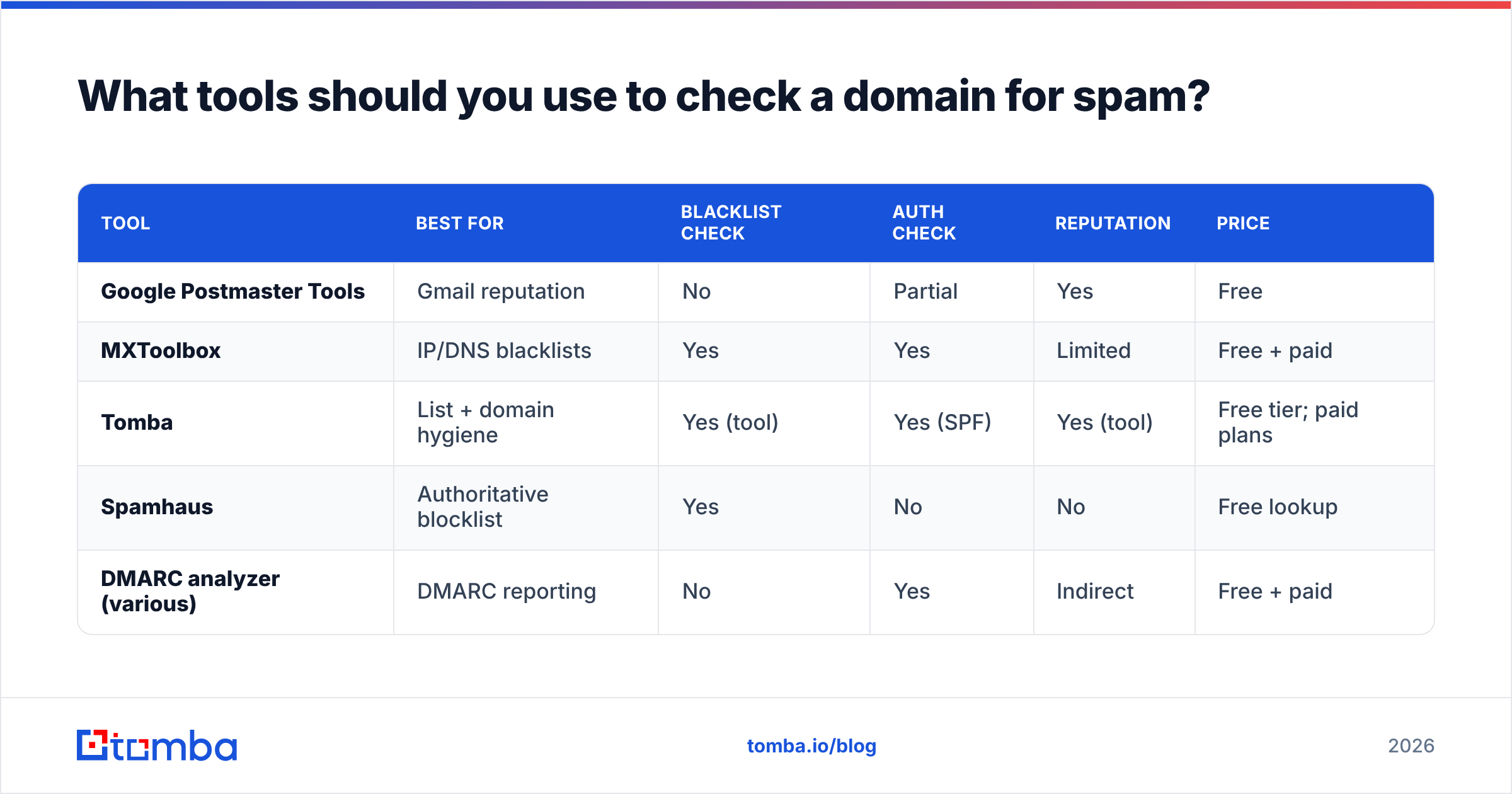
You don't need a paid suite to run a complete check. Here's how common tools compare for the three core jobs.
| Tool | Best for | Blacklist check | Auth check | Reputation | Price |
|---|---|---|---|---|---|
| Google Postmaster Tools | Gmail reputation | No | Partial | Yes | Free |
| MXToolbox | IP/DNS blacklists | Yes | Yes | Limited | Free + paid |
| Tomba | List + domain hygiene | Yes (tool) | Yes (SPF) | Yes (tool) | Free tier; paid plans |
| Spamhaus | Authoritative blocklist | Yes | No | No | Free lookup |
| DMARC analyzer (various) | DMARC reporting | No | Yes | Indirect | Free + paid |
A practical free stack looks like this: use Google Postmaster Tools for reputation, MXToolbox or Spamhaus for blacklist status, and Tomba's free tools for SPF checking, blacklist lookup, and list verification. That covers every signal in the table above without a credit card.
When you're sending at scale or finding new contacts, a paid plan adds bulk verification and an API so you can automate checks inside your workflow. Compare options against alternatives like a ZeroBounce alternative if verification is your main need.
How often should you check a domain for spam?#
Treat domain spam checks like dental cleanings — routine and preventive, not emergency-only. By the time deliverability visibly drops, you've already lost weeks of campaigns to the spam folder.
A sensible cadence:
- Weekly: glance at Google Postmaster Tools reputation and your ESP complaint/bounce rates.
- Before every new campaign or domain: run a blacklist check and confirm authentication passes.
- Monthly: re-verify your active list to strip newly-decayed addresses.
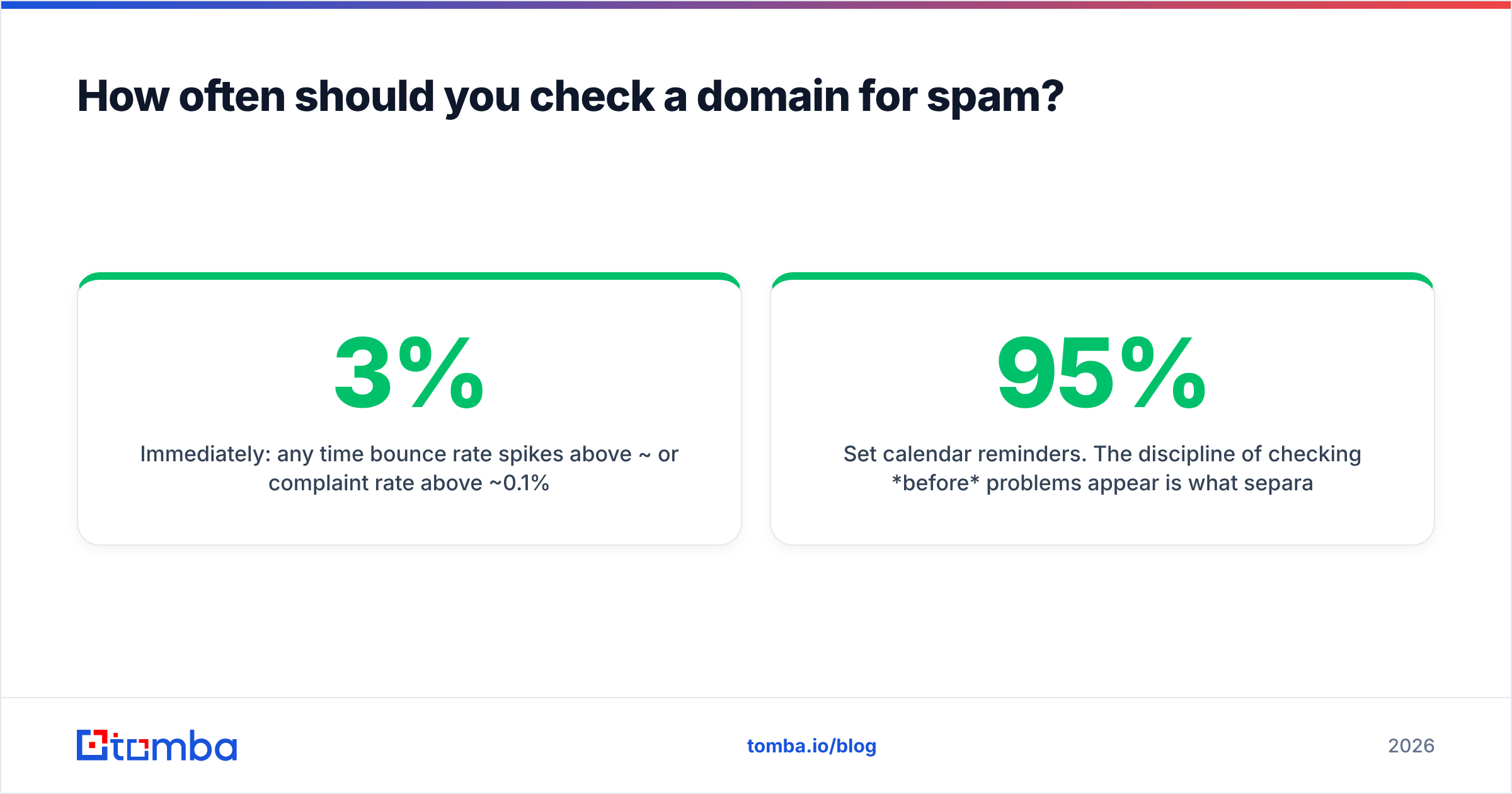
- Immediately: any time bounce rate spikes above ~3% or complaint rate above ~0.1%.
Set calendar reminders. The discipline of checking before problems appear is what separates senders who maintain 95%+ inbox placement from those who quietly drift into spam and never know why.
Common mistakes when checking a domain for spam#
A few traps catch even experienced senders:
- Checking the domain but not the IP. Shared ESP IPs get blacklisted by other tenants' behavior. Check both.
- Ignoring link domains. A clean sending domain with a blacklisted link domain still lands in spam.
- Delisting without fixing the cause. You'll be relisted within days if the dirty list or open relay is still active.
- Treating warmup as optional. A brand-new domain sending volume looks exactly like a spammer to filters.
- Skipping verification because the list "looks fine." Looks tell you nothing — only an email verifier confirms an address accepts mail.
Avoid these and most domains stay clean indefinitely.
Start with clean data#
The single highest-leverage move is sending to addresses that actually exist and want to hear from you. That starts before the first email goes out — at the moment you build your list.
Tomba's Email Finder finds professional email addresses by name, company, or domain and returns a confidence score for each, so the contacts entering your list are verified from the start. Pair it with the free blacklist checker and email verifier, and you've closed the loop: clean sources in, spam signals checked, reputation protected. Start free with 25 searches a month, and scale up on the Starter plan at $49/mo when you're ready to send at volume.
// get started
Find, verify and enrich your first contacts today
Start on the free plan with 25 searches a month, then scale when your team is ready.
Free plan · No credit card required · GDPR & CCPA
// about the author