How to Check Domain Reputation Online (Free Tools, 2026)
Your domain reputation decides whether cold emails hit the inbox or the spam folder. Here's how to check domain reputation online in 2026, which free tools to trust, and how to fix a bad score fast.
TL;DR
- Domain reputation is a 0–100 trust score mailbox providers assign to your sending domain; below ~70 your email starts landing in spam.
- You can check domain reputation online for free using Google Postmaster Tools, Cisco Talos, MXToolbox, and Spamhaus — each measures a different signal, so use several.
- A clean list is the single biggest lever: verify addresses before you send so bounces and spam traps never touch your domain.
- Fixing a damaged reputation takes 2–6 weeks of consistent sending, authentication (SPF/DKIM/DMARC), and bounce reduction — there is no instant reset.
- Check your reputation monthly, not after a campaign tanks. Treat it like a credit score, not a smoke alarm.
What is domain reputation?#
Domain reputation is the trust score that inbox providers — Gmail, Outlook, Yahoo — attach to the domain you send mail from. Think of it like a credit score for your email: lenders (mailbox providers) look at your history before deciding whether to "approve" your message into the inbox or quietly route it to spam.
That score is built from signals you control and signals your recipients control. On your side: authentication records, sending volume consistency, and how many invalid addresses you hit. On their side: how often people open, reply, delete-without-reading, or hit "report spam." A domain with a strong sender reputation clears filters even on aggressive campaigns. A weak one gets throttled no matter how good the copy is.
The important distinction: domain reputation travels with your domain, IP reputation travels with your sending server. If you send through a shared platform, you inherit some IP reputation from neighbors, but your domain reputation is yours alone — and it follows you even if you switch sending tools.

Why should you check domain reputation online before a campaign?#
Because the cost of finding out after you send is brutal. One blast to a stale list can spike your spam-complaint rate, trip a blocklist, and drag your inbox placement down for weeks — affecting every email, including the warm replies and invoices you actually care about.
Checking first answers three questions:
- Am I on a blocklist right now? Spamhaus, Barracuda, and SORBS listings silently kill deliverability.
- What does Gmail already think of me? Postmaster Tools shows the score the largest mailbox provider has assigned.
- Are my authentication records valid? Broken SPF or DKIM tanks reputation faster than bad content.
This is core to email deliverability: the best subject line in the world cannot rescue a domain the receiving server has already decided to distrust.
How do you check domain reputation online for free?#
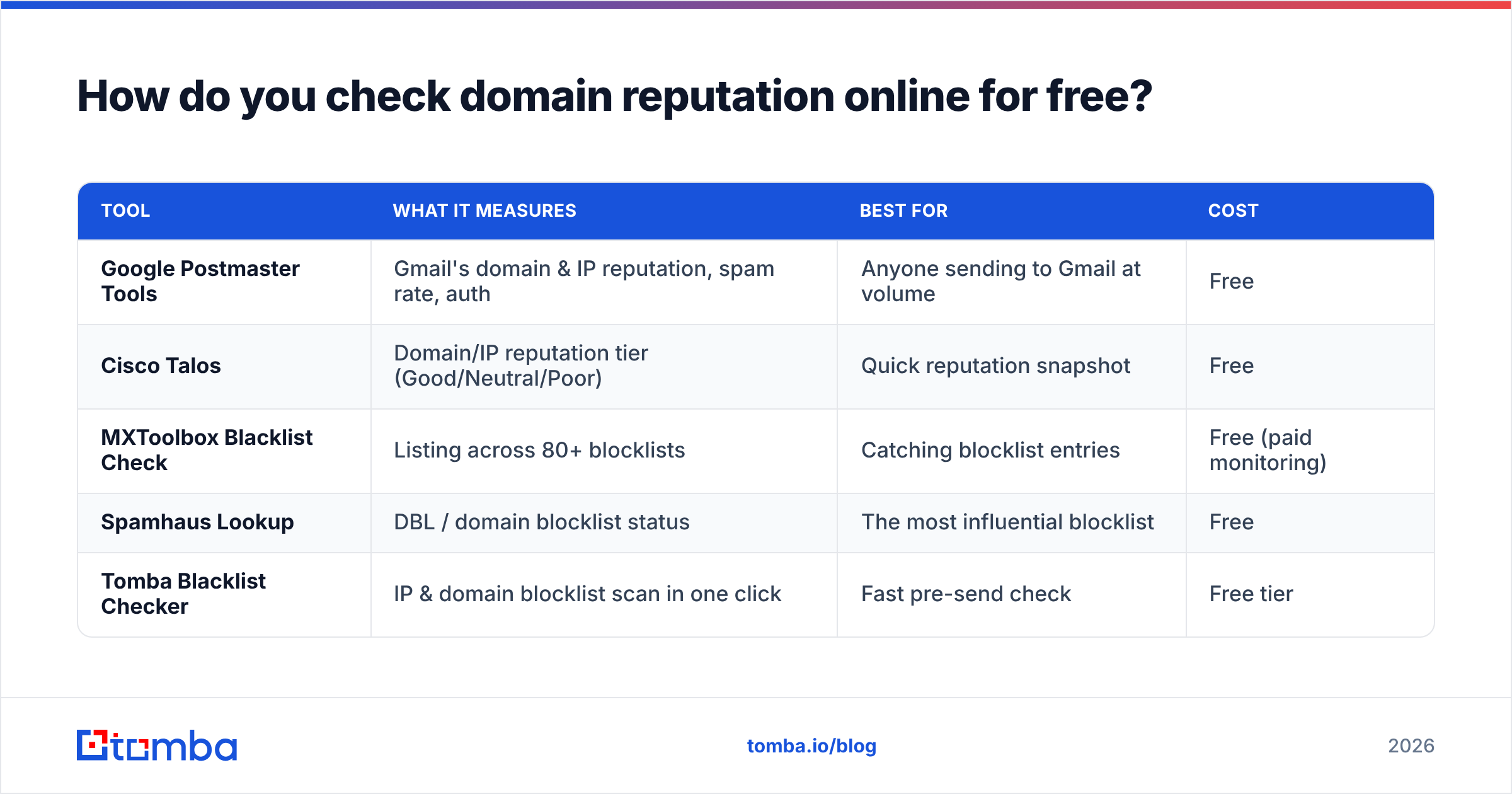
You don't need a paid suite to get a clear picture. Combine these free checkers — each looks at a different angle, and no single tool sees everything.
| Tool | What it measures | Best for | Cost |
|---|---|---|---|
| Google Postmaster Tools | Gmail's domain & IP reputation, spam rate, auth | Anyone sending to Gmail at volume | Free |
| Cisco Talos | Domain/IP reputation tier (Good/Neutral/Poor) | Quick reputation snapshot | Free |
| MXToolbox Blacklist Check | Listing across 80+ blocklists | Catching blocklist entries | Free (paid monitoring) |
| Spamhaus Lookup | DBL / domain blocklist status | The most influential blocklist | Free |
| Tomba Blacklist Checker | IP & domain blocklist scan in one click | Fast pre-send check | Free tier |
A practical order of operations:
- Step 1 — Authentication. Confirm SPF, DKIM, and DMARC pass. Use an SPF checker to validate your record before anything else; a soft-fail here drags down every other score.
- Step 2 — Blocklists. Run your domain and sending IP through a blacklist checker to catch Spamhaus, Barracuda, and SORBS listings.
- Step 3 — Gmail's view. Set up Google Postmaster Tools (requires a DNS TXT verification) and read the Domain Reputation dashboard: High, Medium, Low, or Bad.
- Step 4 — Reputation tier. Cross-check with Talos for an independent Good/Neutral/Poor rating.
If all four agree you're clean, you're cleared to send. If even one flags a problem, fix it before the next campaign — not after.
What's a good domain reputation score?#
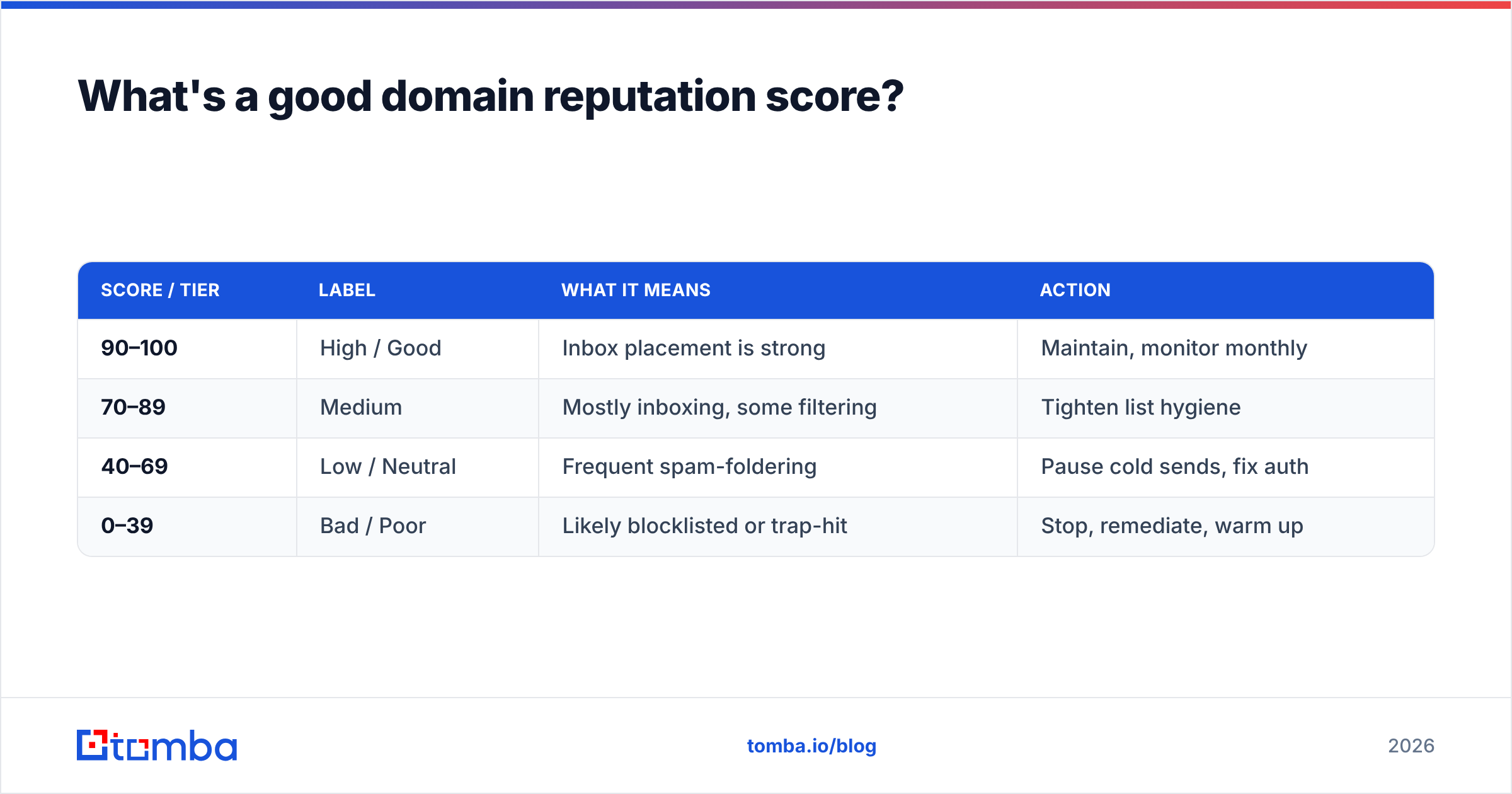
Most tools normalize to a 0–100 scale or a tiered label. Here's how to read them.
| Score / Tier | Label | What it means | Action |
|---|---|---|---|
| 90–100 | High / Good | Inbox placement is strong | Maintain, monitor monthly |
| 70–89 | Medium | Mostly inboxing, some filtering | Tighten list hygiene |
| 40–69 | Low / Neutral | Frequent spam-foldering | Pause cold sends, fix auth |
| 0–39 | Bad / Poor | Likely blocklisted or trap-hit | Stop, remediate, warm up |
Gmail doesn't publish a number — it shows High/Medium/Low/Bad. Treat "Medium" as a yellow light: you're one bad campaign from "Low." The goal is to live in the top tier consistently, because reputation is sticky in both directions. It takes weeks to climb and only one careless send to fall.
What hurts your domain reputation the most?#
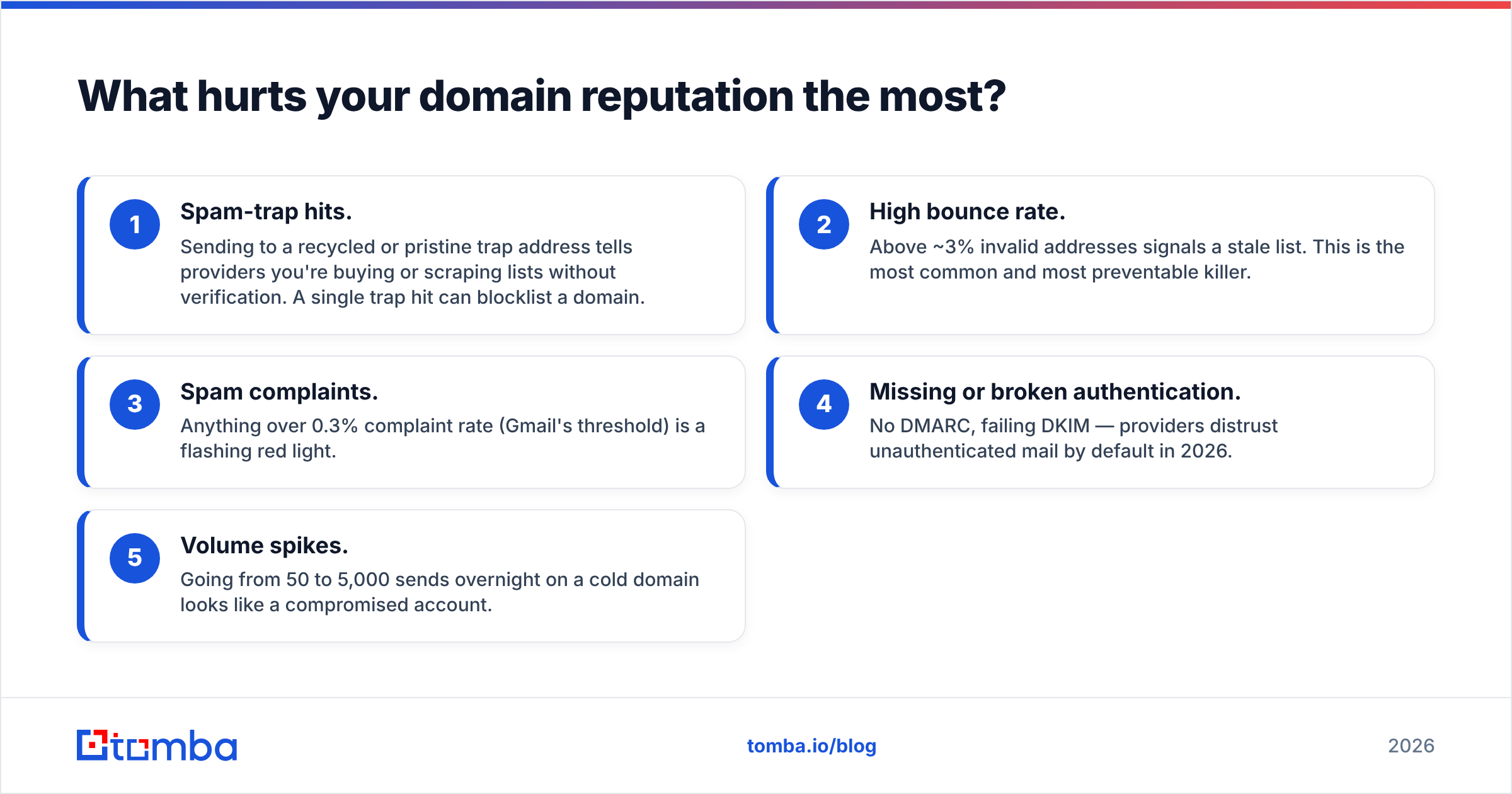
Ranked by how much damage each does, fastest first:
- Spam-trap hits. Sending to a recycled or pristine trap address tells providers you're buying or scraping lists without verification. A single trap hit can blocklist a domain.
- High bounce rate. Above ~3% invalid addresses signals a stale list. This is the most common and most preventable killer.
- Spam complaints. Anything over 0.3% complaint rate (Gmail's threshold) is a flashing red light.
- Missing or broken authentication. No DMARC, failing DKIM — providers distrust unauthenticated mail by default in 2026.
- Volume spikes. Going from 50 to 5,000 sends overnight on a cold domain looks like a compromised account.
Notice that the top two — traps and bounces — are both solved the same way: don't send to addresses you haven't verified. This is why list hygiene is the foundation, not an afterthought.

How do you fix a damaged domain reputation?#
There is no reset button — but there is a reliable recovery path. Plan for 2–6 weeks depending on how deep the damage runs.
- Clean the list immediately. Run every address through an email verifier and remove invalids, role accounts, and risky catch-alls. Stop the bleeding before you send another message.
- Fix authentication. Publish a valid SPF record, enable DKIM signing, and move DMARC from
p=nonetowardp=quarantine. Validate with a checker, don't assume. - Get off blocklists. Submit delisting requests through the provider (Spamhaus, Barracuda) once the underlying issue is fixed. Delisting before fixing the cause just re-lists you.
- Re-warm the domain. Drop your volume to a trickle and ramp gradually — 20–50 sends a day, climbing weekly — to rebuild positive engagement signals.
- Send to engaged contacts first. Re-earn trust with people who open and reply before touching cold prospects again.
You can monitor your progress with an email reputation checker to confirm the score is climbing before you scale back up.
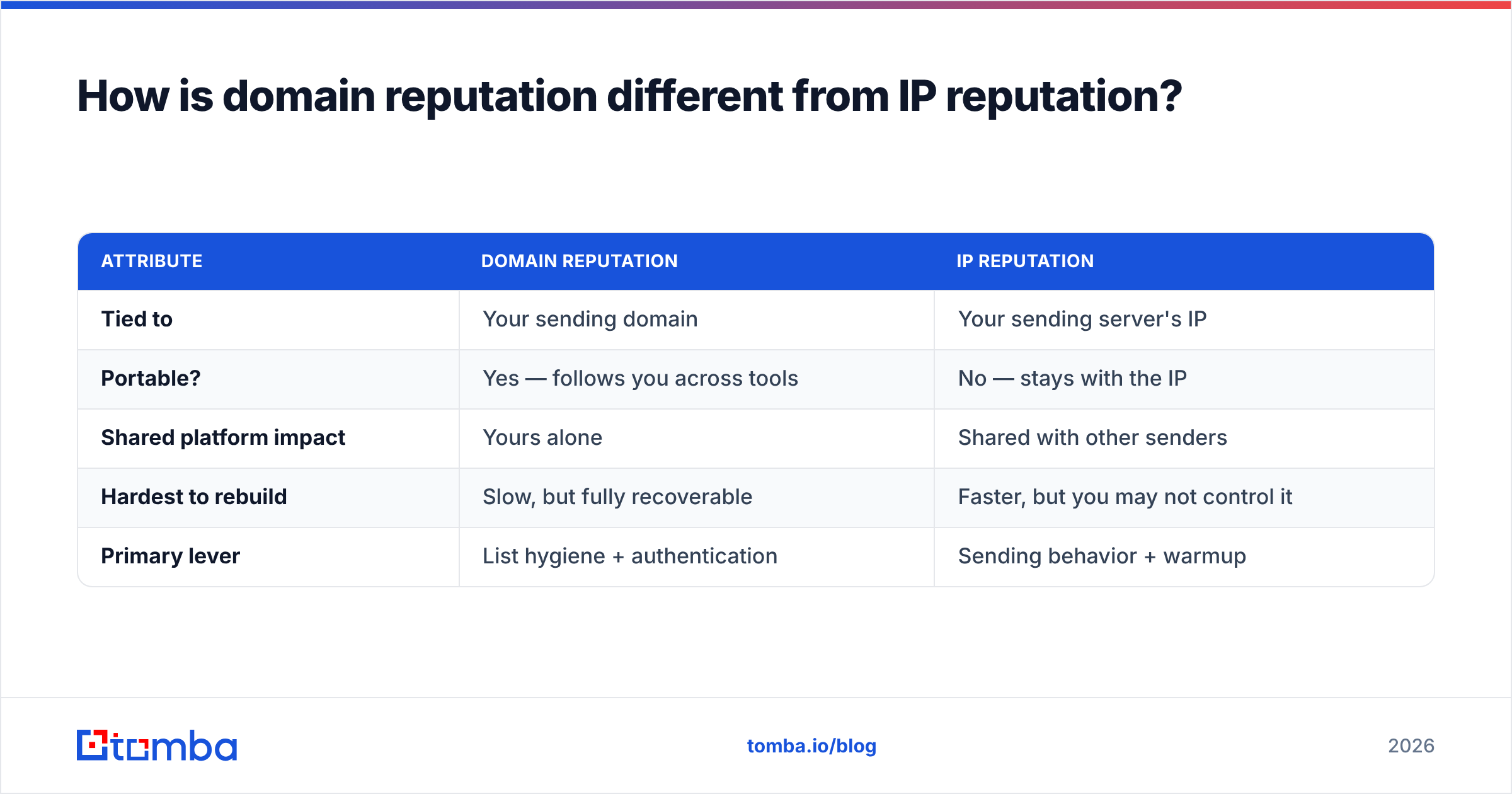
How is domain reputation different from IP reputation?#
This trips up a lot of senders, so let's separate them cleanly.
| Attribute | Domain reputation | IP reputation |
|---|---|---|
| Tied to | Your sending domain | Your sending server's IP |
| Portable? | Yes — follows you across tools | No — stays with the IP |
| Shared platform impact | Yours alone | Shared with other senders |
| Hardest to rebuild | Slow, but fully recoverable | Faster, but you may not control it |
| Primary lever | List hygiene + authentication | Sending behavior + warmup |
The takeaway: even on a shared sending platform with decent IP reputation, a bad domain reputation will still sink you. Domain reputation is the one you own outright, so it's the one worth protecting hardest. Mailbox providers in 2026 weight domain signals more heavily than IP signals precisely because domains are harder to fake.
How often should you check domain reputation online?#
Monthly as a baseline, weekly if you send cold outreach at volume, and immediately before any large campaign. Set a recurring calendar reminder rather than waiting for reply rates to crater — by the time you notice a deliverability problem in your metrics, the reputation damage is already weeks old.
A simple cadence:
- Weekly: Glance at Google Postmaster's reputation dashboard and spam-rate graph.
- Before each campaign: Run a blocklist check and verify your list.
- Monthly: Full audit — auth records, Talos tier, blocklist sweep across all sending domains and subdomains.
If you run outreach across multiple domains, check each one separately. A clean primary domain tells you nothing about the dedicated cold-email domain you spun up last quarter.
The bottom line#
To check domain reputation online, layer free tools that each see a different signal — Google Postmaster for Gmail's verdict, Talos for an independent tier, MXToolbox and Spamhaus for blocklists — and never rely on just one. But monitoring only tells you where you stand; it doesn't fix anything. The single highest-leverage move is keeping bounces and spam traps off your domain in the first place, which comes down to verifying every address before you send.
That's where Tomba fits. Use the Tomba Email Finder to source professional, validated contacts by domain or name, then run the list through Tomba's verifier so traps and dead addresses never reach your sending domain. Clean data in means a high reputation stays high. Start free with 25 searches a month, and see full Tomba pricing — Starter is $49/mo, Growth $99/mo — when you're ready to scale outreach without torching your inbox placement.
External resources: Google Postmaster Tools, Spamhaus blocklist lookup, and MXToolbox Blacklist Check.
// get started
Find, verify and enrich your first contacts today
Start on the free plan with 25 searches a month, then scale when your team is ready.
Free plan · No credit card required · GDPR & CCPA
// about the author