How to Check Your Domain Spam Score in 2026 (Step-by-Step)
Your domain spam score decides whether cold emails land in the inbox or the junk folder. Here's how to check it, read it, and fix it before your next send.

Your domain spam score is the quiet number that decides whether the cold email you spent an hour writing lands in a prospect's inbox or rots in their junk folder. Most senders never check it until reply rates crater. By then the damage is baked in.
This guide shows you how to check domain spam score the right way in 2026, what each signal actually means, and the exact fixes that move the needle.
TL;DR#
- Domain spam score is a composite of blacklist status, authentication (SPF/DKIM/DMARC), sending behavior, and content signals — not one single metric.
- Check it across three layers: blacklist lookups, authentication records, and reputation dashboards like Google Postmaster Tools.
- A "score" under control means clean blacklists, passing auth, low complaint rate, and a verified recipient list.
- The fastest reputation killer is sending to dead or invalid addresses — clean your list with an email verifier before every campaign.
- Recheck monthly and after any infrastructure change (new domain, new ESP, SPF edit).
What is a domain spam score?#
A domain spam score is a reputation rating that mailbox providers and anti-spam systems assign to the domain you send from. Think of it like a credit score for your email: lenders don't see your day-to-day spending, they see a rolled-up number that predicts risk. Mailbox providers do the same thing — they don't read every message, they score the sender and route accordingly.
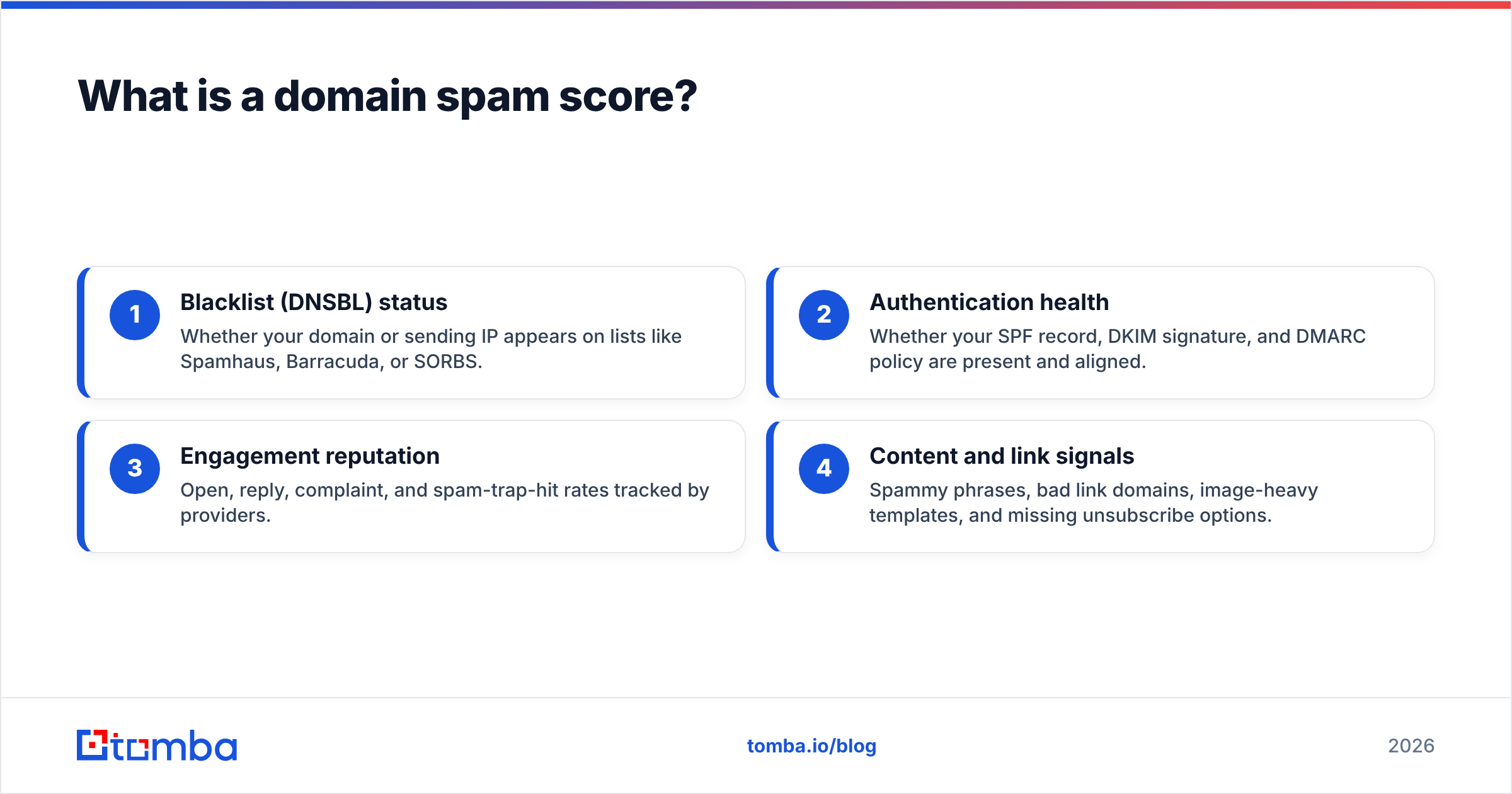
Technically, there is no single universal "spam score." Instead, several systems each produce their own signal:
- Blacklist (DNSBL) status — Whether your domain or sending IP appears on lists like Spamhaus, Barracuda, or SORBS.
- Authentication health — Whether your SPF record, DKIM signature, and DMARC policy are present and aligned.
- Engagement reputation — Open, reply, complaint, and spam-trap-hit rates tracked by providers.
- Content and link signals — Spammy phrases, bad link domains, image-heavy templates, and missing unsubscribe options.
When people say "check my domain spam score," they really mean "audit all four layers." A high score in tools that count up (like SpamAssassin, where higher is worse) is bad; a high score in reputation dashboards (where higher is better) is good. Always read the direction of the scale before you panic.

Why does your domain spam score matter in 2026?#
Because inbox placement is now gated, not guaranteed. In 2024 Google and Yahoo rolled out bulk-sender requirements — mandatory authentication, one-click unsubscribe, and a complaint rate under 0.3%. Those rules have only tightened since. A poor reputation no longer means "slightly lower opens." It means your mail is filtered to spam or rejected at the gateway before a human ever sees it.
The compounding problem: reputation is sticky. One bad campaign blasted to a stale list can land you on a blacklist that takes weeks to clear, and the sender reputation hit lingers long after delisting. Checking proactively is far cheaper than rebuilding trust from zero.
If you run outbound at any volume, your domain spam score is the leading indicator for every downstream metric — deliverability, reply rate, and ultimately pipeline.
How do you check your domain spam score? (step-by-step)#
Here's the practical workflow. Run these in order, top to bottom.
Step 1 — Run blacklist lookups#
Enter your sending domain and IP into a blacklist checker. These query dozens of DNSBLs at once and flag any listing. A clean result across major lists (Spamhaus ZEN, Barracuda, SORBS) is the baseline. Use a blacklist checker for a fast first pass, and cross-reference with MXToolbox for IP-level detail.
If you're listed, note which list — each has its own delisting process and root cause (spam traps, high complaints, compromised account).
Step 2 — Verify authentication records#
Confirm SPF, DKIM, and DMARC are published and passing:
- SPF authorizes which servers can send for your domain. Validate it with an SPF checker.
- DKIM cryptographically signs your mail so receivers can confirm it wasn't tampered with.
- DMARC tells receivers what to do when SPF or DKIM fail, and gives you reporting. Read the spec on Wikipedia's DMARC page if you're new to it.
Missing or misaligned auth is the single most common reason legitimate senders get spam-foldered.
Step 3 — Test message content#
Send a sample campaign through a content scanner. A spam checker parses your subject line, body, and links the way SpamAssassin does and returns a point score with reasons. Aim for a low score, fix flagged phrases, and remove link shorteners.
Step 4 — Read reputation dashboards#
Set up Google Postmaster Tools for your domain. It exposes Gmail's view of your domain reputation, spam rate, and authentication pass rate — the closest thing to seeing your score through the provider's eyes. Microsoft SNDS does the same for Outlook.
Step 5 — Audit your recipient list#
This step is skipped most often and matters most. Sending to invalid, dead, or trap addresses spikes your bounce and complaint rates faster than anything else. Run your list through an email verifier before every send to strip risky contacts.
Which tools should you use to check domain spam score?#
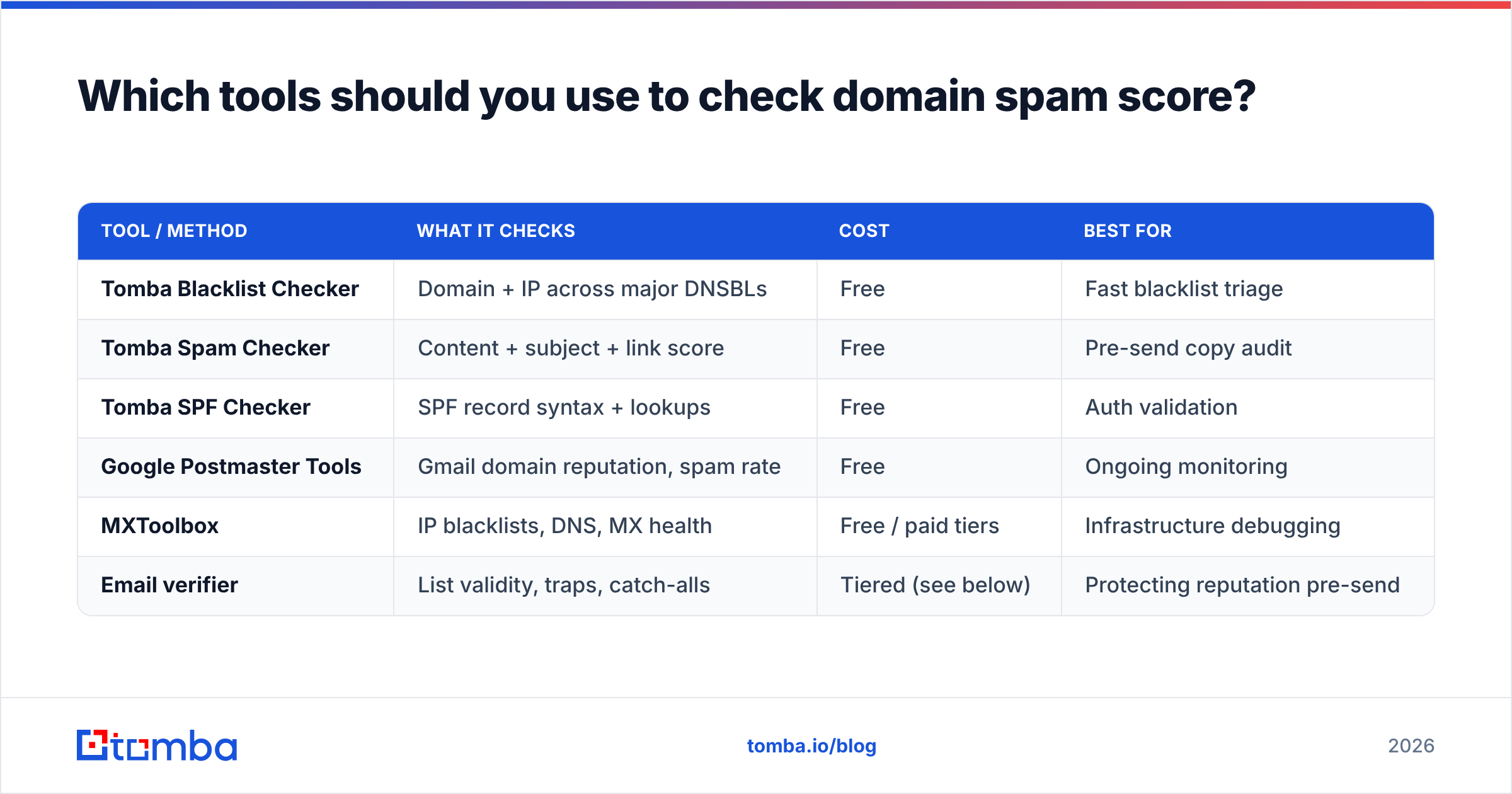
No single tool covers all four layers, so most teams combine a few. Here's how the common options stack up.
| Tool / Method | What it checks | Cost | Best for |
|---|---|---|---|
| Tomba Blacklist Checker | Domain + IP across major DNSBLs | Free | Fast blacklist triage |
| Tomba Spam Checker | Content + subject + link score | Free | Pre-send copy audit |
| Tomba SPF Checker | SPF record syntax + lookups | Free | Auth validation |
| Google Postmaster Tools | Gmail domain reputation, spam rate | Free | Ongoing monitoring |
| MXToolbox | IP blacklists, DNS, MX health | Free / paid tiers | Infrastructure debugging |
| Email verifier | List validity, traps, catch-alls | Tiered (see below) | Protecting reputation pre-send |
A sensible monthly routine: blacklist check → auth check → content scan → Postmaster review → list verification. Fifteen minutes, and it catches 90% of problems before they cost you placement.

What is a good domain spam score vs a bad one?#
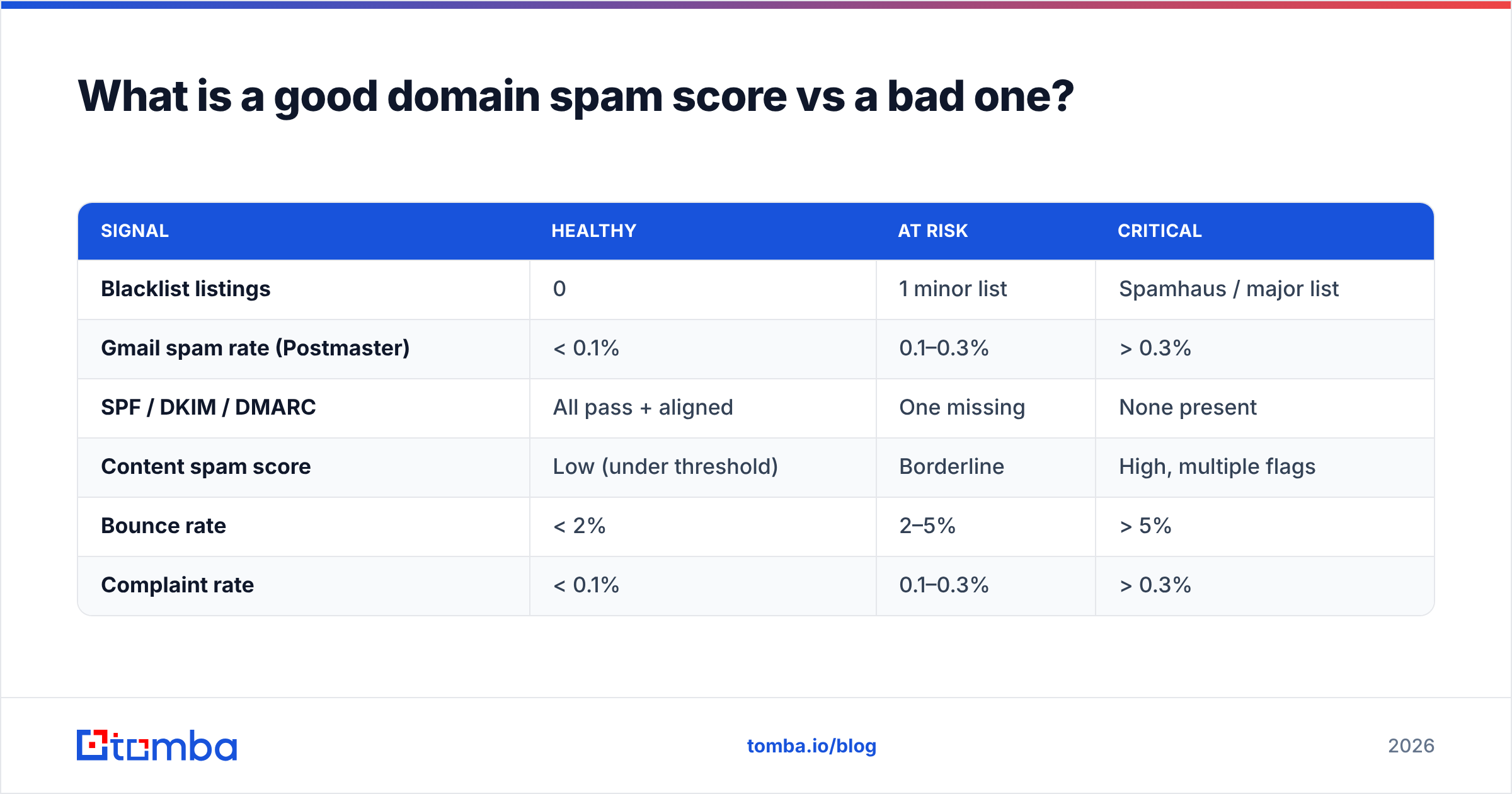
A "good" profile isn't a single number — it's a set of green lights across every layer. Here's how to read the difference.
| Signal | Healthy | At risk | Critical |
|---|---|---|---|
| Blacklist listings | 0 | 1 minor list | Spamhaus / major list |
| Gmail spam rate (Postmaster) | < 0.1% | 0.1–0.3% | > 0.3% |
| SPF / DKIM / DMARC | All pass + aligned | One missing | None present |
| Content spam score | Low (under threshold) | Borderline | High, multiple flags |
| Bounce rate | < 2% | 2–5% | > 5% |
| Complaint rate | < 0.1% | 0.1–0.3% | > 0.3% |
If any row sits in "critical," fix that first — it dominates the others. A Spamhaus listing or a 0.5% complaint rate will sink you even if everything else is perfect.
How do you fix a bad domain spam score?#
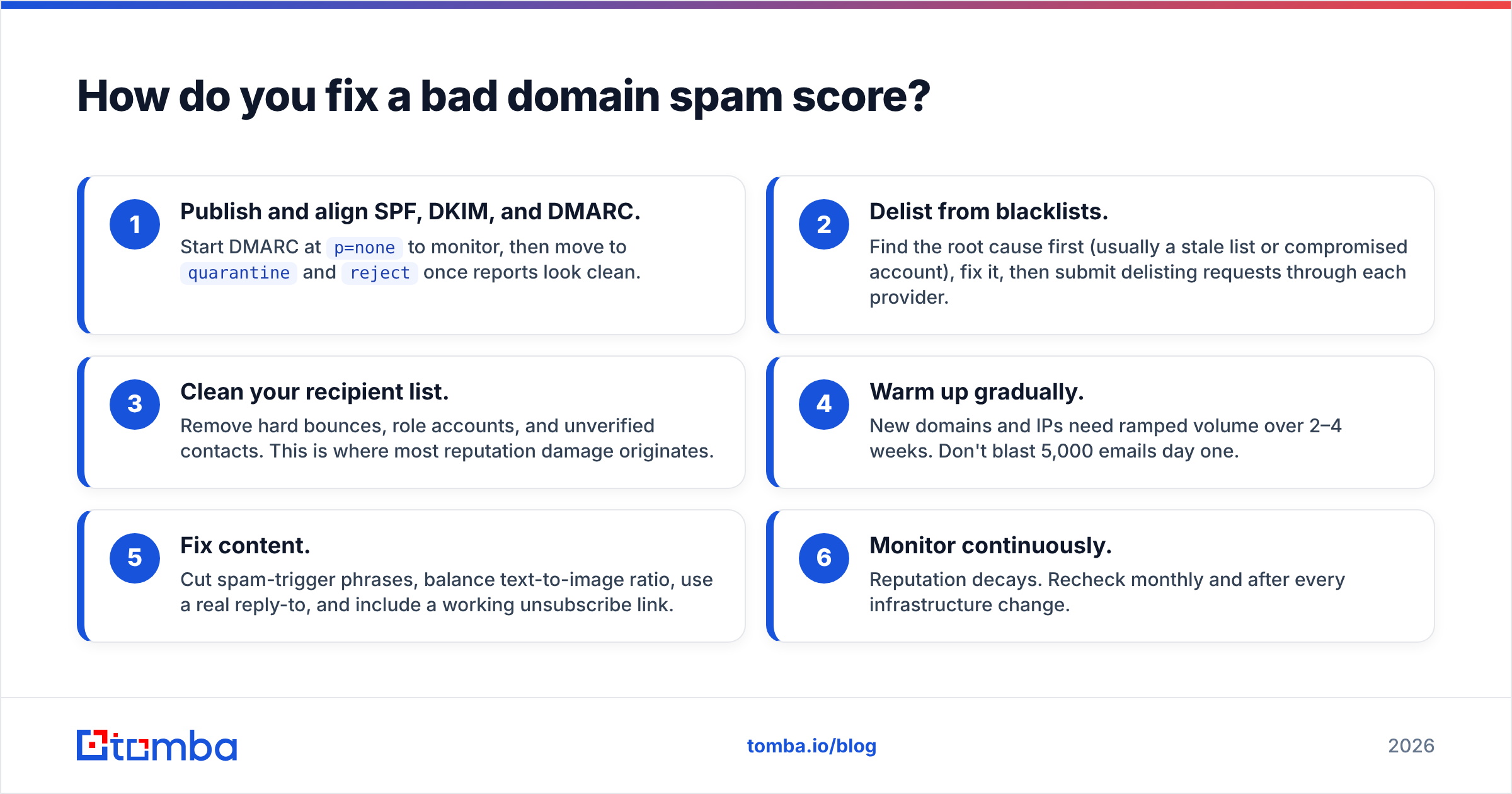
Conclusion first: fix authentication and list hygiene before you touch anything else. They deliver the biggest reputation gains for the least effort.
- Publish and align SPF, DKIM, and DMARC. Start DMARC at
p=noneto monitor, then move toquarantineandrejectonce reports look clean. - Delist from blacklists. Find the root cause first (usually a stale list or compromised account), fix it, then submit delisting requests through each provider.
- Clean your recipient list. Remove hard bounces, role accounts, and unverified contacts. This is where most reputation damage originates.
- Warm up gradually. New domains and IPs need ramped volume over 2–4 weeks. Don't blast 5,000 emails day one.
- Fix content. Cut spam-trigger phrases, balance text-to-image ratio, use a real reply-to, and include a working unsubscribe link.
- Monitor continuously. Reputation decays. Recheck monthly and after every infrastructure change.
The throughline across all six: deliverability is downstream of data quality. You can publish perfect DNS records and still tank your score by mailing a list full of dead addresses. Verified, accurate contact data is the foundation, not an afterthought. (For more on the underlying mechanics, Tomba's primer on email deliverability breaks down each signal.)
How often should you check your domain spam score?#
Monthly at minimum, and immediately after any of these events:
- You switch ESP or sending IP — reputation doesn't transfer.
- You add or edit DNS records — a typo in SPF breaks auth silently.
- You launch a new sending domain — warm it and watch it closely.
- Reply rates drop suddenly — a placement issue is the usual culprit.
- You buy or import a new list — verify before the first send, every time.
Treat it like checking your car's oil. You don't wait for the engine to seize; you check on a schedule because the cheap habit prevents the expensive failure.
The bottom line#
Checking your domain spam score is really an audit of four layers — blacklists, authentication, engagement, and content — plus the recipient data feeding all of them. Tools make each layer fast to inspect, but the recurring root cause of poor reputation is sending to bad addresses. Fix the data and the score follows.
Before your next campaign, run your prospect list through a verification pass and only mail addresses you can trust. Tomba's Email Finder sources verified professional emails by name, domain, or company — so the contacts entering your sequences are real, deliverable, and reputation-safe from the first send. Pair it with the free blacklist checker and spam checker, check your Tomba pricing options, and keep your inbox placement where it belongs: in the inbox.
// get started
Find, verify and enrich your first contacts today
Start on the free plan with 25 searches a month, then scale when your team is ready.
Free plan · No credit card required · GDPR & CCPA
// about the author