How to Check Email Account Validity: Full 2026 Guide
Sending to dead inboxes wrecks your deliverability. Here's how to check email account validity in 2026 — the methods, the limits, and the tools that actually work.
Checking whether an email account is valid is the difference between an inbox-friendly sender and a domain that lands in spam by week two. If you collect, buy, or scrape addresses and send without checking them, you are gambling with your sender reputation every time you hit "send."
This guide explains exactly how to check email account validity in 2026 — what each verification layer actually proves, where the checks break down, and which workflow keeps your bounce rate under the 2% line that mailbox providers watch.
TL;DR#
- Validity is layered. Syntax, domain/MX, mailbox (SMTP), and catch-all checks each answer a different question — no single check is enough.
- Real-time SMTP probing is the most accurate way to confirm a single mailbox exists, but it fails silently on catch-all domains.
- Catch-all domains accept every address, so they return "unknown," not "valid" — treat them as a separate risk bucket.
- Bulk verification before any campaign should target a bounce rate under 2%; most reputable tools clean 95%+ of a list automatically.
- A dedicated email verifier combines all layers and flags catch-alls, which manual checks cannot do reliably.
What does it mean to check email account validity?#
A valid email account is one that can actually receive mail — the syntax is correct, the domain exists, the mail server is reachable, and a real mailbox sits behind the address. Checking validity means confirming each of those conditions before you send.
Think of it like mailing a physical letter. The address has to be formatted correctly (syntax), the street has to exist (domain), the building has to be standing (mail server), and a real person has to live in that unit (mailbox). A letter can fail at any one of those four points, and so can an email.
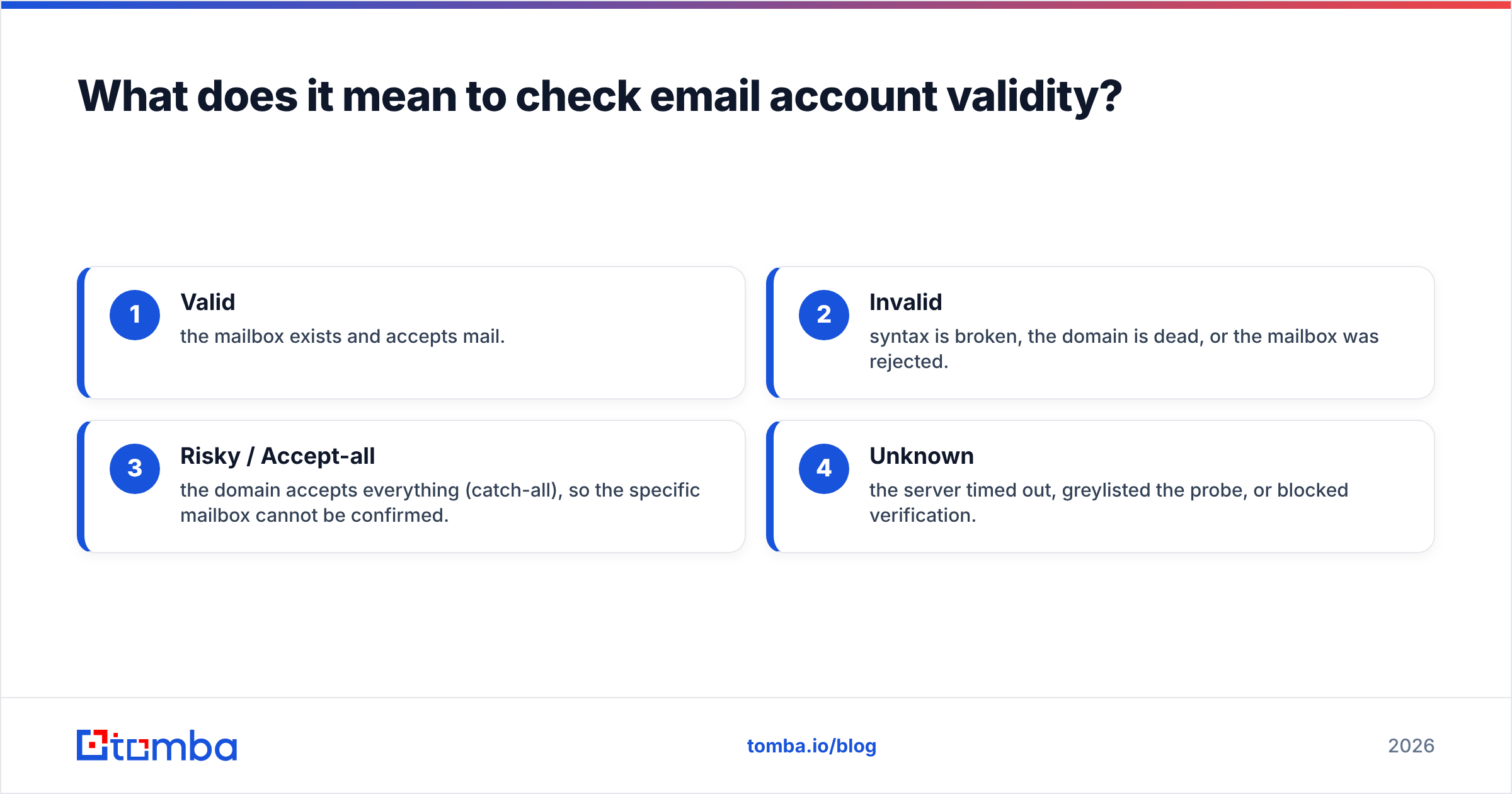
Most people assume "valid" is a yes/no answer. It is not. The honest output of a good check is one of four states:
- Valid — the mailbox exists and accepts mail.
- Invalid — syntax is broken, the domain is dead, or the mailbox was rejected.
- Risky / Accept-all — the domain accepts everything (catch-all), so the specific mailbox cannot be confirmed.
- Unknown — the server timed out, greylisted the probe, or blocked verification.
If a tool only ever returns "valid" or "invalid," it is hiding the risky bucket from you — and that bucket is where most of your silent bounces hide.

What are the layers of email validity checking?#
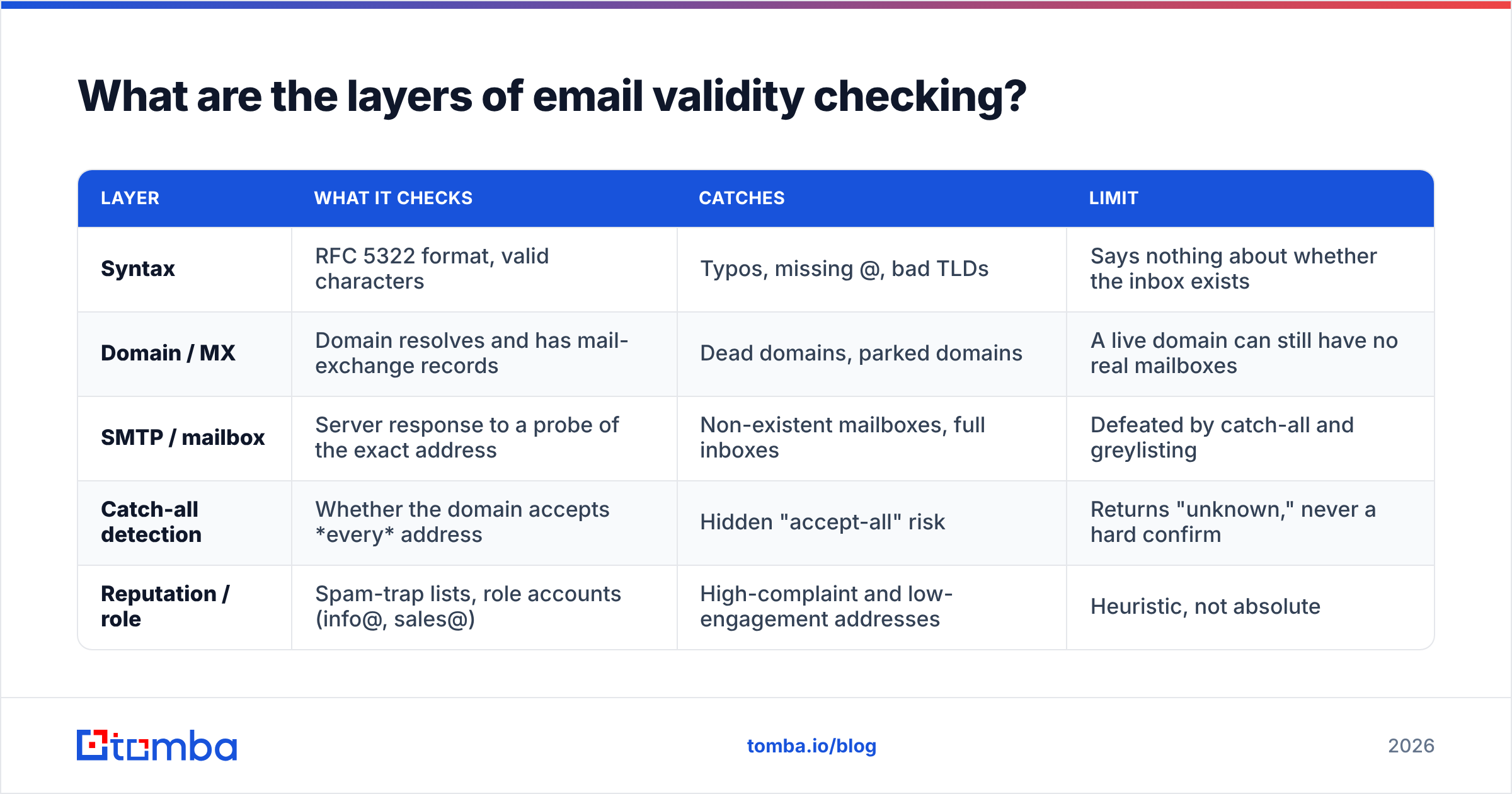
Each layer filters out a different class of bad address. Run them in order, cheapest and fastest first, so you spend expensive SMTP probes only on addresses that survived the earlier gates.
| Layer | What it checks | Catches | Limit |
|---|---|---|---|
| Syntax | RFC 5322 format, valid characters | Typos, missing @, bad TLDs | Says nothing about whether the inbox exists |
| Domain / MX | Domain resolves and has mail-exchange records | Dead domains, parked domains | A live domain can still have no real mailboxes |
| SMTP / mailbox | Server response to a probe of the exact address | Non-existent mailboxes, full inboxes | Defeated by catch-all and greylisting |
| Catch-all detection | Whether the domain accepts every address | Hidden "accept-all" risk | Returns "unknown," never a hard confirm |
| Reputation / role | Spam-trap lists, role accounts (info@, sales@) | High-complaint and low-engagement addresses | Heuristic, not absolute |
Syntax validation#
The first and cheapest gate. A regex or parser confirms the address follows the RFC 5322 standard — one @, a valid local part, a plausible domain. Syntax checks catch john@@gmail.com and jane@gmail instantly, but they will happily pass definitely-not-real@gmail.com. Use syntax as a filter, never as proof.
Domain and MX record checks#
Next, confirm the domain exists and is configured to receive mail. A DNS lookup for MX (mail-exchange) records tells you whether mail can be routed at all. No MX record usually means no email — though some domains fall back to an A record. This layer kills addresses on expired or parked domains before you waste an SMTP probe on them.
SMTP mailbox verification#
This is the closest you get to a definitive answer. The verifier opens an SMTP conversation with the recipient's mail server, issues RCPT TO for the exact address, and reads the server's response code. A 250 is a strong signal the mailbox exists; a 550 means it does not. It is the same handshake a sending server performs — just stopped before any message is delivered, so nothing lands in the recipient's inbox.
The catch: many servers deliberately obscure this response to defeat spammers, and catch-all domains accept everything.
Why do catch-all domains break email validity checks?#
Catch-all domains accept mail for every possible address, so an SMTP probe always returns "valid" even for mailboxes that do not exist. That is the single biggest blind spot in email validation, and it is why "valid" from a naive checker can still bounce.
Imagine a building where the front desk signs for any package addressed to any name, then sorts it out later. From the courier's view, every delivery "succeeds" — but half those names may not work there. A catch-all mail server behaves identically: it says 250 OK to ceo@company.com and xyzqwerty@company.com alike.
This matters because catch-all configurations are common on corporate domains. If your tool reports them as plain "valid," you will send to addresses that route into a black hole — no bounce, no reply, just wasted sends and a slowly decaying sender reputation.
The right move is to detect catch-all domains and bucket them separately. A purpose-built catch-all verifier probes a known-fake address on the domain; if that fake comes back "accepted," the domain is catch-all and every result from it is "risky," not "confirmed." You then decide whether to send to those addresses based on other signals — engagement history, role type, or enrichment data — rather than a false green light.
How do you check email account validity for a single address?#
For a one-off check, you have three practical options, ranging from free and manual to instant and automated.
- Manual SMTP via terminal. You can
telnetoropenssl s_clientinto the recipient's mail server, runHELO,MAIL FROM, andRCPT TO, and read the response code yourself. It works, but most ISPs block outbound port 25, the results are noisy, and you learn nothing about catch-all status. Fine for curiosity, useless at scale. - A free web checker. Drop the address into a browser-based tool like Tomba's free email checker and read the verdict. No setup, no terminal, and it handles MX and SMTP layers for you. Best for spot-checking a handful of addresses.
- An API call. If validity checks belong inside your product or CRM flow, hit an email verification API and get a structured response — status, score, catch-all flag, role-account flag — back in milliseconds.
For a single address you are checking before an important outreach email, the free web checker is almost always the right tool. Reserve the API and bulk workflows for volume.
How do you verify an entire list in bulk?#
Bulk verification is non-negotiable before any cold campaign. Upload your list, let the tool process every layer in parallel, and download a cleaned file segmented by status. The goal is a deliverable list with a projected bounce rate under 2% — the threshold where Gmail, Outlook, and Yahoo start throttling or filtering you.
A solid bulk workflow looks like this:
- Deduplicate first. Remove exact and near-duplicate rows so you do not pay to verify the same address twice. Tomba's remove duplicates tool handles this before upload.
- Run the full verification pass. A bulk email finder and verifier processes thousands of addresses, applying syntax, MX, SMTP, and catch-all detection to each.
- Segment by status. Send to "valid" immediately. Quarantine "catch-all/risky" for a low-volume warmup test. Discard "invalid."
- Re-verify periodically. Email data decays roughly 22–30% per year as people change jobs. A list verified six months ago is already partly stale.
What's the difference between an email finder and an email verifier?#
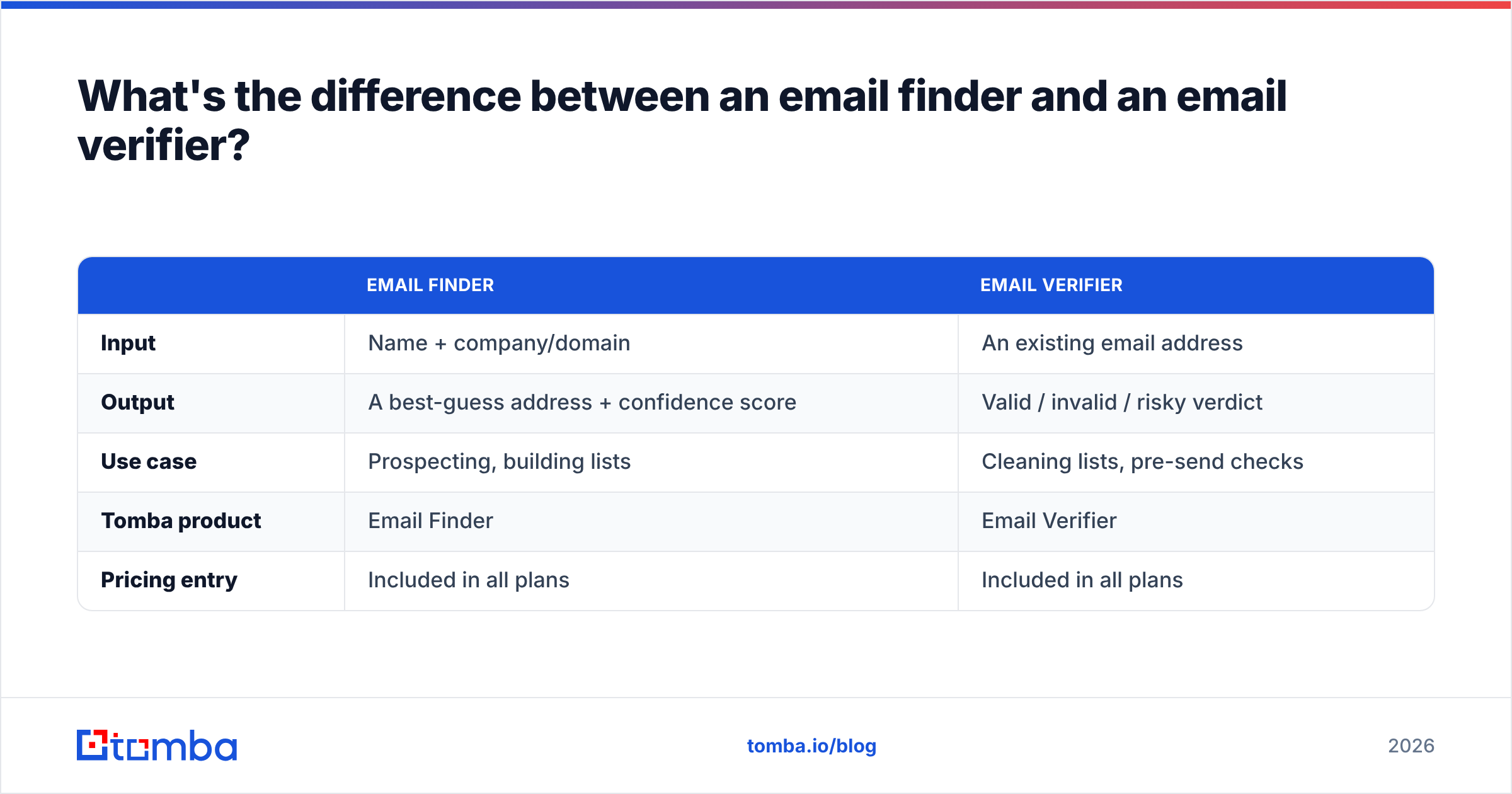
They solve adjacent but distinct problems: a finder discovers an address that you do not have, while a verifier confirms an address you already hold. You usually need both.
| Email Finder | Email Verifier | |
|---|---|---|
| Input | Name + company/domain | An existing email address |
| Output | A best-guess address + confidence score | Valid / invalid / risky verdict |
| Use case | Prospecting, building lists | Cleaning lists, pre-send checks |
| Tomba product | Email Finder | Email Verifier |
| Pricing entry | Included in all plans | Included in all plans |
In practice the two chain together. You use an email finder to discover firstname@company.com, then immediately verify it before adding it to a sequence. Good platforms verify at the moment of discovery so the address you receive is already confirmed — fewer round trips, lower bounce risk.
How accurate is email validity checking, really?#
No checker is 100% accurate, and any vendor claiming otherwise is overselling. Realistic accuracy on confirmable mailboxes is in the 95–99% range; the gap is mostly catch-all domains and servers that block or greylist verification probes. Accuracy depends on the quality and freshness of the provider's underlying data — which is why where a tool sources its data matters as much as its algorithm.
Three factors degrade accuracy in the real world:
- Greylisting. Some servers temporarily reject the first probe to deter spam, returning a "soft fail" that looks like an unknown.
- Catch-all noise. As covered above, these can never be hard-confirmed by SMTP alone.
- Data decay. An address that was valid last quarter may be dead today after a layoff or rebrand.
The defense is layering verification with enrichment. When a mailbox can't be SMTP-confirmed, contact enrichment signals — recent job changes, active social profiles, company status — help you decide whether the address is worth a careful send. You can read more about Tomba's data sources to understand how that confidence score is built.
For an independent view of how verification tools stack up, third-party review sites like G2 aggregate user-reported deliverability and accuracy across vendors — useful when you want signal that isn't from a vendor's own marketing.
How much does it cost to check email validity?#
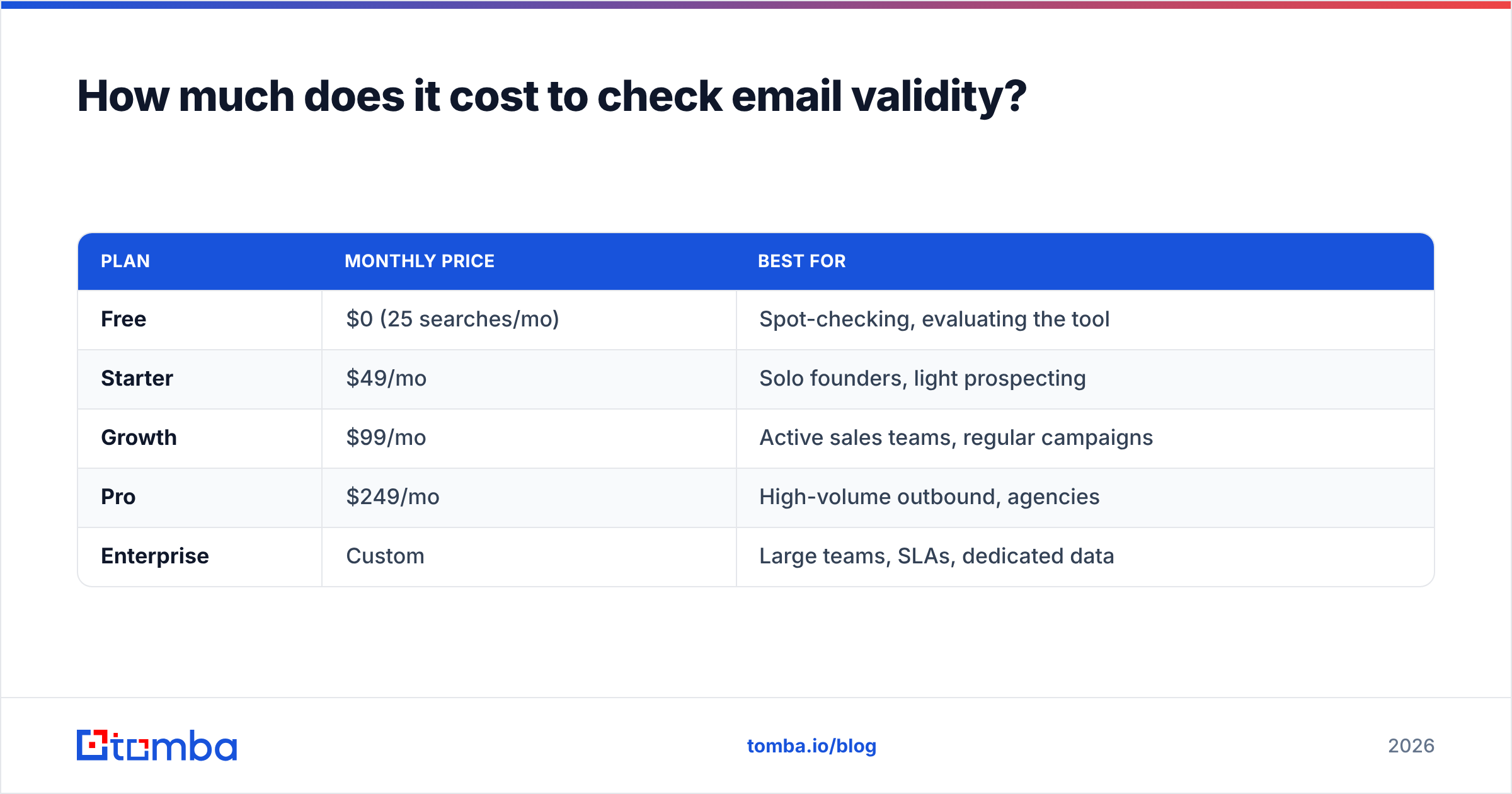
Pricing is almost always credit-based: one credit per address checked, with monthly tiers that lower the per-credit cost as volume rises. Free tiers exist for testing but are too small for production campaigns.
| Plan | Monthly price | Best for |
|---|---|---|
| Free | $0 (25 searches/mo) | Spot-checking, evaluating the tool |
| Starter | $49/mo | Solo founders, light prospecting |
| Growth | $99/mo | Active sales teams, regular campaigns |
| Pro | $249/mo | High-volume outbound, agencies |
| Enterprise | Custom | Large teams, SLAs, dedicated data |
The full breakdown, including credit allocations and overage rates, is on the Tomba pricing page. The practical rule: estimate your monthly verification volume, then pick the tier where your expected usage costs less per credit than the next tier down would — and confirm there's a free tier so you can test accuracy on your own list before committing. Industry guides such as HubSpot's deliverability resources reinforce that the cost of verification is trivial next to the cost of a damaged sending domain.
What happens if you skip validity checks?#
You inherit a compounding deliverability problem. Each hard bounce signals to mailbox providers that you are not maintaining your list, which is a classic spammer pattern. Cross the ~2% bounce threshold and providers start routing your mail to spam — including mail to your valid recipients.
The damage isn't limited to one campaign. A poisoned sending domain takes weeks of careful warmup to recover, and in that window your real prospects never see you. Checking validity is cheap insurance: a few cents per address against the cost of rebuilding a reputation from zero. If you want the mechanics, Tomba's glossary entry on email deliverability walks through how bounces, complaints, and engagement feed the provider's scoring.
Frequently asked questions#
Can you check email validity without sending an email?
Yes. SMTP verification stops the conversation before the DATA command, so no message is ever delivered. The recipient sees nothing — you only read the server's accept/reject response to the address.
Why does an address show as "risky" instead of valid? Almost always because the domain is catch-all (accepts every address) or the server greylisted the probe. "Risky" means the tool was honest enough not to guess. Treat these as a separate, lower-priority send bucket.
How often should I re-verify my list? Every 3–6 months for active lists, and always immediately before a major campaign. B2B email data decays roughly 22–30% per year as people change roles.
Are role accounts like info@ or sales@ valid? They are usually deliverable but risky — they often route to shared inboxes with high complaint rates and low engagement. Most verifiers flag them so you can exclude them from cold outreach.
Start checking email validity the right way#
Stop guessing whether your addresses are real. Run every contact through a layered check — syntax, MX, SMTP, and catch-all — before it ever enters a campaign, and you protect the sending reputation that every future email depends on.
The fastest way to do that at scale is the Tomba Email Finder, which confirms each address the moment it's discovered, flags catch-all domains, and feeds straight into bulk verification. Start on the free tier, test it against your own list, and move up to a paid plan only once you've seen the accuracy on data you already trust. Clean lists in, deliverable mail out — that's the whole game.
// get started
Find, verify and enrich your first contacts today
Start on the free plan with 25 searches a month, then scale when your team is ready.
Free plan · No credit card required · GDPR & CCPA
// about the author