How to Check Any Email Address Online in 2026 (Free Guide)
Bounced emails wreck your sender reputation. Here's how to check an email address online—free, in bulk, or via API—before a single message leaves your outbox in 2026.
You typed a prospect's email from a business card, hit send, and got a bounce three seconds later. Multiply that by a 500-row list and you've just told Gmail and Outlook that you're a careless sender. That's the real cost of skipping verification—not the one lost email, but the reputation damage that drags down every message after it.
This guide shows you how to check an email address online the right way: what "checking" actually means, which free and paid methods exist, how accurate each one is, and when to verify one address versus ten thousand.
TL;DR#
- Checking an email address online means confirming the mailbox exists and can receive mail—syntax, domain, MX records, and SMTP response—without sending anything.
- Free single-address checkers are fine for a quick one-off; bulk verifiers and APIs are what you need for lists and signup forms.
- Real accuracy comes from SMTP-level checks plus catch-all detection, not just regex on the "@" sign.
- Verifying before you send protects your sender reputation and keeps your bounce rate under the ~2% threshold mailbox providers watch.
- For one address use a free email checker; for lists, use bulk verify or the email verification API.
What does it mean to check an email address online?#
Checking an email address online means running a series of validation layers against it to estimate whether a real, reachable mailbox sits behind it—without ever sending a message that could bounce.
Think of it like a security guard checking a guest list at four doors instead of one. Passing the first door doesn't mean you're in; you have to clear all four.
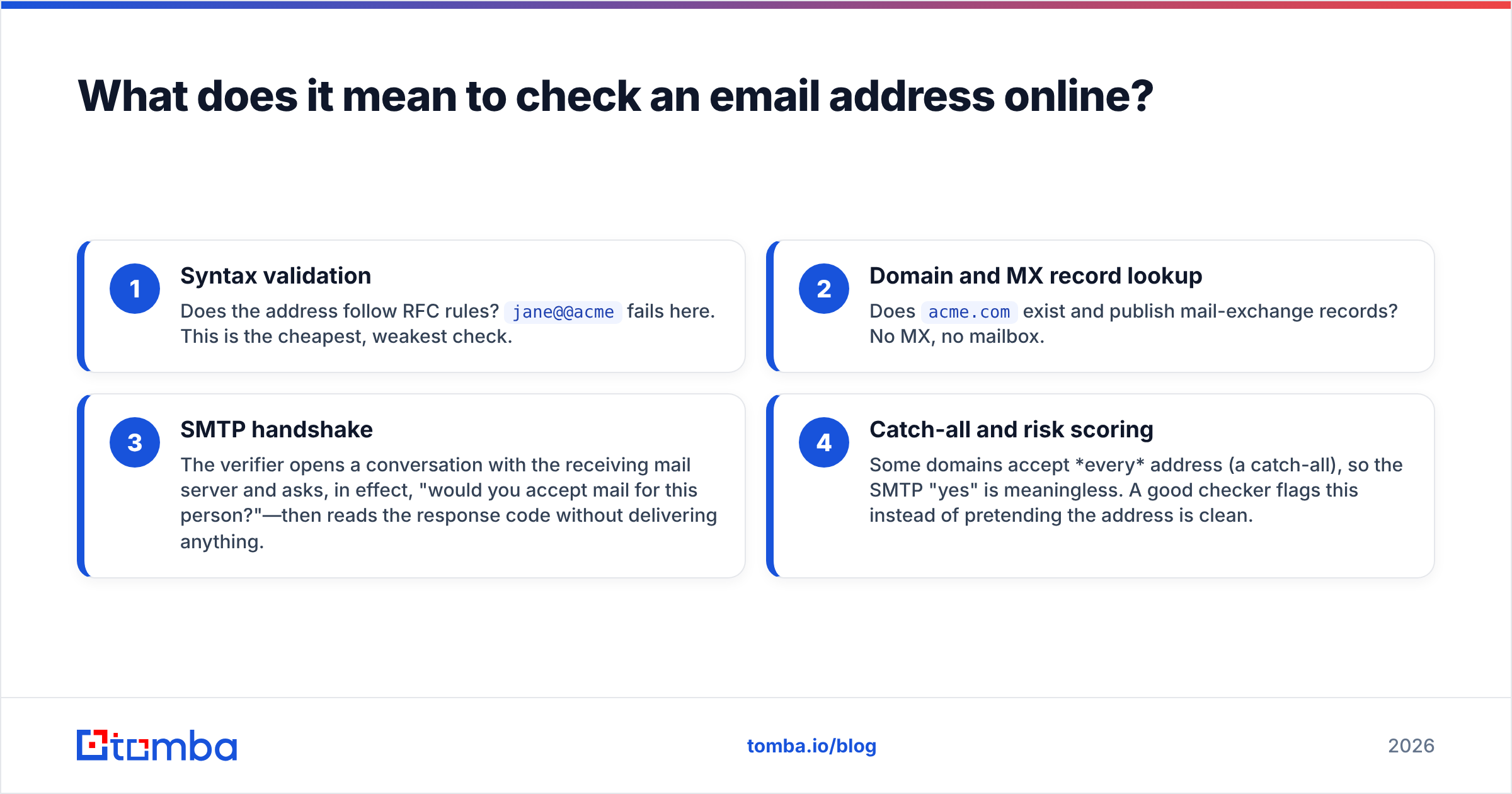
A proper check runs these layers in order:
- Syntax validation — Does the address follow RFC rules?
jane@@acmefails here. This is the cheapest, weakest check. - Domain and MX record lookup — Does
acme.comexist and publish mail-exchange records? No MX, no mailbox. - SMTP handshake — The verifier opens a conversation with the receiving mail server and asks, in effect, "would you accept mail for this person?"—then reads the response code without delivering anything.
- Catch-all and risk scoring — Some domains accept every address (a catch-all), so the SMTP "yes" is meaningless. A good checker flags this instead of pretending the address is clean.
Only a tool that runs all four layers can honestly tell you an address is deliverable. A browser plugin that just turns the field green on a valid "@" is checking syntax and nothing else.

Why bother checking emails before you send?#
Because mailbox providers grade you on bounce rate, and a high bounce rate gets you throttled or blocked. One conclusion up front: verifying is cheaper than recovering a burned domain.
Here's the chain reaction when you skip it:
- Hard bounces signal a bad sender. Gmail, Outlook, and Yahoo interpret invalid recipients as a sign you bought or scraped a list. Cross ~2% bounces and your inbox placement drops.
- Spam traps poison everything. Recycled or pristine trap addresses sit in old lists. Hit one and you can land on a blacklist—run a blacklist checker if you suspect this already happened.
- Wasted spend and skewed metrics. Every invalid contact inflates your CRM count, dilutes your open rate, and burns sending credits.
- Sales reps lose trust in the data. Nothing kills adoption of a prospecting list faster than three bounces in the first ten sends.
According to HubSpot's deliverability guidance, list hygiene is one of the highest-leverage things you can do for email performance. Verification is list hygiene applied before the damage, not after.
How can you check an email address online for free?#
For a single address, free tools are genuinely good enough. You have three realistic options.
1. A dedicated free email checker. Paste one address, get a verdict in seconds. A free email checker runs syntax, MX, and SMTP checks and tells you whether the mailbox is valid, invalid, or risky. Best for the "I'm about to email one important person" moment.
2. A manual SMTP test. Technical users can open a terminal and run an SMTP conversation by hand (telnet/openssl to port 25, then MAILFROM/RCPTTO). It works, but most ISPs block port 25, the receiving server may grey-list you, and you get no catch-all detection. Use an SMTP tester instead of doing it raw.
3. The mailbox-provider hint trick. Some Google Workspace and Microsoft 365 domains leak existence signals during login flows. This is fragile, semi-manual, and not something to build a process on.
The honest limit of free: it's rate-limited and single-shot. Free tools cap how many checks you can run, don't expose an API, and rarely handle catch-all domains well. The moment you have a list, free stops scaling.
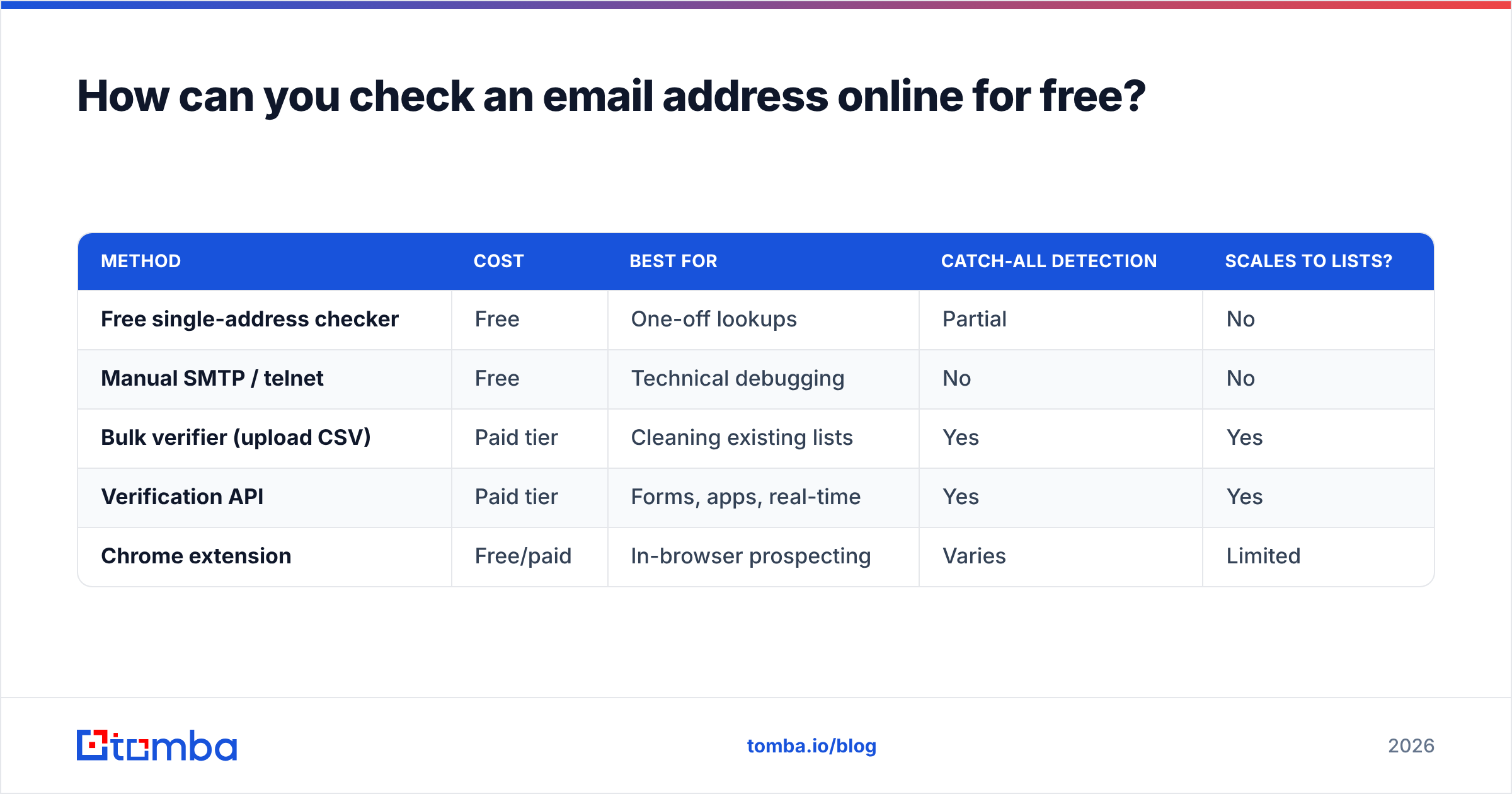
| Method | Cost | Best for | Catch-all detection | Scales to lists? |
|---|---|---|---|---|
| Free single-address checker | Free | One-off lookups | Partial | No |
| Manual SMTP / telnet | Free | Technical debugging | No | No |
| Bulk verifier (upload CSV) | Paid tier | Cleaning existing lists | Yes | Yes |
| Verification API | Paid tier | Forms, apps, real-time | Yes | Yes |
| Chrome extension | Free/paid | In-browser prospecting | Varies | Limited |
What's the difference between checking one email and verifying a list?#
The difference is throughput and integration. Checking one address is a manual click; verifying a list is a pipeline.
When you move from one address to thousands, three new requirements appear:
- Bulk upload. You drop a CSV or connect a sheet and the tool processes every row, returning a status per address. Tomba's bulk verify handles this and de-duplicates along the way—pair it with remove duplicates to clean the file first.
- An API for real-time checks. If you're validating addresses at signup, you can't ask a user to wait while you paste into a web form. An email verification API returns a verdict in milliseconds so you can reject typos at the form level.
- Catch-all handling at scale. On a single check you can shrug at a catch-all. On a 50,000-row list, the percentage that are catch-alls determines how much of your list is genuinely usable. A catch-all verifier gives you a confidence signal instead of a coin flip.
This is also where finding and checking blur together. If you're building the list from scratch—not just cleaning one—an email finder returns addresses that are already validated at discovery time, so you skip a separate cleaning pass.

How accurate is online email checking, really?#
Accuracy depends almost entirely on whether the tool reaches the SMTP layer and how it treats catch-all domains. A realistic ceiling for good verifiers is the high-90s percent on standard domains, and lower on catch-alls—where no tool can be certain without sending.
Set expectations honestly with these categories:
- Valid — SMTP server accepts the recipient. High confidence; send freely.
- Invalid — Server rejects the recipient. High confidence; remove it.
- Catch-all (accept-all) — The domain accepts everything, so the "yes" proves nothing. Medium confidence; segment these and warm into them slowly.
- Unknown — Server timed out, grey-listed, or blocked the probe. Re-check later before deciding.
The accuracy lever you control is the data source behind the checker. Verifiers backed by their own crawled and cross-referenced data—see where Tomba gets its data—resolve more "unknowns" than tools that only do a live SMTP poke. As the SMTP protocol on Wikipedia explains, server responses are advisory, not guarantees, which is exactly why scoring and historical data matter on top of the raw handshake.
Two practical rules:
- Treat "catch-all" and "unknown" as their own buckets, not as "valid." Most bounce surprises come from forcing them into the green pile.
- Re-verify lists older than 90 days. People change jobs; mailboxes get deprovisioned. Yesterday's clean list isn't today's.
Which tools let you check an email address online?#
You have plenty of choices, and the right one depends on volume and where the check happens. Here's an honest layout of categories, with Tomba's options noted where they fit.
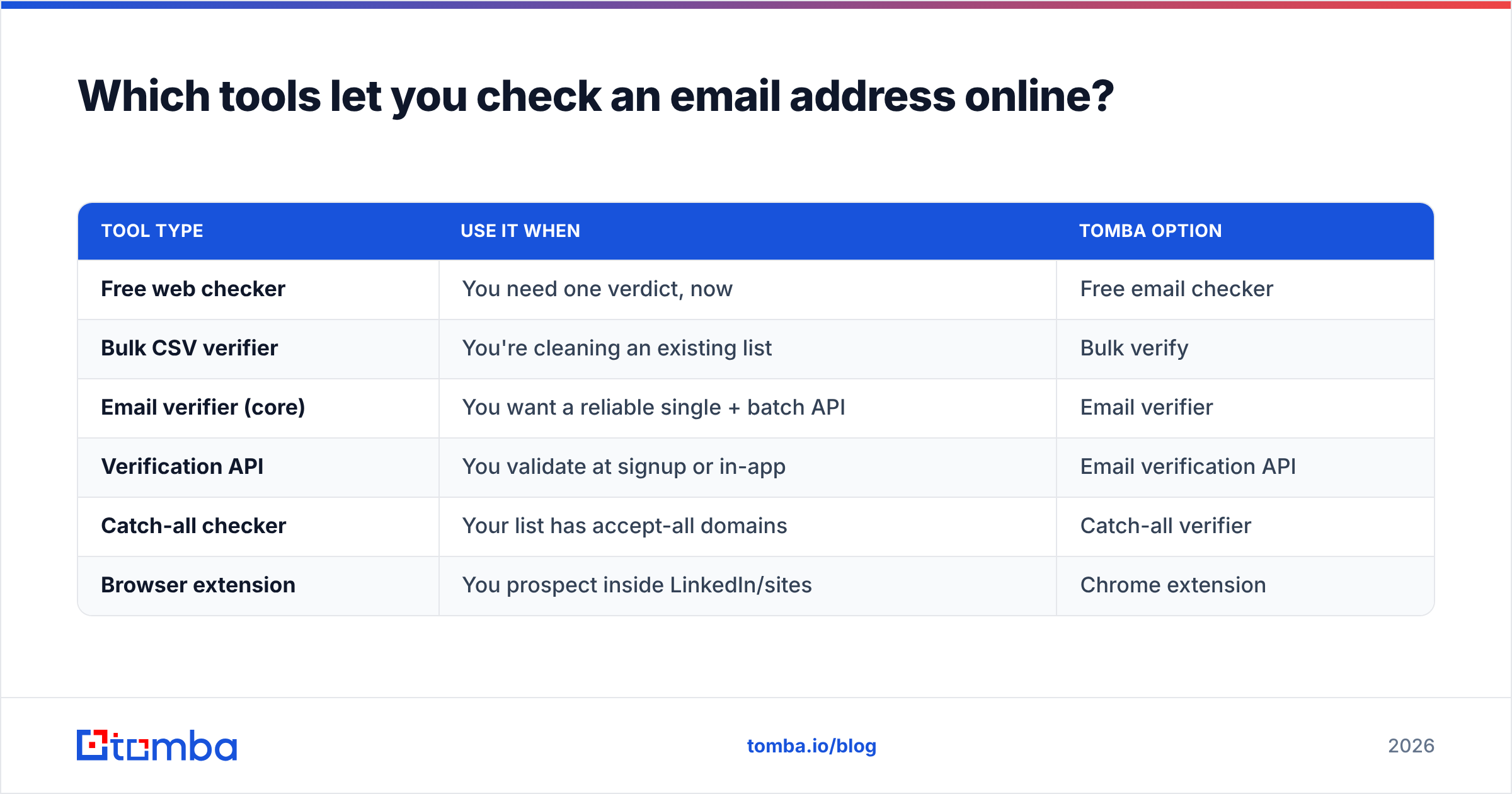
| Tool type | Use it when | Tomba option |
|---|---|---|
| Free web checker | You need one verdict, now | Free email checker |
| Bulk CSV verifier | You're cleaning an existing list | Bulk verify |
| Email verifier (core) | You want a reliable single + batch API | Email verifier |
| Verification API | You validate at signup or in-app | Email verification API |
| Catch-all checker | Your list has accept-all domains | Catch-all verifier |
| Browser extension | You prospect inside LinkedIn/sites | Chrome extension |
You'll also find well-known standalone verifiers on review sites like G2, which is a good place to sanity-check vendor claims against real user reviews before you commit a budget. Compare a few on free-tier limits, catch-all handling, and whether they expose an API—those three line items separate the toy tools from the production ones.
Where Tomba differs from single-purpose verifiers is that checking, finding, and enriching live in one place. If a check comes back invalid, you can immediately re-find the correct address with the email finder or pull the whole company's addresses with domain search instead of switching tools.
How do you build email checking into your workflow?#
Bake verification into three moments, and bounces basically stop being a problem. The principle: never let an unverified address reach your sending tool.
- At capture. Validate every form submission in real time with the API so typos (
gmial.com) get caught before they enter your database. - At import. Before any purchased, scraped, or event list touches your CRM, run it through bulk verify. Quarantine invalids; segment catch-alls.
- At send. Re-check the segment you're about to email if the list has aged past a quarter. A two-minute re-verify beats a deliverability dip.
If you run cold outreach specifically, chain this with the rest of your hygiene stack: check the address, confirm the domain isn't blacklisted, and confirm your own email deliverability setup (SPF, DKIM, warmup) is sound. Clean recipients only help if your sending domain is also in good standing.
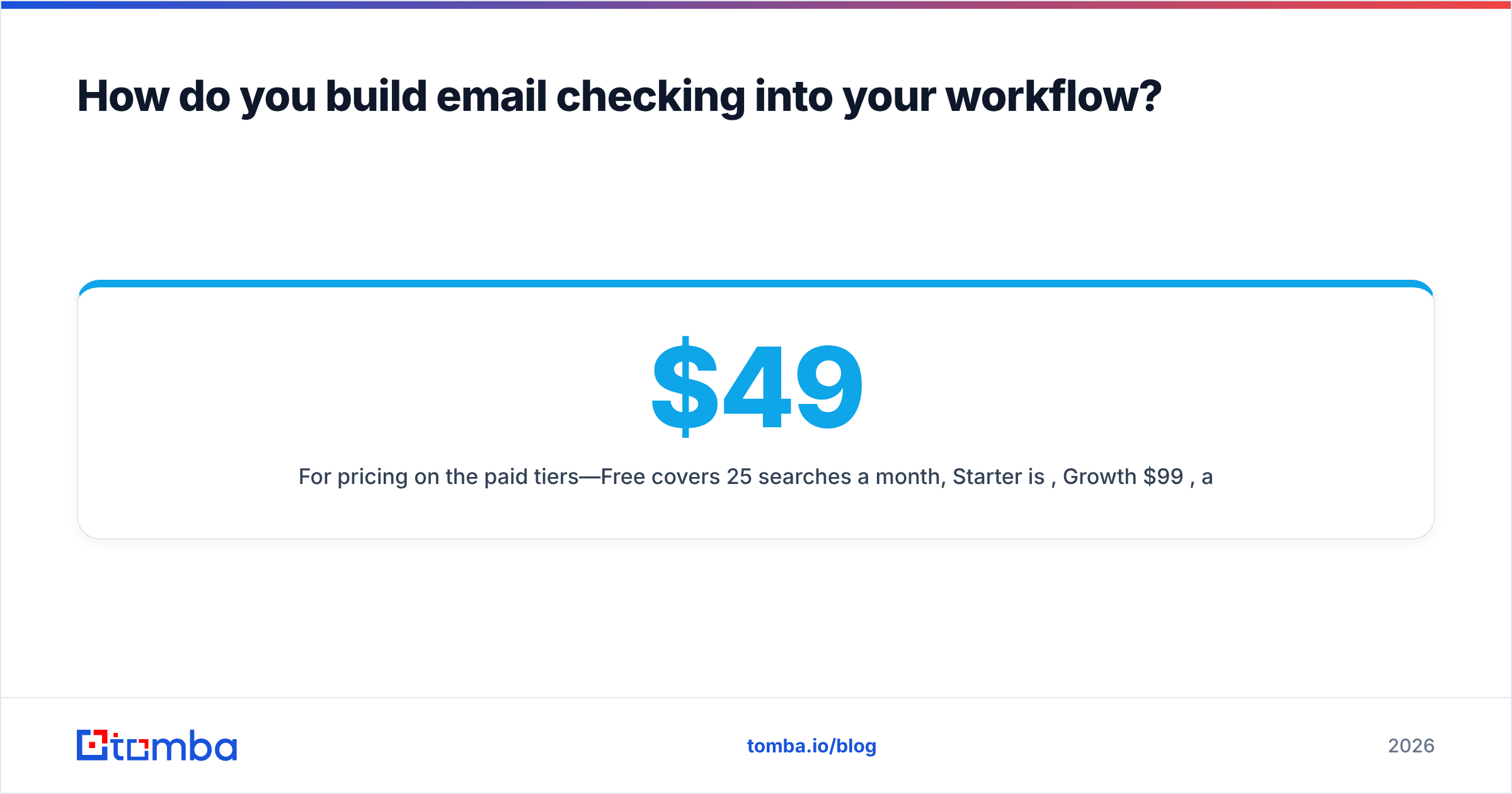
For pricing on the paid tiers—Free covers 25 searches a month, Starter is $49/mo, Growth $99/mo, and Pro $249/mo—see the full Tomba pricing breakdown. The free tier is enough to test the workflow end to end before you scale.
Frequently asked questions#
Can I check if an email exists without sending an email?
Yes. SMTP verification opens a handshake with the receiving server and reads its response to a RCPT TO command without ever delivering a message. That's how online checkers confirm existence silently.
Is it legal to verify email addresses? Verification itself—checking deliverability—is standard practice and legal. What you do with the addresses (consent, opt-in, regional rules like GDPR) is the part governed by law. Verifying doesn't grant permission to email.
Why does a verified email still bounce sometimes? Mailboxes change between your check and your send, servers grey-list probes, and catch-all domains accept addresses they later reject. Re-verifying close to send time and segmenting catch-alls minimizes this.
What's a good bounce rate to aim for? Keep hard bounces under roughly 2%. Above that, mailbox providers start treating you as a risky sender and your inbox placement suffers.
The bottom line#
Checking an email address online isn't a nice-to-have—it's the cheapest insurance you can buy on your sender reputation. One verdict before you send protects every message after it. Start with the free single checker for one-off lookups, move to bulk verification and the API the moment you're handling lists, and always treat catch-all and unknown as their own buckets.
Ready to stop guessing? Run your next list through the Tomba Email Finder and email verifier—find the right addresses and confirm they're deliverable in one pass, free for your first 25 searches a month. Your bounce rate will thank you.
// get started
Find, verify and enrich your first contacts today
Start on the free plan with 25 searches a month, then scale when your team is ready.
Free plan · No credit card required · GDPR & CCPA
// about the author