How to Check Email Availability: The 2026 Verification Guide
Learn how to check email availability before you hit send, why it matters for deliverability, and which methods actually catch dead addresses in 2026.
You found a promising contact, dropped their email into your sequence, and hit send. Three hours later: a hard bounce. Multiply that by a few hundred and your sender reputation starts to slide. The fix is boring but decisive — check email availability before the message ever leaves your outbox.
This guide breaks down what "email availability" actually means, the methods that work in 2026, where they fail, and how to verify at scale without torching your domain.
TL;DR#
- "Check email availability" usually means two things: confirming an address can receive mail (verification) or confirming a mailbox/username is free to register. This guide covers the first — the one that protects your cold outreach.
- SMTP handshake checks are the core technique, but catch-all domains and greylisting make a naive check unreliable.
- Bounce rate is the metric that matters. Keep it under 2–3% or mailbox providers throttle you.
- Bulk verification + a real-time API beats manual lookups once you pass a few dozen contacts.
- Tomba verifies syntax, MX records, SMTP response, and catch-all status in one pass, with a free tier to test it.
What does "check email availability" actually mean?#
Think of an email address like a physical mailbox on a street. "Checking availability" is walking up to confirm three things: the street exists (the domain), the building has a mail slot (the mail server), and there's an actual box with that name on it (the mailbox). If any link breaks, your letter comes back stamped return to sender.
In practice the phrase splits into two intents:
- Deliverability verification — Does
jane@acme.comexist and accept mail? This is what sales, marketing, and recruiting teams care about. A wrong answer costs you a bounce. - Registration availability — Is
yourbrand@gmail.comfree to claim as a new account? This is a signup-flow question, not an outreach one.
The rest of this article is about intent #1, because that's where money and reputation are on the line. If you only need to confirm syntax quickly, a free email checker handles the basics in seconds.

Why does checking availability matter so much?#
Conclusion first: every undeliverable email you send chips away at your sender reputation, and reputation is the single biggest lever on whether your good emails reach the inbox.
Mailbox providers like Google and Microsoft watch your bounce rate closely. According to widely cited industry guidance from providers such as HubSpot, a bounce rate above 2% is a warning sign and anything north of 5% can get your sending domain throttled or blocklisted. Here's the cascade:
- High bounces signal that you're working from a stale or scraped list.
- Spam filters weight that signal heavily, so even valid recipients stop seeing you in the inbox.
- Reply rates collapse, because half your audience never received the message.
Verifying availability upfront breaks the cascade before it starts. It's the difference between a list that lands and a list that quietly dies in spam folders.
How do you check email availability? The core methods#
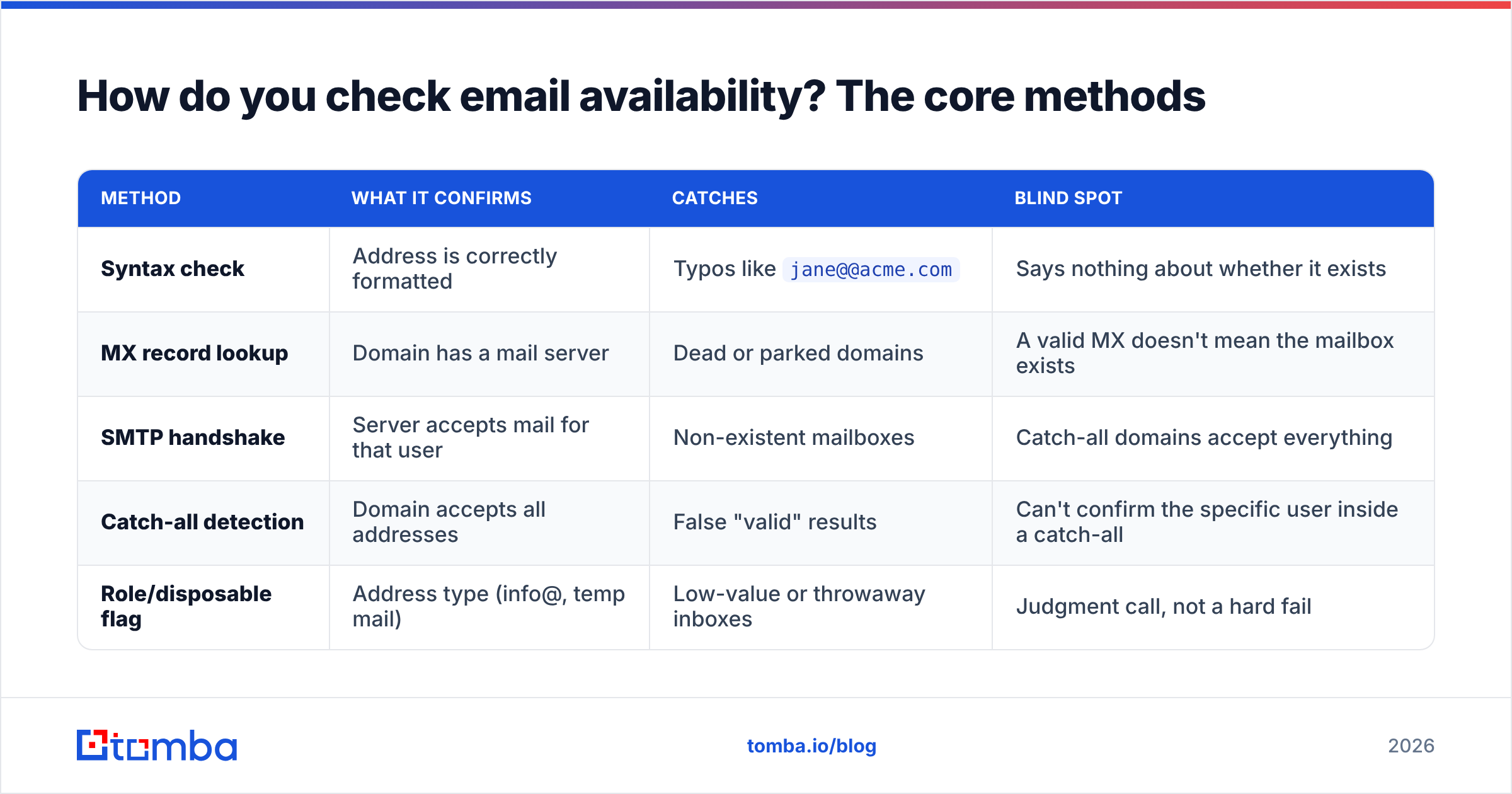
There's no single magic call. Reliable verification stacks several checks, each catching a failure the others miss.
| Method | What it confirms | Catches | Blind spot |
|---|---|---|---|
| Syntax check | Address is correctly formatted | Typos like jane@@acme.com |
Says nothing about whether it exists |
| MX record lookup | Domain has a mail server | Dead or parked domains | A valid MX doesn't mean the mailbox exists |
| SMTP handshake | Server accepts mail for that user | Non-existent mailboxes | Catch-all domains accept everything |
| Catch-all detection | Domain accepts all addresses | False "valid" results | Can't confirm the specific user inside a catch-all |
| Role/disposable flag | Address type (info@, temp mail) | Low-value or throwaway inboxes | Judgment call, not a hard fail |
The workflow most verification tools follow:
- Validate syntax — reject malformed addresses instantly, no network call needed.
- Resolve MX records — confirm the domain actually accepts mail.
- Open an SMTP conversation — connect to the mail server and ask, politely, whether it will accept mail for that recipient, without delivering anything.
- Test for catch-all — probe a random address on the same domain; if the server accepts it too, the domain is catch-all and the per-user answer is uncertain.
- Score the result — combine the signals into valid / invalid / risky / catch-all.
That layered approach is exactly what a dedicated email verifier automates so you don't have to script SMTP commands by hand.
What's the deal with catch-all domains?#
Catch-all domains are the reason naive availability checks lie to you. A catch-all server is configured to accept mail for any address at the domain — jane@acme.com, nonsense123@acme.com, all of it — and sort it out later. So when your SMTP handshake gets a cheerful "250 OK," you can't tell whether the mailbox is real or whether the server just accepts everything.
This is common at larger companies that don't want to lose mail to typos. The practical consequences:
- A basic checker marks every catch-all address "valid," inflating your confidence and your eventual bounce rate.
- You need a tool that flags catch-all status rather than guessing, so you can decide how aggressively to send.
Specialized handling — like a catch-all verifier that uses additional signals to estimate validity — is what separates a serious verification stack from a weekend regex script. When a domain is catch-all, the honest answer is "risky," and a good tool tells you so instead of pretending.
Can't I just check email availability manually?#
You can, for a handful of addresses. Beyond that it falls apart fast.
Manual SMTP checks via telnet or a script work in a demo, but mail servers fight back:
- Greylisting temporarily rejects unknown senders, so a one-shot check returns a false "invalid."
- Rate limiting and IP reputation mean checking from your own server can get your IP flagged for probing.
- Inconsistent server responses — some providers (notably Yahoo and a few others) deliberately return ambiguous codes to defeat verification.
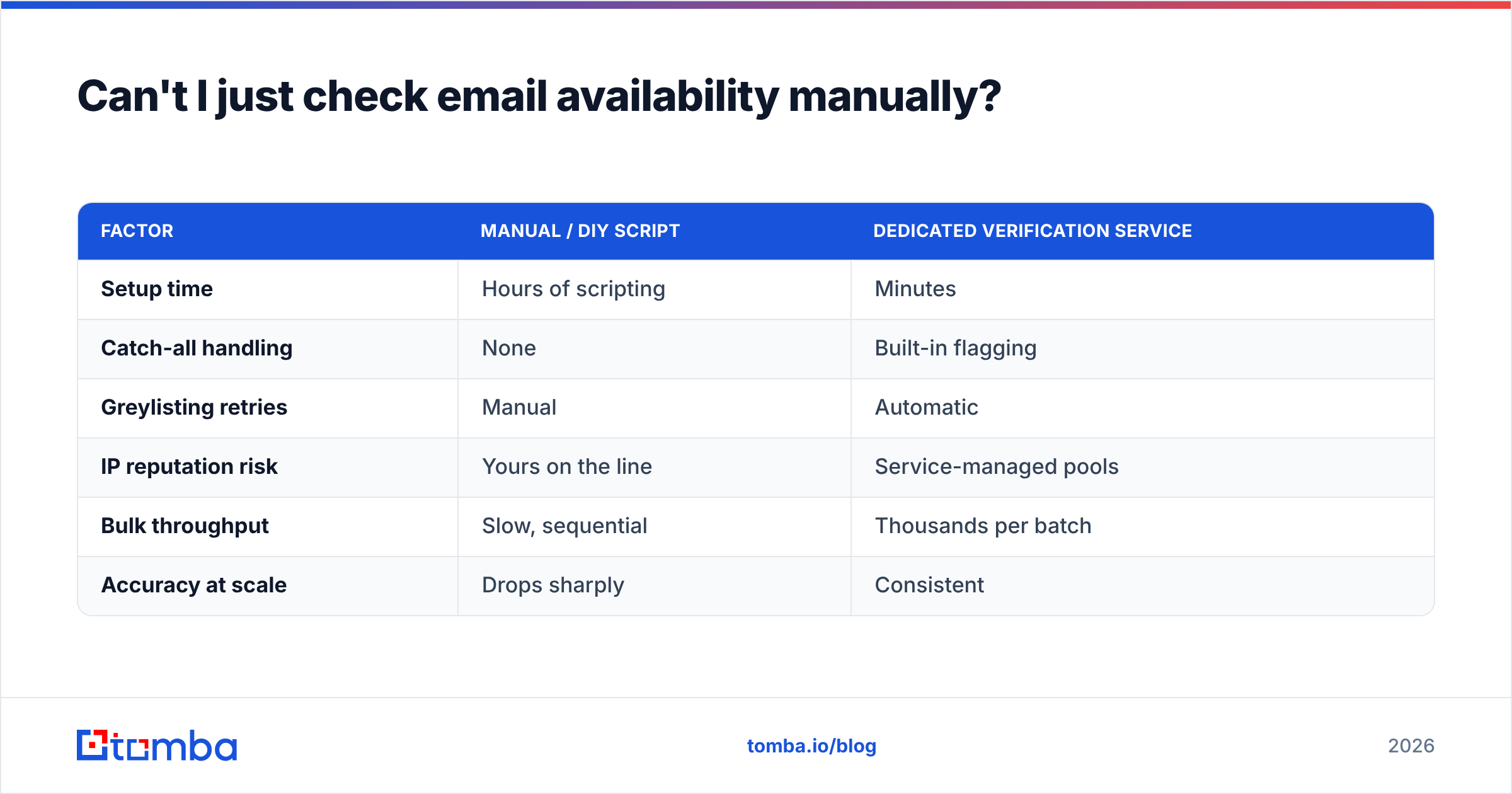
Here's the comparison that usually ends the debate:
| Factor | Manual / DIY script | Dedicated verification service |
|---|---|---|
| Setup time | Hours of scripting | Minutes |
| Catch-all handling | None | Built-in flagging |
| Greylisting retries | Manual | Automatic |
| IP reputation risk | Yours on the line | Service-managed pools |
| Bulk throughput | Slow, sequential | Thousands per batch |
| Accuracy at scale | Drops sharply | Consistent |
Once you're past a few dozen contacts, a managed service is cheaper than the deliverability damage of getting it wrong.

How do you check availability in bulk?#
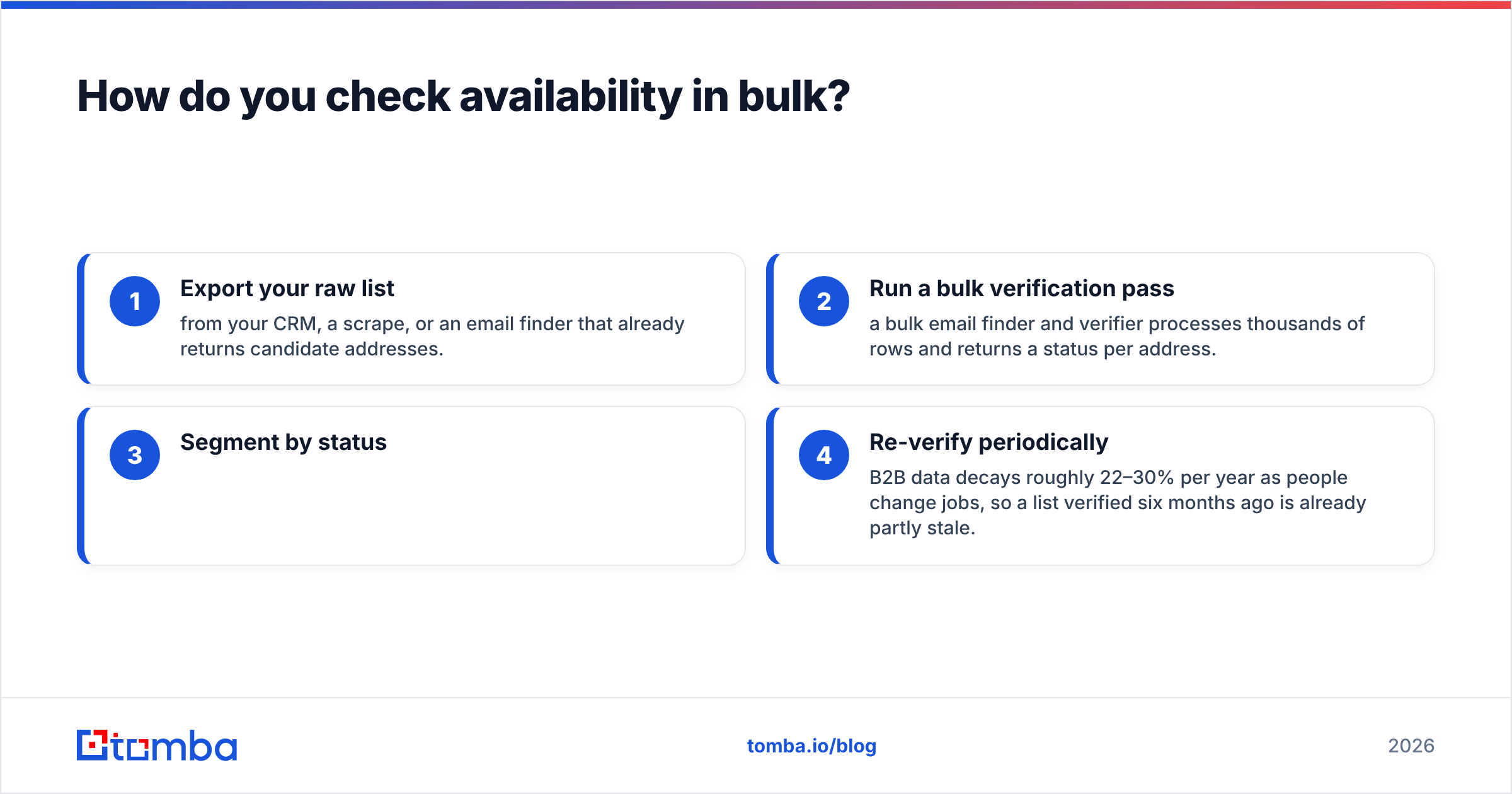
Conclusion first: upload the list, let the service run the layered checks in parallel, then segment results before you send.
For lead lists, the realistic workflow looks like this:
- Export your raw list — from your CRM, a scrape, or an email finder that already returns candidate addresses.
- Run a bulk verification pass — a bulk email finder and verifier processes thousands of rows and returns a status per address.
- Segment by status:
- Valid → safe to send.
- Invalid → discard, never send.
- Catch-all / risky → send carefully, ideally warmed up and low-volume first.
- Role-based (
info@,sales@) → decide case by case; they convert poorly in cold outreach.
- Re-verify periodically — B2B data decays roughly 22–30% per year as people change jobs, so a list verified six months ago is already partly stale.
If your stack lives in a spreadsheet, a Google Sheets add-on or Excel integration keeps verification inline without exporting anywhere. For engineering teams, the email verification API drops real-time checks straight into signup forms and lead-capture flows.
What should you look for in a verification tool?#
Not all "verified" stamps are equal. When you compare options, weigh these against your volume and budget:
- Accuracy and bounce guarantee — look for documented bounce rates, not vague marketing claims. Cross-check reviews on independent sites like G2.
- Catch-all detection — table stakes; if a tool can't flag catch-all, it's overstating validity.
- Real-time and bulk modes — you'll want API checks at signup and batch checks for lists.
- Transparent pricing — credit-based plans should be easy to forecast.
- Integrations — native hooks into your CRM, sheets, and sequencer beat manual CSV juggling.
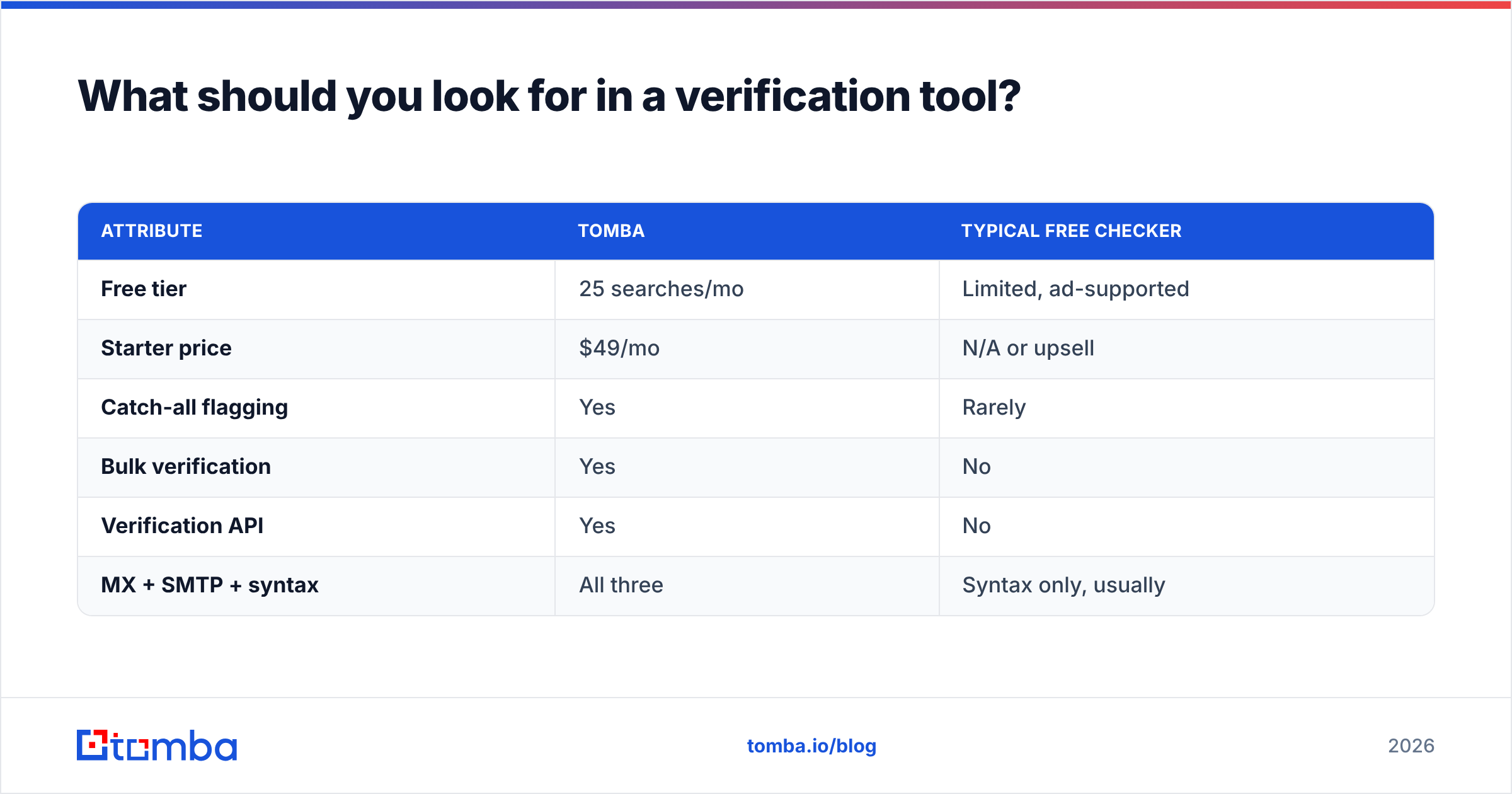
Here's how Tomba's verification stacks up on the attributes that matter:
| Attribute | Tomba | Typical free checker |
|---|---|---|
| Free tier | 25 searches/mo | Limited, ad-supported |
| Starter price | $49/mo | N/A or upsell |
| Catch-all flagging | Yes | Rarely |
| Bulk verification | Yes | No |
| Verification API | Yes | No |
| MX + SMTP + syntax | All three | Syntax only, usually |
Full Tomba pricing runs Free (25 searches), Starter $49/mo, Growth $99/mo, Pro $249/mo, and Enterprise custom — so you can start free and scale only when your volume justifies it.
How does availability checking fit into outbound?#
Verification isn't a one-time gate; it's a recurring step in a healthy pipeline:
- At capture — verify the moment an address enters your system (form fill, scrape, import) so bad data never pollutes the CRM.
- Before each campaign — re-verify the segment you're about to email, because addresses go stale between sends.
- Alongside enrichment — pair verification with data enrichment so a confirmed address also carries job title, company, and other context that lifts reply rates.
The payoff compounds. Clean lists protect deliverability, deliverability protects email response rate, and a strong response rate is what makes outbound worth doing at all.
Common mistakes when checking email availability#
- Trusting a single "250 OK." Without catch-all detection, that's a false positive waiting to bounce.
- Verifying once and never again. Data decay is relentless; schedule re-checks.
- Probing from your production IP. You can get your own sending IP flagged. Use a service with managed pools.
- Ignoring role and disposable addresses. They pass technical checks but tank engagement.
- Skipping verification on "trusted" lists. Even a purchased or partner list needs a pass — you don't know how it was built.
Frequently asked questions#
Is checking email availability legal? Yes. Verification only confirms whether a mailbox can receive mail; it doesn't read or send anything. You should still follow regulations like GDPR and CAN-SPAM for how you use the addresses.
Can I check availability without sending an email? That's the whole point of SMTP verification — it opens a conversation with the mail server and asks about the recipient without ever delivering a message.
How accurate is email verification? For standard domains, a good verifier is highly accurate. Catch-all domains are inherently uncertain, which is why honest tools mark them "risky" rather than "valid."
How often should I re-verify my list? Before every major campaign, and at minimum quarterly, given that B2B contact data decays 22–30% a year.
Start checking email availability the right way#
Stop letting bounces decide your sender reputation. Run every address through a layered check — syntax, MX, SMTP, and catch-all — before it reaches your sequence, and re-verify on a schedule so decay never catches up with you.
The fastest way to put this into practice is the Tomba Email Finder and its built-in verifier: find professional addresses by domain, name, or company, then confirm they're deliverable in the same workflow. Start on the free tier with 25 searches, and only move up to a paid plan once your volume proves it out. Your inbox placement — and your reply rate — will thank you.
Ready to find emails that actually work?
Join 150,000+ professionals who stopped guessing and started sending. Free credits on signup — no credit card required.
Get the Tomba newsletter
Practical outbound tactics and product updates — once every two weeks.
About the author