Check Email Exist Online: The Complete 2026 Playbook
Want to check email exist online before you hit send? Here's how SMTP checks, syntax rules, and verification APIs actually work in 2026 — and where free tools quietly fail.
Sending to an address you never checked is like mailing a letter to a street number you guessed. Sometimes it lands. Often it bounces back, and every bounce chips away at your sender reputation. This guide shows you how to check email exist online — the real methods, what they can and can't prove, and how to do it at scale without torching your domain.
TL;DR#
- To check email exist online, you combine four signals: syntax validity, domain/MX records, SMTP mailbox response, and historical reputation data. No single check is enough.
- Free browser tools are fine for a one-off lookup, but they get rate-limited, miss catch-all domains, and can't verify in bulk.
- SMTP "ping" checks are the core technique, but many providers (Google, Microsoft) now hide mailbox existence, which is why catch-all handling matters.
- For lists over a few hundred addresses, use a verification API or bulk tool so you don't get your IP blacklisted hammering mail servers.
- Tomba's email verifier and bulk verify run all four checks in one pass — useful when accuracy decides whether your campaign sends or stalls.
What does it mean to "check email exist online"?#
Checking whether an email exists online means confirming that a real, reachable mailbox sits behind an address — before you send anything to it. It is the difference between "this string looks like an email" and "a message to this address will actually be delivered."
Think of it like calling a phone number to hear it ring before you read out a long message. You're not talking to the person yet; you're just confirming the line is live. Email verification works the same way: it probes the mail server quietly and reads the response, without dropping a message in the inbox.
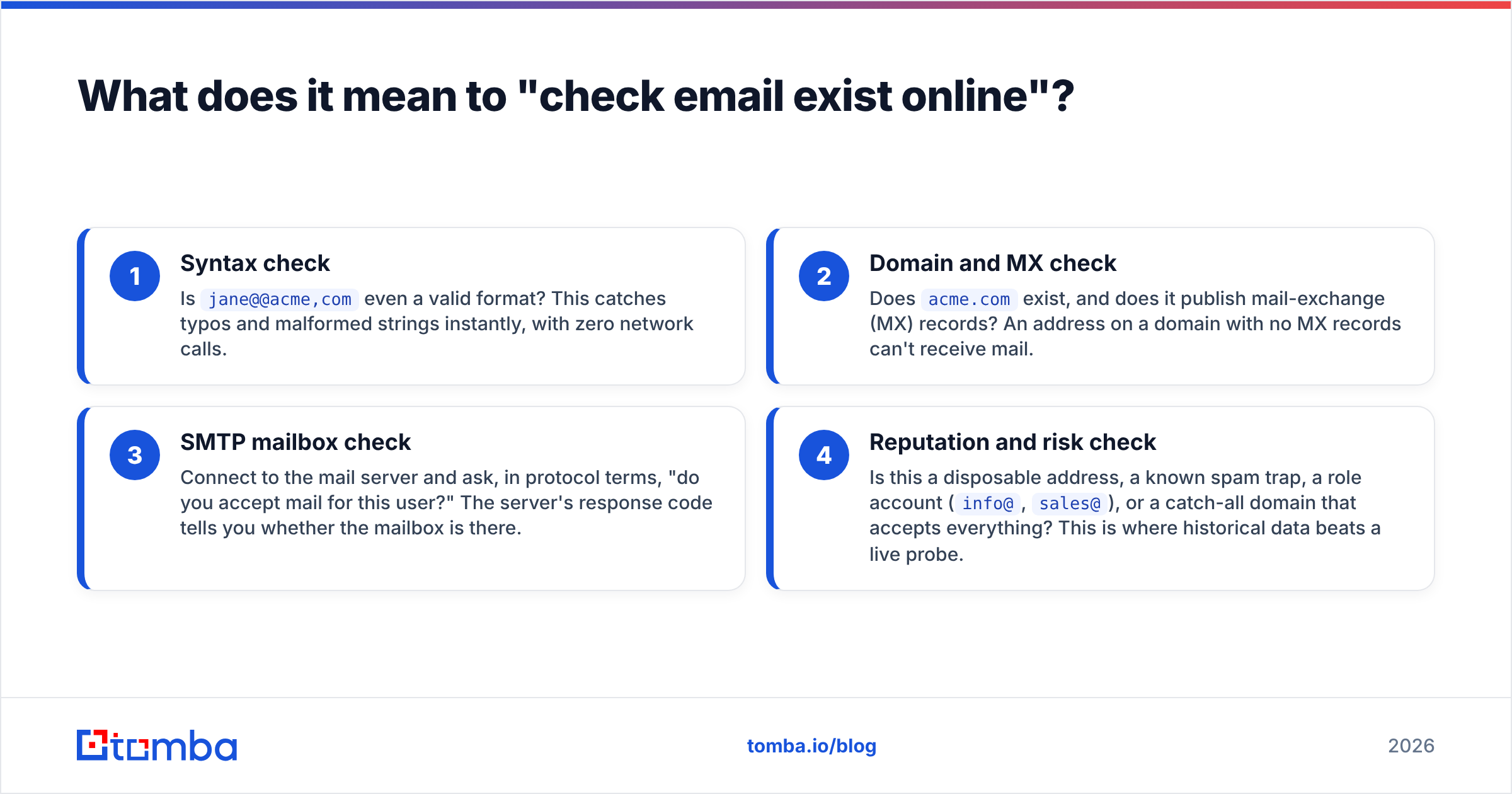
There are four layers to a proper check, and skipping any of them leaves a gap:
- Syntax check — Is
jane@@acme,comeven a valid format? This catches typos and malformed strings instantly, with zero network calls. - Domain and MX check — Does
acme.comexist, and does it publish mail-exchange (MX) records? An address on a domain with no MX records can't receive mail. - SMTP mailbox check — Connect to the mail server and ask, in protocol terms, "do you accept mail for this user?" The server's response code tells you whether the mailbox is there.
- Reputation and risk check — Is this a disposable address, a known spam trap, a role account (
info@,sales@), or a catch-all domain that accepts everything? This is where historical data beats a live probe.
A tool that only checks syntax is barely checking at all. A tool that does all four is what you actually want.
How do free online tools check if an email exists?#
Free online checkers run the same SMTP handshake you could run by hand — they just wrap it in a friendly box. Here's what happens under the hood when you paste an address and click "verify":
- Step 1 — Format parse. The tool validates the local part and domain against RFC 5322 rules. Instant pass/fail.
- Step 2 — DNS lookup. It queries DNS for the domain's MX records to find which server handles mail.
- Step 3 — SMTP conversation. It opens a connection on port 25, says
HELO, issuesMAIL FROM, thenRCPT TO:<the-address>. If the server replies with a250 OK, the mailbox likely exists. A550usually means it doesn't. - Step 4 — Verdict. The tool maps those codes to "valid," "invalid," or "unknown."
You can try this yourself with Tomba's free email checker for single lookups, or use an SMTP tester if you want to see the raw server dialogue.
The catch: major providers have deliberately made this harder. Gmail and Outlook frequently return a 250 OK for every RCPT TO, real or fake, to stop spammers from harvesting valid addresses. That's a catch-all configuration, and it's why a naive SMTP check reports "valid" for addresses that will still bounce. Handling catch-all domains correctly — using pattern data, historical sends, and confidence scoring — is the single biggest difference between a toy checker and a production-grade catch-all verifier.
What's the difference between free checkers and verification APIs?#
The short answer: free checkers are for curiosity, APIs are for revenue. Here's the breakdown.
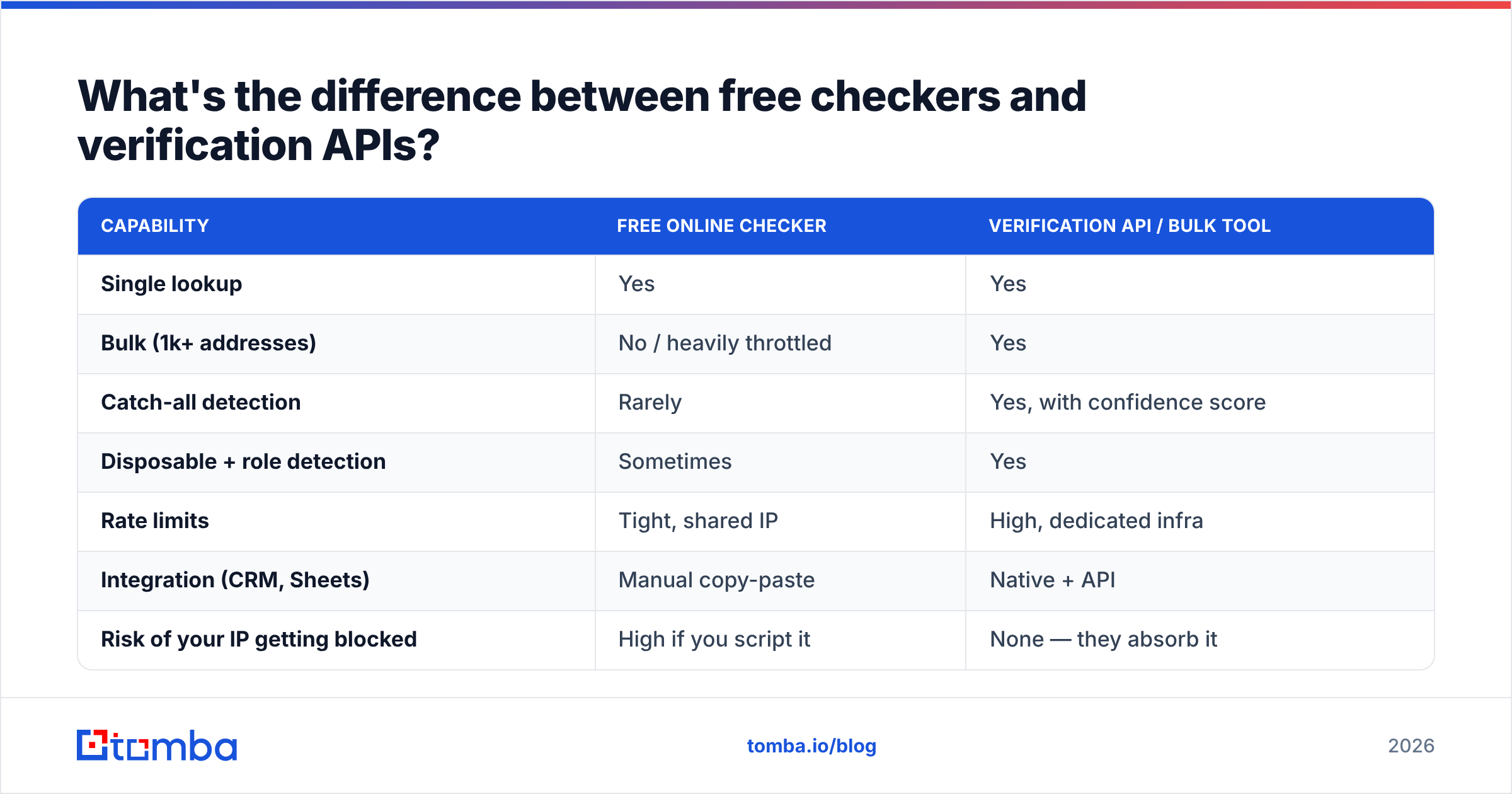
| Capability | Free online checker | Verification API / bulk tool |
|---|---|---|
| Single lookup | Yes | Yes |
| Bulk (1k+ addresses) | No / heavily throttled | Yes |
| Catch-all detection | Rarely | Yes, with confidence score |
| Disposable + role detection | Sometimes | Yes |
| Rate limits | Tight, shared IP | High, dedicated infra |
| Integration (CRM, Sheets) | Manual copy-paste | Native + API |
| Risk of your IP getting blocked | High if you script it | None — they absorb it |
| Cost | $0 | From a free tier up |
The hidden cost of "free" is your own infrastructure. If you write a script to loop a free checker over 5,000 addresses, you'll trip rate limits, get inconsistent results, and possibly land your sending IP on a blacklist for looking like a harvester. Run a blacklist checker after a scripting binge and you may not like what you see.
A verification service spreads those probes across reputable infrastructure, caches known results, and returns a clean verdict — which is the whole point.
How accurate is online email verification?#
Accuracy depends entirely on the domain type, not the tool's marketing. A good verifier is honest about confidence rather than pretending every address is a clean yes/no.
Here's the realistic accuracy picture by address type:
- Standard mailbox (non-catch-all): Very high confidence. The SMTP
RCPT TOresponse is reliable, so a "valid" verdict is trustworthy. - Catch-all domain: Lower confidence by definition — the server accepts everything. The best you get is a probabilistic score based on patterns and history, which is exactly what the catch-all finder is built for.
- Disposable / temporary domains: High confidence, because these are catalogued. A verifier flags them outright.
- Role accounts (
support@,admin@): Detectable by pattern, but "exists" doesn't mean "a person reads it."
According to email infrastructure guidance from providers like Google Postmaster Tools, keeping your bounce rate low is one of the strongest levers on inbox placement. That's why verification before sending matters more than chasing a mythical 100% accuracy number — your goal is to remove the obvious failures and quantify the uncertain ones.
If you want to go deeper on the mechanics, the general concept of email deliverability ties directly to how clean your list is when it hits the send button.
How do you check if many emails exist at once?#
For anything beyond a handful, you switch from manual checking to bulk verification — and you stop touching mail servers yourself.
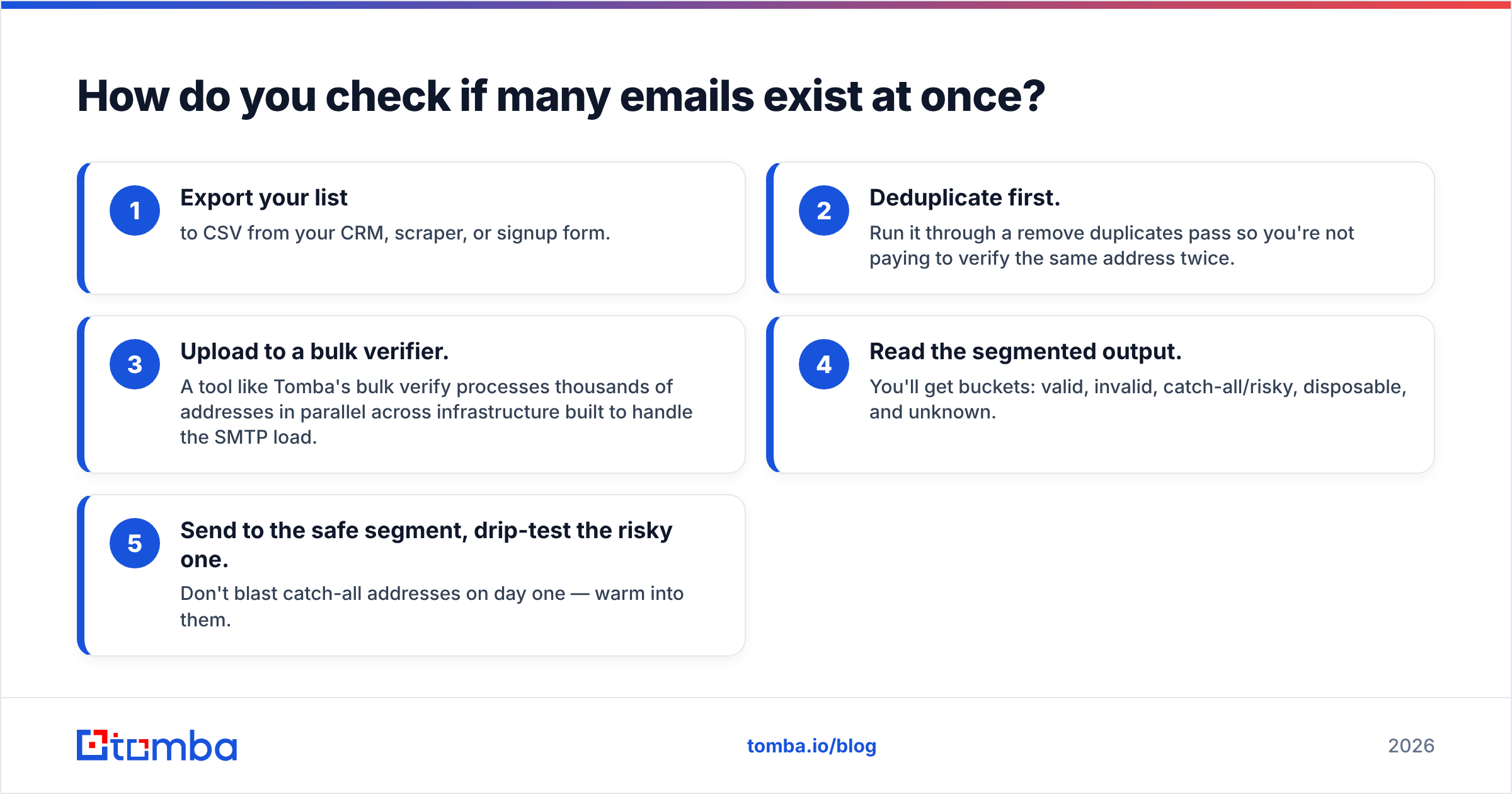
The workflow that scales:
- Export your list to CSV from your CRM, scraper, or signup form.
- Deduplicate first. Run it through a remove duplicates pass so you're not paying to verify the same address twice.
- Upload to a bulk verifier. A tool like Tomba's bulk verify processes thousands of addresses in parallel across infrastructure built to handle the SMTP load.
- Read the segmented output. You'll get buckets: valid, invalid, catch-all/risky, disposable, and unknown.
- Send to the safe segment, drip-test the risky one. Don't blast catch-all addresses on day one — warm into them.
This is also where verification stops being a standalone task and becomes part of your pipeline. If you're already finding addresses with an email finder or pulling them from a domain search, routing every result through verification before it lands in your sequence is the move that keeps bounce rates near zero.
Can you check an email exists without sending a message?#
Yes — and you almost always should. The entire point of SMTP verification is that the RCPT TO step happens before DATA, which is the part where an actual message body would be transmitted. The verifier hangs up after the server acknowledges (or rejects) the recipient, so no email ever arrives in the inbox.
This is what makes silent verification possible. The mailbox owner sees nothing. You learn whether their address is live. It's the email equivalent of checking whether a shop is open by looking at the "open" sign, rather than walking in and asking the staff.
A few honest caveats:
- Greylisting can make a server temporarily defer your probe, returning "unknown" on the first try. Good verifiers retry.
- Aggressive firewalls sometimes block port 25 probes entirely, which is another source of "unknown."
- Privacy-forward providers increasingly obscure mailbox existence, pushing more domains toward catch-all behavior over time.
None of these break verification — they just mean a quality tool reports confidence levels honestly instead of forcing a binary answer.
Which method should you use?#
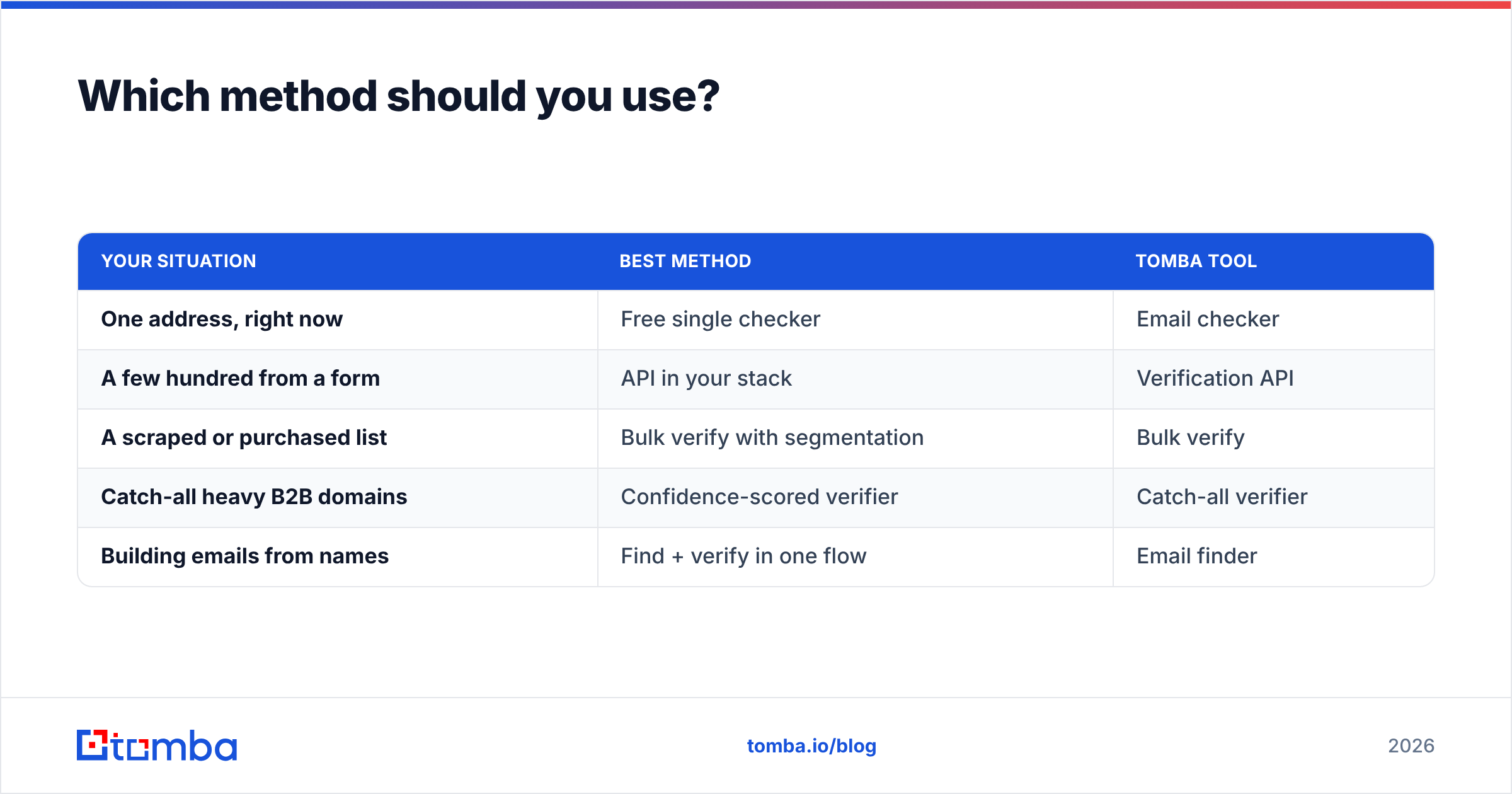
Match the method to the job. Here's the decision shortcut:
| Your situation | Best method | Tomba tool |
|---|---|---|
| One address, right now | Free single checker | Email checker |
| A few hundred from a form | API in your stack | Verification API |
| A scraped or purchased list | Bulk verify with segmentation | Bulk verify |
| Catch-all heavy B2B domains | Confidence-scored verifier | Catch-all verifier |
| Building emails from names | Find + verify in one flow | Email finder |
For most teams running outbound, the right answer is the combined flow: find the address, verify it, and only then let it into the sequence. Pricing for the paid tiers — Starter at $49/mo, Growth at $99/mo, Pro at $249/mo — is laid out on the Tomba pricing page, and the free tier covers 25 searches a month if you just want to test the accuracy on your own list first. Third-party reviews on G2 are a reasonable sanity check when you're comparing verification vendors.
Common mistakes when checking emails online#
- Trusting a lone
250 OK. On catch-all domains, that code means almost nothing. Always check whether the domain is catch-all before treating "valid" as gospel. - Scripting a free tool in bulk. You'll get throttled and risk blacklisting your own IP. Use infrastructure built for volume.
- Verifying once and never again. Lists decay 2–3% per month as people change jobs. Re-verify before every major send.
- Ignoring role and disposable accounts.
info@addresses tank engagement metrics even when they technically "exist." - Skipping the syntax pass. A surprising share of list problems are plain typos that a format check catches for free.
Final word: stop guessing, start verifying#
Checking whether an email exists online comes down to layering four signals — syntax, MX, SMTP, and reputation — and being honest about confidence on catch-all domains. Free tools handle the occasional lookup. Anything that touches revenue deserves a real verifier.
If you want one place that finds the address and confirms it's deliverable before you ever hit send, start with the Tomba Email Finder and pair it with the email verifier. Run your next list through the free tier, watch your bounce rate drop, and let the clean data do the convincing. Your sender reputation will thank you.
// get started
Find, verify and enrich your first contacts today
Start on the free plan with 25 searches a month, then scale when your team is ready.
Free plan · No credit card required · GDPR & CCPA
// about the author