How to Check If a Gmail Account Is Active in 2026: 6 Ways
Need to know if a Gmail address is real and in use before you hit send? Here are six reliable ways to check if a Gmail account is active in 2026 — from manual tricks to bulk verification.
You found a contact, copied their Gmail address, and now you're staring at the cursor wondering: is this inbox even real, or am I about to bounce off a dead account and ding my sender reputation? Knowing how to check if a Gmail account is active is the difference between a clean send and a bounce that follows you for weeks.
This guide walks through six practical methods — from quick manual tricks to bulk verification — so you can confirm a Gmail address before it costs you a deliverability hit.
TL;DR#
- The fastest reliable method is an email verifier that runs an SMTP check without sending mail — it tells you if the mailbox accepts messages.
- Manual tricks (Google account recovery, adding the address to Contacts, Google Chat) give signals but are slow and easy to misread.
- Never bulk-email an unverified Gmail list — Gmail throttles and blocks senders with high bounce rates fast.
- For more than a handful of addresses, use a bulk verifier so you're not checking one inbox at a time.
- A 2–5% bounce rate is the danger zone; verified lists keep you well under it.
Why does it matter if a Gmail account is active?#
Conclusion first: an inactive or fake Gmail address that gets a message bounces, and bounces wreck your sender reputation.
Think of your sending domain like a credit score. Every hard bounce is a missed payment. Stack up enough of them and mailbox providers — Gmail included — start routing your mail to spam or rejecting it outright. Google's own Postmaster guidelines make clear that low spam rates and clean lists are prerequisites for inbox placement.
So checking whether a Gmail account is active isn't busywork. It directly protects three things:
- Deliverability — fewer bounces means more of your real mail reaches real people.
- Data hygiene — your CRM stops filling with dead contacts that skew reporting.
- Cost — you stop paying (in time and tool credits) to email ghosts.

What are the manual ways to check if a Gmail account is active?#
You can get useful signals without any paid tool. None of these are conclusive on their own, but stacked together they paint a picture.
1. The Google account recovery trick. Go to the Gmail sign-in page, enter the address, and click "Forgot password." If Google offers recovery options (a masked phone number or backup email), the account exists. If it says "Couldn't find your Google Account," the address was never registered. Caveat: this confirms existence, not whether the person still checks the inbox.
2. Add it to Google Contacts. When you add a Gmail address to your Google Contacts and the person has a public profile photo or name that populates, that's a strong sign of an active account. An empty placeholder is inconclusive.
3. Start a Google Chat or Meet invite. Typing the address into Google Chat sometimes surfaces the person's name and avatar. A real, active Google identity usually resolves; a dead address often won't.
4. Send a calendar invite (use sparingly). Google Calendar can show free/busy status for some accounts, which implies an active user. This is the most intrusive manual method — don't lean on it for cold outreach.
The problem with all four: they're slow, one-at-a-time, and full of false signals. A profile photo doesn't prove the inbox accepts mail, and "account exists" doesn't mean "account is monitored." For anything beyond a single lookup, you need something built for the job.
How does an email verifier check if a Gmail account is active?#
An email verifier does what the manual tricks can't: it talks to the mail server directly and asks whether the mailbox will accept a message — without actually sending one.
Here's the everyday analogy: it's like calling a restaurant to ask "are you taking reservations tonight?" instead of showing up with eight people and hoping. The verifier knocks on Gmail's SMTP door, checks the response, and reports back.
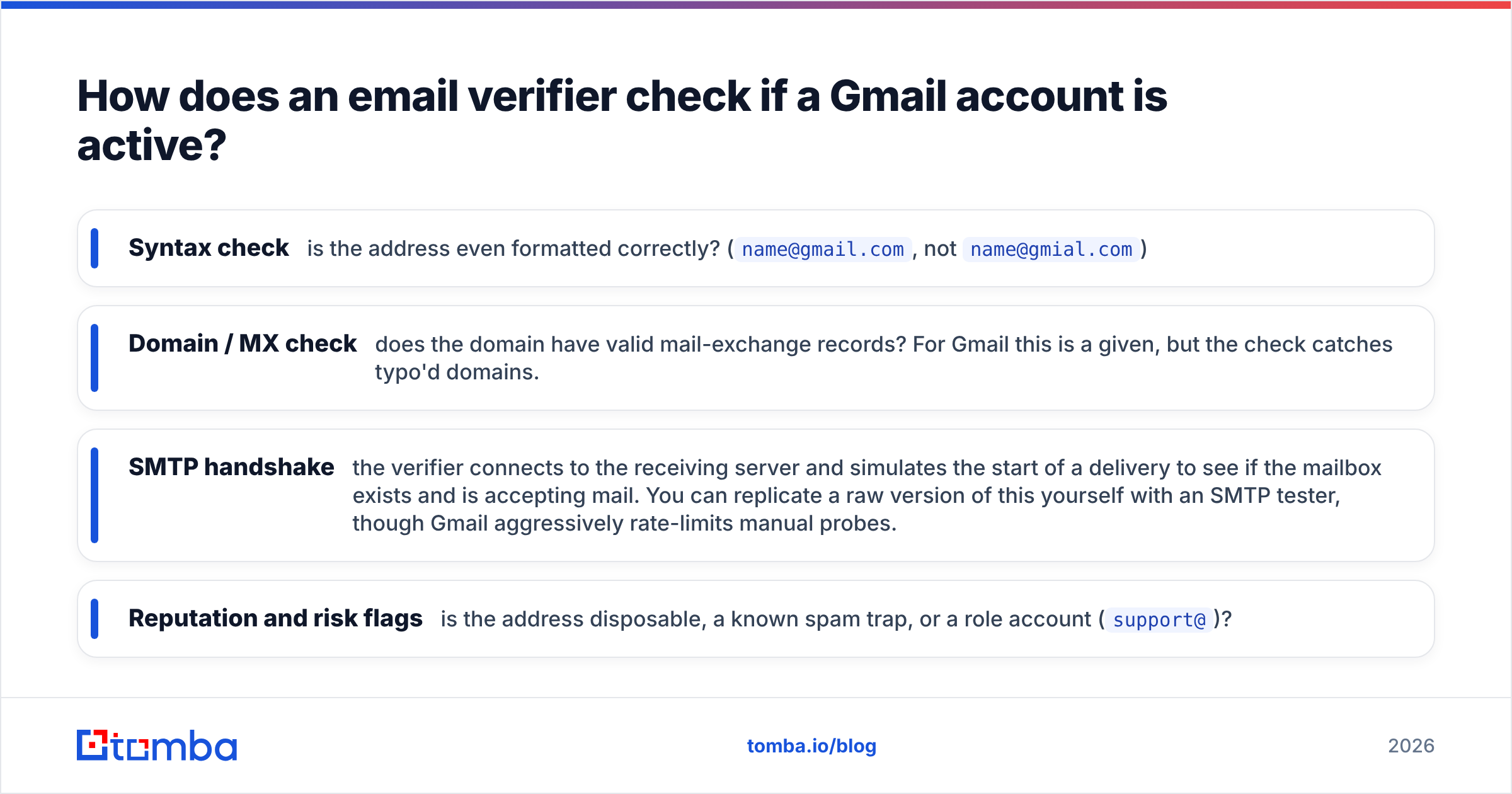
Technically, a quality verifier runs these layers in sequence:
- Syntax check — is the address even formatted correctly? (
name@gmail.com, notname@gmial.com) - Domain / MX check — does the domain have valid mail-exchange records? For Gmail this is a given, but the check catches typo'd domains.
- SMTP handshake — the verifier connects to the receiving server and simulates the start of a delivery to see if the mailbox exists and is accepting mail. You can replicate a raw version of this yourself with an SMTP tester, though Gmail aggressively rate-limits manual probes.
- Reputation and risk flags — is the address disposable, a known spam trap, or a role account (
support@)?
For a single address, a free email checker gives you a yes/no in seconds. If you already have an email address and want to learn who's behind it, a reverse email lookup goes the other direction — turning the address into a name, company, and profile.
One important nuance for Gmail specifically: standard @gmail.com consumer addresses are not catch-all, so SMTP verification is usually reliable. But Google Workspace domains (custom company domains running on Google) can be configured as catch-all, which means the server says "yes" to everything. That's where a dedicated catch-all verifier earns its keep.
Which method should you use to check if a Gmail account is active?#
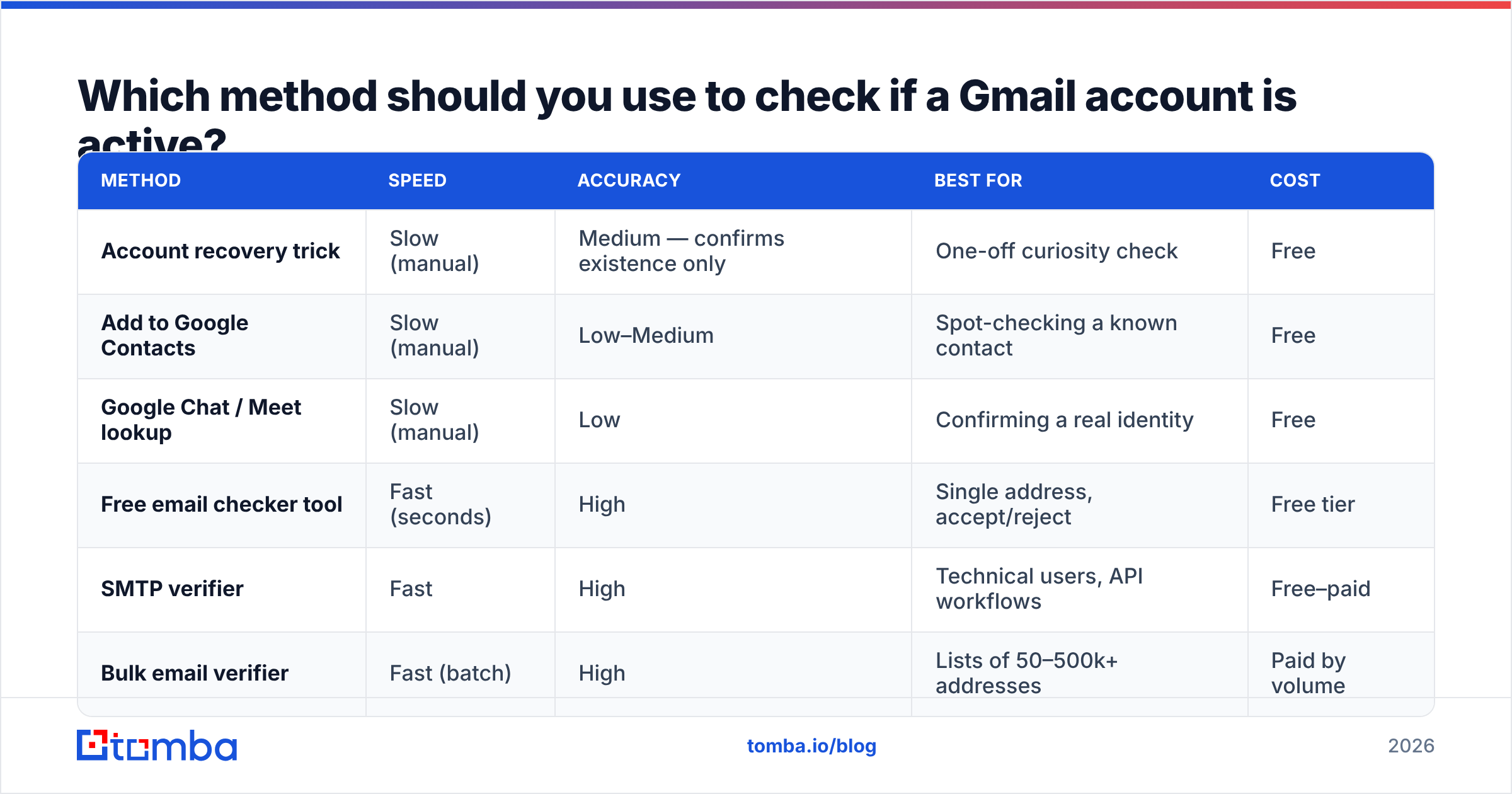
It depends on how many addresses you have and how much accuracy you need. Here's a direct comparison.
| Method | Speed | Accuracy | Best for | Cost |
|---|---|---|---|---|
| Account recovery trick | Slow (manual) | Medium — confirms existence only | One-off curiosity check | Free |
| Add to Google Contacts | Slow (manual) | Low–Medium | Spot-checking a known contact | Free |
| Google Chat / Meet lookup | Slow (manual) | Low | Confirming a real identity | Free |
| Free email checker tool | Fast (seconds) | High | Single address, accept/reject | Free tier |
| SMTP verifier | Fast | High | Technical users, API workflows | Free–paid |
| Bulk email verifier | Fast (batch) | High | Lists of 50–500k+ addresses | Paid by volume |
The pattern is clear: manual methods are fine for one address you're personally curious about. The moment you're working from a list — prospecting, list cleaning, lead imports — a verifier wins on every axis that matters.

How do you check if many Gmail accounts are active at once?#
If you've got more than a handful, stop checking inboxes one at a time. Upload the list to a bulk email verifier and let it run the SMTP and reputation checks in parallel.
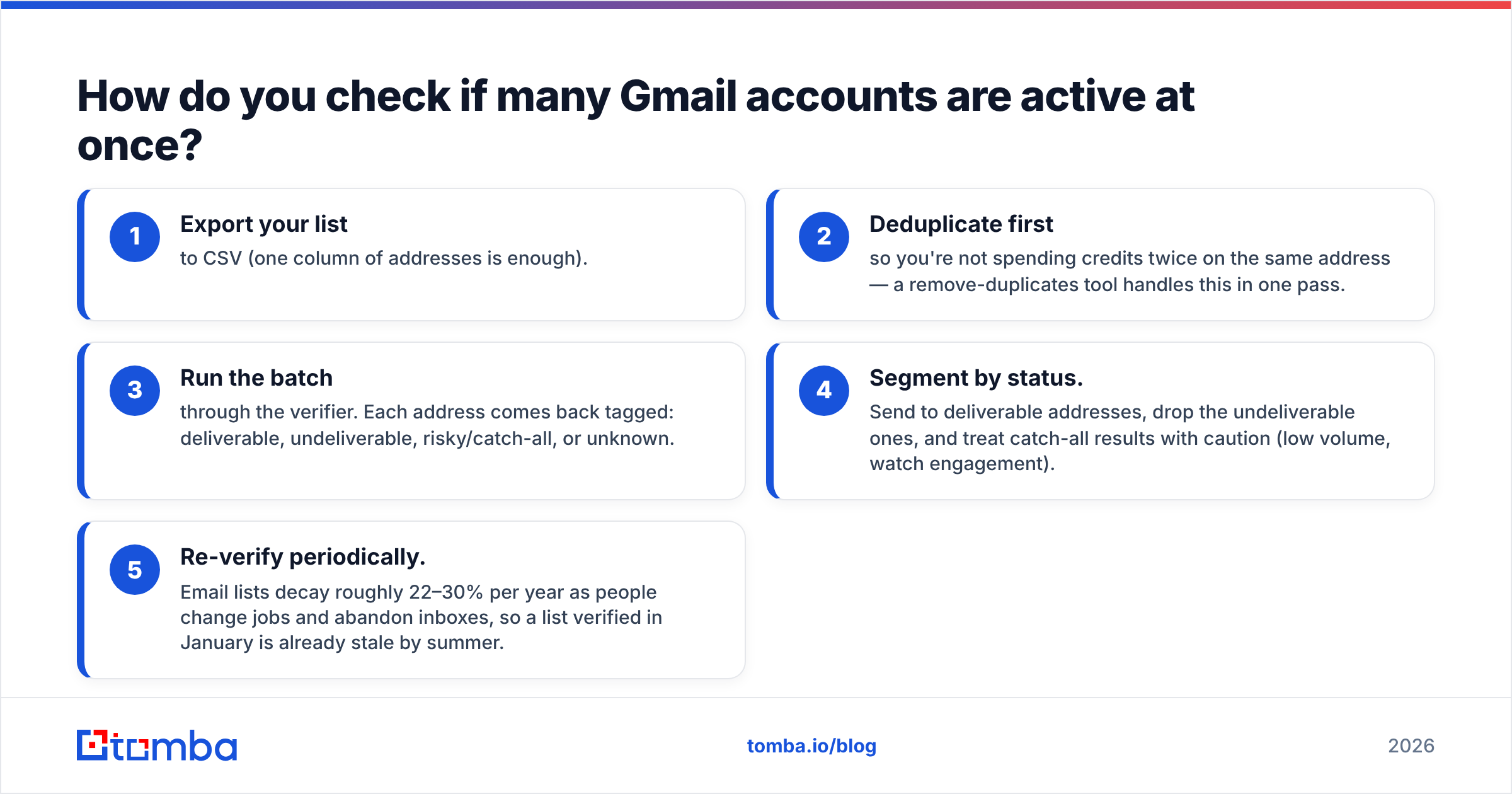
A solid bulk workflow looks like this:
- Export your list to CSV (one column of addresses is enough).
- Deduplicate first so you're not spending credits twice on the same address — a remove-duplicates tool handles this in one pass.
- Run the batch through the verifier. Each address comes back tagged: deliverable, undeliverable, risky/catch-all, or unknown.
- Segment by status. Send to deliverable addresses, drop the undeliverable ones, and treat catch-all results with caution (low volume, watch engagement).
- Re-verify periodically. Email lists decay roughly 22–30% per year as people change jobs and abandon inboxes, so a list verified in January is already stale by summer.
If verification is part of a larger pipeline — enriching leads, syncing to a CRM — you can wire the same checks into the Tomba API and verify addresses programmatically as they enter your system, before they ever reach a campaign.
What do Gmail verification statuses actually mean?#
Verifiers return a status, not just a green checkmark. Reading them correctly keeps you from over-trusting or over-discarding.
- Deliverable / Valid — the mailbox exists and accepts mail. Safe to send.
- Undeliverable / Invalid — the mailbox doesn't exist or rejects mail. Remove it; sending here causes a hard bounce.
- Risky / Accept-all (catch-all) — the server accepts everything, so existence can't be confirmed. Common on Workspace domains. Send low volume and watch engagement.
- Unknown — the server was unreachable or timed out (often from rate-limiting). Re-test later before deciding.
- Disposable — a temporary throwaway address. Almost never worth keeping for B2B.
A practical rule: build your active sends from Deliverable addresses only, sprinkle in catch-all addresses cautiously, and never knowingly mail an Undeliverable result.
Does checking a Gmail account violate Google's rules or privacy?#
Honest answer: SMTP verification that doesn't send a message sits in a widely accepted gray area — it's the same handshake any sending server performs — but you should still verify responsibly and respect data-protection laws.
Two guardrails:
- Don't hammer Gmail's servers manually. Google rate-limits and can temporarily block IPs that probe too aggressively. This is exactly why a managed verifier (with rotating infrastructure and proper throttling) is safer than rolling your own loop.
- Stay compliant. If you're processing contact data for outreach, follow GDPR/CAN-SPAM rules on consent and opt-out. Verification tells you an address works; it doesn't grant you permission to email it. (See Wikipedia's overview of email verification for the technical background.)
Reputable verification providers publish their data sources and handle the SMTP layer in a way that won't get your own domain flagged — which is the entire point of outsourcing it.
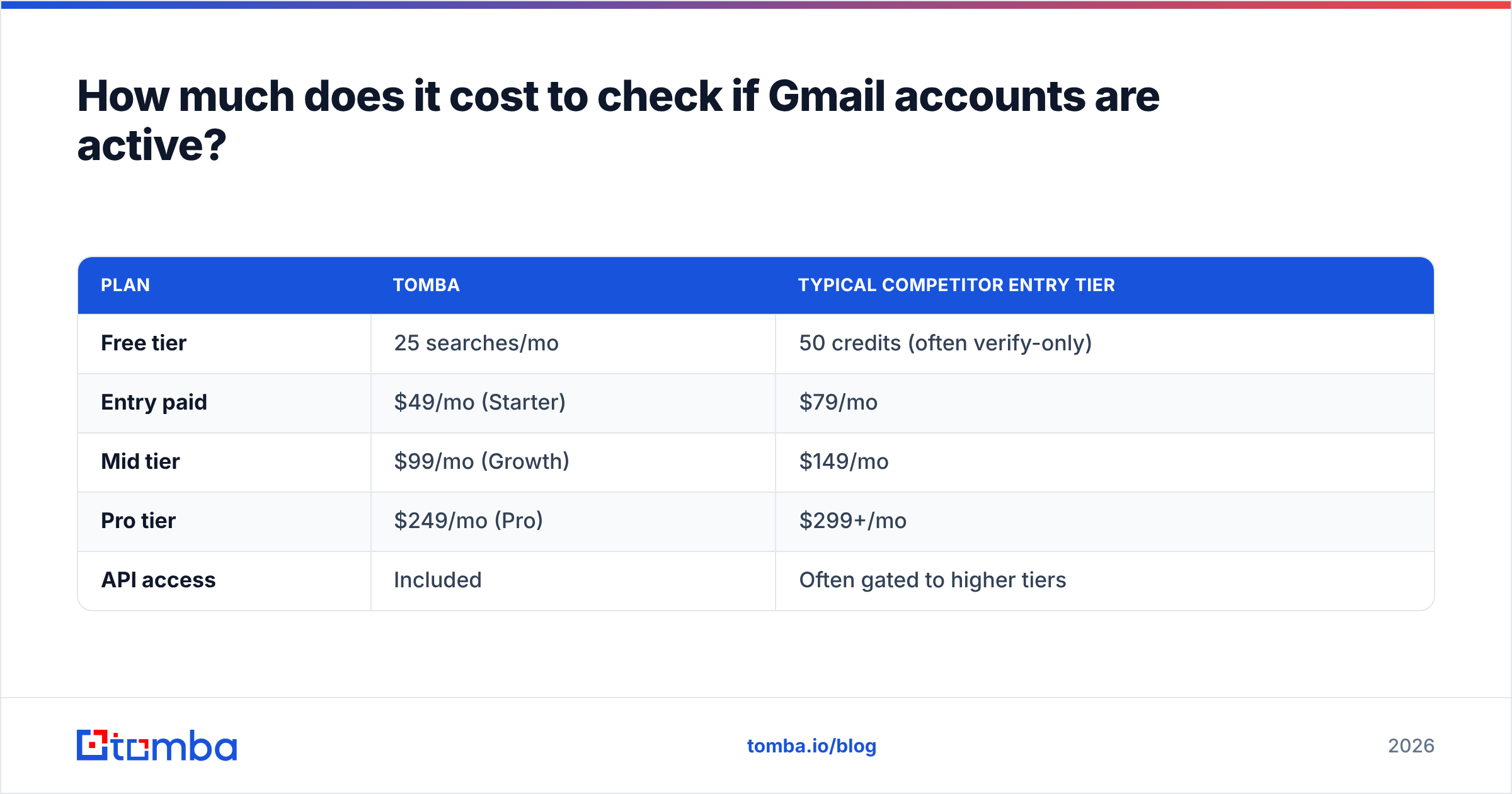
How much does it cost to check if Gmail accounts are active?#
You can check a single address for free. At volume, you pay per credit, and pricing is where tools diverge sharply.
| Plan | Tomba | Typical competitor entry tier |
|---|---|---|
| Free tier | 25 searches/mo | 50 credits (often verify-only) |
| Entry paid | $49/mo (Starter) | $79/mo |
| Mid tier | $99/mo (Growth) | $149/mo |
| Pro tier | $249/mo (Pro) | $299+/mo |
| API access | Included | Often gated to higher tiers |
For exact limits and credit allocations, see the current Tomba pricing. The takeaway: a free tier is enough to check if a Gmail account is active for a small list, and the paid plans only matter once you're verifying thousands of addresses a month or wiring verification into your stack.
Frequently asked questions#
Can you tell if a Gmail account is active without sending an email? Yes. An SMTP-based email verifier checks whether the mailbox accepts mail by simulating the start of a delivery, without actually sending a message. This is the cleanest way to confirm an active account.
Does "Forgot password" really confirm a Gmail exists? It confirms the address is registered. It does not confirm the inbox is monitored or that it will accept your mail — for that, use a verifier.
Why does a Gmail address show as "risky" or "catch-all"? That status usually appears on Google Workspace custom domains configured to accept all mail. The server can't tell you whether a specific mailbox exists, so verification returns "risky." Send carefully and watch engagement.
How often should I re-verify my Gmail contact list? Every 60–90 days for active campaigns. Email lists decay 20–30% per year, so regular re-verification keeps bounce rates low.
Start verifying before you send#
Stop guessing whether a Gmail address is real and start knowing. Drop a single address into the Tomba Email Verifier for an instant accept/reject, or upload a full list to the bulk verifier and clean it in one pass. Either way, you protect your sender reputation, keep your CRM honest, and make sure every send lands in an inbox that's actually checked. Pair it with the Tomba Email Finder when you need to find the right address in the first place — find it, verify it, then send with confidence.
// get started
Find, verify and enrich your first contacts today
Start on the free plan with 25 searches a month, then scale when your team is ready.
Free plan · No credit card required · GDPR & CCPA
// about the author