How to Check If an Email Address Is Blacklisted in 2026
Blacklisted on a DNSBL and watching your open rates crater? Here's how to check if an email address is blacklisted, find the cause, and get delisted fast.
Your campaign open rates dropped off a cliff overnight, bounce notices are stacking up, and replies went silent. Before you blame your copy, check one thing: whether your sending domain or IP landed on a blacklist. A single listing can route every message you send straight to spam — or block it outright.
TL;DR#
- A "blacklisted email address" almost always means the IP or domain behind it is on a DNS-based blocklist (DNSBL) — individual addresses are rarely listed; the infrastructure they send from is.
- Check fast with a multi-blacklist lookup tool (MXToolbox, Spamhaus, or Tomba's free blacklist checker) using your sending domain, sending IP, and the recipient domain.
- Listings come from spam traps, high bounce rates, complaints, or shared-IP neighbors — fix the root cause before you request delisting or you will get relisted.
- Verify your lists before sending with an email verifier to cut the bounces and spam-trap hits that get you listed in the first place.
- Delisting is usually free and self-service, but turnaround ranges from minutes (Barracuda) to weeks (some manual reviews).
What does it mean when an email address is "blacklisted"?#
When people say an email address is blacklisted, they usually mean one of three layers got flagged — not the literal name@company.com string.
Think of it like a building with a bad reputation. The postal service doesn't refuse one tenant's letters; it flags the whole address. Email works the same way. Spam filters and blocklist operators track reputation at the infrastructure level:
- The sending IP address — the server that physically delivers your mail. Shared IPs (most ESPs, Google Workspace, Microsoft 365 pools) inherit the behavior of every other sender on them.
- The sending domain — the
From:domain and its DNS records. Domain-based lists like Spamhaus DBL track this regardless of which IP you switch to. - The recipient or list domain — if you're checking whether a contact's domain is risky to mail, that's a different question answered by an email verifier and catch-all detection.
A blacklist (more precisely a DNSBL or RBL — real-time blackhole list) is a published database of IPs and domains known for spam. Receiving mail servers query these lists in milliseconds during the SMTP handshake. If you're on one, the receiving server can defer, junk, or reject your message before it ever reaches an inbox.
What are the main types of email blacklists?#
Not all blocklists carry the same weight. Getting listed on a major one like Spamhaus affects deliverability across thousands of receivers; a niche list might affect almost nobody. Here's how the landscape breaks down:
- IP blacklists (DNSBLs): Spamhaus ZEN, Barracuda, SpamCop, SORBS. These flag sending IPs and have the broadest reach.
- Domain blacklists (DBLs / URIBLs): Spamhaus DBL, SURBL, URIBL. These flag domains and URLs found in message bodies — switching IPs won't help you escape these.
- Spam-trap networks: Addresses that exist only to catch senders with poor list hygiene. One hit can land you on multiple lists at once.
- Private/internal blocklists: Gmail, Outlook, and Yahoo each run their own internal reputation systems. You can't query these directly — you infer problems from bounce codes and Google Postmaster Tools.
- Industry feedback lists: Reputation data shared between providers like Validity (Sender Score) and Cloudmark.
Knowing which type flagged you decides your fix. An IP listing might be solved by a warm-up or a new IP; a domain listing means you have a content or authentication problem to repair first.
How do I check if an email address is blacklisted?#
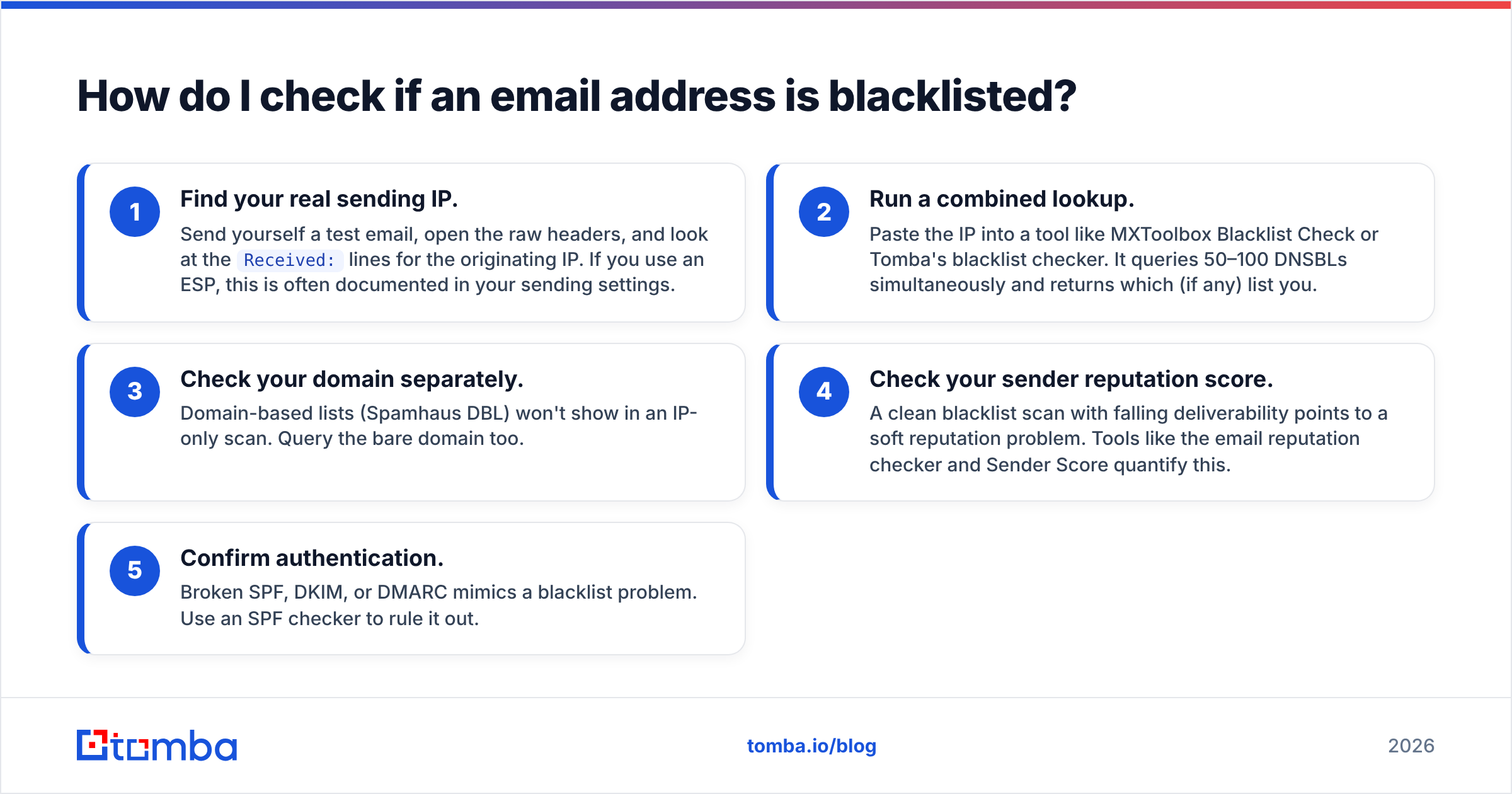
Run your domain and IP through a multi-blacklist lookup — it checks dozens of DNSBLs at once. Here's the practical sequence:
- Find your real sending IP. Send yourself a test email, open the raw headers, and look at the
Received:lines for the originating IP. If you use an ESP, this is often documented in your sending settings. - Run a combined lookup. Paste the IP into a tool like MXToolbox Blacklist Check or Tomba's blacklist checker. It queries 50–100 DNSBLs simultaneously and returns which (if any) list you.
- Check your domain separately. Domain-based lists (Spamhaus DBL) won't show in an IP-only scan. Query the bare domain too.
- Check your sender reputation score. A clean blacklist scan with falling deliverability points to a soft reputation problem. Tools like the email reputation checker and Sender Score quantify this.
- Confirm authentication. Broken SPF, DKIM, or DMARC mimics a blacklist problem. Use an SPF checker to rule it out.
If you manage cold outreach at scale, also verify the recipient side. Mailing to dead or trap addresses is the single fastest way onto a list — validate every contact with the email verifier before you import them.
Which blacklist checker should I use?#
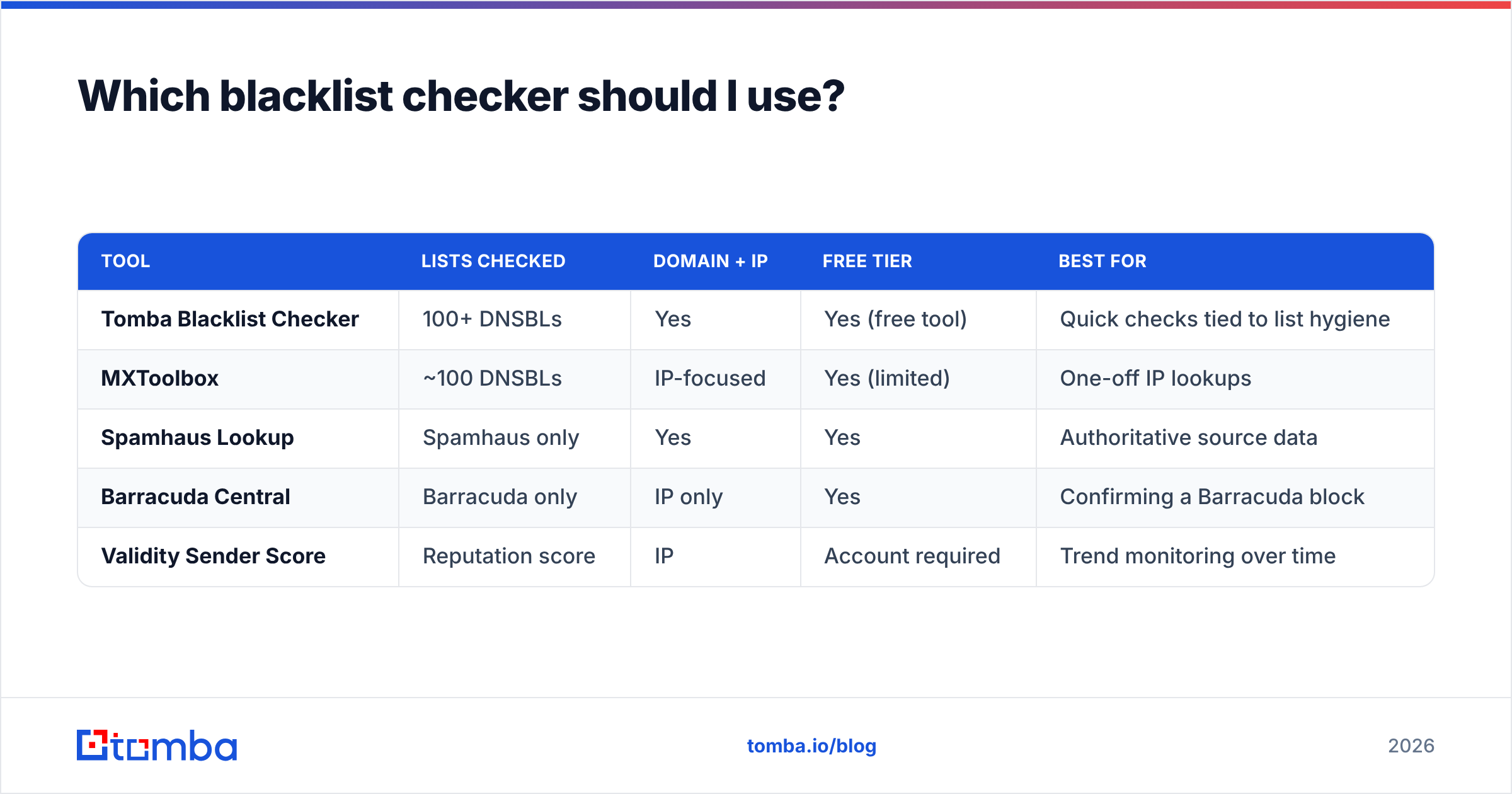
Different tools cover different lists, pricing, and depth. Here's a side-by-side of the most common options sellers reach for:
| Tool | Lists checked | Domain + IP | Free tier | Best for |
|---|---|---|---|---|
| Tomba Blacklist Checker | 100+ DNSBLs | Yes | Yes (free tool) | Quick checks tied to list hygiene |
| MXToolbox | ~100 DNSBLs | IP-focused | Yes (limited) | One-off IP lookups |
| Spamhaus Lookup | Spamhaus only | Yes | Yes | Authoritative source data |
| Barracuda Central | Barracuda only | IP only | Yes | Confirming a Barracuda block |
| Validity Sender Score | Reputation score | IP | Account required | Trend monitoring over time |
A quick note on neutrality: no single tool is "the best." MXToolbox and Spamhaus are the industry references for raw lookups. Tomba's checker is convenient when you're already cleaning lists in the same workflow, because it sits next to the verifier and spam checker you'll need to fix the underlying cause. Use whichever fits — but always cross-reference the authoritative operator (Spamhaus, Barracuda) before you panic over a minor list.
Why did my email address get blacklisted?#
Listings are symptoms, not random bad luck. The usual culprits, ranked by how often they bite cold-outreach senders:
- Spam traps in your list. Recycled or pristine trap addresses signal you're not verifying contacts. This is the number-one cause and the easiest to prevent.
- High bounce rates. Sending to invalid mailboxes tells receivers you bought or scraped a list. Keep hard bounces under ~2%.
- Spike in volume. Going from 50 to 5,000 sends overnight on a cold domain reads as a compromised account.
- Complaints. Recipients hitting "report spam" above ~0.1% triggers reputation systems fast.
- Bad neighbors on a shared IP. If your ESP put you on an IP with spammers, you inherit their listing.
- Compromised account or open relay. Malware sending through your server gets you listed within hours.
- Poor authentication. Missing or misaligned SPF record, DKIM, or DMARC raises suspicion even with clean content.
The thread connecting most of these is data quality. Strong sender reputation starts with a clean, verified list — which is why teams that treat verification as optional keep ending up back on the same lists.
How do I get removed from an email blacklist?#
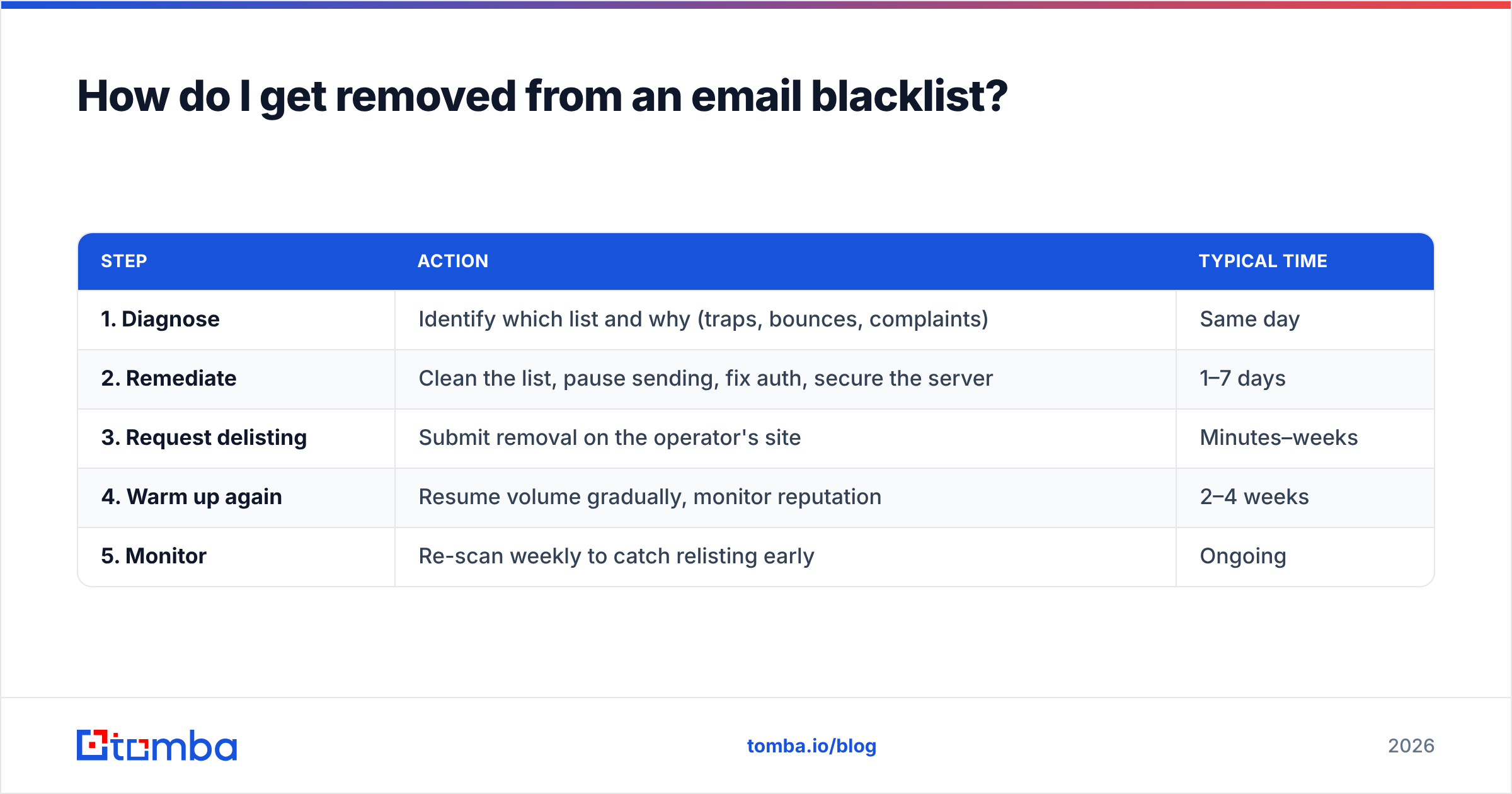
Fix the root cause first, then request delisting — relisting is automatic if the underlying problem remains. The process:
| Step | Action | Typical time |
|---|---|---|
| 1. Diagnose | Identify which list and why (traps, bounces, complaints) | Same day |
| 2. Remediate | Clean the list, pause sending, fix auth, secure the server | 1–7 days |
| 3. Request delisting | Submit removal on the operator's site | Minutes–weeks |
| 4. Warm up again | Resume volume gradually, monitor reputation | 2–4 weeks |
| 5. Monitor | Re-scan weekly to catch relisting early | Ongoing |
A few operator-specific notes:
- Spamhaus: Use their removal portal — but resolve the cause first, or automated relisting kicks in.
- Barracuda: Self-service form, often delisted within hours.
- SpamCop: Listings expire automatically once spam reports stop, usually within 24 hours.
- Gmail/Outlook internal: No removal form. Reduce volume, fix complaints, and let reputation recover through consistent good sending.
Do not "list-bomb" removal requests. Requesting delisting repeatedly without fixing anything is a fast way to lose credibility with operators.
How do I avoid getting blacklisted again?#
Prevention is cheaper than recovery. The senders who never see a blacklist follow a few habits:
- Verify before you send. Run every imported list through an email verifier to strip invalids, role accounts, and likely traps. For large imports, use bulk verify.
- Find emails from reliable sources. Scraping random addresses invites traps. Sourcing through a verified email finder and confirming data accuracy keeps your list clean from the start.
- Warm up new domains and IPs. Ramp volume slowly over weeks; never blast a cold domain.
- Authenticate everything. SPF, DKIM, and DMARC aligned and passing.
- Honor unsubscribes instantly and watch complaint rates.
- Segment and re-engage. Stop mailing contacts who never open; dead engagement drags reputation down.
- Monitor proactively. A weekly blacklist + email deliverability check catches issues before they tank a campaign.
The math is simple: a 3% trap-and-bounce list will eventually get you listed no matter how good your copy is. A verified list rarely does.
How is a blacklisted email different from an invalid one?#
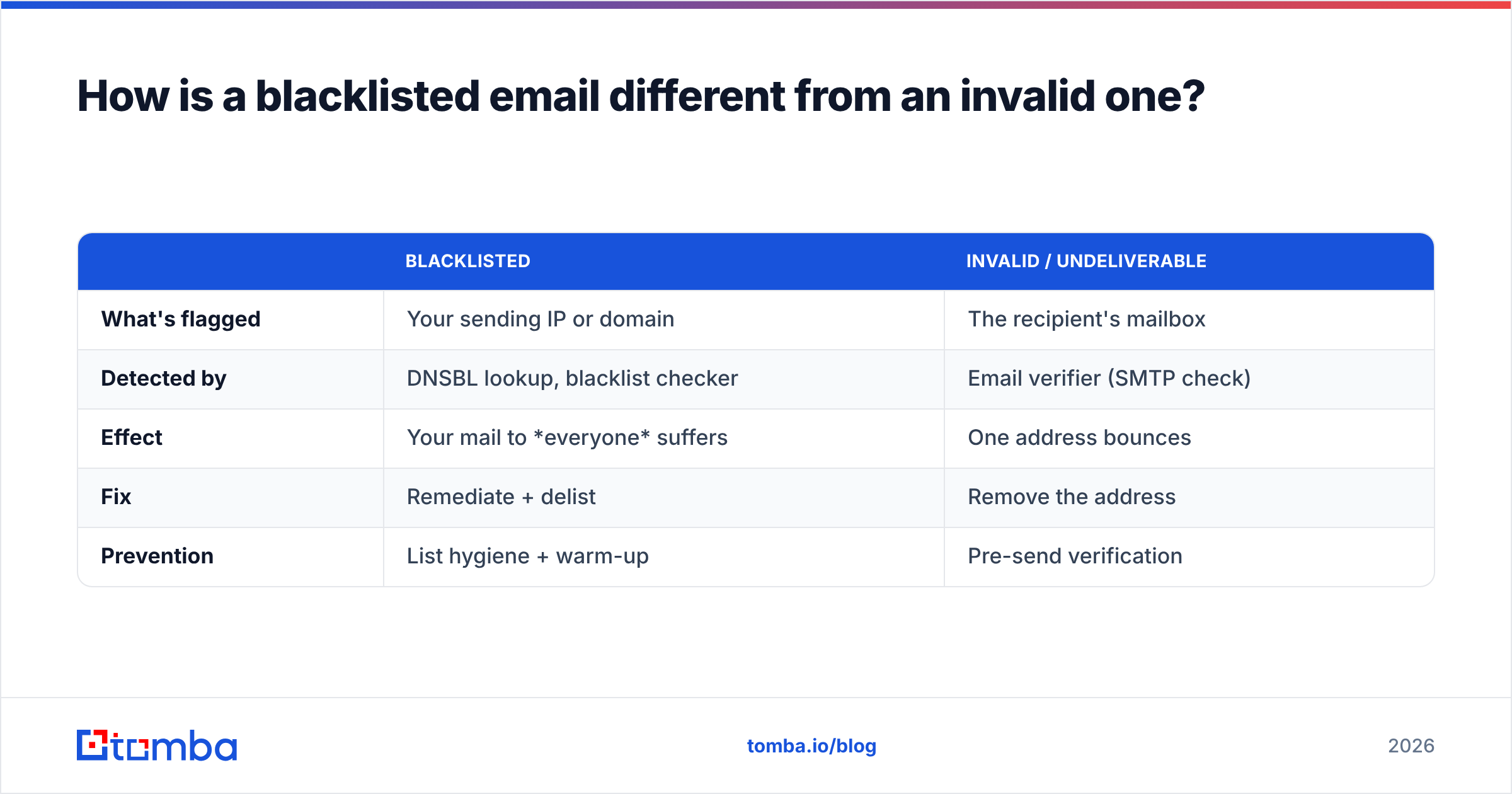
These get conflated, but they're separate problems with separate tools:
| Blacklisted | Invalid / undeliverable | |
|---|---|---|
| What's flagged | Your sending IP or domain | The recipient's mailbox |
| Detected by | DNSBL lookup, blacklist checker | Email verifier (SMTP check) |
| Effect | Your mail to everyone suffers | One address bounces |
| Fix | Remediate + delist | Remove the address |
| Prevention | List hygiene + warm-up | Pre-send verification |
In practice they feed each other: sending to invalid addresses (a verification problem) is what gets you blacklisted (a reputation problem). Solve the input side and the output side mostly takes care of itself. If you also need to confirm whether a recipient's domain accepts all mail, a catch-all verifier tells you what a basic check can't.
Frequently asked questions#
Can a single email address be blacklisted by itself? Rarely. Blocklists track IPs and domains, not individual mailboxes. If a specific address can't reach someone, it's more likely a recipient-side block or an invalid mailbox — check it with an email verifier, not a blacklist tool.
How often should I check my blacklist status? Weekly for active senders, and immediately whenever deliverability drops. High-volume cold outreach teams often automate daily checks via the Tomba API.
Does being on one blacklist matter? It depends on the list. Spamhaus or Barracuda listings hurt broadly. Many small or defunct lists are ignored by major receivers. Always weigh the operator's reach before reacting.
Will switching IPs fix a domain blacklist? No. Domain-based lists (Spamhaus DBL, URIBL) follow your domain across any IP. You must fix the content/authentication cause and request delisting.
Is checking a blacklist free? Yes. Lookups and most delisting requests are free and self-service. The cost is the time spent fixing the root cause.
Stop the cycle before it starts#
Most blacklist trouble traces back to one thing: mailing addresses you never verified. You can keep checking, delisting, and re-warming — or you can fix the input. Build your lists with the Tomba Email Finder, confirm every contact is real and deliverable before it hits your sequence, and you cut off the spam traps and bounces that put senders on blocklists in the first place. Start free with 25 searches a month, and check the Tomba pricing plans (Starter at $49/mo) when you're ready to scale clean outreach. A clean list is the cheapest deliverability insurance you'll ever buy.
// get started
Find, verify and enrich your first contacts today
Start on the free plan with 25 searches a month, then scale when your team is ready.
Free plan · No credit card required · GDPR & CCPA
// about the author