How to Check If an Email Is Genuine: 2026 Verification Guide
Fake and risky email addresses quietly wreck your sender reputation. Here's how to check if an email is genuine in 2026 — from syntax to SMTP to verification tools.
You collected an email address. Maybe a prospect typed it into a form, maybe a teammate pulled it from LinkedIn, maybe you guessed the pattern. The question that decides whether your next campaign lands or tanks is simple: is this address genuine, or is it going to bounce, sit in a spam trap, or belong to nobody at all?
This guide breaks down exactly how to check if an email is genuine in 2026 — the manual signals you can read yourself, the technical checks that machines run, and the tools that do it at scale without torching your sender reputation.
TL;DR#
- "Genuine" means three things at once: valid syntax, a real mailbox that accepts mail, and a reachable domain with proper mail records. Failing any one makes the address risky.
- Manual checks (syntax, domain age, role accounts, disposable domains) catch the obvious fakes in seconds but miss dead mailboxes.
- SMTP verification is the only reliable way to confirm a mailbox actually exists — but doing it yourself from your own server is how you get blacklisted.
- Catch-all domains are the hard case: they accept everything, so a normal SMTP check can't tell real from fake. You need a dedicated catch-all verifier.
- Use a verification tool for anything over a handful of addresses. It protects your domain, scales, and gives you a clean deliverable/risky/invalid verdict.
What does it mean for an email to be "genuine"?#
A genuine email address passes three independent tests, and most people only think about the first one.
- It's syntactically valid. It follows the RFC 5322 rules — one
@, a sane local part, a real top-level domain.john@@gmailfails here. - The domain can receive mail. The domain resolves and publishes MX records pointing at a mail server.
john@companythatfolded2019.commay be perfect syntax but the domain no longer accepts anything. - The mailbox exists and accepts mail.
john.smith@microsoft.comis well-formed and the domain works, but if there's nojohn.smithinbox, every message bounces.
"Genuine" is the intersection of all three. An address can look flawless and still be a dead end. That gap — between looks real and is real — is where bounce rates, spam complaints, and wasted outreach come from.
How can you manually check if an email is genuine?#
You can read several honesty signals without any tool. None of them is conclusive on its own, but together they flag the worst offenders fast.
- Check the syntax. No spaces, exactly one
@, no double dots, a legitimate TLD. Obvious garbage dies here. - Look at the domain. Does the website load? Is the company real and still operating? A free company email pattern check shows whether the address even matches how that company formats addresses.
- Spot role-based accounts.
info@,support@,sales@,admin@are real but rarely belong to a person. They convert poorly and some inbox providers filter outreach to them harder. - Flag disposable domains.
@mailinator.com,@guerrillamail.com,@10minutemail.comand thousands like them are throwaway addresses. A signup using one is almost never a genuine long-term contact. - Sanity-check the name. Does
barbara.chen@acme.comline up with a real person at Acme on LinkedIn? Mismatches between the name, the domain, and the public record are a quiet tell.
Manual checks are great for triage. The problem: they can't tell you whether the mailbox is actually live. For that, you have to talk to the mail server.
What technical checks confirm an email is real?#
Three layers of technical verification move you from "probably real" to "confirmed deliverable." This is the core of any serious check, and it's worth understanding even if a tool does the work for you.
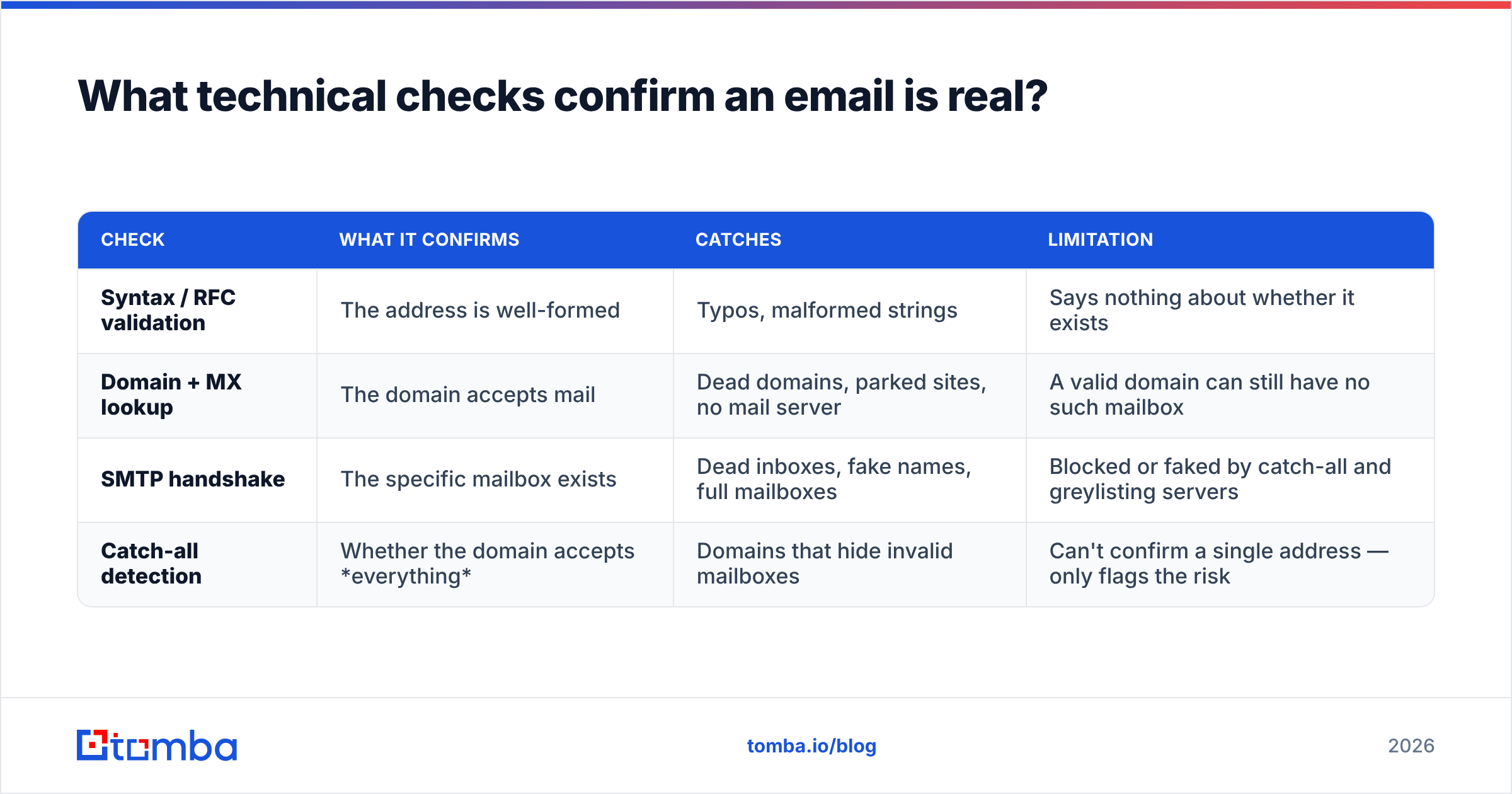
| Check | What it confirms | Catches | Limitation |
|---|---|---|---|
| Syntax / RFC validation | The address is well-formed | Typos, malformed strings | Says nothing about whether it exists |
| Domain + MX lookup | The domain accepts mail | Dead domains, parked sites, no mail server | A valid domain can still have no such mailbox |
| SMTP handshake | The specific mailbox exists | Dead inboxes, fake names, full mailboxes | Blocked or faked by catch-all and greylisting servers |
| Catch-all detection | Whether the domain accepts everything | Domains that hide invalid mailboxes | Can't confirm a single address — only flags the risk |
Here's how the layers work in practice.
- Syntax validation is instant and free — pure pattern matching against the email spec.
- MX record lookup queries DNS to see if the domain publishes mail servers. No MX (and no fallback A record) means mail has nowhere to go.
- The SMTP check is the decisive step. The verifier opens a connection to the recipient's mail server and starts the conversation a real sender would —
HELO,MAIL FROM, thenRCPT TO:<the address>. A250 OKmeans the server accepts mail for that mailbox. A550means it doesn't exist. Critically, this happens without sending an actual message. - Catch-all detection probes the domain with a clearly fake address. If the server says yes to
definitely-not-real-99x@domain.com, it's a catch-all — it accepts everything and verifies nothing.
If you want the deeper background on these mechanics, Cloudflare's primer on how email works and the SMTP standard itself (RFC 5321) are the authoritative sources.
Why shouldn't you run SMTP checks yourself?#
Because doing it from your own domain is one of the fastest ways to get blacklisted. This is the trap most people walk into when they decide to "just script it."
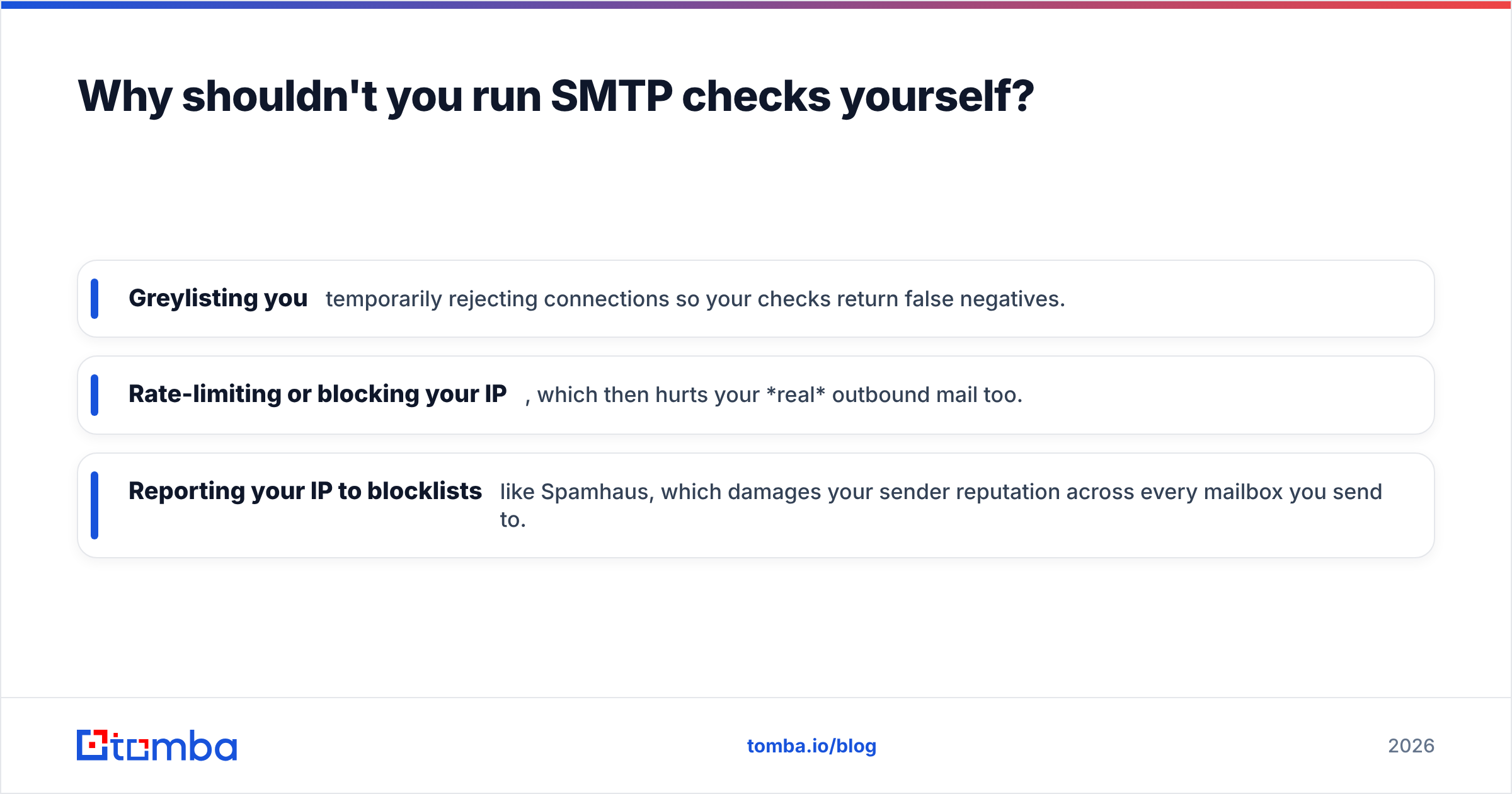
When you hammer mail servers with repeated RCPT TO probes from a single IP, the receiving servers notice. The pattern looks exactly like a spammer enumerating valid addresses (a "directory harvest attack"). Providers respond by:
- Greylisting you — temporarily rejecting connections so your checks return false negatives.
- Rate-limiting or blocking your IP, which then hurts your real outbound mail too.
- Reporting your IP to blocklists like Spamhaus, which damages your sender reputation across every mailbox you send to.
There's also the catch-all problem. A growing share of business domains are configured as catch-alls, so a naive SMTP check returns "valid" for addresses that don't exist. You feel safe, you send, and you bounce anyway.
This is the whole reason verification tools exist: they distribute checks across many IPs, respect rate limits, cache results, and apply catch-all logic so you get an accurate verdict without burning your own domain. If you're choosing one, our roundup of ZeroBounce alternatives compares the main contenders on exactly these points.

How do email verification tools check if an email is genuine?#
A good verifier runs every layer above automatically and returns a single, actionable status. Most tools, including Tomba's email verifier, collapse the result into a handful of categories:
- Deliverable / Valid — mailbox exists, accepts mail. Safe to send.
- Invalid — syntax fails, domain dead, or mailbox doesn't exist. Remove it.
- Risky / Accept-all — a catch-all domain; deliverability is uncertain. Send carefully or warm up first.
- Unknown — the server didn't respond conclusively (greylisting, timeout). Re-check later.
- Disposable / Role — flagged as throwaway or non-personal even if technically deliverable.
The value isn't just the verdict — it's that the tool absorbs all the reputation risk. It does the SMTP handshakes, manages the IP pool, and handles catch-all probing so your sending domain never touches a single suspicious server.
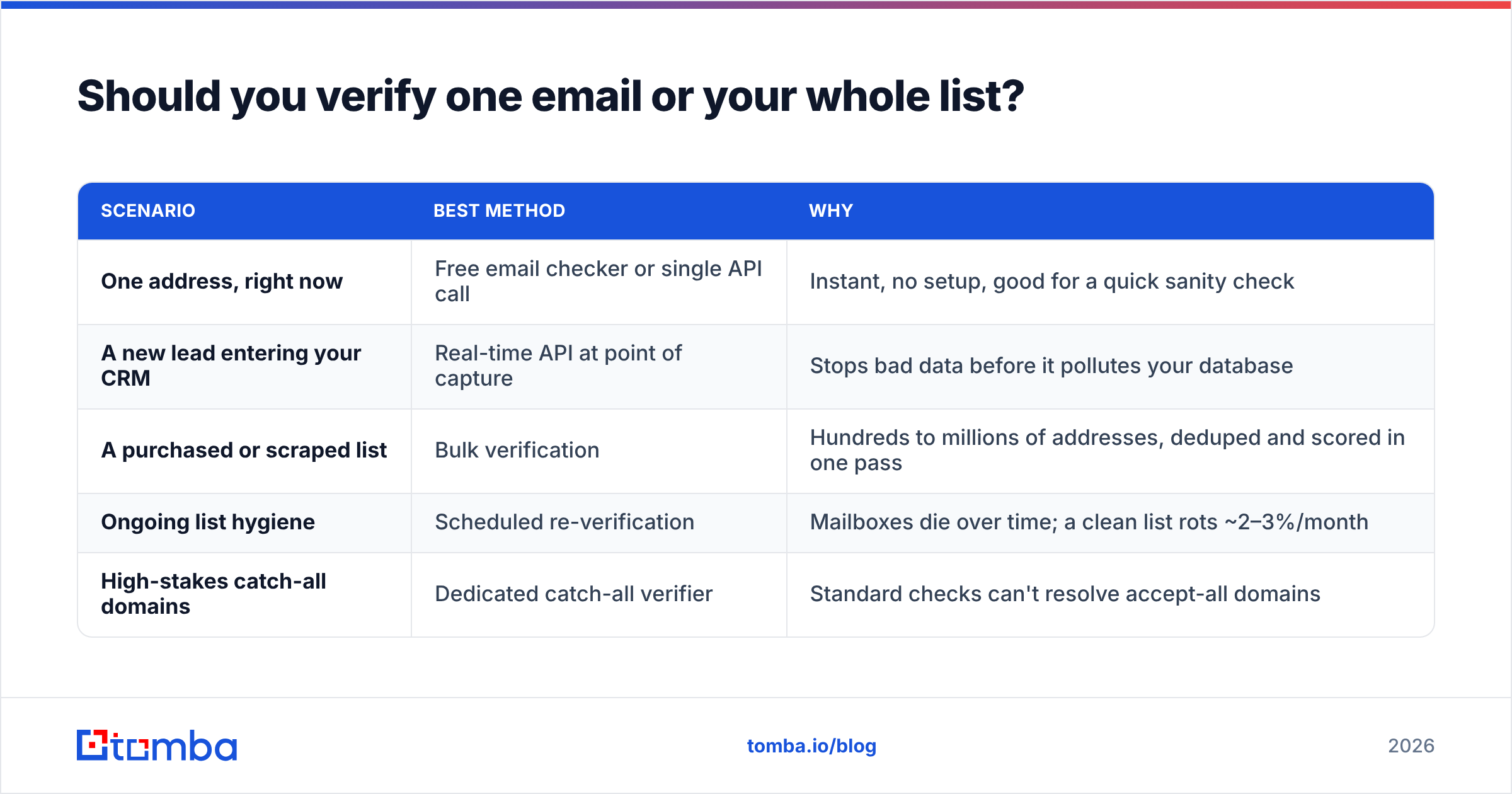
Should you verify one email or your whole list?#
Both, at different moments — and the method changes with volume.
| Scenario | Best method | Why |
|---|---|---|
| One address, right now | Free email checker or single API call | Instant, no setup, good for a quick sanity check |
| A new lead entering your CRM | Real-time API at point of capture | Stops bad data before it pollutes your database |
| A purchased or scraped list | Bulk verification | Hundreds to millions of addresses, deduped and scored in one pass |
| Ongoing list hygiene | Scheduled re-verification | Mailboxes die over time; a clean list rots ~2–3%/month |
| High-stakes catch-all domains | Dedicated catch-all verifier | Standard checks can't resolve accept-all domains |
The rule of thumb: anything past a handful of addresses should go through a tool, not your inbox. And anything entering a system you'll send from later — a CRM, an email platform — should be verified the moment it arrives, because that's the cheapest time to catch a bad address.
How does this compare to spotting a fake or phishing email?#
Worth a quick clarification, because "is this email genuine" gets asked two ways.
This guide is about verifying that an email address is real and deliverable — the sender side, for outreach and list hygiene. A different question is whether an email message you received is genuine or a phishing attempt. The signals there are different: mismatched display names, look-alike domains (micros0ft.com), failed SPF/DKIM/DMARC, and urgent payment requests.
There's overlap, though. A reverse email lookup can tell you who actually owns an address that contacted you, and an SPF checker confirms whether the sending domain authorized the message. If you're chasing inbound authenticity rather than outbound deliverability, start there. For the rest of this guide, "genuine" means real, live, and safe to send to.
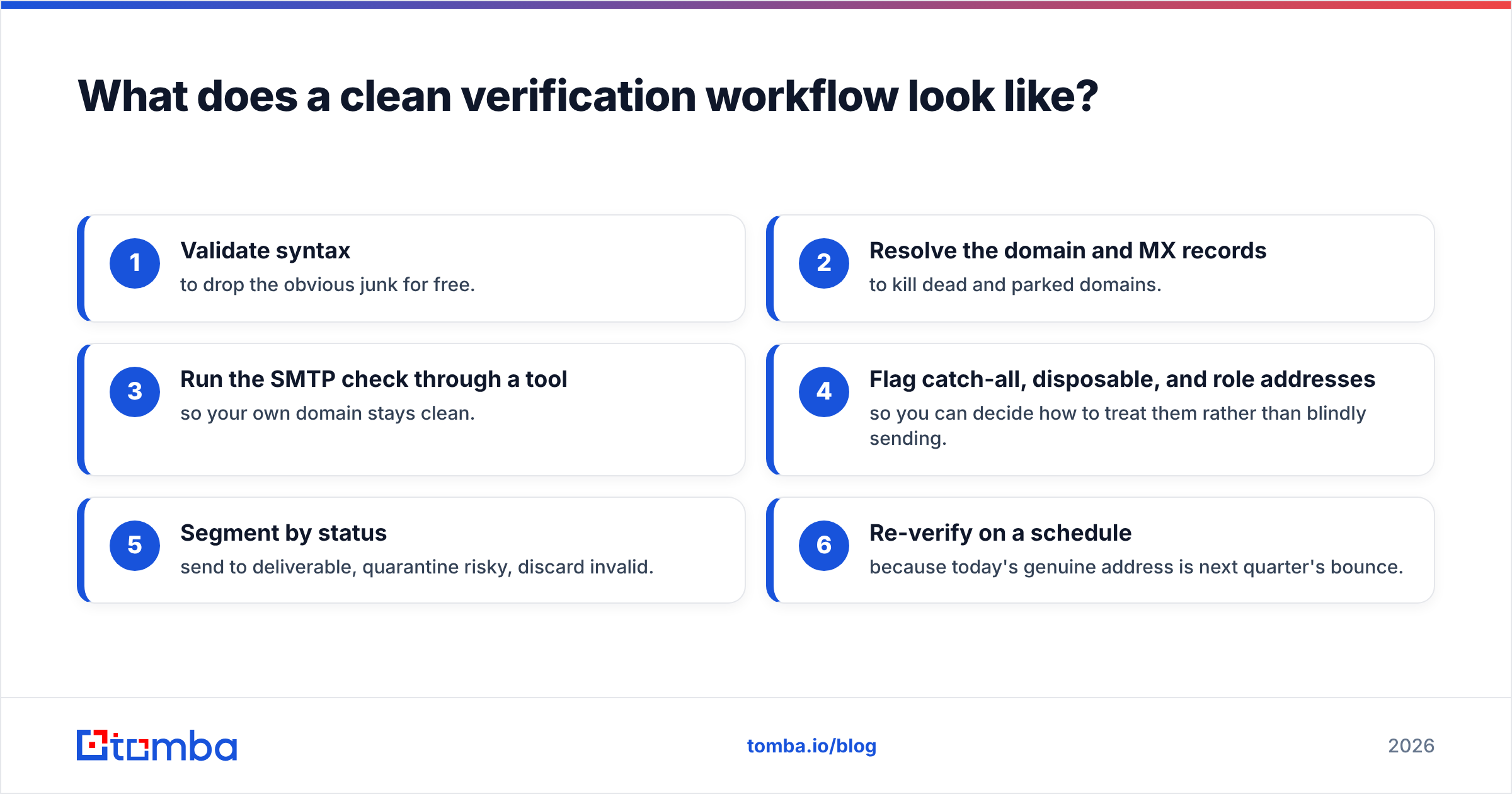
What does a clean verification workflow look like?#
Put the pieces together and a reliable process looks like this:
- Validate syntax to drop the obvious junk for free.
- Resolve the domain and MX records to kill dead and parked domains.
- Run the SMTP check through a tool so your own domain stays clean.
- Flag catch-all, disposable, and role addresses so you can decide how to treat them rather than blindly sending.
- Segment by status — send to deliverable, quarantine risky, discard invalid.
- Re-verify on a schedule because today's genuine address is next quarter's bounce.
Teams that find and verify in one motion save a step entirely. When you pull an address with an email finder that verifies as it goes, the genuineness check is already baked into the result — you're not enriching a list and then cleaning it, you're getting clean data the first time. Tomba's own data and verification run on the same pipeline for this reason.
A quick note on cost: verification is cheap insurance. Bouncing 8% of a campaign doesn't just waste those sends — it signals to mailbox providers that you don't maintain your list, which suppresses delivery to your good addresses too. You can see how verification credits are bundled on the Tomba pricing page; the Free tier (25 searches/month) is enough to test the workflow before you commit.
What are the limits of email verification?#
Be honest with yourself about what no tool can do.
- Catch-all domains stay ambiguous. A verifier can tell you a domain accepts everything; it can't always tell you whether your specific mailbox is real. You manage that risk with warm-up and gradual sending, not certainty.
- Greylisting causes "unknown" results. Some servers deliberately reject the first contact. A single check may be inconclusive — re-verify before you write the address off.
- Verification ≠ engagement. A genuine, deliverable address can still belong to someone who'll never open your email. Verification protects deliverability; it doesn't guarantee a reply.
- Data decays. People change jobs, companies fold, mailboxes get deactivated. A verdict is a snapshot, not a permanent truth.
Knowing these limits is what separates a clean sender from someone who trusts a green checkmark blindly and wonders why their bounce rate crept back up.
The bottom line#
To check if an email is genuine, you confirm three things — valid syntax, a live domain, and a real mailbox — and you do the risky part (the SMTP handshake) through a tool instead of your own server. Manual signals catch the easy fakes; a verifier catches the dead mailboxes and catch-alls that look perfectly fine until they bounce.
If you're finding and verifying contacts at any real volume, the Tomba Email Finder does both in one step — it surfaces professional addresses by name, domain, or company and verifies them on the way out, so what lands in your list is already confirmed genuine. Start on the free tier, run your next batch through it, and watch your bounce rate fall before your first send.
// get started
Find, verify and enrich your first contacts today
Start on the free plan with 25 searches a month, then scale when your team is ready.
Free plan · No credit card required · GDPR & CCPA
// about the author