How to Check If a Gmail Account Exists (2026 Guide)
Need to confirm a Gmail address is real before you hit send? Here are the free methods, the paid tools, and the traps that produce false positives in 2026.
You typed an address into your campaign, hit send, and got a bounce three seconds later. Now your domain reputation took a tiny hit, and you still do not know whether that person exists. Checking whether a Gmail account is real before you send is the cheapest insurance in cold outreach.
This guide walks through every reliable way to check if a Gmail account exists in 2026 — the free browser tricks, the SMTP-level checks, and the verification tools that do it at scale — plus the failure modes that quietly hand you false positives.
TL;DR#
- The Google account recovery page is the fastest free way to check a single Gmail address — if recovery doesn't reject it, the account usually exists.
- Sending a test email is the worst method — it burns your sender reputation and tips off the recipient.
- SMTP verification queries Gmail's mail server without sending anything, but Gmail throttles and partially obscures responses.
- Bulk verification tools like Tomba, ZeroBounce, and NeverBounce are the only sane option above ~20 addresses.
- Gmail's catch-all-like behavior and dot/alias quirks cause most false results — know them before you trust a "valid" verdict.

Why does it matter whether a Gmail account exists?#
Conclusion first: every invalid address you email raises your bounce rate, and bounce rate is the single metric mailbox providers watch most closely. Once you cross roughly 2–3% bounces, Gmail and Outlook start routing your valid mail to spam too.
Think of your sending domain like a credit score. Each hard bounce is a missed payment. A few are survivable; a pattern of them quietly tanks your ability to reach anyone. That is why verification is not a nice-to-have — it protects the deliverability of the inbox you already worked to warm up. If you want the background on how this works, the mechanics of email deliverability are worth a read.
There are non-marketing reasons too: confirming a lead's real address before enrichment, validating signups to block fake accounts, and reverse-checking a suspicious contact. The method you pick depends on whether you're checking one address or fifty thousand.
How can you check if a Gmail account exists for free?#
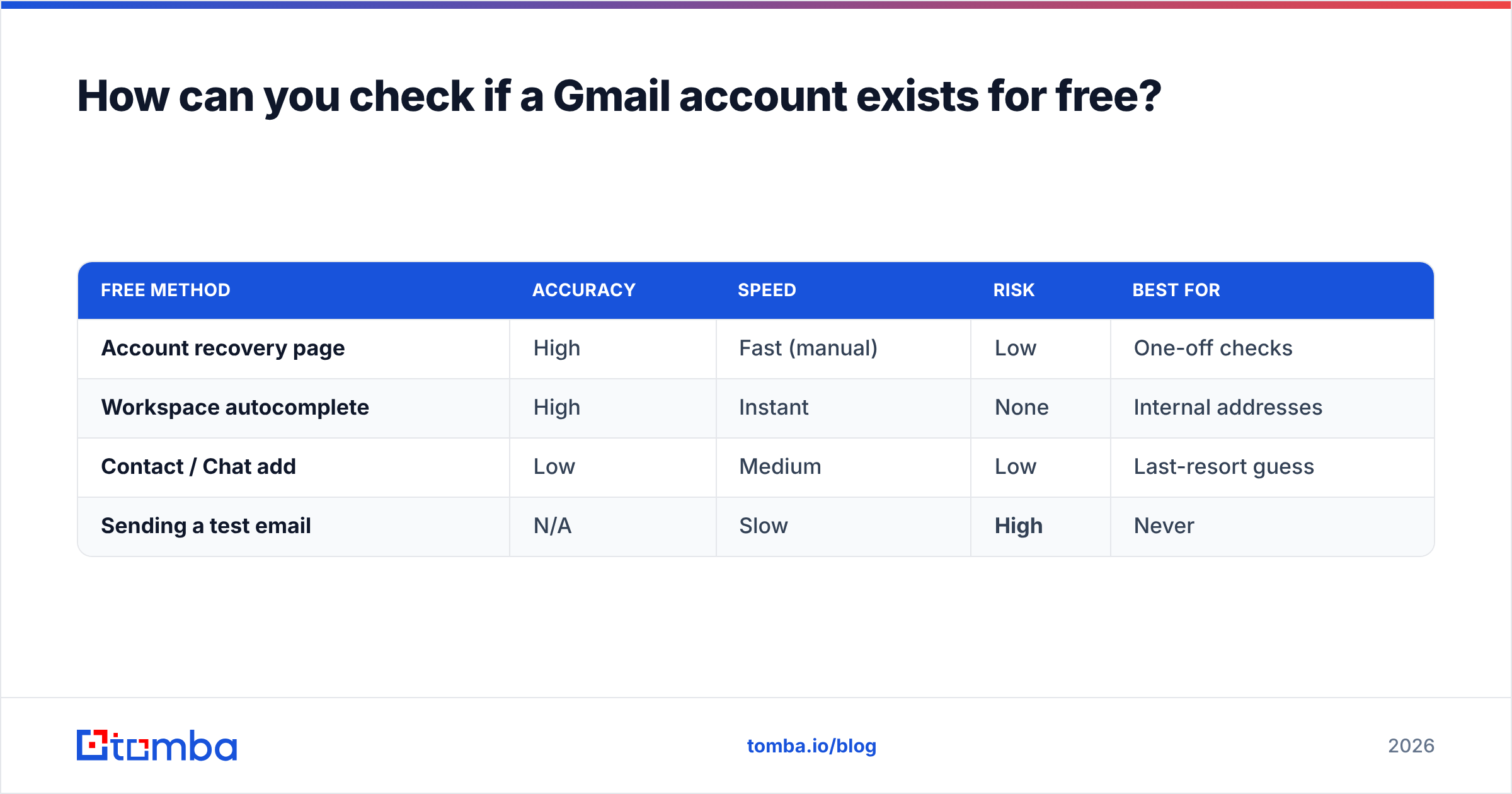
There are three legitimate free methods, in rough order of reliability.
- Google Account Recovery page. Go to the Google account sign-in flow, enter the address, and watch the response. If Google says "Couldn't find your Google Account," the address does not exist. If it advances to the password screen, the account is real. This is the most accurate free signal because it queries Google directly.
- Gmail "compose" autocomplete (inside Google Workspace). If you're inside the same Workspace organization, composing a message and typing the address surfaces directory matches. Useful internally, useless for external prospects.
- Google Chat / contact add. Attempting to add the address as a contact sometimes reveals whether a profile is attached. This is the least reliable and Google has tightened it over the years.
What you should not do: send a "just checking" email. It looks like spam, warns the person you're probing them, and every bounce still counts against you.
| Free method | Accuracy | Speed | Risk | Best for |
|---|---|---|---|---|
| Account recovery page | High | Fast (manual) | Low | One-off checks |
| Workspace autocomplete | High | Instant | None | Internal addresses |
| Contact / Chat add | Low | Medium | Low | Last-resort guess |
| Sending a test email | N/A | Slow | High | Never |
The honest limit of all three: they're manual. They work for one address while you're waiting for coffee. They fall apart the moment you have a list.
What about SMTP verification — does it actually work on Gmail?#
Short answer: partly, and less reliably than it used to. SMTP verification opens a conversation with the recipient's mail server and asks "do you accept mail for this address?" without ever delivering a message. The handshake looks like this:
- Resolve the domain's MX records (for Gmail, Google's servers).
- Open an SMTP connection to that mail server.
- Issue
MAIL FROMandRCPT TOcommands. - Read the server's response code —
250typically means accepted,550means no such user.
In theory this is clean and sends nothing. In practice, Gmail deliberately throttles and masks these probes. Google rate-limits repeated RCPT TO checks from the same IP, and for privacy it sometimes returns a positive-looking code even for nonexistent mailboxes to defeat enumeration. So a raw SMTP check against Gmail can produce false "valid" results — the most dangerous kind, because you trust them.
You can test the handshake manually with an SMTP tester, but for Gmail specifically, the provider-side defenses mean you want a verification service that layers additional signals (historical data, pattern analysis, known-account databases) on top of the raw SMTP response. That layering is exactly what dedicated email verification tools add.

Which tools check if a Gmail account exists at scale?#
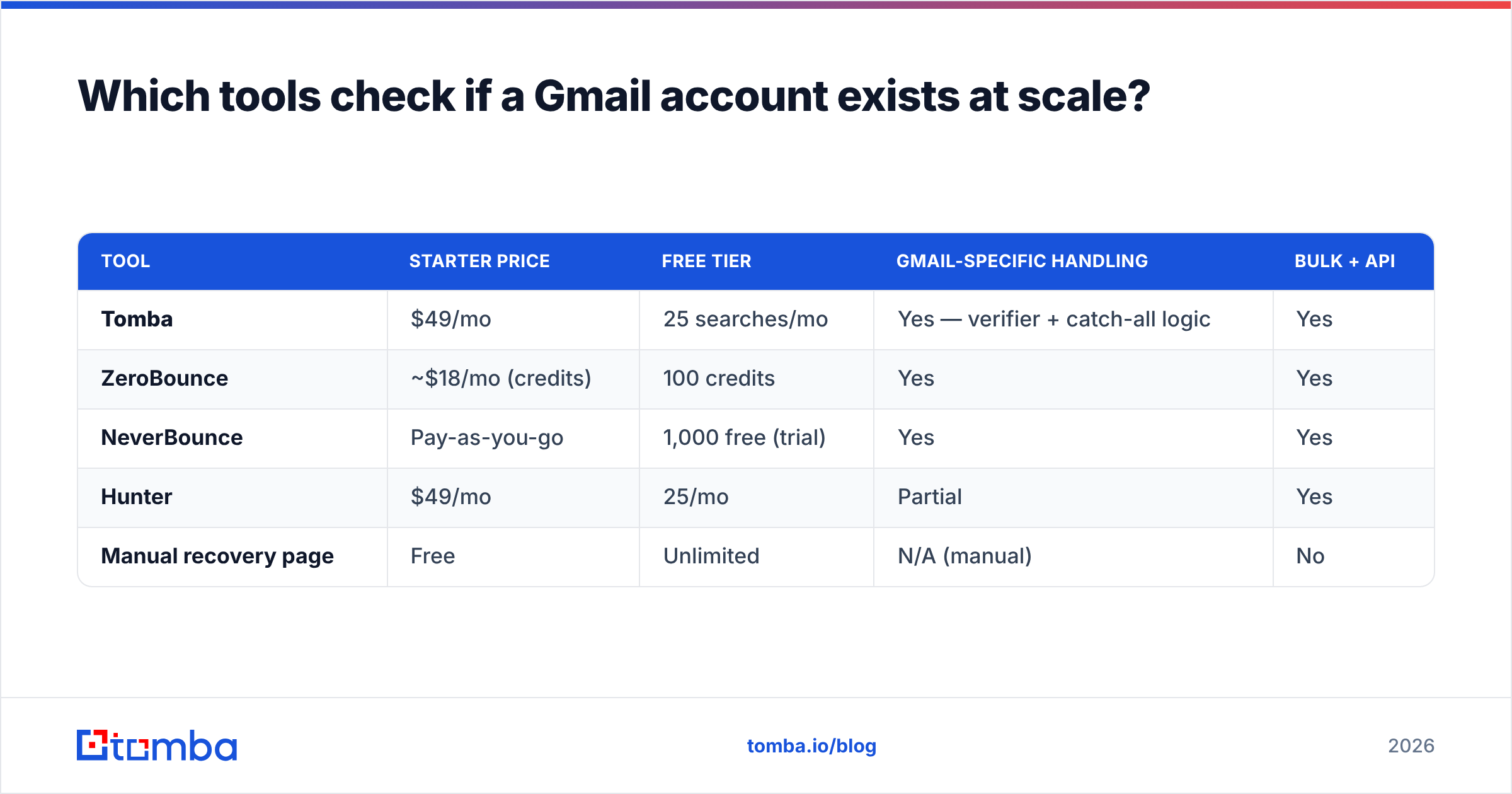
When you're past a handful of addresses, you need a verifier that handles MX lookup, SMTP probing, catch-all detection, and Gmail-specific quirks automatically. Here's how the common options compare.
| Tool | Starter price | Free tier | Gmail-specific handling | Bulk + API |
|---|---|---|---|---|
| Tomba | $49/mo | 25 searches/mo | Yes — verifier + catch-all logic | Yes |
| ZeroBounce | ~$18/mo (credits) | 100 credits | Yes | Yes |
| NeverBounce | Pay-as-you-go | 1,000 free (trial) | Yes | Yes |
| Hunter | $49/mo | 25/mo | Partial | Yes |
| Manual recovery page | Free | Unlimited | N/A (manual) | No |
A few notes so this stays honest:
- ZeroBounce is credit-based and cheap to start, strong on data-append extras. If you only need raw verification, it's competitive. See the ZeroBounce alternative breakdown for the trade-offs.
- NeverBounce shines on pure list-cleaning with a generous trial, but has fewer finding/enrichment features.
- Hunter bundles finding and verification but its Gmail verdicts skew conservative (more "unknown" results).
- Tomba combines the email finder with verification and catch-all verification in one workflow, which matters because Gmail-hosted Workspace domains often behave like catch-alls.
For a single address, the free recovery page wins on cost. For a list, the per-address economics flip hard toward a tool — manually checking 5,000 addresses is days of work and still less accurate.
How accurate is any "Gmail exists" check?#
Conclusion: treat every result as a probability, not a certainty — and the accuracy gap comes almost entirely from Gmail's own anti-abuse behavior.
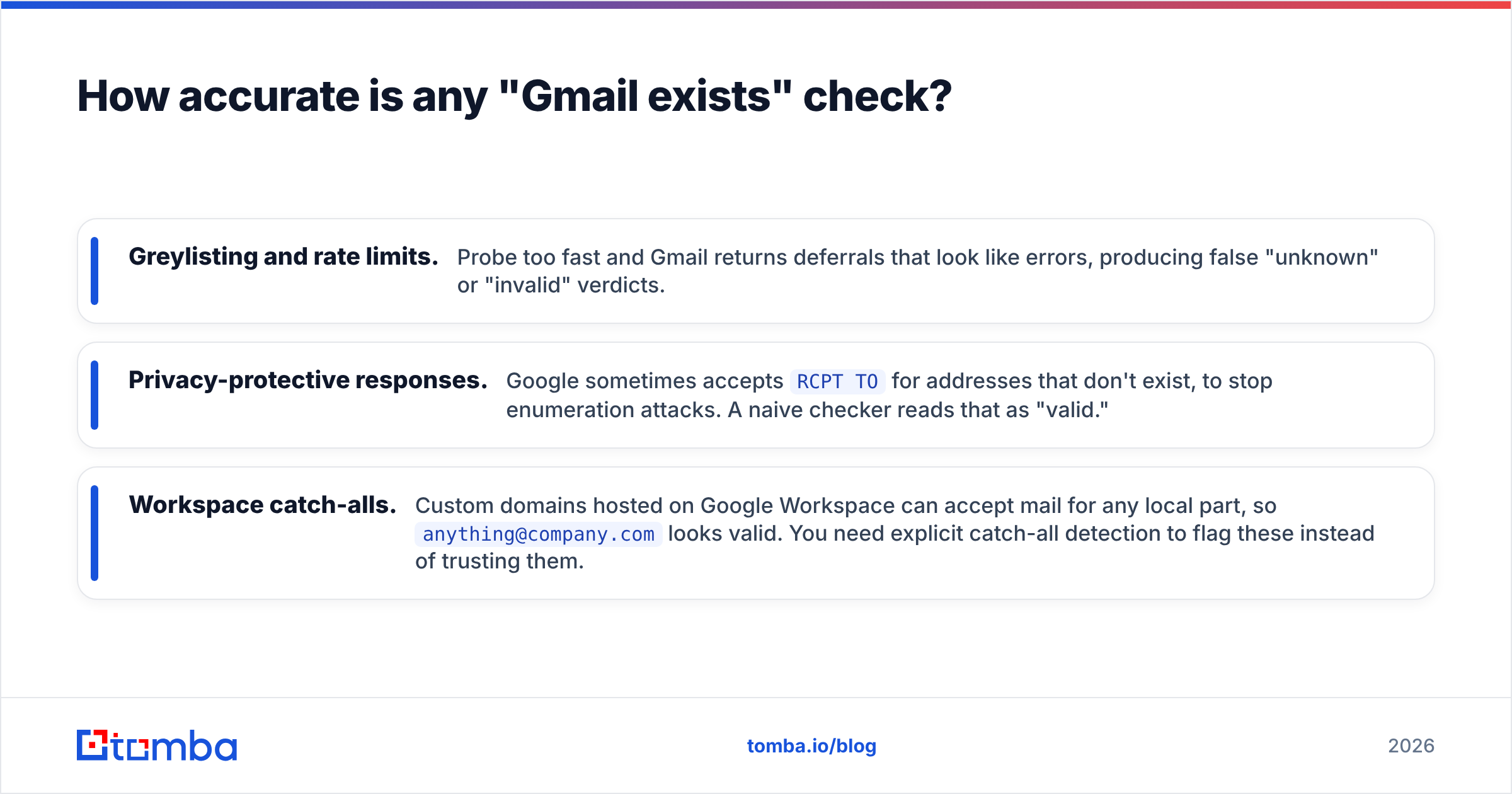
The reasons accuracy degrades:
- Greylisting and rate limits. Probe too fast and Gmail returns deferrals that look like errors, producing false "unknown" or "invalid" verdicts.
- Privacy-protective responses. Google sometimes accepts
RCPT TOfor addresses that don't exist, to stop enumeration attacks. A naive checker reads that as "valid." - Workspace catch-alls. Custom domains hosted on Google Workspace can accept mail for any local part, so
anything@company.comlooks valid. You need explicit catch-all detection to flag these instead of trusting them.
The practical takeaway: a good verifier reports confidence levels (valid / invalid / accept-all / unknown), not just a binary. When you see "accept-all," that is the tool being honest that Gmail won't give a definitive answer — route those to a lower-priority send or a soft first-touch, not your highest-value sequence. If you want to understand where the underlying signals come from, Tomba documents its data sources publicly.
What Gmail quirks cause false results?#
Three Gmail-specific behaviors trip up almost everyone. Know them before you act on a verdict.
- Dots are ignored.
john.smith@gmail.comandjohnsmith@gmail.comroute to the same inbox. A checker treating them as different addresses wastes credits and double-counts. - Plus-aliases are infinite.
john+newsletter@gmail.comis valid and delivers tojohn@gmail.com. You can't enumerate these, and you shouldn't try. - Workspace vs consumer Gmail.
@gmail.comis consumer Google; a company on Google Workspace uses its own domain but Google's servers. The verification path differs, and only the latter can be a catch-all.
If you're cleaning a list, normalize Gmail addresses first — strip dots and plus-tags on @gmail.com before deduping. A remove-duplicates tool handles the dedup step once you've normalized.
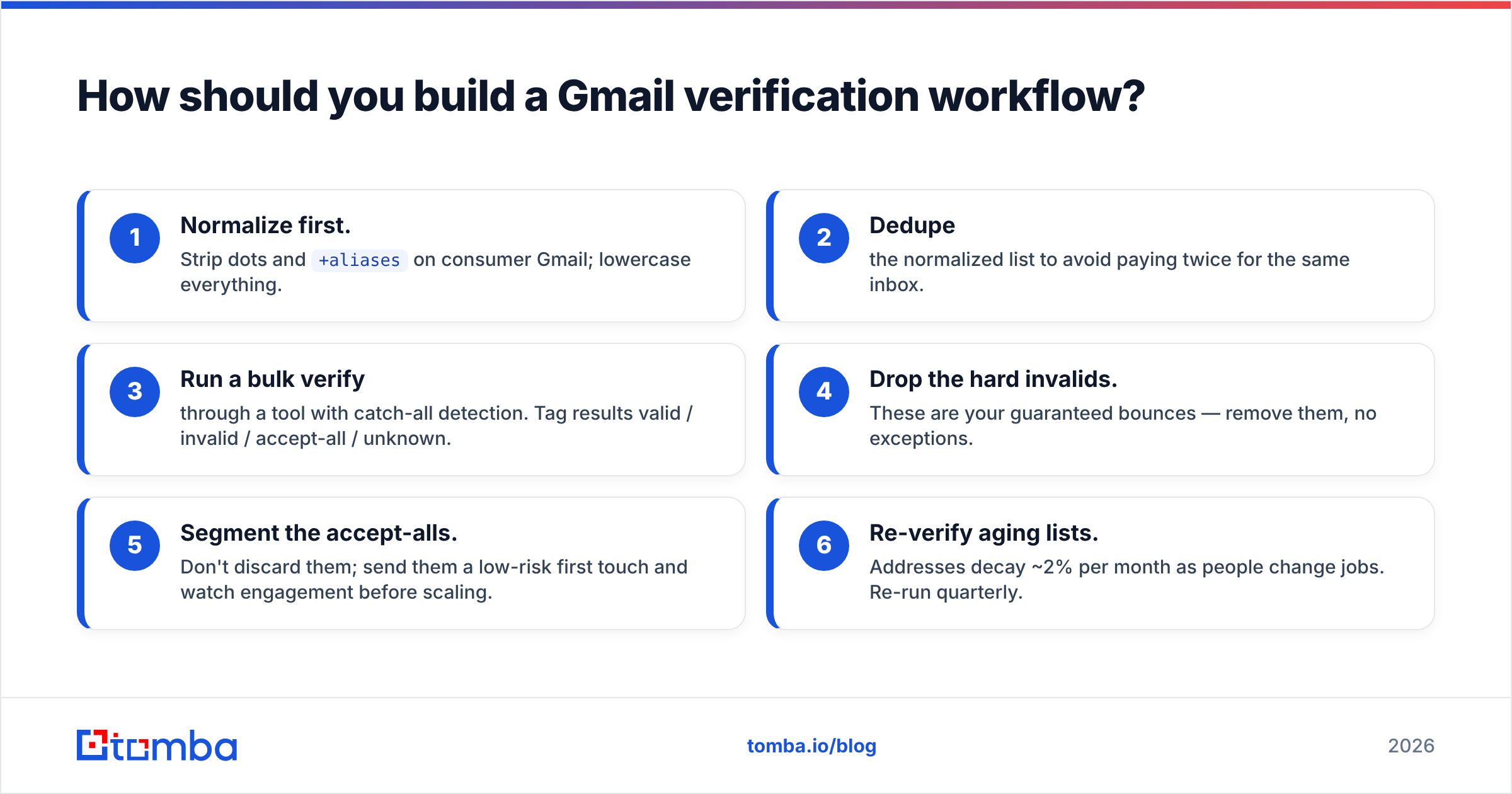
How should you build a Gmail verification workflow?#
Here's a sequence that balances cost, accuracy, and reputation safety.
- Normalize first. Strip dots and
+aliaseson consumer Gmail; lowercase everything. - Dedupe the normalized list to avoid paying twice for the same inbox.
- Run a bulk verify through a tool with catch-all detection. Tag results valid / invalid / accept-all / unknown.
- Drop the hard invalids. These are your guaranteed bounces — remove them, no exceptions.
- Segment the accept-alls. Don't discard them; send them a low-risk first touch and watch engagement before scaling.
- Re-verify aging lists. Addresses decay ~2% per month as people change jobs. Re-run quarterly.
For ongoing programs, wire this into your stack with the Tomba API so verification happens at the point of capture — when a lead enters your CRM, not weeks later. That's the difference between a clean list and a perpetual cleanup project.
When is a free check enough, and when do you need a tool?#
Use the free Google recovery page when:
- You're checking one to a few addresses.
- It's a high-stakes individual contact (a single executive, a partnership lead).
- You don't need an audit trail or API.
Move to a verification tool when:
- You have more than ~20 addresses to check.
- You need results in a spreadsheet, CRM, or pipeline automatically.
- You care about catch-all flags and confidence scoring.
- You're sending volume where a 2% bounce swing matters.
The crossover point is lower than people expect. The manual page is genuinely free, but your time isn't — and at any real list size, the per-address cost of a tool is a rounding error next to the deliverability you protect.
Final take: verify before you send#
Checking if a Gmail account exists comes down to one principle: get the signal before the send, never after. The Google recovery page is your free single-address answer. SMTP checks help but Gmail fights them. And for anything resembling a list, a dedicated verifier is the only method that stays accurate and protects your sender reputation at the same time.
If you're finding and emailing Gmail-based prospects at any scale, start with the Tomba Email Finder — it finds the address, verifies it, and flags catch-alls in one pass, so you're not stitching three tools together. The free tier (25 searches/month) is enough to test it against your own list before you commit. Check Tomba pricing when you're ready to scale, and let the verification run before the campaign does — not after the bounces roll in.
// get started
Find, verify and enrich your first contacts today
Start on the free plan with 25 searches a month, then scale when your team is ready.
Free plan · No credit card required · GDPR & CCPA
// about the author