How to Check If IP Is Blacklisted (2026 Step-by-Step Guide)
A blacklisted sending IP quietly kills your inbox placement. Here's how to check if an IP is blacklisted, which lists matter, and how to get delisted fast.
If your open rates fell off a cliff and nothing in your copy changed, your sending IP is the first suspect. A single listing on a major blocklist can route your mail straight to spam — or get it rejected outright — without a single bounce message you'd notice.
This guide shows you exactly how to check if an IP is blacklisted, how to read what the checkers tell you, and what to do when you find a listing.
TL;DR#
- A blacklist (DNSBL/RBL) is a public list of IPs flagged for spam or abuse. Mailbox providers query these lists in real time to decide whether to accept your mail.
- Check your IP against multiple lists at once using a multi-RBL lookup tool — checking one list at a time wastes hours and misses listings.
- Not all blacklists carry equal weight. Spamhaus and Spamcop listings hurt badly; a niche regional list often does not.
- Delisting is possible but slow. Fix the root cause first (compromised account, dirty list, bad auth), then submit a removal request.
- Prevention beats remediation. Clean lists, proper SPF/DKIM/DMARC, and steady warmup keep you off blocklists in the first place.
What does it mean for an IP to be blacklisted?#
A blacklisted IP is one that appears on a DNS-based blocklist (DNSBL), also called a real-time blocklist (RBL). Think of it like a bouncer's "do not admit" list at a club: when your mail server knocks on a recipient's mail server, that server checks the list, and if your IP is on it, you don't get in.
These lists are maintained by anti-spam organizations that watch for abuse signals — spam traps, sudden volume spikes, malware, open relays, and complaints. When an IP trips enough of those signals, it gets added. Mailbox providers like Gmail, Outlook, and Yahoo, plus thousands of corporate mail servers, query these lists on every inbound connection.
The catch: you usually find out the hard way. There's no email telling you "you've been listed." Your mail just quietly stops landing, and your email deliverability collapses while you're still hitting "send" as if nothing's wrong.
Which types of blacklists actually matter?#
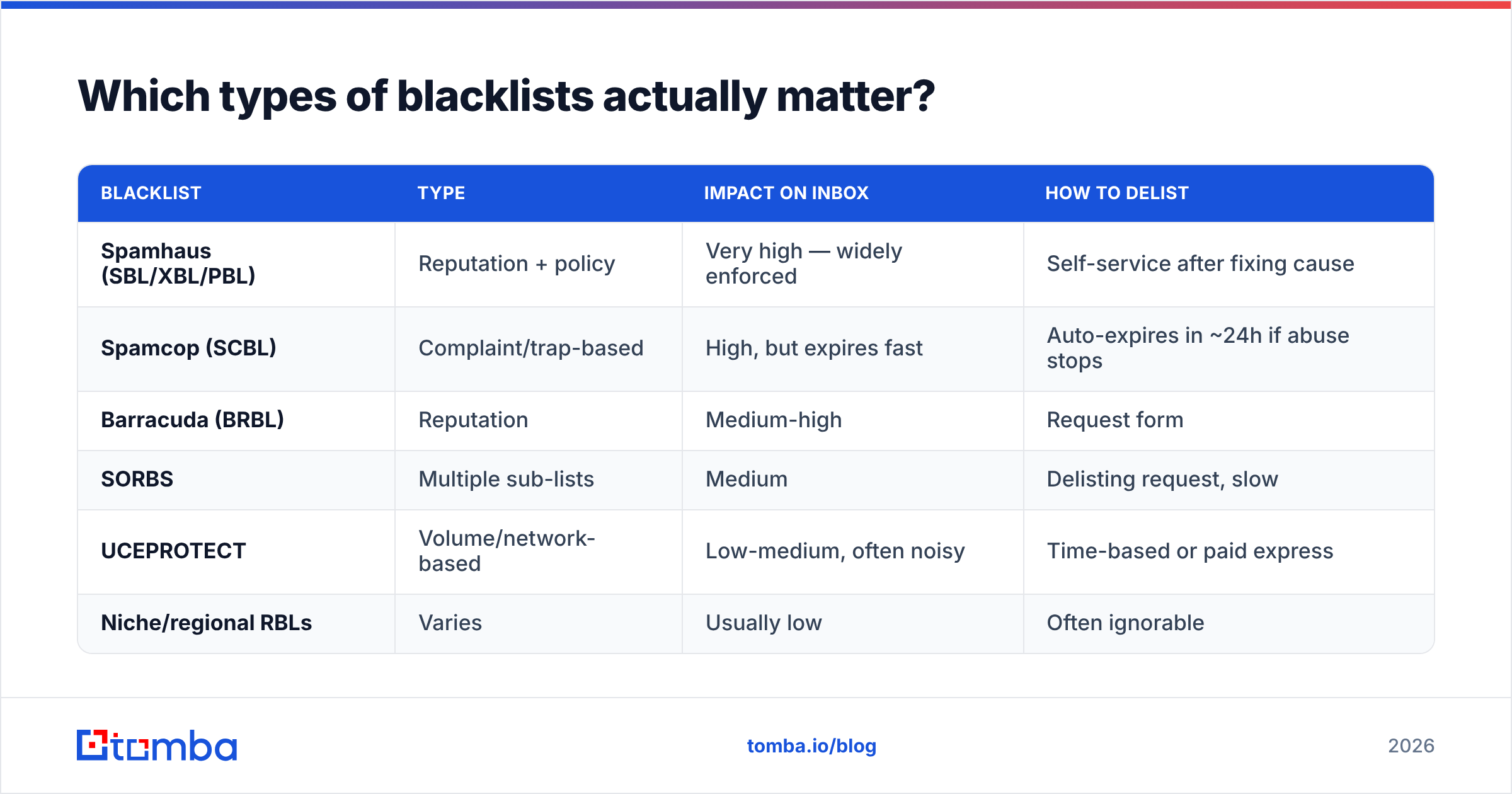
Not every list deserves your panic. There are hundreds of DNSBLs, and they range from "Gmail respects this" to "nobody has used this since 2014." Here's how the major categories break down.
| Blacklist | Type | Impact on inbox | How to delist |
|---|---|---|---|
| Spamhaus (SBL/XBL/PBL) | Reputation + policy | Very high — widely enforced | Self-service after fixing cause |
| Spamcop (SCBL) | Complaint/trap-based | High, but expires fast | Auto-expires in ~24h if abuse stops |
| Barracuda (BRBL) | Reputation | Medium-high | Request form |
| SORBS | Multiple sub-lists | Medium | Delisting request, slow |
| UCEPROTECT | Volume/network-based | Low-medium, often noisy | Time-based or paid express |
| Niche/regional RBLs | Varies | Usually low | Often ignorable |
The practical rule: a Spamhaus or Spamcop listing is a fire to put out today. A UCEPROTECT Level 3 listing — which can list an entire ISP's IP range because of one bad neighbor — is often something you note and move past. Context matters more than the raw count of "X blacklists found."
For the underlying mechanics, the DNSBL entry on Wikipedia is a solid neutral primer on how these queries work at the DNS level.
How do you check if an IP is blacklisted?#
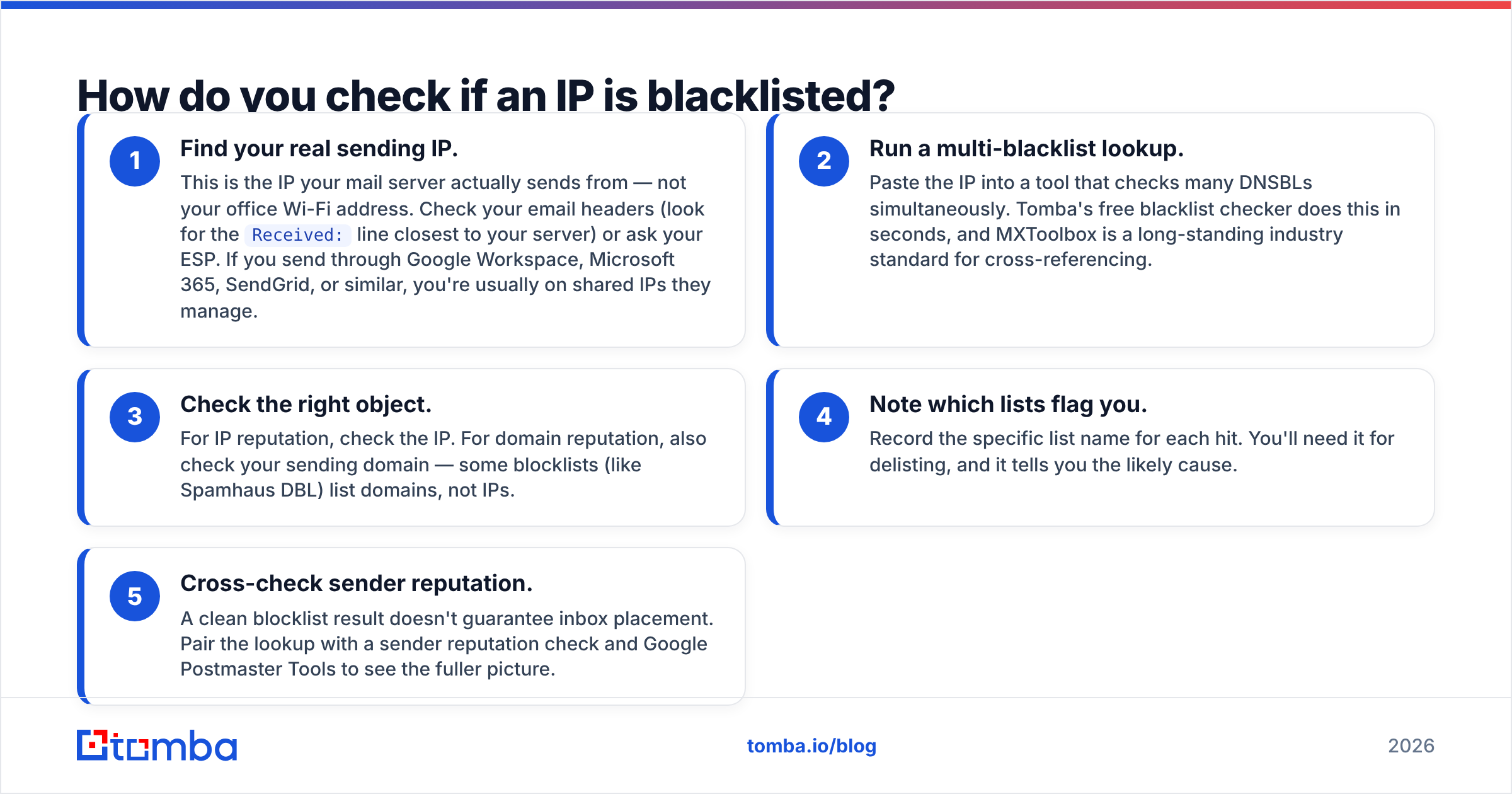
The fastest reliable method is a multi-RBL lookup that queries dozens of lists in one pass. Here's the step-by-step.
- Find your real sending IP. This is the IP your mail server actually sends from — not your office Wi-Fi address. Check your email headers (look for the
Received:line closest to your server) or ask your ESP. If you send through Google Workspace, Microsoft 365, SendGrid, or similar, you're usually on shared IPs they manage. - Run a multi-blacklist lookup. Paste the IP into a tool that checks many DNSBLs simultaneously. Tomba's free blacklist checker does this in seconds, and MXToolbox is a long-standing industry standard for cross-referencing.
- Check the right object. For IP reputation, check the IP. For domain reputation, also check your sending domain — some blocklists (like Spamhaus DBL) list domains, not IPs.
- Note which lists flag you. Record the specific list name for each hit. You'll need it for delisting, and it tells you the likely cause.
- Cross-check sender reputation. A clean blocklist result doesn't guarantee inbox placement. Pair the lookup with a sender reputation check and Google Postmaster Tools to see the fuller picture.
Run this check on a schedule, not just when something breaks. Weekly is reasonable for active senders; daily if you're scaling volume fast.
How do you read the results?#
A blacklist report gives you three things that matter: which list, why (the listing reason or category), and how to remove. Read them in that order.
- Which list tells you the severity. Map it against the table above. One Spamhaus hit outweighs five obscure ones.
- The listing reason points at the root cause. "Spam trap hit" means your list has stale or scraped addresses. "Policy/PBL" often means you're sending from an IP that residential ranges aren't supposed to send mail from. "CSS" (Spamhaus Composite Snowshoe) suggests low-volume spreading across many IPs.
- The removal link is your next action. Most major lists publish a lookup page where you enter your IP and see the exact reason plus a delist button.
If you see "Listed" with no detail, query that specific list's own website directly — the aggregators sometimes lag behind the source.
How do you get an IP delisted?#
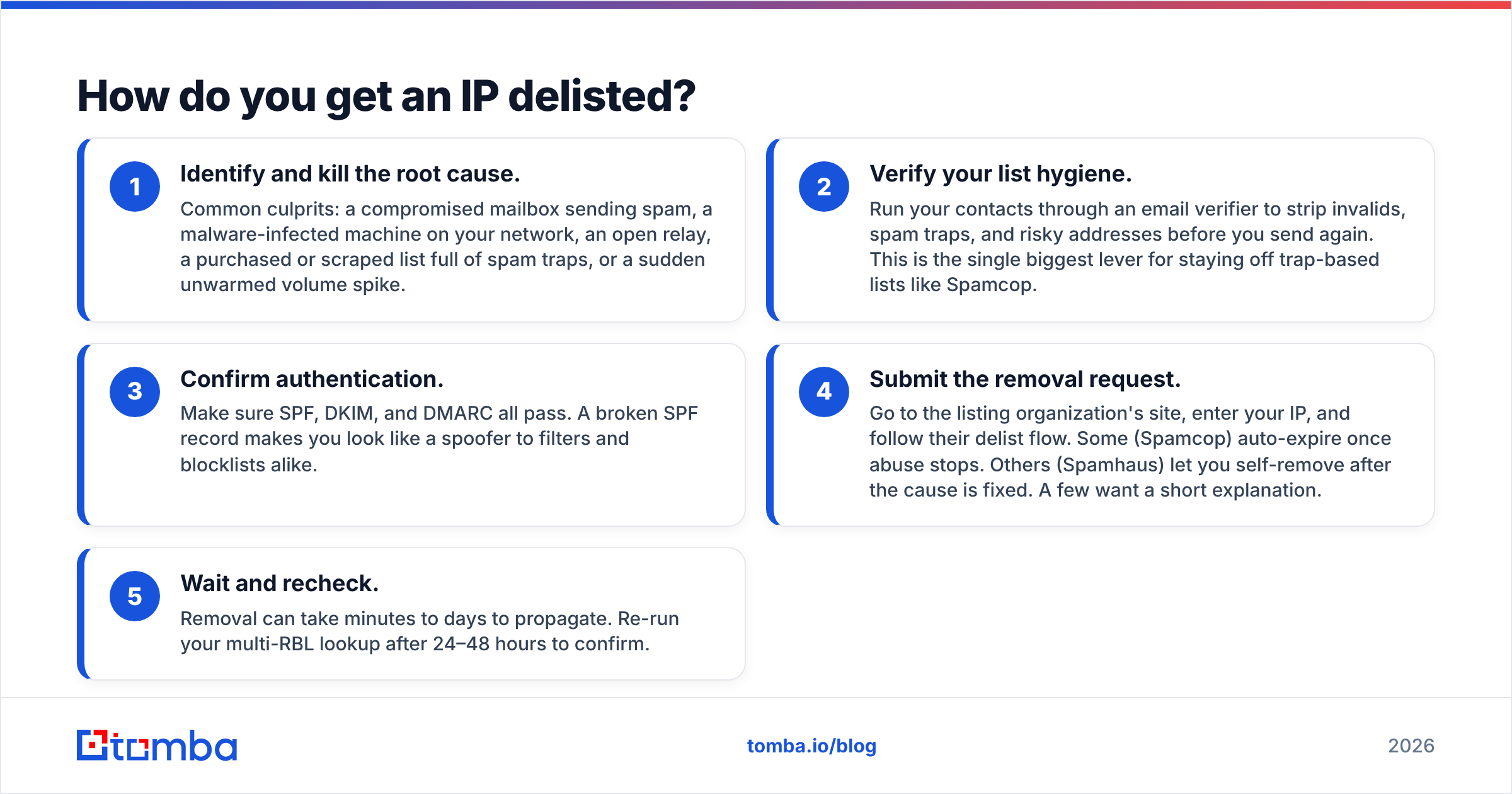
Fix the cause first, then request removal. Delisting before you've solved the underlying problem just gets you relisted within days, and repeat offenders get removed more slowly each time.
The delisting sequence:
- Identify and kill the root cause. Common culprits: a compromised mailbox sending spam, a malware-infected machine on your network, an open relay, a purchased or scraped list full of spam traps, or a sudden unwarmed volume spike.
- Verify your list hygiene. Run your contacts through an email verifier to strip invalids, spam traps, and risky addresses before you send again. This is the single biggest lever for staying off trap-based lists like Spamcop.
- Confirm authentication. Make sure SPF, DKIM, and DMARC all pass. A broken SPF record makes you look like a spoofer to filters and blocklists alike.
- Submit the removal request. Go to the listing organization's site, enter your IP, and follow their delist flow. Some (Spamcop) auto-expire once abuse stops. Others (Spamhaus) let you self-remove after the cause is fixed. A few want a short explanation.
- Wait and recheck. Removal can take minutes to days to propagate. Re-run your multi-RBL lookup after 24–48 hours to confirm.
Never pay for "guaranteed instant delisting" from third parties on reputable lists — legitimate blocklists don't sell removals, and the paid express lanes only exist on a couple of the noisier lists.

What causes an IP to get blacklisted in the first place?#
Most listings trace back to a handful of repeat offenders. Knowing them lets you prevent the next one.
- Spam trap hits. Sending to recycled or pristine trap addresses is the fastest way onto a trap-based list. These come from old, purchased, or scraped lists.
- High complaint rates. When too many recipients hit "mark as spam," providers and blocklists notice. Keep it under 0.1%.
- Sudden volume spikes. Going from 200 to 50,000 sends overnight on a cold IP screams "spammer." Warm up gradually.
- Poor authentication. Missing or failing SPF/DKIM/DMARC makes you look spoofable and untrusted.
- Compromised accounts or servers. A hacked mailbox or an infected machine blasting spam will list your IP fast — and it's the hardest to spot.
- Shared IP neighbors. On shared sending infrastructure, a bad sender on your IP can drag you down with them.
The throughline: blocklists react to behavior that looks like spam. Send wanted mail to real, verified people at a steady pace, and you rarely show up.
How is checking an IP different from checking a domain?#
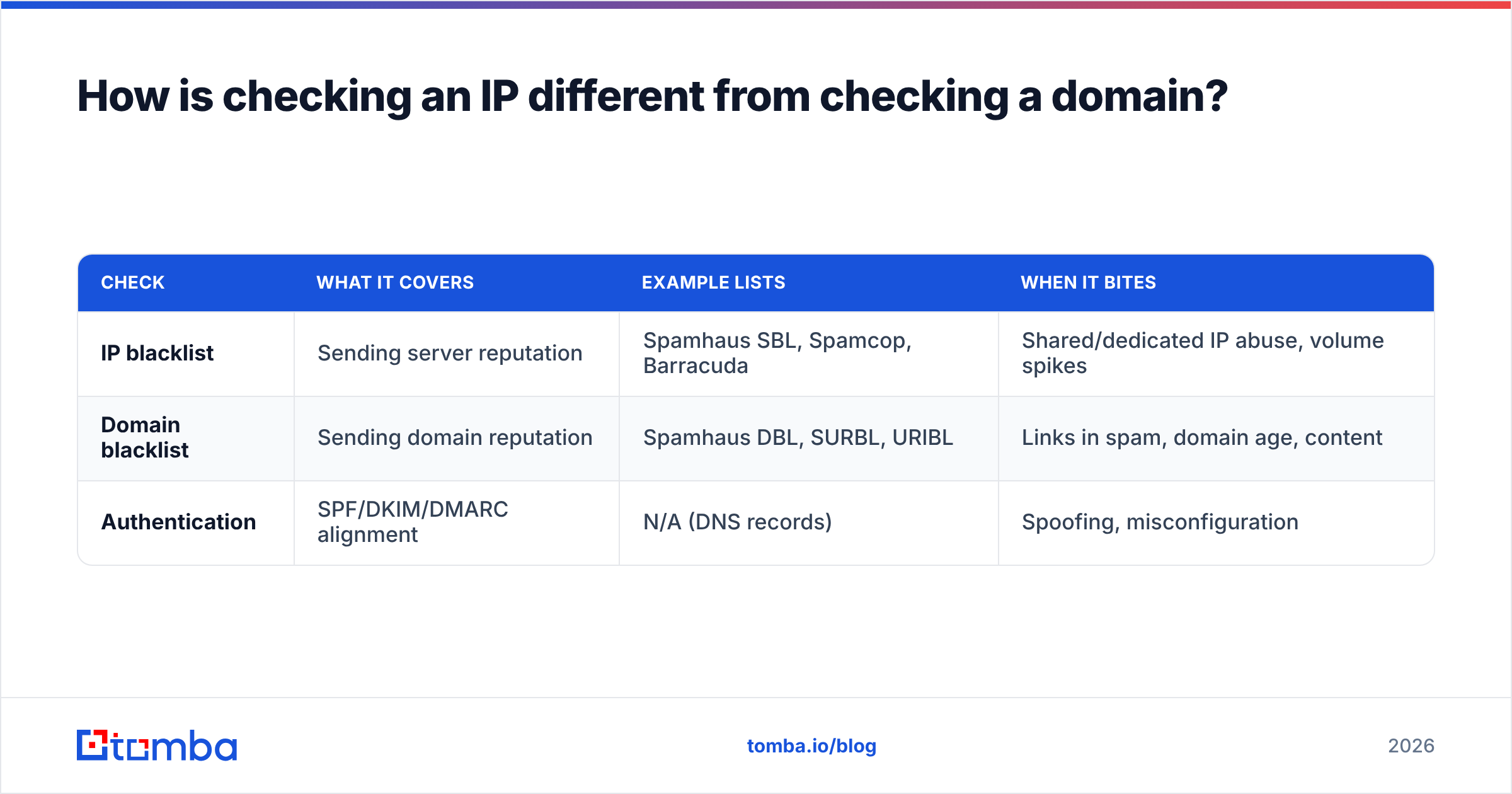
They're related but separate reputations, and you need both clean. Your IP is the postal truck; your domain is the return address on the envelope. A provider can distrust either one.
| Check | What it covers | Example lists | When it bites |
|---|---|---|---|
| IP blacklist | Sending server reputation | Spamhaus SBL, Spamcop, Barracuda | Shared/dedicated IP abuse, volume spikes |
| Domain blacklist | Sending domain reputation | Spamhaus DBL, SURBL, URIBL | Links in spam, domain age, content |
| Authentication | SPF/DKIM/DMARC alignment | N/A (DNS records) | Spoofing, misconfiguration |
If your IP is clean but mail still lands in spam, suspect the domain or the content. URIBL and SURBL flag domains that appear as links inside spam — so even a borrowed link-shortener or a sloppy affiliate URL in your footer can hurt you. Check both objects every time.
What tools should you use to monitor blacklist status?#
You want continuous monitoring, not one-off panic checks. Pair a free multi-RBL lookup with provider-side reputation dashboards.
- Multi-RBL lookup — Tomba's blacklist checker and MXToolbox for fast cross-list scans.
- Google Postmaster Tools — Gmail's own view of your IP and domain reputation, spam rate, and authentication. Free and authoritative for Gmail placement.
- Microsoft SNDS — the equivalent for Outlook/Hotmail senders.
- List hygiene — a verifier in your pipeline so you never send to traps. Tomba's email verifier catches invalids and risky addresses before they cost you a listing.
- Reputation context — an email reputation checker to score a sending domain or address before you scale outreach to it.
Set a recurring reminder to scan weekly. The cost of a five-minute check is nothing next to a week of mail silently disappearing.
How long does delisting take, and will it come back?#
Removal timelines vary by list — minutes for auto-expiring lists, up to a week for manual reviews. It will come back if you don't fix the cause.
Spamcop listings typically clear within 24 hours once the abusive sending stops. Spamhaus self-removals can propagate within an hour but won't stick if the trap hits continue. Manual-review lists like some SORBS sub-lists can take several days. Across all of them, the pattern is the same: the list is a symptom, your sending behavior is the disease. Treat the disease.
If you're relisted repeatedly, stop sending entirely until you've audited your list source, rotated any compromised credentials, and confirmed authentication. Pushing volume through a flagged IP only deepens the hole.
Frequently asked questions#
Can I check if an IP is blacklisted for free? Yes. Multi-RBL lookup tools, including Tomba's blacklist checker and MXToolbox, run dozens of list queries at no cost. You only pay for advanced monitoring or API access.
Does one blacklist listing mean my email won't deliver? Not necessarily. Impact depends on which list and which providers enforce it. A Spamhaus listing is serious; an obscure regional list may have near-zero effect. Always weigh the list, not just the count.
Why is my IP blacklisted when I didn't send spam? Common reasons: you're on a shared IP with a bad neighbor, your account was compromised, your list contained spam traps you didn't know about, or your authentication is broken. Investigate all four.
How often should I check my sending IP? Weekly for steady senders, daily if you're scaling volume or running active cold outreach. Automate it so a listing never goes unnoticed for long.
The bottom line#
Checking if an IP is blacklisted takes five minutes; recovering from an unnoticed listing takes weeks of lost inbox placement. Run a multi-RBL lookup on your real sending IP, read the results by severity, fix the root cause before you request delisting, and keep your list clean so you never trip a trap in the first place.
That last part — clean data — is where most blacklist problems are born and where they're cheapest to prevent. Before your next campaign, push every address through the Tomba Email Finder and verifier so you're sending only to real, reachable people. Verified contacts mean fewer bounces, fewer complaints, and a sending reputation that keeps you off the lists for good. Start free with 25 searches a month, then scale on a plan that fits — see the full Tomba pricing when you're ready to grow.
// get started
Find, verify and enrich your first contacts today
Start on the free plan with 25 searches a month, then scale when your team is ready.
Free plan · No credit card required · GDPR & CCPA
// about the author