How to Check IP Reputation in 2026 (Email Sender Guide)
Your IP reputation decides whether cold emails hit the inbox or vanish into spam. Here is how to check IP reputation, read the signals that matter, and repair a damaged sender score fast.
Your sending IP has a credit score, and mailbox providers pull it every time you hit send. If that score is low, your perfectly written email never reaches a human. This guide shows you how to check IP reputation properly, what the numbers actually mean, and how to climb back out of the spam folder.
TL;DR#
- IP reputation is a trust score Gmail, Outlook, and Yahoo assign to the server address you send from. Low score means filtering, throttling, or outright blocks.
- Check it across several sources — no single tool sees everything. Combine a blacklist lookup, Google Postmaster Tools, and a reputation grader.
- The biggest reputation killers are spam-trap hits, high bounce rates, and spam complaints — almost all of which trace back to dirty contact data.
- You cannot fix reputation overnight. Warm the IP, clean your list, authenticate your domain, and send to people who actually want to hear from you.
- Verifying contacts before you send is the cheapest reputation insurance you can buy — bounces are the fastest way to torch an IP.
What is IP reputation and why does it decide your inbox placement?#
IP reputation is a trust score, much like a credit score for your mail server. Just as a bank checks your credit history before approving a loan, a mailbox provider checks your IP's sending history before approving delivery to the inbox. Send clean, wanted mail for months and your score rises. Blast a stale list and rack up bounces, and it craters.
Technically, every email you send leaves a fingerprint tied to the IP address of the sending server. Providers and anti-spam services aggregate signals from that fingerprint — bounce rate, spam complaints, spam-trap hits, sending volume, and authentication — into a reputation value. That value feeds directly into email deliverability decisions: inbox, spam folder, throttle, or reject.
There are two flavors worth separating:
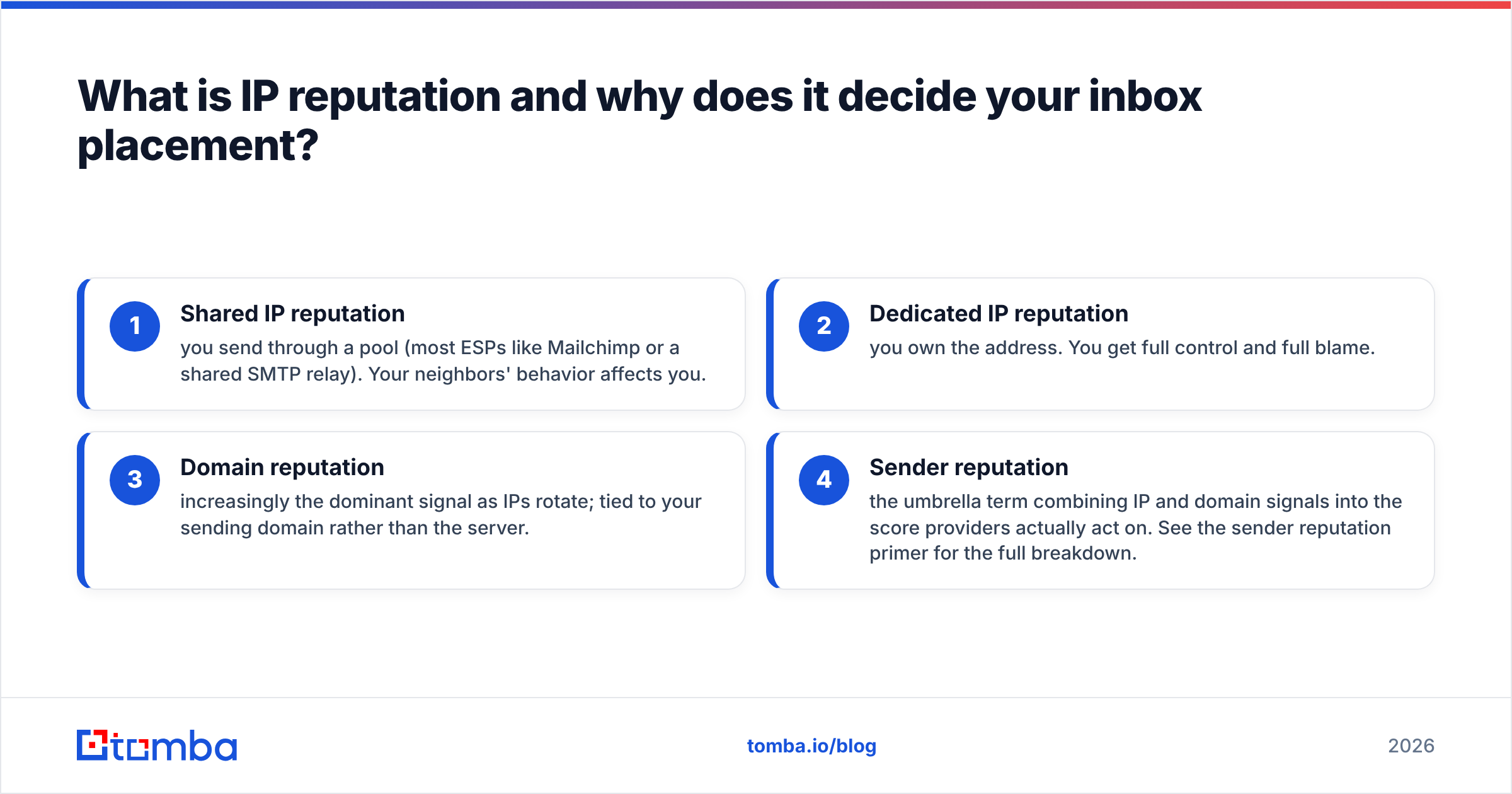
- Shared IP reputation — you send through a pool (most ESPs like Mailchimp or a shared SMTP relay). Your neighbors' behavior affects you.
- Dedicated IP reputation — you own the address. You get full control and full blame.
- Domain reputation — increasingly the dominant signal as IPs rotate; tied to your sending domain rather than the server.
- Sender reputation — the umbrella term combining IP and domain signals into the score providers actually act on. See the sender reputation primer for the full breakdown.
The practical takeaway: a single bad campaign can poison an address that took months to warm. That is why checking reputation is a routine, not a one-time panic.
How do you check IP reputation the right way?#
Use at least three independent sources, because no single tool sees the whole picture. Mailbox providers guard their internal scores; public tools approximate them from different angles. Triangulating gives you a reliable read.
Here is the stack that covers the most ground:
- Blacklist (DNSBL) lookups — check whether your IP appears on Spamhaus, Barracuda, SORBS, and similar lists. A listing is a hard signal that something is wrong. Start with Spamhaus, the most widely respected list.
- Google Postmaster Tools — the closest thing to ground truth for Gmail. It shows IP reputation, domain reputation, spam rate, and authentication results for your own sending. Set it up at postmaster.google.com.
- Reputation graders — services like Validity's Sender Score assign a 0–100 number based on aggregated network data. Treat it as a directional gauge, not gospel.
- Your own engagement metrics — opens, replies, and complaint rates from your sending platform are the leading indicators that move the score before any public tool reflects it.
A quick, free blacklist checker is the fastest first move when deliverability suddenly drops — it tells you in seconds whether a DNSBL listing is the culprit. Pair it with an email reputation check to gauge the sender side.
Reading the signals#
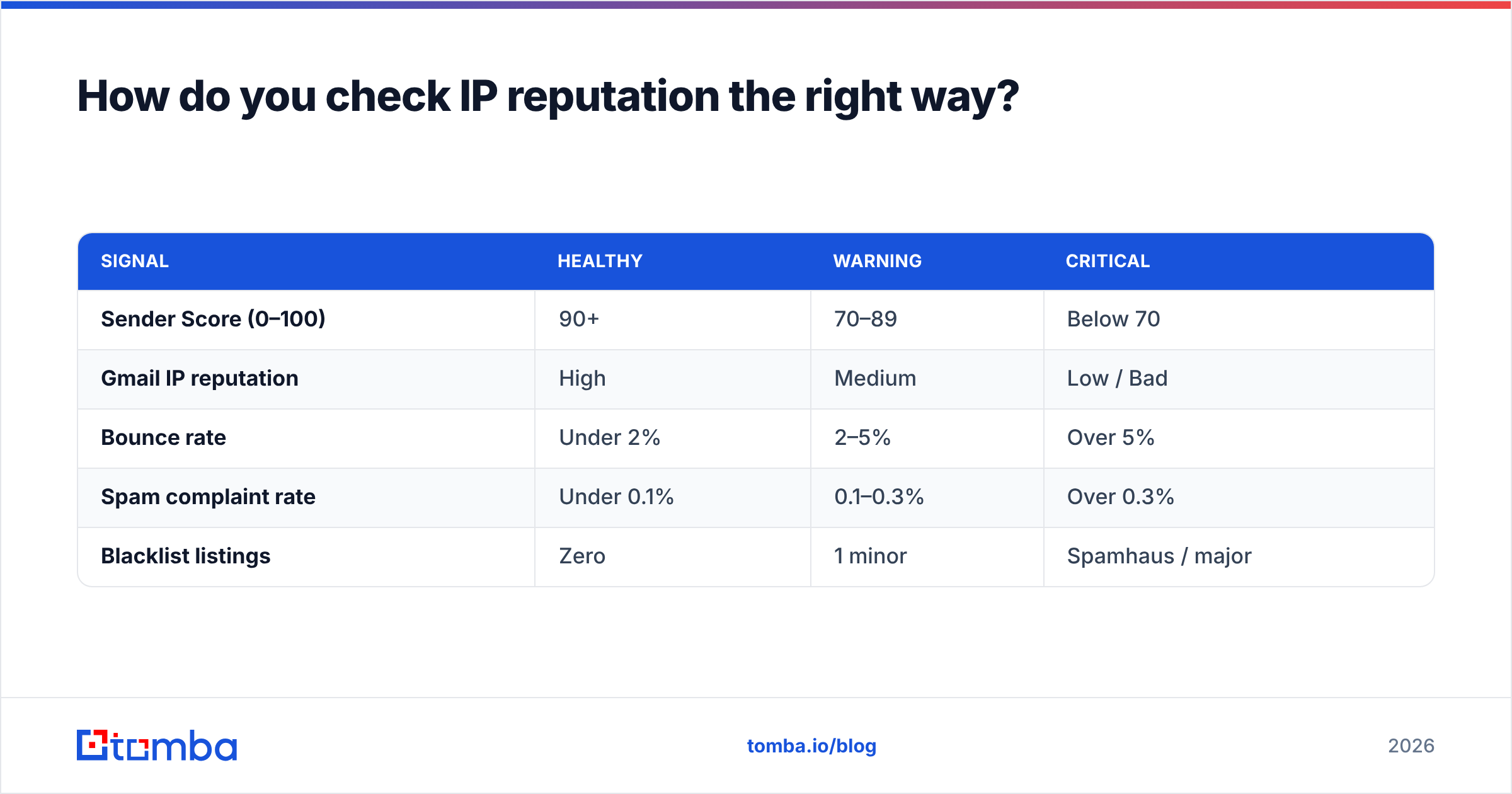
| Signal | Healthy | Warning | Critical |
|---|---|---|---|
| Sender Score (0–100) | 90+ | 70–89 | Below 70 |
| Gmail IP reputation | High | Medium | Low / Bad |
| Bounce rate | Under 2% | 2–5% | Over 5% |
| Spam complaint rate | Under 0.1% | 0.1–0.3% | Over 0.3% |
| Blacklist listings | Zero | 1 minor | Spamhaus / major |
If any column drifts right, stop scaling volume and fix the root cause before you send another batch. Throwing more mail at a damaged IP only digs the hole deeper.
What damages IP reputation the fastest?#
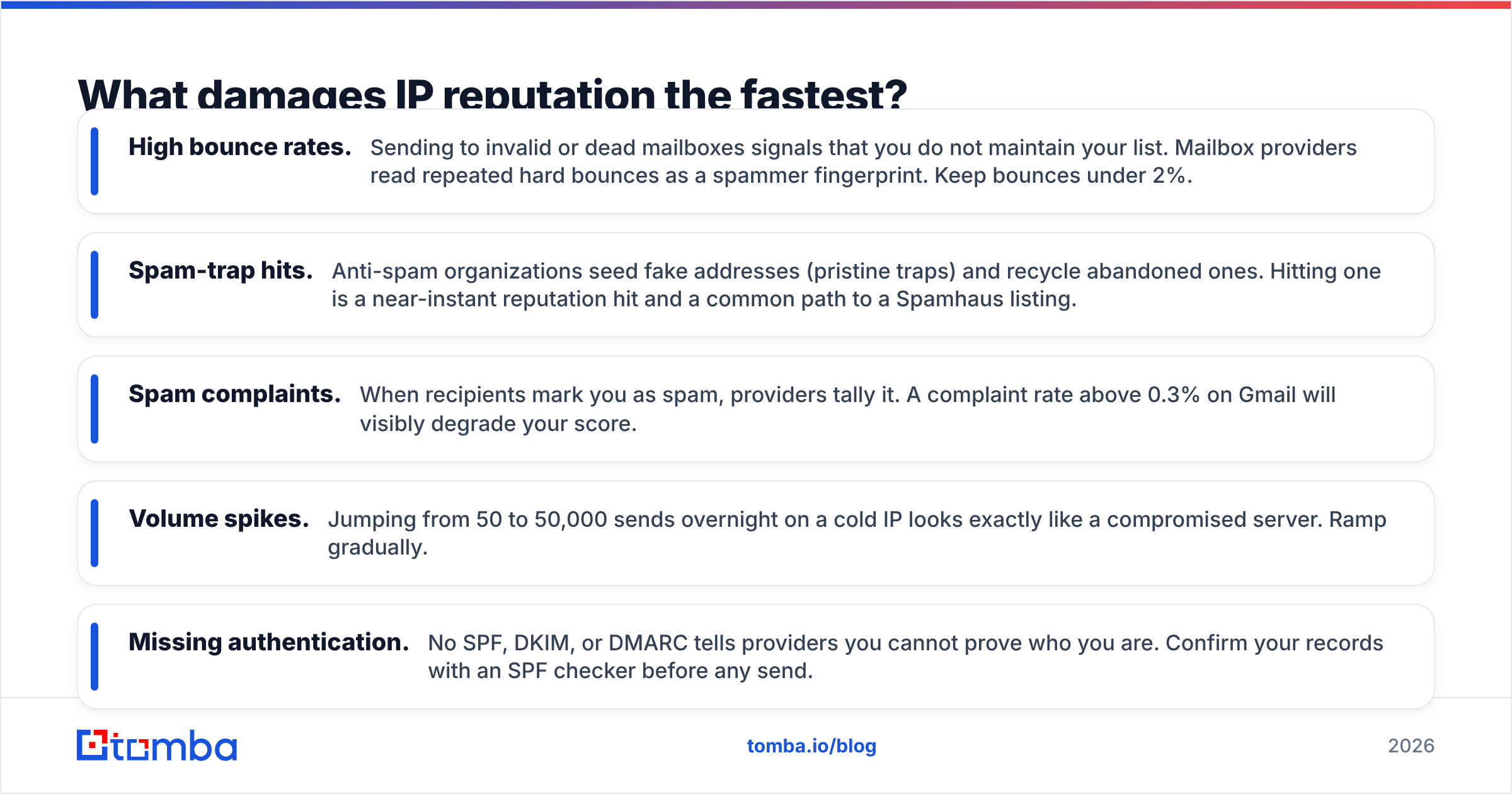
Bad data, in almost every case. The three reputation killers below share one root: sending to addresses you should never have touched.
- High bounce rates. Sending to invalid or dead mailboxes signals that you do not maintain your list. Mailbox providers read repeated hard bounces as a spammer fingerprint. Keep bounces under 2%.
- Spam-trap hits. Anti-spam organizations seed fake addresses (pristine traps) and recycle abandoned ones. Hitting one is a near-instant reputation hit and a common path to a Spamhaus listing.
- Spam complaints. When recipients mark you as spam, providers tally it. A complaint rate above 0.3% on Gmail will visibly degrade your score.
- Volume spikes. Jumping from 50 to 50,000 sends overnight on a cold IP looks exactly like a compromised server. Ramp gradually.
- Missing authentication. No SPF, DKIM, or DMARC tells providers you cannot prove who you are. Confirm your records with an SPF checker before any send.
Notice that bounces and spam traps both come down to whether the email address is real and current. That is the lever you control most directly, which is why list hygiene is the highest-leverage reputation work you can do.

How do you repair and protect a damaged sender reputation?#
Treat recovery like rehabbing an injury: stop the aggravating activity, address the cause, then rebuild strength slowly. There is no button that resets your score — providers want to see sustained good behavior over time.
Step 1 — Stop sending to the bad list. The moment you suspect a problem, pause campaigns. Every additional bounce or complaint extends the recovery window.
Step 2 — Clean your contact data. Run your entire list through an email verifier to strip invalid, role-based, and risky addresses before they bounce. This single step removes the largest source of reputation damage. For ambiguous domains that accept everything, a catch-all verifier reduces guesswork.
Step 3 — Authenticate everything. Publish SPF, DKIM, and DMARC records. These do not directly raise reputation, but their absence caps how high you can ever climb.
Step 4 — Warm the IP gradually. Start with small volumes to your most engaged contacts, then increase ~25% per day as long as bounces and complaints stay low. Engagement (opens, replies) sends the strongest positive signal.
Step 5 — Delist where possible. If you are on a removable blacklist, fix the underlying issue first, then submit a delisting request. Delisting without fixing the cause gets you re-listed within days.
Step 6 — Monitor weekly. Reputation is not set-and-forget. Re-check your blacklist status, Postmaster scores, and complaint rates on a schedule.
Tools that move the needle#
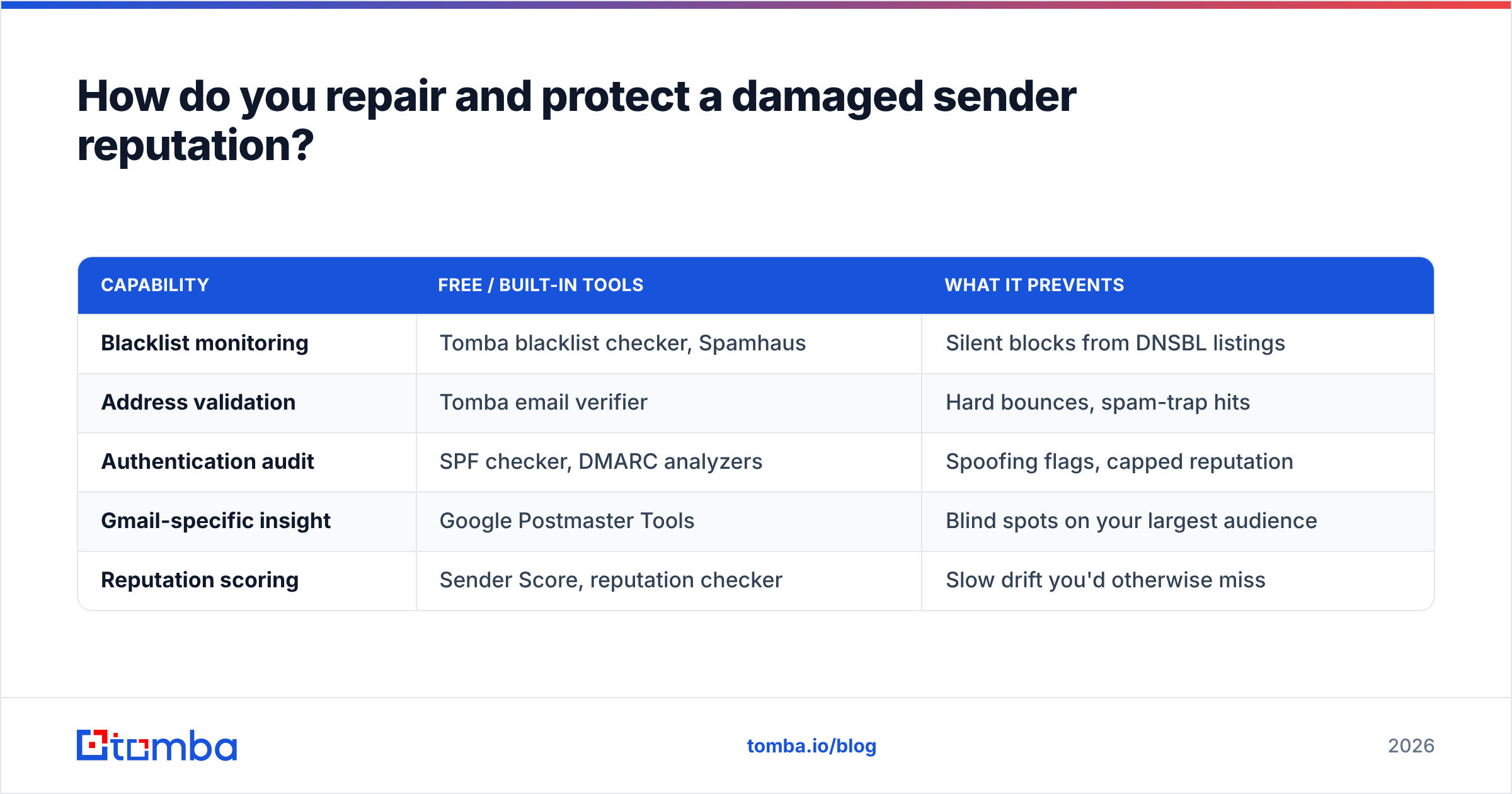
| Capability | Free / built-in tools | What it prevents |
|---|---|---|
| Blacklist monitoring | Tomba blacklist checker, Spamhaus | Silent blocks from DNSBL listings |
| Address validation | Tomba email verifier | Hard bounces, spam-trap hits |
| Authentication audit | SPF checker, DMARC analyzers | Spoofing flags, capped reputation |
| Gmail-specific insight | Google Postmaster Tools | Blind spots on your largest audience |
| Reputation scoring | Sender Score, reputation checker | Slow drift you'd otherwise miss |
The pattern is clear: most reputation protection is upstream of sending. Clean inputs produce clean reputation. If you want third-party validation that these signals matter, G2's email deliverability category catalogs how vendors weight exactly these metrics.
How does contact data quality tie back to IP reputation?#
Directly and completely. Your IP reputation is mostly a reflection of the quality of the addresses you send to, because bounces and spam-trap hits — the two fastest reputation killers — are both data problems, not copywriting problems.
Think of your sending IP as a delivery driver and your contact list as the addresses on the packages. A brilliant driver still fails if half the addresses are fake or abandoned. The packages bounce back, the depot flags the driver as unreliable, and future deliveries get delayed regardless of how good the driver is. Scrubbing the address list is what keeps the driver's record clean.
This is exactly where sourcing data correctly pays off. When you build lists with an accurate email finder and verify on the way in, you start from a foundation that protects reputation instead of one that erodes it. The cheapest bounce is the one that never happens because you caught the bad address before sending.
For teams running outbound at scale, the workflow looks like: find verified contacts, enrich them, validate again at send time, and monitor reputation continuously. Pricing for that full stack is transparent — see Tomba pricing for the tiers, starting with a free plan and a $49/mo Starter.
Frequently asked questions#
How often should I check IP reputation? Weekly for active senders, and immediately any time you notice a drop in open rates or replies. Set a recurring calendar reminder so it does not slip.
Does a single bounce hurt my reputation? No. Isolated bounces are normal. It is the rate and the pattern that matter — consistently high bounce percentages or sudden spikes are what providers penalize.
Is shared or dedicated IP better for reputation? Dedicated gives you control and is better at high, consistent volume. Shared is fine for low volume and offloads warming to the pool — but you inherit your neighbors' behavior. Choose based on volume and how much control you need.
Can I check IP reputation for free? Yes. Blacklist lookups, Google Postmaster Tools, and basic reputation graders are all free. You only pay for ongoing monitoring, bulk verification, and automation.
Does fixing reputation guarantee inbox placement? It removes the biggest blocker, but content, authentication, and recipient engagement also matter. Reputation is necessary, not sufficient.
Protect your reputation before you ever hit send#
The fastest way to wreck an IP is to send to addresses that bounce — and the fastest way to protect it is to never let those addresses into your list in the first place. Source contacts you can trust, verify them on the way in, and your sender score takes care of itself.
Tomba Email Finder gives you verified professional email addresses by name, company, or domain, so your outbound starts from clean, deliverable data instead of the guesswork that triggers blacklists. Pair it with the built-in email verification and you close the loop: find the right person, confirm the address is live, send with confidence. Start free and protect the reputation you have spent months building.
// get started
Find, verify and enrich your first contacts today
Start on the free plan with 25 searches a month, then scale when your team is ready.
Free plan · No credit card required · GDPR & CCPA
// about the author