Check My IP Blacklist: Find & Fix Listings Fast in 2026
Stuck in spam folders? Learn how to check my IP blacklist status across the lists that matter, read the results correctly, and get delisted fast in 2026.
TL;DR
- "Check my IP blacklist" means querying DNS-based blocklists (DNSBLs) like Spamhaus, Barracuda, and SpamCop to see if your sending IP has been flagged for spam.
- Not every blacklist matters. A hit on Spamhaus ZEN can tank inbox placement; a hit on an obscure regional list usually does nothing.
- Use a multi-RBL checker to scan 50+ lists at once, then confirm the specific list and reason before you request removal.
- Delisting is mostly about fixing the cause — compromised accounts, bad lists, broken authentication — not just filling out a removal form.
- Clean data is the cheapest insurance. Verifying addresses before you send keeps bounce rates low and keeps you off the lists in the first place.
What does "check my IP blacklist" actually mean?#
When you check your IP blacklist status, you're asking a set of public databases one simple question: has anyone reported this IP address for sending spam or abuse?
Think of a blacklist like a bouncer's clipboard at a club. Every mail server (the bouncer) keeps a list of IPs it doesn't want to let in. Instead of each server building its own list from scratch, they subscribe to shared lists — called DNS-based blocklists, or DNSBLs — maintained by organizations like Spamhaus and Barracuda. When an email arrives, the receiving server does a quick DNS lookup: "Is this sending IP on any list I trust?" If yes, your message gets rejected, throttled, or quietly dumped into spam.
That lookup is exactly what a blacklist checker automates. You enter your IP (or your domain, which resolves to an IP), and the tool queries dozens of DNSBLs in parallel and reports which ones list you. A clean result returns no listings. A bad result names the specific blocklist and, usually, a reason code.
This matters because blacklisting is one of the most common and least understood causes of poor email deliverability. You can write a perfect cold email, warm your domain for weeks, and still land in spam because the shared IP your provider assigned you got burned by a different sender last month.
Why is my IP on a blacklist?#
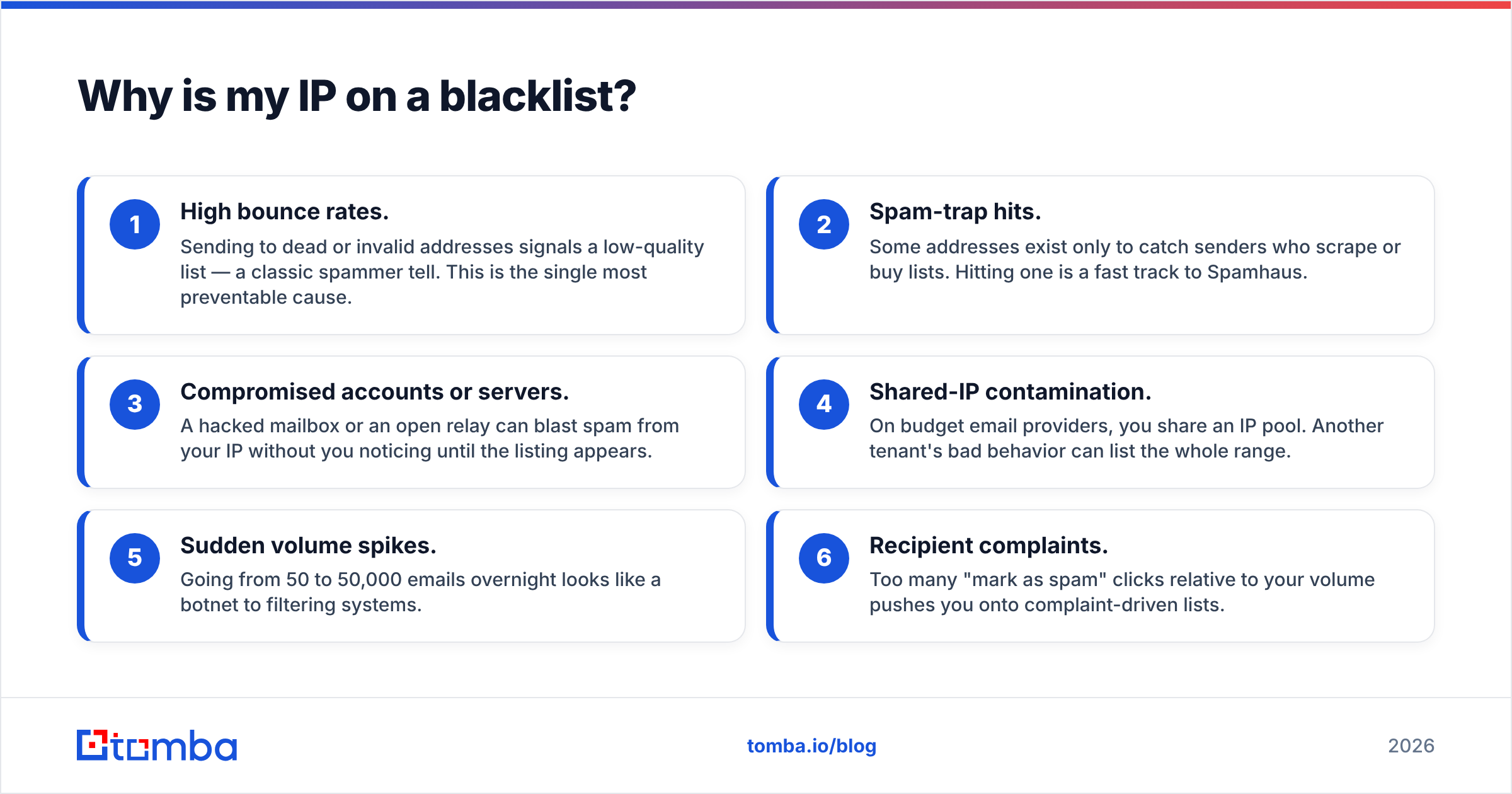
IPs get listed for a handful of recurring reasons. Knowing which one applies to you decides how you fix it.
- High bounce rates. Sending to dead or invalid addresses signals a low-quality list — a classic spammer tell. This is the single most preventable cause.
- Spam-trap hits. Some addresses exist only to catch senders who scrape or buy lists. Hitting one is a fast track to Spamhaus.
- Compromised accounts or servers. A hacked mailbox or an open relay can blast spam from your IP without you noticing until the listing appears.
- Shared-IP contamination. On budget email providers, you share an IP pool. Another tenant's bad behavior can list the whole range.
- Sudden volume spikes. Going from 50 to 50,000 emails overnight looks like a botnet to filtering systems.
- Recipient complaints. Too many "mark as spam" clicks relative to your volume pushes you onto complaint-driven lists.
If you're running cold outreach, the first two — bounces and spam traps — are almost always the culprit. Both trace back to the same root issue: you're emailing addresses you never verified. We'll come back to that, because it's also the cheapest thing to fix.
How do I check my IP blacklist status?#
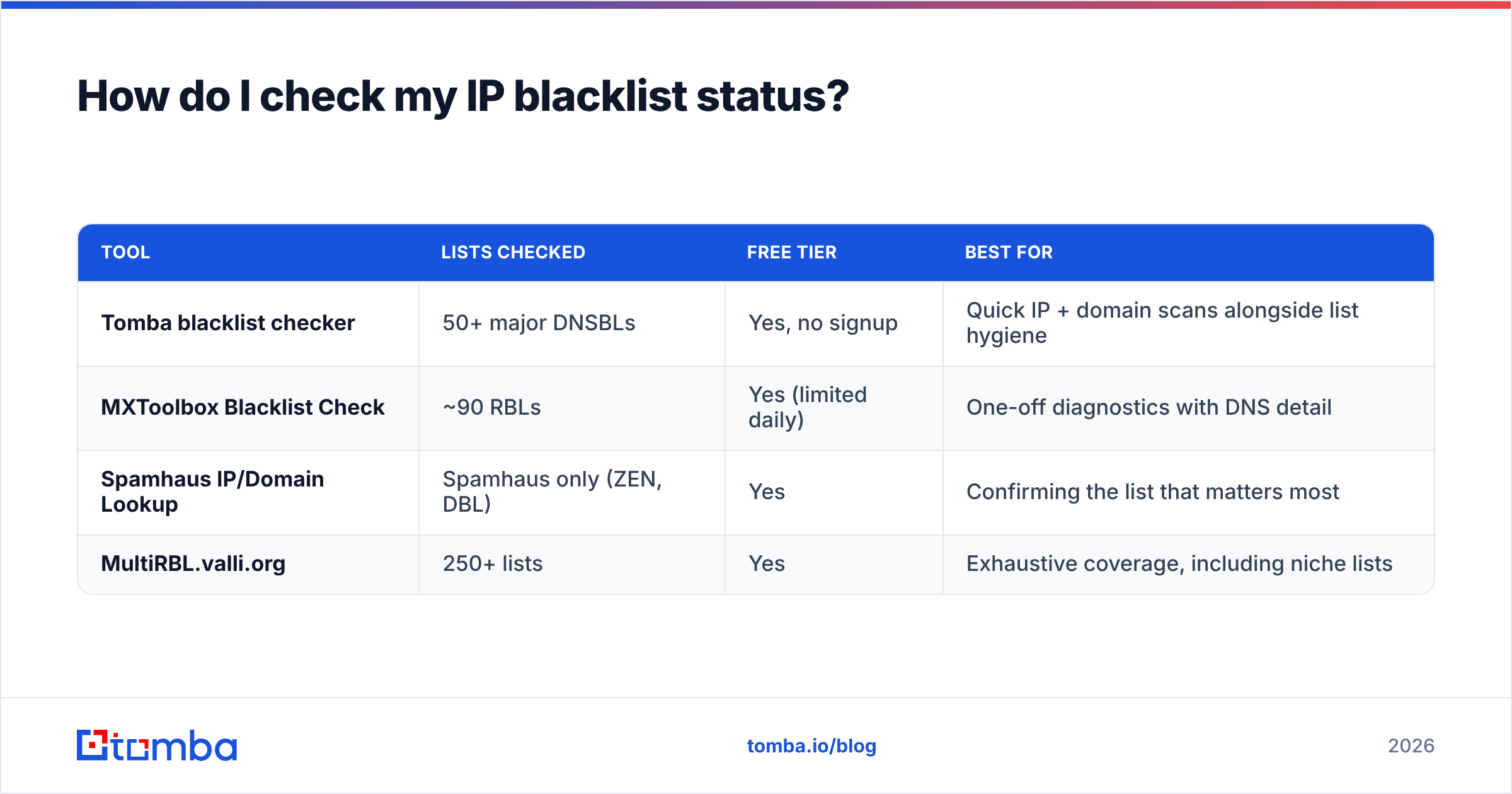
Run a multi-list scan first, then drill into specifics. A single tool that queries many blocklists at once saves you from checking each one by hand. Here's how the common options compare.
| Tool | Lists checked | Free tier | Best for |
|---|---|---|---|
| Tomba blacklist checker | 50+ major DNSBLs | Yes, no signup | Quick IP + domain scans alongside list hygiene |
| MXToolbox Blacklist Check | ~90 RBLs | Yes (limited daily) | One-off diagnostics with DNS detail |
| Spamhaus IP/Domain Lookup | Spamhaus only (ZEN, DBL) | Yes | Confirming the list that matters most |
| MultiRBL.valli.org | 250+ lists | Yes | Exhaustive coverage, including niche lists |
A practical workflow:
- Step 1 — broad scan. Drop your IP into a multi-RBL checker. If everything is green, you're done; your inbox problems are something else (authentication, content, or reputation).
- Step 2 — identify the list. If you're flagged, note the exact blocklist name. "Listed" on Spamhaus ZEN is an emergency. "Listed" on a self-run vanity list is often noise.
- Step 3 — read the reason. Most reputable lists publish why you're on them, with a removal link. Read it before doing anything else.
- Step 4 — check your domain too. IPs and domains are listed separately. Spamhaus DBL targets domains, so a clean IP can still have a dirty domain reputation.
Don't stop at the IP. Pair the blacklist check with a sender reputation checker to see the fuller picture — reputation scores from mailbox providers often move before a formal listing ever appears.
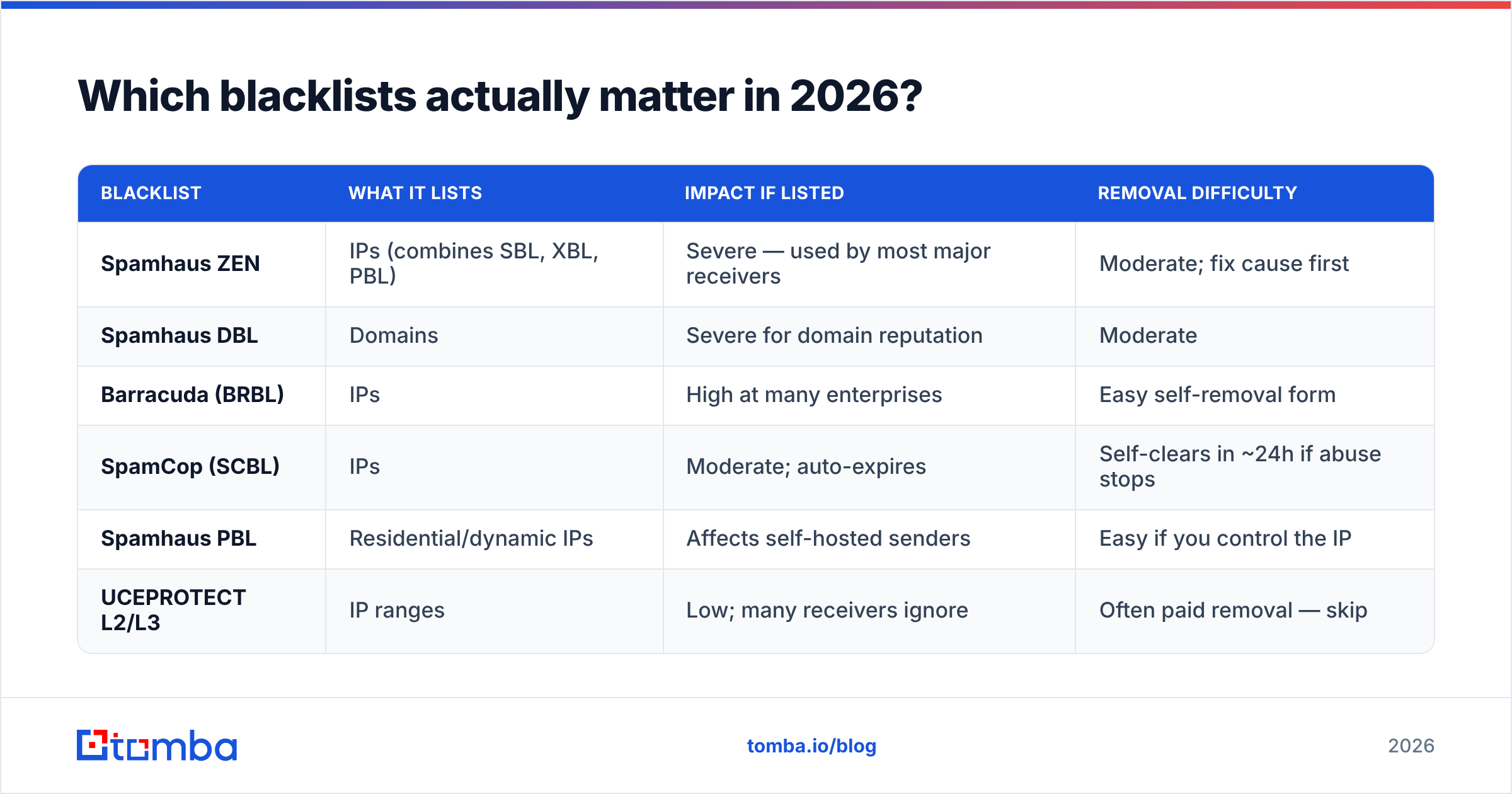
Which blacklists actually matter in 2026?#
There are hundreds of DNSBLs. Maybe a dozen influence real-world inbox placement. Spend your energy on the lists that major providers actually consult.
| Blacklist | What it lists | Impact if listed | Removal difficulty |
|---|---|---|---|
| Spamhaus ZEN | IPs (combines SBL, XBL, PBL) | Severe — used by most major receivers | Moderate; fix cause first |
| Spamhaus DBL | Domains | Severe for domain reputation | Moderate |
| Barracuda (BRBL) | IPs | High at many enterprises | Easy self-removal form |
| SpamCop (SCBL) | IPs | Moderate; auto-expires | Self-clears in ~24h if abuse stops |
| Spamhaus PBL | Residential/dynamic IPs | Affects self-hosted senders | Easy if you control the IP |
| UCEPROTECT L2/L3 | IP ranges | Low; many receivers ignore | Often paid removal — skip |
The headline rule: if Spamhaus lists you, fix it now. Their data feeds a huge share of the world's inbound mail filtering, so a ZEN or DBL listing is the difference between the inbox and the void. You can confirm any Spamhaus listing directly at spamhaus.org, which also explains the specific reason and the removal path.
Lists like UCEPROTECT's Level 2 and Level 3 are the opposite. They list entire IP ranges to pressure hosting providers, and most serious receivers ignore them. Don't pay for "expedited removal" from a list nobody enforces — that's the blacklist equivalent of a scam parking ticket. For background on how these systems are categorized, the DNSBL overview on Wikipedia is a solid neutral primer.
How do I get my IP removed from a blacklist?#
Removal is a two-part job: fix the cause, then request delisting. Skip part one and you'll be relisted within days.
Fix the cause first.
- Audit recent sends. Find the campaign or mailbox that triggered the listing. Check for a spike in bounces or complaints around the listing date.
- Lock down compromised accounts. Reset passwords, enable MFA, and close any open relay. If a hacked account caused it, removal without this step is pointless.
- Scrub your list. Remove every address that bounced and re-verify the rest. This is where most cold senders win or lose.
- Confirm authentication. Make sure SPF, DKIM, and DMARC are aligned. A broken SPF record makes you look forgeable, which invites listings. A free SPF checker confirms your record in seconds.
Then request removal.
- Go to the specific blocklist's site — the one your scan named. Each has its own process.
- For Spamhaus, use their removal center; you'll often need to demonstrate the issue is resolved.
- For Barracuda and SpamCop, the self-service forms usually clear you within a day once abuse stops.
- For auto-expiring lists like SpamCop, you may just need to wait — stop the bad sending and the listing drops off on its own.
After you submit, re-scan. Don't assume; verify. Listings can take a few hours to propagate out of DNS caches even after official removal.

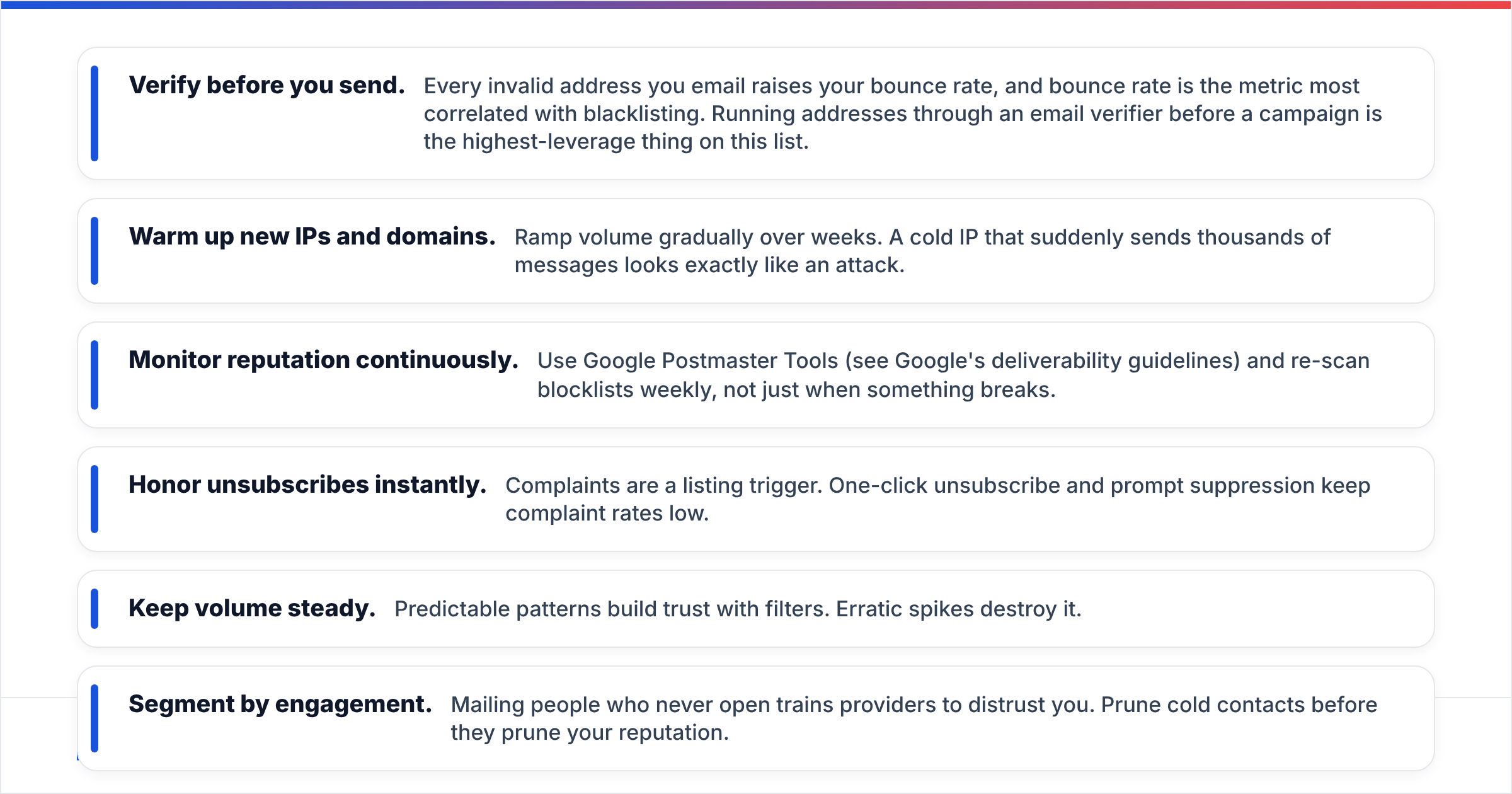
How do I stay off blacklists for good?#
Staying clean is a process, not a one-time fix. The senders who never see a listing share the same habits.
- Verify before you send. Every invalid address you email raises your bounce rate, and bounce rate is the metric most correlated with blacklisting. Running addresses through an email verifier before a campaign is the highest-leverage thing on this list.
- Warm up new IPs and domains. Ramp volume gradually over weeks. A cold IP that suddenly sends thousands of messages looks exactly like an attack.
- Monitor reputation continuously. Use Google Postmaster Tools (see Google's deliverability guidelines) and re-scan blocklists weekly, not just when something breaks.
- Honor unsubscribes instantly. Complaints are a listing trigger. One-click unsubscribe and prompt suppression keep complaint rates low.
- Keep volume steady. Predictable patterns build trust with filters. Erratic spikes destroy it.
- Segment by engagement. Mailing people who never open trains providers to distrust you. Prune cold contacts before they prune your reputation.
The thread running through all of this is data quality. Blacklists are downstream of bad lists. If your contacts are accurate and engaged, your bounce and complaint rates stay low, and low rates are what keep you off the clipboard. This is why list hygiene and email-finding tools belong in the same conversation as deliverability — they're two ends of the same pipeline. Maintaining strong sender reputation is far cheaper than fighting a Spamhaus listing every quarter.
How often should I check my IP blacklist status?#
Match your cadence to your sending volume.
- High-volume senders (daily campaigns): scan weekly, and set an alert so you catch a listing within hours, not after a campaign tanks.
- Moderate senders (weekly campaigns): scan before each major send.
- Low-volume or transactional only: monthly is usually fine, plus an immediate check any time open rates drop suddenly.
The cost of checking is near zero; the cost of not checking is a campaign that silently dies in spam. Build the scan into your pre-send checklist the same way you'd proofread a subject line.
The bottom line#
Checking your IP blacklist status takes two minutes; fixing the underlying cause takes discipline. Run a broad multi-RBL scan, focus only on the lists receivers actually enforce (Spamhaus above all), fix the root problem before you request removal, and then keep your data clean so you never go back.
Most listings start with one thing: emailing addresses you never verified. Stop that at the source. Build your prospecting lists with the Tomba Email Finder to get accurate, deliverable professional addresses from the start, then verify them before every send. Clean inputs mean low bounces, low complaints, and an IP that stays off the clipboard. Compare Tomba pricing — the free tier covers 25 searches a month, with Starter at $49/mo when you scale — and pair it with the free blacklist checker to keep your sender reputation spotless in 2026.
// get started
Find, verify and enrich your first contacts today
Start on the free plan with 25 searches a month, then scale when your team is ready.
Free plan · No credit card required · GDPR & CCPA
// about the author