Checking Email Addresses for Validity: The 2026 Guide
A practical 2026 walkthrough for checking email addresses for validity — syntax, MX, SMTP, and catch-all checks, plus how to verify at scale without burning your sender reputation.
TL;DR
- Checking email addresses for validity means running four layered checks: syntax, domain/MX, mailbox (SMTP), and catch-all detection — each filters out a different class of bad address.
- A single bad list can torch your sender reputation. Keep hard bounces under 2% and you stay out of spam folders.
- Free single-address tools are fine for one-off checks; bulk verification needs an API or batch uploader that respects rate limits.
- Catch-all domains are the hardest case — they accept everything at the SMTP layer, so you need probabilistic scoring, not a yes/no.
- Tomba's email verifier handles all four layers and exposes a confidence score per address, so you decide the risk threshold.
What does "checking email addresses for validity" actually mean?#
Checking an email address for validity is like checking whether a street address can actually receive mail — not just whether it's written correctly, but whether the building exists and someone is home. You can write a perfectly formatted address for a house that was demolished years ago.
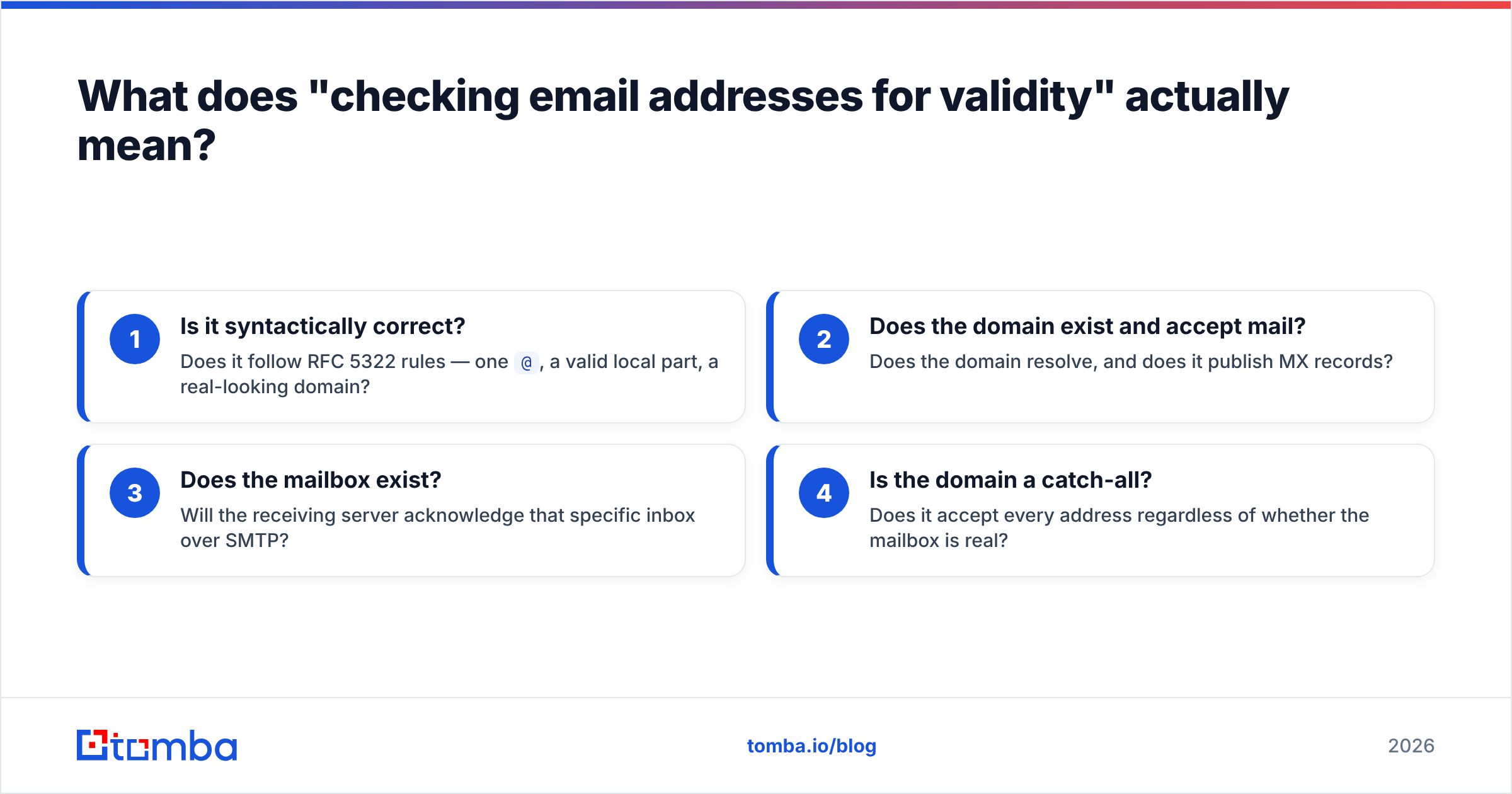
Email validation works the same way in layers. An address can pass the format check and still bounce, because the format is only the first gate. Real validation answers four separate questions:
- Is it syntactically correct? Does it follow RFC 5322 rules — one
@, a valid local part, a real-looking domain? - Does the domain exist and accept mail? Does the domain resolve, and does it publish MX records?
- Does the mailbox exist? Will the receiving server acknowledge that specific inbox over SMTP?
- Is the domain a catch-all? Does it accept every address regardless of whether the mailbox is real?
Skip any layer and you let a category of bad addresses through. That's why a regex check alone — the thing most developers reach for first — gives a false sense of safety.
Why does email validity matter so much in 2026?#
Because mailbox providers now treat bounce rates as a primary reputation signal. Conclusion first: a dirty list doesn't just waste sends — it actively lowers the inbox placement of your good messages.
When you send to dead mailboxes, the receiving server returns a hard bounce. Gmail, Outlook, and Yahoo log that. Cross a threshold (roughly 2% hard bounces) and they start routing you to spam, throttling you, or blocking you outright. The 2024 Google and Yahoo bulk-sender rules made this explicit: keep your spam complaint rate under 0.3% and your bounce rate low, or you lose the inbox.
Good email deliverability starts before you write a single subject line. It starts with a clean list. Validation is the cheapest insurance you can buy against a sender reputation death spiral.
There's also a direct cost angle. Most outreach platforms bill per send or per contact. Every invalid address is money spent mailing a void, plus a small reputation tax on top.
What are the layers of email validation?#
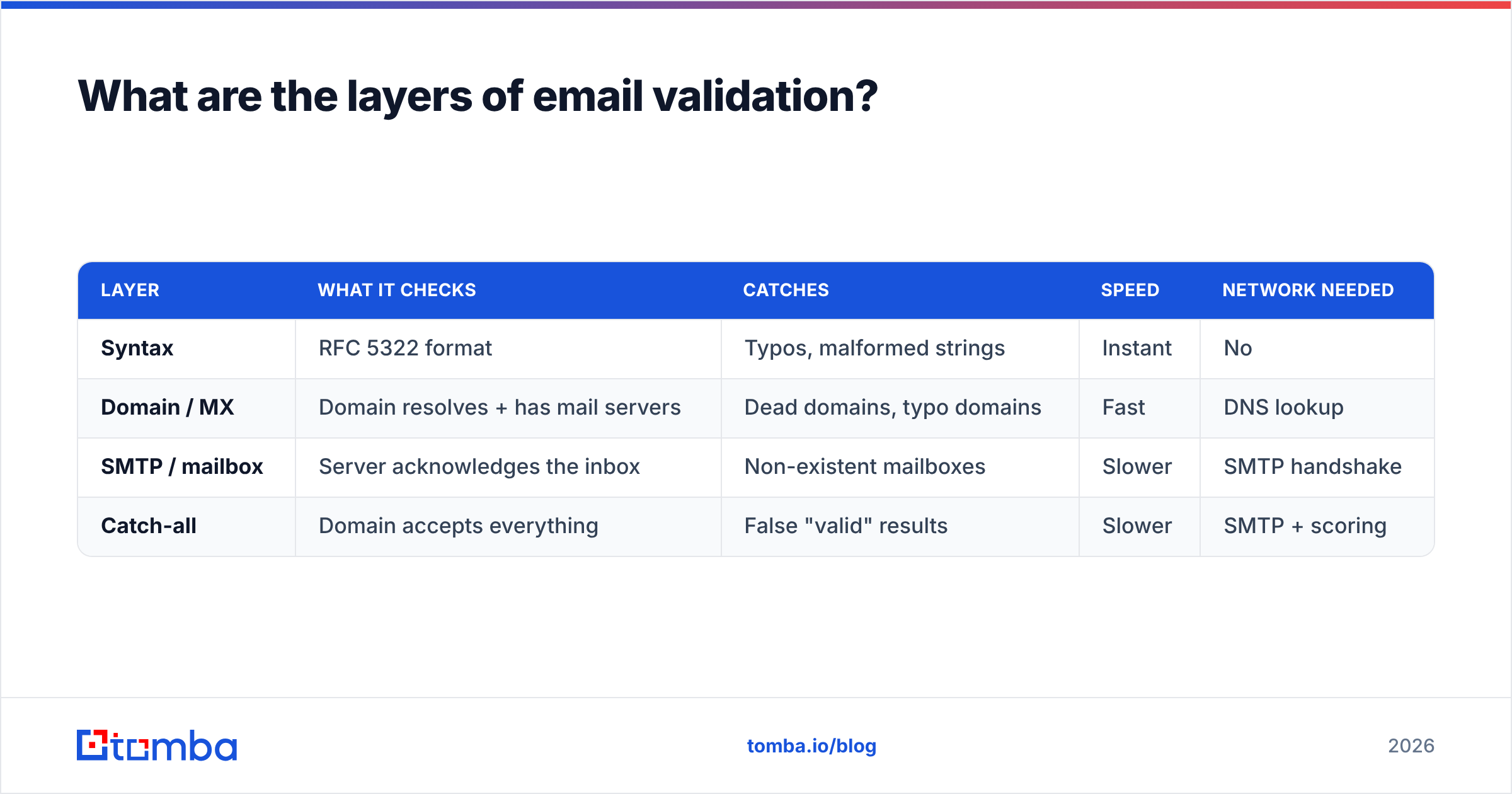
Each layer catches what the previous one missed. Here's how they stack and what each one costs you in time and risk.
| Layer | What it checks | Catches | Speed | Network needed |
|---|---|---|---|---|
| Syntax | RFC 5322 format | Typos, malformed strings | Instant | No |
| Domain / MX | Domain resolves + has mail servers | Dead domains, typo domains | Fast | DNS lookup |
| SMTP / mailbox | Server acknowledges the inbox | Non-existent mailboxes | Slower | SMTP handshake |
| Catch-all | Domain accepts everything | False "valid" results | Slower | SMTP + scoring |
Syntax is the cheap, offline gate. You can run it client-side with a free email checker before anything hits a server.
Domain and MX validation confirms the domain isn't a typo (gmial.com) and actually publishes mail-exchange records. No MX records means the domain can't receive email, full stop.
SMTP verification is where the real signal lives. The verifier opens a conversation with the receiving mail server and asks, in effect, "do you have a mailbox for this user?" A clean server answers honestly. This is the step a regex can never replicate.
Catch-all detection is the trap. Some domains are configured to accept mail for every address — anything@company.com returns "OK" at the SMTP layer. So a naive verifier marks a fake address as valid. You need a tool that flags catch-all domains and gives you a confidence score instead of a false green light.
Can you check email validity for free?#
Yes — for single addresses or tiny batches. No — not reliably at scale.
For a one-off check, a browser tool is plenty. You paste an address, it runs syntax + MX + a careful SMTP probe, and returns a verdict. Tomba's free email checker does exactly this, and the email reputation checker adds sender-reputation context on top.
The free route breaks down when you have thousands of addresses. Running SMTP checks yourself from a single IP gets you rate-limited or temporarily blocked by big providers, because raw mailbox probing looks like exactly what spammers do. That's the moment you move to a dedicated email verifier that spreads checks across reputable infrastructure and respects each provider's limits.
Here's the honest trade-off across the common approaches:
- DIY regex + DNS: Free and instant, but blind to whether the mailbox actually exists. Use it only as a pre-filter.
- Free single-check tools: Accurate per address, but manual and slow for lists. Great for verifying one prospect before a high-stakes email.
- Bulk verification service: Costs credits, but handles SMTP and catch-all at scale without wrecking your own IP. The only sane option above a few hundred addresses.
- Real-time API: Pay per call, validate at the point of capture (signup forms, CRM entry) so bad data never enters your system.
How do you verify a large list without getting blocked?#
Conclusion first: batch it through a service that owns the SMTP infrastructure, don't hammer mail servers from your own machine.
When you verify in bulk yourself, every check is an outbound SMTP connection. A few hundred to the same provider and you'll see greylisting, then outright 4xx/5xx refusals. The provider can't tell your cleanup job from a directory-harvest attack.
A proper bulk email finder and verifier solves this three ways:
- Distributed probing — checks come from a pool of warmed, reputable IPs, not your single address.
- Provider-aware throttling — it knows Gmail's and Outlook's tolerance and paces accordingly.
- Result caching — recently-verified domains and catch-all flags are reused instead of re-probed.
For developers, the cleanest path is the email verification API: validate addresses the moment they're captured, so your database never accumulates rot in the first place. If you live in spreadsheets, the Google Sheets add-on and Excel add-in let you verify a column in place.
How accurate is email verification, and what limits it?#
No verifier is 100% accurate, and any vendor claiming otherwise is selling you something. Honest accuracy sits around 95–99% on verifiable domains, with two hard limits.
Catch-all domains are the first ceiling. Because they accept everything, even a perfect SMTP check can't confirm an individual mailbox. The best a tool can do is flag the domain as catch-all and assign a probability. Tomba exposes this through a dedicated catch-all verifier, so you can treat catch-all addresses as a separate risk tier instead of pretending they're confirmed.
Greylisting and tarpitting are the second. Some servers deliberately delay or obscure responses to deter exactly this kind of probing. A good verifier retries intelligently; a bad one reports a false "invalid."
The practical move is to read the status a verifier returns, not just a binary:
- Valid / deliverable — safe to send.
- Invalid / undeliverable — remove immediately.
- Catch-all / accept-all — send with caution, or only to high-value targets.
- Unknown — the server wouldn't answer; re-check later or exclude from cold sends.
If you want to understand where verification data comes from and why coverage varies, Tomba documents its data sources openly. For broader industry context on validation practices, the rules published by Google's bulk sender guidelines and reviews on G2 are worth reading before you commit to any vendor.
How does Tomba compare to other verification tools?#
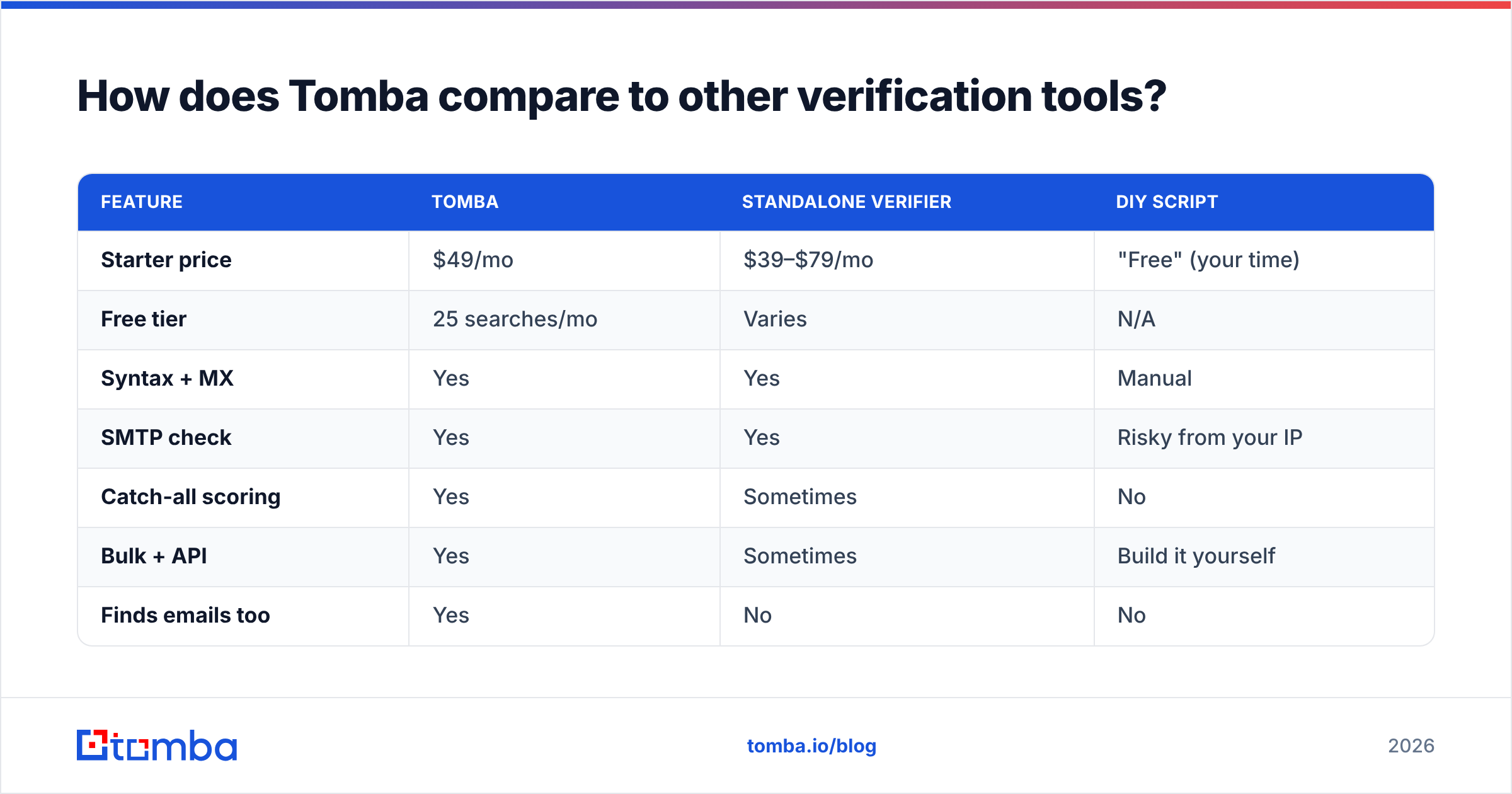
Most teams need a tool that does both — find the address and verify it — rather than stitching two vendors together. Here's how the common options line up.
| Feature | Tomba | Standalone verifier | DIY script |
|---|---|---|---|
| Starter price | $49/mo | $39–$79/mo | "Free" (your time) |
| Free tier | 25 searches/mo | Varies | N/A |
| Syntax + MX | Yes | Yes | Manual |
| SMTP check | Yes | Yes | Risky from your IP |
| Catch-all scoring | Yes | Sometimes | No |
| Bulk + API | Yes | Sometimes | Build it yourself |
| Finds emails too | Yes | No | No |
The differentiator is that Tomba combines discovery and verification in one credit pool. You can run a domain search to find every address at a company, then verify the results in the same workflow — no export/import dance between tools. Full Tomba pricing runs from the free tier through Growth ($99/mo) and Pro ($249/mo) as volume grows.
If you only ever verify and never find, a pure-play verifier might shave a few dollars. But the moment you also need to build lists, the combined approach wins on both cost and time.
What's a sensible email-checking workflow?#
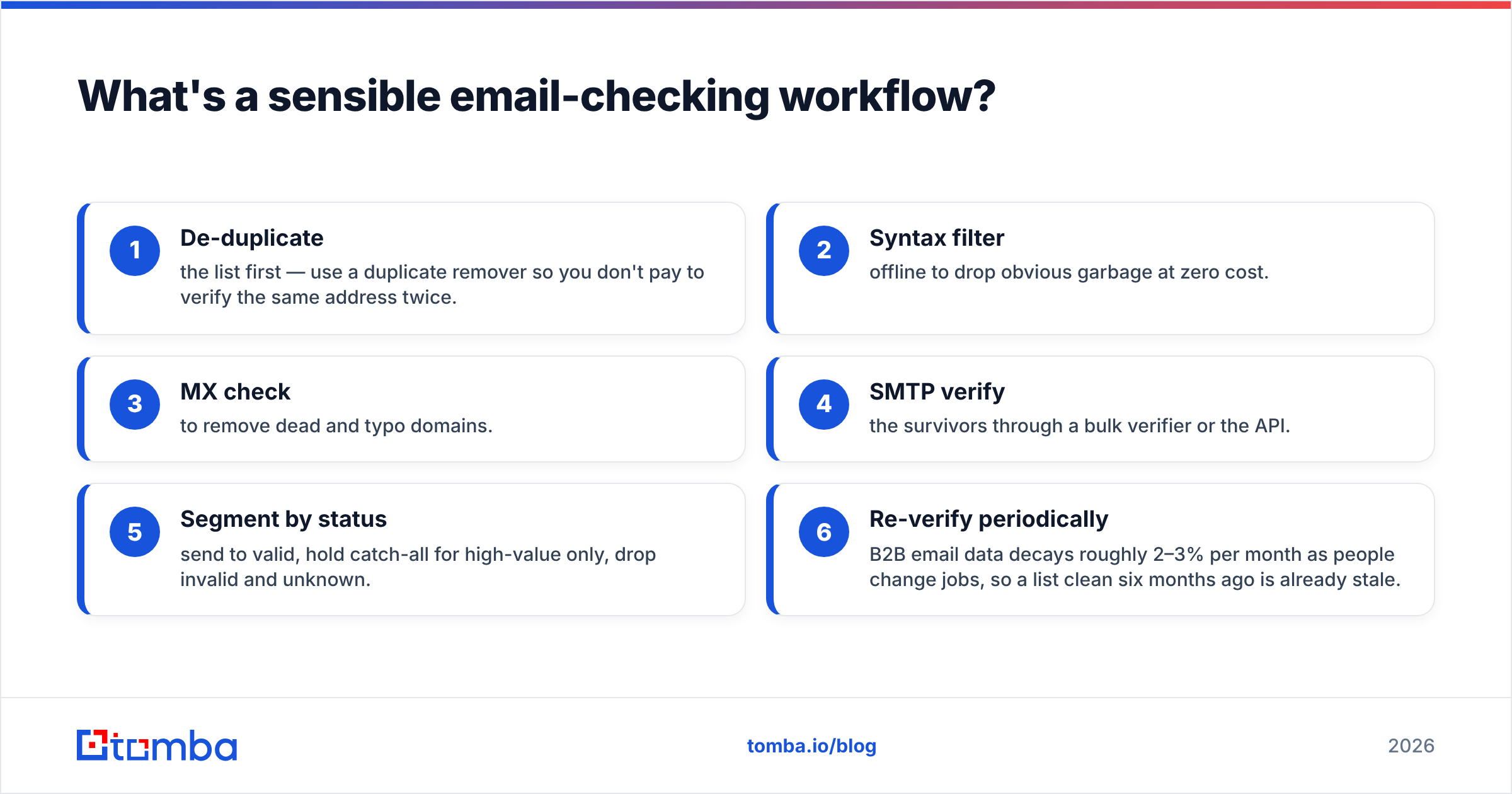
Put the layers in order of cost, cheapest first, so you spend SMTP checks only on addresses that have already passed the free gates.
- De-duplicate the list first — use a duplicate remover so you don't pay to verify the same address twice.
- Syntax filter offline to drop obvious garbage at zero cost.
- MX check to remove dead and typo domains.
- SMTP verify the survivors through a bulk verifier or the API.
- Segment by status — send to valid, hold catch-all for high-value only, drop invalid and unknown.
- Re-verify periodically — B2B email data decays roughly 2–3% per month as people change jobs, so a list clean six months ago is already stale.
That last point is the one teams forget. Validation isn't a one-time event; it's hygiene. Bake it into your data enrichment routine and re-check active segments quarterly.
Final word: verify before you send#
Checking email addresses for validity is the single highest-ROI habit in outbound. It costs cents per address and protects the reputation that determines whether any of your email reaches an inbox at all. Run the four layers — syntax, MX, SMTP, catch-all — read the status codes instead of a binary, and re-verify on a schedule.
If you want one tool that finds the addresses and proves they're real, start with the Tomba Email Finder and pair it with the built-in email verifier. The free tier gives you 25 searches a month to test it on your own list before committing — verify a sample, watch your bounce rate, and scale from there.
// get started
Find, verify and enrich your first contacts today
Start on the free plan with 25 searches a month, then scale when your team is ready.
Free plan · No credit card required · GDPR & CCPA
// about the author