Cirrus Insight vs Yesware (2026): Full Feature Comparison
Cirrus Insight vs Yesware compared for 2026 — Salesforce sync, email tracking, templates, pricing, and which sales-engagement tool actually fits your team.
Cirrus Insight vs Yesware: Which Sales Engagement Tool Wins in 2026?
Both Cirrus Insight and Yesware live inside your inbox and promise to turn Gmail or Outlook into a sales machine. They look similar on a feature grid. They are not similar in practice. The right pick depends almost entirely on whether Salesforce is the center of your world.
TL;DR
- Pick Cirrus Insight if Salesforce is your system of record and you need deep, two-way CRM sync, calendar booking, and activity logging that actually sticks.
- Pick Yesware if you want lightweight email tracking, templates, and reporting that works just as well for HubSpot, Outreach-style cadences, and teams without a Salesforce admin.
- Pricing is close at the entry level, but Cirrus Insight gets expensive fast once you add scheduling and sync tiers; Yesware stays simpler.
- Neither tool finds or verifies email addresses — they engage contacts you already have. Pair either one with a dedicated email finder so your tracking data is built on real, deliverable addresses.
- Both have free trials; Yesware has a genuine free forever tier, Cirrus Insight does not.
What Are Cirrus Insight and Yesware?#
Both are "sales engagement" overlays for your email client. Instead of bouncing between your inbox and a separate CRM tab, the tool injects a sidebar into Gmail or Outlook so you can see contact context, send tracked emails, and log activity without leaving the message you are writing.
Think of them like a heads-up display in a car. The road (your inbox) is unchanged, but now speed, navigation, and warnings appear on the glass in front of you. Cirrus Insight and Yesware both project CRM and engagement data onto your inbox — they just emphasize different gauges.
- Cirrus Insight started as a Salesforce-for-Gmail integration and never lost that DNA. Its strongest feature is making Salesforce usable from inside your inbox: sync emails, create records, log calls, and book meetings that write straight back to Salesforce.
- Yesware started as an email tracking and templates tool. Its strongest feature is fast, reliable open/click tracking plus reporting, with optional CRM connectors. It is CRM-agnostic by design.
/blog/generated/memes/2026-06-23/cirrus-insight-vs-yesware-meme-1.png
That origin story matters more than any single feature checkbox, because it shapes where each product is genuinely good versus where it is merely adequate.
How Do Cirrus Insight and Yesware Compare on Features?#
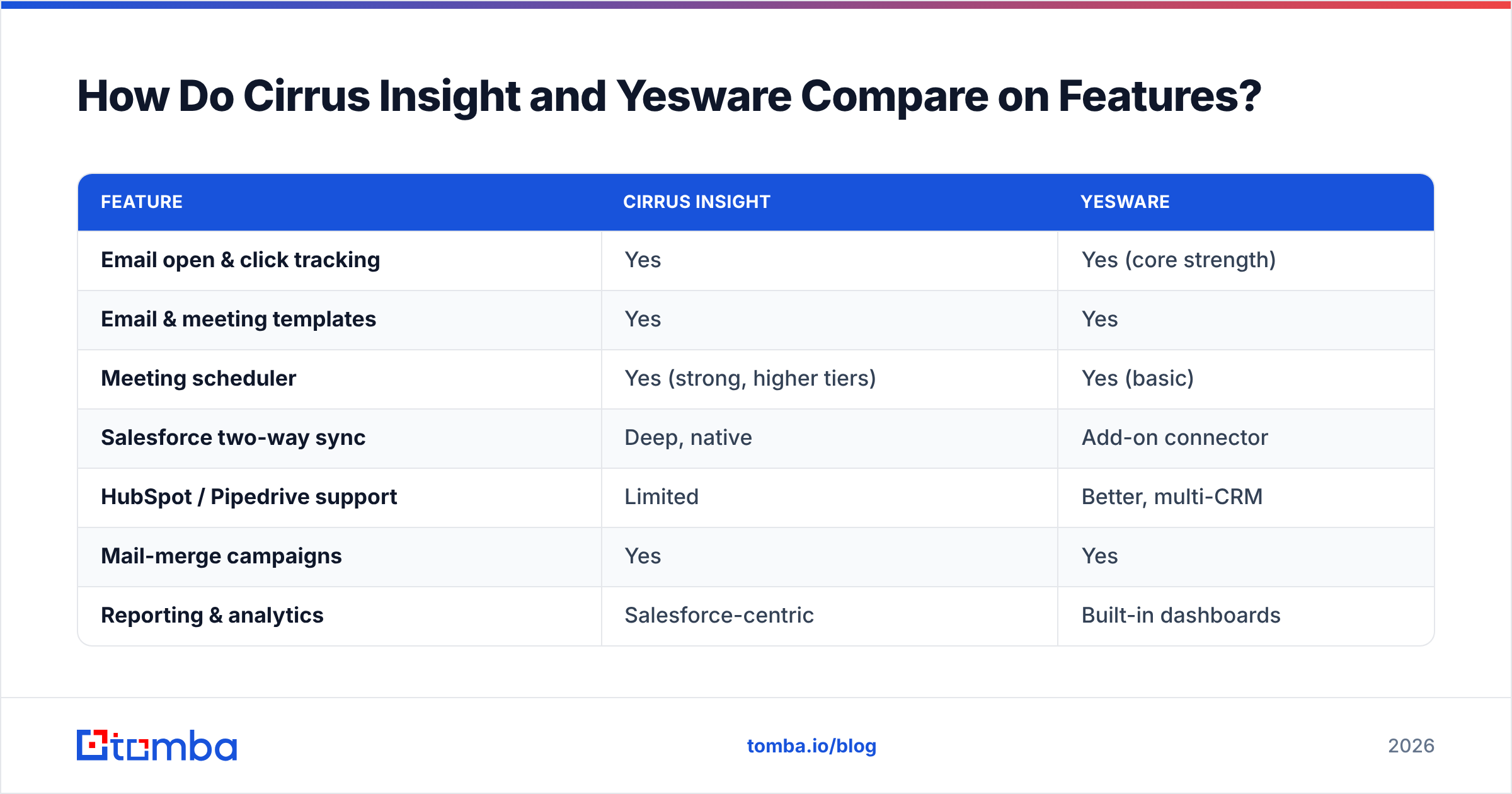
Here is the head-to-head on the capabilities sales teams actually use day to day.
| Feature | Cirrus Insight | Yesware |
|---|---|---|
| Email open & click tracking | Yes | Yes (core strength) |
| Email & meeting templates | Yes | Yes |
| Meeting scheduler | Yes (strong, higher tiers) | Yes (basic) |
| Salesforce two-way sync | Deep, native | Add-on connector |
| HubSpot / Pipedrive support | Limited | Better, multi-CRM |
| Mail-merge campaigns | Yes | Yes |
| Reporting & analytics | Salesforce-centric | Built-in dashboards |
| Gmail support | Yes | Yes |
| Outlook support | Yes | Yes |
| Free forever plan | No | Yes (limited) |
| Best fit | Salesforce shops | CRM-agnostic teams |
The pattern is clear. Cirrus Insight wins anything that touches Salesforce, and Yesware wins anything that needs to be lightweight, fast, or CRM-flexible. If you read down the table and most of your "must-haves" sit in the Salesforce rows, you already have your answer.
Where Cirrus Insight Pulls Ahead#
Cirrus Insight's two-way Salesforce sync is the real product. Emails, events, and tasks logged from your inbox appear on the correct Salesforce records without you babysitting them. For a team whose pipeline reports are run out of Salesforce, that activity capture is the difference between clean forecasting and a spreadsheet of guesses. Its scheduling tool — book meetings that auto-create Salesforce events — is also more mature than Yesware's basic scheduler.
Where Yesware Pulls Ahead#
Yesware is faster to adopt. There is no Salesforce admin in the loop, the tracking is dead reliable, and the reporting dashboards are readable without building a single custom report. Teams on HubSpot, Pipedrive, or no formal CRM at all get more out of Yesware because it never assumes Salesforce is present. For a founder-led sales motion or an SDR pod running cold outreach, that simplicity is a feature, not a limitation.
Is Cirrus Insight or Yesware Better for Salesforce Users?#
Cirrus Insight, clearly. If Salesforce is your source of truth, this is not a close call. Cirrus Insight was built to make Salesforce livable from the inbox, and it does that better than Yesware's bolt-on connector.
That said, "better for Salesforce" comes with a cost. Cirrus Insight's pricing climbs as you unlock the sync depth and scheduling that justify choosing it in the first place. You are paying for the integration, so make sure your team actually lives in Salesforce before committing. If half your reps quietly work out of spreadsheets, you will pay for sync nobody uses.
If you run HubSpot or a lighter stack, the calculus flips. Yesware's CRM-agnostic design means you are not paying a Salesforce tax for features you cannot use. You can still connect it to your CRM for activity logging — it just will not be as deep as Cirrus Insight's Salesforce sync, and for most non-Salesforce teams that depth is overkill anyway.
How Much Do Cirrus Insight and Yesware Cost in 2026?#
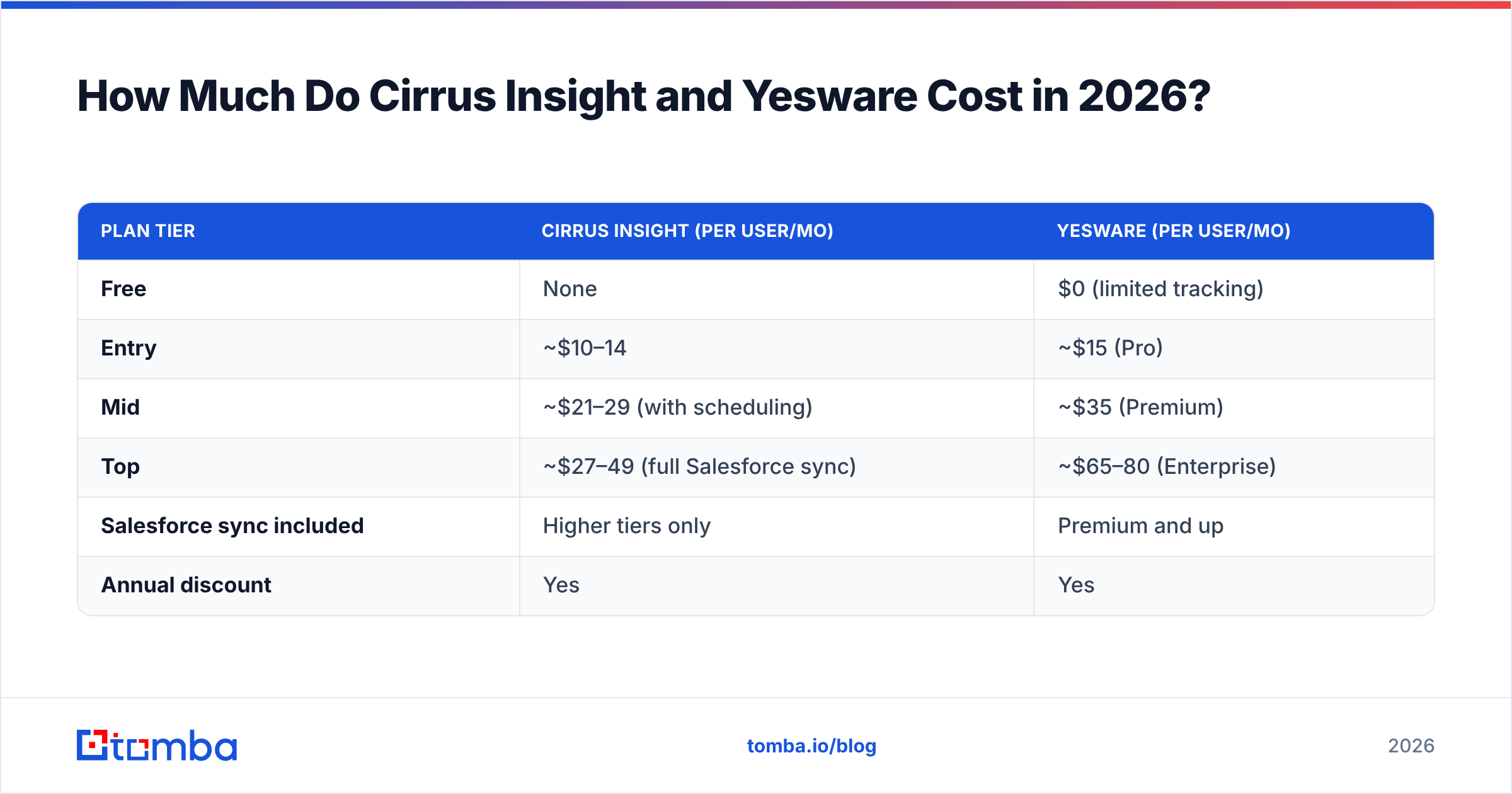
Both price per user per month, billed annually for the best rate. The headline numbers look close, but the effective cost diverges once you add the tiers that unlock each tool's signature features.
| Plan tier | Cirrus Insight (per user/mo) | Yesware (per user/mo) |
|---|---|---|
| Free | None | $0 (limited tracking) |
| Entry | ~$10–14 | ~$15 (Pro) |
| Mid | ~$21–29 (with scheduling) | ~$35 (Premium) |
| Top | ~$27–49 (full Salesforce sync) | ~$65–80 (Enterprise) |
| Salesforce sync included | Higher tiers only | Premium and up |
| Annual discount | Yes | Yes |
Pricing changes often, so confirm current numbers on the Cirrus Insight and Yesware sites before you buy. The structural takeaway is stable, though: Yesware has a free tier and simpler ladder; Cirrus Insight has no free plan and gates its best features behind its higher tiers.
For budget-conscious teams, Yesware's free forever plan is a genuine on-ramp. You can run real tracking on it before paying a cent. Cirrus Insight expects you to be a Salesforce buyer from day one.
What Do Cirrus Insight and Yesware Miss?#
Here is the part most comparison posts skip: neither tool solves your data problem. They both assume you already have accurate contact data to engage. They track, template, and sync — but they do not find new prospects, and they do not verify that the addresses you are emailing are real.
That gap matters more than the feature differences above, because email tracking is worthless if the email bounces. If your list is full of stale or guessed addresses, you are paying per seat to watch deliverability tank and your sender reputation erode. Engagement tools amplify whatever data you feed them, good or bad.
This is where a data layer belongs in your stack, sitting upstream of Cirrus Insight or Yesware:
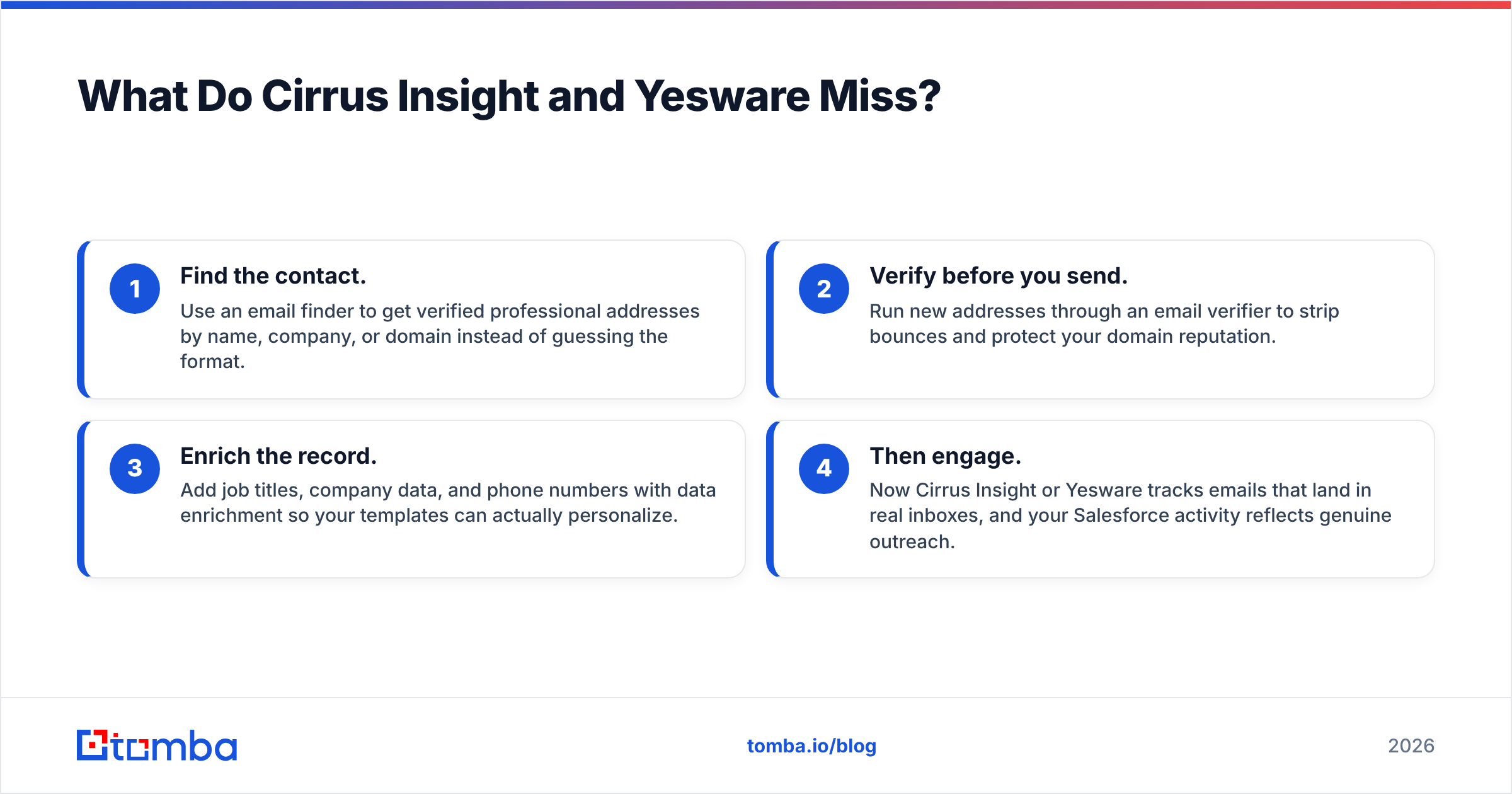
- Find the contact. Use an email finder to get verified professional addresses by name, company, or domain instead of guessing the format.
- Verify before you send. Run new addresses through an email verifier to strip bounces and protect your domain reputation.
- Enrich the record. Add job titles, company data, and phone numbers with data enrichment so your templates can actually personalize.
- Then engage. Now Cirrus Insight or Yesware tracks emails that land in real inboxes, and your Salesforce activity reflects genuine outreach.
Skip step one or two and the most expensive sales-engagement tool on the market still mails into the void.
Which Should You Choose: Cirrus Insight or Yesware?#
Match the tool to your motion, not to the longest feature list.
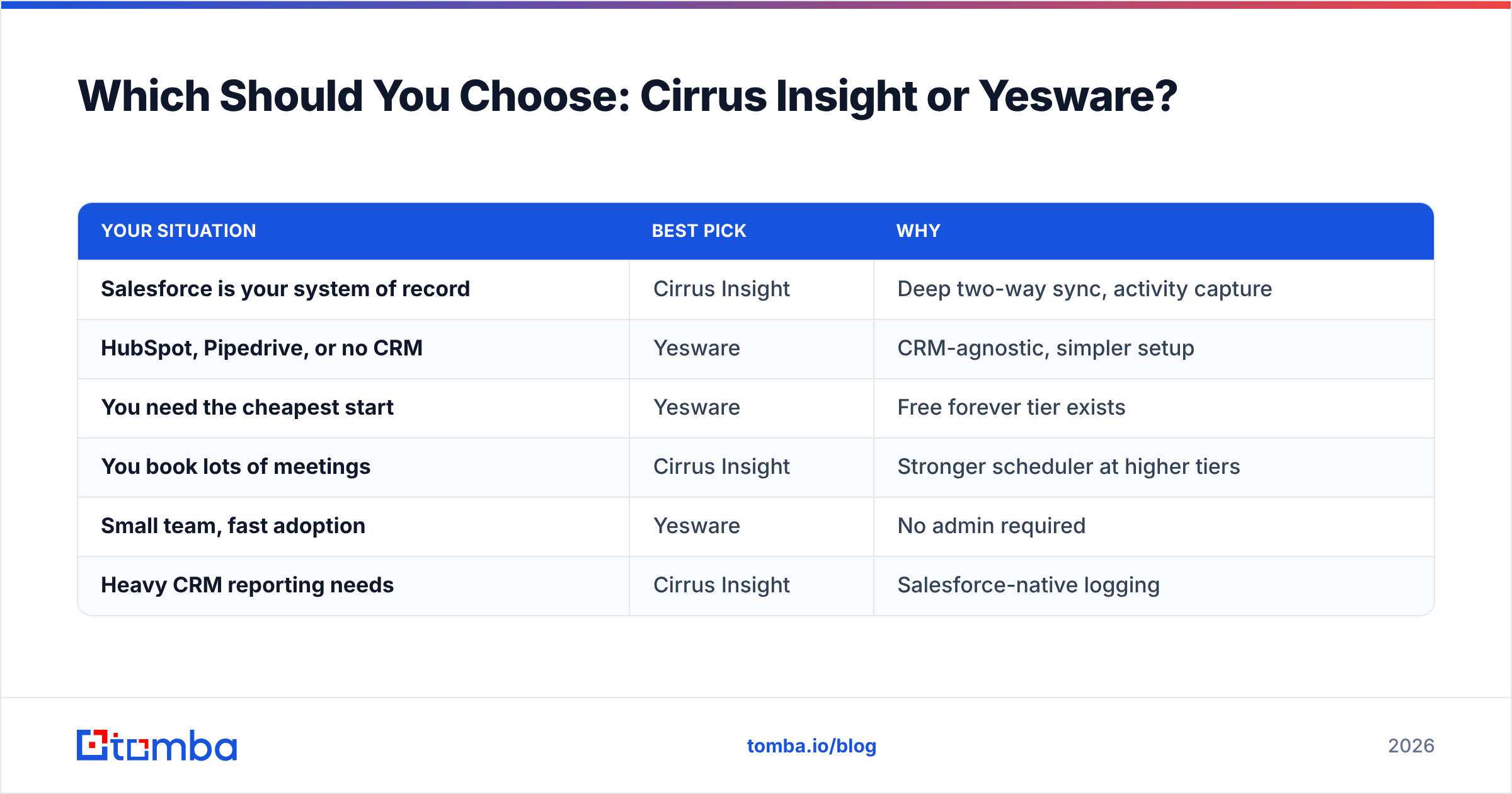
| Your situation | Best pick | Why |
|---|---|---|
| Salesforce is your system of record | Cirrus Insight | Deep two-way sync, activity capture |
| HubSpot, Pipedrive, or no CRM | Yesware | CRM-agnostic, simpler setup |
| You need the cheapest start | Yesware | Free forever tier exists |
| You book lots of meetings | Cirrus Insight | Stronger scheduler at higher tiers |
| Small team, fast adoption | Yesware | No admin required |
| Heavy CRM reporting needs | Cirrus Insight | Salesforce-native logging |
A useful gut check: if removing Salesforce from your company tomorrow would not change how your reps work, choose Yesware. If it would cause a five-alarm fire, choose Cirrus Insight. Most teams know which camp they are in immediately.
Cross-checking real-world reviews helps too. Browse current user feedback on G2 for both tools and weight the reviews from companies that look like yours — a 200-rep Salesforce org and a five-person startup will rate the same product very differently.
How Do You Build the Data Layer Underneath Either Tool?#
Whichever engagement tool you land on, the workflow that keeps it productive is the same. Start with clean, verified contacts and feed them into your CRM, then let Cirrus Insight or Yesware do the tracking.
- By domain: Use domain search to pull every public email pattern at a target company, then prioritize the right personas.
- In bulk: Run a bulk email finder pass on your prospect list so reps are not hand-hunting addresses one at a time.
- Inside your stack: Connect everything through integrations — including Salesforce and HubSpot — so verified contacts flow into the same CRM your engagement tool syncs with.
Do that, and the Cirrus Insight vs Yesware decision stops being a high-stakes bet. Both tools become good at their actual job — engaging the right people — because the people are real.
The Bottom Line#
Cirrus Insight and Yesware are not really competing for the same buyer. Cirrus Insight is a Salesforce productivity layer that happens to track email. Yesware is an email tracking and templates tool that happens to connect to CRMs. Choose based on how central Salesforce is to your team, and choose Yesware if you want a free, low-friction start.
But remember the part the feature grids hide: both tools only matter if your contact data is accurate. Before you spend a dollar per seat on engagement, fix the foundation. Use the Tomba Email Finder to source verified professional emails, run them through verification, and enrich them with the context your templates need. Start free with 25 searches a month, and see full Tomba pricing when you are ready to scale. Get the data right first, and whichever engagement tool you pick will finally earn its subscription.
Ready to find emails that actually work?
Join 150,000+ professionals who stopped guessing and started sending. Free credits on signup — no credit card required.
Get the Tomba newsletter
Practical outbound tactics and product updates — once every two weeks.
About the author