Clay Email Finder Review 2026: Accuracy, Pricing & Alternatives
Is the Clay email finder worth it in 2026? A neutral look at how Clay's waterfall enrichment finds emails, what it costs, where accuracy drops, and the leaner tools that beat it on price.
TL;DR
- The Clay email finder isn't a single finder — it's a "waterfall" that queries dozens of third-party providers in sequence until one returns an email, then charges you credits along the way.
- That design is powerful for complex enrichment workflows, but it's overkill (and overpriced) if all you need is accurate B2B emails by name or domain.
- Clay's effective cost scales with credit consumption, not seats — easy to blow a budget on a large list.
- Accuracy depends entirely on which providers you stack into the waterfall; the verification layer is on you to configure.
- For most teams that just want verified emails, a dedicated tool like Tomba Email Finder is faster to set up, cheaper to predict, and ships verification out of the box.
What is the Clay email finder?#
Clay is a spreadsheet-style GTM data platform, and its email-finding feature is one column type inside a much larger enrichment engine. Instead of running its own email database, Clay orchestrates a waterfall: you point it at a person (name + company, or a LinkedIn URL), and it calls provider A first, then provider B if A misses, then C, and so on until something returns a result.
Think of it like ordering a part for your car by calling every shop in town in order until one has it in stock. You get coverage, but you pay each shop's "lookup fee" as you go, and you have to decide the call order yourself.
That model is the whole story behind Clay's strengths and its frustrations. It's not a finder you switch on — it's a finder you assemble. If you've used a straightforward email finder before, the mental shift is real: Clay gives you control and complexity in equal measure.
How does Clay's waterfall enrichment actually find emails?#
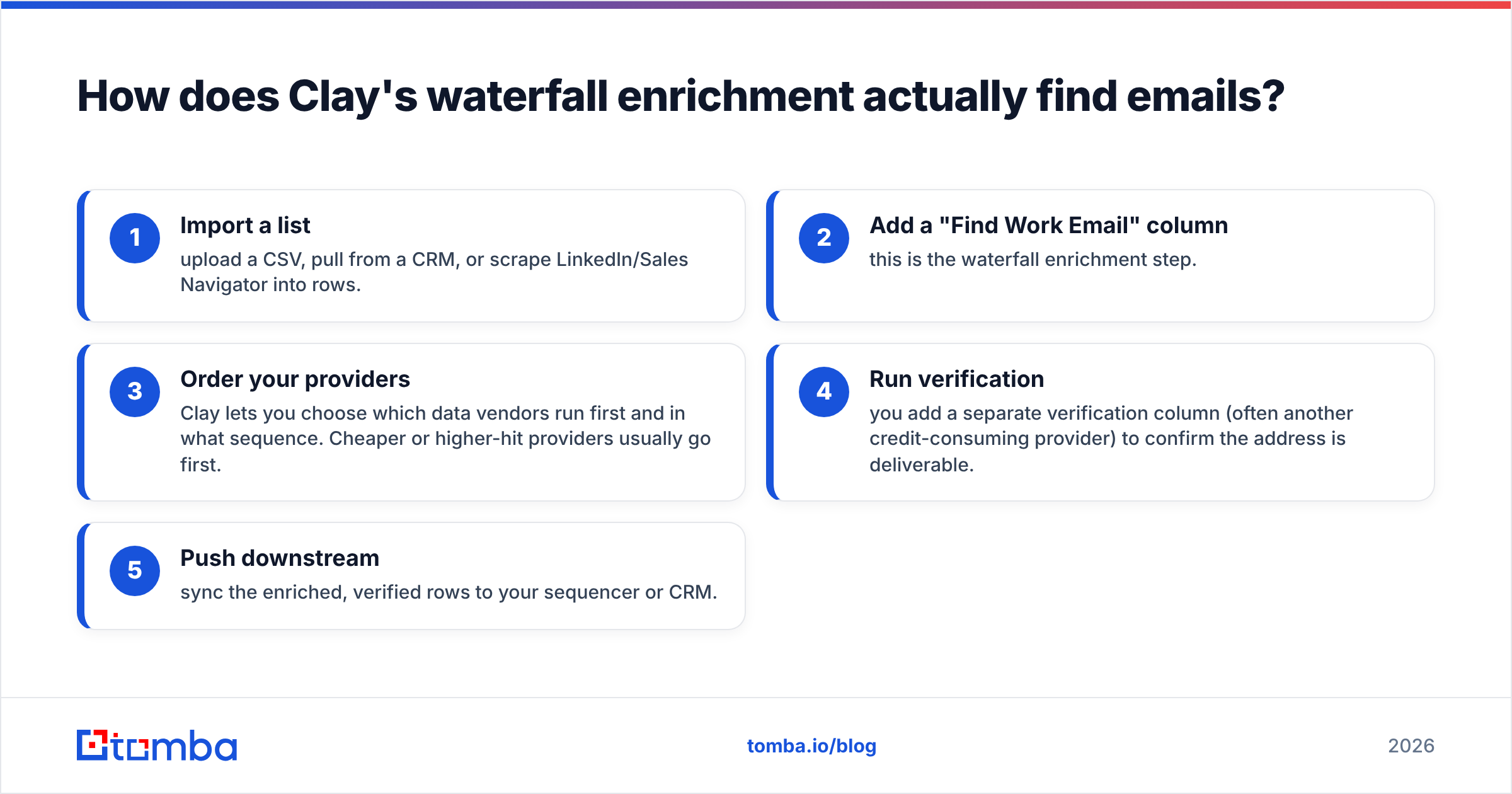
Here's the flow most teams set up inside a Clay table:
- Import a list — upload a CSV, pull from a CRM, or scrape LinkedIn/Sales Navigator into rows.
- Add a "Find Work Email" column — this is the waterfall enrichment step.
- Order your providers — Clay lets you choose which data vendors run first and in what sequence. Cheaper or higher-hit providers usually go first.
- Run verification — you add a separate verification column (often another credit-consuming provider) to confirm the address is deliverable.
- Push downstream — sync the enriched, verified rows to your sequencer or CRM.
The key thing to understand: every step that touches a provider can burn credits, and a single email can cost credits at both the finding and verifying stages. The upside is genuine flexibility — you can chain enrichment, scoring, AI columns, and routing in one place.
The downside is that the "email finder" you think you're buying is really a configuration project. If you misorder the waterfall or skip verification, you'll either overpay or ship bad data.
How accurate is the Clay email finder?#
Clay's accuracy is not a fixed number — it's whatever the providers you stacked deliver, combined with how aggressively you verify. Because Clay aggregates many sources, raw coverage (the share of contacts it finds something for) can be high. But coverage is not the same as accuracy, and an unverified waterfall result can still bounce.
This is the part teams underestimate. A waterfall can return an email that looks plausible but is stale or a guessed pattern. Without a strong verification pass, that result lands straight in your sequencer and damages your sender reputation. If you care about email deliverability, you have to budget extra credits for a real verification step — Clay doesn't bundle one for free.

For independent reviews of how Clay scores on usability and data quality, G2's Clay listing is a useful neutral reference. The recurring theme: powerful, but with a learning curve and credit costs that surprise people.
If your priority is finding the email and knowing it's safe to send to in one motion, a dedicated tool that pairs finding with a built-in email verifier removes that whole second-provider gamble.
What does the Clay email finder cost in 2026?#
Clay prices on credits, billed in tiers, plus usage. The headline plan prices are modest, but the credits attached to each plan run out quickly once you start running waterfalls across thousands of rows — and each provider in the waterfall can consume credits per attempt.
That makes Clay's real cost hard to predict. Two teams on the same plan can pay wildly different effective rates depending on how deep their waterfalls run and how much they verify. Compare that to per-search or per-credit finders where the math is linear.
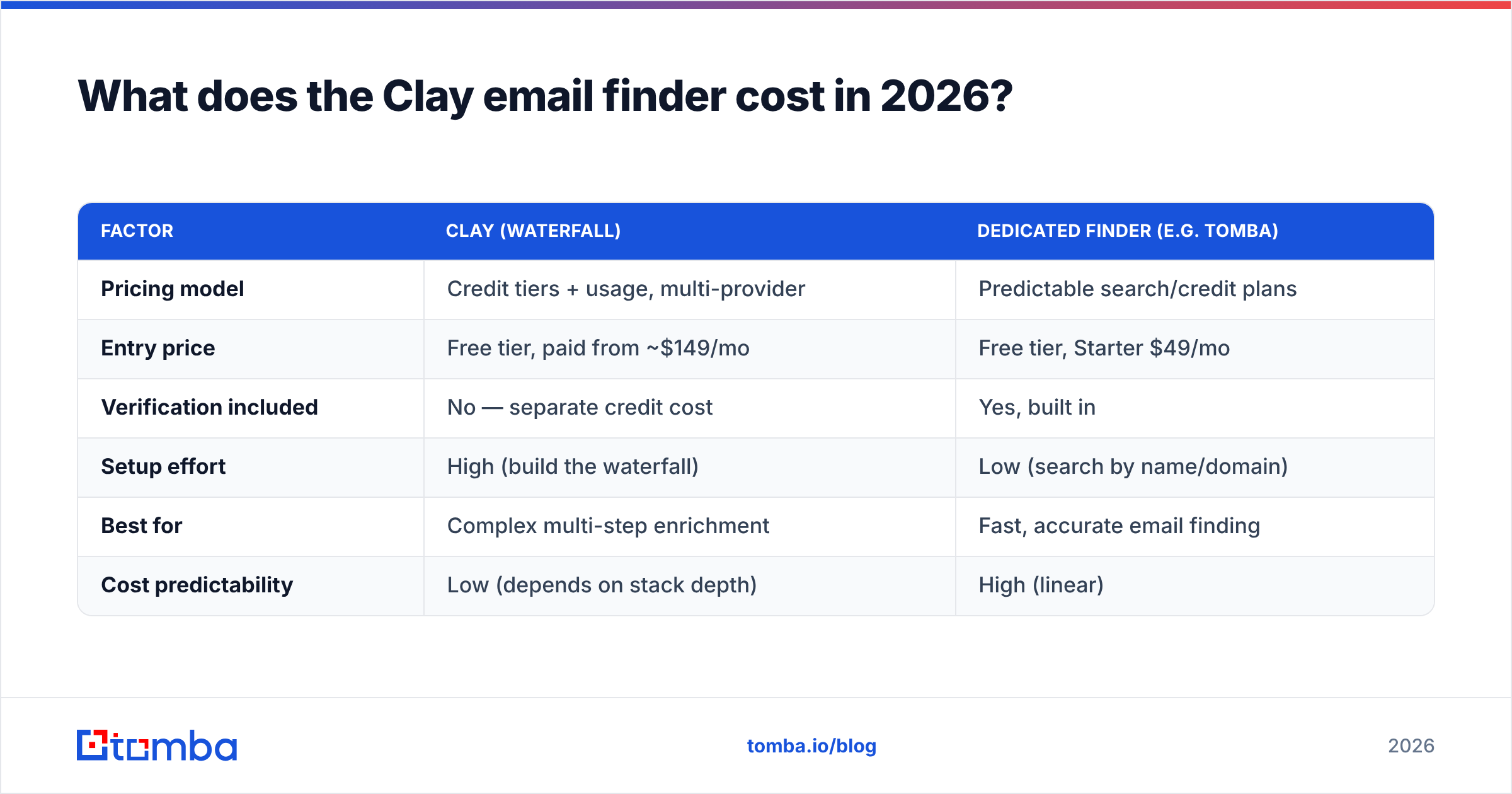
Here's how the models stack up at a glance:
| Factor | Clay (waterfall) | Dedicated finder (e.g. Tomba) |
|---|---|---|
| Pricing model | Credit tiers + usage, multi-provider | Predictable search/credit plans |
| Entry price | Free tier, paid from ~$149/mo | Free tier, Starter $49/mo |
| Verification included | No — separate credit cost | Yes, built in |
| Setup effort | High (build the waterfall) | Low (search by name/domain) |
| Best for | Complex multi-step enrichment | Fast, accurate email finding |
| Cost predictability | Low (depends on stack depth) | High (linear) |
For Tomba's exact tiers, see the Tomba pricing page — Free (25 searches/mo), Starter $49/mo, Growth $99/mo, Pro $249/mo, and Enterprise. The point isn't that one is universally cheaper; it's that one is predictable and the other depends on how you configure it.
When is Clay the right tool — and when is it overkill?#
Be honest about your use case. Clay earns its price when email finding is one node in a larger automated GTM machine.
Clay is a strong fit when you:
- Run multi-step enrichment (firmographics, technographics, intent, scoring) in one table
- Want to chain AI research columns and conditional routing alongside finding
- Have a RevOps owner who can build and maintain waterfalls
- Need maximum coverage across niche segments and will pay for it
Clay is overkill when you:
- Mostly need verified work emails by name or domain
- Want predictable cost per contact
- Don't have someone to own waterfall configuration
- Care more about clean, deliverable lists than aggregating ten data vendors
If you fall in the second group, you're paying for an orchestration layer you won't use. That's the moment teams start eyeing a focused finder.
How does the Clay email finder compare to dedicated finders?#
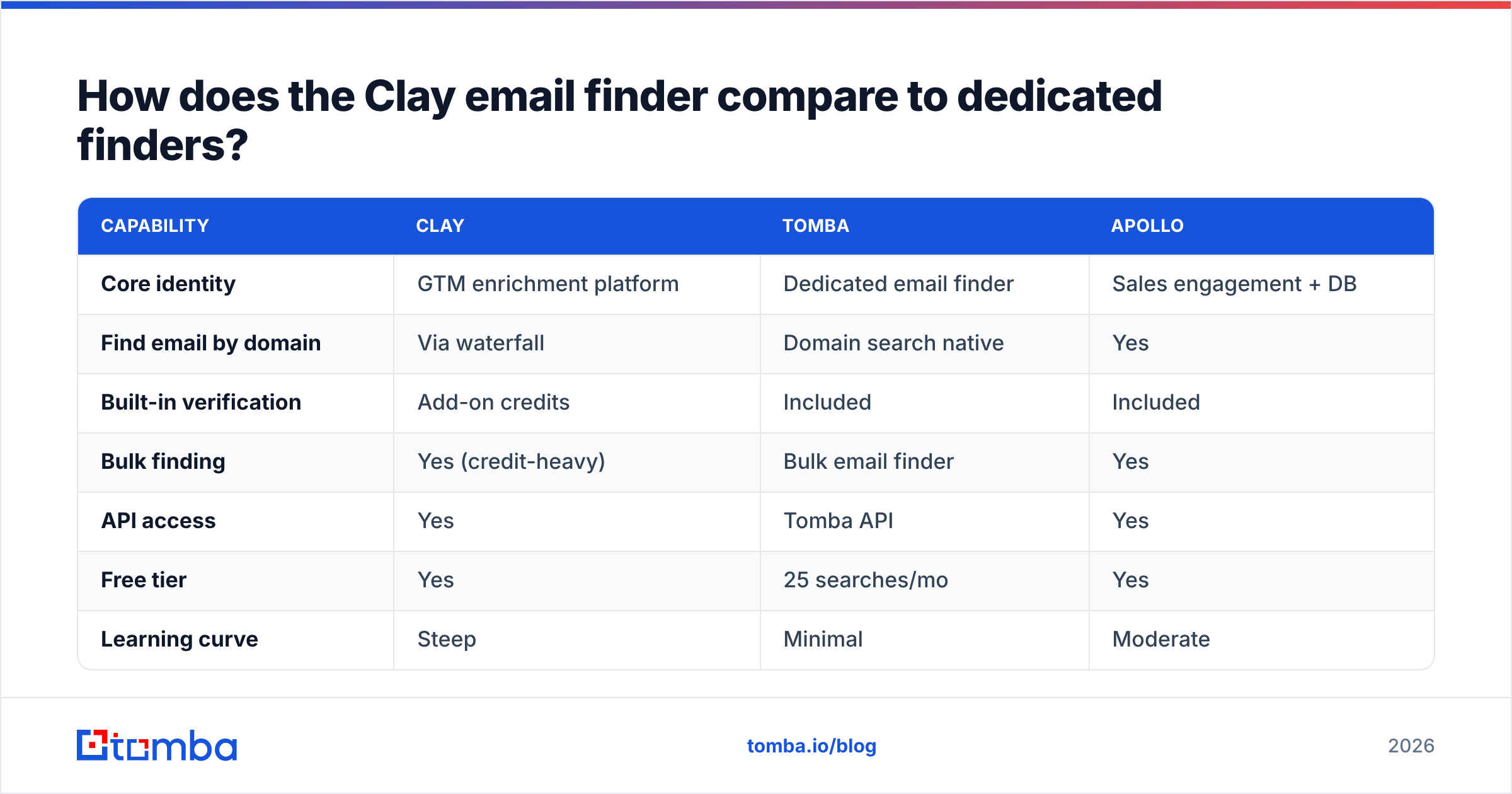
The cleanest way to choose is to compare what each tool is rather than feature checklists. Clay is a platform; a dedicated finder is a precision instrument.

| Capability | Clay | Tomba | Apollo |
|---|---|---|---|
| Core identity | GTM enrichment platform | Dedicated email finder | Sales engagement + DB |
| Find email by domain | Via waterfall | Domain search native | Yes |
| Built-in verification | Add-on credits | Included | Included |
| Bulk finding | Yes (credit-heavy) | Bulk email finder | Yes |
| API access | Yes | Tomba API | Yes |
| Free tier | Yes | 25 searches/mo | Yes |
| Learning curve | Steep | Minimal | Moderate |
A few honest takeaways:
- Clay wins when you need it to be the connective tissue of your whole data stack.
- A dedicated finder wins when speed, predictable cost, and bundled verification matter more than orchestration.
- Apollo sits in the middle — a database plus sequencer, less flexible than Clay, broader than a pure finder.
If Clay's credit model is what's pushing you to look elsewhere, it's worth scanning dedicated Apollo alternatives and Clearbit alternatives too, since teams evaluating Clay usually have those on the same shortlist.
What about catch-all domains and verification gaps?#
Catch-all domains accept every address, so a waterfall can "find" an email that no verifier can confidently confirm. Clay will happily return these, and unless you've wired in catch-all handling, they slip through as false positives.
This is where a tool with a dedicated catch-all verifier pulls ahead. Instead of guessing, you get a clear status before the address ever reaches your sequencer. For high-volume outbound, that single distinction protects your domain reputation more than any coverage stat.
The broader lesson: a finder is only as good as the verification attached to it. Clay externalizes that responsibility to you; dedicated finders increasingly bake it in. For background on why this matters, the Hunter guide to email verification covers the deliverability mechanics well.
How do you decide between Clay and a dedicated email finder?#
Ask three questions:
- Is email finding your main job, or one step in a bigger workflow? Main job → dedicated finder. One step → Clay may pay off.
- Can someone own waterfall configuration and cost monitoring? No → Clay's flexibility becomes a liability.
- Do you need predictable cost per contact? Yes → a linear-priced finder wins on budgeting.
There's no shame in choosing the simpler tool. Most teams that "graduated" to Clay for email finding discover they only needed reliable emails and verification — the rest of the platform sat idle while the credits drained.
The bottom line#
The Clay email finder is a genuinely capable orchestration layer, and for RevOps teams building complex enrichment pipelines, it's worth the complexity. But if your real need is accurate, verified B2B emails without a configuration project or an unpredictable credit bill, a focused tool is the better buy.
That's exactly the gap Tomba Email Finder fills: search by name, domain, or company, get results with verification built in, and pay on a plan you can actually forecast — starting free at 25 searches/mo and scaling to $49/mo when you're ready. Spin up the Tomba Email Finder, run your toughest list, and compare the hit rate and cost against your Clay waterfall. If a dedicated finder gets you cleaner emails for less effort, you've got your answer.
// get started
Find, verify and enrich your first contacts today
Start on the free plan with 25 searches a month, then scale when your team is ready.
Free plan · No credit card required · GDPR & CCPA
Get the Tomba newsletter
Product and data updates
// about the author