Clay Reviews 2026: Honest Pricing, Features & Alternatives
An unsponsored look at Clay in 2026: what the credit-based pricing really costs, where the data enrichment shines, where it frustrates teams, and the cheaper alternatives worth testing first.
Clay has become the loudest name in go-to-market tooling, and the reviews are split right down the middle. Some teams call it the most powerful data tool they have ever touched. Others quietly churn three months in, buried under credit math they never signed up for. Both groups are right. This is the unsponsored read on where Clay earns its hype in 2026 and where it doesn't.
TL;DR — Is Clay worth it in 2026?#
- Clay is a spreadsheet-style data orchestration platform, not a single email finder. It chains 100+ data providers, AI prompts, and enrichment steps into automated tables.
- The power is real: waterfall enrichment, AI research agents, and CRM sync that genuinely replace manual SDR busywork.
- The pain is also real: credit-based pricing gets expensive fast, the learning curve is steep, and small teams often overpay for capacity they never use.
- For most teams that just need accurate emails and phone numbers, a focused tool like a dedicated email finder or data enrichment API delivers 80% of the value at a fraction of the cost.
- Verdict: Excellent for RevOps engineers building complex pipelines. Overkill — and overpriced — for teams who simply want verified contact data.
What is Clay and what does it actually do?#
Clay is best understood as a programmable spreadsheet for go-to-market data. You drop a list of companies or people into a table, then add "enrichment columns" that each call out to an external source — a person's job title from one provider, their email from another, their funding round from a third. Clay runs each row through that chain automatically.
Think of it like a kitchen with every appliance pre-plugged in. Instead of you walking to a dozen vendors and stitching their outputs together by hand, Clay sits in the middle and routes the work. That orchestration layer is the whole point, and it's why the Clay reviews from technical RevOps users skew so positive.
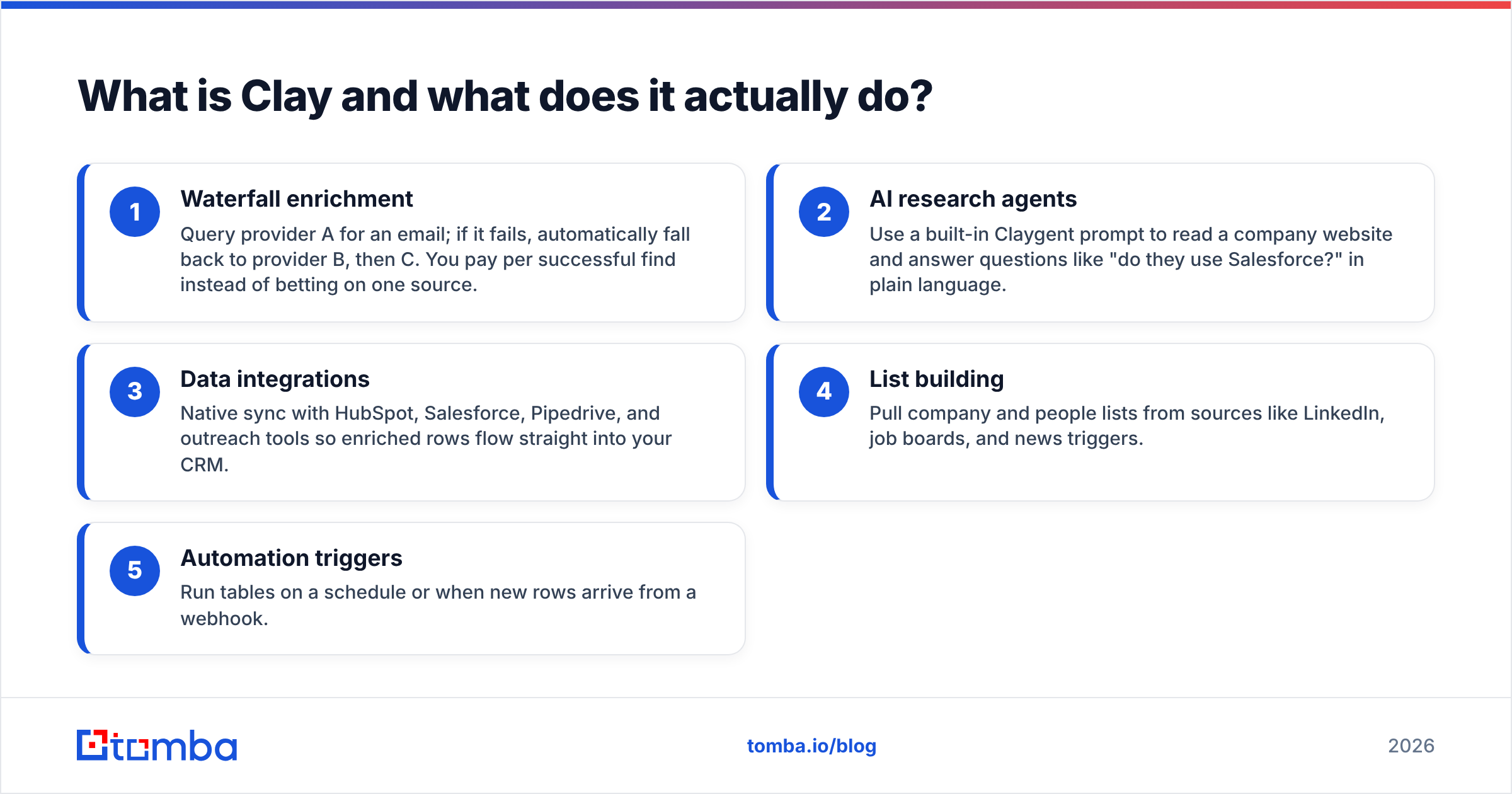
Its headline capabilities break down into a few buckets:
- Waterfall enrichment — Query provider A for an email; if it fails, automatically fall back to provider B, then C. You pay per successful find instead of betting on one source.
- AI research agents — Use a built-in Claygent prompt to read a company website and answer questions like "do they use Salesforce?" in plain language.
- Data integrations — Native sync with HubSpot, Salesforce, Pipedrive, and outreach tools so enriched rows flow straight into your CRM.
- List building — Pull company and people lists from sources like LinkedIn, job boards, and news triggers.
- Automation triggers — Run tables on a schedule or when new rows arrive from a webhook.
That breadth is the headline. It's also the trap, because every one of those columns burns credits.

How does Clay pricing work in 2026?#
Clay charges on two axes at once: a monthly seat-and-feature tier, plus a separate pool of credits that every enrichment action consumes. This is the single most misunderstood part of every Clay review, so it's worth slowing down.
A "credit" is spent each time a column runs an action on a row. A table with 1,000 companies and five enrichment columns can burn 5,000 credits in a single run — and if you re-run it, you spend them again. Waterfalls can multiply this further when multiple providers get queried per row.
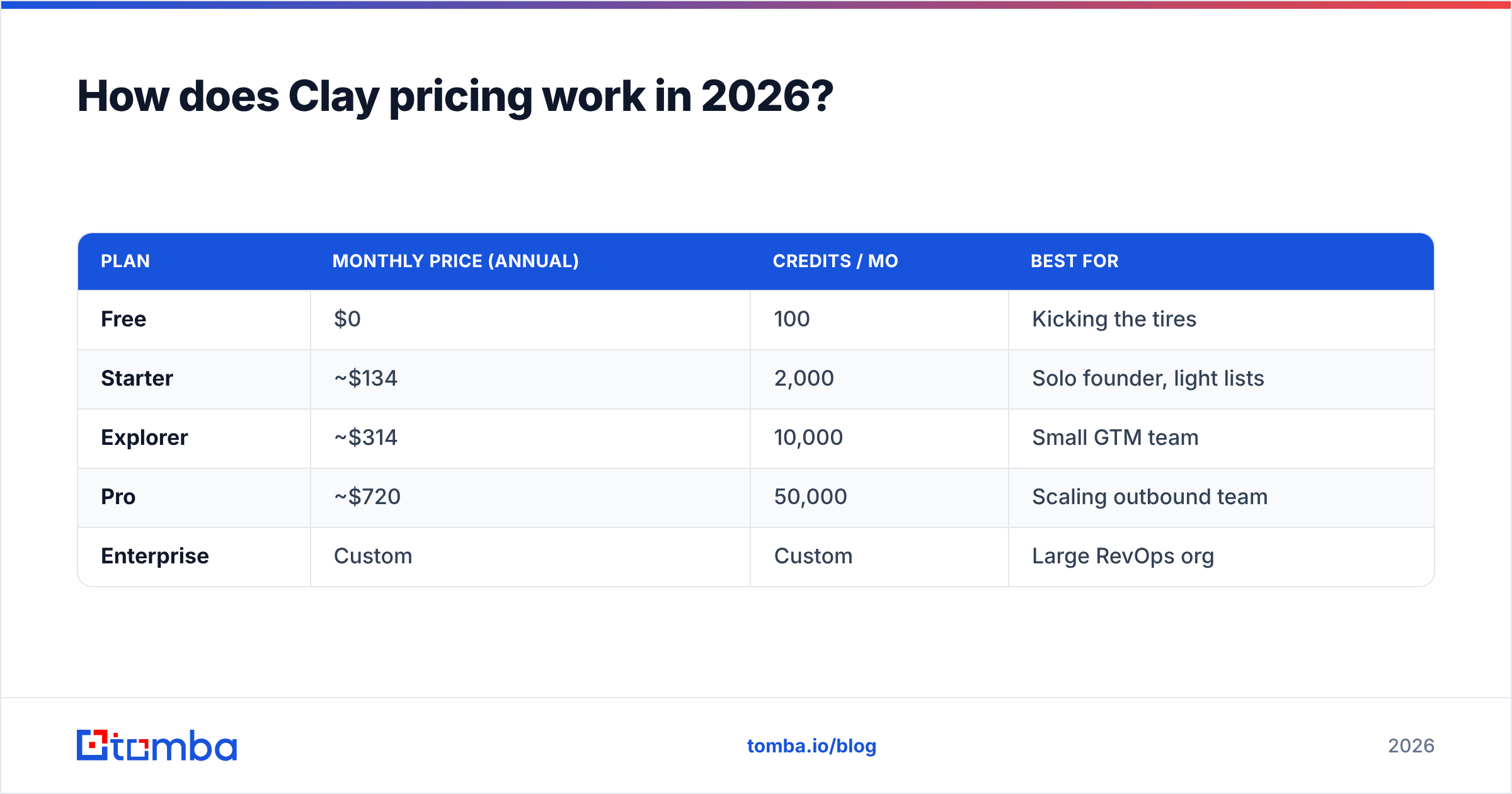
Here's the rough shape of the plans as of 2026. Always confirm current numbers on Clay's own pricing page, since tiers shift often.
| Plan | Monthly price (annual) | Credits / mo | Best for |
|---|---|---|---|
| Free | $0 | 100 | Kicking the tires |
| Starter | ~$134 | 2,000 | Solo founder, light lists |
| Explorer | ~$314 | 10,000 | Small GTM team |
| Pro | ~$720 | 50,000 | Scaling outbound team |
| Enterprise | Custom | Custom | Large RevOps org |
The numbers tell the story: the entry point that most reviewers actually recommend (Explorer) lands north of $300/month, and credits become the real budget line. Heavy users routinely report blowing through monthly credits in the first two weeks, then buying top-ups or jumping a tier.
Compare that to a focused contact-data tool. Tomba pricing starts with a Free tier (25 searches/mo), then Starter at $49/mo, Growth at $99/mo, and Pro at $249/mo — with searches and verifications counted in plain, predictable units instead of multiplied across columns.
Is Clay's data accuracy actually better?#
Yes and no — and the nuance matters. Clay itself does not own a proprietary contact database the way a dedicated provider does. Its accuracy is the accuracy of whichever providers you stack inside it. Waterfalls genuinely help here: by chaining several sources, a good Clay setup can push email coverage higher than any single vendor alone.
But that advantage comes with three asterisks:
- You pay per provider hit. A three-step email waterfall can cost three times the credits of a single lookup even when only one source succeeds.
- Verification is a separate step. Finding an email is not the same as confirming it's deliverable; you'll want an email verifier in the chain, which adds more credits.
- Garbage in, garbage out. If your input list is messy, Clay happily enriches the wrong people at full price.
For teams whose entire need is "give me a verified business email from a name and domain," running a dedicated finder with built-in verification is usually both more accurate per dollar and far simpler to reason about. The waterfall edge only pays off when you're enriching dozens of attributes, not just contact details.
What do real Clay reviews say — pros and cons?#
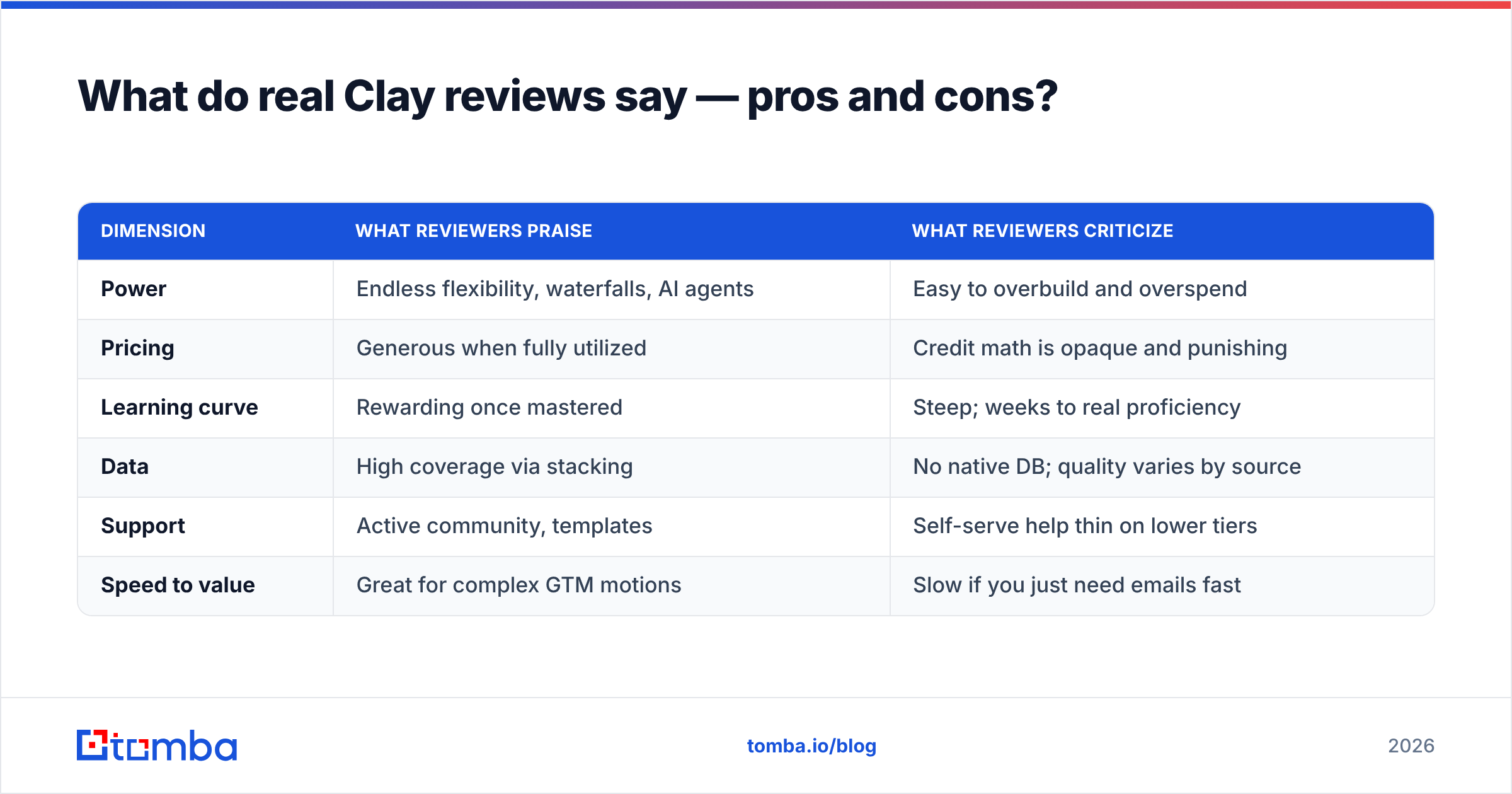
Pulling together public feedback from G2 and Capterra plus practitioner write-ups, a consistent pattern emerges.
| Dimension | What reviewers praise | What reviewers criticize |
|---|---|---|
| Power | Endless flexibility, waterfalls, AI agents | Easy to overbuild and overspend |
| Pricing | Generous when fully utilized | Credit math is opaque and punishing |
| Learning curve | Rewarding once mastered | Steep; weeks to real proficiency |
| Data | High coverage via stacking | No native DB; quality varies by source |
| Support | Active community, templates | Self-serve help thin on lower tiers |
| Speed to value | Great for complex GTM motions | Slow if you just need emails fast |
The throughline: Clay rewards people who treat it like a development environment. RevOps engineers and growth-ops specialists love it. Founders and small sales teams who expected a plug-and-play list tool tend to feel the friction — and the bill.
One review summed it up well: "Clay is the most powerful tool I've ever been too intimidated to fully use." That tension shows up over and over.

Who should use Clay — and who shouldn't?#
Clay is a strong fit if you:
- Have someone on the team who enjoys building automations and reading API docs
- Run multi-attribute enrichment (firmographics, tech stack, intent, plus contacts)
- Need flexible, conditional logic that off-the-shelf tools can't express
- Have the budget to treat credits as a real, ongoing line item
Clay is probably the wrong tool if you:
- Mainly need verified emails and phone numbers at predictable cost
- Want to be productive on day one without a setup project
- Run a lean team where nobody owns "the Clay table"
- Get nervous watching credits tick down mid-run
That second group is large, and it's where most disappointed Clay reviews come from. The tool isn't bad — it's mismatched to the job. If your real requirement is contact data, you want a contact-data tool, ideally one with a clean email finder API you can call directly from your own workflow or bulk email finder for list work.
What are the best Clay alternatives in 2026?#
There's no single replacement because Clay does several jobs. Match the alternative to the job you actually need done.
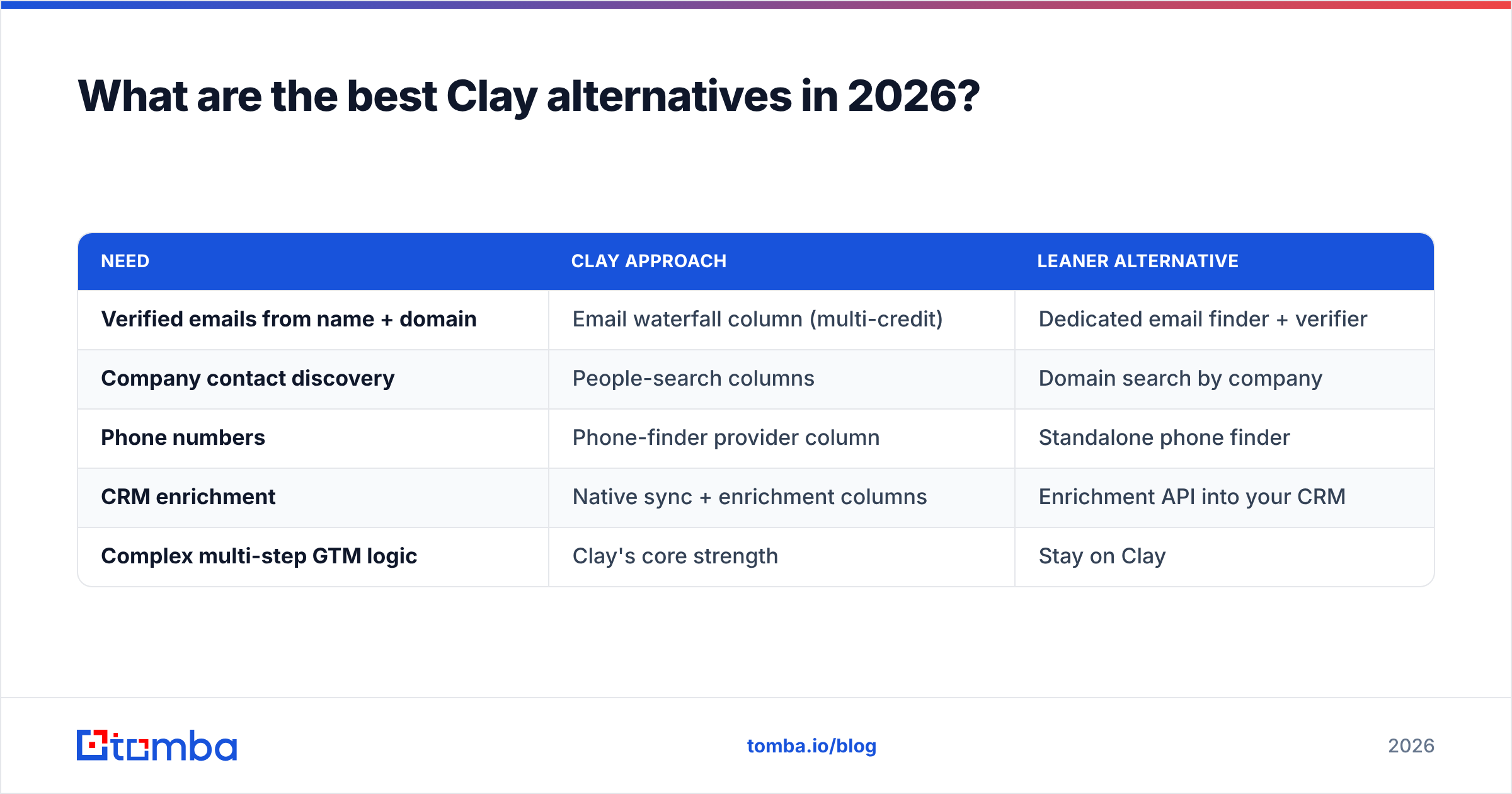
| Need | Clay approach | Leaner alternative |
|---|---|---|
| Verified emails from name + domain | Email waterfall column (multi-credit) | Dedicated email finder + verifier |
| Company contact discovery | People-search columns | Domain search by company |
| Phone numbers | Phone-finder provider column | Standalone phone finder |
| CRM enrichment | Native sync + enrichment columns | Enrichment API into your CRM |
| Complex multi-step GTM logic | Clay's core strength | Stay on Clay |
The honest take: if your workflow genuinely needs branching, AI research, and a dozen data sources orchestrated together, nothing replaces Clay cleanly — keep it. But if you've been using Clay as an expensive way to find and verify emails, a purpose-built finder will be cheaper, faster, and easier for the whole team to operate. You can even keep Clay for the heavy automation and route just the contact-finding step through a dedicated provider to cut credit burn.
For teams that want predictable units, a finder priced per search rather than per multiplied column is the simplest way to stop the credit bleed without losing data quality.
How do I decide between Clay and a focused tool?#
Run this quick gut check before you commit a budget:
- Count your attributes. Need 1–3 fields (email, phone, title)? Go focused. Need 8+ enriched fields with logic? Clay earns its keep.
- Name the owner. If nobody will own and maintain tables weekly, Clay's power goes to waste.
- Do the credit math. Estimate rows × columns × monthly runs. Multiply by your tier's credit cost. If that number scares you, it should.
- Test deliverability. Whatever you pick, route results through real verification before sending — finding an address means nothing if it bounces.
- Start free, scale on proof. Both Clay and most focused tools have free tiers. Prove ROI on a small list before upgrading.
Most teams land in a hybrid spot: a focused finder for everyday contact data, and Clay reserved for the genuinely complex campaigns where orchestration pays off.
The bottom line on Clay reviews#
Clay is a remarkable piece of software that too many people buy for the wrong reason. If you're a RevOps engineer building sophisticated, multi-source GTM pipelines, it may be the best money you spend in 2026. If you're a sales or marketing team that mostly needs accurate, verified contact data without a credit-counting habit, the value just isn't there — and the negative reviews you'll write in three months are predictable today.
Be honest about which team you're on. The most expensive tool is the powerful one you only use at 10% of its capacity.
If contact data is the real job — finding and verifying business emails at a price you can predict — skip the credit math and start with the Tomba Email Finder. The Free tier gives you 25 searches a month to test accuracy on your own list, paid plans start at a flat $49/mo, and the API drops straight into whatever stack you already run, including Clay itself. Try it on your hardest list and compare the cost per verified email — that single number usually settles the debate.
// get started
Find, verify and enrich your first contacts today
Start on the free plan with 25 searches a month, then scale when your team is ready.
Free plan · No credit card required · GDPR & CCPA
// about the author